

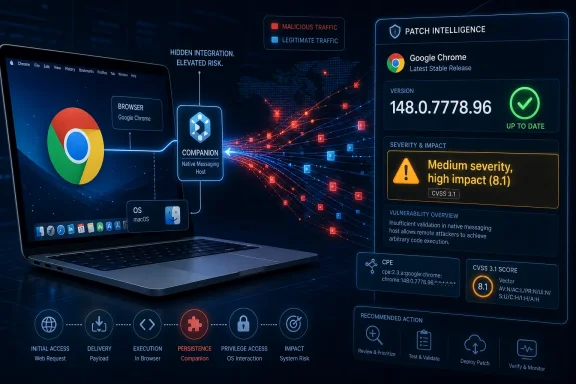
CVE-2026-7978 is a newly published Google Chrome for macOS vulnerability, disclosed on May 6, 2026 and fixed before version 148.0.7778.96, in which an inappropriate implementation in the browser’s Companion component could allow remote OS-level privilege escalation through malicious network traffic. The awkward part is not merely the bug, but the bookkeeping around it: a Chromium issue that Google rates Medium now carries a CISA ADP CVSS 3.1 score of 8.1, and NVD enrichment shows a Mac-only CPE configuration. For admins, that gap between vendor severity, third-party scoring, and asset-matching metadata is where patch management stops being tidy and starts being operational risk.
Chrome security advisories often look deceptively routine. A stable-channel update lands, dozens or even hundreds of vulnerabilities are swept into the release notes, and enterprise dashboards begin their ritual of converting browser versions into compliance percentages. CVE-2026-7978 is the kind of entry that can disappear in that noise because its Chromium severity is listed as Medium.
But the description does not read like a casual browser footgun. A remote attacker, no privileges, no user interaction, malicious network traffic, and possible OS-level privilege escalation on macOS is a chain-friendly combination even with high attack complexity. That is why the CISA ADP vector matters: it scores confidentiality, integrity, and availability impacts as high, while tempering the total score through high complexity rather than dismissing the bug as minor.
This is the first lesson of CVE-2026-7978: vendor severity and operational severity are not the same thing. Google’s internal severity reflects Chromium’s own triage model, exploitability assumptions, and perhaps component-level context that outsiders cannot fully see. A security team deciding whether to accelerate a fleet update, however, must care less about the label and more about the path from network exposure to local privilege.
The second lesson is more specific to modern browsers. Chrome is no longer just a renderer with tabs. It is an update framework, identity surface, AI feature delivery vehicle, policy client, password manager, extension runtime, media stack, and native OS citizen. When a component at that boundary fails, the browser becomes less like an app and more like a privileged broker that happens to render the web.
For years, the mental model of Chrome risk has been dominated by V8, Blink, Skia, WebRTC, GPU acceleration, and sandbox escapes. That model is not wrong; those components still generate serious vulnerabilities. But the modern browser’s attack surface also includes helpers, background services, platform integrations, update logic, local resource access, sync features, enterprise controls, and network-facing mechanisms that do not resemble the old “visit a malicious page and pop calc” archetype.
That shift matters because “malicious network traffic” is broader and more uncomfortable than “malicious web page.” It suggests that defenders should not assume the exploit depends on a user clicking a suspicious link or installing a rogue extension. The CVSS vector currently says no user interaction is required, which is precisely the sort of detail that should make Mac administrators check patch status before waiting for their next leisurely maintenance window.
The macOS-only scope is also significant. Enterprise Mac fleets are often treated as lower-risk endpoints because they are fewer in number, less exposed to commodity malware, or managed by a different team from Windows. But Chrome is one of the great cross-platform equalizers. If the same browser is present across Windows, macOS, and Linux, and one platform-specific integration misbehaves, the exposure becomes a fleet-management problem rather than a platform-war talking point.
In this case, the listed configuration appears to be an AND relationship: vulnerable Chrome plus macOS. That is meaningfully different from a generic Chrome CPE that would light up Windows and Linux hosts unnecessarily. If a scanner only ingests the application CPE without honoring the platform condition, it may overreport. If it fails to associate Chrome-on-macOS correctly, it may underreport. Both outcomes are bad, but underreporting is the one that leaves the exploitable machines unpatched.
The subtlety is versioning. Google’s stable-channel note lists Chrome 148.0.7778.96 for Linux and 148.0.7778.96/97 for Windows and Mac, while the CVE description says Chrome on Mac prior to 148.0.7778.96. That does not necessarily mean the CPE is wrong; it may simply reflect the minimum fixed build line for the vulnerable product. But it does mean inventory systems should compare actual installed versions, not rely on the presence of “Chrome 148” as a sufficient proxy.
A second CPE could eventually be relevant if downstream Chromium-based products inherit the affected code path. That is the uncomfortable part of Chromium security in the real world. Microsoft Edge, Brave, Vivaldi, Opera, Electron applications, and embedded Chromium runtimes do not all ship the same feature set or platform glue. A CVE may originate in Chromium yet only affect Google Chrome on macOS, or it may later become relevant to another vendor’s product after that vendor confirms exposure.
For now, the safest reading is narrow but urgent: Chrome on macOS before the fixed build is the named affected product. Security teams should not invent broader exposure without vendor confirmation, but they also should not assume their vulnerability platform has perfectly modeled every Chromium derivative. The practical answer is to patch Chrome immediately, monitor Edge and other Chromium-based release notes, and validate scanner logic against real endpoint inventory.
This is where WindowsForum readers need to be especially disciplined. The Microsoft page is useful because it puts the CVE into the ecosystem that Windows and Edge admins actually watch. But the primary description still names Google Chrome on Mac, and the fixed version cited is Chrome’s 148.0.7778.96 line rather than an Edge stable build.
That distinction matters for patch triage. If your organization manages Windows endpoints running Edge, the existence of an MSRC entry should prompt review, not panic. If your organization manages Macs running Chrome, the CVE should go straight into the active patch queue. If your organization manages Macs running Edge, the answer depends on Microsoft’s Edge release notes and whether the affected Chromium code path exists in Microsoft’s build.
The broader enterprise lesson is that Chromium has made browser security both easier and harder. Easier, because one upstream fix can remove risk across a large part of the browser market. Harder, because the dependency graph is opaque to many patch tools, and the time between upstream disclosure, vendor integration, release, and scanner recognition can create a short but meaningful window of confusion.
High complexity is often misread as safety. In enterprise risk terms, it usually means “do not expect mass exploitation by every botnet by dinner,” not “ignore this until next month.” Sophisticated attackers love bugs that are hard to reproduce, difficult to detect, and platform-specific enough to avoid broad attention.
The OS-level privilege escalation phrase is the real accelerant. Browser compromises are often constrained by sandboxing, site isolation, and hardened renderer boundaries. A path to operating-system privilege changes the value of the bug in a chain, especially if paired with an initial foothold, network position, or another browser flaw.
There is no public indication in the supplied details that CVE-2026-7978 is being exploited in the wild. That should keep the temperature below emergency-zero-day mode. But absence of known exploitation is not an argument for delay when the fixed version is already available and the product updates cleanly through standard Chrome mechanisms.
That is why treating CVE-2026-7978 as an isolated curiosity would be a mistake. Even if your Mac fleet exposure is limited, Chrome 148 is carrying a large security payload. Organizations that wait for a single CVE to cross some internal “critical” threshold may miss the cumulative risk reduction of moving the browser baseline forward.
Browser patching has become one of the few areas where automatic updates generally work better than committee-driven change control. The downside is that admins sometimes lose visibility into exactly when a fix has landed, especially on laptops that sleep, travel, or sit behind user-controlled update prompts. Chrome’s own “roll out over days or weeks” language is normal for consumer stability, but enterprises should not confuse staged rollout with a security SLA.
For managed environments, the key is not whether Google has technically released the patch. The key is whether your endpoints have actually installed it and restarted into it. Chrome can download an update and still leave the vulnerable binary active until the browser restarts. That small operational detail is where many browser patch campaigns quietly fail.
That gap is closing. Macs are now common among developers, executives, design teams, security staff, and cloud engineers — exactly the groups that often hold valuable credentials. A Chrome bug that can be triggered remotely and potentially escalate at the OS level should be read against that reality. The interesting endpoint is not the average kiosk; it is the MacBook with production access, Git credentials, browser-stored sessions, and a user who has local admin rights because “it is a developer machine.”
The browser is also where personal and corporate identities blur. A compromised Chrome instance may expose password managers, SSO sessions, synced data, browser cookies, OAuth tokens, and cloud console access. Even when the original CVE is described as a local privilege problem, the practical blast radius may involve identity abuse and lateral movement.
This is why Mac patching cannot be an afterthought in a Windows-centric security program. If the enterprise uses Chrome as a standard browser, the endpoint management team needs Mac-specific compliance reporting, not just Windows Update dashboards. A Chrome CVE that names macOS is a test of whether the organization’s asset inventory can still see the machines outside its Microsoft comfort zone.
Restricted bugs are understandable. Browser vendors do not want to hand attackers a working exploit recipe while users are still updating. But sparse advisories place more weight on metadata: CPEs, CVSS vectors, platform notes, version bounds, and weakness categories. When those fields lag or disagree, enterprise risk teams are left deciding whether to trust the vendor severity, the NVD record, the ADP score, or their own threat model.
The weakness mapping to CWE-693, protection mechanism failure, is broad but telling. It suggests a breakdown in a protective boundary or enforcement mechanism rather than a simple memory-safety crash. That aligns with the privilege-escalation wording, although it still does not explain the underlying technical path.
This is the modern bargain of browser security. Users get rapid fixes and fewer public exploit details. Defenders get speed, but not always clarity. The only sustainable response is to make browser updating boring, measurable, and fast enough that ambiguity does not paralyze action.
For enterprise admins, the work is slightly more involved. First, confirm which Macs run Google Chrome and which version is actually active. Second, check whether management tooling distinguishes Chrome on macOS from Chrome on Windows and Linux. Third, verify that the vulnerability scanner honors the CPE platform condition rather than simply matching every Chrome installation below a build number.
The restart step deserves special emphasis. Browser updates are often “installed” in the sense that the new payload is staged, but the old process remains alive. If a user keeps Chrome open for days, the window of exposure remains longer than the compliance dashboard may imply. This is why browser relaunch enforcement, user notification, and deadline policies matter.
Organizations using Chrome Browser Cloud Management, MDM profiles, Jamf, Kandji, Intune, or other Mac management tools should already have the levers to close this out quickly. The difference between a mature and immature program will show up in how fast they can answer a basic question: how many Macs are still running Chrome before 148.0.7778.96 right now?
The prudent move is to watch Microsoft Edge security release notes for corresponding Chromium fixes and to keep Edge current through its own stable-channel updates. If Microsoft identifies CVE-2026-7978 as affecting Edge, the response becomes straightforward: update Edge on the affected platforms. If Microsoft does not, admins should avoid creating false vulnerability exceptions or noisy tickets based only on upstream Chromium naming.
This is not special pleading for Microsoft. It is a general rule for Chromium derivatives. Shared engine code does not mean identical attack surface. A browser vendor may disable, replace, reimplement, or wrap components differently, especially around platform integration.
Still, “not confirmed affected” is not the same as “safe forever.” The correct operational state is watchful automation: update Chromium-based browsers rapidly, monitor vendor-specific advisories, and use scanner findings as prompts for validation rather than as gospel.
There is no need to dramatize it as the end of macOS security. There is also no justification for letting the Medium label lull teams into a slow cycle. A network-reachable, no-user-interaction, high-impact vulnerability with OS-level privilege language is too valuable to leave hanging around unmanaged Macs.
The practical challenge is that browsers sit between endpoint and application ownership. Security teams track the CVE, desktop teams own the software, users control restarts, and vulnerability scanners arbitrate the truth. When the metadata is still settling, the organization’s process either absorbs the ambiguity or amplifies it.
CVE-2026-7978 therefore becomes less a story about one Chrome component than a story about whether modern IT can patch the software it depends on most. The browser is the workplace now. Treating it as a normal app undersells both its power and its risk.
Source: NVD / Chromium Security Update Guide - Microsoft Security Response Center
 A Medium Chrome Bug With High-Severity Consequences
Chrome security advisories often look deceptively routine. A stable-channel update lands, dozens or even hundreds of vulnerabilities are swept into the release notes, and enterprise dashboards begin their ritual of converting browser versions into compliance percentages. CVE-2026-7978 is the kind of entry that can disappear in that noise because its Chromium severity is listed as Medium.But the description does not read like a casual browser footgun. A remote attacker, no privileges, no user interaction, malicious network traffic, and possible OS-level privilege escalation on macOS is a chain-friendly combination even with high attack complexity. That is why the CISA ADP vector matters: it scores confidentiality, integrity, and availability impacts as high, while tempering the total score through high complexity rather than dismissing the bug as minor.
This is the first lesson of CVE-2026-7978: vendor severity and operational severity are not the same thing. Google’s internal severity reflects Chromium’s own triage model, exploitability assumptions, and perhaps component-level context that outsiders cannot fully see. A security team deciding whether to accelerate a fleet update, however, must care less about the label and more about the path from network exposure to local privilege.
The second lesson is more specific to modern browsers. Chrome is no longer just a renderer with tabs. It is an update framework, identity surface, AI feature delivery vehicle, policy client, password manager, extension runtime, media stack, and native OS citizen. When a component at that boundary fails, the browser becomes less like an app and more like a privileged broker that happens to render the web.
Companion Is a Reminder That Browser Risk Now Lives Outside the Tab
The most intriguing word in the CVE is “Companion.” Google has not published the underlying Chromium issue publicly, and the issue tracker entry is permission-restricted, so we should be careful not to overclaim what the component does or how the exploit path works. Still, the name points toward an important pattern: browser vulnerabilities increasingly live in the connective tissue around the browsing experience, not only in the JavaScript engine or rendering pipeline.For years, the mental model of Chrome risk has been dominated by V8, Blink, Skia, WebRTC, GPU acceleration, and sandbox escapes. That model is not wrong; those components still generate serious vulnerabilities. But the modern browser’s attack surface also includes helpers, background services, platform integrations, update logic, local resource access, sync features, enterprise controls, and network-facing mechanisms that do not resemble the old “visit a malicious page and pop calc” archetype.
That shift matters because “malicious network traffic” is broader and more uncomfortable than “malicious web page.” It suggests that defenders should not assume the exploit depends on a user clicking a suspicious link or installing a rogue extension. The CVSS vector currently says no user interaction is required, which is precisely the sort of detail that should make Mac administrators check patch status before waiting for their next leisurely maintenance window.
The macOS-only scope is also significant. Enterprise Mac fleets are often treated as lower-risk endpoints because they are fewer in number, less exposed to commodity malware, or managed by a different team from Windows. But Chrome is one of the great cross-platform equalizers. If the same browser is present across Windows, macOS, and Linux, and one platform-specific integration misbehaves, the exposure becomes a fleet-management problem rather than a platform-war talking point.
The CPE Question Is Not Pedantry
The NVD change record shows a vulnerable software configuration that combines Google Chrome versions before 148.0.7778.96 with Apple macOS. That is the right high-level shape for a Mac-only Chrome vulnerability. The user-facing question — “Are we missing a CPE here?” — is not silly, because CPE completeness determines whether scanners flag the right systems, suppress the wrong ones, and give executives a credible remediation count.In this case, the listed configuration appears to be an AND relationship: vulnerable Chrome plus macOS. That is meaningfully different from a generic Chrome CPE that would light up Windows and Linux hosts unnecessarily. If a scanner only ingests the application CPE without honoring the platform condition, it may overreport. If it fails to associate Chrome-on-macOS correctly, it may underreport. Both outcomes are bad, but underreporting is the one that leaves the exploitable machines unpatched.
The subtlety is versioning. Google’s stable-channel note lists Chrome 148.0.7778.96 for Linux and 148.0.7778.96/97 for Windows and Mac, while the CVE description says Chrome on Mac prior to 148.0.7778.96. That does not necessarily mean the CPE is wrong; it may simply reflect the minimum fixed build line for the vulnerable product. But it does mean inventory systems should compare actual installed versions, not rely on the presence of “Chrome 148” as a sufficient proxy.
A second CPE could eventually be relevant if downstream Chromium-based products inherit the affected code path. That is the uncomfortable part of Chromium security in the real world. Microsoft Edge, Brave, Vivaldi, Opera, Electron applications, and embedded Chromium runtimes do not all ship the same feature set or platform glue. A CVE may originate in Chromium yet only affect Google Chrome on macOS, or it may later become relevant to another vendor’s product after that vendor confirms exposure.
For now, the safest reading is narrow but urgent: Chrome on macOS before the fixed build is the named affected product. Security teams should not invent broader exposure without vendor confirmation, but they also should not assume their vulnerability platform has perfectly modeled every Chromium derivative. The practical answer is to patch Chrome immediately, monitor Edge and other Chromium-based release notes, and validate scanner logic against real endpoint inventory.
Microsoft’s CVE Page Is a Signal, Not Proof That Edge Is Affected
The source provided is Microsoft’s Security Update Guide page for CVE-2026-7978, which can confuse readers at first glance. Microsoft tracks Chromium CVEs because Microsoft Edge is Chromium-based, and the Security Update Guide often serves as a clearinghouse for vulnerabilities relevant to Microsoft products or potentially relevant to Edge. That does not automatically mean this exact Mac-only Google Chrome Companion issue affects Edge in the same way.This is where WindowsForum readers need to be especially disciplined. The Microsoft page is useful because it puts the CVE into the ecosystem that Windows and Edge admins actually watch. But the primary description still names Google Chrome on Mac, and the fixed version cited is Chrome’s 148.0.7778.96 line rather than an Edge stable build.
That distinction matters for patch triage. If your organization manages Windows endpoints running Edge, the existence of an MSRC entry should prompt review, not panic. If your organization manages Macs running Chrome, the CVE should go straight into the active patch queue. If your organization manages Macs running Edge, the answer depends on Microsoft’s Edge release notes and whether the affected Chromium code path exists in Microsoft’s build.
The broader enterprise lesson is that Chromium has made browser security both easier and harder. Easier, because one upstream fix can remove risk across a large part of the browser market. Harder, because the dependency graph is opaque to many patch tools, and the time between upstream disclosure, vendor integration, release, and scanner recognition can create a short but meaningful window of confusion.
The Score Tells Us the Attack Is Hard, Not Harmless
The CVSS 3.1 vector assigned by CISA ADP is worth unpacking because it captures the tension in this vulnerability. Network attack vector, no privileges required, no user interaction, unchanged scope, and high impact across confidentiality, integrity, and availability are all serious signals. The reason the score lands at 8.1 rather than higher is attack complexity: exploitation is considered hard.High complexity is often misread as safety. In enterprise risk terms, it usually means “do not expect mass exploitation by every botnet by dinner,” not “ignore this until next month.” Sophisticated attackers love bugs that are hard to reproduce, difficult to detect, and platform-specific enough to avoid broad attention.
The OS-level privilege escalation phrase is the real accelerant. Browser compromises are often constrained by sandboxing, site isolation, and hardened renderer boundaries. A path to operating-system privilege changes the value of the bug in a chain, especially if paired with an initial foothold, network position, or another browser flaw.
There is no public indication in the supplied details that CVE-2026-7978 is being exploited in the wild. That should keep the temperature below emergency-zero-day mode. But absence of known exploitation is not an argument for delay when the fixed version is already available and the product updates cleanly through standard Chrome mechanisms.
Chrome 148 Is a Security Rollup, Not a Single-Bug Release
CVE-2026-7978 arrived as part of the Chrome 148 stable-channel update for desktop, and that context matters. The release moved Chrome 148 to stable for Windows, Mac, and Linux, with builds in the 148.0.7778.96 and 148.0.7778.97 range depending on platform. Reporting on the release indicates it contained well over 100 security fixes, including several critical vulnerabilities unrelated to this Mac-specific Companion issue.That is why treating CVE-2026-7978 as an isolated curiosity would be a mistake. Even if your Mac fleet exposure is limited, Chrome 148 is carrying a large security payload. Organizations that wait for a single CVE to cross some internal “critical” threshold may miss the cumulative risk reduction of moving the browser baseline forward.
Browser patching has become one of the few areas where automatic updates generally work better than committee-driven change control. The downside is that admins sometimes lose visibility into exactly when a fix has landed, especially on laptops that sleep, travel, or sit behind user-controlled update prompts. Chrome’s own “roll out over days or weeks” language is normal for consumer stability, but enterprises should not confuse staged rollout with a security SLA.
For managed environments, the key is not whether Google has technically released the patch. The key is whether your endpoints have actually installed it and restarted into it. Chrome can download an update and still leave the vulnerable binary active until the browser restarts. That small operational detail is where many browser patch campaigns quietly fail.
macOS Fleets Need the Same Patch Discipline Windows Teams Learned the Hard Way
Windows administrators are used to the monthly indignity of patch prioritization. They have learned, sometimes painfully, that vulnerability metadata is incomplete, that exploitability changes after disclosure, and that “not actively exploited” can become “actively exploited” before the next maintenance window. Mac administration in mixed enterprises has not always had the same institutional muscle.That gap is closing. Macs are now common among developers, executives, design teams, security staff, and cloud engineers — exactly the groups that often hold valuable credentials. A Chrome bug that can be triggered remotely and potentially escalate at the OS level should be read against that reality. The interesting endpoint is not the average kiosk; it is the MacBook with production access, Git credentials, browser-stored sessions, and a user who has local admin rights because “it is a developer machine.”
The browser is also where personal and corporate identities blur. A compromised Chrome instance may expose password managers, SSO sessions, synced data, browser cookies, OAuth tokens, and cloud console access. Even when the original CVE is described as a local privilege problem, the practical blast radius may involve identity abuse and lateral movement.
This is why Mac patching cannot be an afterthought in a Windows-centric security program. If the enterprise uses Chrome as a standard browser, the endpoint management team needs Mac-specific compliance reporting, not just Windows Update dashboards. A Chrome CVE that names macOS is a test of whether the organization’s asset inventory can still see the machines outside its Microsoft comfort zone.
The Browser Supply Chain Has Outgrown the Old Advisory Format
CVE-2026-7978 also highlights a disclosure-format problem. The official description is short, the Chromium issue is restricted, NVD enrichment is still evolving, and downstream vendors may or may not have published corresponding notes by the time scanners begin firing. Everyone is technically doing what the system expects, yet the defender still has to infer too much.Restricted bugs are understandable. Browser vendors do not want to hand attackers a working exploit recipe while users are still updating. But sparse advisories place more weight on metadata: CPEs, CVSS vectors, platform notes, version bounds, and weakness categories. When those fields lag or disagree, enterprise risk teams are left deciding whether to trust the vendor severity, the NVD record, the ADP score, or their own threat model.
The weakness mapping to CWE-693, protection mechanism failure, is broad but telling. It suggests a breakdown in a protective boundary or enforcement mechanism rather than a simple memory-safety crash. That aligns with the privilege-escalation wording, although it still does not explain the underlying technical path.
This is the modern bargain of browser security. Users get rapid fixes and fewer public exploit details. Defenders get speed, but not always clarity. The only sustainable response is to make browser updating boring, measurable, and fast enough that ambiguity does not paralyze action.
Patch Management Should Treat This as a Mac Chrome Baseline Event
For individual users, the advice is simple: update Chrome and restart it. On macOS, that generally means opening Chrome’s About page, letting the update apply, and relaunching. The target is at least the fixed 148.0.7778.96 line, with 148.0.7778.97 also appearing in the desktop stable-channel release context for Windows and Mac.For enterprise admins, the work is slightly more involved. First, confirm which Macs run Google Chrome and which version is actually active. Second, check whether management tooling distinguishes Chrome on macOS from Chrome on Windows and Linux. Third, verify that the vulnerability scanner honors the CPE platform condition rather than simply matching every Chrome installation below a build number.
The restart step deserves special emphasis. Browser updates are often “installed” in the sense that the new payload is staged, but the old process remains alive. If a user keeps Chrome open for days, the window of exposure remains longer than the compliance dashboard may imply. This is why browser relaunch enforcement, user notification, and deadline policies matter.
Organizations using Chrome Browser Cloud Management, MDM profiles, Jamf, Kandji, Intune, or other Mac management tools should already have the levers to close this out quickly. The difference between a mature and immature program will show up in how fast they can answer a basic question: how many Macs are still running Chrome before 148.0.7778.96 right now?
The Edge Angle Belongs in Monitoring, Not Guesswork
Because this story arrives through an MSRC page, WindowsForum readers will naturally ask about Microsoft Edge. That question is valid, but the right answer is conditional. Edge is Chromium-based, but Edge is not Chrome, and a Chrome-on-Mac Companion component may not map cleanly to Microsoft’s browser.The prudent move is to watch Microsoft Edge security release notes for corresponding Chromium fixes and to keep Edge current through its own stable-channel updates. If Microsoft identifies CVE-2026-7978 as affecting Edge, the response becomes straightforward: update Edge on the affected platforms. If Microsoft does not, admins should avoid creating false vulnerability exceptions or noisy tickets based only on upstream Chromium naming.
This is not special pleading for Microsoft. It is a general rule for Chromium derivatives. Shared engine code does not mean identical attack surface. A browser vendor may disable, replace, reimplement, or wrap components differently, especially around platform integration.
Still, “not confirmed affected” is not the same as “safe forever.” The correct operational state is watchful automation: update Chromium-based browsers rapidly, monitor vendor-specific advisories, and use scanner findings as prompts for validation rather than as gospel.
The Real Exposure Is the Time Between Disclosure and Relaunch
Most browser vulnerabilities are not defeated by heroic incident response. They are defeated by boring automation that moves endpoints to a fixed build before attackers can weaponize the disclosure. CVE-2026-7978 is exactly that kind of test.There is no need to dramatize it as the end of macOS security. There is also no justification for letting the Medium label lull teams into a slow cycle. A network-reachable, no-user-interaction, high-impact vulnerability with OS-level privilege language is too valuable to leave hanging around unmanaged Macs.
The practical challenge is that browsers sit between endpoint and application ownership. Security teams track the CVE, desktop teams own the software, users control restarts, and vulnerability scanners arbitrate the truth. When the metadata is still settling, the organization’s process either absorbs the ambiguity or amplifies it.
CVE-2026-7978 therefore becomes less a story about one Chrome component than a story about whether modern IT can patch the software it depends on most. The browser is the workplace now. Treating it as a normal app undersells both its power and its risk.
The Chrome 148 Lesson for Mac Admins Is Written in the Version String
The immediate action is not complicated, but the surrounding signals are easy to misread. This is a Mac-specific Chrome vulnerability as currently described, fixed in the Chrome 148 stable line, with a severity picture that looks more serious in CVSS than in Chromium’s own label.- Update Google Chrome on macOS to version 148.0.7778.96 or later, and confirm that users have relaunched the browser into the fixed build.
- Treat the CPE record as directionally correct for Chrome on macOS, but validate that scanners are not overmatching Windows and Linux systems or undermatching managed Macs.
- Do not assume Microsoft Edge is affected solely because MSRC tracks the CVE, but do monitor Edge security release notes and keep Edge current.
- Prioritize developer, administrator, executive, and cloud-privileged Mac endpoints because browser compromise on those machines can quickly become identity compromise.
- Use this event to test whether browser patch compliance reflects active running versions rather than merely staged updates.
Source: NVD / Chromium Security Update Guide - Microsoft Security Response Center
