

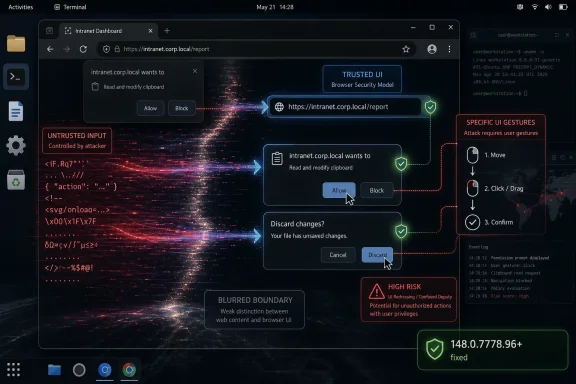
CVE-2026-7992 is a newly published Chromium vulnerability disclosed on May 6, 2026, affecting Google Chrome on Linux and ChromeOS before version 148.0.7778.96, where insufficient validation of untrusted UI input could let a remote attacker execute code after tricking a user into specific gestures. The awkward phrase “specific UI gestures” is doing a lot of work here. It tells defenders this is not a drive-by bug in the purest sense, but it also tells attackers the browser’s trusted surface was close enough to web content to become an execution path.
That is why this medium-severity Chromium bug deserves more attention than its label suggests. In the modern browser, user interface code is not decorative chrome around the security model. It is part of the security model. When the UI accepts hostile input, or lets a crafted page choreograph a user into the wrong gesture at the wrong moment, the line between “the site did something” and “the user approved something” begins to blur.
Google’s own Chromium severity for CVE-2026-7992 is Medium, but the CISA ADP CVSS 3.1 score attached to the record is 8.8 High: network attack vector, low complexity, no privileges required, user interaction required, and high impact to confidentiality, integrity, and availability. That split is not a clerical curiosity. It is a useful reminder that vendor severity and scoring systems are optimized for different audiences.
Chromium severity usually reflects the project’s internal view of exploitability, sandboxing assumptions, affected component, and whether the issue is likely to compose cleanly with other bugs. CVSS, by contrast, describes the theoretical shape of the vulnerability: can it be reached remotely, does it need credentials, does it require the user to do something, and what happens if the exploit works? A bug can be “Medium” in Chromium’s taxonomy while still looking alarming in a generic enterprise risk dashboard.
For WindowsForum readers, the important bit is not whether the dashboard cell is orange or red. It is that the described outcome is arbitrary code execution from a crafted HTML page, with the catch that the attacker must convince the user to perform specific UI gestures. That is still a browser exploit scenario, not a nuisance bug.
This is also the kind of vulnerability that lands in a crowded Chrome release and gets buried beneath louder flaws. Chrome 148’s stable desktop update included 127 security fixes, including critical and high-severity issues in Blink, V8, ANGLE, WebRTC, GPU, and other components. CVE-2026-7992 appears as one line in that storm: “Insufficient validation of untrusted input in UI.” But UI bugs are often the bugs that turn trust assumptions into exploit primitives.
That model is now more aspiration than reality. Modern browsers are operating environments with layers of web content, browser-controlled WebUI, native UI, GPU surfaces, embedded documents, install prompts, federated identity flows, payments, media permissions, remote desktop features, and synchronization surfaces. Each layer has to decide whether some input came from a site, the user, the browser, the OS, or another subsystem pretending to be one of those things.
CVE-2026-7992 lives in that messy territory. The public description does not expose exploit mechanics, and Google’s linked Chromium issue is permission-restricted as usual until broad patch adoption. But the available description is enough to establish the threat category: untrusted input reached UI code in a way it should not have, and under the right user-driven sequence the result could be code execution.
That is not the same as a spoofing-only flaw, where the user might see a misleading prompt or fake browser decoration. It is not merely a policy bypass where a browser feature allows something it should have blocked. The public CVE text says arbitrary code execution. If that wording survives later enrichment and analysis, the bug belongs in the class of UI boundary failures that are operationally more serious than their short descriptions make them sound.
The “specific UI gestures” requirement should not lull anyone to sleep. Attackers are good at gesture farming. The entire phishing economy is built around getting users to click, drag, approve, open, paste, confirm, retry, and ignore warnings. A vulnerability that requires a carefully staged click path is still exploitable if the page can supply urgency, deception, animation, or reward.
For Linux administrators, this turns the usual “Chrome updates itself” assumption into something more complicated. Google’s official Chrome package will move through Google’s own update channels, but Chromium builds in Linux distributions often follow different packaging rules, naming conventions, and release cadences. Ubuntu’s security tracker, for example, treats the old
Debian’s tracker, meanwhile, shows the Chromium 148.0.7778.96 source accepted into unstable with CVE-2026-7992 among the fixed issues. That is the open-source ecosystem in miniature: the same upstream vulnerability becomes a different operational question depending on whether a fleet uses Google Chrome, Chromium from a distro repository, a snap, a flatpak, a kiosk image, or a managed ChromeOS channel.
ChromeOS is its own story. The CVE says ChromeOS before 148.0.7778.96 is affected, but ChromeOS rollouts do not always map one-to-one with desktop Chrome availability on the same day. Schools, kiosks, point-of-sale deployments, and managed Chromebook fleets often ride staged update channels. In those environments, the browser is the operating system’s front door, and a UI-mediated arbitrary code execution bug is not just a browser ticket.
There is also a Microsoft angle, and it is the reason many Windows admins will see this CVE even if the public description names Linux and ChromeOS. Microsoft tracks Chromium vulnerabilities through the MSRC Update Guide because Microsoft Edge is Chromium-based. That does not automatically mean every Chromium CVE affects every Edge build on every platform. It means Microsoft has to account for inherited Chromium risk, evaluate Edge applicability, and publish guidance when the shared engine or surrounding code matters.
Still, the configuration deserves scrutiny. CPE modeling often struggles with vulnerabilities that are platform-constrained inside a cross-platform application. If Chrome on Linux is affected, the vulnerable product is Chrome, but the vulnerable condition may require a Linux environment. If ChromeOS is affected, the affected product may be both the browser component and the OS image that ships it. NVD sometimes expresses that by combining application and operating-system CPEs in ways that look more like a logical condition than a human-readable affected-products list.
The practical question is simpler than the CPE syntax: do you have Chrome or Chromium builds below 148.0.7778.96 on Linux or ChromeOS? If yes, treat them as exposed unless your vendor explicitly says the package is not affected. If you have Microsoft Edge, Brave, Vivaldi, Electron-based applications, or other Chromium derivatives, do not assume the CVE maps perfectly. Check vendor advisories and shipped Chromium baselines.
This is where vulnerability management tools can either help or mislead. A scanner that keys only on
The right answer is not to ignore the CPE mess. It is to supplement it with version-based validation. Browser vulnerabilities are often best triaged by actual product version and channel, not by abstract platform strings alone.
CVE-2026-7992’s requirement that the attacker convince the user to engage in specific UI gestures is therefore not much of a barrier in consumer environments. It is a speed bump. In enterprise environments, it becomes a question of whether the exploit chain can be embedded inside a plausible workflow: a helpdesk portal, a supplier invoice, a shared file preview, a web conference link, a device enrollment step, or a fake browser update page.
The more precise the required gesture, the narrower the exploit. But attackers do not need every user. They need the subset that can be persuaded, rushed, distracted, or targeted. If the vulnerability can execute code after the right browser UI state is reached, the social engineering layer becomes part of the exploit delivery mechanism.
This is why browser UI security is so hard. The browser must continually ask users to make security-relevant decisions, while hostile pages compete to shape the context in which those decisions are made. The browser can own the prompt, but it cannot fully own the story the page tells around the prompt.
Attackers understand that. Defenders sometimes still pretend they do not.
The release includes critical issues such as an integer overflow in Blink and use-after-free vulnerabilities in Mobile and Chromoting. It includes high-severity issues across V8, ANGLE, Fonts, SVG, DOM, Fullscreen, ServiceWorker, Views, Aura, GPU, Passwords, PresentationAPI, Runtime, WebRTC, and MediaRecording. It includes a large group of medium-severity validation, policy, race, lifecycle, and memory bugs spread across browser subsystems.
That distribution tells the real story of Chromium security in 2026. The browser attack surface is not one engine or one parser. It is an ecosystem of subsystems built to make the web feel like a native application platform: graphics acceleration, media capture, remote access, payments, identity, storage, extensions, developer tools, autofill, codecs, UI surfaces, and privileged internal pages.
CVE-2026-7992 is notable because it sits in the UI bucket, but it is surrounded by related hints. The same release contains a use-after-free in UI, a script injection issue in UI, validation problems in dialog-like and prompt-adjacent components, and many “inappropriate implementation” and “insufficient policy enforcement” entries. Not all of those are connected, and we should not imply a single root cause. But together they underline the pressure on the browser’s boundary code.
The browser has become a permissions broker for the operating system. It decides when a web page gets a file, a microphone, a camera, a screen, a credential, a payment method, a local network socket, a notification channel, or a native app handoff. Bugs in that broker do not need to look dramatic to matter.
The browser monoculture is not exactly Chrome monoculture, but it is Chromium dependency at scale. Edge, Chrome, ChromeOS, Android WebView, Electron, and a long tail of embedded browsers all inherit architectural ideas, code, or release pressure from Chromium. A single upstream bug may be fixed quickly in Google Chrome and then linger in derivative environments where update responsibility is less obvious.
For Windows admins, the immediate Edge question is applicability. CVE-2026-7992 as described names Google Chrome on Linux and ChromeOS, not Edge on Windows. But MSRC’s listing means Microsoft is tracking the issue in the context of its Chromium-based browser. The safe operational stance is to ensure Edge is current while separately confirming whether Microsoft marks the specific CVE as applicable to your deployed Edge channels.
The larger lesson is asset inventory. If your vulnerability program can tell you the Windows build number on every laptop but cannot tell you which Chromium baselines are embedded in your developer tools, kiosk shells, chat clients, password managers, RMM consoles, and packaged web apps, then browser CVEs will keep arriving faster than you can reason about them.
This is particularly true for Electron applications. They are not Chrome, and they will not necessarily be covered by Chrome’s auto-update path. Many ship their own Chromium snapshot, and some lag upstream for compatibility reasons. CVE-2026-7992 may or may not apply to a given embedded runtime, but the pattern should push teams to ask the uncomfortable versioning question.
The hard part is not clicking “Update.” The hard part is confirming that every channel, package type, and managed fleet actually moved. Chrome’s stable channel rolls out over days or weeks, and enterprises often deliberately slow browser updates to avoid breaking internal web apps. That caution is understandable, but a browser security release with 127 fixes is a poor candidate for leisurely rollout.
Linux packaging adds more room for ambiguity. Google Chrome from Google’s repository, Chromium from a distribution, Chromium as a snap, Chromium as a flatpak, and Chrome inside a container image can all tell different stories on the same host. The version string is the ground truth, but many fleet tools do not collect it uniformly across Linux desktop, server, and developer environments.
ChromeOS adds policy questions. Admins can pin versions, control release channels, and stage rollouts. Those features are useful, but they also create security debt when devices sit below a fixed version because a testing ring never closed. For a UI-triggered browser RCE, the population most likely to click through unusual prompts — students, kiosks, shared devices, frontline workers — may also be the population least visible to traditional endpoint tooling.
Enterprises should also watch for a lag between advisory publication and scanner fidelity. NVD enrichment may change. CPE configurations may be corrected. Vendor advisories may refine applicability. A vulnerability record published on May 6 and modified the same day is not a static artifact; it is an early map.
For CVE-2026-7992, the Chromium issue link is permission-restricted, and the public record does not describe the gestures, the UI state, the affected class, or the exploit chain. That absence should not be filled with speculation masquerading as analysis. We know the component category, the affected platforms, the fixed version, the weakness class, and the stated impact. We do not know whether the bug was found by fuzzing, internal review, exploit testing, or incident response.
The release note says the issue was reported by Google on April 2, 2026. That is a meaningful detail, but not a smoking gun. Many Chromium vulnerabilities are found internally by Google’s own security engineering, fuzzing infrastructure, and hardening work. A Google-reported bug is not automatically a zero-day, and there is no public evidence in the CVE text that CVE-2026-7992 was exploited in the wild.
That distinction matters. Panic patching and complacent patching both produce bad outcomes. The rational posture is urgency without theatrics: assume exploit details will become clearer over time, assume attackers will diff patches, and assume that any browser RCE with a social-engineering component is more useful after the advisory than before.
The industry has learned this lesson repeatedly. Once a fix ships, attackers can compare old and new code, infer the vulnerable path, and build proof-of-concept material. The disclosure clock does not stop because the bug details page is locked.
UI validation bugs fit that evolution. They are not always memory corruption in the classic sense. They can involve state confusion, trust confusion, focus confusion, gesture confusion, origin confusion, or timing confusion. The user thinks one thing is happening; the browser records another; the page supplies input that should never have crossed into a privileged decision; and the security model quietly loses its footing.
That does not mean every UI bug is catastrophic. Many are spoofing issues, annoyance bugs, or narrow bypasses. But when the stated impact is arbitrary code execution, defenders should think beyond the visible prompt. A UI component that mishandles untrusted input may be the first domino in a chain involving privileged browser process code, platform APIs, or another memory-safety flaw.
The platform specificity of CVE-2026-7992 is also instructive. Linux desktop UI stacks and ChromeOS shell integration have their own event models, windowing assumptions, sandbox interfaces, and display-server histories. Browser UI code is cross-platform until it is not. The exact same web-facing feature may be hardened differently on Windows, macOS, Linux, and ChromeOS because the native plumbing underneath it differs.
This is one reason Chromium security releases can feel noisy. The browser is not a single product so much as a family of products sharing a codebase. A vulnerability in the “UI” component may be a Chromium issue, a platform integration issue, a ChromeOS shell issue, or a narrow interaction between all three.
CVE-2026-7992 is a reminder that browser patching needs the same operational discipline as OS patching, only faster. Browsers sit on the public internet all day. They parse hostile input by design. They are exposed to drive-by content, advertising ecosystems, compromised legitimate sites, collaboration links, and identity workflows. They are also the place where users are most likely to be convinced to perform “specific UI gestures.”
A healthy browser SLO is not “eventually updated.” It is a defined maximum exposure window for stable-channel security releases, with telemetry that proves the version distribution has moved. For unmanaged consumer devices, that may mean user education and forced restarts. For enterprise devices, it means policy, reporting, rings, exception handling, and escalation when a ring stalls.
The same discipline should extend to ChromeOS fleets. Device channels, pinned versions, and staged rollouts should be visible to security teams, not hidden inside endpoint management silos. A classroom Chromebook is still an endpoint. A kiosk is still an endpoint. A managed browser profile is still an attack surface.
For Linux, the answer is inventory plus package-source awareness. If a workstation has both Google Chrome and distro Chromium installed, both matter. If containers or remote desktops expose browsers to users, they matter. If developers test against old Chromium snapshots, they matter at least enough to keep out of privileged workflows.
Source: NVD / Chromium Security Update Guide - Microsoft Security Response Center
That is why this medium-severity Chromium bug deserves more attention than its label suggests. In the modern browser, user interface code is not decorative chrome around the security model. It is part of the security model. When the UI accepts hostile input, or lets a crafted page choreograph a user into the wrong gesture at the wrong moment, the line between “the site did something” and “the user approved something” begins to blur.
 A Medium Bug With a High-Severity Shape
Google’s own Chromium severity for CVE-2026-7992 is Medium, but the CISA ADP CVSS 3.1 score attached to the record is 8.8 High: network attack vector, low complexity, no privileges required, user interaction required, and high impact to confidentiality, integrity, and availability. That split is not a clerical curiosity. It is a useful reminder that vendor severity and scoring systems are optimized for different audiences.Chromium severity usually reflects the project’s internal view of exploitability, sandboxing assumptions, affected component, and whether the issue is likely to compose cleanly with other bugs. CVSS, by contrast, describes the theoretical shape of the vulnerability: can it be reached remotely, does it need credentials, does it require the user to do something, and what happens if the exploit works? A bug can be “Medium” in Chromium’s taxonomy while still looking alarming in a generic enterprise risk dashboard.
For WindowsForum readers, the important bit is not whether the dashboard cell is orange or red. It is that the described outcome is arbitrary code execution from a crafted HTML page, with the catch that the attacker must convince the user to perform specific UI gestures. That is still a browser exploit scenario, not a nuisance bug.
This is also the kind of vulnerability that lands in a crowded Chrome release and gets buried beneath louder flaws. Chrome 148’s stable desktop update included 127 security fixes, including critical and high-severity issues in Blink, V8, ANGLE, WebRTC, GPU, and other components. CVE-2026-7992 appears as one line in that storm: “Insufficient validation of untrusted input in UI.” But UI bugs are often the bugs that turn trust assumptions into exploit primitives.
The Browser UI Is No Longer Just the Browser’s Frame
The old mental model of the browser was simple: the webpage lives in the viewport, and the browser lives around it. Tabs, address bar, permissions prompts, download shelves, password bubbles, extension controls, fullscreen affordances, and file pickers were assumed to belong to the browser. Web content was assumed to be the untrusted thing being contained.That model is now more aspiration than reality. Modern browsers are operating environments with layers of web content, browser-controlled WebUI, native UI, GPU surfaces, embedded documents, install prompts, federated identity flows, payments, media permissions, remote desktop features, and synchronization surfaces. Each layer has to decide whether some input came from a site, the user, the browser, the OS, or another subsystem pretending to be one of those things.
CVE-2026-7992 lives in that messy territory. The public description does not expose exploit mechanics, and Google’s linked Chromium issue is permission-restricted as usual until broad patch adoption. But the available description is enough to establish the threat category: untrusted input reached UI code in a way it should not have, and under the right user-driven sequence the result could be code execution.
That is not the same as a spoofing-only flaw, where the user might see a misleading prompt or fake browser decoration. It is not merely a policy bypass where a browser feature allows something it should have blocked. The public CVE text says arbitrary code execution. If that wording survives later enrichment and analysis, the bug belongs in the class of UI boundary failures that are operationally more serious than their short descriptions make them sound.
The “specific UI gestures” requirement should not lull anyone to sleep. Attackers are good at gesture farming. The entire phishing economy is built around getting users to click, drag, approve, open, paste, confirm, retry, and ignore warnings. A vulnerability that requires a carefully staged click path is still exploitable if the page can supply urgency, deception, animation, or reward.
Linux and ChromeOS Are the Named Targets, but Chromium Never Lives Alone
The CVE description names Google Chrome on Linux and ChromeOS before 148.0.7778.96. That platform specificity matters. It suggests the vulnerable path may depend on UI implementation details, toolkit behavior, platform integration, or ChromeOS-specific browser shell assumptions rather than a universal bug across every desktop build.For Linux administrators, this turns the usual “Chrome updates itself” assumption into something more complicated. Google’s official Chrome package will move through Google’s own update channels, but Chromium builds in Linux distributions often follow different packaging rules, naming conventions, and release cadences. Ubuntu’s security tracker, for example, treats the old
chromium-browser package as not affected for current supported releases because Ubuntu’s Chromium delivery has long been tied to the snap packaging model rather than a conventional deb package.Debian’s tracker, meanwhile, shows the Chromium 148.0.7778.96 source accepted into unstable with CVE-2026-7992 among the fixed issues. That is the open-source ecosystem in miniature: the same upstream vulnerability becomes a different operational question depending on whether a fleet uses Google Chrome, Chromium from a distro repository, a snap, a flatpak, a kiosk image, or a managed ChromeOS channel.
ChromeOS is its own story. The CVE says ChromeOS before 148.0.7778.96 is affected, but ChromeOS rollouts do not always map one-to-one with desktop Chrome availability on the same day. Schools, kiosks, point-of-sale deployments, and managed Chromebook fleets often ride staged update channels. In those environments, the browser is the operating system’s front door, and a UI-mediated arbitrary code execution bug is not just a browser ticket.
There is also a Microsoft angle, and it is the reason many Windows admins will see this CVE even if the public description names Linux and ChromeOS. Microsoft tracks Chromium vulnerabilities through the MSRC Update Guide because Microsoft Edge is Chromium-based. That does not automatically mean every Chromium CVE affects every Edge build on every platform. It means Microsoft has to account for inherited Chromium risk, evaluate Edge applicability, and publish guidance when the shared engine or surrounding code matters.
The CPE Record Looks Odd Because the Vulnerability Is Odd
The NVD configuration text attached to CVE-2026-7992 is easy to misread. The change record shows an added configuration with Google Chrome versions up to but excluding 148.0.7778.96, and it also references ChromeOS and the Linux kernel in a way that may look strange to anyone expecting a clean one-product CPE entry. The “Are we missing a CPE?” prompt is boilerplate from NVD’s interface, not a finding by itself.Still, the configuration deserves scrutiny. CPE modeling often struggles with vulnerabilities that are platform-constrained inside a cross-platform application. If Chrome on Linux is affected, the vulnerable product is Chrome, but the vulnerable condition may require a Linux environment. If ChromeOS is affected, the affected product may be both the browser component and the OS image that ships it. NVD sometimes expresses that by combining application and operating-system CPEs in ways that look more like a logical condition than a human-readable affected-products list.
The practical question is simpler than the CPE syntax: do you have Chrome or Chromium builds below 148.0.7778.96 on Linux or ChromeOS? If yes, treat them as exposed unless your vendor explicitly says the package is not affected. If you have Microsoft Edge, Brave, Vivaldi, Electron-based applications, or other Chromium derivatives, do not assume the CVE maps perfectly. Check vendor advisories and shipped Chromium baselines.
This is where vulnerability management tools can either help or mislead. A scanner that keys only on
google:chrome may miss a distro Chromium package. A scanner that sees a Linux kernel CPE attached to the record may create confusing asset matches. A scanner that flags Windows Chrome solely because Chrome 148 fixed the broader security batch may be right for the broader batch but not necessarily for this specific CVE’s platform note.The right answer is not to ignore the CPE mess. It is to supplement it with version-based validation. Browser vulnerabilities are often best triaged by actual product version and channel, not by abstract platform strings alone.
User Interaction Is Not a Comfort Blanket
Security teams often down-rank bugs that require user interaction. That instinct made more sense when user interaction meant opening a suspicious attachment from a suspicious sender. It is weaker in a world where a browser page can deliver a full-screen onboarding flow, fake collaboration prompt, counterfeit document viewer, simulated CAPTCHA, game mechanic, or “click here to continue” funnel that looks normal to the user.CVE-2026-7992’s requirement that the attacker convince the user to engage in specific UI gestures is therefore not much of a barrier in consumer environments. It is a speed bump. In enterprise environments, it becomes a question of whether the exploit chain can be embedded inside a plausible workflow: a helpdesk portal, a supplier invoice, a shared file preview, a web conference link, a device enrollment step, or a fake browser update page.
The more precise the required gesture, the narrower the exploit. But attackers do not need every user. They need the subset that can be persuaded, rushed, distracted, or targeted. If the vulnerability can execute code after the right browser UI state is reached, the social engineering layer becomes part of the exploit delivery mechanism.
This is why browser UI security is so hard. The browser must continually ask users to make security-relevant decisions, while hostile pages compete to shape the context in which those decisions are made. The browser can own the prompt, but it cannot fully own the story the page tells around the prompt.
Attackers understand that. Defenders sometimes still pretend they do not.
Chrome 148 Is a Security Release Wearing a Feature Release’s Clothes
Chrome 148 is not just a vehicle for CVE-2026-7992. It is a major stable-channel update with a dense security payload: 127 fixes, multiple critical vulnerabilities, a long tail of high and medium issues, and the usual temporary restrictions on bug details until most users have updated. That matters because patch priority should be driven by the release, not only by the single CVE that happens to show up in an alert.The release includes critical issues such as an integer overflow in Blink and use-after-free vulnerabilities in Mobile and Chromoting. It includes high-severity issues across V8, ANGLE, Fonts, SVG, DOM, Fullscreen, ServiceWorker, Views, Aura, GPU, Passwords, PresentationAPI, Runtime, WebRTC, and MediaRecording. It includes a large group of medium-severity validation, policy, race, lifecycle, and memory bugs spread across browser subsystems.
That distribution tells the real story of Chromium security in 2026. The browser attack surface is not one engine or one parser. It is an ecosystem of subsystems built to make the web feel like a native application platform: graphics acceleration, media capture, remote access, payments, identity, storage, extensions, developer tools, autofill, codecs, UI surfaces, and privileged internal pages.
CVE-2026-7992 is notable because it sits in the UI bucket, but it is surrounded by related hints. The same release contains a use-after-free in UI, a script injection issue in UI, validation problems in dialog-like and prompt-adjacent components, and many “inappropriate implementation” and “insufficient policy enforcement” entries. Not all of those are connected, and we should not imply a single root cause. But together they underline the pressure on the browser’s boundary code.
The browser has become a permissions broker for the operating system. It decides when a web page gets a file, a microphone, a camera, a screen, a credential, a payment method, a local network socket, a notification channel, or a native app handoff. Bugs in that broker do not need to look dramatic to matter.
Windows Admins Should Care Even When the CVE Says Linux
A WindowsForum audience can reasonably ask why a Linux and ChromeOS CVE belongs here. The answer is that Windows shops rarely run Windows alone anymore, and Chromium rarely stays inside one brand. A Microsoft 365 tenant may have Windows endpoints, Linux developer workstations, ChromeOS classrooms, Edge on Windows, Chrome on macOS, Chromium in CI containers, and Electron apps wrapping old Chromium runtimes.The browser monoculture is not exactly Chrome monoculture, but it is Chromium dependency at scale. Edge, Chrome, ChromeOS, Android WebView, Electron, and a long tail of embedded browsers all inherit architectural ideas, code, or release pressure from Chromium. A single upstream bug may be fixed quickly in Google Chrome and then linger in derivative environments where update responsibility is less obvious.
For Windows admins, the immediate Edge question is applicability. CVE-2026-7992 as described names Google Chrome on Linux and ChromeOS, not Edge on Windows. But MSRC’s listing means Microsoft is tracking the issue in the context of its Chromium-based browser. The safe operational stance is to ensure Edge is current while separately confirming whether Microsoft marks the specific CVE as applicable to your deployed Edge channels.
The larger lesson is asset inventory. If your vulnerability program can tell you the Windows build number on every laptop but cannot tell you which Chromium baselines are embedded in your developer tools, kiosk shells, chat clients, password managers, RMM consoles, and packaged web apps, then browser CVEs will keep arriving faster than you can reason about them.
This is particularly true for Electron applications. They are not Chrome, and they will not necessarily be covered by Chrome’s auto-update path. Many ship their own Chromium snapshot, and some lag upstream for compatibility reasons. CVE-2026-7992 may or may not apply to a given embedded runtime, but the pattern should push teams to ask the uncomfortable versioning question.
The Patch Is Simple; Proving Coverage Is Not
For standalone Google Chrome on Linux, the remediation is straightforward: update to 148.0.7778.96 or later. For Chrome on Windows and macOS, the same Chrome 148 release line is available as 148.0.7778.96 or 148.0.7778.97, though the public CVE description for CVE-2026-7992 is platform-specific to Linux and ChromeOS. For ChromeOS, move managed devices to a fixed 148 build when it is available in the relevant channel.The hard part is not clicking “Update.” The hard part is confirming that every channel, package type, and managed fleet actually moved. Chrome’s stable channel rolls out over days or weeks, and enterprises often deliberately slow browser updates to avoid breaking internal web apps. That caution is understandable, but a browser security release with 127 fixes is a poor candidate for leisurely rollout.
Linux packaging adds more room for ambiguity. Google Chrome from Google’s repository, Chromium from a distribution, Chromium as a snap, Chromium as a flatpak, and Chrome inside a container image can all tell different stories on the same host. The version string is the ground truth, but many fleet tools do not collect it uniformly across Linux desktop, server, and developer environments.
ChromeOS adds policy questions. Admins can pin versions, control release channels, and stage rollouts. Those features are useful, but they also create security debt when devices sit below a fixed version because a testing ring never closed. For a UI-triggered browser RCE, the population most likely to click through unusual prompts — students, kiosks, shared devices, frontline workers — may also be the population least visible to traditional endpoint tooling.
Enterprises should also watch for a lag between advisory publication and scanner fidelity. NVD enrichment may change. CPE configurations may be corrected. Vendor advisories may refine applicability. A vulnerability record published on May 6 and modified the same day is not a static artifact; it is an early map.
The Disclosure Silence Is a Feature, Not a Cover-Up
Google’s release note repeats the standard warning that bug details and links may remain restricted until most users are updated, and that restrictions can persist when a bug exists in third-party libraries used by other projects. This frustrates defenders who want exploit details to prioritize work. It also frustrates attackers, which is the point.For CVE-2026-7992, the Chromium issue link is permission-restricted, and the public record does not describe the gestures, the UI state, the affected class, or the exploit chain. That absence should not be filled with speculation masquerading as analysis. We know the component category, the affected platforms, the fixed version, the weakness class, and the stated impact. We do not know whether the bug was found by fuzzing, internal review, exploit testing, or incident response.
The release note says the issue was reported by Google on April 2, 2026. That is a meaningful detail, but not a smoking gun. Many Chromium vulnerabilities are found internally by Google’s own security engineering, fuzzing infrastructure, and hardening work. A Google-reported bug is not automatically a zero-day, and there is no public evidence in the CVE text that CVE-2026-7992 was exploited in the wild.
That distinction matters. Panic patching and complacent patching both produce bad outcomes. The rational posture is urgency without theatrics: assume exploit details will become clearer over time, assume attackers will diff patches, and assume that any browser RCE with a social-engineering component is more useful after the advisory than before.
The industry has learned this lesson repeatedly. Once a fix ships, attackers can compare old and new code, infer the vulnerable path, and build proof-of-concept material. The disclosure clock does not stop because the bug details page is locked.
The UI Boundary Is Becoming the Browser’s Weakest Strong Point
Chromium has invested heavily in sandboxing, site isolation, memory safety mitigations, fuzzing, and compiler hardening. Those investments have changed the economics of browser exploitation. A clean one-shot renderer-to-system compromise is harder than it used to be. Attackers respond by looking for seams: prompts, permissions, IPC boundaries, native integrations, GPU paths, and UI code that must interpret messy real-world state.UI validation bugs fit that evolution. They are not always memory corruption in the classic sense. They can involve state confusion, trust confusion, focus confusion, gesture confusion, origin confusion, or timing confusion. The user thinks one thing is happening; the browser records another; the page supplies input that should never have crossed into a privileged decision; and the security model quietly loses its footing.
That does not mean every UI bug is catastrophic. Many are spoofing issues, annoyance bugs, or narrow bypasses. But when the stated impact is arbitrary code execution, defenders should think beyond the visible prompt. A UI component that mishandles untrusted input may be the first domino in a chain involving privileged browser process code, platform APIs, or another memory-safety flaw.
The platform specificity of CVE-2026-7992 is also instructive. Linux desktop UI stacks and ChromeOS shell integration have their own event models, windowing assumptions, sandbox interfaces, and display-server histories. Browser UI code is cross-platform until it is not. The exact same web-facing feature may be hardened differently on Windows, macOS, Linux, and ChromeOS because the native plumbing underneath it differs.
This is one reason Chromium security releases can feel noisy. The browser is not a single product so much as a family of products sharing a codebase. A vulnerability in the “UI” component may be a Chromium issue, a platform integration issue, a ChromeOS shell issue, or a narrow interaction between all three.
Security Teams Need Browser SLOs, Not Browser Folklore
Most organizations have patching policies for operating systems. Fewer have meaningful service-level objectives for browsers. They say browsers auto-update, and then they discover exceptions: VDI images, lab machines, developer laptops, kiosk profiles, pinned ChromeOS channels, old portable builds, offline networks, and third-party apps with embedded runtimes.CVE-2026-7992 is a reminder that browser patching needs the same operational discipline as OS patching, only faster. Browsers sit on the public internet all day. They parse hostile input by design. They are exposed to drive-by content, advertising ecosystems, compromised legitimate sites, collaboration links, and identity workflows. They are also the place where users are most likely to be convinced to perform “specific UI gestures.”
A healthy browser SLO is not “eventually updated.” It is a defined maximum exposure window for stable-channel security releases, with telemetry that proves the version distribution has moved. For unmanaged consumer devices, that may mean user education and forced restarts. For enterprise devices, it means policy, reporting, rings, exception handling, and escalation when a ring stalls.
The same discipline should extend to ChromeOS fleets. Device channels, pinned versions, and staged rollouts should be visible to security teams, not hidden inside endpoint management silos. A classroom Chromebook is still an endpoint. A kiosk is still an endpoint. A managed browser profile is still an attack surface.
For Linux, the answer is inventory plus package-source awareness. If a workstation has both Google Chrome and distro Chromium installed, both matter. If containers or remote desktops expose browsers to users, they matter. If developers test against old Chromium snapshots, they matter at least enough to keep out of privileged workflows.
The Practical Read Is Faster Than the Advisory
The operational response to CVE-2026-7992 should be measured but not slow. The bug is public, the fixed Chrome version is known, and the release carrying it fixes far more than this one CVE. The following points are the ones administrators should be able to answer without waiting for another enrichment pass.- Chrome on Linux should be updated to 148.0.7778.96 or later, and teams should verify the installed version rather than relying on package names alone.
- ChromeOS fleets below a fixed 148 build should be treated as candidates for expedited rollout once the appropriate stable-channel update is available to the managed channel.
- The CVE’s platform wording does not automatically make Edge on Windows vulnerable, but Edge should still be kept current because Microsoft tracks Chromium issues through MSRC and ships fixes through its own channels.
- Vulnerability scanners may show confusing CPE logic for this record, so version-based checks should be used to confirm exposure and remediation.
- The user-interaction requirement should reduce panic, not priority, because social engineering is a normal part of browser exploitation rather than an exotic prerequisite.
- Electron and other Chromium-derived applications should be reviewed separately, because Chrome’s update does not guarantee that embedded Chromium runtimes have moved.
The Next Browser Bug Will Also Be a Workflow Bug
The most important thing about CVE-2026-7992 is not that it is the scariest bug in Chrome 148. It probably is not. The important thing is that it captures where browser risk keeps moving: away from a neat separation between malicious web content and trusted browser machinery, and toward the complicated choreography between pages, prompts, gestures, operating systems, and users. The fix is a browser update, but the lesson is bigger. Organizations that treat browsers as self-updating utilities will keep being surprised when the browser becomes the fastest-moving part of their attack surface; organizations that treat browser versions, channels, and embedded Chromium runtimes as first-class assets will be ready for the next advisory before the CVE record finishes changing.Source: NVD / Chromium Security Update Guide - Microsoft Security Response Center
