
Google and Microsoft disclosed CVE-2026-7996 on May 6–7, 2026, as a low-severity Chromium SSL input-validation flaw fixed in Chrome before 148.0.7778.96 and incorporated into Microsoft Edge Stable 148.0.3967.54 on Windows, macOS, Linux, and Chromium-derived browser deployments. The bug is not the scariest item in Chrome 148’s security ledger, but it is a useful reminder that browser trust is often lost at the edges rather than at the kernel boundary. A renderer compromise was already required, which lowers the standalone drama; the payoff was UI spoofing, which raises the social-engineering stakes. For defenders, the lesson is blunt: low severity does not mean low operational importance when the affected component helps users decide what to trust.
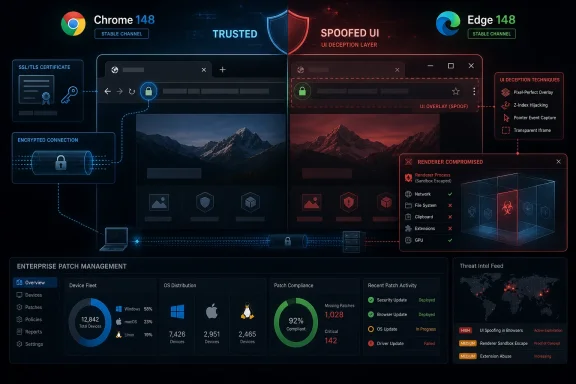
CVE-2026-7996 is described as insufficient validation of untrusted input in SSL, allowing a remote attacker who had already compromised the renderer process to perform UI spoofing through a crafted HTML page. That is a narrow chain, and Chromium’s own severity rating reflects that. This is not a clean remote code execution bug where a victim merely lands on a page and hands over the machine.
But the browser is not just an execution environment. It is also a courtroom, constantly showing users evidence about identity, encryption, origin, permissions, downloads, pop-ups, profiles, and account state. A UI spoofing flaw attacks that courtroom by tampering with what the user thinks the browser has certified.
That is why this CVE deserves more than a shrug. The attacker’s first step is hard: compromise the renderer. The second step is subtle: make the browser’s interface say, imply, or visually frame something that is not true. In a world where passkeys, OAuth prompts, password managers, payment forms, and enterprise SSO flows all rely on user trust in browser chrome, subtle is enough.
The irony is that SSL is supposed to be the vocabulary of trust. Users are trained, imperfectly, to look for secure connection indicators and familiar browser cues. A validation flaw in that area does not have to break encryption to be useful; it only has to blur the line between the website’s canvas and the browser’s authority.
That matters because CVE-2026-7996 was not the headline vulnerability in the release. Chrome 148 also included critical issues such as an integer overflow in Blink and use-after-free flaws in other components. Those are the bugs that will attract scanner dashboards, emergency tickets, and executive “are we exposed?” emails.
Still, the long tail of medium and low Chromium bugs is where many exploit chains become more believable. Attackers do not need every link in a chain to be spectacular. They need a workable sequence: renderer foothold, sandbox escape or post-compromise leverage, user deception, credential capture, persistence, or lateral movement.
CVE-2026-7996 sits in that chain-building category. By itself, it is constrained. In combination with a renderer compromise, a phishing kit, a fake login flow, or a malicious browser session already in progress, it becomes a trust amplifier.
This is the bargain Microsoft made when it moved Edge to Chromium. The company gained compatibility, speed of web-platform adoption, and relief from the lonely burden of maintaining a separate browser engine. In exchange, Microsoft inherited Chromium’s cadence, disclosure rhythm, and vulnerability taxonomy.
For most organizations, that trade is still rational. A shared engine means faster fixes and a larger research ecosystem. But it also means browser patch management cannot stop at “we don’t deploy Chrome.” Edge, Chrome, Brave, Opera, Vivaldi, Electron apps, embedded WebView2 components, and managed browser runtimes often ride the same underlying wave.
The result is a kind of security monoculture with multiple logos. When Chromium fixes SSL UI spoofing, enterprises need to ask not just where Chrome is installed, but where Chromium-derived trust decisions are being made. That may include line-of-business apps, kiosk systems, admin consoles, helpdesk tools, and packaged desktop software that nobody thinks of as a browser.
CPE data is good at naming a product. It is weaker at expressing inheritance. A vulnerability can originate in Chromium, be fixed in Chrome, incorporated into Edge, and potentially matter to other Chromium-based browsers on their own schedules. That does not always translate into a neat, universal CPE list on day one.
Microsoft’s advisory path reinforces this point. MSRC tracks CVE-2026-7996 because Edge consumes the Chromium fix, but the Chrome CPE and the Edge product version are not the same object. Chrome’s fixed desktop version is 148.0.7778.96 or later; Edge’s corresponding stable release is 148.0.3967.54. The version numbers are different because the products are different, even when the engine lineage is shared.
So, if an asset-management tool is asking whether
The modern browser is a security boundary made of pixels. The address bar, lock icon, permissions prompts, download shelf, extension badges, profile selector, identity chips, tab-modal dialogs, and payment surfaces all communicate authority. If a crafted page can make a compromised renderer manipulate or mimic those cues, the attacker can steer the user into doing the rest.
The precondition in CVE-2026-7996 is important: the renderer process must already be compromised. But renderer compromise is not science fiction. Browser bugs, malicious extensions, ad-tech abuse, exploit kits, and chained vulnerabilities all keep renderer-level attacks in the plausible category. Once there, the attacker wants to convert technical access into a decision the user will make willingly.
This is where UI spoofing shines. It can make a fake sign-in prompt feel browser-native. It can blur whether a permission request came from the page or the browser. It can make a phishing page look like a secure continuation of a legitimate session. The damage is not necessarily in what the flaw directly executes; it is in what it persuades the victim to authorize.
That distinction matters because overstatement leads to bad defense. If administrators think the issue is a cryptographic collapse, they look for certificate failures, TLS interception anomalies, or network-layer indicators. If they understand it as a browser trust-presentation issue, they patch clients, tighten browser management, and review exposure to renderer-compromise chains.
SSL and TLS indicators have always been an awkward user-education target. The industry spent years teaching users to “look for the lock,” then spent years explaining that the lock only means the connection is encrypted, not that the site is honest. UI spoofing bugs make that problem worse by attacking even the limited signals users still understand.
The fix, therefore, is not more user training. It is reducing the amount of trust users must place in ambiguous browser surfaces. Managed password managers, origin-bound authentication, passkeys, conditional access, app isolation, and fast browser patching all do more than another poster telling employees not to click suspicious links.
Chrome’s staged rollout is convenient for consumers and sensible for reliability, but enterprises should not confuse staged availability with risk acceptance. If a release fixes 127 vulnerabilities, including critical Chromium bugs and trust-surface issues like CVE-2026-7996, waiting passively for automatic updates is a policy choice. It may be fine for low-risk users; it is less defensible for privileged administrators.
Edge complicates this because many Windows shops assume Microsoft Update or Edge’s updater will do the right thing. Usually it does. But “usually” is not an inventory strategy. Admins need reporting that shows actual browser versions, restart pending state, disabled update services, stale images, VDI pools, kiosk devices, and servers where browsers are installed for convenience and then forgotten.
The uncomfortable truth is that browser patch SLAs should look more like endpoint security SLAs than productivity-app SLAs. A compromised browser session is often the front door to the enterprise. Treating it as just another application is a legacy habit from an era before every business process moved into a tab.
A renderer process handles web content. It is where hostile JavaScript, HTML, CSS, images, and web APIs get parsed, executed, and displayed. If an attacker controls that space, they may still be boxed in by sandboxing and browser privilege separation, but they are operating close to the user’s live session.
That position is valuable even without full device compromise. The attacker may be able to observe page behavior, influence what the victim sees, shape authentication flows, or prepare the ground for another exploit. UI spoofing after renderer compromise is a reminder that the browser’s security architecture is layered, and attackers monetize partial wins.
This is also why exploitability scores can understate business impact. A high-complexity, user-interaction-required bug may be unattractive as a standalone mass-exploitation primitive. In a targeted intrusion, however, a partial browser foothold plus convincing UI deception against a privileged user can be enough.
That concentration has benefits. Vulnerability research has a large target, fixes propagate through a mature upstream project, and enterprise compatibility is vastly better than in the days of fractured engines. But concentration also means a Chromium security release can become a cross-vendor operational event overnight.
CVE-2026-7996 illustrates the quiet version of that event. It is not a famous zero-day. It is not marked as exploited in the wild in the available advisory language. It has a moderate CVSS score from CISA’s ADP enrichment and a low Chromium severity. Yet it still travels through the same supply chain that carries the critical bugs.
That is the browser security story in 2026. The scary vulnerabilities and the boring vulnerabilities ship together. The same reboot, the same version check, and the same management policy fix both. The organizations that wait to distinguish glamorous bugs from unglamorous ones are often just adding latency to a patch they will deploy anyway.
Source: NVD / Chromium Security Update Guide - Microsoft Security Response Center
 The “Low” Label Hides a More Interesting Browser Problem
CVE-2026-7996 is described as insufficient validation of untrusted input in SSL, allowing a remote attacker who had already compromised the renderer process to perform UI spoofing through a crafted HTML page. That is a narrow chain, and Chromium’s own severity rating reflects that. This is not a clean remote code execution bug where a victim merely lands on a page and hands over the machine.But the browser is not just an execution environment. It is also a courtroom, constantly showing users evidence about identity, encryption, origin, permissions, downloads, pop-ups, profiles, and account state. A UI spoofing flaw attacks that courtroom by tampering with what the user thinks the browser has certified.
That is why this CVE deserves more than a shrug. The attacker’s first step is hard: compromise the renderer. The second step is subtle: make the browser’s interface say, imply, or visually frame something that is not true. In a world where passkeys, OAuth prompts, password managers, payment forms, and enterprise SSO flows all rely on user trust in browser chrome, subtle is enough.
The irony is that SSL is supposed to be the vocabulary of trust. Users are trained, imperfectly, to look for secure connection indicators and familiar browser cues. A validation flaw in that area does not have to break encryption to be useful; it only has to blur the line between the website’s canvas and the browser’s authority.
Chrome 148 Was a Security Dump, Not a Single-Bug Emergency
The patch landed inside Chrome 148, a large stable-channel release that fixed 127 security issues across desktop platforms. Google promoted Chrome 148 to stable for Windows, macOS, and Linux on May 5, with versions 148.0.7778.96 for Linux and 148.0.7778.96/97 for Windows and Mac. The rollout, as usual, is staged over days and weeks rather than delivered as a single synchronized event.That matters because CVE-2026-7996 was not the headline vulnerability in the release. Chrome 148 also included critical issues such as an integer overflow in Blink and use-after-free flaws in other components. Those are the bugs that will attract scanner dashboards, emergency tickets, and executive “are we exposed?” emails.
Still, the long tail of medium and low Chromium bugs is where many exploit chains become more believable. Attackers do not need every link in a chain to be spectacular. They need a workable sequence: renderer foothold, sandbox escape or post-compromise leverage, user deception, credential capture, persistence, or lateral movement.
CVE-2026-7996 sits in that chain-building category. By itself, it is constrained. In combination with a renderer compromise, a phishing kit, a fake login flow, or a malicious browser session already in progress, it becomes a trust amplifier.
Microsoft Edge Turns Chromium Debt Into Windows Debt
For WindowsForum readers, the Microsoft angle is not incidental. Microsoft’s May 7 Edge Stable release, version 148.0.3967.54, includes the most recent Chromium security updates and adds three Edge-specific security fixes. That means a Chromium bug like CVE-2026-7996 is not merely a Chrome problem; it becomes part of the Windows desktop security surface through Edge.This is the bargain Microsoft made when it moved Edge to Chromium. The company gained compatibility, speed of web-platform adoption, and relief from the lonely burden of maintaining a separate browser engine. In exchange, Microsoft inherited Chromium’s cadence, disclosure rhythm, and vulnerability taxonomy.
For most organizations, that trade is still rational. A shared engine means faster fixes and a larger research ecosystem. But it also means browser patch management cannot stop at “we don’t deploy Chrome.” Edge, Chrome, Brave, Opera, Vivaldi, Electron apps, embedded WebView2 components, and managed browser runtimes often ride the same underlying wave.
The result is a kind of security monoculture with multiple logos. When Chromium fixes SSL UI spoofing, enterprises need to ask not just where Chrome is installed, but where Chromium-derived trust decisions are being made. That may include line-of-business apps, kiosk systems, admin consoles, helpdesk tools, and packaged desktop software that nobody thinks of as a browser.
The CPE Looks Odd Because Browser Inventory Is Odd
The NVD change history for CVE-2026-7996 shows a Chrome application CPE with versions up to, but excluding, 148.0.7778.96, combined with operating-system CPEs for Windows, Linux, and macOS. If the question is whether a CPE is missing, the practical answer is: probably not for Google Chrome as described, but the ecosystem view is messier than the CPE view.CPE data is good at naming a product. It is weaker at expressing inheritance. A vulnerability can originate in Chromium, be fixed in Chrome, incorporated into Edge, and potentially matter to other Chromium-based browsers on their own schedules. That does not always translate into a neat, universal CPE list on day one.
Microsoft’s advisory path reinforces this point. MSRC tracks CVE-2026-7996 because Edge consumes the Chromium fix, but the Chrome CPE and the Edge product version are not the same object. Chrome’s fixed desktop version is 148.0.7778.96 or later; Edge’s corresponding stable release is 148.0.3967.54. The version numbers are different because the products are different, even when the engine lineage is shared.
So, if an asset-management tool is asking whether
cpe:2.3:a:microsoft:edge should appear beside the Google Chrome CPE, that is a reasonable operational question. But NVD’s Chrome-origin entry and Microsoft’s Edge release notes may not converge into a single tidy CPE set immediately. Defenders should not wait for perfect metadata before patching a browser family they already know is downstream of Chromium.UI Spoofing Is the Bug Class Security Teams Still Underrate
Security teams tend to rank bugs by the machines they can seize. UI spoofing ranks lower because it often attacks the person in the loop. That instinct is understandable and still wrong often enough to be dangerous.The modern browser is a security boundary made of pixels. The address bar, lock icon, permissions prompts, download shelf, extension badges, profile selector, identity chips, tab-modal dialogs, and payment surfaces all communicate authority. If a crafted page can make a compromised renderer manipulate or mimic those cues, the attacker can steer the user into doing the rest.
The precondition in CVE-2026-7996 is important: the renderer process must already be compromised. But renderer compromise is not science fiction. Browser bugs, malicious extensions, ad-tech abuse, exploit kits, and chained vulnerabilities all keep renderer-level attacks in the plausible category. Once there, the attacker wants to convert technical access into a decision the user will make willingly.
This is where UI spoofing shines. It can make a fake sign-in prompt feel browser-native. It can blur whether a permission request came from the page or the browser. It can make a phishing page look like a secure continuation of a legitimate session. The damage is not necessarily in what the flaw directly executes; it is in what it persuades the victim to authorize.
The SSL Angle Is Less About Cryptography Than Trust Semantics
The CVE wording mentions SSL, but nobody should read that as “TLS is broken.” The issue is not that attackers can decrypt traffic or forge certificates at will. It is about validation of untrusted input in the browser machinery around secure-connection handling and the user interface implications that follow.That distinction matters because overstatement leads to bad defense. If administrators think the issue is a cryptographic collapse, they look for certificate failures, TLS interception anomalies, or network-layer indicators. If they understand it as a browser trust-presentation issue, they patch clients, tighten browser management, and review exposure to renderer-compromise chains.
SSL and TLS indicators have always been an awkward user-education target. The industry spent years teaching users to “look for the lock,” then spent years explaining that the lock only means the connection is encrypted, not that the site is honest. UI spoofing bugs make that problem worse by attacking even the limited signals users still understand.
The fix, therefore, is not more user training. It is reducing the amount of trust users must place in ambiguous browser surfaces. Managed password managers, origin-bound authentication, passkeys, conditional access, app isolation, and fast browser patching all do more than another poster telling employees not to click suspicious links.
Patch Management Needs to Treat Browsers Like Infrastructure
Browsers are updated like consumer apps but used like infrastructure. They front-end identity providers, SaaS consoles, financial systems, remote management portals, developer tooling, and admin dashboards. Yet in too many organizations, browser patching still lives in the uncomfortable gap between endpoint management and “the browser updates itself.”Chrome’s staged rollout is convenient for consumers and sensible for reliability, but enterprises should not confuse staged availability with risk acceptance. If a release fixes 127 vulnerabilities, including critical Chromium bugs and trust-surface issues like CVE-2026-7996, waiting passively for automatic updates is a policy choice. It may be fine for low-risk users; it is less defensible for privileged administrators.
Edge complicates this because many Windows shops assume Microsoft Update or Edge’s updater will do the right thing. Usually it does. But “usually” is not an inventory strategy. Admins need reporting that shows actual browser versions, restart pending state, disabled update services, stale images, VDI pools, kiosk devices, and servers where browsers are installed for convenience and then forgotten.
The uncomfortable truth is that browser patch SLAs should look more like endpoint security SLAs than productivity-app SLAs. A compromised browser session is often the front door to the enterprise. Treating it as just another application is a legacy habit from an era before every business process moved into a tab.
Renderer Compromise Is the Assumption That Changes Everything
The phrase “had compromised the renderer process” can make CVE-2026-7996 sound academic. It should instead make defenders ask what happens after the first browser boundary falls. Chromium’s multi-process architecture is designed to contain damage, but containment is not the same as irrelevance.A renderer process handles web content. It is where hostile JavaScript, HTML, CSS, images, and web APIs get parsed, executed, and displayed. If an attacker controls that space, they may still be boxed in by sandboxing and browser privilege separation, but they are operating close to the user’s live session.
That position is valuable even without full device compromise. The attacker may be able to observe page behavior, influence what the victim sees, shape authentication flows, or prepare the ground for another exploit. UI spoofing after renderer compromise is a reminder that the browser’s security architecture is layered, and attackers monetize partial wins.
This is also why exploitability scores can understate business impact. A high-complexity, user-interaction-required bug may be unattractive as a standalone mass-exploitation primitive. In a targeted intrusion, however, a partial browser foothold plus convincing UI deception against a privileged user can be enough.
The Browser Wars Ended, But the Browser Risk Concentrated
The old browser wars were about market share and standards. The new browser reality is about concentration. Chromium dominates desktop browsing not only through Chrome, but through Edge and a constellation of Chromium-based alternatives and embedded runtimes.That concentration has benefits. Vulnerability research has a large target, fixes propagate through a mature upstream project, and enterprise compatibility is vastly better than in the days of fractured engines. But concentration also means a Chromium security release can become a cross-vendor operational event overnight.
CVE-2026-7996 illustrates the quiet version of that event. It is not a famous zero-day. It is not marked as exploited in the wild in the available advisory language. It has a moderate CVSS score from CISA’s ADP enrichment and a low Chromium severity. Yet it still travels through the same supply chain that carries the critical bugs.
That is the browser security story in 2026. The scary vulnerabilities and the boring vulnerabilities ship together. The same reboot, the same version check, and the same management policy fix both. The organizations that wait to distinguish glamorous bugs from unglamorous ones are often just adding latency to a patch they will deploy anyway.
The Signal Administrators Should Pull From the Noise
The sane response to CVE-2026-7996 is neither panic nor dismissal. It is to use the advisory as a forcing function for browser inventory, patch verification, and Chromium-family awareness. The details are narrow, but the operating lesson is broad.- Chrome desktop installations should be updated to 148.0.7778.96 or later, with Windows and macOS fleets also seeing 148.0.7778.97 depending on channel and rollout state.
- Microsoft Edge Stable should be updated to 148.0.3967.54 or later to pick up the Chromium security updates and the Edge-specific fixes released on May 7, 2026.
- Asset teams should not rely solely on a Chrome CPE match to understand exposure across Chromium-based browsers and embedded browser runtimes.
- The vulnerability requires a compromised renderer process, so it is best understood as a post-compromise trust-manipulation risk rather than a one-click standalone takeover.
- UI spoofing deserves attention because browser interface cues are now part of authentication, payment, permissions, and enterprise identity workflows.
- Patch verification should include actual running versions and pending restarts, not just whether an update package was offered to the endpoint.
Source: NVD / Chromium Security Update Guide - Microsoft Security Response Center
