

CVE-2026-7997 is a Google Chrome for macOS vulnerability, published May 6, 2026, in which insufficient input validation in Chrome’s Updater before version 148.0.7778.96 could let a local attacker escalate privileges through a malicious file. The uncomfortable part is not that Chrome had another CVE; it is that the vulnerable component sits in the machinery users and admins rely on to make Chrome safer. A “Low” Chromium severity label and a “High” CVSS score tell different stories, and both are useful only if we understand what they are measuring. For WindowsForum readers, the lesson is bigger than Chrome on Mac: browser security increasingly lives in the updater, the installer, and the fleet-management plumbing around the browser, not just in the rendering engine.
Most Chrome security stories begin in the familiar territory of Blink, V8, WebRTC, graphics parsers, sandbox escapes, and hostile web content. CVE-2026-7997 does not. Its center of gravity is the Updater, the component that keeps Chrome moving from one build to the next and, on macOS, operates close enough to the operating system to make mistakes unusually consequential.
That distinction matters because users have been trained to think of browser risk as something that arrives from a web page. A bad site, a malicious ad, a compromised JavaScript engine, a drive-by exploit: that is the shape of the modern browser scare. CVE-2026-7997 asks admins to look in a less glamorous direction, at the local update pipeline and the assumptions it makes about files, paths, prompts, permissions, signatures, and user interaction.
The published description is terse, as Chrome advisories often are before bug details are fully opened. It says insufficient validation of untrusted input in the Updater in Chrome on Mac before 148.0.7778.96 allowed a local attacker to perform OS-level privilege escalation via a malicious file. In plain language, something the updater accepted or processed should have been treated with more suspicion, and that failure could help a local attacker climb to a higher privilege level.
This is exactly the kind of vulnerability that can look small in isolation and serious in a real intrusion chain. Local attacker requirements often lead casual readers to shrug, because the attacker is already on the machine. But in enterprise security, “already local” is not the end of the story; it is often the middle chapter, after phishing, malware staging, or abuse of a low-privilege account and before persistence, credential theft, and lateral movement.
Chromium’s internal severity rating reflects how the project weighs the bug in the context of Chrome’s architecture, exploitability, affected component, and available mitigations. CVSS, by contrast, is a standardized scoring model that tries to describe the technical characteristics of a vulnerability in a portable way. A local privilege escalation with low attack complexity, no privileges required, user interaction required, and high confidentiality, integrity, and availability impact can score high even if a vendor labels the bug low in its own taxonomy.
That mismatch is not necessarily evidence that one party is wrong. It is evidence that security scoring is a compression algorithm, and compression loses detail. A score can tell you that something is worth examining; it cannot tell you whether your Mac fleet is exposed, whether the vulnerable updater is present, whether user behavior makes exploitation plausible, or whether your management tooling has already pushed the fixed build.
The mistake would be to treat “Low” as a reason to ignore the update. The equally bad mistake would be to treat “7.8 High” as evidence of an active internet-scale emergency. The right response is more boring and more professional: identify affected macOS Chrome installations, confirm the fixed version, and close the window before attackers have time to operationalize the details.
But that trust turns updater bugs into a special class of problem. A rendering bug may need a browser sandbox escape to become full system compromise. An updater bug may begin much closer to the boundary between application and operating system. If an attacker can feed it a malicious file or manipulate what it considers valid input, the updater’s privileged role becomes the attacker’s opportunity.
This is not unique to Google. Every major software ecosystem has had to learn, often painfully, that the path from “download this update” to “install this update safely” is lined with edge cases. Symlinks, temporary directories, mount points, quarantine attributes, helper tools, package metadata, user prompts, notarization, code signatures, and file ownership rules can all become security boundaries when an updater crosses privilege levels.
macOS adds its own flavor to the problem. Apple’s platform security model is strict in many ways, but it also encourages a complex dance between signed apps, privileged helper tools, launch services, user approvals, and background update agents. A browser vendor that wants silent, reliable, cross-version updates on Mac must integrate deeply enough to be useful. That integration is precisely why input validation failures in the updater deserve attention.
Macs are also often where endpoint management discipline goes to become aspirational. Windows fleets tend to have decades of patching muscle memory behind them: WSUS, Intune, Configuration Manager, Group Policy, third-party patch tools, and compliance reporting. Mac fleets, especially outside heavily regulated industries, can be less uniform. Browser updates may be left to the browser, OS updates may be handled separately, and local admin rights may be more common than anyone wants to admit.
That is the environment where a local privilege escalation becomes interesting. The attacker does not need Chrome to be the initial foothold. They need Chrome’s updater to be a useful rung on the ladder after something else has landed. A malicious file combined with user interaction is not exotic when the attacker already has social engineering, downloads folders, cloud drives, developer workflows, or chat attachments to play with.
The bug also lands at a time when macOS is no longer a polite exception in enterprise threat models. The growth of SaaS administration, cross-platform development, and browser-based work has made the endpoint operating system less important in one sense and more important in another. If a Mac has a browser session, a password manager, a device certificate, and access to production infrastructure, it is not a lifestyle accessory. It is an attack surface.
The critical bugs were not in the updater. They sat in more familiar high-drama territory: Blink, Mobile, and Chromoting. Those are the sorts of components that attract attention because they sound closer to remote exploitation, browser rendering, and remote desktop functionality. CVE-2026-7997, by contrast, is a low-labeled local privilege escalation in the update plumbing.
That is why it risks being missed. Patch notes with more than a hundred CVEs force readers into triage shortcuts, and triage shortcuts favor the words “Critical,” “remote,” “zero-day,” and “exploited in the wild.” A Mac-only updater flaw marked Low does not naturally win the room, even when its CVSS vector says the impact can be high.
Security teams should resist headline-only patching. The biggest numerical score and the scariest component are not always the only items worth operational attention. A large release can contain a mix of internet-facing memory corruption bugs and local post-exploitation primitives, and an attacker does not have to choose one category. Mature intrusion chains use both.
The specific description points to Google Chrome on Mac, not a broad Windows Chrome or Edge exposure. Still, the presence of a Chromium CVE in MSRC’s guide is a reminder of how modern browser supply chains work. Microsoft does not own Chromium’s entire codebase, but Edge inherits a significant amount of its security posture from Chromium. Google does not run your Microsoft endpoint dashboard, but Google’s fixes often become Microsoft’s advisories, release notes, and compliance signals.
That shared ecosystem is efficient and messy at the same time. It means a fix in Chromium can propagate across Chrome, Edge, and other Chromium-based browsers. It also means administrators must parse product applicability carefully. A CVE title that begins with “Chromium” does not automatically mean every Chromium-derived browser is equally affected on every platform, and a Microsoft listing does not automatically mean Windows endpoints are exposed.
For patch teams, the operational habit should be simple: treat Chromium CVEs as ecosystem events, then narrow the blast radius by platform, product, version, and deployment channel. That is less satisfying than a red-or-green dashboard, but it is much closer to how the software is actually built.
CPEs are supposed to connect a human-readable vulnerability to machine-readable product inventory. In theory, that lets scanners say, “This host has product X at version Y, and CVE Z applies.” In practice, browsers, updaters, helper tools, platform-specific builds, and vendor-specific packaging can make that mapping surprisingly fragile.
For CVE-2026-7997, the platform matters. A Windows machine with Chrome below a version number may not be affected by this specific Mac updater issue in the way a Mac is. A Mac with a Chromium-derived browser may or may not have the same updater component. A system with Chrome installed but not actively used may still have updater components present. A scanner that cannot express those distinctions cleanly will either miss risk or create noise.
That is why CPE hygiene matters to defenders. Bad vulnerability metadata burns time. It causes emergency tickets for systems that are not exposed and complacency around systems that are. In a patch cycle crowded with browser CVEs, the accuracy of product matching becomes part of the security control.
User interaction is often treated as a major barrier in vulnerability scoring, and sometimes it is. But in the real world, users open files constantly, especially on systems used for development, design, finance, recruiting, and administration. Malicious files are not rare artifacts; they are the native currency of phishing, collaboration abuse, supply-chain compromise, and help-desk impersonation.
A local privilege escalation with user interaction is particularly useful after the first breach. Imagine a low-privilege foothold achieved through a malicious document, a developer toolchain trick, a fake installer, or stolen credentials used to sync files onto a machine. At that stage, the attacker’s problem is no longer initial access. It is how to become durable, privileged, and quiet.
That is where updater vulnerabilities can become attractive. They may offer a path from user space to OS-level privileges without needing a kernel exploit. They may blend into expected system activity. They may leave logs that look like software maintenance rather than malware. Even if exploitation is not trivial, the strategic value is obvious.
That temporary opacity frustrates defenders who want to understand exactly what happened. It also protects them. A fully public proof-of-concept on day one would be useful to security researchers and vulnerability-management teams, but it would be equally useful to threat actors watching the same feed and racing against auto-update adoption.
The bargain is imperfect. Enterprises need enough detail to prioritize intelligently, and vague advisories push them back toward generic scoring. But browser vendors are managing a global installed base measured in billions, including unmanaged home systems, under-resourced businesses, and machines that do not update immediately. The disclosure policy is built around that reality.
For admins, the absence of details should change the tone, not the action. Do not invent exploit mechanics that are not public. Do not downplay the bug because the tracker is closed. Confirm the affected version boundary, update, and move on to verification.
Browser updates are staggered. Users may believe they are current because Chrome updates automatically, while their browser is waiting for a restart. Managed environments may pin channels, defer updates, or rely on maintenance windows. Some endpoint tools report application versions but not helper tool versions. Some users run multiple browsers and forget that Chrome is still installed because one internal application launches it.
The right question is not, “Did Google release the fix?” It is, “Which endpoints still have Chrome for macOS below 148.0.7778.96?” That answer should come from inventory, not vibes. If inventory is weak, this CVE is a useful excuse to improve it.
There is also a lesson for communication. Telling users to “update Chrome” is fine for a consumer audience. Telling an IT team to “verify Chrome 148.0.7778.96 or later on macOS and ensure pending browser restarts are completed” is better. Patch language should be boring enough to be executable.
That is defensible up to a point. Chrome’s rapid update cadence is one of the reasons the web is not more dangerous than it already is. Waiting for monthly maintenance windows to patch browser bugs is an invitation to trouble. But letting browsers update themselves is not the same as managing browser risk.
Management means knowing which channel is installed, whether auto-update is working, whether restarts are pending, whether extensions are controlled, whether legacy apps force old versions, and whether security tooling can distinguish Chrome on Mac from Chrome on Windows. It also means understanding the updater itself as a managed component, not just the browser UI that users see.
This is especially important in mixed estates. A Windows-first organization may have excellent controls for Edge on Windows and weaker visibility into Chrome on Mac. A cloud-native startup may have strong MDM enrollment but loose local admin practices. A media or engineering shop may have many Macs running Chrome, Brave, Edge, Electron apps, and developer builds. Chromium risk does not respect the neat categories in procurement spreadsheets.
Assurance requires multiple views. The browser can report its own version. MDM can report installed applications. EDR can observe process and file versions. Vulnerability scanners can map CVEs to assets. None of those sources is perfect on its own, and the differences matter most during a fast-moving browser release.
A particularly common failure mode is the pending restart. Chrome may download an update but continue running the old version until the browser is relaunched. Users who keep dozens of tabs alive for weeks can defeat the practical effect of automatic updates. In a security release with more than a hundred fixes, that is not a harmless inconvenience.
Admins should also resist the temptation to solve this with user nagging alone. Good browser patch operations use policy, telemetry, enforcement, and a defined restart grace period. If a browser remains below the fixed version after the grace period, the system should generate a compliance signal. If the device is high-risk, the response should be faster.
On macOS, that bridge can include browser cookies, OAuth sessions, synced credentials, developer tokens, SSH keys, password-manager integrations, and access to administrative web consoles. An attacker who elevates privileges on the endpoint may not need to exploit the SaaS provider at all. They can abuse the trusted session and the trusted device.
This is where the old perimeter model continues to fail. A vulnerability in a browser updater is not just a desktop hygiene issue if the affected machine can approve cloud deployments, reset user passwords, access source code, or administer identity systems. The blast radius follows the user’s authority, not the CVE’s component name.
That is also why severity debates can become sterile. Whether Chromium calls this Low and CISA scores it High, the real question is whether the exposed endpoint belongs to a low-impact user or a high-value operator. A local privilege escalation on a kiosk is one thing. The same class of bug on a production engineer’s MacBook is another.
CVE-2026-7997 illustrates that tension well. The fix is already in the stable channel. The public description is short. The vulnerable version boundary is clear. Yet the operational reality is still messy because some machines will lag, some inventories will be wrong, and some dashboards will argue about severity.
The browser ecosystem has also become more entangled. Chromium is an upstream project, Chrome is Google’s product, Edge is Microsoft’s Chromium-based product, and many desktop applications embed Chromium or Chromium-adjacent technology in one form or another. Not every Chromium CVE affects every downstream consumer, but every Chromium security release forces downstream consumers to ask the question.
That is the quiet tax of monoculture. Shared code gives the industry faster fixes and a stronger common security base. It also means a single upstream advisory can ripple across operating systems, browsers, compliance tools, and help desks. The answer is not to panic about Chromium; it is to build patch processes that match Chromium’s speed.
CPEs are downstream of reality. They describe products after vendors, databases, and scanners agree on names and versions. Asset management lives upstream, on actual machines with actual software installed in actual locations. If your asset data is stale, a perfect CPE will not save you. If your asset data is strong, imperfect CPEs become manageable.
For CVE-2026-7997, the minimum useful inventory fields are straightforward: operating system, browser product, browser version, update channel, installation path, device owner, management status, and last check-in time. That is not exotic. It is table stakes for browser security in 2026.
The more advanced question is whether organizations can connect those fields to business risk. A vulnerable Chrome on a test Mac in a lab is not equal to a vulnerable Chrome on the laptop of a cloud administrator. Vulnerability management that cannot weight assets by privilege and exposure will always chase the wrong fires.
Patch culture has to move from awareness to assurance. That means knowing when a vendor release lands, translating it into affected products, pushing updates through managed channels, forcing restarts when needed, and measuring completion. It also means treating Mac endpoints as first-class citizens in the same risk program as Windows endpoints.
CVE-2026-7997 is not the biggest Chrome bug in the 148 release. It is not reported as exploited in the wild in the public description. It is not a reason to declare a browser apocalypse. It is, however, a useful test of whether an organization can handle a platform-specific, component-specific, severity-ambiguous browser vulnerability without either ignoring it or overreacting.
That is the maturity bar. Not every CVE deserves a war room. Every CVE that touches a widely deployed, privileged update path deserves enough attention to verify exposure and remediation. The difference between those two sentences is the difference between security theater and security operations.
Source: NVD / Chromium Security Update Guide - Microsoft Security Response Center
 The Browser Bug That Wasn’t Really About Browsing
Most Chrome security stories begin in the familiar territory of Blink, V8, WebRTC, graphics parsers, sandbox escapes, and hostile web content. CVE-2026-7997 does not. Its center of gravity is the Updater, the component that keeps Chrome moving from one build to the next and, on macOS, operates close enough to the operating system to make mistakes unusually consequential.That distinction matters because users have been trained to think of browser risk as something that arrives from a web page. A bad site, a malicious ad, a compromised JavaScript engine, a drive-by exploit: that is the shape of the modern browser scare. CVE-2026-7997 asks admins to look in a less glamorous direction, at the local update pipeline and the assumptions it makes about files, paths, prompts, permissions, signatures, and user interaction.
The published description is terse, as Chrome advisories often are before bug details are fully opened. It says insufficient validation of untrusted input in the Updater in Chrome on Mac before 148.0.7778.96 allowed a local attacker to perform OS-level privilege escalation via a malicious file. In plain language, something the updater accepted or processed should have been treated with more suspicion, and that failure could help a local attacker climb to a higher privilege level.
This is exactly the kind of vulnerability that can look small in isolation and serious in a real intrusion chain. Local attacker requirements often lead casual readers to shrug, because the attacker is already on the machine. But in enterprise security, “already local” is not the end of the story; it is often the middle chapter, after phishing, malware staging, or abuse of a low-privilege account and before persistence, credential theft, and lateral movement.
“Low” Severity Does Not Mean Low Priority
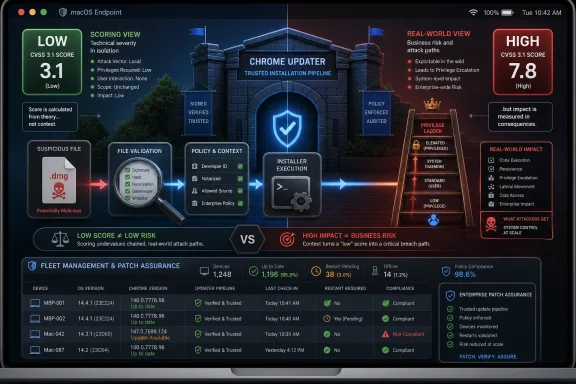
Chromium labels CVE-2026-7997 as Low severity, while CISA’s ADP entry assigns a CVSS 3.1 base score of 7.8, which lands in High. That apparent contradiction will irritate anyone trying to triage patches by dashboard color alone. It is also a useful reminder that severity systems are not interchangeable currencies.Chromium’s internal severity rating reflects how the project weighs the bug in the context of Chrome’s architecture, exploitability, affected component, and available mitigations. CVSS, by contrast, is a standardized scoring model that tries to describe the technical characteristics of a vulnerability in a portable way. A local privilege escalation with low attack complexity, no privileges required, user interaction required, and high confidentiality, integrity, and availability impact can score high even if a vendor labels the bug low in its own taxonomy.
That mismatch is not necessarily evidence that one party is wrong. It is evidence that security scoring is a compression algorithm, and compression loses detail. A score can tell you that something is worth examining; it cannot tell you whether your Mac fleet is exposed, whether the vulnerable updater is present, whether user behavior makes exploitation plausible, or whether your management tooling has already pushed the fixed build.
The mistake would be to treat “Low” as a reason to ignore the update. The equally bad mistake would be to treat “7.8 High” as evidence of an active internet-scale emergency. The right response is more boring and more professional: identify affected macOS Chrome installations, confirm the fixed version, and close the window before attackers have time to operationalize the details.
Updaters Are Trusted Because They Have to Be
The modern browser updater is one of the most trusted pieces of consumer and enterprise software on an endpoint. It phones home, downloads code, writes into application locations, invokes installers, restarts services, and often runs with privileges that normal applications do not need. We accept that bargain because the alternative — waiting for users to manually patch the most attacked application class on the desktop — is worse.But that trust turns updater bugs into a special class of problem. A rendering bug may need a browser sandbox escape to become full system compromise. An updater bug may begin much closer to the boundary between application and operating system. If an attacker can feed it a malicious file or manipulate what it considers valid input, the updater’s privileged role becomes the attacker’s opportunity.
This is not unique to Google. Every major software ecosystem has had to learn, often painfully, that the path from “download this update” to “install this update safely” is lined with edge cases. Symlinks, temporary directories, mount points, quarantine attributes, helper tools, package metadata, user prompts, notarization, code signatures, and file ownership rules can all become security boundaries when an updater crosses privilege levels.
macOS adds its own flavor to the problem. Apple’s platform security model is strict in many ways, but it also encourages a complex dance between signed apps, privileged helper tools, launch services, user approvals, and background update agents. A browser vendor that wants silent, reliable, cross-version updates on Mac must integrate deeply enough to be useful. That integration is precisely why input validation failures in the updater deserve attention.
The Mac Angle Is the Story, Not a Footnote
CVE-2026-7997 is described as affecting Google Chrome on Mac prior to 148.0.7778.96. That specificity should stop Windows-centric admins from mentally filing it under “not my problem” too quickly. Many organizations that standardize on Windows for desktops still have executive Macs, developer Macs, design Macs, test Macs, or unmanaged BYOD Macs sitting near sensitive credentials and cloud consoles.Macs are also often where endpoint management discipline goes to become aspirational. Windows fleets tend to have decades of patching muscle memory behind them: WSUS, Intune, Configuration Manager, Group Policy, third-party patch tools, and compliance reporting. Mac fleets, especially outside heavily regulated industries, can be less uniform. Browser updates may be left to the browser, OS updates may be handled separately, and local admin rights may be more common than anyone wants to admit.
That is the environment where a local privilege escalation becomes interesting. The attacker does not need Chrome to be the initial foothold. They need Chrome’s updater to be a useful rung on the ladder after something else has landed. A malicious file combined with user interaction is not exotic when the attacker already has social engineering, downloads folders, cloud drives, developer workflows, or chat attachments to play with.
The bug also lands at a time when macOS is no longer a polite exception in enterprise threat models. The growth of SaaS administration, cross-platform development, and browser-based work has made the endpoint operating system less important in one sense and more important in another. If a Mac has a browser session, a password manager, a device certificate, and access to production infrastructure, it is not a lifestyle accessory. It is an attack surface.
Chrome 148 Was a Security Release With a Crowded Cast
CVE-2026-7997 arrived as part of the Chrome 148 stable desktop update, which moved desktop builds to 148.0.7778.96 on Linux and 148.0.7778.96 or 148.0.7778.97 on Windows and macOS. Reports on the release counted 127 security fixes, including three critical vulnerabilities. In any normal week, that would be the headline.The critical bugs were not in the updater. They sat in more familiar high-drama territory: Blink, Mobile, and Chromoting. Those are the sorts of components that attract attention because they sound closer to remote exploitation, browser rendering, and remote desktop functionality. CVE-2026-7997, by contrast, is a low-labeled local privilege escalation in the update plumbing.
That is why it risks being missed. Patch notes with more than a hundred CVEs force readers into triage shortcuts, and triage shortcuts favor the words “Critical,” “remote,” “zero-day,” and “exploited in the wild.” A Mac-only updater flaw marked Low does not naturally win the room, even when its CVSS vector says the impact can be high.
Security teams should resist headline-only patching. The biggest numerical score and the scariest component are not always the only items worth operational attention. A large release can contain a mix of internet-facing memory corruption bugs and local post-exploitation primitives, and an attacker does not have to choose one category. Mature intrusion chains use both.
The MSRC Listing Shows How Chromium Risk Spills Into Microsoft Shops
The user-visible source here is Microsoft’s Security Update Guide entry for CVE-2026-7997, not just Google’s Chrome release blog. That matters for a WindowsForum audience because Chromium vulnerabilities routinely cross the psychological boundary between “Google problem” and “Microsoft estate problem.” Edge is Chromium-based, Microsoft tracks Chromium CVEs through MSRC, and enterprise security teams often consume the vulnerability through Microsoft’s tooling even when the original bug lives upstream.The specific description points to Google Chrome on Mac, not a broad Windows Chrome or Edge exposure. Still, the presence of a Chromium CVE in MSRC’s guide is a reminder of how modern browser supply chains work. Microsoft does not own Chromium’s entire codebase, but Edge inherits a significant amount of its security posture from Chromium. Google does not run your Microsoft endpoint dashboard, but Google’s fixes often become Microsoft’s advisories, release notes, and compliance signals.
That shared ecosystem is efficient and messy at the same time. It means a fix in Chromium can propagate across Chrome, Edge, and other Chromium-based browsers. It also means administrators must parse product applicability carefully. A CVE title that begins with “Chromium” does not automatically mean every Chromium-derived browser is equally affected on every platform, and a Microsoft listing does not automatically mean Windows endpoints are exposed.
For patch teams, the operational habit should be simple: treat Chromium CVEs as ecosystem events, then narrow the blast radius by platform, product, version, and deployment channel. That is less satisfying than a red-or-green dashboard, but it is much closer to how the software is actually built.
CPE Metadata Is Boring Until It Breaks Your Scanner
The NVD change history for CVE-2026-7997 includes an affected software configuration that combines Google Chrome versions before 148.0.7778.96 with Apple macOS. That is the kind of CPE detail most readers skip, until a vulnerability scanner starts producing false positives, false negatives, or confusing asset counts. The “Are we missing a CPE?” prompt on NVD pages is not bureaucratic wallpaper; it is an admission that vulnerability metadata is a living, imperfect mapping layer.CPEs are supposed to connect a human-readable vulnerability to machine-readable product inventory. In theory, that lets scanners say, “This host has product X at version Y, and CVE Z applies.” In practice, browsers, updaters, helper tools, platform-specific builds, and vendor-specific packaging can make that mapping surprisingly fragile.
For CVE-2026-7997, the platform matters. A Windows machine with Chrome below a version number may not be affected by this specific Mac updater issue in the way a Mac is. A Mac with a Chromium-derived browser may or may not have the same updater component. A system with Chrome installed but not actively used may still have updater components present. A scanner that cannot express those distinctions cleanly will either miss risk or create noise.
That is why CPE hygiene matters to defenders. Bad vulnerability metadata burns time. It causes emergency tickets for systems that are not exposed and complacency around systems that are. In a patch cycle crowded with browser CVEs, the accuracy of product matching becomes part of the security control.
The Malicious File Requirement Is Not a Comfort Blanket
The description says exploitation requires a malicious file and user interaction. That should reduce panic. It should not reduce discipline.User interaction is often treated as a major barrier in vulnerability scoring, and sometimes it is. But in the real world, users open files constantly, especially on systems used for development, design, finance, recruiting, and administration. Malicious files are not rare artifacts; they are the native currency of phishing, collaboration abuse, supply-chain compromise, and help-desk impersonation.
A local privilege escalation with user interaction is particularly useful after the first breach. Imagine a low-privilege foothold achieved through a malicious document, a developer toolchain trick, a fake installer, or stolen credentials used to sync files onto a machine. At that stage, the attacker’s problem is no longer initial access. It is how to become durable, privileged, and quiet.
That is where updater vulnerabilities can become attractive. They may offer a path from user space to OS-level privileges without needing a kernel exploit. They may blend into expected system activity. They may leave logs that look like software maintenance rather than malware. Even if exploitation is not trivial, the strategic value is obvious.
The Restricted Bug Tracker Is a Feature, Not a Cover-Up
The Chromium issue linked for CVE-2026-7997 is marked as requiring permissions. This is normal for Chrome security bugs shortly after disclosure. Google commonly restricts technical details until a large share of users have received the fixed build, especially when the details could make exploitation easier.That temporary opacity frustrates defenders who want to understand exactly what happened. It also protects them. A fully public proof-of-concept on day one would be useful to security researchers and vulnerability-management teams, but it would be equally useful to threat actors watching the same feed and racing against auto-update adoption.
The bargain is imperfect. Enterprises need enough detail to prioritize intelligently, and vague advisories push them back toward generic scoring. But browser vendors are managing a global installed base measured in billions, including unmanaged home systems, under-resourced businesses, and machines that do not update immediately. The disclosure policy is built around that reality.
For admins, the absence of details should change the tone, not the action. Do not invent exploit mechanics that are not public. Do not downplay the bug because the tracker is closed. Confirm the affected version boundary, update, and move on to verification.
Version Numbers Are the Only Safe Language in a Browser Emergency
The fixed Chrome version for this CVE is 148.0.7778.96 on macOS, with Chrome 148 also appearing as 148.0.7778.96 or 148.0.7778.97 for Windows and Mac in the stable desktop rollout. That level of specificity can feel pedantic, but it is the only language that patch operations should trust. “Latest Chrome” is not a version; it is a hope.Browser updates are staggered. Users may believe they are current because Chrome updates automatically, while their browser is waiting for a restart. Managed environments may pin channels, defer updates, or rely on maintenance windows. Some endpoint tools report application versions but not helper tool versions. Some users run multiple browsers and forget that Chrome is still installed because one internal application launches it.
The right question is not, “Did Google release the fix?” It is, “Which endpoints still have Chrome for macOS below 148.0.7778.96?” That answer should come from inventory, not vibes. If inventory is weak, this CVE is a useful excuse to improve it.
There is also a lesson for communication. Telling users to “update Chrome” is fine for a consumer audience. Telling an IT team to “verify Chrome 148.0.7778.96 or later on macOS and ensure pending browser restarts are completed” is better. Patch language should be boring enough to be executable.
Enterprise Mac Management Still Has a Browser-Shaped Gap
The biggest practical risk around CVE-2026-7997 may not be the exploit itself. It may be the number of organizations that cannot quickly answer whether their Macs are patched. Browser auto-update has made individual users safer, but it has also encouraged some enterprises to treat browser patching as something that happens “out there” beyond formal change control.That is defensible up to a point. Chrome’s rapid update cadence is one of the reasons the web is not more dangerous than it already is. Waiting for monthly maintenance windows to patch browser bugs is an invitation to trouble. But letting browsers update themselves is not the same as managing browser risk.
Management means knowing which channel is installed, whether auto-update is working, whether restarts are pending, whether extensions are controlled, whether legacy apps force old versions, and whether security tooling can distinguish Chrome on Mac from Chrome on Windows. It also means understanding the updater itself as a managed component, not just the browser UI that users see.
This is especially important in mixed estates. A Windows-first organization may have excellent controls for Edge on Windows and weaker visibility into Chrome on Mac. A cloud-native startup may have strong MDM enrollment but loose local admin practices. A media or engineering shop may have many Macs running Chrome, Brave, Edge, Electron apps, and developer builds. Chromium risk does not respect the neat categories in procurement spreadsheets.
The Patch Is Easy; The Assurance Is Hard
For most users, the remediation is simple: update Chrome on macOS to 148.0.7778.96 or later. Chrome’s updater should do that automatically, and a manual check through the browser’s About page should trigger the process. The hard part is proving that this happened everywhere that matters.Assurance requires multiple views. The browser can report its own version. MDM can report installed applications. EDR can observe process and file versions. Vulnerability scanners can map CVEs to assets. None of those sources is perfect on its own, and the differences matter most during a fast-moving browser release.
A particularly common failure mode is the pending restart. Chrome may download an update but continue running the old version until the browser is relaunched. Users who keep dozens of tabs alive for weeks can defeat the practical effect of automatic updates. In a security release with more than a hundred fixes, that is not a harmless inconvenience.
Admins should also resist the temptation to solve this with user nagging alone. Good browser patch operations use policy, telemetry, enforcement, and a defined restart grace period. If a browser remains below the fixed version after the grace period, the system should generate a compliance signal. If the device is high-risk, the response should be faster.
Why “Local” Bugs Still Matter in the Age of SaaS
The browser has become the operating system for much of enterprise work, but the underlying operating system still decides who can read files, install agents, capture keystrokes, access keychains, and persist through reboots. That is why local privilege escalation remains valuable. SaaS did not eliminate endpoint privilege; it made endpoint privilege a bridge to cloud privilege.On macOS, that bridge can include browser cookies, OAuth sessions, synced credentials, developer tokens, SSH keys, password-manager integrations, and access to administrative web consoles. An attacker who elevates privileges on the endpoint may not need to exploit the SaaS provider at all. They can abuse the trusted session and the trusted device.
This is where the old perimeter model continues to fail. A vulnerability in a browser updater is not just a desktop hygiene issue if the affected machine can approve cloud deployments, reset user passwords, access source code, or administer identity systems. The blast radius follows the user’s authority, not the CVE’s component name.
That is also why severity debates can become sterile. Whether Chromium calls this Low and CISA scores it High, the real question is whether the exposed endpoint belongs to a low-impact user or a high-value operator. A local privilege escalation on a kiosk is one thing. The same class of bug on a production engineer’s MacBook is another.
Chrome’s Scale Turns Small Bugs Into Fleet Events
Chrome’s security advantage is its velocity. Google can ship fixes rapidly, restrict details while rollout happens, and move a huge population to a patched build faster than traditional desktop software ever could. Chrome’s security disadvantage is the same scale: every release becomes a global coordination exercise among vendors, enterprises, scanners, managed browsers, and users who hate restarts.CVE-2026-7997 illustrates that tension well. The fix is already in the stable channel. The public description is short. The vulnerable version boundary is clear. Yet the operational reality is still messy because some machines will lag, some inventories will be wrong, and some dashboards will argue about severity.
The browser ecosystem has also become more entangled. Chromium is an upstream project, Chrome is Google’s product, Edge is Microsoft’s Chromium-based product, and many desktop applications embed Chromium or Chromium-adjacent technology in one form or another. Not every Chromium CVE affects every downstream consumer, but every Chromium security release forces downstream consumers to ask the question.
That is the quiet tax of monoculture. Shared code gives the industry faster fixes and a stronger common security base. It also means a single upstream advisory can ripple across operating systems, browsers, compliance tools, and help desks. The answer is not to panic about Chromium; it is to build patch processes that match Chromium’s speed.
The CPE Question Is Really an Asset Question
The user’s prompt asks, “Are we missing a CPE here?” That is a vulnerability-management question with a deceptively narrow surface. Maybe the NVD mapping will need refinement. Maybe downstream products will add advisories. Maybe scanners will adjust plugins as more data appears. But the practical question for defenders is whether their asset data is good enough to survive that uncertainty.CPEs are downstream of reality. They describe products after vendors, databases, and scanners agree on names and versions. Asset management lives upstream, on actual machines with actual software installed in actual locations. If your asset data is stale, a perfect CPE will not save you. If your asset data is strong, imperfect CPEs become manageable.
For CVE-2026-7997, the minimum useful inventory fields are straightforward: operating system, browser product, browser version, update channel, installation path, device owner, management status, and last check-in time. That is not exotic. It is table stakes for browser security in 2026.
The more advanced question is whether organizations can connect those fields to business risk. A vulnerable Chrome on a test Mac in a lab is not equal to a vulnerable Chrome on the laptop of a cloud administrator. Vulnerability management that cannot weight assets by privilege and exposure will always chase the wrong fires.
The Real Test Is Whether Patch Culture Has Matured
There was a time when browser patching was primarily a user education problem. Tell people to update. Tell them to restart. Tell them not to click suspicious things. That advice is still true, but it is insufficient for organizations that depend on browsers as the front end to nearly everything.Patch culture has to move from awareness to assurance. That means knowing when a vendor release lands, translating it into affected products, pushing updates through managed channels, forcing restarts when needed, and measuring completion. It also means treating Mac endpoints as first-class citizens in the same risk program as Windows endpoints.
CVE-2026-7997 is not the biggest Chrome bug in the 148 release. It is not reported as exploited in the wild in the public description. It is not a reason to declare a browser apocalypse. It is, however, a useful test of whether an organization can handle a platform-specific, component-specific, severity-ambiguous browser vulnerability without either ignoring it or overreacting.
That is the maturity bar. Not every CVE deserves a war room. Every CVE that touches a widely deployed, privileged update path deserves enough attention to verify exposure and remediation. The difference between those two sentences is the difference between security theater and security operations.
The Chrome 148 Lesson for Mac Fleets Is Narrow but Unforgiving
The practical story is smaller than the noise around a 127-fix release, and that is exactly why it is easy to mishandle. CVE-2026-7997 is a Mac-specific Chrome Updater privilege-escalation issue fixed in Chrome 148.0.7778.96, and the operational goal is to make sure no managed Mac is left behind because the bug was labeled Low, hidden among louder CVEs, or misread through a Windows-only lens.- Chrome for macOS installations below 148.0.7778.96 should be treated as exposed to CVE-2026-7997 and updated promptly.
- The Chromium Low severity label should not override the practical significance of a local privilege-escalation path in a privileged updater component.
- The CISA ADP CVSS 3.1 score of 7.8 reflects a high-impact local attack scenario with user interaction, not a remote drive-by browser exploit.
- Windows and Edge administrators should still track the advisory because Chromium vulnerabilities often enter Microsoft workflows even when platform applicability is narrower.
- Vulnerability scanners may need time to represent the affected CPE configuration cleanly, so asset inventory and direct version checks remain essential.
- The most important remediation evidence is not that the update was released, but that every relevant Mac has actually restarted into Chrome 148.0.7778.96 or later.
Source: NVD / Chromium Security Update Guide - Microsoft Security Response Center
