

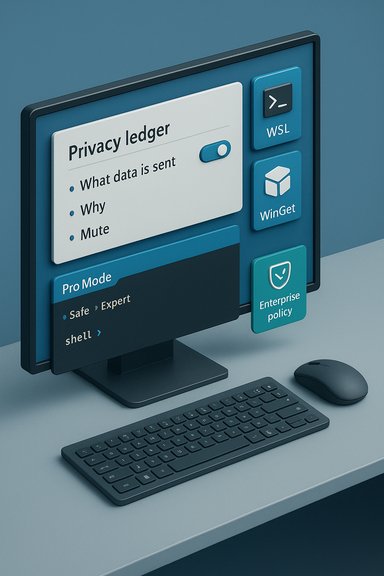
Dave Plummer — the engineer behind Windows Task Manager, ZIP Folders, the Space Cadet Pinball port for Windows NT and a string of other Windows-era utilities — has published a blunt, pragmatic video outlining why parts of Windows “suck” for advanced users and how Microsoft could fix it. His prescription centers on a single, system-wide toggle (a “Pro” or “Expert” mode) that would change Windows’ operational personality from “safe and chatty” to deterministic, terse, and respectful of a knowledgeable operator. That toggle, combined with radical telemetry transparency, clearer account choices at setup, rollback-first update semantics, and better-first-class treatment for developer tooling (WSL, WinGet, Windows Terminal), is meant to restore control to power users without regressing the on-ramp for newcomers. Several leading tech outlets quickly summarized Plummer’s ideas and amplified the conversation; the takeaways are tightly aligned across coverage and Plummer’s own channel.
That said, they sit at the crossroads of engineering, business incentives, and enterprise needs. Transforming Windows from a ‘one‑size‑fits‑all’ operating system into one that politely bifurcates the novice and the expert experience requires Microsoft to reconcile short‑term engagement metrics with long‑term platform trust. The engineering work is doable; the cultural and commercial trade‑offs are the harder part.
If Microsoft wants to placate vocal power users while maintaining mass appeal, Plummer’s “Pro mode,” privacy ledger, and focused developer tooling are precisely the kinds of product changes that would move the needle. They would restore trust, reduce friction for people who live in Windows every day, and make Windows a better platform for developers — all without taking anything away from newcomers who benefit from the existing on‑ramp.
Windows is a mature technical platform with world‑class kernel and storage stacks and an enormous device ecosystem — but software succeeds when it meets the people using it. Plummer’s critique is a timely reminder that power and polish matter in equal measure: technical excellence must be matched by a product experience that knows what kind of user is at the keyboard and behaves accordingly. The question is whether Microsoft will treat this as a tactical UX tweak or as a strategic rebalancing of how Windows serves experts and newcomers alike.
Source: Neowin Frustrated ex-Microsoft engineer explains why Windows sucks
 Background
Who is Dave Plummer and why this matters
Dave Plummer — known in many tech circles as “davepl” — is a well‑known former Microsoft operating-systems engineer who has been publicly engaged with Windows history and engineering for years. His résumé is regularly invoked by reporters: he’s credited with implementing Task Manager, Zip Folders, the Windows NT Space Cadet Pinball port, and work across MS‑DOS, Windows 95/NT and later components. Those credentials lend weight to his observations: he knows the engineering trade‑offs, what it takes to ship features, and where design decisions typically come from. Plummer’s video is a practitioner’s critique rather than an abstract usability essay, and that practical voice is why it’s being widely discussed.The conversation in context
This isn’t a novel complaint. For years, enthusiasts and enterprise admins have argued that modern Windows trades raw configurability and minimal friction for safety features, nudges, and monetization opportunities. The difference here is that a veteran engineer who helped build Windows’ tooling is offering concrete, implementable ideas — not just outrage. Multiple outlets summarized his proposals and amplified the conversation, which now overlaps with larger debates about privacy, telemetry, cloud identity, and how operating systems balance novice help with expert control.Overview of Plummer’s proposals
1) A single, authoritative “Pro/Expert” mode (the clutch pedal)
Plummer’s core idea is simple: let users flip a single system‑wide switch that alters the operating system’s behavior from “mitten mode” to “expert mode.” In practice that means:- Stop nudging and suggesting apps or services (no sponsored Start tiles, no repeated Edge/other Microsoft product recommendations).
- Disable web search in local search unless explicitly requested.
- Make advanced tools immediately available and first-class (Windows Subsystem for Linux (WSL), Windows Terminal, curl, and WinGet).
- Centralize all system configuration in one authoritative place to eliminate the “scavenger hunt” between Settings, Control Panel, and hidden Registry changes.
2) A “privacy ledger” and radical telemetry transparency
Plummer argues telemetry per se isn’t evil — it’s essential for diagnosing crashes, regressions, and security incidents — but the lack of clear control and visibility makes telemetry politically radioactive. His proposal:- Record every telemetry packet in an always‑available, human‑readable “privacy ledger” that explains what would be sent and why in plain English.
- Allow per‑category muting of telemetry packets with durable user control that updates can’t silently reverse.
3) Clear account choices at setup
Plummer wants the Windows setup flow to present the tradeoffs for a local account versus a Microsoft account clearly and to let users pick knowingly. The idea is to inform the user of the benefits and caveats of each choice rather than steer them toward a Microsoft Account habitually. This is meant to reduce friction for privacy‑conscious users and organizations that prefer local or federated identities.4) Safer, rollback‑first updates and no surprise reboots
The video insists that Windows updates must be installed only outside active hours and that rollbacks should be one click and automatic if an update fails a health check. Plummer frames this as a new social contract: security updates are essential, but they must respect productivity windows and provide safe, fast paths back if something breaks.5) Make developer and power tools first‑class
Plummer highlights practical power‑user elements that have become more important:- Ship WSL as a comfortable, supported experience and make Windows Terminal the first-class console host.
- Ensure WinGet (Windows Package Manager) is available and well‑integrated.
- Treat CLI tools and scripting as part of the OS baseline rather than an optional add‑on.
Why these proposals resonate — and where they’re realistic
Strength: Clear, pragmatic fixes for recurring pain points
Many of Plummer’s complaints are specific and actionable. The fragmentation between Settings and Control Panel is a genuine usability issue; toggling web search behavior in Start is a technical change already feasible in search code; and shipping a human‑readable telemetry ledger is an engineering and UX challenge — but conceptually straightforward. The proposals focus on behavioral defaults and visibility rather than rewriting core systems, which increases their feasibility. Industry reporting agrees these are tangible problems with practical mitigations.Strength: Aligns Windows with modern developer expectations
The ecosystem has changed: developers expect package managers (WinGet), integrated shell experiences (Windows Terminal), and WSL that behaves like a first‑class feature. Microsoft has already moved in that direction, shipping WSL and heavily investing in Terminal; Plummer’s ask is for deeper, more consistent prioritization rather than piecemeal flagship features. That alignment would improve developer productivity and make Windows more competitive for software projects. Official Microsoft documentation shows WSL and Terminal are mature, installable and widely used features.Strength: Addresses the trust deficit
Transparency on telemetry and durable local account choices would address a political and trust problem more than a technical one. A privacy ledger could serve as a visible commitment to principled data handling, which could reduce friction in regions and organizations wary of opaque data collection. The ledger concept reframes telemetry as diagnosable, auditable behavior rather than mysterious “phoning home.”Risks, trade‑offs, and practical constraints
Risk 1: Business incentives vs. user trust
Plummer’s proposals directly conflict with monetization vectors: curated store placements, upsell surfaces, and attention‑based product suggestions. Microsoft’s push to surface services (Edge, Copilot, Microsoft 365) has product and revenue rationales. Removing or disabling suggestion surfaces by default for “Pro” users may be straightforward, but rolling that out in a way that preserves Microsoft’s commercial channels is politically fraught. Executives who track engagement metrics will see trade‑offs that are not purely technical. Several outlets noted Microsoft’s push toward product suggestions as a key friction source.Risk 2: Complexity of telemetry control and security
Telemetry isn’t a single monolith — it spans crash dumps, diagnostic pings, update health telemetry, telemetry for driver/firmware updates, security signals, and more. Turning telemetry toggles into safe, user‑facing switches requires careful categorization (what’s mission‑critical vs. optional) and the ability to enforce or exempt crucial security telemetry during incidents. A poorly designed ledger or mute system could create blind spots for security teams or degrade Microsoft’s ability to patch systemic vulnerabilities quickly. Engineering teams would need to categorize telemetry, define fallbacks, and build protections against accidental or malicious muting.Risk 3: Enterprise and OEM fragmentation
Not all Windows deployments are consumer laptops. OEM images, enterprise images, and managed corporate fleets are configured by IT, often with specialized tooling. A global “Pro mode” toggle must interact cleanly with group policy, MDM (Mobile Device Management) controls, and OEM provisioning kits. If not carefully designed, the feature could increase fragmentation: some systems will expose Pro mode; others will lock it down; confusion will grow. Any change must be MDM/Group Policy aware from day one.Risk 4: Support and helpdesk implications
An expert mode that reduces helpful nudges also reduces safety nets. For users who toggle into Pro mode and then run into a problem they can’t resolve, support organizations will need a clear way to identify whether a device was in Pro mode and whether certain diagnostics were disabled. Otherwise, support burdens could rise. A privacy ledger helps here — if it includes an audit trail of what was disabled and why, support can be faster and less guesswork‑filled.Implementation realities: how Microsoft could (and should) build this
1. Start with a graded “Expert Mode” pilot
- Ship Expert Mode as an optional, documented feature in Windows Insider channels first.
- Ensure the feature is MDM/GPO controllable and that enterprises can enforce a particular mode.
- Gather diagnostics on usage patterns and support calls to refine the UX.
2. Build the privacy ledger iteratively
- Phase 1: produce a human‑readable log for outbound connections initiated by OS components (what, why, destination).
- Phase 2: add a UI to mute categories and show historical telemetries with provenance.
- Phase 3: expose a policy object for enterprise management and an exportable ledger for audits.
3. Make developer tooling the default for appropriately scoped SKUs
- On developer SKUs of Windows (or when Expert Mode is enabled), make Windows Terminal, WSL, and WinGet visible by default.
- Provide an express “Developer Tools” option during setup that pre‑installs these components and configures them appropriately.
4. Update semantics: rollback and health checks as defaults
- Make updates respect active hours explicitly and require explicit consent to install outside them.
- Implement automatic health checks and an automatic rollback path if post‑update checks fail.
Practical recommendations for users and admins today
- If you’re a power user wanting less noise today, explore local settings and Group Policy options to disable suggestions and limit preinstalled app behavior.
- Use App Installer/WinGet to quickly provision and manage developer tools; verify App Installer availability if WinGet isn’t present by default.
- For telemetry and privacy, use Windows Privacy settings and audit the Diagnostics & feedback options; consider selective corporate policies for managed fleets. While a privacy ledger would be better, current tools can still provide meaningful control.
- For enterprise update management, leverage Windows Update for Business and related MDM features to control update cadence and retention policies until rollback-first semantics are broadly available.
Verdict: Valuable ideas, politically complicated but technically achievable
Dave Plummer’s recommendations are valuable precisely because they’re practical: they don’t require rebuilding the Windows kernel or undoing years of product thinking. Instead, they request a different product posture — one that respects the user’s expressed skill level, makes diagnostic and privacy behavior visible, and treats developer tools as first‑class citizens. These are largely product and policy choices combined with careful engineering and UX work.That said, they sit at the crossroads of engineering, business incentives, and enterprise needs. Transforming Windows from a ‘one‑size‑fits‑all’ operating system into one that politely bifurcates the novice and the expert experience requires Microsoft to reconcile short‑term engagement metrics with long‑term platform trust. The engineering work is doable; the cultural and commercial trade‑offs are the harder part.
If Microsoft wants to placate vocal power users while maintaining mass appeal, Plummer’s “Pro mode,” privacy ledger, and focused developer tooling are precisely the kinds of product changes that would move the needle. They would restore trust, reduce friction for people who live in Windows every day, and make Windows a better platform for developers — all without taking anything away from newcomers who benefit from the existing on‑ramp.
Windows is a mature technical platform with world‑class kernel and storage stacks and an enormous device ecosystem — but software succeeds when it meets the people using it. Plummer’s critique is a timely reminder that power and polish matter in equal measure: technical excellence must be matched by a product experience that knows what kind of user is at the keyboard and behaves accordingly. The question is whether Microsoft will treat this as a tactical UX tweak or as a strategic rebalancing of how Windows serves experts and newcomers alike.
Source: Neowin Frustrated ex-Microsoft engineer explains why Windows sucks
