

Microsoft is moving Microsoft Defender for Endpoint EDR sensor updates to Microsoft Update starting with Windows 10 devices in late May 2026, separating those packages from monthly Windows cumulative updates and delivering them through the recurring KB5005292 servicing channel once prerequisites are met. That is a plumbing change, but in endpoint security, plumbing is policy. Microsoft is acknowledging that detection-and-response code cannot comfortably live on the same calendar as operating-system patch bundles. For administrators, the win is faster sensor servicing; the cost is one more update stream that must be deliberately observed, governed, and tested.
Patch Tuesday remains the organizing ritual of Windows administration because it turns chaos into a calendar invite. The second Tuesday of the month gives IT teams a predictable cadence for testing, change windows, CAB approvals, phased deployment, and the inevitable handful of machines that refuse to behave. But that rhythm was designed around operating-system servicing, not the tactical tempo of endpoint detection.
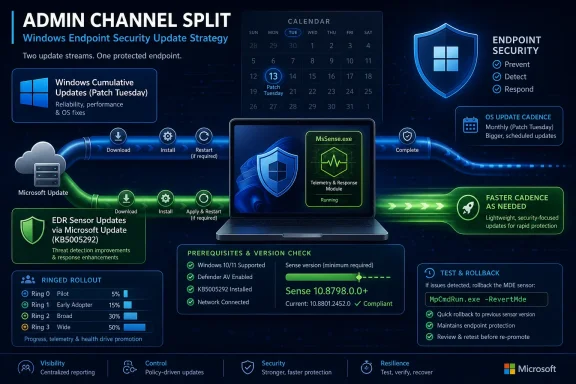
EDR is different. It is not merely a set of signatures, nor is it the same thing as Defender Antivirus security intelligence. The Microsoft Defender for Endpoint sensor, commonly associated with MsSense.exe, is the telemetry and response component that helps collect behavioral signals, surface suspicious activity, and connect the endpoint to Microsoft’s broader security stack.
That sensor sits in an awkward middle ground. It is security-critical enough to require rapid fixes, but infrastructure-sensitive enough that administrators do not want it changing invisibly. By moving EDR packages out of monthly cumulative updates and onto Microsoft Update under KB5005292, Microsoft is trying to split the difference: faster movement without abandoning enterprise update control.
The decision is not surprising. Microsoft has spent years turning Windows servicing into a set of parallel rails: cumulative updates, Defender platform updates, security intelligence updates, Store-delivered components, Microsoft Edge updates, driver updates, hotpatching for select scenarios, and cloud-managed policy changes. The EDR sensor was always an uneasy passenger inside the monthly Windows train.
That matters because EDR is not just a passive scanner. In modern Defender for Endpoint deployments, the sensor contributes to incident timelines, behavioral detections, advanced hunting data, vulnerability context, automated investigation, device isolation workflows, and response actions. A lagging sensor can mean a lagging view of compromise.
Microsoft’s previous model made sense when Windows itself was the center of gravity and Defender components could be treated as part of the operating system’s monthly maintenance cycle. But Defender for Endpoint is now a service, not merely a Windows feature. Services evolve continuously, and security services evolve under pressure.
This is the same logic behind the separate servicing paths for Defender security intelligence and antimalware platform updates. Detection content needs to move quickly. The EDR sensor is more complex than definitions, but it increasingly belongs to that same security-response clock rather than the Windows release calendar.
That distinction matters for administrators who think in terms of “the KB.” A recurring KB number can create confusion because the identifier remains stable while the payload version changes over time. Microsoft’s support documentation already frames KB5005292 as a periodically released update for the EDR sensor, which means administrators must track the actual sensor version rather than assume the KB number tells the whole story.
The reported prerequisite Sense version is 10.8798.25857.1000 or newer. That threshold is not a bureaucratic detail; it is the line between devices that can participate in the new servicing model and devices that will remain stuck on the older path until brought forward. If your fleet has inconsistent Defender for Endpoint onboarding history, mixed Windows builds, or stale server images, the transition will expose it.
Microsoft is also creating a new folder path under
But enterprise reality is never the narrow sense. Some organizations still tightly separate Windows Update from Microsoft Update. Some rely on WSUS or Configuration Manager rules that were built years ago and then treated as wallpaper. Some manually stage Defender updates for disconnected or semi-connected systems. Some block update categories because an unrelated driver incident burned them once.
Those organizations do have work to do. They need to verify that the Microsoft Defender for Endpoint category is synchronized where appropriate, that KB5005292 is not excluded by automatic deployment rules, and that reporting distinguishes between OS cumulative update compliance and EDR sensor freshness. A dashboard that says “fully patched” while the EDR sensor is stale is now worse than incomplete; it is misleading.
The manual-deployment group has the sharpest edge. If administrators previously treated the monthly Windows cumulative update as the vehicle that carried the EDR sensor forward, they now need to include the Defender EDR package explicitly. Otherwise, their patch process may appear healthy while the security sensor quietly stops advancing.
A broken EDR update is easy to notice. Machines spike CPU, services crash, alerts flood the SOC, or response actions misfire. A delayed EDR update is harder to see. The sensor continues running, dashboards remain green, and no one knows which detection improvements or stability fixes are missing until an incident review asks why telemetry was incomplete.
Microsoft’s move forces administrators to separate two questions that are often conflated. The first is whether Windows itself is patched. The second is whether the security sensor watching Windows is current enough to be trusted. Those are related questions, but they are no longer the same workflow.
That is a healthier model, even if it creates more work. Security teams have long wanted endpoint controls to move at threat speed; infrastructure teams have long wanted updates to move at maintenance-window speed. The new Defender EDR channel makes that tension explicit instead of hiding it inside the monthly rollup.
That matters because EDR agents are privileged, deeply integrated, and operationally sensitive. If a sensor update causes instability on a subset of devices, administrators need a supported mechanism to restore service without rebuilding machines or ripping out the Defender stack. A rollback command is a sign that Microsoft knows this is not equivalent to updating a browser extension.
But rollback should not become the default risk plan. The inbox version is a baseline, not a permanent refuge. Reverting may buy time during an incident, but it also means returning to older sensor code while the rest of the Defender ecosystem continues to evolve.
The better strategy is ringed deployment. Pilot a small set of representative devices, expand to broader production groups, and reserve critical systems for a later wave where business impact justifies caution. That is standard Windows update hygiene, but the key shift is that it must now apply to EDR sensor updates as their own object of governance.
Servers carry older baselines, more brittle dependencies, tighter maintenance windows, and a higher likelihood of special-case update handling. Windows Server 2012 R2 and Server 2016 Defender for Endpoint deployments have already lived through years of unified agent packaging, onboarding prerequisites, and KB5005292 applicability quirks. Newer server versions may be cleaner, but the operational culture around them is still conservative.
That conservatism is rational. A bad EDR update on a laptop is annoying. A bad EDR update on a domain controller, production SQL Server, or line-of-business application host is a meeting with executives. Microsoft can make the package technically sound, but it cannot eliminate the need for staged adoption.
The prerequisite updates mentioned for July 2025 preview releases and August 2025 cumulative updates also deserve attention. Preview updates in particular can make some administrators uneasy, even when later cumulative updates supersede the necessary components. The practical question for IT is not whether a prerequisite exists on paper, but whether every supported image and servicing branch in the fleet has actually crossed the required baseline.
But Microsoft Update is not magic. It is policy, connectivity, categorization, metadata, scan behavior, caching, proxy rules, and reporting. If any of those are misconfigured, Defender EDR updates can fail in ways that look like Microsoft’s problem but originate in local architecture.
This is especially true in restricted networks. Security teams often want the most current endpoint protection on the most sensitive machines, while network teams often restrict those same machines most aggressively. If a device cannot reach the necessary update infrastructure directly or through an approved management path, the new servicing model will not help.
The move also raises a governance question for organizations that have deliberately separated security content from OS updates. If EDR sensor updates arrive through Microsoft Update, who owns the approval path? The desktop engineering team, the security operations team, the server team, or the patch management office? Microsoft’s technical change will force some companies to answer an organizational question they have postponed for years.
Edge has its own cadence. Defender intelligence updates have their own cadence. Store apps, WebView2, Office, Teams, and cloud-connected Windows experiences all move on separate rails. Hotpatching in supported scenarios further weakens the old assumption that security updates must equal reboot-heavy monthly bundles.
The Defender EDR shift is part of that larger fragmentation. Fragmentation sounds bad, but the alternative is worse: forcing every component, regardless of risk profile, to wait for the same monthly release train. Modern Windows is too sprawling for that model.
The challenge is that Microsoft’s customers built processes around the old simplicity. “Install the cumulative update” was an imperfect but understandable instruction. “Install the cumulative update, keep the Defender platform current, keep intelligence current, track EDR sensor version, validate Microsoft Update categories, watch driver policy, and monitor rollback state” is more accurate, but it is also a lot more work.
For operations teams, the most important consequence is reporting. Organizations need a way to tell whether devices have received the current EDR package, whether they are eligible for the new channel, and whether they have fallen back to the inbox version. That cannot be buried in a patch compliance report that was designed for cumulative updates.
The version number matters. The presence of the new Defender Update folder may matter. The KB5005292 installation state matters, but only in context because the KB number is reused. The Sense service version matters most of all because it tells administrators what code is actually running.
This is where many organizations will discover that their endpoint inventory is not as precise as they assumed. They may know OS build numbers, cumulative update levels, and antivirus definition dates. They may not have a clean fleetwide view of Defender for Endpoint sensor versions by ring, platform, business unit, and connectivity profile.
For them, the migration is a test of institutional memory. Why is this category disabled? Why do these laptops use Microsoft Update directly while those servers rely on a disconnected catalog import? Why does the SOC report Defender health from one portal while endpoint engineering reports patch health from another? The EDR servicing change will surface those contradictions.
That is not a reason to resist the move. It is a reason to treat it as a cleanup opportunity. A security sensor that updates independently from Windows deserves independent lifecycle management, including ownership, monitoring, exception handling, and rollback documentation.
The worst response would be to assume that “no action required” means “no validation required.” Microsoft can deliver the package. It cannot know whether your update rules, network paths, and reporting assumptions are still fit for purpose.
That demands a different kind of compliance conversation. Instead of asking whether a machine is patched, administrators need to ask whether each security-relevant layer is current enough for its role. OS build, Defender platform, security intelligence, EDR sensor, browser, drivers, and management agent all tell different parts of the truth.
The new model should improve Microsoft’s ability to respond to emerging threats and sensor defects. It should also reduce the awkward delay between engineering fixes and customer deployment. But it gives organizations less excuse to treat endpoint security as a monthly checkbox.
For Windows enthusiasts, this is another example of Microsoft turning the operating system into a serviced substrate. For sysadmins, it is a reminder that the work of Windows maintenance has moved from installing patches to managing channels. For security teams, it is a small but meaningful step toward endpoint defenses that can adapt faster than the old calendar allowed.
 Microsoft Breaks the Patch Tuesday Habit Where It Hurts Least
Patch Tuesday remains the organizing ritual of Windows administration because it turns chaos into a calendar invite. The second Tuesday of the month gives IT teams a predictable cadence for testing, change windows, CAB approvals, phased deployment, and the inevitable handful of machines that refuse to behave. But that rhythm was designed around operating-system servicing, not the tactical tempo of endpoint detection.EDR is different. It is not merely a set of signatures, nor is it the same thing as Defender Antivirus security intelligence. The Microsoft Defender for Endpoint sensor, commonly associated with MsSense.exe, is the telemetry and response component that helps collect behavioral signals, surface suspicious activity, and connect the endpoint to Microsoft’s broader security stack.
That sensor sits in an awkward middle ground. It is security-critical enough to require rapid fixes, but infrastructure-sensitive enough that administrators do not want it changing invisibly. By moving EDR packages out of monthly cumulative updates and onto Microsoft Update under KB5005292, Microsoft is trying to split the difference: faster movement without abandoning enterprise update control.
The decision is not surprising. Microsoft has spent years turning Windows servicing into a set of parallel rails: cumulative updates, Defender platform updates, security intelligence updates, Store-delivered components, Microsoft Edge updates, driver updates, hotpatching for select scenarios, and cloud-managed policy changes. The EDR sensor was always an uneasy passenger inside the monthly Windows train.
The Sensor Is Now Too Important to Wait for the Train
The strongest argument for the move is simple: attackers do not wait for Patch Tuesday. If Microsoft discovers a sensor defect that weakens detection, breaks telemetry, causes noisy alerts, or impairs response actions, waiting for the next monthly Windows cumulative update is operationally convenient but strategically poor. Endpoint security products live or die by how quickly they can close gaps between detection engineering and deployment.That matters because EDR is not just a passive scanner. In modern Defender for Endpoint deployments, the sensor contributes to incident timelines, behavioral detections, advanced hunting data, vulnerability context, automated investigation, device isolation workflows, and response actions. A lagging sensor can mean a lagging view of compromise.
Microsoft’s previous model made sense when Windows itself was the center of gravity and Defender components could be treated as part of the operating system’s monthly maintenance cycle. But Defender for Endpoint is now a service, not merely a Windows feature. Services evolve continuously, and security services evolve under pressure.
This is the same logic behind the separate servicing paths for Defender security intelligence and antimalware platform updates. Detection content needs to move quickly. The EDR sensor is more complex than definitions, but it increasingly belongs to that same security-response clock rather than the Windows release calendar.
KB5005292 Becomes the New Address for a Familiar Package
The KB number is not new. KB5005292 has long been associated with Microsoft Defender for Endpoint EDR sensor updates, especially in server and unified solution scenarios. What changes here is the role it plays for broader Windows endpoint servicing as Microsoft shifts the EDR package into Microsoft Update distribution outside the monthly cumulative update bundle.That distinction matters for administrators who think in terms of “the KB.” A recurring KB number can create confusion because the identifier remains stable while the payload version changes over time. Microsoft’s support documentation already frames KB5005292 as a periodically released update for the EDR sensor, which means administrators must track the actual sensor version rather than assume the KB number tells the whole story.
The reported prerequisite Sense version is 10.8798.25857.1000 or newer. That threshold is not a bureaucratic detail; it is the line between devices that can participate in the new servicing model and devices that will remain stuck on the older path until brought forward. If your fleet has inconsistent Defender for Endpoint onboarding history, mixed Windows builds, or stale server images, the transition will expose it.
Microsoft is also creating a new folder path under
%ProgramData%\Microsoft\Microsoft Defender\Defender Update once the first update lands. That is the sort of small filesystem breadcrumb administrators will quickly turn into detection logic, compliance checks, and troubleshooting scripts. In Windows operations, a new folder is rarely just a folder; it is a signal that the lifecycle has changed.“No Action Required” Still Means “Check Your Assumptions”
Microsoft’s likely message to many tenants is that no major action is required if devices already receive Microsoft Update content through the organization’s update management stack. That is true in the narrow sense. If Microsoft Update traffic is allowed, update classifications are configured properly, and Defender for Endpoint updates are not filtered out, the new package should eventually flow.But enterprise reality is never the narrow sense. Some organizations still tightly separate Windows Update from Microsoft Update. Some rely on WSUS or Configuration Manager rules that were built years ago and then treated as wallpaper. Some manually stage Defender updates for disconnected or semi-connected systems. Some block update categories because an unrelated driver incident burned them once.
Those organizations do have work to do. They need to verify that the Microsoft Defender for Endpoint category is synchronized where appropriate, that KB5005292 is not excluded by automatic deployment rules, and that reporting distinguishes between OS cumulative update compliance and EDR sensor freshness. A dashboard that says “fully patched” while the EDR sensor is stale is now worse than incomplete; it is misleading.
The manual-deployment group has the sharpest edge. If administrators previously treated the monthly Windows cumulative update as the vehicle that carried the EDR sensor forward, they now need to include the Defender EDR package explicitly. Otherwise, their patch process may appear healthy while the security sensor quietly stops advancing.
Faster Security Servicing Makes Change Management More Honest
There is a familiar enterprise objection to any faster update channel: speed increases risk. That is not wrong, but it is incomplete. Slow security servicing also increases risk, and it does so in a way that is often less visible to the change board.A broken EDR update is easy to notice. Machines spike CPU, services crash, alerts flood the SOC, or response actions misfire. A delayed EDR update is harder to see. The sensor continues running, dashboards remain green, and no one knows which detection improvements or stability fixes are missing until an incident review asks why telemetry was incomplete.
Microsoft’s move forces administrators to separate two questions that are often conflated. The first is whether Windows itself is patched. The second is whether the security sensor watching Windows is current enough to be trusted. Those are related questions, but they are no longer the same workflow.
That is a healthier model, even if it creates more work. Security teams have long wanted endpoint controls to move at threat speed; infrastructure teams have long wanted updates to move at maintenance-window speed. The new Defender EDR channel makes that tension explicit instead of hiding it inside the monthly rollup.
The Rollback Command Is a Safety Valve, Not a Strategy
Microsoft’s transition includes a rollback path to the inbox EDR version stored under%ProgramFiles%\Windows Defender Advanced Threat Protection. The command MpCmdRun.exe -RevertMde -Product Edr -ToVersion Inbox gives administrators a way to back out of the updated EDR package if something goes wrong.That matters because EDR agents are privileged, deeply integrated, and operationally sensitive. If a sensor update causes instability on a subset of devices, administrators need a supported mechanism to restore service without rebuilding machines or ripping out the Defender stack. A rollback command is a sign that Microsoft knows this is not equivalent to updating a browser extension.
But rollback should not become the default risk plan. The inbox version is a baseline, not a permanent refuge. Reverting may buy time during an incident, but it also means returning to older sensor code while the rest of the Defender ecosystem continues to evolve.
The better strategy is ringed deployment. Pilot a small set of representative devices, expand to broader production groups, and reserve critical systems for a later wave where business impact justifies caution. That is standard Windows update hygiene, but the key shift is that it must now apply to EDR sensor updates as their own object of governance.
Servers Will Make the Transition Messier Than Desktops
The rollout beginning with Windows 10 devices is the easy part. Desktops are numerous, but they tend to follow more standardized servicing rules than servers. The harder questions arrive as Microsoft expands the model to Windows 11 and supported Windows Server platforms.Servers carry older baselines, more brittle dependencies, tighter maintenance windows, and a higher likelihood of special-case update handling. Windows Server 2012 R2 and Server 2016 Defender for Endpoint deployments have already lived through years of unified agent packaging, onboarding prerequisites, and KB5005292 applicability quirks. Newer server versions may be cleaner, but the operational culture around them is still conservative.
That conservatism is rational. A bad EDR update on a laptop is annoying. A bad EDR update on a domain controller, production SQL Server, or line-of-business application host is a meeting with executives. Microsoft can make the package technically sound, but it cannot eliminate the need for staged adoption.
The prerequisite updates mentioned for July 2025 preview releases and August 2025 cumulative updates also deserve attention. Preview updates in particular can make some administrators uneasy, even when later cumulative updates supersede the necessary components. The practical question for IT is not whether a prerequisite exists on paper, but whether every supported image and servicing branch in the fleet has actually crossed the required baseline.
Microsoft Update Is Both the Solution and the New Dependency
Microsoft Update is the logical delivery channel because it already handles Microsoft product updates beyond Windows itself. For organizations using Intune, Windows Update for Business, Configuration Manager, WSUS, or hybrid combinations, it provides a familiar distribution mechanism. It is also where Microsoft can publish revised packages without tying them to the OS cumulative update cadence.But Microsoft Update is not magic. It is policy, connectivity, categorization, metadata, scan behavior, caching, proxy rules, and reporting. If any of those are misconfigured, Defender EDR updates can fail in ways that look like Microsoft’s problem but originate in local architecture.
This is especially true in restricted networks. Security teams often want the most current endpoint protection on the most sensitive machines, while network teams often restrict those same machines most aggressively. If a device cannot reach the necessary update infrastructure directly or through an approved management path, the new servicing model will not help.
The move also raises a governance question for organizations that have deliberately separated security content from OS updates. If EDR sensor updates arrive through Microsoft Update, who owns the approval path? The desktop engineering team, the security operations team, the server team, or the patch management office? Microsoft’s technical change will force some companies to answer an organizational question they have postponed for years.
Patch Tuesday Keeps Shrinking Without Disappearing
This is not the end of Patch Tuesday. Windows cumulative updates remain essential, and the monthly security cycle still anchors enterprise patch operations. But Microsoft keeps carving more components out of that rhythm because the Windows estate is no longer serviced as one monolithic operating system.Edge has its own cadence. Defender intelligence updates have their own cadence. Store apps, WebView2, Office, Teams, and cloud-connected Windows experiences all move on separate rails. Hotpatching in supported scenarios further weakens the old assumption that security updates must equal reboot-heavy monthly bundles.
The Defender EDR shift is part of that larger fragmentation. Fragmentation sounds bad, but the alternative is worse: forcing every component, regardless of risk profile, to wait for the same monthly release train. Modern Windows is too sprawling for that model.
The challenge is that Microsoft’s customers built processes around the old simplicity. “Install the cumulative update” was an imperfect but understandable instruction. “Install the cumulative update, keep the Defender platform current, keep intelligence current, track EDR sensor version, validate Microsoft Update categories, watch driver policy, and monitor rollback state” is more accurate, but it is also a lot more work.
The Security Upside Is Real, but So Is the Reporting Gap
For security teams, the most attractive part of this change is that Microsoft can ship EDR fixes and enhancements closer to when they are ready. If a detection pipeline depends on endpoint sensor behavior, the sensor should not be frozen behind an OS release window. Faster delivery can mean more reliable telemetry, fewer blind spots, and quicker remediation of defects.For operations teams, the most important consequence is reporting. Organizations need a way to tell whether devices have received the current EDR package, whether they are eligible for the new channel, and whether they have fallen back to the inbox version. That cannot be buried in a patch compliance report that was designed for cumulative updates.
The version number matters. The presence of the new Defender Update folder may matter. The KB5005292 installation state matters, but only in context because the KB number is reused. The Sense service version matters most of all because it tells administrators what code is actually running.
This is where many organizations will discover that their endpoint inventory is not as precise as they assumed. They may know OS build numbers, cumulative update levels, and antivirus definition dates. They may not have a clean fleetwide view of Defender for Endpoint sensor versions by ring, platform, business unit, and connectivity profile.
The Real Audience Is the Admin Who Inherited the Rules
Microsoft’s announcement is easy to read as a cloud-era servicing improvement, and it is. But the people who will feel it most are not the architects who designed pristine Intune policies last quarter. They are the administrators who inherited old WSUS approvals, half-documented Configuration Manager ADRs, firewall exceptions created for a different decade, and server groups named after former employees.For them, the migration is a test of institutional memory. Why is this category disabled? Why do these laptops use Microsoft Update directly while those servers rely on a disconnected catalog import? Why does the SOC report Defender health from one portal while endpoint engineering reports patch health from another? The EDR servicing change will surface those contradictions.
That is not a reason to resist the move. It is a reason to treat it as a cleanup opportunity. A security sensor that updates independently from Windows deserves independent lifecycle management, including ownership, monitoring, exception handling, and rollback documentation.
The worst response would be to assume that “no action required” means “no validation required.” Microsoft can deliver the package. It cannot know whether your update rules, network paths, and reporting assumptions are still fit for purpose.
The Calendar Has Lost Its Monopoly on Trust
The practical reading of Microsoft’s Defender EDR change is not that Patch Tuesday matters less. It is that Patch Tuesday is no longer sufficient evidence of endpoint health. A Windows device can be current on cumulative updates and still lag behind on a security component that the SOC relies on during an intrusion.That demands a different kind of compliance conversation. Instead of asking whether a machine is patched, administrators need to ask whether each security-relevant layer is current enough for its role. OS build, Defender platform, security intelligence, EDR sensor, browser, drivers, and management agent all tell different parts of the truth.
The new model should improve Microsoft’s ability to respond to emerging threats and sensor defects. It should also reduce the awkward delay between engineering fixes and customer deployment. But it gives organizations less excuse to treat endpoint security as a monthly checkbox.
For Windows enthusiasts, this is another example of Microsoft turning the operating system into a serviced substrate. For sysadmins, it is a reminder that the work of Windows maintenance has moved from installing patches to managing channels. For security teams, it is a small but meaningful step toward endpoint defenses that can adapt faster than the old calendar allowed.
The Defender Shift Leaves Admins With a Short Checklist and a Long Memory
The immediate work is not dramatic, but it is concrete. Treat the Defender EDR package as its own serviced component, then make sure the organization’s tools can see, approve, deploy, and roll it back without confusing it with the monthly Windows cumulative update.- Organizations should verify that Microsoft Update content for Microsoft Defender for Endpoint is allowed through their update management infrastructure.
- Administrators should confirm that devices meet the required Sense version and Windows prerequisite update baselines before expecting the new EDR package to apply.
- Teams that manually deploy updates should add the new Defender EDR package workflow instead of relying on monthly Windows cumulative updates to carry it.
- Compliance reporting should track the actual Defender for Endpoint sensor version, not merely the presence of KB5005292 or the device’s Windows patch level.
- Rollback procedures should be documented and tested, but reverting to the inbox EDR version should be treated as a temporary incident response measure rather than normal operations.
References
- Primary source: Windows Report
Published: 2026-06-08T10:22:07.000840
Microsoft Moves Defender EDR Updates to Microsoft Update Service
Microsoft will deliver Defender for Endpoint EDR updates through Microsoft Update, ending their dependency on Patch Tuesday releases. windowsreport.com
- Official source: support.microsoft.com
Microsoft Defender for Endpoint update for EDR Sensor - Microsoft Support
Update for the Defender for Endpoint EDR Sensorsupport.microsoft.com - Official source: learn.microsoft.com
Microsoft Defender for Endpoint release notes - Microsoft Defender for Endpoint | Microsoft Learn
This article describes releases of Microsoft Defender for Endpoint on Windows, macOS, Linux, Android, and iOS.learn.microsoft.com - Official source: catalog.update.microsoft.com
- Official source: techcommunity.microsoft.com
Microsoft Defender for Endpoint: Defending Windows Server 2012 R2 and 2016
Reducing complexity and improving resiliency with the new unified solution package for Microsoft Defender for Endpoint for Windows Server 2012 R2 and Windows... techcommunity.microsoft.com
- Related coverage: techradar.com
Microsoft confirms two major Defender security issues — so update now or face possible attack | TechRadar
CISA confirms two bugs being actively exploited in the wildwww.techradar.com
- Related coverage: labs.cloudsecurityalliance.org
Microsoft Defender Triple Zero-Day: BlueHammer, RedSun, UnDefend
PDF documentlabs.cloudsecurityalliance.org
- Official source: cdn-dynmedia-1.microsoft.com
1084167628
Mid adult Chinese man sitting at desk using computer, IT supporter assisting office worker, software developer looking at screen and concentratingcdn-dynmedia-1.microsoft.com
- Related coverage: cirt.gy
- Official source: download.microsoft.com
