

Verdict: patch Windows and endpoint tools as updates become available, enable Microsoft’s junction mitigations wherever your build and services support them, and do not treat EDR recursive scanning as a control you can safely trust by itself. GhostTree matters because it turns a familiar Windows feature, NTFS junctions, into a test of whether your scanners, file servers, and administrative assumptions understand path redirection at all.
The practical decision is not “upgrade or rely on EDR.” It is “upgrade, patch, and then remove blind trust from recursive directory enumeration.” If a tool walks every directory tree it sees and follows junctions without cycle detection, privilege awareness, or policy boundaries, GhostTree is a reminder that the tool is not merely scanning the filesystem; it is accepting an attacker’s map of the filesystem.
GhostTree is not interesting because junctions are new. Windows administrators have lived with junctions, symbolic links, reparse points, profile redirection, installer tricks, and compatibility shims for years. The interesting part is that Varonis reported a technique that can abuse recursive Windows junctions to stall directory enumeration and make a containing folder effectively unscannable.
That should bother defenders because recursive scanning is one of those security behaviors everyone assumes is boring until it fails. Antivirus engines, EDR sensors, backup agents, data discovery tools, and file inventory scripts all depend on the same basic promise: start at a directory, enumerate the contents, descend into subdirectories, and keep going until there is nothing left to see. GhostTree attacks the “keep going” part.
The technique belongs to the same family of problems as archive bombs and path traversal bugs, but with a Windows-specific twist. Instead of hiding by encryption, obfuscation, or a clever process injection chain, the attacker abuses the structure of the namespace. The files may be present, the paths may be valid enough to lure a scanner forward, and the security tool may still fail to complete the inspection that its dashboard implies is happening.
That distinction is the heart of the risk. A missed detection because malware is novel is one problem. A missed detection because the scanner can be trapped into walking a recursive directory structure is a different and more operationally embarrassing one. It means the defensive system did not just fail to recognize a threat; it failed to reliably inspect the location where the threat was placed.
Microsoft’s RedirectionGuard is the important Windows-side development to watch. Microsoft has described it as an opt-in mitigation that can run in audit or enforce mode, and it is enabled in Windows 11 for targeted services rather than universally. That “targeted” part is the difference between a mitigation and a force field.
Microsoft has said the User Profile Service, AppX Deployment Service, and Installer Service had already enabled the mitigation in Windows Insider builds. That is meaningful because those services touch exactly the kinds of paths and privilege boundaries where redirection attacks can become dangerous. It is also limited, because it does not mean every process that scans, copies, repairs, deploys, backs up, or indexes files on a Windows machine is automatically protected.
So the near-term guidance is plain. Patch Windows. Patch EDR. Patch antivirus. Patch backup and data discovery tools. Then ask each vendor a sharper question than “are we protected from GhostTree?” Ask whether the product detects and safely terminates recursive junction traversal, whether it reports skipped or unscannable paths as a security signal, and whether its scanner follows user-created junctions inside sensitive paths.
That design choice matters. Windows cannot simply outlaw junctions without breaking legitimate software, deployment flows, profile mechanics, and compatibility behavior. The platform therefore needs a way to distinguish a trusted redirection from one created by a lower-privileged user in a place where a higher-privileged process may later walk into it.
The price of that compatibility is opt-in scope. RedirectionGuard can be powerful for services that adopt it, especially in enforce mode, but it does not automatically make every Windows scanner junction-aware. Audit mode can help administrators understand what would have been blocked before they risk production breakage, while enforce mode is where the mitigation becomes a true control.
This is why “just upgrade to Windows 11” is an incomplete answer. Windows 11 may be where Microsoft is placing this mitigation work, but the useful question is whether the specific service, process, or product doing the traversal is opted in and operating in the right mode. A scanner that does not participate in the mitigation, or that implements its own traversal logic poorly, can still turn recursive directory walking into an attacker-controlled maze.
EDR is still essential. It can observe process behavior, command execution, suspicious file creation, abnormal junction activity, and post-compromise movement that a simple file scanner may miss. But if the EDR’s file inspection path can be stalled by recursive junctions, relying on it as the only control around user-writable directories becomes wishful thinking.
This is especially important for file servers, developer workstations, shared build machines, and VDI environments. Those systems often have deep directory trees, tool-generated paths, profile redirection, package caches, and user-writable locations that security tools must crawl. They are also the places where a “scan completed” status can become dangerously ambiguous if the scanner quietly gave up, timed out, or skipped a path without raising an actionable alert.
WindowsForum readers have seen versions of this movie before. Directory junctions have already surfaced in discussions around Microsoft fixes that introduced new junction-related concerns, and other Windows security stories — from File Explorer spoofing to LNK stomping — keep returning to the same uncomfortable theme: trusted Windows components often do risky work on attacker-influenced input. GhostTree simply moves that lesson from the user interface into the filesystem traversal layer.
That should trigger a review of assumptions. If a folder is writable by ordinary users but routinely traversed by SYSTEM-level services, backup agents, deployment tools, or security scanners, it is not just a storage location. It is an input surface for privileged file operations.
The issue becomes sharper when administrators treat recursive scanning as an act of authority. A scanner running with high privilege may have access to places the user does not. But if it accepts user-created redirection structures without sufficient guardrails, the scanner’s privilege can become part of the attack surface rather than part of the defense.
The fix is not to panic-delete every junction in the estate. Windows uses redirection for legitimate reasons, and blunt cleanup scripts can break applications faster than malware can. The fix is to inventory where junctions exist, identify which ones are user-created or user-modifiable, and draw a policy boundary around the locations your trusted tools recursively traverse.
The Windows upgrade question is the narrowest of the three, and perhaps the easiest to overstate. If you are already moving to Windows 11, RedirectionGuard gives security teams one more reason to accelerate testing and validation. If you are still supporting older Windows estates, GhostTree should be added to the risk register, but the article’s verified public facts do not support pretending there is a single universal Windows 11 switch that solves the issue everywhere.
The patch question is broader. Security products, inventory systems, backup agents, and administrative scripts need explicit handling for junction loops and untrusted reparse points. If a vendor cannot tell you how its product behaves when it encounters recursive junctions, excessively deep paths, or junctions created by non-admin users, that is not a reassuring answer.
The EDR question is the harshest. EDR is not optional in a modern Windows environment, but it is also not a waiver from filesystem hygiene. If your control model assumes “the agent will scan it eventually,” GhostTree is precisely the kind of technique that tests the word eventually until it becomes meaningless.
That progression should feel familiar to anyone who has deployed application control, attack surface reduction rules, macro restrictions, or controlled folder access. The best Windows hardening projects rarely begin with a heroic global toggle. They begin with visibility, exception handling, staged enforcement, and a willingness to discover that business-critical software has been relying on questionable behavior for years.
The missing piece is that administrators need comparable visibility outside Microsoft’s own opted-in services. If your backup product, EDR agent, file classification platform, or vulnerability scanner has its own traversal engine, RedirectionGuard’s existence does not automatically answer how that engine behaves. You need vendor documentation, testing, and telemetry.
For internal scripts, the responsibility is even more direct. PowerShell, .NET, Python, and legacy batch routines that recursively process directories should be reviewed with junction behavior in mind. The goal is simple: do not let an untrusted filesystem object decide how long a trusted automation job will run, how deep it will recurse, or which paths it will silently skip.
Security teams often measure coverage by agent deployment and policy compliance. GhostTree argues for a more concrete metric: which paths were actually inspected, which paths were skipped, and why. A green dashboard that cannot distinguish “clean” from “not fully examined” is not a security outcome; it is a reporting artifact.
This is where data-layer monitoring can matter. If a tool can detect anomalous junction creation, recursive structures, or unusual filesystem changes independently of the scanner being trapped, it can compensate for some of the weakness in recursive enumeration. That does not eliminate the need for endpoint scanning, but it reduces the chance that one traversal failure becomes a complete blind spot.
The same principle applies to backups and incident response. If backup software follows recursive junctions badly, it may waste time, balloon jobs, or miss important contents. If incident responders use ad hoc recursive collection scripts without junction awareness, they may reproduce the same blind spot they are trying to investigate.
The practical home-user guidance is less elaborate but still real. Keep Windows and Defender current. Avoid running unknown “driver updater” or “system cleaner” tools that request broad filesystem permissions. Be skeptical of malware advice that treats a completed scan as proof of absence, especially if the system is already behaving suspiciously.
The WindowsForum archive has long returned to that theme, including community discussions about malware delivered through fake driver updates and the risks of unsupported Windows versions. GhostTree belongs in that same lineage. The details change, but the defensive habit does not: do not let untrusted software reshape the parts of Windows that trusted tools later rely on.
For enthusiasts who maintain family PCs or small-office machines, the most useful action is to simplify trust boundaries. Standard users should not have write access to locations used for administrative deployment, security tooling, or shared automation. If a machine is used for testing malware, unsigned tools, cracks, cheats, or random binaries from forums, treat recursive scanner results as one signal rather than the final verdict.
Start with the highest-value paths. File shares, profile locations, software deployment caches, build directories, endpoint quarantine-adjacent folders, and application data paths deserve early review. Anywhere a user can write and a privileged service later scans should be treated as a candidate for junction-aware controls.
Then test the tools. In a lab, create benign recursive junction scenarios and observe whether your EDR, antivirus, backup, inventory, and file classification products complete, timeout, alert, or silently skip. The most important result is not whether the tool produces a scary marketing-named detection. It is whether the tool gives administrators a truthful account of what it could and could not inspect.
Finally, tighten policy. Remove unnecessary write permissions, separate user content from privileged workflows, and prefer tools that can identify reparse points before blindly traversing them. If a business process genuinely requires junctions, document the owner, expected path, creator privilege, and monitoring logic around it.
That makes the security model more complicated for administrators. A mitigation enabled for targeted Windows services is valuable, but it creates a patchwork of protection. Some system services may become safer, while third-party tools, legacy applications, and internal automations remain exposed unless they implement comparable safeguards.
This is a familiar Windows bargain. Microsoft adds a mitigation, makes it available in a way that avoids mass regression, and gradually expands adoption where telemetry and compatibility allow. Administrators then have to translate that platform movement into local policy before attackers translate the same behavior into repeatable tradecraft.
The mistake would be to read RedirectionGuard as proof that the problem is solved. The better reading is that Microsoft has given the ecosystem a direction: privilege-aware handling of junction traversal, staged audit and enforcement, and skepticism toward user-created redirection in privileged file operations. That is a useful foundation, not a finished deployment plan.
GhostTree’s real message is that Windows security decisions cannot stop at “we have EDR” or “we are patched.” The filesystem is part of the attack surface, and any tool that recursively follows paths is making a trust decision whether its authors admit it or not. The organizations that come out ahead will be the ones that patch quickly, adopt mitigations carefully, and make junction-aware controls part of ordinary Windows hygiene before the next path-manipulation trick gets a better name.
The practical decision is not “upgrade or rely on EDR.” It is “upgrade, patch, and then remove blind trust from recursive directory enumeration.” If a tool walks every directory tree it sees and follows junctions without cycle detection, privilege awareness, or policy boundaries, GhostTree is a reminder that the tool is not merely scanning the filesystem; it is accepting an attacker’s map of the filesystem.
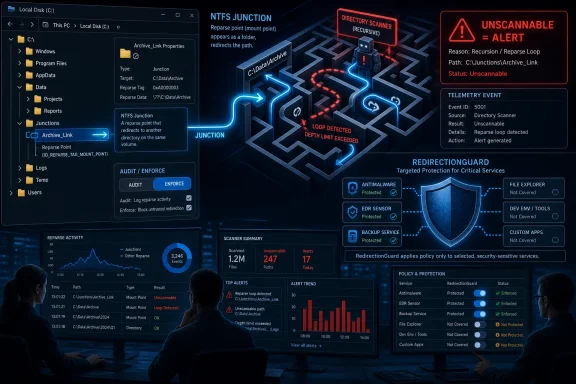 GhostTree Turns a Filesystem Convenience Into a Security Boundary
GhostTree is not interesting because junctions are new. Windows administrators have lived with junctions, symbolic links, reparse points, profile redirection, installer tricks, and compatibility shims for years. The interesting part is that Varonis reported a technique that can abuse recursive Windows junctions to stall directory enumeration and make a containing folder effectively unscannable.That should bother defenders because recursive scanning is one of those security behaviors everyone assumes is boring until it fails. Antivirus engines, EDR sensors, backup agents, data discovery tools, and file inventory scripts all depend on the same basic promise: start at a directory, enumerate the contents, descend into subdirectories, and keep going until there is nothing left to see. GhostTree attacks the “keep going” part.
The technique belongs to the same family of problems as archive bombs and path traversal bugs, but with a Windows-specific twist. Instead of hiding by encryption, obfuscation, or a clever process injection chain, the attacker abuses the structure of the namespace. The files may be present, the paths may be valid enough to lure a scanner forward, and the security tool may still fail to complete the inspection that its dashboard implies is happening.
That distinction is the heart of the risk. A missed detection because malware is novel is one problem. A missed detection because the scanner can be trapped into walking a recursive directory structure is a different and more operationally embarrassing one. It means the defensive system did not just fail to recognize a threat; it failed to reliably inspect the location where the threat was placed.
The First Move Is Boring by Design: Patch, Then Verify Behavior
The first answer for Windows teams is still the unglamorous one: stay current on Windows servicing, update endpoint security products, and test whether your scanners handle recursive junctions safely. There is no virtue in treating GhostTree as a reason to delay patching or wait for a single magic CVE banner. The problem lives at the boundary between operating system behavior, service hardening, and third-party scanner implementation.Microsoft’s RedirectionGuard is the important Windows-side development to watch. Microsoft has described it as an opt-in mitigation that can run in audit or enforce mode, and it is enabled in Windows 11 for targeted services rather than universally. That “targeted” part is the difference between a mitigation and a force field.
Microsoft has said the User Profile Service, AppX Deployment Service, and Installer Service had already enabled the mitigation in Windows Insider builds. That is meaningful because those services touch exactly the kinds of paths and privilege boundaries where redirection attacks can become dangerous. It is also limited, because it does not mean every process that scans, copies, repairs, deploys, backs up, or indexes files on a Windows machine is automatically protected.
So the near-term guidance is plain. Patch Windows. Patch EDR. Patch antivirus. Patch backup and data discovery tools. Then ask each vendor a sharper question than “are we protected from GhostTree?” Ask whether the product detects and safely terminates recursive junction traversal, whether it reports skipped or unscannable paths as a security signal, and whether its scanner follows user-created junctions inside sensitive paths.
RedirectionGuard Helps, But Only Where Windows Is Asked to Use It
RedirectionGuard is a welcome sign that Microsoft is treating unsafe junction traversal as a platform problem rather than a one-off bug class. The mitigation stores privilege metadata about the creator or modifier of a junction. When an opted-in process uses the mitigation, traversal can be blocked for junctions that were not created by an administrator.That design choice matters. Windows cannot simply outlaw junctions without breaking legitimate software, deployment flows, profile mechanics, and compatibility behavior. The platform therefore needs a way to distinguish a trusted redirection from one created by a lower-privileged user in a place where a higher-privileged process may later walk into it.
The price of that compatibility is opt-in scope. RedirectionGuard can be powerful for services that adopt it, especially in enforce mode, but it does not automatically make every Windows scanner junction-aware. Audit mode can help administrators understand what would have been blocked before they risk production breakage, while enforce mode is where the mitigation becomes a true control.
This is why “just upgrade to Windows 11” is an incomplete answer. Windows 11 may be where Microsoft is placing this mitigation work, but the useful question is whether the specific service, process, or product doing the traversal is opted in and operating in the right mode. A scanner that does not participate in the mitigation, or that implements its own traversal logic poorly, can still turn recursive directory walking into an attacker-controlled maze.
EDR Is a Sensor, Not a Substitute for Filesystem Policy
The temptation after every evasion story is to ask which EDR product “wins.” That framing flatters the market and undersells the architecture problem. GhostTree is less a bake-off between endpoint agents than a reminder that a sensor can be made to observe a hostile environment through hostile paths.EDR is still essential. It can observe process behavior, command execution, suspicious file creation, abnormal junction activity, and post-compromise movement that a simple file scanner may miss. But if the EDR’s file inspection path can be stalled by recursive junctions, relying on it as the only control around user-writable directories becomes wishful thinking.
This is especially important for file servers, developer workstations, shared build machines, and VDI environments. Those systems often have deep directory trees, tool-generated paths, profile redirection, package caches, and user-writable locations that security tools must crawl. They are also the places where a “scan completed” status can become dangerously ambiguous if the scanner quietly gave up, timed out, or skipped a path without raising an actionable alert.
WindowsForum readers have seen versions of this movie before. Directory junctions have already surfaced in discussions around Microsoft fixes that introduced new junction-related concerns, and other Windows security stories — from File Explorer spoofing to LNK stomping — keep returning to the same uncomfortable theme: trusted Windows components often do risky work on attacker-influenced input. GhostTree simply moves that lesson from the user interface into the filesystem traversal layer.
The Weak Point Is User-Writable Space Inside Trusted Scan Paths
The most dangerous environments are not necessarily the ones with the oldest endpoint agent. They are the ones where standard users can create filesystem structures in places that privileged or trusted tools later inspect, copy, clean, repair, back up, or index. Microsoft’s own framing of RedirectionGuard reflects this problem: junctions can be created by standard users, so user-writable locations inside sensitive scan paths create room for path-manipulation abuse.That should trigger a review of assumptions. If a folder is writable by ordinary users but routinely traversed by SYSTEM-level services, backup agents, deployment tools, or security scanners, it is not just a storage location. It is an input surface for privileged file operations.
The issue becomes sharper when administrators treat recursive scanning as an act of authority. A scanner running with high privilege may have access to places the user does not. But if it accepts user-created redirection structures without sufficient guardrails, the scanner’s privilege can become part of the attack surface rather than part of the defense.
The fix is not to panic-delete every junction in the estate. Windows uses redirection for legitimate reasons, and blunt cleanup scripts can break applications faster than malware can. The fix is to inventory where junctions exist, identify which ones are user-created or user-modifiable, and draw a policy boundary around the locations your trusted tools recursively traverse.
The Patch Decision Is Really Three Decisions
For most organizations, the “patch, upgrade, or rely on EDR” question breaks into three separate decisions. First, you patch and upgrade the platform because Microsoft is clearly moving mitigation into Windows 11 and targeted services. Second, you patch endpoint and operational tooling because scanners must defend their own traversal logic. Third, you change local policy because no vendor mitigation can save a design that lets untrusted users place recursive redirection structures inside trusted workflows.The Windows upgrade question is the narrowest of the three, and perhaps the easiest to overstate. If you are already moving to Windows 11, RedirectionGuard gives security teams one more reason to accelerate testing and validation. If you are still supporting older Windows estates, GhostTree should be added to the risk register, but the article’s verified public facts do not support pretending there is a single universal Windows 11 switch that solves the issue everywhere.
The patch question is broader. Security products, inventory systems, backup agents, and administrative scripts need explicit handling for junction loops and untrusted reparse points. If a vendor cannot tell you how its product behaves when it encounters recursive junctions, excessively deep paths, or junctions created by non-admin users, that is not a reassuring answer.
The EDR question is the harshest. EDR is not optional in a modern Windows environment, but it is also not a waiver from filesystem hygiene. If your control model assumes “the agent will scan it eventually,” GhostTree is precisely the kind of technique that tests the word eventually until it becomes meaningless.
Audit Mode Is Where Sensible Administrators Start
RedirectionGuard’s audit and enforce modes are important because filesystem redirection is too embedded in Windows to treat with reckless certainty. Audit mode lets a team observe what would happen before turning a mitigation into a production-breaking event. Enforce mode is where the organization decides that the observed risk is acceptable and the blocked behavior is intended.That progression should feel familiar to anyone who has deployed application control, attack surface reduction rules, macro restrictions, or controlled folder access. The best Windows hardening projects rarely begin with a heroic global toggle. They begin with visibility, exception handling, staged enforcement, and a willingness to discover that business-critical software has been relying on questionable behavior for years.
The missing piece is that administrators need comparable visibility outside Microsoft’s own opted-in services. If your backup product, EDR agent, file classification platform, or vulnerability scanner has its own traversal engine, RedirectionGuard’s existence does not automatically answer how that engine behaves. You need vendor documentation, testing, and telemetry.
For internal scripts, the responsibility is even more direct. PowerShell, .NET, Python, and legacy batch routines that recursively process directories should be reviewed with junction behavior in mind. The goal is simple: do not let an untrusted filesystem object decide how long a trusted automation job will run, how deep it will recurse, or which paths it will silently skip.
“Unscannable” Should Become an Alert, Not a Footnote
The most operationally useful lesson from GhostTree is that scan failure is security data. If a folder becomes effectively unscannable, that should not be treated as a harmless timeout buried in a debug log. It should be visible, triaged, and correlated with file creation, junction creation, user identity, and process activity.Security teams often measure coverage by agent deployment and policy compliance. GhostTree argues for a more concrete metric: which paths were actually inspected, which paths were skipped, and why. A green dashboard that cannot distinguish “clean” from “not fully examined” is not a security outcome; it is a reporting artifact.
This is where data-layer monitoring can matter. If a tool can detect anomalous junction creation, recursive structures, or unusual filesystem changes independently of the scanner being trapped, it can compensate for some of the weakness in recursive enumeration. That does not eliminate the need for endpoint scanning, but it reduces the chance that one traversal failure becomes a complete blind spot.
The same principle applies to backups and incident response. If backup software follows recursive junctions badly, it may waste time, balloon jobs, or miss important contents. If incident responders use ad hoc recursive collection scripts without junction awareness, they may reproduce the same blind spot they are trying to investigate.
Enthusiast PCs Are Not Exempt From Enterprise Lessons
Home users and enthusiasts may be tempted to dismiss GhostTree as an enterprise file-server problem. That is too narrow. Developer machines, modding rigs, lab systems, and power-user desktops often contain complex directory trees, package caches, build outputs, Windows Subsystem for Linux-related paths, and tools that create or traverse links.The practical home-user guidance is less elaborate but still real. Keep Windows and Defender current. Avoid running unknown “driver updater” or “system cleaner” tools that request broad filesystem permissions. Be skeptical of malware advice that treats a completed scan as proof of absence, especially if the system is already behaving suspiciously.
The WindowsForum archive has long returned to that theme, including community discussions about malware delivered through fake driver updates and the risks of unsupported Windows versions. GhostTree belongs in that same lineage. The details change, but the defensive habit does not: do not let untrusted software reshape the parts of Windows that trusted tools later rely on.
For enthusiasts who maintain family PCs or small-office machines, the most useful action is to simplify trust boundaries. Standard users should not have write access to locations used for administrative deployment, security tooling, or shared automation. If a machine is used for testing malware, unsigned tools, cracks, cheats, or random binaries from forums, treat recursive scanner results as one signal rather than the final verdict.
The Enterprise Playbook Starts With Finding the Junctions
The next step for IT teams is not to wait for a dramatic exploit chain. It is to map where junctions exist and decide which ones are legitimate. That does not require declaring every reparse point malicious. It requires knowing whether ordinary users can create or modify redirection structures in locations that privileged tools later traverse.Start with the highest-value paths. File shares, profile locations, software deployment caches, build directories, endpoint quarantine-adjacent folders, and application data paths deserve early review. Anywhere a user can write and a privileged service later scans should be treated as a candidate for junction-aware controls.
Then test the tools. In a lab, create benign recursive junction scenarios and observe whether your EDR, antivirus, backup, inventory, and file classification products complete, timeout, alert, or silently skip. The most important result is not whether the tool produces a scary marketing-named detection. It is whether the tool gives administrators a truthful account of what it could and could not inspect.
Finally, tighten policy. Remove unnecessary write permissions, separate user content from privileged workflows, and prefer tools that can identify reparse points before blindly traversing them. If a business process genuinely requires junctions, document the owner, expected path, creator privilege, and monitoring logic around it.
Microsoft’s Mitigation Strategy Shows the Platform Is Choosing Compatibility
RedirectionGuard’s opt-in design is not a failure of nerve. It is Microsoft acknowledging the reality of Windows compatibility. The operating system is too broad, too old, and too dependent on path redirection behavior for a universal block to be safe without breaking workloads.That makes the security model more complicated for administrators. A mitigation enabled for targeted Windows services is valuable, but it creates a patchwork of protection. Some system services may become safer, while third-party tools, legacy applications, and internal automations remain exposed unless they implement comparable safeguards.
This is a familiar Windows bargain. Microsoft adds a mitigation, makes it available in a way that avoids mass regression, and gradually expands adoption where telemetry and compatibility allow. Administrators then have to translate that platform movement into local policy before attackers translate the same behavior into repeatable tradecraft.
The mistake would be to read RedirectionGuard as proof that the problem is solved. The better reading is that Microsoft has given the ecosystem a direction: privilege-aware handling of junction traversal, staged audit and enforcement, and skepticism toward user-created redirection in privileged file operations. That is a useful foundation, not a finished deployment plan.
The GhostTree Decision Matrix Is Smaller Than the Hype
The concrete guidance is not complicated, but it does require discipline. GhostTree should push Windows teams to treat recursive junction traversal as a controlled behavior, not an invisible implementation detail.- Patch Windows and endpoint products promptly, because platform and scanner behavior both matter for this class of attack.
- Treat RedirectionGuard as a targeted mitigation that helps opted-in Windows services, not as a universal shield for every process that walks the filesystem.
- Test whether EDR, antivirus, backup, inventory, and file discovery tools safely terminate recursive junction traversal and report unscannable paths.
- Remove ordinary user write access from sensitive paths that privileged services, scanners, deployment tools, or administrative scripts recursively inspect.
- Monitor for unusual junction creation, recursive directory structures, scan timeouts, and skipped-path events as security signals rather than operational noise.
- Review internal scripts and automation so they identify reparse points and avoid blindly following attacker-controlled directory maps.
GhostTree’s real message is that Windows security decisions cannot stop at “we have EDR” or “we are patched.” The filesystem is part of the attack surface, and any tool that recursively follows paths is making a trust decision whether its authors admit it or not. The organizations that come out ahead will be the ones that patch quickly, adopt mitigations carefully, and make junction-aware controls part of ordinary Windows hygiene before the next path-manipulation trick gets a better name.
References
- Primary source: learn.microsoft.com
Virus and threat protection in Windows Security | Microsoft Learn
Use the Virus & threat protection section to see and configure Microsoft Defender Antivirus, Controlled folder access, and 3rd-party antivirus products.learn.microsoft.com - Independent coverage: microsoft.com
redirectionguard-mitigating-unsafe-junction-traversal-in-windows
www.microsoft.com
- Independent coverage: download.microsoft.com
Next gen ransomware protection with Windows 10 Creators Update EN US
PDF documentdownload.microsoft.com
- Primary source: WindowsForum
Windows 7 Targeted Malware Increased 125% | Windows Forum
The thread discusses the end of support for Windows 7, which officially reached EOL on January 14, 2020, leading to increased malware targeting the OS. ...windowsforum.com
