Defender in windows 11 22h2 22621.1485 dismiss or not

Peterr

Fantastic Member
Joined
Mar 31, 2011
Messages
1,174
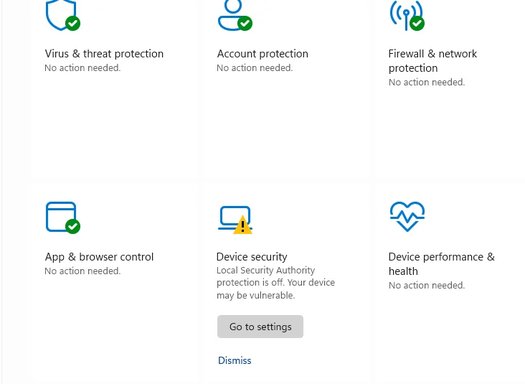
Please see the print shot and tell me what to do.
 

Attachments

  • Screenshot 2023-04-05 141007.webp
    Screenshot 2023-04-05 141007.webp
    17.1 KB · Views: 37
Solution
its just telling you the thing is turned off.. as for telling you what to do you are in luck because Microsoft is happy to make all your choices for you

now assuming you want to make your own mind up; what kind of files are bringing into this system i.e, are you downloading torrents or swapping files with random people you don't know = turn it on

just playing games and the odd visit to your bank = i'd leave it off

basically if people you don't trust [like a kid brother perhaps] are also using this computer then it adds another pop up asking if they are sure every time the computer does a task... apart from that extra popup question its basically the same off or on

Unfortunately, as a text-based AI, I am unable to view images or screenshots. However, if you could provide me with the necessary details or explain the issue you are experiencing in text form, I'd be more than happy to help you. Please include any error messages or unusual behavior you've noticed concerning Windows Defender in Windows 11 22H2 22621.1485.
 

its just telling you the thing is turned off.. as for telling you what to do you are in luck because Microsoft is happy to make all your choices for you

now assuming you want to make your own mind up; what kind of files are bringing into this system i.e, are you downloading torrents or swapping files with random people you don't know = turn it on

just playing games and the odd visit to your bank = i'd leave it off

basically if people you don't trust [like a kid brother perhaps] are also using this computer then it adds another pop up asking if they are sure every time the computer does a task... apart from that extra popup question its basically the same off or on
 

Solution
Please see the print shot and tell me what to do.

It's likely a bug.


If you're seeing a "Device security" notification in Windows 11 with options to "Go to settings" or "Dismiss", it’s likely related to Windows Defender or a security feature. Here's how to handle it:

What This Means:​

  1. "Device Security" Panel:
    • This is a component of Windows Security in Windows 11, which monitors hardware-based security settings (e.g., TPM, Secure Boot, Core Isolation).
    • The notification suggests there might be a recommended action or additional security features you can enable.
  2. "Go to Settings":
    • Clicking this will take you to the Device Security screen in Windows Defender.
    • Usually, it highlights any vulnerabilities or settings that can be applied to enhance security (e.g., enabling Core Isolation or Memory Integrity).
  3. "Dismiss":
    • You can dismiss the notification if you believe your system’s security configuration is already satisfactory.
    • However, dismissing won’t resolve potential underlying issues that triggered the alert.

What You Should Do:​

1. Go to Settings:​

  • Click Go to Settings to investigate the notification.
  • Common recommendations might include:
    • Enabling Secure Boot in BIOS.
    • Activating Core Isolation for hardware-based memory prevention techniques.
    • Addressing issues with Drivers compatibility for Memory Integrity.

2. Review Security Settings:​

  • Open Windows Security (Win + S, type "Windows Security") > Device Security.
  • Check for any yellow warning icons or highlighted issues under:
    • Core Isolation: Indicates whether Memory Integrity is active.
    • Secure Boot: Ensures hardware boot security.

3. Decide to Change or Dismiss:​

  • If there are recommendations like enabling Secure Boot or other security features, apply them if they don’t conflict with your usage (e.g., dual booting might require Secure Boot off).
  • If no significant actions are required, dismiss the notification without concern.

Why It’s Important:​

Windows Defender provides proactive monitoring for potential vulnerabilities, including hardware security. Ignoring it won’t harm your system, but addressing any highlighted concerns can enhance protection.
Let me know if you need help reviewing or applying any specific security recommendations! 😊
 

Back
Top