

Microsoft’s latest guidance on Windows 11 security is simple, but it lands in a noisy market: for most people, Microsoft Defender Antivirus is enough, and third-party antivirus is no longer a default necessity. That does not mean every PC owner should uninstall their security suite tomorrow, but it does reflect how far Windows’ built-in protection has evolved. The real story is less about antivirus as a category and more about Microsoft trying to redefine what “good enough” security looks like on a modern Windows 11 device.
For years, Windows users were told the opposite. In the XP and Windows 7 era, third-party security software often filled obvious gaps in Microsoft’s own protections, and paid suites from vendors like Norton, McAfee, and Avast built entire businesses around that reality. Today, Microsoft is making a more confident argument: the operating system now ships with a layered, always-on security stack that covers most consumer threat scenarios without extra software.
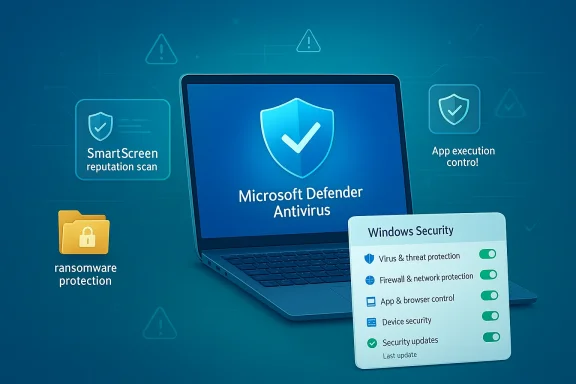
That change is not a marketing flourish; it is the result of a long technical rebuild. Windows 11 arrives with Defender Antivirus active by default, SmartScreen for reputation checks, ransomware-focused tools such as Controlled Folder Access, and app-control features designed to block unknown or unsafe code before it runs. Microsoft’s own documentation also makes clear that when a third-party antivirus product is installed and kept up to date, Defender steps aside automatically, which means the platform is designed to support either approach.
The Technobezz report reflects that broader shift in tone, arguing that Microsoft has effectively told most Windows 11 users they can stop treating third-party antivirus as mandatory. That interpretation aligns closely with Microsoft’s current public guidance, though the practical message is more nuanced than “never use third-party security again.” Microsoft still leaves room for families, power users, and enterprise teams that want extra controls, identity protection, or centralized management.
The timing matters, too. Windows 10 support ended on October 14, 2025, pushing more users toward Windows 11 and into Microsoft’s newer security model. In other words, this is not a small product note; it is part of Microsoft’s broader effort to persuade users that the modern Windows platform is secure by design and capable of standing on its own.
Windows 11 is the clearest expression of that strategy. Microsoft says Defender Antivirus provides the primary malware protection in Windows 11, while SmartScreen and other protections work alongside it to stop malicious files, phishing sites, and unsafe downloads. That layered approach is important because modern threats rarely rely on a single technique; they mix email lures, browser-based delivery, weaponized archives, and living-off-the-land tactics.
The key technical change is integration. Built-in security can inspect activity earlier in the execution chain because it sits inside the platform, not on top of it. Microsoft’s documentation notes that Windows Security acts as the central place for status and configuration, while Defender is automatically disabled when another real-time antivirus takes over, preserving one primary scanner rather than forcing two to compete for the same files and processes. That design reduces conflict, but it also means Microsoft is betting on its own stack to be sufficient for the median user.
There is also a commercial backdrop. Security vendors have long depended on the notion that Windows needs a separate protection layer to be safe. Microsoft’s current messaging chips away at that assumption by framing third-party security as optional rather than essential. That does not kill the market, but it does pressure vendors to justify their subscriptions with features beyond basic malware scanning.
The result is a shift in user expectations. Instead of asking whether Windows has “an antivirus,” the better question is whether the default protection model is comprehensive enough for a given user’s habits. For many home users, the answer is yes. For specialized environments, the answer may still be not quite.
Smart App Control pushes that model even further. Microsoft Learn describes it as an app execution control feature that blocks malware, potentially unwanted apps, and unknown unsigned code by default, but only on eligible clean installs. That makes it more aggressive than ordinary antivirus in one respect: instead of just detecting known bad behavior, it can refuse to run software that has not earned trust.
The practical reason is simple: multiple real-time scanners can create friction. Microsoft’s FAQ warns that running more than one real-time security product can hurt performance and even produce update or installation errors. In everyday terms, that means the “more protection” instinct can backfire if two products fight over the same files, the same hooks, or the same trust decisions.
There is a second-order benefit as well. When users rely on built-in security, they are more likely to keep one coherent protection model instead of mixing overlapping tools, browser extensions, and cleanup utilities. That can reduce confusion and make it easier to tell whether a block or warning came from Windows itself or from a vendor add-on.
For managed environments, Defender is part of a bigger ecosystem that includes Microsoft Defender for Endpoint, Intune, and Windows Defender Application Control. Microsoft’s documentation shows that protection and policy enforcement can be extended well beyond the home-PC model, which makes the “do you need third-party antivirus?” question less relevant than “how should the security stack be governed?”
Vendors are already responding by emphasizing VPNs, password managers, parental controls, identity monitoring, and dark web alerts. In other words, they are moving up the stack. Basic antivirus alone is increasingly hard to sell, especially when Microsoft can point to its own testing claims, default activation, and platform integration.
This architecture helps explain why Microsoft can claim ownership of baseline protection without forcing users into a locked ecosystem. Defender can be the active engine, another product can take over real-time scanning, and Windows Security still provides status visibility. In effect, Microsoft is trying to be the security referee as much as the security provider.
It also arrives at a moment when cybersecurity itself is becoming more integrated and less standalone. Cloud-delivered threat intelligence, reputation services, exploit mitigation, and app control are now bundled into the operating system experience. That makes “install antivirus first” feel dated in the same way that manual driver hunts or separate firewall tools once did.
What will matter next is how third-party vendors respond and whether Microsoft continues to improve usability around features like Smart App Control and Controlled Folder Access. If those tools become easier to understand and manage, Microsoft’s claim will only grow stronger. If they remain opaque to normal users, the market for “simpler” third-party suites will persist.
Source: Technobezz Microsoft says Windows 11 users do not need third-party antivirus software
 Overview
For years, Windows users were told the opposite. In the XP and Windows 7 era, third-party security software often filled obvious gaps in Microsoft’s own protections, and paid suites from vendors like Norton, McAfee, and Avast built entire businesses around that reality. Today, Microsoft is making a more confident argument: the operating system now ships with a layered, always-on security stack that covers most consumer threat scenarios without extra software.That change is not a marketing flourish; it is the result of a long technical rebuild. Windows 11 arrives with Defender Antivirus active by default, SmartScreen for reputation checks, ransomware-focused tools such as Controlled Folder Access, and app-control features designed to block unknown or unsafe code before it runs. Microsoft’s own documentation also makes clear that when a third-party antivirus product is installed and kept up to date, Defender steps aside automatically, which means the platform is designed to support either approach.
The Technobezz report reflects that broader shift in tone, arguing that Microsoft has effectively told most Windows 11 users they can stop treating third-party antivirus as mandatory. That interpretation aligns closely with Microsoft’s current public guidance, though the practical message is more nuanced than “never use third-party security again.” Microsoft still leaves room for families, power users, and enterprise teams that want extra controls, identity protection, or centralized management.
The timing matters, too. Windows 10 support ended on October 14, 2025, pushing more users toward Windows 11 and into Microsoft’s newer security model. In other words, this is not a small product note; it is part of Microsoft’s broader effort to persuade users that the modern Windows platform is secure by design and capable of standing on its own.
Background
The antivirus conversation around Windows has always been shaped by trust. In the old model, consumers bought protection because Windows itself was seen as the weakest link, and a third-party suite was often viewed as a safety net against both malware and operating system shortcomings. Microsoft spent years reversing that perception by folding more security controls into the OS and tying them more tightly to the update pipeline.Windows 11 is the clearest expression of that strategy. Microsoft says Defender Antivirus provides the primary malware protection in Windows 11, while SmartScreen and other protections work alongside it to stop malicious files, phishing sites, and unsafe downloads. That layered approach is important because modern threats rarely rely on a single technique; they mix email lures, browser-based delivery, weaponized archives, and living-off-the-land tactics.
The key technical change is integration. Built-in security can inspect activity earlier in the execution chain because it sits inside the platform, not on top of it. Microsoft’s documentation notes that Windows Security acts as the central place for status and configuration, while Defender is automatically disabled when another real-time antivirus takes over, preserving one primary scanner rather than forcing two to compete for the same files and processes. That design reduces conflict, but it also means Microsoft is betting on its own stack to be sufficient for the median user.
There is also a commercial backdrop. Security vendors have long depended on the notion that Windows needs a separate protection layer to be safe. Microsoft’s current messaging chips away at that assumption by framing third-party security as optional rather than essential. That does not kill the market, but it does pressure vendors to justify their subscriptions with features beyond basic malware scanning.
Why Microsoft’s position changed
The answer is not just that Defender improved. It is that the threat landscape matured, and Microsoft had to respond with hardware-backed, cloud-assisted, reputation-based defenses that behave more like a platform service than a standalone app. Windows 11’s security stack now includes multiple controls that address different stages of an attack, from download reputation to ransomware containment.The result is a shift in user expectations. Instead of asking whether Windows has “an antivirus,” the better question is whether the default protection model is comprehensive enough for a given user’s habits. For many home users, the answer is yes. For specialized environments, the answer may still be not quite.
What Windows 11 Actually Protects
Windows 11’s security story is not built around a single antivirus engine. Microsoft bundles several protection layers that work together, and that is the part many casual users overlook when they compare Defender to a subscription suite. Defender scans files in real time, SmartScreen checks reputation for websites and downloads, and ransomware controls can lock down important folders against unauthorized changes.Smart App Control pushes that model even further. Microsoft Learn describes it as an app execution control feature that blocks malware, potentially unwanted apps, and unknown unsigned code by default, but only on eligible clean installs. That makes it more aggressive than ordinary antivirus in one respect: instead of just detecting known bad behavior, it can refuse to run software that has not earned trust.
The layered model matters
This layered structure is why Microsoft can credibly argue that most users do not need extra software. A third-party package might scan files slightly differently or add extra web filtering, but Windows 11 already covers the basic attack paths that matter most to ordinary consumers. For people who browse carefully, keep updates current, and install apps from known sources, the incremental benefit of a second scanner may be small.- Defender handles core malware protection.
- SmartScreen helps evaluate reputation for sites and downloads.
- Controlled Folder Access focuses on ransomware resistance.
- Smart App Control blocks risky code on supported devices.
Why Third-Party Antivirus Is Less Central
Third-party antivirus used to be the first recommendation for many Windows users because the operating system itself had weaker baseline defenses. That era is fading. Microsoft now positions Defender as the default layer and treats outside tools as optional enhancements rather than mandatory protection.The practical reason is simple: multiple real-time scanners can create friction. Microsoft’s FAQ warns that running more than one real-time security product can hurt performance and even produce update or installation errors. In everyday terms, that means the “more protection” instinct can backfire if two products fight over the same files, the same hooks, or the same trust decisions.
Performance and complexity
This is one of Microsoft’s strongest arguments, especially for consumer PCs and lower-end laptops. Every background process consumes resources, every extra driver adds complexity, and every layered integration raises the odds of incompatibility. A well-integrated platform security stack can therefore be better than a heavier third-party setup, even if the latter advertises more features on paper.- Fewer security agents usually mean fewer conflicts.
- Built-in tools update with Windows itself.
- Integrated protections can respond earlier in the execution chain.
- Simpler security stacks are easier for average users to understand.
Consumer Impact
For consumers, Microsoft’s message is mostly liberating. It removes the old anxiety that a fresh Windows PC is incomplete unless you buy an extra security bundle, and it lets users focus on basics like updates, backups, and safer browsing habits. That is a meaningful shift because many home users previously paid for software they barely understood and rarely configured correctly.There is a second-order benefit as well. When users rely on built-in security, they are more likely to keep one coherent protection model instead of mixing overlapping tools, browser extensions, and cleanup utilities. That can reduce confusion and make it easier to tell whether a block or warning came from Windows itself or from a vendor add-on.
Who still benefits from third-party suites
Not everyone should rush to the same conclusion, though. Families may want bundled parental controls, some users want identity theft monitoring, and others may prefer a polished dashboard that centralizes security for multiple devices. In those cases, the value is not just malware scanning; it is convenience, reporting, or cross-device oversight.- Families may value parental controls.
- Multi-device households may want unified dashboards.
- Users concerned about identity theft may prefer bundled monitoring.
- Power users may want separate control over specialized features.
Enterprise and Managed Devices
The enterprise picture is more complicated. Microsoft’s consumer-facing guidance says most users do not need extra antivirus, but organizations often buy more than malware protection when they buy security software. They buy telemetry, policy enforcement, incident workflows, device inventory, and integration with broader identity and compliance systems.For managed environments, Defender is part of a bigger ecosystem that includes Microsoft Defender for Endpoint, Intune, and Windows Defender Application Control. Microsoft’s documentation shows that protection and policy enforcement can be extended well beyond the home-PC model, which makes the “do you need third-party antivirus?” question less relevant than “how should the security stack be governed?”
Endpoint control versus consumer simplicity
Enterprises care about consistency, not just detection. They need assurance that devices follow policy, that suspicious binaries are controlled, and that exceptions are logged and audited. A third-party vendor may still be preferred if it fits an existing security operations center, but Microsoft’s own stack is now strong enough that many businesses can standardize on it without feeling underprotected.- Central management is often more important than raw detection claims.
- Policy-driven allowlists and blocklists matter in enterprise settings.
- Telemetry and compliance workflows can outweigh feature checklists.
- Microsoft’s native stack reduces the need for multiple agents on one device.
How This Changes the Antivirus Market
The antivirus market has been bracing for this shift for years. When the operating system vendor says built-in protection is enough for most users, it narrows the value proposition of standalone antivirus to adjacent services rather than core scanning. That is a powerful message because it comes from the platform owner, not a competitor.Vendors are already responding by emphasizing VPNs, password managers, parental controls, identity monitoring, and dark web alerts. In other words, they are moving up the stack. Basic antivirus alone is increasingly hard to sell, especially when Microsoft can point to its own testing claims, default activation, and platform integration.
Competitive implications
That pressure may ultimately be healthy for the market. If third-party products have to compete on usability and extras rather than fear-based antivirus marketing, consumers could benefit from clearer feature differentiation. But it could also lead to more bundling, more upsells, and more confusing subscription tiers.- Antivirus vendors must justify themselves with more than scanning.
- Microsoft’s platform advantage is integration, not just detection scores.
- Consumers may see more bundled services and higher subscription complexity.
- The market may shift from “antivirus” to “security ecosystem.”
The Role of Windows Security and Defender Management
Windows Security is the user-facing hub that collects status from Microsoft and third-party security products. Microsoft explains that this service does not disable Defender by itself, and that disabling or modifying the Windows Security service can lower the protection state even when a third-party antivirus is installed. That is an important detail because it shows how much Microsoft expects the built-in control plane to remain present and functional.This architecture helps explain why Microsoft can claim ownership of baseline protection without forcing users into a locked ecosystem. Defender can be the active engine, another product can take over real-time scanning, and Windows Security still provides status visibility. In effect, Microsoft is trying to be the security referee as much as the security provider.
Automatic behavior is the point
Automatic behavior is what makes the system workable at scale. If third-party antivirus installs cleanly and disables Defender in the background, users are less likely to create redundant scanning conflicts. If Windows Security keeps reporting state across all layers, users and admins can more easily understand what is active and what is not.- Defender turns off automatically when a compatible third-party antivirus is active.
- Windows Security remains the central status panel.
- Service changes can reduce protection visibility.
- Microsoft’s model assumes one primary real-time engine at a time.
Why This Matters Now
The timing of Microsoft’s message is tied to Windows 11’s maturity and Windows 10’s retirement. As older systems leave support, users are increasingly forced into the newer platform, and Microsoft has every incentive to present Windows 11 as both secure and self-sufficient. The antivirus claim is part of that credibility campaign.It also arrives at a moment when cybersecurity itself is becoming more integrated and less standalone. Cloud-delivered threat intelligence, reputation services, exploit mitigation, and app control are now bundled into the operating system experience. That makes “install antivirus first” feel dated in the same way that manual driver hunts or separate firewall tools once did.
The changing security baseline
For many users, the baseline security question is no longer about whether Windows has protection. It is about whether their habits and device configuration allow that protection to work as intended. The strongest built-in tool in the world will not help much if updates are ignored, downloads are careless, or admin rights are handed out too freely.- Windows 11 security is increasingly default-on.
- Microsoft is relying on platform integration, not add-on software.
- User behavior still determines real-world outcomes.
- The operating system is now part of the security product itself.
Strengths and Opportunities
Microsoft’s position has several clear advantages, and they explain why the company is comfortable telling users to trust the built-in stack. It simplifies the setup story, reduces software overlap, and frames Windows 11 as a modern platform rather than a blank canvas that needs immediate patchwork. The opportunity is not just fewer downloads; it is a cleaner security experience.- Built-in protection is easier for average users to understand.
- Automatic updates keep defenses current without extra effort.
- Lower conflict risk can improve performance and stability.
- Stronger platform trust helps Windows 11’s security reputation.
- Optional third-party tools still exist for specialized needs.
- Enterprise alignment is easier when the OS vendor owns the baseline.
- Security integration supports broader Microsoft cloud and endpoint strategy.
Risks and Concerns
The biggest risk is overconfidence. If users interpret Microsoft’s guidance as a reason to stop thinking about security altogether, they may become more vulnerable to phishing, unsafe downloads, and credential theft. Another concern is that Microsoft’s own stack, while strong, may not match the specialized controls some users or organizations require.- User complacency can be as dangerous as weak software.
- Third-party feature gaps still matter for families and enterprises.
- Compatibility issues can arise with layered security tools.
- Legacy apps may not play nicely with stricter controls.
- Regional or install limitations can affect features like Smart App Control.
- False confidence may lead users to ignore backups and patching.
- Subscription creep from vendor suites may create confusion rather than clarity.
Looking Ahead
Microsoft is likely to keep pushing the idea that Windows 11 security is complete enough for most people, while reserving extra-value messaging for enterprise customers and advanced users. Expect more emphasis on layered protection, cloud reputation services, and OS-integrated controls rather than standalone antivirus language. That direction is consistent with how Microsoft has positioned Windows 11 so far.What will matter next is how third-party vendors respond and whether Microsoft continues to improve usability around features like Smart App Control and Controlled Folder Access. If those tools become easier to understand and manage, Microsoft’s claim will only grow stronger. If they remain opaque to normal users, the market for “simpler” third-party suites will persist.
- Watch for further Microsoft guidance on Defender and consumer security.
- Track whether Smart App Control expands to more eligible systems.
- Monitor third-party vendors shifting toward identity and family protection.
- See whether enterprise admins standardize more heavily on Microsoft-native tools.
- Pay attention to any new Windows 11 security defaults in future updates.
Source: Technobezz Microsoft says Windows 11 users do not need third-party antivirus software
