

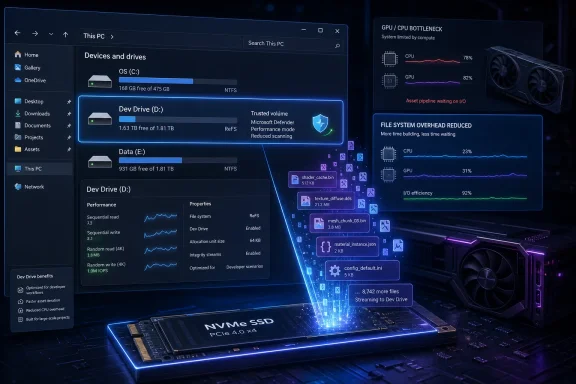
Microsoft’s Dev Drive is a Windows 11 storage feature that creates a ReFS-formatted volume for developer workloads, and PCWorld is now arguing that the same small-file optimizations can also help some games load and stream assets faster. That does not make Dev Drive a secret turbo button for every gaming PC. It does, however, expose a useful truth Windows gamers often forget: performance is not only about the GPU, the CPU, or the newest upscaler. Sometimes the bottleneck is the humble file system, quietly shuffling thousands of tiny assets while the rest of the machine waits.
Dev Drive arrived as part of Microsoft’s broader attempt to make Windows 11 less hostile to modern development workflows. Its official purpose is straightforward: give developers a dedicated volume optimized for source trees, package caches, build outputs, and dependency-heavy projects where the system is constantly reading, writing, scanning, and deleting small files.
That description sounds suspiciously familiar to anyone who has watched a modern game unpack shaders, stream textures, rebuild caches, or spend a mysteriously long time on a “preparing” screen. The games industry has spent years pushing asset complexity upward, while PC storage has moved from spinning disks to SATA SSDs to NVMe drives. Yet Windows still has to mediate file access through layers of file-system behavior, security filtering, launcher logic, and antivirus scanning.
PCWorld’s framing is useful because it moves Dev Drive out of the developer niche and into the performance conversation that ordinary Windows users actually care about. Gamers rarely think in terms of build pipelines, but they absolutely understand shader compilation stutter, long launch times, and open-world hitching when a title is pulling data from storage faster than the software stack can comfortably deliver it.
The catch is that Dev Drive was not designed as a gaming feature. That matters. When a platform capability is borrowed for a different job, the result can be clever, fragile, or both.
For developers, the appeal is obvious. A large JavaScript project, a .NET solution, a Rust workspace, or a package cache can contain huge numbers of small files. Build tools may touch those files repeatedly, often in parallel, while antivirus and indexing tools try to inspect the same activity. A regular NTFS volume can handle that, but it is not always graceful under that sort of churn.
Games increasingly resemble those workloads. Modern titles are sprawling collections of textures, shaders, configuration files, audio banks, compressed archives, and runtime-generated cache data. Some assets are loaded once; others are constantly streamed, unpacked, discarded, or rebuilt. If that process runs into file-system overhead, security scanning delays, or inefficient small-file access, the GPU is not the thing holding the frame together.
That is why the “gaming speed trick” headline is both enticing and slightly dangerous. Dev Drive can plausibly help when the workload resembles what Dev Drive was built to accelerate. It will not rewrite a game engine, fix a bad port, or make a weak graphics card behave like a flagship GPU.
But raw throughput is not the whole story. Sequential read speeds look wonderful on a spec sheet, yet real games rarely behave like a single clean file copy. They perform messy, mixed I/O across thousands of files, with frequent small reads and writes that collide with CPU scheduling, memory pressure, decompression work, DRM, launcher services, cloud save clients, overlays, and antivirus.
This is why two systems with similar GPUs can feel different in the first five minutes of launching a game. One may sit through shader preparation, then enter a world smoothly. The other may stutter during traversal because the game is still building or retrieving data from a less efficient storage path. In that situation, the storage stack becomes part of the gaming experience, even if no one markets it that way.
Dev Drive’s relevance begins there. It is not about turning storage into a graphics feature. It is about reducing friction in the path between game data and the rest of the system.
That distinction matters because antivirus overhead is one of the least glamorous but most persistent sources of Windows performance weirdness. Developers know this intimately: package managers and build systems can trigger a storm of file operations, and each operation may invite security inspection. Gamers see a less obvious version when launchers update thousands of files, games rebuild caches, or mod managers shuffle assets around.
Performance mode does not mean “no security.” It means Microsoft is treating a trusted Dev Drive differently because the workload is expected to involve rapid, repetitive file operations that would otherwise be penalized by ordinary scanning behavior. For a developer compiling a large project, that is the official use case. For a game generating shader caches or maintaining a large install directory, the analogy is not absurd.
Still, trust is the operative word. A Dev Drive should not become the place where users dump random downloads, cracked executables, unvetted mods, and abandoned utilities. If the volume is receiving a lighter-touch security posture, users need to treat it as a deliberate performance zone, not a digital junk drawer.
The benefit is less compelling for simpler games, older titles, or systems that already load everything almost instantly. It is also less compelling on SATA SSDs, where the underlying hardware may become the limiting factor before file-system optimizations have much room to matter. On hard drives, the idea is mostly beside the point; the mechanical latency is the wall.
This is where PCWorld’s advice needs a sober reading. Dev Drive is not a universal prescription. It is a situational optimization for machines where storage is already fast enough that file-system behavior and security scanning overhead can become meaningful.
That also means benchmarks will vary wildly. A game that gains a few seconds in launch time on one system may show nothing on another. A shader-heavy title may benefit after a fresh install or cache rebuild, while another game remains bound by CPU decompression, network authentication, engine design, or simply poor optimization.
That simplicity is slightly deceptive. Existing volumes cannot simply be converted into Dev Drives in the same casual way users might flip a preference. The Dev Drive designation happens when the volume is created and formatted. If a user later decides that ReFS is a poor fit and wants to return to NTFS, the practical answer is to move the data elsewhere, reformat, and move it back.
For developers, that is an acceptable trade-off because the drive is usually a workspace. For gamers, it may be less obvious. A Steam library with hundreds of gigabytes of games, mods, screenshots, local settings, and launcher metadata is not something everyone wants to rearrange casually.
The cleanest approach is to create the Dev Drive first and then install games onto it intentionally. Steam’s library management tools make this easier than it used to be, and some launchers can discover or move installations with varying degrees of grace. But “varying degrees” is doing a lot of work here. Anyone who has wrestled with multiple launchers knows that storage paths can become a small archaeological dig.
Most mainstream games will probably not care. Many launchers are primarily concerned with whether the path exists, whether the user has permission to write to it, and whether files can be verified after download. But the PC gaming ecosystem is not just mainstream games. It includes ancient titles, fan patches, mod loaders, anti-cheat drivers, overlay injectors, symbolic-link tricks, and backup utilities of wildly different quality.
That is where Dev Drive becomes an enthusiast feature rather than a general recommendation. If a launcher, DRM system, or old utility expects NTFS-specific behavior, ReFS may expose assumptions the software never knew it had. The result might be harmless. It might also be a failed install, a broken mod chain, or a tool that refuses to operate correctly.
This does not make ReFS dangerous. It makes it different. And in Windows, different file-system behavior has a way of finding the oldest program on the machine and making that program the test case.
Windows has long treated storage as a general-purpose layer. You installed the operating system on C:, created another NTFS volume if you were tidy, and let applications scatter data across Program Files, AppData, Documents, and whatever launcher directory happened to be fashionable that year. Dev Drive represents a more specialized view: different workloads deserve different storage behavior.
That is a subtle but important shift. Developers get one set of assumptions. The system drive gets another. Security policy can attach differently. File-system features can be chosen for a workload instead of imposed uniformly across the machine. In a world of increasingly specialized PC use, that model makes sense.
Gaming may be the most obvious consumer workload that could benefit from the same thinking. Microsoft already has DirectStorage, Xbox app integration, Game Bar, Auto HDR, and a long-running desire to make Windows the default high-end gaming platform. A storage profile tuned for large, asset-heavy games would not be an absurd product direction.
But Dev Drive is not that product yet. It is a developer feature that happens to overlap with some gaming pain points. Treating it as an unofficial Game Drive is clever, but it also highlights a gap Microsoft has not explicitly filled.
Windows PCs are more flexible, but that flexibility is also chaos. A game might be installed on a Gen 5 NVMe SSD, an external USB drive, an aging SATA SSD, or a hard drive someone carried forward from a previous build. It might be under Steam, Epic, Xbox, GOG, EA, Ubisoft Connect, Battle.net, or a standalone launcher. It might be scanned by Defender, a third-party antivirus suite, backup software, cloud sync tools, or all of them at once.
Dev Drive cannot solve that mess. What it can do is give power users a more controlled storage island. If the game library, shader caches, and related data live there, the user has at least reduced some variables.
The problem is that Windows does not automatically understand “this is my high-performance game volume” in the same complete way it understands a trusted Dev Drive for development. Users have to assemble that behavior themselves, one launcher setting and cache directory at a time.
That means a user can move a 150GB game to a Dev Drive and still leave some of the most performance-sensitive temporary data on C:. In that case, the Dev Drive may improve some operations while leaving others untouched. The result will feel inconsistent because the system is inconsistent.
Power users can chase those paths with symbolic links, launcher settings, environment variables, or per-application configuration. But this is precisely where a clever optimization turns into weekend tinkering. The gains may be real, but the time spent finding them starts to matter.
For most users, the reasonable version is simpler: create the Dev Drive, install a few storage-heavy games directly onto it, and see whether the experience improves. If it does, expand the library. If it does not, resist the urge to turn the PC into a storage science project.
In managed environments, that is not a detail. A developer workstation is often a high-value target because it contains credentials, source code, build scripts, signing material, and access to internal systems. Any feature that reduces security friction for performance reasons has to be understood, documented, and controlled.
Microsoft’s model anticipates this by giving administrators policy control over Dev Drive behavior. That is the correct enterprise posture. Developers need performance, but security teams need to know which volumes are trusted, what filters are attached, and whether users can create performance-optimized zones without oversight.
The gaming reuse case should not distract from that. On a home PC, the risk calculation is personal. In a company, a Dev Drive is part of endpoint posture. The same feature that makes a build faster can also become a blind spot if treated casually.
That makes Dev Drive tempting. It also makes compatibility risk more acute. Mod managers, script extenders, patchers, archive tools, and older utilities often assume NTFS behavior because NTFS has been the default Windows reality for so long. If anything is going to find an edge case, it is a 12-year-old tool maintained by one volunteer and essential to a mod list with 600 dependencies.
The right move is incremental testing. Put one modded title on the Dev Drive and verify the whole toolchain: launcher, mod manager, script extender, save location, backup process, and update behavior. If that works, expand from there.
The wrong move is to migrate an entire mod library in one afternoon and discover that the failure mode is not obvious until 40 hours into a save file. Enthusiast storage experiments should be reversible, and ReFS-to-NTFS reversal is not something Windows handles with a polite undo button.
That distinction matters because PC performance culture is always vulnerable to folk magic. A real feature gets discovered, a few users report big improvements, and suddenly everyone is formatting drives as though the setting itself were the cure. Windows has seen this movie before with registry tweaks, service disabling, pagefile myths, and “debloat” scripts that break more than they fix.
Dev Drive is better than those because it is a real Microsoft-supported feature with a coherent technical purpose. But coherent purpose is not the same as universal benefit. It should be tested like any other performance change: one variable at a time, with backups, and with realistic expectations.
Microsoft does not need to pretend Dev Drive is a consumer gaming feature. In fact, it probably should not. The name, documentation, and policy model all point clearly toward development workloads, and that clarity is useful. But the company should study why gamers are interested in it anyway.
There is room in Windows for a first-class “Game Drive” concept: a supported storage profile that understands launchers, shader caches, DirectStorage, Defender behavior, backup expectations, and the messy reality of PC game libraries. Such a feature would need guardrails that Dev Drive does not currently provide for casual users. It would also need to respect security rather than treating performance as an excuse to look away.
Until then, Dev Drive remains one of those Windows features that rewards the informed and punishes the impulsive. Used carefully, it can be a smart optimization for the right games on the right hardware. Used as a blanket miracle cure, it will mostly create another partition to explain, maintain, and eventually reformat.
The PC has always been the platform where users can color outside the lines, and Dev Drive is another line worth understanding before crossing. For Windows enthusiasts, that is part of the appeal. For everyone else, the safest conclusion is also the most honest one: Dev Drive is not the future of gaming storage, but it is a glimpse of the kind of workload-aware Windows that gaming increasingly needs.
Source: PCWorld Meet Windows 11's Dev Drive, the gaming speed trick hiding in plain sight
 Microsoft Built a Developer Tool, and Gamers Found the Side Door
Dev Drive arrived as part of Microsoft’s broader attempt to make Windows 11 less hostile to modern development workflows. Its official purpose is straightforward: give developers a dedicated volume optimized for source trees, package caches, build outputs, and dependency-heavy projects where the system is constantly reading, writing, scanning, and deleting small files.That description sounds suspiciously familiar to anyone who has watched a modern game unpack shaders, stream textures, rebuild caches, or spend a mysteriously long time on a “preparing” screen. The games industry has spent years pushing asset complexity upward, while PC storage has moved from spinning disks to SATA SSDs to NVMe drives. Yet Windows still has to mediate file access through layers of file-system behavior, security filtering, launcher logic, and antivirus scanning.
PCWorld’s framing is useful because it moves Dev Drive out of the developer niche and into the performance conversation that ordinary Windows users actually care about. Gamers rarely think in terms of build pipelines, but they absolutely understand shader compilation stutter, long launch times, and open-world hitching when a title is pulling data from storage faster than the software stack can comfortably deliver it.
The catch is that Dev Drive was not designed as a gaming feature. That matters. When a platform capability is borrowed for a different job, the result can be clever, fragile, or both.
The Real Trick Is ReFS, Not a Magic Gaming Mode
A Dev Drive is built on ReFS, Microsoft’s Resilient File System, rather than the NTFS format most Windows users have lived with for decades. ReFS was designed for resilience, scalability, and certain performance characteristics that matter in server and storage-heavy environments. In the Dev Drive implementation, Microsoft layers targeted optimizations and administrative controls on top of that foundation.For developers, the appeal is obvious. A large JavaScript project, a .NET solution, a Rust workspace, or a package cache can contain huge numbers of small files. Build tools may touch those files repeatedly, often in parallel, while antivirus and indexing tools try to inspect the same activity. A regular NTFS volume can handle that, but it is not always graceful under that sort of churn.
Games increasingly resemble those workloads. Modern titles are sprawling collections of textures, shaders, configuration files, audio banks, compressed archives, and runtime-generated cache data. Some assets are loaded once; others are constantly streamed, unpacked, discarded, or rebuilt. If that process runs into file-system overhead, security scanning delays, or inefficient small-file access, the GPU is not the thing holding the frame together.
That is why the “gaming speed trick” headline is both enticing and slightly dangerous. Dev Drive can plausibly help when the workload resembles what Dev Drive was built to accelerate. It will not rewrite a game engine, fix a bad port, or make a weak graphics card behave like a flagship GPU.
The Storage Bottleneck Never Really Went Away
The PC gaming world spent the last decade acting as though SSD adoption solved storage performance. In one sense, it did. Moving from a hard drive to a SATA SSD was one of the most dramatic upgrades a consumer PC could receive, and moving from SATA to NVMe gave developers even more headroom.But raw throughput is not the whole story. Sequential read speeds look wonderful on a spec sheet, yet real games rarely behave like a single clean file copy. They perform messy, mixed I/O across thousands of files, with frequent small reads and writes that collide with CPU scheduling, memory pressure, decompression work, DRM, launcher services, cloud save clients, overlays, and antivirus.
This is why two systems with similar GPUs can feel different in the first five minutes of launching a game. One may sit through shader preparation, then enter a world smoothly. The other may stutter during traversal because the game is still building or retrieving data from a less efficient storage path. In that situation, the storage stack becomes part of the gaming experience, even if no one markets it that way.
Dev Drive’s relevance begins there. It is not about turning storage into a graphics feature. It is about reducing friction in the path between game data and the rest of the system.
Defender Performance Mode Is the Quiet Half of the Story
The ReFS format gets most of the attention, but Microsoft Defender’s behavior is just as important. A trusted Dev Drive can use Defender performance mode, which is intended to reduce the performance impact of antivirus scanning on that volume while keeping real-time protection active elsewhere.That distinction matters because antivirus overhead is one of the least glamorous but most persistent sources of Windows performance weirdness. Developers know this intimately: package managers and build systems can trigger a storm of file operations, and each operation may invite security inspection. Gamers see a less obvious version when launchers update thousands of files, games rebuild caches, or mod managers shuffle assets around.
Performance mode does not mean “no security.” It means Microsoft is treating a trusted Dev Drive differently because the workload is expected to involve rapid, repetitive file operations that would otherwise be penalized by ordinary scanning behavior. For a developer compiling a large project, that is the official use case. For a game generating shader caches or maintaining a large install directory, the analogy is not absurd.
Still, trust is the operative word. A Dev Drive should not become the place where users dump random downloads, cracked executables, unvetted mods, and abandoned utilities. If the volume is receiving a lighter-touch security posture, users need to treat it as a deliberate performance zone, not a digital junk drawer.
The Best-Case Scenario Is Narrower Than the Hype
The users most likely to see a benefit are those with fast NVMe storage, large modern games, and workloads that involve frequent small-file access. Open-world titles, shader-heavy games, modded installations, and large libraries that are constantly updated are the obvious candidates. In those cases, installing the game directly to a Dev Drive may reduce loading friction or make asset handling feel smoother.The benefit is less compelling for simpler games, older titles, or systems that already load everything almost instantly. It is also less compelling on SATA SSDs, where the underlying hardware may become the limiting factor before file-system optimizations have much room to matter. On hard drives, the idea is mostly beside the point; the mechanical latency is the wall.
This is where PCWorld’s advice needs a sober reading. Dev Drive is not a universal prescription. It is a situational optimization for machines where storage is already fast enough that file-system behavior and security scanning overhead can become meaningful.
That also means benchmarks will vary wildly. A game that gains a few seconds in launch time on one system may show nothing on another. A shader-heavy title may benefit after a fresh install or cache rebuild, while another game remains bound by CPU decompression, network authentication, engine design, or simply poor optimization.
The Setup Is Easy, but the Commitment Is Real
Creating a Dev Drive is not especially difficult. Windows 11 exposes the option through Settings, under System, Storage, Advanced storage settings, and Disks & volumes. From there, users can create a new Dev Drive, assign a drive letter and label, and use it like a dedicated volume.That simplicity is slightly deceptive. Existing volumes cannot simply be converted into Dev Drives in the same casual way users might flip a preference. The Dev Drive designation happens when the volume is created and formatted. If a user later decides that ReFS is a poor fit and wants to return to NTFS, the practical answer is to move the data elsewhere, reformat, and move it back.
For developers, that is an acceptable trade-off because the drive is usually a workspace. For gamers, it may be less obvious. A Steam library with hundreds of gigabytes of games, mods, screenshots, local settings, and launcher metadata is not something everyone wants to rearrange casually.
The cleanest approach is to create the Dev Drive first and then install games onto it intentionally. Steam’s library management tools make this easier than it used to be, and some launchers can discover or move installations with varying degrees of grace. But “varying degrees” is doing a lot of work here. Anyone who has wrestled with multiple launchers knows that storage paths can become a small archaeological dig.
ReFS Is Not NTFS With a New Badge
The most important warning is also the least exciting: ReFS does not support every NTFS feature. That is not a historical footnote. NTFS is deeply embedded in Windows assumptions, third-party tools, backup products, copy protection systems, mod managers, and old utilities that have never been tested against anything else.Most mainstream games will probably not care. Many launchers are primarily concerned with whether the path exists, whether the user has permission to write to it, and whether files can be verified after download. But the PC gaming ecosystem is not just mainstream games. It includes ancient titles, fan patches, mod loaders, anti-cheat drivers, overlay injectors, symbolic-link tricks, and backup utilities of wildly different quality.
That is where Dev Drive becomes an enthusiast feature rather than a general recommendation. If a launcher, DRM system, or old utility expects NTFS-specific behavior, ReFS may expose assumptions the software never knew it had. The result might be harmless. It might also be a failed install, a broken mod chain, or a tool that refuses to operate correctly.
This does not make ReFS dangerous. It makes it different. And in Windows, different file-system behavior has a way of finding the oldest program on the machine and making that program the test case.
Microsoft’s Feature Naming Hides the Bigger Platform Shift
There is an irony in calling this feature “Dev Drive.” The name is accurate but limiting. It tells users who the feature was built for, while obscuring why it might matter to anyone else.Windows has long treated storage as a general-purpose layer. You installed the operating system on C:, created another NTFS volume if you were tidy, and let applications scatter data across Program Files, AppData, Documents, and whatever launcher directory happened to be fashionable that year. Dev Drive represents a more specialized view: different workloads deserve different storage behavior.
That is a subtle but important shift. Developers get one set of assumptions. The system drive gets another. Security policy can attach differently. File-system features can be chosen for a workload instead of imposed uniformly across the machine. In a world of increasingly specialized PC use, that model makes sense.
Gaming may be the most obvious consumer workload that could benefit from the same thinking. Microsoft already has DirectStorage, Xbox app integration, Game Bar, Auto HDR, and a long-running desire to make Windows the default high-end gaming platform. A storage profile tuned for large, asset-heavy games would not be an absurd product direction.
But Dev Drive is not that product yet. It is a developer feature that happens to overlap with some gaming pain points. Treating it as an unofficial Game Drive is clever, but it also highlights a gap Microsoft has not explicitly filled.
The Console Comparison Makes Windows Look Messy
The reason this discussion resonates is that consoles have already made storage part of the gaming platform contract. The PlayStation 5 and Xbox Series consoles assume fast SSDs and provide developers with predictable I/O paths. Games are designed around that baseline, even if PC versions must support a messier universe of hardware.Windows PCs are more flexible, but that flexibility is also chaos. A game might be installed on a Gen 5 NVMe SSD, an external USB drive, an aging SATA SSD, or a hard drive someone carried forward from a previous build. It might be under Steam, Epic, Xbox, GOG, EA, Ubisoft Connect, Battle.net, or a standalone launcher. It might be scanned by Defender, a third-party antivirus suite, backup software, cloud sync tools, or all of them at once.
Dev Drive cannot solve that mess. What it can do is give power users a more controlled storage island. If the game library, shader caches, and related data live there, the user has at least reduced some variables.
The problem is that Windows does not automatically understand “this is my high-performance game volume” in the same complete way it understands a trusted Dev Drive for development. Users have to assemble that behavior themselves, one launcher setting and cache directory at a time.
The Cache Problem Is Where Enthusiasts Will Win or Lose
Installing the game on a Dev Drive is only part of the story. Many games and launchers store cache data elsewhere, often under AppData, ProgramData, Documents, or a vendor-specific folder on the system drive. Shader caches may be controlled by the game, the graphics driver, the launcher, or the engine.That means a user can move a 150GB game to a Dev Drive and still leave some of the most performance-sensitive temporary data on C:. In that case, the Dev Drive may improve some operations while leaving others untouched. The result will feel inconsistent because the system is inconsistent.
Power users can chase those paths with symbolic links, launcher settings, environment variables, or per-application configuration. But this is precisely where a clever optimization turns into weekend tinkering. The gains may be real, but the time spent finding them starts to matter.
For most users, the reasonable version is simpler: create the Dev Drive, install a few storage-heavy games directly onto it, and see whether the experience improves. If it does, expand the library. If it does not, resist the urge to turn the PC into a storage science project.
Enterprise IT Will See a Policy Story Before a Gaming Story
For sysadmins, the gaming angle is entertaining but secondary. Dev Drive is a reminder that Microsoft is giving Windows more workload-specific knobs, and those knobs intersect with security policy. A trusted Dev Drive changes the relationship between storage and Defender behavior, which means governance matters.In managed environments, that is not a detail. A developer workstation is often a high-value target because it contains credentials, source code, build scripts, signing material, and access to internal systems. Any feature that reduces security friction for performance reasons has to be understood, documented, and controlled.
Microsoft’s model anticipates this by giving administrators policy control over Dev Drive behavior. That is the correct enterprise posture. Developers need performance, but security teams need to know which volumes are trusted, what filters are attached, and whether users can create performance-optimized zones without oversight.
The gaming reuse case should not distract from that. On a home PC, the risk calculation is personal. In a company, a Dev Drive is part of endpoint posture. The same feature that makes a build faster can also become a blind spot if treated casually.
The Modding Community Should Be Both Curious and Careful
Modded games are one of the more interesting Dev Drive candidates because they can produce exactly the kind of small-file chaos that storage optimizations are meant to ease. A heavily modded Bethesda title, a simulation game with thousands of assets, or a texture-overhauled RPG may involve far more file operations than the stock game.That makes Dev Drive tempting. It also makes compatibility risk more acute. Mod managers, script extenders, patchers, archive tools, and older utilities often assume NTFS behavior because NTFS has been the default Windows reality for so long. If anything is going to find an edge case, it is a 12-year-old tool maintained by one volunteer and essential to a mod list with 600 dependencies.
The right move is incremental testing. Put one modded title on the Dev Drive and verify the whole toolchain: launcher, mod manager, script extender, save location, backup process, and update behavior. If that works, expand from there.
The wrong move is to migrate an entire mod library in one afternoon and discover that the failure mode is not obvious until 40 hours into a save file. Enthusiast storage experiments should be reversible, and ReFS-to-NTFS reversal is not something Windows handles with a polite undo button.
The Sensible Windows User Treats Dev Drive as a Lab Bench
The best way to think about Dev Drive is not “free FPS.” It is a lab bench for storage-sensitive workloads. If a game is bottlenecked by asset access, cache churn, or launcher update behavior, a Dev Drive may help. If the bottleneck is GPU rendering, CPU simulation, network latency, shader compilation code quality, or a badly optimized engine, the Dev Drive will mostly sit there looking sophisticated.That distinction matters because PC performance culture is always vulnerable to folk magic. A real feature gets discovered, a few users report big improvements, and suddenly everyone is formatting drives as though the setting itself were the cure. Windows has seen this movie before with registry tweaks, service disabling, pagefile myths, and “debloat” scripts that break more than they fix.
Dev Drive is better than those because it is a real Microsoft-supported feature with a coherent technical purpose. But coherent purpose is not the same as universal benefit. It should be tested like any other performance change: one variable at a time, with backups, and with realistic expectations.
The Dev Drive Gaming Experiment Has Rules, Not Miracles
The practical lesson is not that every Windows gamer should rush into Disk Management. It is that Windows 11 now includes a storage tool that can be repurposed intelligently when the workload matches the design. That makes Dev Drive worth knowing about, especially for enthusiasts who already maintain large libraries, test multiple games, or deal with shader-heavy titles.- A Dev Drive is most likely to help when games perform lots of small-file operations, frequent asset streaming, or repeated shader and cache work.
- The feature makes the most sense on fast NVMe SSDs, where file-system and scanning overhead can matter after the hardware bottleneck has been reduced.
- ReFS compatibility should be checked before moving a critical game library, especially if older games, anti-cheat tools, mod managers, or backup software are involved.
- Installing games directly onto the Dev Drive is cleaner than moving them after the fact, although Steam and some other launchers can relocate existing installations.
- Cache and shader directories may remain outside the Dev Drive unless the game, launcher, or user explicitly moves them, which can limit the benefit.
- Returning to NTFS generally means backing up the data, reformatting the volume, and restoring the files, so the experiment should not be treated as a casual toggle.
Microsoft Accidentally Showed What a Real Game Drive Could Be
The larger story is not that Dev Drive is a hidden gaming hack. The larger story is that Windows gaming has grown sophisticated enough that a one-size-fits-all storage model looks increasingly dated. Developers already get a specialized volume because their workloads punish ordinary assumptions; modern games are beginning to look similar enough that the overlap is impossible to ignore.Microsoft does not need to pretend Dev Drive is a consumer gaming feature. In fact, it probably should not. The name, documentation, and policy model all point clearly toward development workloads, and that clarity is useful. But the company should study why gamers are interested in it anyway.
There is room in Windows for a first-class “Game Drive” concept: a supported storage profile that understands launchers, shader caches, DirectStorage, Defender behavior, backup expectations, and the messy reality of PC game libraries. Such a feature would need guardrails that Dev Drive does not currently provide for casual users. It would also need to respect security rather than treating performance as an excuse to look away.
Until then, Dev Drive remains one of those Windows features that rewards the informed and punishes the impulsive. Used carefully, it can be a smart optimization for the right games on the right hardware. Used as a blanket miracle cure, it will mostly create another partition to explain, maintain, and eventually reformat.
The PC has always been the platform where users can color outside the lines, and Dev Drive is another line worth understanding before crossing. For Windows enthusiasts, that is part of the appeal. For everyone else, the safest conclusion is also the most honest one: Dev Drive is not the future of gaming storage, but it is a glimpse of the kind of workload-aware Windows that gaming increasingly needs.
Source: PCWorld Meet Windows 11's Dev Drive, the gaming speed trick hiding in plain sight
