

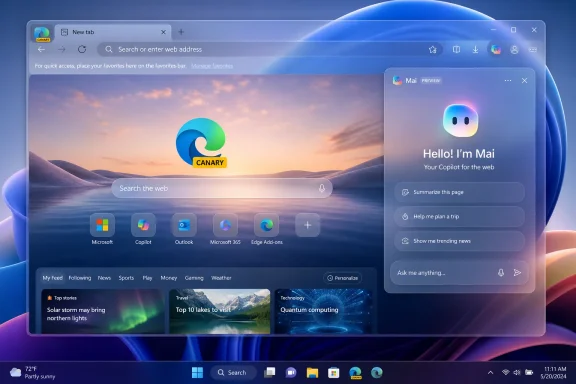
Microsoft has added support for Windows 11’s Mica material in the “Mai” redesign of Microsoft Edge Canary, allowing testers in June 2026 to use the browser’s Copilot-inspired interface and translucent system-matched window treatment at the same time instead of choosing between them. That sounds like the smallest possible browser news: a visual effect now works with another visual effect. But in Microsoft’s current product strategy, polish is not decoration; it is part of the pitch. Edge is being remade to feel less like a Chromium browser with Microsoft services attached and more like a native front door to Windows, Copilot, and the company’s AI-first future.
The latest Canary change matters because it removes a visible seam in Microsoft’s redesign effort. Until now, users experimenting with Edge’s hidden interface work reportedly hit a trade-off: enable the new Mai look, or enable Mica, but not both together without the redesign falling apart. That is the sort of bug only enthusiasts notice, but it also reveals the larger problem Microsoft is trying to solve.
Edge has spent years oscillating between two identities. It is a fast Chromium browser with enterprise controls, a consumer portal full of Microsoft services, a PDF reader, a shopping assistant, a sidebar launcher, and increasingly an AI client. The Mai redesign appears to be Microsoft’s attempt to impose one visual grammar across those roles.
That grammar comes from Copilot. Rounded surfaces, softer spacing, cleaner menus, and more generous visual hierarchy are not merely cosmetic decisions. They are a way of telling users that Edge belongs to the same family as the AI interfaces Microsoft is placing across Windows and Microsoft 365.
Mica support completes that argument at the window level. On Windows 11, Mica is the background material that lets an app subtly inherit color from the desktop wallpaper and system theme. When it works well, the app feels grounded in the operating system rather than pasted on top of it.
For a browser, that distinction is unusually important. Browsers are now operating systems inside operating systems, and Edge’s job is to look native enough that Microsoft can keep moving Windows experiences into it without making users feel they have been pushed into a separate product.
That subtlety is why Edge’s Mica story has been so frustrating for design-sensitive users. Microsoft has experimented with Mica in Edge before, including title bar and tab-strip treatments, but the implementation has come and gone across versions and channels. For enthusiasts, the browser has become a long-running reminder that Microsoft’s design system can be more coherent in documentation than in shipped software.
The Canary fix does not settle the matter for stable-channel users. It does, however, suggest Microsoft is no longer treating the new interface and Windows-native materials as separate experiments. If Mai is the future Edge shell, and Mica can now live inside it, the redesign is moving from sketch to product.
There is a practical reason to care. UI experiments that conflict with one another rarely survive in their purest form. When two flags break each other, one often gets delayed, hidden, or abandoned. Making Mica and Mai coexist is a sign that Microsoft wants both pieces in the same shipping path.
It also matters because Edge is one of the most visible Windows apps Microsoft controls end to end. If Microsoft cannot make its own browser feel aligned with Windows 11, the broader design language starts to look aspirational rather than operational.
That is a strategic choice. Microsoft is not merely adding AI features to Edge; it is making the browser visually resemble the AI product family. The interface becomes a kind of ambient branding layer, reminding users that browsing, searching, summarizing, shopping, reading PDFs, and working with web apps are all expected to flow into Copilot-adjacent workflows.
There is an obvious risk here. Users who simply want a browser may read the redesign as another example of Microsoft converting neutral desktop space into an AI billboard. Edge already carries baggage from years of prompts, defaults battles, sidebar experiments, rewards integrations, and aggressive Windows promotion. A Copilot-styled redesign could either make the browser feel modern or make it feel captured by Microsoft’s current obsession.
The Mica addition softens that risk because it pulls the design back toward Windows rather than only toward Copilot. A browser that looks like Copilot may feel like a service wrapper. A browser that looks like Copilot and behaves visually like a Windows 11 app has a better chance of feeling native.
That balance is the crux of the redesign. Microsoft needs Edge to be an AI surface without making every user feel as if the browser has stopped being theirs.
Still, Canary changes often reveal Microsoft’s priorities earlier than official announcements do. A bug fix in a hidden redesign tells us which pieces Microsoft is willing to spend engineering time reconciling. In this case, the company appears to be investing in making Edge’s next interface both Copilot-aligned and Windows-native.
That combination fits the broader cadence of Edge development in 2026. Microsoft has been repositioning the browser as a place where AI actions, Microsoft account services, enterprise policy, and Windows integration meet. The browser is no longer just a competitor to Chrome; it is a managed container for Microsoft’s web-era operating environment.
The Canary channel also gives Microsoft cover. If users complain that the redesign is too rounded, too Copilot-like, too wasteful of vertical space, or too inconsistent with classic desktop expectations, the company can still adjust before stable rollout. That is the generous interpretation.
The less generous interpretation is that Microsoft sometimes uses preview channels to normalize changes long before users have a meaningful choice. By the time a redesign lands broadly, the internal direction may already be fixed, with feedback limited to rough edges rather than fundamentals.
Enterprises prize browser stability in a way consumer design teams often underestimate. A browser is not just an app; it is the runtime for line-of-business portals, identity flows, admin consoles, SaaS dashboards, remote support tools, and increasingly internal AI assistants. Even small interface changes can trigger training costs, accessibility concerns, screenshot mismatches, and support friction.
The Mai redesign will likely be judged by whether it preserves predictability. If Microsoft keeps menus logically placed, policies intact, performance steady, and visual changes restrained, IT departments may barely notice. If the redesign arrives alongside more Copilot prompts, shifting defaults, or interface churn, it will be read as another consumer-led change spilling into managed environments.
There is also a policy question. Microsoft has generally given organizations extensive Edge controls, but the practical value of policy depends on whether new experiences can be cleanly disabled, delayed, or standardized. A redesign that behaves differently by channel, account type, region, or feature flag can be difficult to document internally.
That is why Canary sightings matter to IT pros even when the feature seems superficial. They are an early warning system for the direction of the product. Mica is not a deployment problem, but the redesign it now supports may become part of the next round of enterprise browser planning.
Edge’s interface is valuable because it is adjacent to intent. A user opening a tab, searching, saving a page, signing in, or asking for a summary is making a decision Microsoft can route through Bing, Copilot, Microsoft 365, shopping tools, or enterprise services. Design is the traffic system for those decisions.
That helps explain why Microsoft is pushing so hard on coherence. If the browser looks like a disjointed pile of features, users will treat each Microsoft prompt as an interruption. If the browser feels like a unified assistant-oriented environment, those same prompts may feel like part of the workflow.
Mica contributes to that illusion of coherence. It tells the eye that Edge is part of Windows, while Mai tells the eye that Edge is part of Copilot. Together, they bridge the old Microsoft platform and the new one.
The danger is that coherence can become camouflage. A smoother interface does not automatically make a feature less intrusive, a prompt less self-serving, or an AI integration more useful. Microsoft’s challenge is not simply to make Edge look modern; it is to make the modernized browser earn the space it occupies.
Edge should be one of the apps that makes Windows 11 feel complete. It is updated frequently, installed broadly, and central to Microsoft’s consumer and enterprise strategy. When Edge looks visually out of step, it weakens the claim that Windows 11 has a cohesive modern interface.
This is why the Mai-and-Mica combination is more than eye candy. It is Microsoft trying to make one of its most important apps carry the operating system’s visual identity forward. If File Explorer, Settings, Microsoft Store, Copilot, and Edge all share enough material and spacing logic, Windows starts to feel less like a museum of Microsoft eras.
But consistency has to survive real use. It must work in dark mode and light mode, on high-DPI displays and remote sessions, with vertical tabs and horizontal tabs, with accessibility settings, with multiple profiles, and under enterprise policy. A design language that only looks good in a staged screenshot is not a design system; it is marketing.
The Canary update is encouraging because it fixes a conflict in the messy place where real design systems are proven: feature interactions. Mica working with Mai is a small sign that Microsoft is trying to reduce the distance between design intent and daily behavior.
That makes the Mai redesign unusually exposed. The people most likely to enable hidden flags are also the people most likely to notice inconsistency, complain about wasted pixels, and compare every change against Chrome, Firefox, Vivaldi, Arc, and older versions of Edge. They are not a representative audience, but they are an influential one.
For this group, Mica support is a credibility point. It says Microsoft is paying attention to the kind of polish that enthusiasts have asked for since Windows 11 began defining its native-app aesthetic. It also reduces the annoyance of having to choose between two experimental pieces of the same visual future.
Yet the same users may be wary of the Copilot framing. A cleaner browser is welcome; an AI-branded browser shell is more divisive. Microsoft’s task is to persuade power users that Mai is a genuine usability improvement, not merely a new coat of paint for service promotion.
That persuasion will depend on restraint. If the redesign improves readability, reduces clutter, makes menus more consistent, and preserves customization, it can win skeptics. If it becomes a prettier wrapper around more prompts, it will harden opposition.
The Mai redesign could help by creating a calmer, clearer hierarchy. A well-designed interface can make a feature-rich app feel intentional rather than cluttered. If Microsoft uses the redesign to simplify Edge’s surfaces, it could make the browser more approachable without removing power.
But a visual refresh can also enable more accumulation. Once the interface feels cleaner, product teams may find new room for banners, buttons, side panels, agents, recommendations, and account-linked experiences. The history of Edge suggests that this is not a theoretical risk.
Mica does not solve that. It makes the window more elegant, not the product strategy more disciplined. The best version of Mai would pair the new look with a more careful philosophy about what belongs in the browser by default.
That is where Microsoft’s incentives are conflicted. Edge is both a user tool and a distribution channel. The more important Copilot becomes to Microsoft’s business, the harder it will be for Edge to remain visually modern without becoming behaviorally pushy.
The broader direction is harder to miss. Edge is being aligned with Copilot’s design language, integrated more tightly with Windows 11’s materials, and prepared for a future where the browser is one of Microsoft’s primary AI surfaces. The company is not merely changing pixels; it is changing what Edge is supposed to represent.
This is not automatically bad. Browsers need to evolve, and Edge has legitimate strengths that deserve a better, more coherent interface. If Microsoft can make Edge feel lighter, more native, and more consistent, users may benefit even if they never touch Copilot.
But the company’s recent history makes skepticism reasonable. Microsoft often frames integration as convenience while users experience it as pressure. The difference between those two outcomes will determine whether Mai is remembered as a successful modernization or another chapter in Edge’s long struggle for trust.
 Microsoft’s Browser Redesign Is Really a Platform Argument
The latest Canary change matters because it removes a visible seam in Microsoft’s redesign effort. Until now, users experimenting with Edge’s hidden interface work reportedly hit a trade-off: enable the new Mai look, or enable Mica, but not both together without the redesign falling apart. That is the sort of bug only enthusiasts notice, but it also reveals the larger problem Microsoft is trying to solve.Edge has spent years oscillating between two identities. It is a fast Chromium browser with enterprise controls, a consumer portal full of Microsoft services, a PDF reader, a shopping assistant, a sidebar launcher, and increasingly an AI client. The Mai redesign appears to be Microsoft’s attempt to impose one visual grammar across those roles.
That grammar comes from Copilot. Rounded surfaces, softer spacing, cleaner menus, and more generous visual hierarchy are not merely cosmetic decisions. They are a way of telling users that Edge belongs to the same family as the AI interfaces Microsoft is placing across Windows and Microsoft 365.
Mica support completes that argument at the window level. On Windows 11, Mica is the background material that lets an app subtly inherit color from the desktop wallpaper and system theme. When it works well, the app feels grounded in the operating system rather than pasted on top of it.
For a browser, that distinction is unusually important. Browsers are now operating systems inside operating systems, and Edge’s job is to look native enough that Microsoft can keep moving Windows experiences into it without making users feel they have been pushed into a separate product.
Mica Is Small Until It Disappears
Mica is one of those Windows 11 features that only draws attention when it is missing, broken, or inconsistently applied. It is not Aero Glass reborn, and it is not meant to be a showy transparency layer. Its purpose is quieter: it gives windows depth, color continuity, and a sense that the app belongs to the desktop environment.That subtlety is why Edge’s Mica story has been so frustrating for design-sensitive users. Microsoft has experimented with Mica in Edge before, including title bar and tab-strip treatments, but the implementation has come and gone across versions and channels. For enthusiasts, the browser has become a long-running reminder that Microsoft’s design system can be more coherent in documentation than in shipped software.
The Canary fix does not settle the matter for stable-channel users. It does, however, suggest Microsoft is no longer treating the new interface and Windows-native materials as separate experiments. If Mai is the future Edge shell, and Mica can now live inside it, the redesign is moving from sketch to product.
There is a practical reason to care. UI experiments that conflict with one another rarely survive in their purest form. When two flags break each other, one often gets delayed, hidden, or abandoned. Making Mica and Mai coexist is a sign that Microsoft wants both pieces in the same shipping path.
It also matters because Edge is one of the most visible Windows apps Microsoft controls end to end. If Microsoft cannot make its own browser feel aligned with Windows 11, the broader design language starts to look aspirational rather than operational.
The Mai Redesign Pushes Edge Toward Copilot Even When AI Is Not the Task
The most interesting part of Mai is not that it borrows from Copilot. It is that it does so even for users who are not explicitly using Copilot. Reports on the redesign have pointed to changes in menus, settings, the new tab experience, and other interface surfaces that adopt the softer, rounder look associated with Microsoft’s AI client.That is a strategic choice. Microsoft is not merely adding AI features to Edge; it is making the browser visually resemble the AI product family. The interface becomes a kind of ambient branding layer, reminding users that browsing, searching, summarizing, shopping, reading PDFs, and working with web apps are all expected to flow into Copilot-adjacent workflows.
There is an obvious risk here. Users who simply want a browser may read the redesign as another example of Microsoft converting neutral desktop space into an AI billboard. Edge already carries baggage from years of prompts, defaults battles, sidebar experiments, rewards integrations, and aggressive Windows promotion. A Copilot-styled redesign could either make the browser feel modern or make it feel captured by Microsoft’s current obsession.
The Mica addition softens that risk because it pulls the design back toward Windows rather than only toward Copilot. A browser that looks like Copilot may feel like a service wrapper. A browser that looks like Copilot and behaves visually like a Windows 11 app has a better chance of feeling native.
That balance is the crux of the redesign. Microsoft needs Edge to be an AI surface without making every user feel as if the browser has stopped being theirs.
Canary Is Where Microsoft Tests the Future and Measures the Backlash
Edge Canary is not a promise. It is the channel where Microsoft can ship rough ideas, break assumptions, and watch what enthusiasts notice. The addition of Mica support to Mai should therefore be read as directional, not final.Still, Canary changes often reveal Microsoft’s priorities earlier than official announcements do. A bug fix in a hidden redesign tells us which pieces Microsoft is willing to spend engineering time reconciling. In this case, the company appears to be investing in making Edge’s next interface both Copilot-aligned and Windows-native.
That combination fits the broader cadence of Edge development in 2026. Microsoft has been repositioning the browser as a place where AI actions, Microsoft account services, enterprise policy, and Windows integration meet. The browser is no longer just a competitor to Chrome; it is a managed container for Microsoft’s web-era operating environment.
The Canary channel also gives Microsoft cover. If users complain that the redesign is too rounded, too Copilot-like, too wasteful of vertical space, or too inconsistent with classic desktop expectations, the company can still adjust before stable rollout. That is the generous interpretation.
The less generous interpretation is that Microsoft sometimes uses preview channels to normalize changes long before users have a meaningful choice. By the time a redesign lands broadly, the internal direction may already be fixed, with feedback limited to rough edges rather than fundamentals.
Enterprise IT Will Care Less About Mica Than About Momentum
For sysadmins, Mica itself is not the story. No help desk is likely to be overwhelmed by tickets about a translucent title bar. The concern is what the redesign signals about Edge’s direction, release cadence, and expanding role inside managed Windows environments.Enterprises prize browser stability in a way consumer design teams often underestimate. A browser is not just an app; it is the runtime for line-of-business portals, identity flows, admin consoles, SaaS dashboards, remote support tools, and increasingly internal AI assistants. Even small interface changes can trigger training costs, accessibility concerns, screenshot mismatches, and support friction.
The Mai redesign will likely be judged by whether it preserves predictability. If Microsoft keeps menus logically placed, policies intact, performance steady, and visual changes restrained, IT departments may barely notice. If the redesign arrives alongside more Copilot prompts, shifting defaults, or interface churn, it will be read as another consumer-led change spilling into managed environments.
There is also a policy question. Microsoft has generally given organizations extensive Edge controls, but the practical value of policy depends on whether new experiences can be cleanly disabled, delayed, or standardized. A redesign that behaves differently by channel, account type, region, or feature flag can be difficult to document internally.
That is why Canary sightings matter to IT pros even when the feature seems superficial. They are an early warning system for the direction of the product. Mica is not a deployment problem, but the redesign it now supports may become part of the next round of enterprise browser planning.
The Browser Chrome Is Becoming Microsoft’s Most Contested Surface
The irony of modern browser design is that the less visible the browser frame becomes, the more politically important it is. The tab strip, address bar, sidebar, profile button, and new tab page are the few places where the browser vendor can still shape behavior before the web page takes over. Microsoft knows this, Google knows this, and users increasingly know it too.Edge’s interface is valuable because it is adjacent to intent. A user opening a tab, searching, saving a page, signing in, or asking for a summary is making a decision Microsoft can route through Bing, Copilot, Microsoft 365, shopping tools, or enterprise services. Design is the traffic system for those decisions.
That helps explain why Microsoft is pushing so hard on coherence. If the browser looks like a disjointed pile of features, users will treat each Microsoft prompt as an interruption. If the browser feels like a unified assistant-oriented environment, those same prompts may feel like part of the workflow.
Mica contributes to that illusion of coherence. It tells the eye that Edge is part of Windows, while Mai tells the eye that Edge is part of Copilot. Together, they bridge the old Microsoft platform and the new one.
The danger is that coherence can become camouflage. A smoother interface does not automatically make a feature less intrusive, a prompt less self-serving, or an AI integration more useful. Microsoft’s challenge is not simply to make Edge look modern; it is to make the modernized browser earn the space it occupies.
Windows 11’s Design Language Still Needs Its Flagship Apps to Behave
Windows 11 launched with a strong design thesis and an uneven implementation reality. Rounded corners, Mica, refreshed icons, centered taskbar elements, and modern context menus gave the operating system a recognizable identity. But many users still encounter a patchwork of old dialogs, inconsistent surfaces, legacy controls, and apps that only partially follow the rules.Edge should be one of the apps that makes Windows 11 feel complete. It is updated frequently, installed broadly, and central to Microsoft’s consumer and enterprise strategy. When Edge looks visually out of step, it weakens the claim that Windows 11 has a cohesive modern interface.
This is why the Mai-and-Mica combination is more than eye candy. It is Microsoft trying to make one of its most important apps carry the operating system’s visual identity forward. If File Explorer, Settings, Microsoft Store, Copilot, and Edge all share enough material and spacing logic, Windows starts to feel less like a museum of Microsoft eras.
But consistency has to survive real use. It must work in dark mode and light mode, on high-DPI displays and remote sessions, with vertical tabs and horizontal tabs, with accessibility settings, with multiple profiles, and under enterprise policy. A design language that only looks good in a staged screenshot is not a design system; it is marketing.
The Canary update is encouraging because it fixes a conflict in the messy place where real design systems are proven: feature interactions. Mica working with Mai is a small sign that Microsoft is trying to reduce the distance between design intent and daily behavior.
Enthusiasts Are the Test Audience Microsoft Cannot Quite Please
Windows enthusiasts have a complicated relationship with Edge. Many appreciate its performance, sleeping tabs, vertical tabs, PDF tools, and enterprise manageability. Many also resent its persistence in Windows, its promotional nudges, and Microsoft’s habit of treating the browser as a strategic beachhead.That makes the Mai redesign unusually exposed. The people most likely to enable hidden flags are also the people most likely to notice inconsistency, complain about wasted pixels, and compare every change against Chrome, Firefox, Vivaldi, Arc, and older versions of Edge. They are not a representative audience, but they are an influential one.
For this group, Mica support is a credibility point. It says Microsoft is paying attention to the kind of polish that enthusiasts have asked for since Windows 11 began defining its native-app aesthetic. It also reduces the annoyance of having to choose between two experimental pieces of the same visual future.
Yet the same users may be wary of the Copilot framing. A cleaner browser is welcome; an AI-branded browser shell is more divisive. Microsoft’s task is to persuade power users that Mai is a genuine usability improvement, not merely a new coat of paint for service promotion.
That persuasion will depend on restraint. If the redesign improves readability, reduces clutter, makes menus more consistent, and preserves customization, it can win skeptics. If it becomes a prettier wrapper around more prompts, it will harden opposition.
The Real Test Is Whether Microsoft Can Stop Overloading Edge
Edge’s central problem has never been capability. If anything, Edge has too much capability pressing against too little trust. Microsoft has packed the browser with features at a pace that can make it feel less like a refined tool and more like a strategic container into which every corporate priority eventually gets poured.The Mai redesign could help by creating a calmer, clearer hierarchy. A well-designed interface can make a feature-rich app feel intentional rather than cluttered. If Microsoft uses the redesign to simplify Edge’s surfaces, it could make the browser more approachable without removing power.
But a visual refresh can also enable more accumulation. Once the interface feels cleaner, product teams may find new room for banners, buttons, side panels, agents, recommendations, and account-linked experiences. The history of Edge suggests that this is not a theoretical risk.
Mica does not solve that. It makes the window more elegant, not the product strategy more disciplined. The best version of Mai would pair the new look with a more careful philosophy about what belongs in the browser by default.
That is where Microsoft’s incentives are conflicted. Edge is both a user tool and a distribution channel. The more important Copilot becomes to Microsoft’s business, the harder it will be for Edge to remain visually modern without becoming behaviorally pushy.
The Canary Fix Shows Where Edge Is Headed Next
The immediate news is simple: Microsoft has made the Mai redesign and Mica effect work together in Edge Canary. For users testing the hidden interface, that means a more complete preview of the browser Microsoft appears to be building. For everyone else, it is a signpost.The broader direction is harder to miss. Edge is being aligned with Copilot’s design language, integrated more tightly with Windows 11’s materials, and prepared for a future where the browser is one of Microsoft’s primary AI surfaces. The company is not merely changing pixels; it is changing what Edge is supposed to represent.
This is not automatically bad. Browsers need to evolve, and Edge has legitimate strengths that deserve a better, more coherent interface. If Microsoft can make Edge feel lighter, more native, and more consistent, users may benefit even if they never touch Copilot.
But the company’s recent history makes skepticism reasonable. Microsoft often frames integration as convenience while users experience it as pressure. The difference between those two outcomes will determine whether Mai is remembered as a successful modernization or another chapter in Edge’s long struggle for trust.
A Small Visual Fix Carries a Larger Warning for Edge’s Future
The practical read is straightforward, but the implications are bigger than the flag that enabled them.- Microsoft is now testing Edge’s Copilot-inspired Mai redesign with Windows 11’s Mica material working at the same time in Canary builds.
- The change fixes an earlier conflict where enabling Mica could reportedly cause the new redesign to disappear or fail to display correctly.
- The redesign appears aimed at making Edge feel visually closer to Copilot while still preserving a native Windows 11 look.
- Stable-channel users should treat the change as a preview rather than a guaranteed shipping commitment.
- Enterprise administrators should watch the redesign less for Mica itself and more for accompanying changes to defaults, prompts, policies, and user training needs.
- Microsoft’s biggest challenge is not whether Edge looks modern, but whether the redesigned browser feels useful without becoming more intrusive.
References
- Primary source: thewincentral.com
Published: 2026-06-09T11:58:10.503281
Microsoft Edge Mai Redesign Now Supports Mica Effect in Canary - WinCentral
Microsoft has added Mica support to Edge Canary's new Copilot-inspired Mai redesign, fixing the issue that previously disabled the UI. - Read in Microsoft News on WinCentral thewincentral.com
- Related coverage: windowslatest.com
Microsoft confirms Windows 11's Edge browser is getting an AI-driven redesign to look more like Copilot and Bing
Microsoft confirms Edge redesign with Copilot-style UI, bringing rounded design, and unified UI across Bing and other Microsoft AI surfaces. www.windowslatest.com
- Related coverage: pcworld.com
Microsoft Edge is getting a Copilot-style makeover, even if you don't use AI | PCWorld
A major redesign is coming to the Edge browser and it's borrowing design elements from the Copilot app.www.pcworld.com - Related coverage: windowscentral.com
Microsoft is slowly turning Edge into another Copilot app — tests redesigned UI that takes inspiration from Copilot | Windows Central
The latest Edge preview builds now feature an updated UI that borrows the design language that first debuted in Microsoft's Copilot app.www.windowscentral.com - Official source: blogs.windows.com
New updates to Edge across desktop and mobile
Edge just made it easier to go from first tab to final plan, wherever you go. Your favorite Copilot experiences, plus new ones, are now available directly in Edge on desktop and, for the first time, in the Edge mobile app. This includes capabilitiesblogs.windows.com - Official source: learn.microsoft.com
Microsoft Edge release schedule | Microsoft Learn
Microsoft Edge release schedulelearn.microsoft.com
- Related coverage: chip.de
Stärker an KI orientiert: Neues Design für Microsoft Edge - CHIP
Microsoft plant, die grafische Benutzeroberfläche seines Edge-Browsers unter Windows 11 stärker an die Suchmaschine Bing und den KI-Assistenten Copilot anzulehnen.www.chip.de
- Related coverage: techradar.com
'Microslop' is heading for Edge – major browser redesign is inspired by Copilot, and it's already seriously unpopular | TechRadar
From 'Micro$oft' to 'Microslop'? Copilot-inspired revamp for Edge stokes further AI rebellionwww.techradar.com - Related coverage: pureinfotech.com
How to enable mica effect on Microsoft Edge in 2026 - Pureinfotech
To enable the mica visual effect for tabs on Microsoft Edge, you'll have to append "--enable-features=Windows11MicaTitlebar" to the icon. pureinfotech.com
- Official source: blogs.microsoft.com
Microsoft Build 2026: Be yourself at work - The Official Microsoft Blog
Platforms shift when developers build. We explore, choose tools, dream, create. This platform shift comes with more information than ever, ready at your fingertips. This shift, it’s about building fast AND THEN: it’s about building, operating, optimizing and observing. Securing your...blogs.microsoft.com - Related coverage: nsaneforums.com
Edge Canary gets Windows 11-like redesign with rounded tabs and Mica effect - Software News - Nsane Forums
Microsoft recently added a new setting for managing experimental appearance settings in Edge Canary. The toggle did not work initially, but now you can use it to test what looks like the biggest Edge redesign since its launch in early 2020. Microsoft is on track to introduce more Windows 11-like ... nsaneforums.com
- Related coverage: drwindows.de
Microsoft Edge: Microsoft plant offenbar größeres Redesign - Update - Dr. Windows
Der Browser Microsoft Edge soll zahlreiche optische Anpassungen erhalten, um sich besser in Microsofts KI-Ökosystem einzufügen.www.drwindows.de
