

Microsoft began rolling out new Edge updates on May 13, 2026, adding Copilot-powered “Journeys” to the browser’s desktop and mobile experience so Edge can group past browsing activity into topic cards and suggest AI-assisted ways to resume unfinished web research. The feature arrives as Microsoft is reshaping Edge’s new tab page around Copilot, retiring older user-managed tools such as Collections, and betting that the browser’s next job is not just to remember where you went, but to interpret why you went there. That is the bargain now being forced into view: convenience in exchange for control, synthesis in exchange for source trails, and an “AI browser” in exchange for a browser that simply obeys.
The modern browser history page is ugly, literal, and indispensable. It is a chronological ledger of user intent, full of dead ends, mistyped searches, forgotten tabs, accidental visits, and the one page you actually need to recover at 11:47 p.m. before a deadline. Its value is not elegance. Its value is that it does not pretend to know better than you.
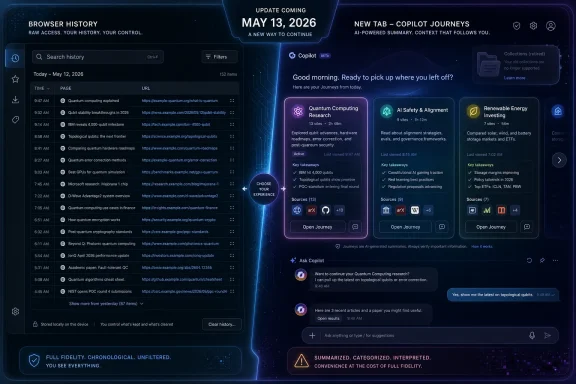
Edge’s new Journeys feature takes a different view. Instead of treating history as a searchable record, Microsoft wants to treat it as raw material for Copilot. The company’s own framing is benign enough: Edge can group past browsing into helpful topic cards on the new tab page, letting users resume a project such as researching a hobby, planning a purchase, or studying a topic without starting from scratch.
That sounds sensible until you notice the shift in agency. A browser history entry is a pointer. A Journey is a judgment. The old system says, “Here are the pages you visited.” The new one says, “Here is what I think you were doing, and here is the summary I think you need.”
That is not automatically bad. Anyone who has tried to reconstruct a research trail from dozens of tabs knows that browser history has never been a polished productivity tool. Chrome’s history search, tab groups, shared tabs, bookmarks, Reading List, and Edge’s own Collections all exist because raw chronology is a poor match for how people actually work.
But those tools kept the web page at the center. Journeys moves the AI-generated abstraction closer to the center. That is why the PCWorld criticism lands: the issue is not merely that Microsoft added AI to Edge, but that it is allowing Copilot to occupy the mental and interface space previously reserved for the user’s own navigation record.
That matters more than browser vendors often admit. A remembered website is not interchangeable with a summary of its contents. The source may have a pricing table, a firmware download, a forum thread, a caveat in the comments, a vendor’s support matrix, a code snippet, or an authorial voice that matters precisely because it is not flattened into an AI answer.
Microsoft’s example, as described in the PCWorld piece, is revealing because it shows Copilot turning a set of previously visited pages into a prompt-like action: summarize beginner-friendly projects across these pages. That may be useful if the user’s goal is to compare. It is much less useful if the user’s goal is to find the exact page they previously decided was worth saving.
The anxiety here is not nostalgia for bad UI. It is a practical objection from people who use browsers as work tools. IT pros, developers, researchers, students, and power users do not only want “the gist.” They want provenance. They want to know which Microsoft Learn page had the correct parameter name, which GitHub issue contained the workaround, which vendor PDF included the footnote, and which tab was the one they meant to keep open.
AI summaries can help with that work, but they cannot replace the trail. When the summary appears before the source, the browser stops acting like a map and starts acting like a concierge. Sometimes that is helpful. Sometimes it is exactly how you lose the address.
Collections understood something Journeys risks forgetting. Not every browsing session is a topic cluster waiting to be inferred. Sometimes a collection is a shopping shortlist. Sometimes it is a procurement trail. Sometimes it is a training module in progress, a set of competing support articles, a group of pages for a vacation, or a bundle of evidence for a forum post. The meaning comes from the user’s decision to save it.
Microsoft’s reported plan to retire Collections while pushing Edge deeper into Copilot territory makes the strategy feel less like additive innovation and more like substitution. The company can argue that it is simplifying Edge, and there is a case to be made that Edge has accumulated too many sidebars, toggles, shopping widgets, coupon tools, news panels, and Microsoft account hooks. But removing a user-curated research tool while elevating an AI-curated substitute sends a clear message about what kind of browser Microsoft wants Edge to become.
The old Edge pitch, especially after the Chromium relaunch in 2020, was that Microsoft could build a faster, cleaner, enterprise-friendly browser that happened to have useful extras. The new pitch is that Edge is an AI surface. That is a very different product promise.
For users who ignored Collections, its retirement may barely register. For people who used it heavily, it looks like yet another example of Microsoft training users not to trust first-party workflows. Invest time in a Microsoft feature and it may be rebranded, moved, monetized, deprecated, or replaced by something that better fits the company’s current strategic slide deck.
That competitive context matters. Microsoft is not acting in a vacuum. Every major browser maker is trying to decide whether the browser is still a neutral window onto the web or the front end for an AI assistant that mediates the web. Google has Gemini, Chrome, Search, Lens, and Android. Microsoft has Copilot, Edge, Bing, Windows, and Microsoft 365. The Browser Company has pushed toward AI-native browsing with Dia. Mozilla, even while criticizing Microsoft’s tactics, has had to explain its own experiments with AI-enhanced browsing.
The difference is that Microsoft has a long history of turning optional-seeming integrations into ambient defaults. Edge is not just another app on Windows; it is entangled with the operating system, the search box, widgets, default browser prompts, PDF handling, Microsoft account identity, and enterprise policy. When Microsoft changes Edge’s center of gravity, Windows users feel it even if they did not go shopping for an AI browser.
That is why the opt-in question matters. Microsoft says Copilot can use browsing history to deliver more relevant answers with user permission, and enterprise documentation points to controls for configuring the Copilot new tab page. But the lived experience of Windows users has often turned on the difference between “permission for sensitive data use” and “product surfaces that keep nudging you toward the thing Microsoft wants adopted.”
A feature can be technically optional and still be strategically unavoidable. If the new tab page, the sidebar, the context menu, the mobile browser, and the default prompts all point toward Copilot, the browser has been redesigned around Copilot whether or not every data flow is enabled by default.
Microsoft’s Copilot new tab page is an attempt to replace that clutter with a more modern kind of mediation. Instead of a feed of disconnected items, Microsoft wants a unified surface where users can search, chat, navigate, summarize, and resume activity. In theory, this is cleaner. In practice, it shifts the new tab page from a launchpad into an assistant-controlled workspace.
That distinction is subtle but important. A launchpad waits for direction. A workspace proposes direction. If Edge opens to a Copilot interface that suggests Journeys, study modes, summaries, and next steps, the browser is no longer merely helping the user get to the web. It is inserting a layer of interpretation before the user reaches the web.
For casual users, that may be pleasant. If someone was researching cross-stitch patterns, trip plans, or beginner guitar lessons, a topic card and summary might be exactly what they need. But for the kind of users who care about browser behavior, the new tab page is sacred territory. It is the point of maximum repetition. A small annoyance there becomes a daily tax.
Microsoft should know this. The company has spent years irritating users with Edge prompts, Bing defaults, Windows search web results, account nudges, Teams integrations, and Copilot placement experiments. The backlash is rarely about one feature in isolation. It is about the accumulated sense that Windows and Edge have become negotiation surfaces, where the user’s preference is only one stakeholder among many.
The trouble is that web research depends on chain of custody. A fact without a source is fragile. A recommendation without the page that produced it is hard to verify. A summary without visible links can turn productive research into a scavenger hunt through your own past.
This is not a theoretical concern. Generative AI systems are prone to compression errors, misplaced emphasis, confident paraphrases, and missing caveats. Even when they do not hallucinate, they can distort the user’s priorities by deciding what matters. In browser history, omission is not neutral. If Copilot summarizes five pages and downplays the sixth, the user may never return to the page that contained the deciding detail.
That is why a useful AI history tool should be source-first, not summary-first. It should show the pages, explain the grouping, and make the summary secondary. It should let users expand the trail, pin specific pages, correct the grouping, and reject inferred topics. Above all, it should never make users feel that the exact link they visited is now hidden behind a conversational layer.
The best AI browser feature would act like an indexer. The worst one acts like a substitute memory. Journeys needs to prove it belongs in the first category.
That is where Edge’s dual identity becomes complicated. Edge is both a consumer browser and a managed enterprise client. Microsoft can ship flashy Copilot experiences to consumers while also offering policies for Edge for Business, but the boundary is not always obvious to users who sign into a work profile on a personal machine or a personal profile on a work-managed device.
The Copilot new tab page is already described in enterprise terms, with configuration guidance for organizations. That is good as far as it goes. Admins need the ability to disable or shape AI surfaces, especially in regulated environments where browsing history can reveal client names, legal research, medical topics, acquisitions, vulnerabilities, internal tools, or confidential investigations.
But policy availability is not the same as operational clarity. IT departments will need to know whether Journeys appears in stable builds, how it behaves across profiles, whether it respects existing history and sync settings, how it interacts with Microsoft 365 Copilot licensing, and what user-facing language appears when history access is requested. They will also need to document the change for help desks, because “Where did my history go?” and “Why is Copilot showing this?” are exactly the kinds of tickets that arrive after a browser update.
The risk is not only data leakage. It is workflow drift. If employees begin relying on AI-generated summaries of previously visited internal or external pages, organizations may need guidance around verification, recordkeeping, and citation. In sectors where auditability matters, “Copilot told me that was the answer” is not a process.
There is a world in which Edge Journeys is a beloved power feature. In that world, it is clearly opt-in, visibly source-linked, easy to disable, respectful of profiles, transparent about data use, and designed around the user’s own saved pages rather than Microsoft’s desire to make Copilot the first stop. In that world, Collections is not killed before its successor earns trust. In that world, AI helps users remember without taking over the act of remembering.
The current trajectory feels less careful. Microsoft’s recent Edge changes sit alongside a broader pattern: Copilot buttons, Copilot-styled interfaces, AI-first new tab experiences, Recall controversies, Windows search integration, and product language that treats AI as the natural endpoint of every workflow. Even when individual features have merit, the pattern makes users defensive.
Trust is especially hard to rebuild in a browser. A browser is where people bank, work, read, argue, shop, research symptoms, manage passwords, access admin consoles, and recover from mistakes. It is not just another productivity app. If users feel the browser is constantly trying to reinterpret their behavior for a vendor’s AI strategy, they will start looking for exits.
That is the opportunity for competitors. Chrome has its own AI ambitions, and Google is hardly a neutral monk of the open web. But Chrome’s history and tab model still feel familiar to many users. Firefox can position itself as the browser that asks before it mediates. Brave, Vivaldi, and others can pitch control, privacy, and customization to users tired of being product-managed by default.
When Edge turns history into AI summaries, critics see the fog moving inside the tool itself. That may be unfair to the engineering behind Journeys, but it is not irrational. If users have spent the last two years watching AI systems confidently summarize pages they have not read, invent sources, flatten nuance, and bury links, they are not going to greet an AI-mediated browser history with automatic trust.
Microsoft’s defenders can argue that Journeys is not replacing the entire browser history system, that traditional history remains accessible, and that Copilot history use requires permission for richer answers. Those details matter. But product perception is shaped by defaults and prominence, not only by buried fallbacks. If the new tab page pushes users into AI summaries while the old history page remains somewhere in the menu, the functional replacement has already begun.
There is also a cultural issue. Calling every feature “AI” now carries baggage. A browser feature that intelligently clusters history might have been welcomed a decade ago as smart organization. In 2026, attaching it to Copilot means attaching it to every frustration users have with forced assistants, cloudy privacy explanations, and corporate AI maximalism.
Microsoft has to decide whether it wants Edge to be trusted infrastructure or a showcase for Copilot adoption. Trying to be both is possible, but only if the company treats user control as a product requirement rather than a settings-page afterthought.
A respectful implementation would keep chronological history obvious and searchable. It would make every Journey card expand into the underlying pages. It would expose links before summaries. It would let users delete, rename, pin, merge, or disable topic groupings. It would preserve the distinction between tabs the user saved and topics the model inferred.
A disrespectful implementation would do the opposite. It would make the AI view the default, bury the raw list, summarize without showing source links, nudge users to grant broader history access, and remove older workflows before the new one proves itself. That is the version users are worried about because it matches too many recent software trends.
Microsoft still has time to steer. The company can present Journeys as an enhancement to history rather than a replacement for it. It can slow the retirement of Collections or provide a first-class migration path into a user-controlled saved research feature. It can give enterprise admins clear policies and consumers plain toggles. It can stop assuming that every Edge surface must become a Copilot surface.
The irony is that Edge does not need this kind of overreach. Underneath the clutter, Edge is a capable Chromium browser with strong PDF features, good performance, useful vertical tabs, solid enterprise management, and deep Windows integration. Microsoft keeps taking a browser many people might choose on its merits and making it feel like the delivery vehicle for a corporate priority.
Source: PCWorld Copilot is replacing Edge's browser history with AI slop
 Microsoft Is Turning Browser Memory Into a Copilot Product
The modern browser history page is ugly, literal, and indispensable. It is a chronological ledger of user intent, full of dead ends, mistyped searches, forgotten tabs, accidental visits, and the one page you actually need to recover at 11:47 p.m. before a deadline. Its value is not elegance. Its value is that it does not pretend to know better than you.Edge’s new Journeys feature takes a different view. Instead of treating history as a searchable record, Microsoft wants to treat it as raw material for Copilot. The company’s own framing is benign enough: Edge can group past browsing into helpful topic cards on the new tab page, letting users resume a project such as researching a hobby, planning a purchase, or studying a topic without starting from scratch.
That sounds sensible until you notice the shift in agency. A browser history entry is a pointer. A Journey is a judgment. The old system says, “Here are the pages you visited.” The new one says, “Here is what I think you were doing, and here is the summary I think you need.”
That is not automatically bad. Anyone who has tried to reconstruct a research trail from dozens of tabs knows that browser history has never been a polished productivity tool. Chrome’s history search, tab groups, shared tabs, bookmarks, Reading List, and Edge’s own Collections all exist because raw chronology is a poor match for how people actually work.
But those tools kept the web page at the center. Journeys moves the AI-generated abstraction closer to the center. That is why the PCWorld criticism lands: the issue is not merely that Microsoft added AI to Edge, but that it is allowing Copilot to occupy the mental and interface space previously reserved for the user’s own navigation record.
The URL Was the Product All Along
There is a reason browser history has barely changed in its core form for decades. It is one of the few remaining places in consumer software where the machine keeps a humble record rather than constructing a feed. The page title, favicon, URL, timestamp, and search box are primitive, but they preserve the user’s ability to retrace steps.That matters more than browser vendors often admit. A remembered website is not interchangeable with a summary of its contents. The source may have a pricing table, a firmware download, a forum thread, a caveat in the comments, a vendor’s support matrix, a code snippet, or an authorial voice that matters precisely because it is not flattened into an AI answer.
Microsoft’s example, as described in the PCWorld piece, is revealing because it shows Copilot turning a set of previously visited pages into a prompt-like action: summarize beginner-friendly projects across these pages. That may be useful if the user’s goal is to compare. It is much less useful if the user’s goal is to find the exact page they previously decided was worth saving.
The anxiety here is not nostalgia for bad UI. It is a practical objection from people who use browsers as work tools. IT pros, developers, researchers, students, and power users do not only want “the gist.” They want provenance. They want to know which Microsoft Learn page had the correct parameter name, which GitHub issue contained the workaround, which vendor PDF included the footnote, and which tab was the one they meant to keep open.
AI summaries can help with that work, but they cannot replace the trail. When the summary appears before the source, the browser stops acting like a map and starts acting like a concierge. Sometimes that is helpful. Sometimes it is exactly how you lose the address.
Collections Was the Better Answer Microsoft Already Had
The most damning part of this story is that Microsoft already built a more human-centered solution. Edge Collections let users gather pages, notes, and research into saved groups. It was not perfect, and Microsoft’s implementation drifted over time, but the idea was sound: let people create their own context.Collections understood something Journeys risks forgetting. Not every browsing session is a topic cluster waiting to be inferred. Sometimes a collection is a shopping shortlist. Sometimes it is a procurement trail. Sometimes it is a training module in progress, a set of competing support articles, a group of pages for a vacation, or a bundle of evidence for a forum post. The meaning comes from the user’s decision to save it.
Microsoft’s reported plan to retire Collections while pushing Edge deeper into Copilot territory makes the strategy feel less like additive innovation and more like substitution. The company can argue that it is simplifying Edge, and there is a case to be made that Edge has accumulated too many sidebars, toggles, shopping widgets, coupon tools, news panels, and Microsoft account hooks. But removing a user-curated research tool while elevating an AI-curated substitute sends a clear message about what kind of browser Microsoft wants Edge to become.
The old Edge pitch, especially after the Chromium relaunch in 2020, was that Microsoft could build a faster, cleaner, enterprise-friendly browser that happened to have useful extras. The new pitch is that Edge is an AI surface. That is a very different product promise.
For users who ignored Collections, its retirement may barely register. For people who used it heavily, it looks like yet another example of Microsoft training users not to trust first-party workflows. Invest time in a Microsoft feature and it may be rebranded, moved, monetized, deprecated, or replaced by something that better fits the company’s current strategic slide deck.
Copilot Is No Longer an Add-On in Edge
The broader Edge update is not only about Journeys. Microsoft is also bringing more Copilot features across desktop and mobile, including Copilot Vision and Voice on mobile, study-oriented tools such as quizzes, and podcast-style generated experiences. Some of this mirrors what Google and others have already been doing with AI summaries, Lens-style visual understanding, and education features.That competitive context matters. Microsoft is not acting in a vacuum. Every major browser maker is trying to decide whether the browser is still a neutral window onto the web or the front end for an AI assistant that mediates the web. Google has Gemini, Chrome, Search, Lens, and Android. Microsoft has Copilot, Edge, Bing, Windows, and Microsoft 365. The Browser Company has pushed toward AI-native browsing with Dia. Mozilla, even while criticizing Microsoft’s tactics, has had to explain its own experiments with AI-enhanced browsing.
The difference is that Microsoft has a long history of turning optional-seeming integrations into ambient defaults. Edge is not just another app on Windows; it is entangled with the operating system, the search box, widgets, default browser prompts, PDF handling, Microsoft account identity, and enterprise policy. When Microsoft changes Edge’s center of gravity, Windows users feel it even if they did not go shopping for an AI browser.
That is why the opt-in question matters. Microsoft says Copilot can use browsing history to deliver more relevant answers with user permission, and enterprise documentation points to controls for configuring the Copilot new tab page. But the lived experience of Windows users has often turned on the difference between “permission for sensitive data use” and “product surfaces that keep nudging you toward the thing Microsoft wants adopted.”
A feature can be technically optional and still be strategically unavoidable. If the new tab page, the sidebar, the context menu, the mobile browser, and the default prompts all point toward Copilot, the browser has been redesigned around Copilot whether or not every data flow is enabled by default.
The New Tab Page Is Becoming the Real Browser
For years, Edge’s new tab page has been a strange compromise between utility and distraction. At its best, it gives quick access to search, pinned sites, weather, and Microsoft account content. At its worst, it resembles a portal-era content firehose: finance snippets, celebrity headlines, sports tiles, sponsored links, and whatever the MSN algorithm thinks will keep a user’s eyes on the page for three more seconds.Microsoft’s Copilot new tab page is an attempt to replace that clutter with a more modern kind of mediation. Instead of a feed of disconnected items, Microsoft wants a unified surface where users can search, chat, navigate, summarize, and resume activity. In theory, this is cleaner. In practice, it shifts the new tab page from a launchpad into an assistant-controlled workspace.
That distinction is subtle but important. A launchpad waits for direction. A workspace proposes direction. If Edge opens to a Copilot interface that suggests Journeys, study modes, summaries, and next steps, the browser is no longer merely helping the user get to the web. It is inserting a layer of interpretation before the user reaches the web.
For casual users, that may be pleasant. If someone was researching cross-stitch patterns, trip plans, or beginner guitar lessons, a topic card and summary might be exactly what they need. But for the kind of users who care about browser behavior, the new tab page is sacred territory. It is the point of maximum repetition. A small annoyance there becomes a daily tax.
Microsoft should know this. The company has spent years irritating users with Edge prompts, Bing defaults, Windows search web results, account nudges, Teams integrations, and Copilot placement experiments. The backlash is rarely about one feature in isolation. It is about the accumulated sense that Windows and Edge have become negotiation surfaces, where the user’s preference is only one stakeholder among many.
AI Summaries Are Useful Until They Break the Chain of Custody
The strongest version of Microsoft’s argument is easy to understand. Browser history is noisy. People forget what they read. AI can cluster pages by theme, summarize common ideas, and surface a half-finished task at the moment the user is ready to resume it. For many ordinary tasks, that is better than a thousand-line chronological log.The trouble is that web research depends on chain of custody. A fact without a source is fragile. A recommendation without the page that produced it is hard to verify. A summary without visible links can turn productive research into a scavenger hunt through your own past.
This is not a theoretical concern. Generative AI systems are prone to compression errors, misplaced emphasis, confident paraphrases, and missing caveats. Even when they do not hallucinate, they can distort the user’s priorities by deciding what matters. In browser history, omission is not neutral. If Copilot summarizes five pages and downplays the sixth, the user may never return to the page that contained the deciding detail.
That is why a useful AI history tool should be source-first, not summary-first. It should show the pages, explain the grouping, and make the summary secondary. It should let users expand the trail, pin specific pages, correct the grouping, and reject inferred topics. Above all, it should never make users feel that the exact link they visited is now hidden behind a conversational layer.
The best AI browser feature would act like an indexer. The worst one acts like a substitute memory. Journeys needs to prove it belongs in the first category.
Enterprise IT Will See a Policy Surface, Not a Convenience Feature
Home users will debate whether Journeys is annoying, helpful, creepy, or just another feature to ignore. Enterprise administrators will ask a narrower question: what data is being processed, where does it go, what controls exist, and how much user confusion will this create?That is where Edge’s dual identity becomes complicated. Edge is both a consumer browser and a managed enterprise client. Microsoft can ship flashy Copilot experiences to consumers while also offering policies for Edge for Business, but the boundary is not always obvious to users who sign into a work profile on a personal machine or a personal profile on a work-managed device.
The Copilot new tab page is already described in enterprise terms, with configuration guidance for organizations. That is good as far as it goes. Admins need the ability to disable or shape AI surfaces, especially in regulated environments where browsing history can reveal client names, legal research, medical topics, acquisitions, vulnerabilities, internal tools, or confidential investigations.
But policy availability is not the same as operational clarity. IT departments will need to know whether Journeys appears in stable builds, how it behaves across profiles, whether it respects existing history and sync settings, how it interacts with Microsoft 365 Copilot licensing, and what user-facing language appears when history access is requested. They will also need to document the change for help desks, because “Where did my history go?” and “Why is Copilot showing this?” are exactly the kinds of tickets that arrive after a browser update.
The risk is not only data leakage. It is workflow drift. If employees begin relying on AI-generated summaries of previously visited internal or external pages, organizations may need guidance around verification, recordkeeping, and citation. In sectors where auditability matters, “Copilot told me that was the answer” is not a process.
Microsoft’s AI Browser Strategy Has a Trust Deficit
Microsoft’s problem is not that users hate AI. Many do not. Plenty of WindowsForum readers use Copilot, ChatGPT, Gemini, Claude, local models, or code assistants daily because they are genuinely useful. The problem is that Microsoft keeps confusing usefulness with inevitability.There is a world in which Edge Journeys is a beloved power feature. In that world, it is clearly opt-in, visibly source-linked, easy to disable, respectful of profiles, transparent about data use, and designed around the user’s own saved pages rather than Microsoft’s desire to make Copilot the first stop. In that world, Collections is not killed before its successor earns trust. In that world, AI helps users remember without taking over the act of remembering.
The current trajectory feels less careful. Microsoft’s recent Edge changes sit alongside a broader pattern: Copilot buttons, Copilot-styled interfaces, AI-first new tab experiences, Recall controversies, Windows search integration, and product language that treats AI as the natural endpoint of every workflow. Even when individual features have merit, the pattern makes users defensive.
Trust is especially hard to rebuild in a browser. A browser is where people bank, work, read, argue, shop, research symptoms, manage passwords, access admin consoles, and recover from mistakes. It is not just another productivity app. If users feel the browser is constantly trying to reinterpret their behavior for a vendor’s AI strategy, they will start looking for exits.
That is the opportunity for competitors. Chrome has its own AI ambitions, and Google is hardly a neutral monk of the open web. But Chrome’s history and tab model still feel familiar to many users. Firefox can position itself as the browser that asks before it mediates. Brave, Vivaldi, and others can pitch control, privacy, and customization to users tired of being product-managed by default.
The Slop Accusation Sticks Because the Web Is Already Drowning
The phrase “AI slop” is crude, but it captures a real fatigue. Users are already surrounded by generated summaries, low-effort articles, SEO debris, synthetic images, chatbot answers, automated videos, and search results that increasingly blur the line between information retrieval and content production. The browser used to be the tool for escaping that fog by going directly to sources.When Edge turns history into AI summaries, critics see the fog moving inside the tool itself. That may be unfair to the engineering behind Journeys, but it is not irrational. If users have spent the last two years watching AI systems confidently summarize pages they have not read, invent sources, flatten nuance, and bury links, they are not going to greet an AI-mediated browser history with automatic trust.
Microsoft’s defenders can argue that Journeys is not replacing the entire browser history system, that traditional history remains accessible, and that Copilot history use requires permission for richer answers. Those details matter. But product perception is shaped by defaults and prominence, not only by buried fallbacks. If the new tab page pushes users into AI summaries while the old history page remains somewhere in the menu, the functional replacement has already begun.
There is also a cultural issue. Calling every feature “AI” now carries baggage. A browser feature that intelligently clusters history might have been welcomed a decade ago as smart organization. In 2026, attaching it to Copilot means attaching it to every frustration users have with forced assistants, cloudy privacy explanations, and corporate AI maximalism.
Microsoft has to decide whether it wants Edge to be trusted infrastructure or a showcase for Copilot adoption. Trying to be both is possible, but only if the company treats user control as a product requirement rather than a settings-page afterthought.
The Real Edge Test Is Whether Users Can Still Say No
The practical question is simple: can users still get a clean, predictable browser that preserves direct access to their own web trail? If the answer is yes, Journeys can be judged as an optional layer. If the answer is no, then PCWorld’s complaint is not hyperbole; it is an early warning.A respectful implementation would keep chronological history obvious and searchable. It would make every Journey card expand into the underlying pages. It would expose links before summaries. It would let users delete, rename, pin, merge, or disable topic groupings. It would preserve the distinction between tabs the user saved and topics the model inferred.
A disrespectful implementation would do the opposite. It would make the AI view the default, bury the raw list, summarize without showing source links, nudge users to grant broader history access, and remove older workflows before the new one proves itself. That is the version users are worried about because it matches too many recent software trends.
Microsoft still has time to steer. The company can present Journeys as an enhancement to history rather than a replacement for it. It can slow the retirement of Collections or provide a first-class migration path into a user-controlled saved research feature. It can give enterprise admins clear policies and consumers plain toggles. It can stop assuming that every Edge surface must become a Copilot surface.
The irony is that Edge does not need this kind of overreach. Underneath the clutter, Edge is a capable Chromium browser with strong PDF features, good performance, useful vertical tabs, solid enterprise management, and deep Windows integration. Microsoft keeps taking a browser many people might choose on its merits and making it feel like the delivery vehicle for a corporate priority.
The Browser Should Remember Before It Explains
The concrete stakes are easy to lose in the AI rhetoric, so they are worth spelling out plainly. Journeys may become useful, but it should not be allowed to redefine browser history around summaries before Microsoft proves it can preserve user control.- Microsoft’s May 13, 2026 Edge update adds Copilot-powered Journeys that group browsing history into topic cards on the new tab page.
- The controversy is not simply that Edge has AI, but that AI is moving into the space once occupied by direct, user-controlled browser history and saved research tools.
- Edge Collections remains important to this debate because it represented user-curated context, while Journeys represents machine-inferred context.
- AI summaries are most useful when they expose their source pages clearly and least useful when they force users to hunt for the links they already visited.
- Enterprise administrators should treat Copilot history features as a governance, privacy, and support issue rather than a cosmetic browser change.
- Microsoft can reduce backlash by making raw history, source links, disable controls, and migration paths more prominent than Copilot’s interpretations.
Source: PCWorld Copilot is replacing Edge's browser history with AI slop
