

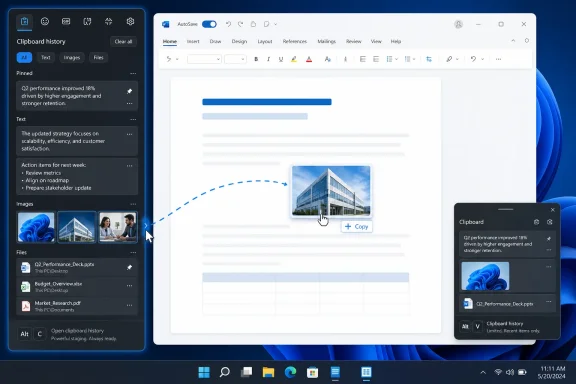
A new third-party clipboard utility called Edge Drop is making an early case for a more mouse-friendly alternative to Windows 11’s built-in clipboard history. The app, from developer AdiArtist, sits as a hidden strip along the left edge of the desktop and opens when the pointer reaches it or when the user presses Alt+C, according to Windows Central.
Unlike the standard Windows clipboard panel, Edge Drop is designed around drag and drop. Copied text, images, and supported files are collected in the panel, while users can also drag content directly into it for temporary holding. The result is closer to a small desktop staging area than a conventional clipboard history.
Windows 11 already offers clipboard history through Win+V, with support for pinned entries and cloud syncing between devices. Microsoft’s documentation says the feature can store text, HTML, and bitmap content, with individual entries capped at 4 MB.
Edge Drop’s differentiator is presentation and interaction. Rather than opening a pop-up menu and selecting a prior item with the keyboard, users can leave a collection of copied material at the edge of the screen, group it into stacks, then drag it into another application. That could suit workflows involving asset gathering, document assembly, image work, or moving several files between windows.
The current preview reportedly supports text, images, and several file types. Stacks are available for organizing content, though cross-type grouping—such as combining text notes with images—appears to be a limitation for now.
For ordinary copy-and-paste work, Windows 11’s built-in feature remains the simpler and more integrated option. It does not need another process running, can sync text across signed-in devices, and is managed under Settings > System > Clipboard. Edge Drop is aimed at people who want a persistent, visual scratchpad for items that need to be moved around rather than pasted immediately.
Windows Central reported in June that recent Edge Canary builds display a retirement notice for Drop, telling users that shared files are saved to OneDrive and text notes must be downloaded separately. That does not necessarily clear the branding for an unrelated utility, particularly one that also handles files and positions itself around edge-of-screen access.
There is no indication that Microsoft has contacted AdiArtist or that a rename is already planned. But shipping a Windows utility called Edge Drop while Microsoft retains an identically named Edge feature is an avoidable source of confusion, regardless of whether the browser tool survives.
Edge Drop is worth watching for users who prefer drag-and-drop organization, but its developer will likely need to settle on a distinct name before the preview becomes a broader release.
Unlike the standard Windows clipboard panel, Edge Drop is designed around drag and drop. Copied text, images, and supported files are collected in the panel, while users can also drag content directly into it for temporary holding. The result is closer to a small desktop staging area than a conventional clipboard history.
 A visual clipboard, not a replacement
Windows 11 already offers clipboard history through Win+V, with support for pinned entries and cloud syncing between devices. Microsoft’s documentation says the feature can store text, HTML, and bitmap content, with individual entries capped at 4 MB.Edge Drop’s differentiator is presentation and interaction. Rather than opening a pop-up menu and selecting a prior item with the keyboard, users can leave a collection of copied material at the edge of the screen, group it into stacks, then drag it into another application. That could suit workflows involving asset gathering, document assembly, image work, or moving several files between windows.
The current preview reportedly supports text, images, and several file types. Stacks are available for organizing content, though cross-type grouping—such as combining text notes with images—appears to be a limitation for now.
For ordinary copy-and-paste work, Windows 11’s built-in feature remains the simpler and more integrated option. It does not need another process running, can sync text across signed-in devices, and is managed under Settings > System > Clipboard. Edge Drop is aimed at people who want a persistent, visual scratchpad for items that need to be moved around rather than pasted immediately.
The name is a problem
The app’s name is likely temporary at best. Microsoft has used “Drop” for its Edge browser file-sharing feature, generally referred to as Edge Drop. Microsoft’s Edge policy documentation still identifies the feature as “Drop,” even as the company is in the process of retiring it.Windows Central reported in June that recent Edge Canary builds display a retirement notice for Drop, telling users that shared files are saved to OneDrive and text notes must be downloaded separately. That does not necessarily clear the branding for an unrelated utility, particularly one that also handles files and positions itself around edge-of-screen access.
There is no indication that Microsoft has contacted AdiArtist or that a rename is already planned. But shipping a Windows utility called Edge Drop while Microsoft retains an identically named Edge feature is an avoidable source of confusion, regardless of whether the browser tool survives.
Edge Drop is worth watching for users who prefer drag-and-drop organization, but its developer will likely need to settle on a distinct name before the preview becomes a broader release.
References
- Primary source: Windows Central
Published: 2026-07-17T17:01:43+00:00
I love this Windows 11 clipboard utility, but it needs a new name | Windows Central
Edge Drop is a clipboard manager that lives on the side of your screen. It also has a few tricks up its sleeve!www.windowscentral.com - Official source: support.microsoft.com
Using the clipboard | Microsoft Support
Learn how to use and troubleshoot the clipboard in Windows to paste multiple items, pin items, and sync your clipboard to the cloud.support.microsoft.com
