

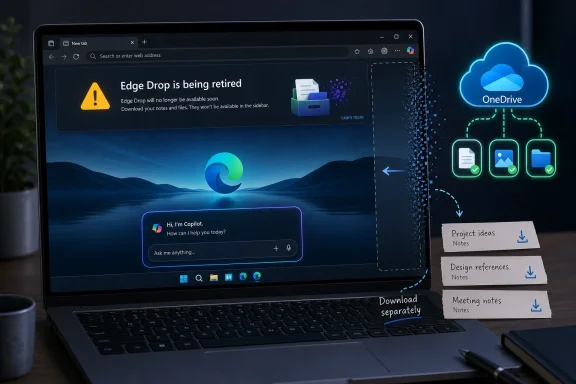
Microsoft Edge Canary now warns that Edge Drop is being retired, telling users that files shared through the feature remain saved in OneDrive while text notes must be downloaded separately before the browser removes the experience. The move is not just another small cleanup in a fast-moving browser channel. It is the latest sign that Microsoft is willing to trade modest, practical browser conveniences for a more singular Copilot-shaped vision of Edge. For users who valued Edge precisely because it did useful little things Chrome did not, that trade is starting to feel less like simplification and more like eviction.
Edge Drop was never the flashiest feature in Microsoft’s browser. It did not promise to summarize the web, reason across your tabs, rewrite your emails, or transform the browser into an agentic assistant. It did something humbler: it gave you a quick, persistent, cross-device thread for sending files, photos, links, and notes to yourself from inside Edge.
That modesty was the point. Drop lived in the browser’s side panel and worked because Edge was already where many users were reading, downloading, copying, and researching. It was a small convenience stitched into the daily mess of moving information between a Windows PC and a phone.
Now, according to the warning appearing in Edge Canary, Microsoft is preparing to remove it. The message does not frame the decision as an AI tradeoff, and Microsoft has not publicly said that Copilot is the reason Drop is going away. But the surrounding evidence is hard to ignore: Edge’s Sidebar has been retired, Collections has been wound down, Copilot Mode has been folded into the browser, and the same strip of interface once used for practical side-panel apps is increasingly treated as strategic territory for Microsoft’s AI assistant.
This is the shape of Microsoft’s current browser bet. Edge is no longer merely a Chromium browser with Microsoft services attached. It is becoming a distribution surface for Copilot, and every square inch of chrome that does not serve that goal must justify its existence.
That architecture made Drop both useful and slightly odd. It was not a full messaging app, not a cloud storage replacement, not a collaboration platform, and not a Notes competitor. It was a browser-native transfer lane for people who live across devices and do not want to email themselves a screenshot, paste text into a private chat, or hunt through a cloud drive hierarchy for something they just moved five minutes ago.
Its weakness was the same as its strength: it required a user to be all-in enough on Edge for the feature to matter. If you use Edge on Windows but Safari on iPhone, Chrome on Android, or Firefox on a personal laptop, Drop becomes just another Microsoft-specific lane in an already crowded cross-device world. WhatsApp, Telegram, Signal, Slack, Teams, iMessage, Google Drive, OneDrive, Nearby Share-style tools, and plain old email all compete for the same “send this to myself” habit.
That likely made Drop vulnerable in telemetry. A feature can be loved by a certain class of power user and still be invisible at global browser scale. Microsoft’s product managers do not need to hate Drop to kill it; they only need to decide that the same interface space can produce more engagement, more retention, or more strategic value if it belongs to Copilot.
Then Copilot arrived and changed the economics of that space. A sidebar that once looked like a place for user-chosen tools began to look, from Microsoft’s perspective, like a prime location for an AI assistant that the company wants users to encounter everywhere. In that context, “decluttering” becomes a loaded word. It can mean removing noise for users, but it can also mean removing anything that competes with the thing Microsoft most wants users to notice.
That is why Drop’s removal feels bigger than the feature itself. The user-facing impact is narrow: download your text notes, remember that files are in OneDrive, and find another way to move quick scraps between devices. The product signal is broader: Microsoft is consolidating Edge around AI, even when the casualties are working features with clear, non-AI utility.
This is not unique to Microsoft. The entire software industry is re-ranking roadmaps around AI, often at the expense of long-requested fixes, quality-of-life polish, and features that are boring but beloved. What makes Edge stand out is that the browser is a daily tool, and daily tools build trust through continuity. When users learn that a feature may vanish because a vendor’s strategic obsession has changed, they start treating the product as less dependable.
That distinction matters. A mode is something users can understand as optional, bounded, and reversible. A built-in layer is harder to reason about. It becomes part of search, tab management, page understanding, writing assistance, study tools, mobile browsing, and eventually whatever Microsoft decides the browser should do next.
For enthusiasts, the problem is not that AI exists in Edge. Many users genuinely like page summaries, writing help, cross-tab context, and natural-language search when these tools are fast, accurate, and controllable. The problem is the suspicion that AI integration is not being added beside the browser’s useful machinery but is being prioritized over it.
That suspicion is fed by timing. Collections, Sidebar, Copilot Mode, and now Drop all sit in the same recent narrative of Edge being simplified around Copilot. Microsoft can reasonably argue that old features were underused, redundant, expensive to maintain, or confusing. But when the only thing left standing in the contested interface zone is Copilot, users are not wrong to see a pattern.
Still, “low usage” should not be treated as a magic phrase that ends the conversation. Microsoft’s own design decisions influence whether features become discoverable, trustworthy, and sticky. If a feature lives in a sidebar that is later removed, buried, renamed, hidden behind sign-in requirements, or de-emphasized in favor of Copilot, usage will reflect those choices.
There is also a difference between a low-usage feature and a low-value feature. Enterprise tools, accessibility affordances, power-user workflows, and cross-device utilities may never light up consumer telemetry the way a large AI button does. But they can still matter disproportionately to the people who choose one platform over another.
Edge’s problem is not that Microsoft removes features. Browsers need pruning. Dead code, duplicated workflows, and undermaintained tools create complexity for users and security exposure for developers. The problem is that Microsoft keeps pruning in a direction that makes Edge feel less like a browser shaped by user workflows and more like a browser shaped by corporate AI placement.
Text notes are the sharper edge. The Canary warning says they need to be downloaded separately, which means users who used Drop as a scratchpad should not assume everything will remain neatly visible in OneDrive after the interface disappears. That is a small but very Microsoft kind of migration: the storage layer persists, but the experience layer that gave the data meaning is going away.
It also highlights the awkwardness of features built as thin product skins over broader Microsoft services. Drop looked like a browser feature, behaved like a chat thread, and stored files like a OneDrive workflow. When it goes away, users are left to reconstruct the model after the fact: files here, notes there, interface gone.
For IT admins, this is less likely to be a crisis than a nuisance. Drop was not the backbone of most managed file-transfer strategies, and many organizations already steer users toward OneDrive, SharePoint, Teams, or approved collaboration tools. But unmanaged conveniences have a way of becoming shadow workflows. If employees used Drop to move screenshots, logs, PDFs, or phone photos into desktop sessions, its removal will push that behavior somewhere else.
That is precisely the sort of workflow Microsoft has repeatedly struggled to make seamless across its ecosystem. Phone Link helps, but its usefulness varies by handset and scenario. OneDrive camera uploads solve some photo-transfer problems but not quick one-off movement. Teams can work if you are already in an organizational context. Email works because it always works, not because anyone enjoys using it as a personal clipboard.
Drop made Edge feel a bit more like a glue layer. It gave Microsoft a cross-platform utility in a world where Windows no longer owns the phone. Removing it means Edge loses one of the small reasons a user might install Microsoft’s browser on a phone in the first place.
That matters because mobile browser loyalty is harder to win than desktop browser loyalty. On iOS, every browser lives under Apple’s platform rules; on Android, Chrome is deeply entrenched. Edge needs differentiated, low-friction reasons to exist on those devices. “Install this so Copilot can be closer to your browsing” may appeal to some users. “Install this because it makes moving stuff between your phone and PC painless” was a more concrete pitch.
But cleanups earn trust when they make the product feel calmer, faster, and more user-directed. They lose trust when users perceive them as clearing brush for a feature Microsoft wants to promote regardless of demand. The distinction is not subtle. A browser with fewer distractions is welcome; a browser with fewer user tools and more AI insistence is something else.
Microsoft has already learned this lesson elsewhere in Windows. Copilot’s spread across Windows 11, Microsoft 365, and built-in apps has produced both genuine interest and visible fatigue. Users are not uniformly anti-AI. They are anti-coercion, anti-clutter, and anti-surprise. They object when AI entry points appear where they did not ask for them, when settings move, when defaults change, or when existing workflows degrade.
Edge sits at the center of that tension because it is both a browser and a Microsoft services vehicle. If Copilot makes Edge better, users will notice. If Copilot merely explains why useful features are disappearing, users will notice that too.
But Edge also carries the baggage of Microsoft’s consumer growth tactics. The same browser that IT wants to standardize can feel, to end users, like a rotating billboard for Microsoft’s current priorities. That tension creates headaches for administrators who want predictability more than novelty.
Feature retirements are part of enterprise life, but cadence and clarity matter. Admins need to know what is being removed, what data is affected, what policies change, and what user communications are required. A Canary warning discovered by browser watchers is not the same as a well-telegraphed lifecycle plan, even if fuller documentation follows later.
The Drop retirement is unlikely to generate the kind of enterprise disruption associated with a security change or authentication deprecation. Still, it reinforces a broader governance point: organizations should be cautious about allowing browser-native convenience features to become undocumented workflows. If the feature is not central to Microsoft’s enterprise commitments, it may disappear when the product strategy turns.
That bargain is weakening. Some of Edge’s best ideas have either been removed, reduced, or repositioned around Copilot. The browser still has technical strengths, and Chromium parity means it remains compatible with the modern web. But differentiation increasingly runs through AI, and that makes Edge more polarizing.
The issue is not nostalgia for every retired feature. Collections had critics. Sidebar could become cluttered. Drop was redundant for users with established messaging or cloud habits. But taken together, these features represented a philosophy: Edge as a productivity browser with multiple small affordances for organizing, saving, moving, and acting on information.
Copilot represents a different philosophy: Edge as an AI-mediated browser where the assistant becomes the organizing layer. That may be the future Microsoft wants. It may even be the future many users eventually accept. But it is a risky transition because it asks users to give up tools that behave predictably in exchange for systems that are still uneven, sometimes opaque, and often dependent on Microsoft’s cloud intelligence.
When a practical feature goes away, Microsoft can say it is simplifying. When Copilot gains deeper placement, Microsoft can say it is innovating. When users complain, Microsoft can point to telemetry, feedback, and the need to focus. Each individual explanation may be reasonable. The aggregate story is still that AI gets the benefit of the doubt and everything else has to justify itself.
This is where Microsoft risks confusing distribution with adoption. Putting Copilot into more surfaces guarantees exposure, not affection. Users may click because the button is there, because the old workflow is gone, or because Microsoft has made Copilot the most obvious path. That is not the same as users deciding that Copilot is the best answer to their problem.
The best version of AI in Edge would not need to displace small utilities. It would enhance them. A smarter Drop could have summarized transferred notes, extracted text from shared images, grouped files by project, or made cross-device handoff more searchable. A smarter Sidebar could have let users choose Copilot, Teams, OneNote, third-party AI tools, or simple web apps without turning the whole surface into a single-vendor funnel.
Instead, Microsoft appears to be narrowing the browser around its preferred assistant. That may simplify the interface. It also simplifies the user’s choice in a way many Windows enthusiasts instinctively distrust.
Yet its disappearance bothers people because it symbolizes a broader change in Edge’s personality. The browser that once seemed eager to win users with clever utilities now seems eager to train them around Copilot. That is a meaningful shift, and Microsoft should not be surprised when users describe it as losing something even if the replacement is technically more ambitious.
If Microsoft wants users to accept AI as the new organizing layer of Edge, it needs to prove that AI reduces friction rather than merely occupying space. It needs to make Copilot feel optional where trust requires optionality, controllable where privacy concerns are obvious, and genuinely superior where old tools are retired. Most of all, it needs to stop making every removal look like another sacrifice at the Copilot altar.
 Microsoft Is Turning Browser Real Estate Into AI Real Estate
Edge Drop was never the flashiest feature in Microsoft’s browser. It did not promise to summarize the web, reason across your tabs, rewrite your emails, or transform the browser into an agentic assistant. It did something humbler: it gave you a quick, persistent, cross-device thread for sending files, photos, links, and notes to yourself from inside Edge.That modesty was the point. Drop lived in the browser’s side panel and worked because Edge was already where many users were reading, downloading, copying, and researching. It was a small convenience stitched into the daily mess of moving information between a Windows PC and a phone.
Now, according to the warning appearing in Edge Canary, Microsoft is preparing to remove it. The message does not frame the decision as an AI tradeoff, and Microsoft has not publicly said that Copilot is the reason Drop is going away. But the surrounding evidence is hard to ignore: Edge’s Sidebar has been retired, Collections has been wound down, Copilot Mode has been folded into the browser, and the same strip of interface once used for practical side-panel apps is increasingly treated as strategic territory for Microsoft’s AI assistant.
This is the shape of Microsoft’s current browser bet. Edge is no longer merely a Chromium browser with Microsoft services attached. It is becoming a distribution surface for Copilot, and every square inch of chrome that does not serve that goal must justify its existence.
Drop Was a Tiny Feature With an Unusually Clear Job
The best browser features are often the ones that require almost no explanation. Drop let you send yourself a file or note and pick it up elsewhere, provided you were signed into Edge on supported devices. Underneath, Microsoft used OneDrive for storage, which is why the retirement notice can reassure users that shared files are not simply disappearing with the feature.That architecture made Drop both useful and slightly odd. It was not a full messaging app, not a cloud storage replacement, not a collaboration platform, and not a Notes competitor. It was a browser-native transfer lane for people who live across devices and do not want to email themselves a screenshot, paste text into a private chat, or hunt through a cloud drive hierarchy for something they just moved five minutes ago.
Its weakness was the same as its strength: it required a user to be all-in enough on Edge for the feature to matter. If you use Edge on Windows but Safari on iPhone, Chrome on Android, or Firefox on a personal laptop, Drop becomes just another Microsoft-specific lane in an already crowded cross-device world. WhatsApp, Telegram, Signal, Slack, Teams, iMessage, Google Drive, OneDrive, Nearby Share-style tools, and plain old email all compete for the same “send this to myself” habit.
That likely made Drop vulnerable in telemetry. A feature can be loved by a certain class of power user and still be invisible at global browser scale. Microsoft’s product managers do not need to hate Drop to kill it; they only need to decide that the same interface space can produce more engagement, more retention, or more strategic value if it belongs to Copilot.
The Browser’s Sidebar Became the Front Line
The retirement of Drop lands differently because it follows a larger cleanup of Edge’s side experiences. Microsoft spent years building Edge into a browser that was more than a tab strip and address bar. The Sidebar hosted apps, tools, search surfaces, productivity shortcuts, and the kind of sticky utilities that made Edge feel distinctly Microsoft.Then Copilot arrived and changed the economics of that space. A sidebar that once looked like a place for user-chosen tools began to look, from Microsoft’s perspective, like a prime location for an AI assistant that the company wants users to encounter everywhere. In that context, “decluttering” becomes a loaded word. It can mean removing noise for users, but it can also mean removing anything that competes with the thing Microsoft most wants users to notice.
That is why Drop’s removal feels bigger than the feature itself. The user-facing impact is narrow: download your text notes, remember that files are in OneDrive, and find another way to move quick scraps between devices. The product signal is broader: Microsoft is consolidating Edge around AI, even when the casualties are working features with clear, non-AI utility.
This is not unique to Microsoft. The entire software industry is re-ranking roadmaps around AI, often at the expense of long-requested fixes, quality-of-life polish, and features that are boring but beloved. What makes Edge stand out is that the browser is a daily tool, and daily tools build trust through continuity. When users learn that a feature may vanish because a vendor’s strategic obsession has changed, they start treating the product as less dependable.
Copilot Mode Died So Copilot Could Be Everywhere
One of the more revealing moves in Edge this year was Microsoft’s retirement of the dedicated Copilot Mode. On paper, that sounded like a retreat from AI branding. In practice, it meant the opposite: Microsoft no longer needed a special mode because Copilot capabilities were being woven directly into the browser experience.That distinction matters. A mode is something users can understand as optional, bounded, and reversible. A built-in layer is harder to reason about. It becomes part of search, tab management, page understanding, writing assistance, study tools, mobile browsing, and eventually whatever Microsoft decides the browser should do next.
For enthusiasts, the problem is not that AI exists in Edge. Many users genuinely like page summaries, writing help, cross-tab context, and natural-language search when these tools are fast, accurate, and controllable. The problem is the suspicion that AI integration is not being added beside the browser’s useful machinery but is being prioritized over it.
That suspicion is fed by timing. Collections, Sidebar, Copilot Mode, and now Drop all sit in the same recent narrative of Edge being simplified around Copilot. Microsoft can reasonably argue that old features were underused, redundant, expensive to maintain, or confusing. But when the only thing left standing in the contested interface zone is Copilot, users are not wrong to see a pattern.
Low Usage Is a Reason, Not an Alibi
It is entirely plausible that Drop did not have the usage numbers needed to survive. Browser features are brutally difficult to popularize because habits are sticky. Most people already have a personal workaround for sending themselves files and notes, even if that workaround is clumsy. A small Edge-only tool has to be not merely useful but habit-changing.Still, “low usage” should not be treated as a magic phrase that ends the conversation. Microsoft’s own design decisions influence whether features become discoverable, trustworthy, and sticky. If a feature lives in a sidebar that is later removed, buried, renamed, hidden behind sign-in requirements, or de-emphasized in favor of Copilot, usage will reflect those choices.
There is also a difference between a low-usage feature and a low-value feature. Enterprise tools, accessibility affordances, power-user workflows, and cross-device utilities may never light up consumer telemetry the way a large AI button does. But they can still matter disproportionately to the people who choose one platform over another.
Edge’s problem is not that Microsoft removes features. Browsers need pruning. Dead code, duplicated workflows, and undermaintained tools create complexity for users and security exposure for developers. The problem is that Microsoft keeps pruning in a direction that makes Edge feel less like a browser shaped by user workflows and more like a browser shaped by corporate AI placement.
The OneDrive Escape Hatch Is Useful but Incomplete
The retirement notice’s most important practical detail is that files shared through Drop are saved in OneDrive. That should prevent the worst version of this story, where users wake up to find years of transferred files stranded in a dead browser panel. If you used Drop mostly for file movement, your content should remain accessible through the underlying cloud storage.Text notes are the sharper edge. The Canary warning says they need to be downloaded separately, which means users who used Drop as a scratchpad should not assume everything will remain neatly visible in OneDrive after the interface disappears. That is a small but very Microsoft kind of migration: the storage layer persists, but the experience layer that gave the data meaning is going away.
It also highlights the awkwardness of features built as thin product skins over broader Microsoft services. Drop looked like a browser feature, behaved like a chat thread, and stored files like a OneDrive workflow. When it goes away, users are left to reconstruct the model after the fact: files here, notes there, interface gone.
For IT admins, this is less likely to be a crisis than a nuisance. Drop was not the backbone of most managed file-transfer strategies, and many organizations already steer users toward OneDrive, SharePoint, Teams, or approved collaboration tools. But unmanaged conveniences have a way of becoming shadow workflows. If employees used Drop to move screenshots, logs, PDFs, or phone photos into desktop sessions, its removal will push that behavior somewhere else.
The Practical Feature Gap Is Bigger on Mobile
Drop’s best use case was not necessarily PC-to-PC movement. Windows users already have OneDrive sync, SMB shares, remote desktops, USB drives, cloud folders, and a long tail of admin-approved tools. Drop was most compelling when it bridged the emotional gap between phone and desktop: snap a picture, send a note, move a file, pick it up in Edge.That is precisely the sort of workflow Microsoft has repeatedly struggled to make seamless across its ecosystem. Phone Link helps, but its usefulness varies by handset and scenario. OneDrive camera uploads solve some photo-transfer problems but not quick one-off movement. Teams can work if you are already in an organizational context. Email works because it always works, not because anyone enjoys using it as a personal clipboard.
Drop made Edge feel a bit more like a glue layer. It gave Microsoft a cross-platform utility in a world where Windows no longer owns the phone. Removing it means Edge loses one of the small reasons a user might install Microsoft’s browser on a phone in the first place.
That matters because mobile browser loyalty is harder to win than desktop browser loyalty. On iOS, every browser lives under Apple’s platform rules; on Android, Chrome is deeply entrenched. Edge needs differentiated, low-friction reasons to exist on those devices. “Install this so Copilot can be closer to your browsing” may appeal to some users. “Install this because it makes moving stuff between your phone and PC painless” was a more concrete pitch.
Microsoft’s AI Push Keeps Colliding With Trust
The most charitable reading of Microsoft’s Edge strategy is that the company is trying to simplify a browser that accumulated too many overlapping experiments. Edge has often felt like a product where every Microsoft team got a button: shopping tools, coupons, games, news feeds, Office integrations, sidebar apps, collections, workspaces, Drop, Bing, and now Copilot. A cleanup was overdue.But cleanups earn trust when they make the product feel calmer, faster, and more user-directed. They lose trust when users perceive them as clearing brush for a feature Microsoft wants to promote regardless of demand. The distinction is not subtle. A browser with fewer distractions is welcome; a browser with fewer user tools and more AI insistence is something else.
Microsoft has already learned this lesson elsewhere in Windows. Copilot’s spread across Windows 11, Microsoft 365, and built-in apps has produced both genuine interest and visible fatigue. Users are not uniformly anti-AI. They are anti-coercion, anti-clutter, and anti-surprise. They object when AI entry points appear where they did not ask for them, when settings move, when defaults change, or when existing workflows degrade.
Edge sits at the center of that tension because it is both a browser and a Microsoft services vehicle. If Copilot makes Edge better, users will notice. If Copilot merely explains why useful features are disappearing, users will notice that too.
The Enterprise Browser Has a Consumer Browser Problem
Microsoft wants Edge to be taken seriously in business environments, and it has a strong case. It integrates with Microsoft Entra ID, Microsoft 365, Defender, management policies, data protection controls, and the broader Windows enterprise stack. For many organizations, Edge is the path of least resistance because it is already present, manageable, and aligned with Microsoft’s security and identity story.But Edge also carries the baggage of Microsoft’s consumer growth tactics. The same browser that IT wants to standardize can feel, to end users, like a rotating billboard for Microsoft’s current priorities. That tension creates headaches for administrators who want predictability more than novelty.
Feature retirements are part of enterprise life, but cadence and clarity matter. Admins need to know what is being removed, what data is affected, what policies change, and what user communications are required. A Canary warning discovered by browser watchers is not the same as a well-telegraphed lifecycle plan, even if fuller documentation follows later.
The Drop retirement is unlikely to generate the kind of enterprise disruption associated with a security change or authentication deprecation. Still, it reinforces a broader governance point: organizations should be cautious about allowing browser-native convenience features to become undocumented workflows. If the feature is not central to Microsoft’s enterprise commitments, it may disappear when the product strategy turns.
Edge Is Losing the Argument That It Respects Power Users
For years, Microsoft’s pitch for Edge had an implicit power-user bargain. Yes, it was Microsoft’s browser, and yes, it pushed Microsoft services, but it also offered useful extras: vertical tabs, sleeping tabs, strong PDF handling, Collections, Sidebar tools, Drop, Workspaces, and tight Windows integration. You could dislike the nagging and still admit that Edge had ideas.That bargain is weakening. Some of Edge’s best ideas have either been removed, reduced, or repositioned around Copilot. The browser still has technical strengths, and Chromium parity means it remains compatible with the modern web. But differentiation increasingly runs through AI, and that makes Edge more polarizing.
The issue is not nostalgia for every retired feature. Collections had critics. Sidebar could become cluttered. Drop was redundant for users with established messaging or cloud habits. But taken together, these features represented a philosophy: Edge as a productivity browser with multiple small affordances for organizing, saving, moving, and acting on information.
Copilot represents a different philosophy: Edge as an AI-mediated browser where the assistant becomes the organizing layer. That may be the future Microsoft wants. It may even be the future many users eventually accept. But it is a risky transition because it asks users to give up tools that behave predictably in exchange for systems that are still uneven, sometimes opaque, and often dependent on Microsoft’s cloud intelligence.
The Cost of Making Copilot the Only Feature That Cannot Lose
The pattern now is not that every Edge feature is disappearing. It is that Copilot appears to be structurally protected while other features must compete for space, attention, and maintenance. That creates a product culture users can feel even if they never read a roadmap.When a practical feature goes away, Microsoft can say it is simplifying. When Copilot gains deeper placement, Microsoft can say it is innovating. When users complain, Microsoft can point to telemetry, feedback, and the need to focus. Each individual explanation may be reasonable. The aggregate story is still that AI gets the benefit of the doubt and everything else has to justify itself.
This is where Microsoft risks confusing distribution with adoption. Putting Copilot into more surfaces guarantees exposure, not affection. Users may click because the button is there, because the old workflow is gone, or because Microsoft has made Copilot the most obvious path. That is not the same as users deciding that Copilot is the best answer to their problem.
The best version of AI in Edge would not need to displace small utilities. It would enhance them. A smarter Drop could have summarized transferred notes, extracted text from shared images, grouped files by project, or made cross-device handoff more searchable. A smarter Sidebar could have let users choose Copilot, Teams, OneNote, third-party AI tools, or simple web apps without turning the whole surface into a single-vendor funnel.
Instead, Microsoft appears to be narrowing the browser around its preferred assistant. That may simplify the interface. It also simplifies the user’s choice in a way many Windows enthusiasts instinctively distrust.
The Edge Drop Lesson Microsoft Should Have Learned
Drop’s retirement should be read less as a tragedy than as a warning. The feature was useful, but not essential. Loved, but probably not widely enough. Distinctive, but easy to replace with a messaging app, cloud folder, or notes service. It is exactly the kind of feature that disappears when a company tightens focus.Yet its disappearance bothers people because it symbolizes a broader change in Edge’s personality. The browser that once seemed eager to win users with clever utilities now seems eager to train them around Copilot. That is a meaningful shift, and Microsoft should not be surprised when users describe it as losing something even if the replacement is technically more ambitious.
If Microsoft wants users to accept AI as the new organizing layer of Edge, it needs to prove that AI reduces friction rather than merely occupying space. It needs to make Copilot feel optional where trust requires optionality, controllable where privacy concerns are obvious, and genuinely superior where old tools are retired. Most of all, it needs to stop making every removal look like another sacrifice at the Copilot altar.
The Drop Retirement Leaves Users With a Simple Checklist
For Edge users who relied on Drop, the immediate task is not ideological; it is housekeeping. The feature is still surfacing retirement messaging in Canary, but waiting until the last stable-channel warning is a bad data-management strategy.- Users should open Drop and separately save any text notes they want to keep, because the retirement warning says those notes need to be downloaded outside the OneDrive file flow.
- Users should check OneDrive for files shared through Drop, especially if they used the feature as a temporary transfer bin rather than a deliberate archive.
- Users who depended on Drop for phone-to-PC handoff should choose a replacement workflow now, whether that is OneDrive, a private chat thread, Phone Link, Teams, or another approved tool.
- IT admins should treat Drop as another reminder that browser convenience features can become user workflows without ever becoming managed infrastructure.
- Microsoft should assume that removing small productivity tools for an AI-centered interface will be judged not by its strategy decks, but by whether Edge feels more useful the next morning.
References
- Primary source: Windows Central
Published: 2026-06-22T14:05:08.020789
Microsoft is retiring Edge Drop to make room for Copilot | Windows Central
Another unique Edge feature is on the way out as Microsoft shifts the browser toward AI.www.windowscentral.com - Related coverage: windowslatest.com
Microsoft just killed Edge's Collections and Sidebar for more Copilot, after years of pushing both features
Microsoft told Windows Latest that Collections and Sidebar are no longer available with Edge 149, which began rolling out on June 4, 2026. www.windowslatest.com
- Related coverage: techrepublic.com
Microsoft Retires ‘Copilot Mode’ as Edge Gets Built-In AI Tools
Microsoft is retiring “Copilot Mode” in Edge as it builds AI browsing tools directly into Edge on desktop and mobile.www.techrepublic.com
- Related coverage: berrall.com
Microsoft is killing Edge’s Drop file sharing after Collections and Sidebar, all for Copilot AI takeover - Peer Networks UK
Wales & West leading provider of PC repairs & IT support for home & business. Peer Networks delivers prompt, no fuss, PC repair services to customers.www.berrall.com
- Related coverage: techradar.com
Microsoft's Copilot can now peek into your open tabs in Edge — if you let it — as part of new AI features for the browser | TechRadar
It's a big change for Edge, but AI isn't going awaywww.techradar.com - Related coverage: europapress.es
Microsoft retira el modo Copilot de Edge tras integrar la IA en el navegador
    Microsoft ha retirado el modo Copilot del navegador Edge después de integrar en él las...www.europapress.es
- Related coverage: wwwhatsnew.com
Microsoft retira el Copilot Mode de Edge porque Copilot ya es Edge: multi-tab, Journeys y Voice llegan también al móvil
Microsoft hace hoy lo que muchos predecían que era inevitable. El 13 de mayo de 2026, la compañía anuncia la retirada de "Copilot Mode" en Edge —la experiencia de IA experimental que lanzó en julio de 2025— porque sus funciones ya no son un modo separado: son el propio navegador... wwwhatsnew.com
- Related coverage: windowsreport.com
Microsoft Retires Copilot Mode in Edge, But AI Push Feels Even More Aggressive Now
Microsoft retires Copilot Mode in Edge, but its broader AI push across the browser now feels more aggressive than ever. windowsreport.com
- Related coverage: digitaltrends.com
Microsoft just killed one of the coolest features of its Edge browser to favor more AI - Digital Trends
Microsoft is discontinuing Edge Collections, a popular research and organization tool, as the company continues shifting the browser toward AI-powered Copilot experiences.www.digitaltrends.com - Related coverage: technobezz.com
Microsoft Retires Edge Copilot Mode and Integrates AI Features Directly into Browser | Technobezz
Microsoft retires Edge's Copilot Mode, embedding AI features like multi-tab reasoning and voice control directly into the browser for a seamless experience.www.technobezz.com - Related coverage: ad-hoc-news.de
Microsoft Edge: Drop-Funktion entfernt, Google-Login kommt im Juli
Microsoft entfernt die Drop-Funktion im Edge-Browser und treibt die Integration des KI-Assistenten Copilot voran. Ab Juli ist zudem der Google-Login möglich.www.ad-hoc-news.de - Related coverage: engadget.com
Microsoft Is Retiring Copilot Mode On Edge, Because Everything Is Copilot Mode Now
Copilot features are now available on Edge for mobile.www.engadget.com - Related coverage: labs.cloudsecurityalliance.org
CSA research note M365 Copilot CVE 2026 24299 20260505 csa styled
PDF documentlabs.cloudsecurityalliance.org
- Official source: microsoft.com

Drop: Simple File Sharing Feature | Microsoft Edge
Use the new Drop feature from Microsoft Edge for easy file sharing across devices. Share files or send notes from mobile to desktop with an intuitive drag and drop.
www.microsoft.com
- Official source: support.microsoft.com
Upload photos and files to OneDrive | Microsoft Support
Learn how to upload files to OneDrive. Save photos or files to OneDrive using the website, desktop, or mobile app.support.microsoft.com - Related coverage: makeuseof.com
How to Share Files Between Devices Using Microsoft Edge
Edge contains a feature that allows you to quickly share files between your devices. Here's how to use it to share files on Microsoft Edge. www.makeuseof.com
- Related coverage: guidingtech.com
How to Use Microsoft Edge Drop Feature to Share Files Between Devices - Guiding Tech
A step-by-step guide on how to use Microsoft Edge's Drop feature to share files between mobile and desktop devices.www.guidingtech.com
- Official source: learn.microsoft.com
Microsoft Edge Drop Feature can't download - Microsoft Q&A
Hi im using edge Version 122.0.2365.52 im using edge feature to send file to other device multiple time already, but starting form 23th Feb edge drop feature won't work, it said "Download failed -4". I still have 1.1 gb used out of 5 gb…learn.microsoft.com - Related coverage: beebom.com
How to Use Microsoft Edge Drop to Share Files Across Your Phone and Desktop PC | Beebom
Microsoft is testing Edge Drop, a new feature that lets you share notes, files, and images from Edge browser across mobile and PC devices.beebom.com - Official source: download.microsoft.com
- Related coverage: help.kahootz.com
