

Microsoft’s latest in‑product push to keep Windows users from installing Google Chrome is no longer subtle: Edge now interrupts the Chrome download flow with targeted pop‑ups, comparison cards and even Microsoft Rewards incentives designed to persuade users to “try” or stay with Microsoft Edge instead of switching browsers. These messages — tested in Windows 11 and visible in certain Edge/Bing sessions — present Edge as both a performance‑efficient and more secure choice, tout exclusive features like Collections and AI tools, and in some reproduced instances offer Microsoft Rewards credit as a direct economic nudge. The move is an escalation of long‑running platform marketing from Microsoft and raises practical, competitive, and regulatory questions about how far an OS owner can push users toward first‑party software.
Microsoft has long used built‑in Windows surfaces to favor Edge: default settings, taskbar and Start menu placement, and occasional in‑product prompts have been part of the company’s retention toolkit for years. With the modern Edge rebuilt on Chromium, technical parity with Chrome removed many prior compatibility excuses — but market share remains firmly in Google’s favor on desktop. Independent trackers place Chrome’s desktop share in the multiple‑tens of percent range while Edge lingers in the single‑digit to low‑double‑digit range depending on the dataset and region, underscoring why Microsoft continues to press the advantage of Windows distribution. What’s new is the timing and tone of the prompts. Rather than passive banners, Microsoft has been observed delivering targeted comparison cards and full‑width pop‑ups specifically when a Windows 11 user, inside Edge, expresses intent to download Chrome (for example, by searching “Chrome” or navigating to Google’s Chrome download page). These units have emphasized privacy and security, performance advantages, and — in at least one A/B‑tested creative — offered Microsoft Rewards points as a direct incentive to remain in Edge. Community reproductions and screenshots circulated widely, and multiple outlets independently confirmed that the creatives are labeled “Promoted by Microsoft.”
But the delivery matters. Timing a Rewards offer or a “protect your PC” pop‑up precisely when a user is trying to download a competing browser shifts the interaction from informational to persuasive in a way that many users and competitors find heavy‑handed. Critics characterize such tactics as dark patterns or as leveraging platform power to distort competition. Opera has publicly complained about Microsoft’s Edge‑related behavior to antitrust authorities in multiple jurisdictions, and regulators are watching platform owners’ distribution leverage more closely now than at any point in the last decade. Reuters reported that Opera filed a complaint with Brazil’s antitrust regulator alleging unfair advantage for Edge, an example of the competitive friction this kind of marketing can produce. Two practical points of verification are critical:
Regulatory risk vectors include:
Practical guidance to avoid or neutralize the nudges:
The dispute is over how those advantages are marketed. Using default‑integrated channels and moment‑of‑intent incentives to shape user choice crosses from product promotion into the territory of platform leverage. That crossing is what drives both user frustration and regulatory interest.
For Windows users:
Source: Qoo10.co.id Microsoft's New Tactic: Forcing Windows 11 Users to Switch from Chrome to Edge
 Background
Microsoft has long used built‑in Windows surfaces to favor Edge: default settings, taskbar and Start menu placement, and occasional in‑product prompts have been part of the company’s retention toolkit for years. With the modern Edge rebuilt on Chromium, technical parity with Chrome removed many prior compatibility excuses — but market share remains firmly in Google’s favor on desktop. Independent trackers place Chrome’s desktop share in the multiple‑tens of percent range while Edge lingers in the single‑digit to low‑double‑digit range depending on the dataset and region, underscoring why Microsoft continues to press the advantage of Windows distribution. What’s new is the timing and tone of the prompts. Rather than passive banners, Microsoft has been observed delivering targeted comparison cards and full‑width pop‑ups specifically when a Windows 11 user, inside Edge, expresses intent to download Chrome (for example, by searching “Chrome” or navigating to Google’s Chrome download page). These units have emphasized privacy and security, performance advantages, and — in at least one A/B‑tested creative — offered Microsoft Rewards points as a direct incentive to remain in Edge. Community reproductions and screenshots circulated widely, and multiple outlets independently confirmed that the creatives are labeled “Promoted by Microsoft.” What Microsoft is showing users — the mechanics and messaging
The pop‑up and reward flows
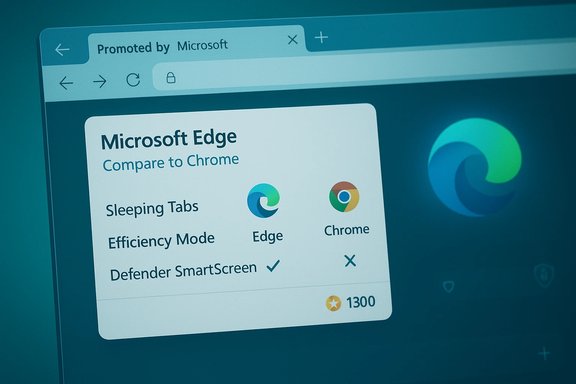
- The message often appears in the Edge UI or at the top of Bing search results when a user looks for Chrome. It can be a comparison card that lists ticks for Edge features and muted markers for Chrome.
- In some observed instances, the card offered a fixed Microsoft Rewards amount (reported in screenshots as 1,300 Microsoft Rewards points) for trying Edge rather than immediately downloading Chrome. The amount and exact presentation have shown signs of being regionally targeted and A/B tested.
- Clicking the “Browse securely now” or “Try Microsoft Edge” actions typically opens Microsoft’s product pages or security landing content inside Edge; they do not appear to technically block Chrome installers at the OS level, but they do intervene at the moment of intent. Multiple reporting threads and test reproductions show this behavior is a browser‑level nudge rather than a system‑level blockade.
The claims inside the creative
Microsoft’s on‑screen arguments fall into a few repeating themes:- Resource efficiency: claims that Edge uses less RAM and CPU than Chrome and therefore can extend battery life on mobile/laptop devices.
- Security and privacy: highlighting Defender SmartScreen, password monitoring, and the browser‑level privacy tunnel (Edge Secure Network).
- Value‑added productivity: Collections that export to Office (Word/Excel/PowerPoint), built‑in shopping/price comparison tools, and AI‑enabled features or Copilot integration.
- Trust and integration: messaging that Edge is “based on Chromium” (same engine) but benefits from Microsoft integration and platform advantages in Windows 11.
Verifying the technical claims
Resource efficiency: “Edge uses less RAM and CPU”
Microsoft and independent testing communities both emphasize that Edge includes efficiency‑focused features — most notably Sleeping Tabs, Efficiency Mode, and Startup optimizations — that can reduce background CPU activity and reclaim memory from idle tabs. These features are real and documented in Microsoft’s materials and third‑party tests; they can materially reduce memory usage in multi‑tab scenarios compared with a naive Chrome setup that leaves all tabs active. That said, raw performance depends heavily on workload, hardware, extensions, and which browser features are enabled:- Benchmarks and community tests show Edge can use less memory than Chrome under comparable settings when Sleeping Tabs and other optimizations are active; the magnitude varies widely across tests. Some tests report savings of hundreds of megabytes in heavy multi‑tab situations, while other synthetic JavaScript and GPU benchmarks still favor Chrome on raw throughput. This means Edge’s efficiency wins are workload dependent.
- Microsoft’s specific phrasing — that Edge “uses less RAM and CPU” — is a generalization. It is accurate in many realistic, multi‑tab Windows scenarios where Edge’s tab hibernation and Windows‑level optimizations can reduce background resource consumption, but it is not an absolute across every possible workload or machine. Treat the claim as directionally true but situational, not universal.
Security and privacy: Edge Secure Network and integrated protections
Edge promotes a suite of integrated protections — Microsoft Defender SmartScreen, password leak monitoring, tracking prevention, and a browser‑level privacy tunnel called Edge Secure Network. Edge Secure Network is implemented in partnership with Cloudflare and functions as a browser‑scoped privacy proxy (it encrypts and tunnels browser traffic for privacy protection and hides IP metadata), not as a full, system‑wide VPN with selectable exit nodes. Feature availability and traffic caps vary by region and user state (signed‑in Microsoft Account required for the free monthly allotment). The Cloudflare partnership and the limits of the feature are publicly documented by both Microsoft and Cloudflare. Important nuance:- Edge Secure Network can be useful for protecting browser sessions on untrusted networks, but it does not replace enterprise VPNs or systems that require full device tunneling.
- Many of the security protections Microsoft highlights have functional analogues in Chrome and other modern browsers (phishing and malware heuristics, HTTPS indicators, password breach alerts), so the degree of superiority depends on specific configurations and telemetry choices.
Productivity features: Collections and Office export
Edge’s Collections feature is an established capability that lets users gather web pages, images and notes and export them to Office apps like Word and Excel (the export commonly saves to OneDrive-backed Word/Excel documents). Microsoft documents this functionality and provides admin controls that organizations can use to enable or disable Collections. The feature is real and integrated with Microsoft 365 workflows. Caveat for administrators: enterprise policy controls exist to restrict Collections and the export behavior for managed devices; the function can be disabled for environments that require tighter data governance.How to read Microsoft’s strategy: product promotion — or coercion?
Microsoft frames these in‑product prompts as helpful guidance — presenting a secure, efficient, and integrated browser experience that plays nicely with Windows 11 and Microsoft 365. From a product standpoint, the arguments are coherent: deeper OS integration gives Microsoft levers for optimization and unique features that are legitimate selling points.But the delivery matters. Timing a Rewards offer or a “protect your PC” pop‑up precisely when a user is trying to download a competing browser shifts the interaction from informational to persuasive in a way that many users and competitors find heavy‑handed. Critics characterize such tactics as dark patterns or as leveraging platform power to distort competition. Opera has publicly complained about Microsoft’s Edge‑related behavior to antitrust authorities in multiple jurisdictions, and regulators are watching platform owners’ distribution leverage more closely now than at any point in the last decade. Reuters reported that Opera filed a complaint with Brazil’s antitrust regulator alleging unfair advantage for Edge, an example of the competitive friction this kind of marketing can produce. Two practical points of verification are critical:
- These are UX‑level promotions, not technical blockers. Reported tests show the banner and reward units can be dismissed and do not stop Chrome installers. That distinction matters for legal and technical analysis.
- The rewards and creatives are often A/B tested and regionally targeted. Observations from community reproductions indicate Microsoft can selectively show these promos to cohorts and switch creatives server‑side, which complicates transparency and auditing.
The legal and regulatory angle
Microsoft’s position as the owner of the dominant desktop OS gives it unique distribution power. That power has drawn antitrust scrutiny in the past — historically around Internet Explorer — and contemporary episodes provoke similar concerns.Regulatory risk vectors include:
- Claims of self‑preferencing: using built‑in OS or default app pathways to advantage proprietary software over third parties.
- Dark patterns and deceptive UX: if regulators find the design intentionally manipulates choice or obscures alternatives, that can factor into consumer‑protection or competition inquiries.
- Cross‑border enforcement: browser vendors and coalitions (like the Browser Choice Alliance) have already mobilized to challenge behaviors they see as exclusionary, and regulators in the EU, Brazil and elsewhere are receptive to complaints about platform owners using in‑product channels to influence choice.
User impact: practical effects and what users can do
For most people the new prompts are an annoyance; for some they’re a confusing barrier. While the pop‑ups and reward prompts rarely prevent a determined user from installing Chrome, they do add friction and — importantly — they can influence undecided or less tech‑savvy users.Practical guidance to avoid or neutralize the nudges:
- Install your preferred browser directly from its official site and set defaults:
- Open Settings → Apps → Default apps.
- Choose your preferred browser (e.g., Google Chrome).
- Click Set default and, where necessary, assign HTTP/HTTPS and common web file types to the browser.
- Use an alternate search engine to avoid Bing‑served creatives (set the address bar search provider to Google or DuckDuckGo).
- Download the installer from another device or a non‑Edge browser if you want to avoid seeing Edge’s targeted messages during the download flow.
- If you’re privacy‑oriented, be aware that Microsoft Rewards redemptions require a Microsoft account and that the point‑to‑value conversions vary by region; treat rewards as a small incentive, not cash.
- For administrators: use Group Policy or Intune controls to restrict Edge‑specific features or to prevent promotional UI elements where possible; monitor Edge policies (for example, controls around Collections and export features) in enterprise environments.
Strengths of Microsoft’s approach — why it might work
- Right moment targeting: delivering a promotion at the precise moment a user intends to switch maximizes conversion potential. Small per‑user incentives can move marginal users at scale.
- Tangible product advantages: Edge’s Windows‑specific optimizations (Sleeping Tabs, Startup Boost, Efficiency Mode) yield measurable efficiency gains for many typical users, particularly on devices with limited RAM or battery sensitivity. These are defensible product claims in many scenarios.
- Ecosystem leverage: integrating rewards, search and browser features creates a multi‑touch funnel that encourages deeper engagement with Microsoft services beyond the browser itself (Bing, Microsoft Rewards, Microsoft 365).
Risks and downsides — why the tactic could backfire
- Reputational damage: aggressive, persistent nudges risk alienating customers. Several outlets and user communities report irritation and an increase in negative sentiment toward Edge as a direct result of continuously intrusive prompts.
- Regulatory exposure: a consistent pattern of steering users via built‑in channels is exactly the sort of behavior regulators and competitors are documenting. Complaints and investigations — such as Opera’s filing in Brazil — show the risk is real.
- Marginal return on investment: the practical monetary value of small rewards (like 1,300 Microsoft Rewards points, which historically converts to modest gift‑card value) is low for most users; those committed to Chrome are unlikely to be swayed by token incentives. The tactic is more effective at catching casual or undecided users than at converting dedicated Chrome power users.
A fair reading: product merit vs platform leverage
The modern Edge is a competitive browser that offers legitimate advantages for many Windows users. The feature set — from Collections with Office export to Cloudflare‑backed Edge Secure Network and efficiency modes — can add real value that’s especially visible on Windows laptops and lower‑powered machines. Those are product advantages worth marketing.The dispute is over how those advantages are marketed. Using default‑integrated channels and moment‑of‑intent incentives to shape user choice crosses from product promotion into the territory of platform leverage. That crossing is what drives both user frustration and regulatory interest.
Final assessment and recommendations
Microsoft’s new tactic of intercepting Chrome download intent with Edge pop‑ups and rewards is both predictable — and consequential. Predictable because platform owners naturally use built‑in channels to promote first‑party products; consequential because the timing, incentives and UX framing materially influence user choice and have already drawn criticism and regulatory attention. Observers should treat the current rollout as a testbed: server‑side A/B experiments, regional creatives and rewards that can be flipped on or off.For Windows users:
- Expect the prompts to be dismissible but persistent; use the default‑apps controls or a different search provider if you want to avoid them.
- Evaluate Edge on its merits: test Sleeping Tabs, Efficiency Mode, Collections, and Edge Secure Network yourself to confirm whether the product advantages are meaningful for your workflow.
- Review Group Policy/Intune controls for Edge features.
- Document and test enterprise controls for pop‑up behavior and default app enforcement.
- The combination of UI nudges, loyalty incentives, and OS distribution power is precisely the pattern that has attracted scrutiny in other platform disputes. Continued monitoring and, where warranted, formal complaints or inquiries may be an appropriate response.
Quick takeaway (TL;DR)
- Edge now surfaces targeted pop‑ups and rewards when users try to download Chrome from Windows 11, combining product claims (efficiency and security) with small economic incentives.
- The technical claims about efficiency, Collections and Edge Secure Network are grounded in real features, but their benefits are situational and depend on configuration and workload.
- These tactics are UX‑level promotions, not OS‑level blocks, but they raise legitimate concerns about fairness, dark patterns and competition — concerns regulators and rivals are already pursuing.
Source: Qoo10.co.id Microsoft's New Tactic: Forcing Windows 11 Users to Switch from Chrome to Edge
