

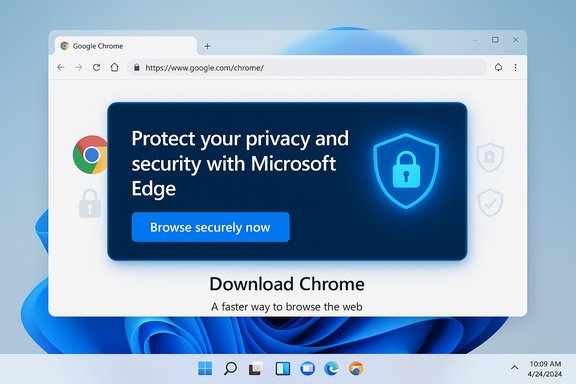
Microsoft’s new Edge banner that appears when users visit Google’s Chrome download page is the latest, highly visible escalation in a long-running tug-of-war over browser choice on Windows — and it crystallizes a wider strategic problem: Microsoft is trying to win users back with safety messaging while using UI advantages that many find coercive. The pop-up — which urges visitors to “Protect your privacy and security with Microsoft Edge” and offers a “Browse securely now” button — is being A/B-tested on Windows 11 systems and is already prompting strong reactions from people who say it feels like nagware rather than helpful guidance.
Background
Why this matters now
Web browsers are the single most-used application on most desktops. Whoever controls first impressions — defaults, install flows, and the initial post-install prompts — shapes long-term user behavior and the distribution of search, extensions, and data flows across the web economy. That strategic leverage is precisely why the design and placement of “stay with Edge” prompts matters beyond mere UX: they affect market competition, developer ecosystems, and even regulatory scrutiny.Browser market share remains heavily tilted toward Google Chrome globally, while Microsoft Edge continues to occupy only a single-digit desktop share in many datasets. Chrome's dominance gives users a strong default preference for familiarity and ecosystem continuity; Microsoft's challenge is reversing a long-term habit that favors Chrome. Recent market snapshots show Chrome commanding the vast majority of desktop browser sessions worldwide while Edge lingers in the low-to-mid single digits depending on the dataset and region.
A short history of the “Edge nudge”
Microsoft’s efforts to retain or grow Edge usage on Windows are not new. Over several Windows and Edge releases the company has deployed in-product banners, default-search nudges, “import data” dialogs, and taskbar pinning behaviors intended to keep users inside the Microsoft stack. Some of these moves drew sharp user criticism and competitor complaints, and at least once forced Microsoft to adjust how users change default browsers in Windows 11 after public backlash. The current safety-focused pop-up appears to be the latest iteration of that long-running playbook.What Microsoft is testing in Edge (the pop-up explained)
The message and the mechanics
The test banner appears when a Windows 11 user navigates in Edge to the Chrome download page. Its messaging pivots away from the old “we’re technically similar” rationale and instead emphasizes concrete security features: private browsing (InPrivate), password leak monitoring, and malicious-content blocking — essentially a “stay safer with Edge” pitch. Clicking the banner’s action button opens Microsoft’s security-features landing page inside Edge. Tech outlets reporting the test point out that Microsoft is attempting to make security the reason to stay, not just technical parity.Why Microsoft likely switched to safety messaging
There’s marketing sense to this move. Consumers tend to care about security in plain language more than underlying engine details (like the shared Chromium codebase). Security is a perceived differentiator that speaks to everyday user fears about malware, phishing, and credential theft. Shifting the narrative from “we’re the same engine” to “we protect you better” is a logical pivot for Microsoft — if the claims are accurate, believable, and not perceived as manipulation.Fact check: Are Edge’s security claims unique?
Password monitoring
Microsoft Edge includes an integrated Password Monitor or Password security check that scans saved credentials against lists of leaked credentials and offers alerts and remediation guidance. Microsoft documents how the feature works, how it’s surfaced in settings, and the privacy protections built into its matching process. Administrators can also control the feature via group policy in enterprise environments. Google Chrome offers similar capabilities via Password Check (part of Google Password Manager) and integration with Google account protections. Chrome’s Safety Check flags compromised credentials, reused passwords, and weak passwords; Google has also updated its password-check tools to include weak/reused password alerts in recent updates. In short: password leak scanning is not unique to Edge.Malicious content blocking and Safe Browsing
Edge relies on Microsoft Defender SmartScreen and other protective layers to block phishing sites, malware downloads, and suspicious pages. Chrome uses Google's Safe Browsing infrastructure, which protects billions of devices and continuously updates lists of unsafe sites; Chrome also added real-time checks and enhanced modes that further tighten protections. Both browsers therefore provide robust malicious-content defenses, but they use different centralized services (Microsoft versus Google) and vary slightly in which protections are opt-in versus default.Private browsing
Both browsers offer private or “InPrivate/Incognito” modes. The technical guarantees and marketing descriptions differ — and both companies have had to clarify limits to private modes (for example, how third parties can still track sessions via non-browser channels) — but the availability of a private session mode is not a point of differentiation in practice. Recent regulatory and legal headlines have also highlighted the limits of private modes across browsers.Takeaway on security parity
Microsoft’s security claims are not false: Edge does ship features that help protect users. The more important point is that many of those features are also available in Chrome, often with equivalent levels of protection or with different trade-offs (privacy design, telemetry, cloud-based checks). Positioning these features as exclusive or materially superior without clear comparative data risks being perceived as marketing spin.Market context: numbers and reality
- Google Chrome continues to dominate global desktop browsing by a wide margin; different analytics providers report slightly different figures, but the trend is consistent: Chrome is the market leader by far, while Edge sits substantially behind. Recent aggregated stats show Chrome above 70% in many global tallies, with Edge in the single digits or low teens depending on region and methodology.
- Region matters. In North America and on Windows-dominant desktops, Edge’s share can be a bit higher than on a worldwide basis, but Chrome still tends to be the overwhelming default for most users. Competitor strategies therefore must consider both global and regional dynamics.
UX and psychology: why “nags” backfire
The irritation factor
Repeated banners and modal-style nudges create friction that can be counterproductive. Research into dark patterns and UX persuasion shows that users often react negatively when they perceive an app is trying to override their intent, particularly if the intervention appears repetitive, intrusive, or disingenuous.Anecdotally and in forum discussions, users describe feeling more determined to install Chrome after seeing Microsoft’s persistent prompts — the so-called “reactance” effect where persuasion attempts produce resistance rather than compliance. The emotional response matters because retention is not just about blocking exits; it’s also about building goodwill. Heavy-handed tactics can damage that goodwill.
The “Apple comparison”
A common refrain among users who switch between macOS and Windows is that Apple’s approach to defaults is relatively unobtrusive. On macOS you can change the default browser quickly via System Settings, and Apple historically hasn’t displayed the same level of in-browser nagging to keep users on Safari. The result: users who switch to Chrome on macOS often report less annoyance at the platform for making the choice easy. This contrast highlights an important product design lesson: letting users choose easily can reduce resentment even if they leave your product.Regulatory and competitive context
Antitrust attention and regional rules
Microsoft’s browser-and-search nudges have attracted not only user complaints but regulatory interest in the past. Notably, Europe’s Digital Markets Act (DMA) and related enforcement efforts have pushed platform owners to offer clearer choice screens and to limit coercive default behaviors. Microsoft has already had to adjust Windows behavior in EEA countries and roll out changes that reduce certain types of Edge-specific nudges. Those legal and policy pressures shape what Microsoft can and cannot do at scale.Why regulators care
Competition authorities worry about default-supremacy effects: a preinstalled browser with privileged access to the OS can entrench market power that is hard for rivals to overcome through product quality alone. Nudges that materially reduce competitor access or that create substantial switching friction can be considered anti-competitive under certain rules, especially where platform control is coupled with preferential treatment of first-party services.Practical guidance for Windows users (what to do if you just want Chrome)
- Open Windows Settings → Apps → Default apps.
- Locate the browser you want (e.g., Google Chrome) and click the new Set default button (Windows 11 has restored a more straightforward flow after earlier criticism). If you don’t see that option, change the defaults for HTTP, HTTPS, .htm and .html at minimum.
- Install Chrome directly from Google if you prefer; if Edge displays a banner, you can dismiss it and continue with the download.
- To avoid first-run prompts later, open Chrome after install and accept Chrome’s prompt to become the default browser (this will walk you to the same system settings).
Editorial analysis: is Microsoft’s strategy likely to work?
Strengths of Microsoft’s move
- Reframing to security is smart in principle: security resonates with non-technical users more than engine lineage.
- Integrating security features into Edge and making them easy to use (password checks, SmartScreen, enhanced security mode) creates legitimate product value that Microsoft can highlight.
- Control of default UX gives Microsoft a direct lever to increase engagement if the messaging converts even a small percentage of hesitant users.
Real risks and weaknesses
- Perceived coercion: Users often respond badly to repeated, platform-level nudges that interrupt their stated intent (download Chrome), and that backlash can reduce trust.
- Feature parity undermines the message: When features touted as differentiators exist in Chrome as well, the message risks being dismissed as disingenuous marketing.
- Regulatory exposure: Continued heavy-handed tactics will invite scrutiny and potential restrictions in regions with active competition law enforcement.
- Brand trust deficits: Microsoft is asking users to trust its claim of being safer; after years of browser wars and telemetry controversies across companies, trust must be earned, not shouted via banners.
How Microsoft could do better (product and policy suggestions)
- Stop interrupting a user’s explicit task flow (e.g., downloading a competing browser) with modal persuasion. Use less intrusive, context-sensitive suggestions that respect intent.
- Publish clear, side-by-side, independently verifiable comparisons for security features so users can judge claims themselves.
- Provide a single, easy “set defaults” flow that respects user choice and reduces friction — and keep it consistent globally except where legally constrained.
- Offer migration perks that add real value without coercion (e.g., fast import, privacy-focused onboarding, incentives for first-run experiences).
- Reduce telemetry opacity: be explicit about what data is used for safety features and how long it’s retained.
Final verdict
Microsoft’s new Edge banner is an understandable marketing tactic: emphasize security, reduce churn, and keep users inside the first-party ecosystem. But product nudges operate in a social and legal ecosystem where user perception, actual feature parity, and regulatory constraints all matter.The banner’s core message — that Edge includes security features like InPrivate, password monitoring, and malicious-content blocking — is true in isolation, but it’s not a decisive differentiator because Chrome offers comparable protections. More importantly, the delivery matters: users resent being blocked or nagged when their intent is clear, and those negative feelings often outweigh the persuasive impact of a product pitch.
If Microsoft wants to shift long-term adoption curves it will need to pair legitimate security advantages with respectful UX and transparent comparisons. Anything less likely produces temporary headline noise and long-term user distrust — the opposite of what good platform stewardship requires.
Conclusion
The current Edge pop-up is a high-visibility experiment that highlights a stubborn industry truth: defaults and install flows matter as much as code quality. Microsoft’s switch to safety messaging makes sense strategically, but the approach will only work if the company moves from coercion to credibility — proving in measurable, verifiable ways that Edge’s protections offer value people can’t easily get elsewhere, and then letting users decide without feeling railroaded. Until then, the pop-ups will keep being a flashpoint in the browser wars: effective at drawing attention, but questionable as a long-term retention strategy.
Source: TechRadar https://www.techradar.com/computing...oad-google-chrome-focuses-on-internet-safety/
