

Microsoft Edge has begun testing a new, security‑focused banner that appears when users attempt to download Google Chrome, pitching Edge as an “all‑in‑one” browser with built‑in privacy and safety tools rather than the older engine‑or‑brand comparisons that appeared in previous nudges.
Microsoft’s push to keep Windows users inside Edge has been visible for years through a mix of UI prompts, search promotions, and system‑level nudges. Those efforts have ranged from simple “set Edge as your default” dialogs to targeted banners and even Microsoft Rewards incentives shown when users search for competing browsers.
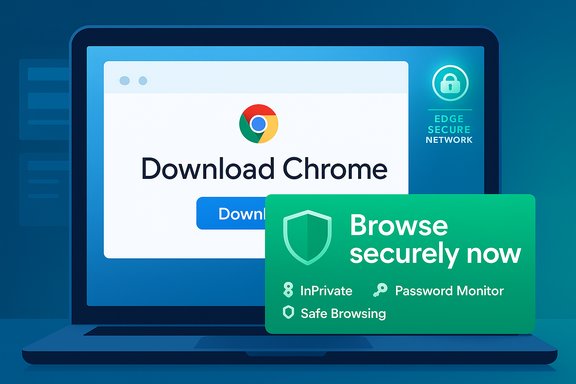
The current test swaps comparative language for a safety narrative: the new banner emphasizes InPrivate browsing, password monitoring, protection against scams and scareware, and Edge Secure Network — Edge’s built‑in browser VPN — with a “Browse securely now” call to action. Clicking the button does not open a generic tab; it redirects to Microsoft’s Online Safety/feature walkthrough for Edge. The behavior is experimental and has been observed in limited Edge channel rollouts rather than as a universal change.
The core UX tension is this: when a platform owner uses OS integration to promote first‑party services, where does helpful guidance end and coercion begin? Microsoft’s experiments illustrate how small UI choices — a banner here, a rewards card there — scale into a broader perception of pressure, especially when experiments run server‑side and vary across users.
Microsoft’s new “all‑in‑one” safety framing is a logical next step in its long campaign to retain Windows users in Edge: it trades engine‑based comparisons for a user‑focused safety story. The features Microsoft highlights are real and can benefit many users, but the mechanics of how those benefits are marketed — especially when the banner appears atop a rival’s download page — will continue to draw debate about user choice, transparency, and the proper boundaries of platform persuasion.
Source: Windows Report Microsoft Edge Pushes an "All in One Browser" Message on Chrome’s Download Page
 Background
Microsoft’s push to keep Windows users inside Edge has been visible for years through a mix of UI prompts, search promotions, and system‑level nudges. Those efforts have ranged from simple “set Edge as your default” dialogs to targeted banners and even Microsoft Rewards incentives shown when users search for competing browsers.The current test swaps comparative language for a safety narrative: the new banner emphasizes InPrivate browsing, password monitoring, protection against scams and scareware, and Edge Secure Network — Edge’s built‑in browser VPN — with a “Browse securely now” call to action. Clicking the button does not open a generic tab; it redirects to Microsoft’s Online Safety/feature walkthrough for Edge. The behavior is experimental and has been observed in limited Edge channel rollouts rather than as a universal change.
What Microsoft is showing — the message and mechanics
The banner’s pitch
- The message reframes Edge as an all‑in‑one browser whose integrated features make switching unnecessary.
- The tone is safety‑first: “Browse securely now” rather than “Stay with Edge because it uses Chromium”.
- The banner links to an Online Safety page that reads more like a feature tour than a one‑line reminder.
Technical behavior and A/B testing
The banner appears to be a controlled experiment — rolled out to subsets of users and channels to measure effectiveness. Observers noted that the banner is implemented as a browser UI element layered over the page, not as part of Google’s HTML. That design makes the banner visible even when visiting the Chrome download page and allows Edge to control the call to action. Because these are tests, the experience is inconsistent across users and builds and may change without notice.What the banner highlights: features Microsoft emphasizes
Microsoft’s Online Safety and Edge promotion content focuses on a handful of features. Each is an important selling point that the company uses to justify the “all‑in‑one” framing.- InPrivate browsing — Edge’s private mode that avoids saving local browsing history, cookies, and site data in a given session. Microsoft ties InPrivate to privacy protections like InPrivate search.
- Password monitoring / Password Monitor — Edge can scan saved passwords against known leaked credentials and alert users to compromised accounts. Microsoft documents this feature and the enterprise policies that control it.
- Scam and scareware protection — Edge leverages SmartScreen and safe‑browsing technologies to warn about malicious downloads and phishing. Microsoft positions these protections as core to safer browsing.
- Edge Secure Network — a browser‑integrated VPN that encrypts browser traffic and offers a 5 GB free monthly allowance for signed‑in users; Microsoft positions it as a lightweight privacy layer for public Wi‑Fi and casual use.
- Copilot in InPrivate — Microsoft has begun enabling Copilot in InPrivate mode for some users, with permission prompts to control page access and no chat history saved unless the user signs in.
- Tracking prevention parity — Edge maintains that tracking prevention settings are shared between normal and InPrivate windows unless a user explicitly toggles a stricter InPrivate setting; Microsoft has historically adjusted this behavior to avoid breaking site functionality.
Why Microsoft is emphasizing safety now
Microsoft is shifting the message for several practical reasons:- Differentiation beyond Chromium: Chromium parity undercuts arguments based solely on engine compatibility. Highlighting built‑in safety gives Microsoft an angle that’s not just technical: it’s a value proposition around trust and convenience.
- Regulatory context: When default choices and browser bundling are under regulatory scrutiny, promoting user‑facing safety features can read as product improvement rather than competitive gating.
- User trust and retention: Security and privacy language tends to resonate with mainstream users less likely to care about engines or extension ecosystems; safety messaging can be more persuasive at scale.
- Experimentation culture: Microsoft uses staged tests and A/B experiments across Edge channels and Bing/Windows surfaces to discover what moves users — from UX tweaks to rewards offers. Evidence of reward‑based nudges has appeared in prior tests, further illustrating a multi‑pronged retention strategy.
Strengths of the safety‑first approach
- Legitimate security features: Edge does bundle useful features — password checks, SmartScreen, and a simple browser VPN — that can materially improve safety for users who don’t want to configure third‑party tools. Microsoft’s documentation confirms these capabilities and their intended protections.
- Lower friction for novices: For non‑technical users, a single, integrated browser with toggles for privacy and built‑in password checks reduces the complexity of composing multiple apps and extensions.
- Signal to enterprise admins: Emphasizing security helps Microsoft frame Edge as a controllable, enterprise‑grade browser with group policies for features like Password Monitor, which IT teams can enable or disable centrally.
- Marketing that ties to product value: Positioning Edge as an “all‑in‑one” tool leans into legitimate product differences — vertical tabs, Copilot integration, and shopping tools — beyond the runtime engine. If users truly value convenience and integrated security, the pitch may be persuasive.
Risks, downsides, and trade‑offs
1. User choice and perceived coercion
Layering a browser UI element over another vendor’s site to discourage a download can feel coercive. The behavior blurs the line between browser UI and webpage content, which some observers have flagged as confusing and potentially problematic from a user‑choice perspective. That perception is only amplified when prompts are persistent or appear in multiple places across the OS.2. Regulatory and antitrust exposure
Regulators and competition advocates have scrutinized how platform owners surface first‑party services. Aggressive nudges and experiment‑backed persuasion mechanics — especially when combined with registry or protocol handler behaviors that route or override links — raise the risk of regulatory complaints in multiple jurisdictions. Microsoft has already faced attention over default browser experiences, and further pressure is plausible if nudges are seen as tipping the market.3. Trust erosion
Marketing that claims added trust while being inserted into a rival’s download page can produce negative PR and erode trust. Messaging that emphasizes safety will ring hollow if users perceive the prompt as manipulative. Independent reporting noted that earlier iterations of these prompts provoked ridicule as much as conversion.4. Technical and security concerns
There are technical trade‑offs when a browser overlays content or alters perceived page layout. Observers have speculated about accessibility, DOM inspection, and potential security implications if the boundary between browser UI and webpage content becomes fuzzy. While experiments appear to be implemented as a UI overlay rather than code injected into the site, the design choice merits scrutiny.5. Feature limitations and transparency
- Edge Secure Network is a browser‑only VPN limited to browser traffic and capped at 5 GB per month for free users — a technical constraint that matters for users who assume a VPN protects all device traffic. Microsoft’s own pages clearly state the cap. Users should be made aware of that limit to avoid mistaken assumptions.
- Password Monitor scans saved browser passwords but requires sign‑in and may be governed by enterprise policies; it only covers passwords stored in Edge. That scope should be transparent to users who use multiple password stores.
Cross‑checking and verification
Key claims in the recent reporting and in Microsoft’s promotions cross‑check cleanly across independent sources and Microsoft’s documentation:- The Chrome‑download banner experiments were reported by multiple outlets and observers; The Register and TechRadar documented the overlay banners and their messaging, concluding these were tests rather than global rollouts.
- Microsoft’s Password Monitor is documented on official Microsoft pages, including the user‑facing feature page and the enterprise policy documentation that controls its availability and behavior. Those pages explain how the feature works, how frequently checks occur, and the administrative controls available.
- Edge Secure Network is an official feature with a documented free tier and 5 GB monthly allocation; multiple browser reviews note the feature’s scope and limitations compared with standalone VPNs.
- Edge’s tracking prevention behavior and the InPrivate parity decisions are described in Microsoft blog posts and support pages, which explain why Edge carries main‑window tracking settings into InPrivate unless users choose a strict InPrivate toggle. Microsoft has repeatedly adjusted this behavior to balance compatibility and privacy.
Practical guidance for Windows users and admins
For everyday users
- Understand what Edge’s security features actually protect:
- Edge Secure Network only covers browser‑originated traffic and is capped at 5 GB/month for free users.
- Password Monitor checks passwords saved in Edge and requires sign‑in.
- If you don’t want to see promotional banners:
- Keep Edge updated and check channel behavior (Canary/Beta/Stable) — some tests appear only on preview channels.
- Use Edge settings to control notifications and review privacy settings under Privacy, search, and services.
- If you prefer Chrome or another browser:
- Set your preferred browser as default via Settings → Apps → Default apps. That reduces but may not fully eliminate platform or search‑level nudges on Windows.
For IT administrators
- Review Edge group policies for Password Monitor (PasswordMonitorAllowed) and decide whether to enable, disable, or mandate the setting via ADMX/Intune. The enterprise doc covers supported versions and policy options.
- Consider communications to users if your org standardizes on a browser, explaining what integrated protections are in use and whether features like Edge Secure Network are allowed on corporate networks. Edge’s Secure Network may be disabled or blocked in managed environments.
- Monitor regulatory and compliance advice: persistent platform nudging may trigger complaints or require changes in markets with active competition enforcement.
The policy and UX line Microsoft walks
Microsoft’s pivot to safety messaging is defensible as product marketing: many users will appreciate integrated protections and simplified privacy tooling. The problem arises when product messaging appears as a system‑level intervention that complicates the user’s ability to obtain rival software without friction. The industry has seen similar behavior from other platform owners — including search and browser promotions — and regulators have increasingly paid attention.The core UX tension is this: when a platform owner uses OS integration to promote first‑party services, where does helpful guidance end and coercion begin? Microsoft’s experiments illustrate how small UI choices — a banner here, a rewards card there — scale into a broader perception of pressure, especially when experiments run server‑side and vary across users.
Final assessment: is the new banner good for users?
- For users who prioritize convenience and built‑in protections, the banner’s safety narrative is accurate in part: Edge does include genuine features that can improve privacy and security for casual users. Official Microsoft documentation confirms the presence and mechanics of features highlighted in the promotion.
- For users sensitive to platform dominance and choice, the tactic risks coming off as coercive, especially if the banner overlays or alters the perceived content of another vendor’s page. Independent reporting showed backlash and skepticism when similar banners first appeared in tests.
- For IT and privacy professionals, the change is a reminder to verify the scope and limitations of integrated features (e.g., VPN cap, password coverage) and to embed explicit policy choices at the admin level where necessary.
How this story may evolve
- Microsoft will likely continue rotating and A/B testing banner language while measuring conversion and user response; such tests are often ephemeral and targeted.
- Expect further productization of the safety features if uptake and user satisfaction metrics are positive — potentially deeper Copilot integration, expanded Secure Network options, or tighter enterprise controls.
- Regulatory scrutiny or negative public reaction could force Microsoft to alter how these messages are presented — making them less intrusive or adding clearer “dismiss” affordances and transparency about A/B testing and data use.
Microsoft’s new “all‑in‑one” safety framing is a logical next step in its long campaign to retain Windows users in Edge: it trades engine‑based comparisons for a user‑focused safety story. The features Microsoft highlights are real and can benefit many users, but the mechanics of how those benefits are marketed — especially when the banner appears atop a rival’s download page — will continue to draw debate about user choice, transparency, and the proper boundaries of platform persuasion.
Source: Windows Report Microsoft Edge Pushes an "All in One Browser" Message on Chrome’s Download Page
