

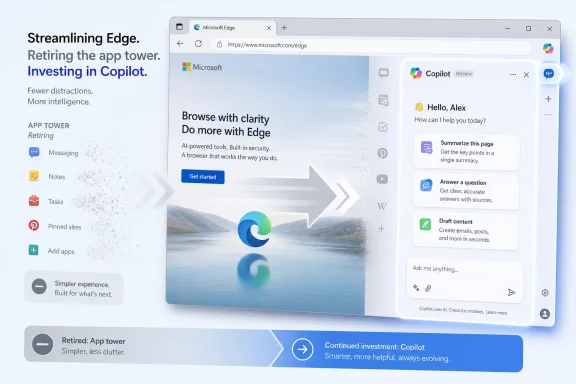
Microsoft is retiring the Microsoft Edge sidebar app list in the near future, beginning with users signed in with personal Microsoft accounts, while leaving Copilot available in the browser and continuing to treat it as a core Edge experience. That is the plain version of the news, but it undersells the meaning of the move. Microsoft is not merely trimming a stray browser feature; it is deciding which kind of complexity deserves to survive. In Edge, the customizable sidebar is expendable, while the AI assistant is infrastructure.
The official explanation is almost aggressively simple: Microsoft says it is simplifying Edge. New apps can no longer be added to the sidebar, and apps already pinned in the app tower are slated to disappear in a future update. There is no confirmed retirement date, which means users are being told the direction of travel before they are given a precise calendar.
That kind of phrasing has become familiar in modern Microsoft product language. Features are not always “removed”; they are “retired.” Interfaces are not stripped down; they are “simplified.” The vocabulary suggests tidiness, but the outcome is still the same for anyone who used Edge’s sidebar as a small productivity dock for messaging apps, notes, search tools, social sites, or frequently visited web apps.
The exception is what makes the decision politically interesting. Copilot is not being swept into the simplification campaign. Microsoft is making clear that Edge’s sidebar app list can go, but Copilot remains, with the company saying it will continue to improve and enhance that experience.
That distinction tells users what Microsoft thinks Edge is for in 2026. Edge can be less of a customizable browser workspace, but it cannot be less of an AI delivery surface.
The appeal was not mysterious. A user could keep Outlook, WhatsApp, YouTube Music, Instagram, search, or a custom site available without fully switching tabs. In a world where browsers are already operating systems in disguise, Edge’s sidebar was a small admission that people do not always want another tab; sometimes they want a panel.
For multitaskers, that mattered. It let a messaging app live beside a document, a dictionary sit beside a draft, or a lightweight dashboard remain available while the main tab stayed focused. It was not revolutionary, but it was useful in the mundane way that sticky features often are.
That is why the backlash from committed Edge users has been so sharp. The sidebar app list was not necessarily a mass-market triumph, but it was a loyalty feature. It gave a subset of users a concrete reason to choose Edge over Chrome, Brave, Firefox, or Vivaldi.
And this is where Microsoft’s problem begins. The features that make a browser feel distinctive are often the same features that make it feel bloated to everyone else.
From Microsoft’s perspective, a sidebar full of arbitrary apps and pinned web experiences may create support burden, policy complexity, telemetry noise, and UI inconsistency. It is another surface that must behave across personal accounts, work profiles, managed devices, regional compliance regimes, and increasingly complicated Copilot licensing models. Removing it probably makes the product easier to explain internally and easier to steer externally.
From a user’s perspective, however, simplification can look like subtraction without consent. The sidebar app list was optional. Users who disliked it could ignore it, hide it, or disable much of the sidebar experience. Users who loved it could make Edge feel less like a generic Chromium shell and more like a workspace.
That asymmetry is why this kind of feature retirement generates disproportionate anger. Microsoft sees a rarely used surface; the people who used it see the thing that made Edge worth keeping. Both can be true at the same time.
The sharper frustration is that Copilot does not appear to be held to the same standard. If the test is interface cleanliness, Copilot is hardly invisible. If the test is user choice, Copilot has been a frequent flashpoint across Windows, Edge, Microsoft 365, and the broader Microsoft account ecosystem. Yet in this cleanup, the AI panel survives while the user-defined app list does not.
That does not prove a conspiracy. It does prove a priority.
But Edge remains different. The browser is one of the few places where Microsoft can plausibly argue that AI has context, immediacy, and user intent. A browser sees pages, PDFs, searches, shopping flows, emails opened from Outlook, enterprise portals, and the public web. If Copilot is going to become a persistent assistant rather than a novelty chatbot, Edge is one of the most valuable pieces of real estate Microsoft owns.
That explains why the company can remove sidebar apps while preserving Copilot in the same neighborhood. Microsoft does not want the right rail of Edge to be a generic dock anymore. It wants that rail to be a controlled assistant surface.
This is not just about pixels. A customizable sidebar encourages users to bring their own workflows. A Copilot-centered sidebar encourages users to route workflows through Microsoft’s assistant. One model treats Edge as a container; the other treats Edge as a funnel.
That difference matters because browsers are habit machines. Once a user trains themselves to summarize a page, compare products, draft text, or query a PDF through a browser assistant, the assistant becomes part of the browsing loop. Microsoft wants Copilot to be part of that loop before Google, OpenAI, Perplexity, Anthropic, or a dozen extension makers own it instead.
Chrome won because it became the default mental model of the web for a generation of users. Safari wins on Apple platforms because it is both good enough and deeply integrated. Firefox survives because it stands for something its users care about. Vivaldi and Arc attracted attention by arguing that the browser should be a workspace, not just a window.
Edge has never had a clean identity. It is fast, because Chromium is fast. It is compatible, because Chromium is compatible. It is enterprise-friendly, because Microsoft is Microsoft. But for consumers, Edge has often felt like a browser that cannot decide whether it wants to be Chrome with Microsoft services, a productivity suite, a shopping companion, a PDF tool, a Windows feature, or an AI shell.
The sidebar app list fit the productivity-suite version of Edge. It made the browser more opinionated and more useful for people who wanted a built-in sidecar. Copilot fits the AI-shell version of Edge. It makes the browser a host for Microsoft’s next platform bet.
By retiring one and preserving the other, Microsoft is choosing the story it wants Edge to tell. The company may call it simplification, but it is also narrative discipline. Edge is being edited down to the features Microsoft believes can differentiate it in an AI-first market.
That is a gamble. Users rarely object to simplification in the abstract; they object when the removed feature is the one they actually used.
In that light, retiring the app list may reduce some administrative ambiguity. A fleet of managed browsers is easier to govern when fewer user-customizable web panels can appear beside corporate resources. Security teams that disliked arbitrary sidebar apps may quietly welcome the move.
But Copilot keeps the governance challenge alive. Microsoft’s own management model treats Copilot in Edge as something administrators need to control carefully, especially when browsing context, PDFs, work profiles, personal Microsoft accounts, Entra accounts, and tenant settings are involved. If the sidebar is disabled entirely, Copilot can be hidden too; if Copilot is allowed, admins then have to decide what context it can access and which identities can use it.
That means Microsoft is not removing complexity so much as concentrating it. The old complexity was: which sidebar apps can users pin? The new complexity is: what is Copilot allowed to see, summarize, and act on inside the browser?
For organizations that have already standardized on Edge, this is manageable. Microsoft has the policy machinery, the admin center hooks, and the documentation trail. But for organizations still evaluating AI in the workplace, the message is more complicated. Edge is becoming a more strategic Copilot endpoint at the same time Microsoft is pruning user-controlled surfaces.
That will not necessarily scare enterprise customers away. Many of them prefer fewer consumer-style widgets and more centralized controls. But it does mean Edge’s future is being tied more tightly to Microsoft’s AI governance story, and that story is still evolving.
Personal Microsoft accounts are also where Microsoft can shape consumer Copilot habits most directly. The company has spent years trying to make the Microsoft account the connective tissue across Windows, Edge, Bing, OneDrive, Outlook.com, Xbox, Microsoft Store, and now Copilot. Edge is one of the few places where those services converge in a daily-use surface.
Starting with MSA users lets Microsoft test the pain. If the backlash remains confined to enthusiast forums, Reddit threads, and power-user communities, the company may judge the tradeoff acceptable. If the telemetry shows meaningful browser abandonment or a spike in sidebar-related complaints, Microsoft still has room to adjust the timeline, wording, or replacement experience.
The lack of a confirmed retirement date gives Microsoft flexibility. It can roll the change gradually, pause it, or soften it with alternative pinning mechanisms. It can also wait for users to acclimate, which is often how controversial software changes become permanent.
That ambiguity is frustrating, but it is deliberate. Microsoft has announced enough to set expectations, but not enough to be pinned down.
But dismissing the reaction misses the deeper issue. Power users are often the people who make a product legible to everyone else. They write the guides, recommend the browser, configure family machines, set workplace defaults, and defend weird features because those features solve real problems. When they feel ignored, the product loses unpaid evangelists.
Microsoft has learned this lesson repeatedly. Windows 8 was not doomed because every normal user had a sophisticated theory of desktop ergonomics; it was doomed because the people who understood PCs best hated explaining it. Windows 11’s strict hardware requirements, Start menu changes, default-app friction, and Copilot push all produced variations of the same dynamic. The enthusiast response does not always represent the mass market, but it often predicts where Microsoft has made a trust withdrawal.
The Edge sidebar app list is smaller than any of those controversies. Still, it touches the same nerve. Users are not only complaining that a feature is going away. They are complaining that the feature going away is theirs, while the feature staying is Microsoft’s.
That is the emotional core of the story.
There is a version of this future where Microsoft is vindicated. Copilot in Edge becomes genuinely useful, fast, context-aware, policy-compliant, and restrained. It summarizes dense pages without hallucinating, helps users compare information across tabs, drafts replies without becoming intrusive, and respects enterprise boundaries. In that future, removing the app list looks like clearing weeds around the feature that mattered.
There is another version where Copilot remains uneven, while Microsoft continues removing or demoting features that users already understood. In that future, each “simplification” looks less like product discipline and more like forced migration toward an AI assistant users did not ask to prioritize. That is how a feature becomes a mascot for resentment.
Microsoft’s challenge is that both futures are plausible. Copilot is not useless; it can be genuinely helpful in the browser context. But AI features also carry a burden that older browser tools do not. They must earn trust every time they summarize, infer, rewrite, or recommend. A sidebar app either opens or it does not. An AI assistant can be subtly wrong.
That makes the tradeoff harder to sell. Microsoft is replacing predictable user control with a more ambitious, less predictable layer of assistance.
The browser market in 2026 is not short of escape hatches. Chrome remains the default choice for many people outside Microsoft’s ecosystem. Firefox remains the principled alternative. Brave sells privacy and crypto-adjacent independence to its audience. Vivaldi has built a home for people who actually like knobs, panels, and deep customization. Arc and its descendants have pushed the idea that the browser can be redesigned around tasks rather than tabs.
That last category is especially relevant. Microsoft is removing a panel-based productivity feature at a time when other browser makers are still experimenting with the browser as a workspace. The industry has not settled the question of whether browsers should be simpler windows or richer work environments. Microsoft is answering that question in a very specific way: richer, yes, but richer through AI rather than user-pinned app surfaces.
That may be the correct commercial answer. AI is where Microsoft sees platform leverage, subscription gravity, and enterprise differentiation. A customizable sidebar app list is useful, but it does not obviously create a moat.
The risk is that users experience strategy as erosion. They do not wake up caring about Microsoft’s platform leverage. They care that the tool they configured yesterday is less capable tomorrow.
There were obvious compromise paths. Microsoft could have kept existing pinned apps while preventing new additions. It could have moved the app list behind an advanced setting. It could have limited custom apps to installed web apps. It could have created a policy-controlled “workspace rail” for enterprise users and a lighter Copilot rail for consumers. It could have let users choose between Copilot-first and app-first sidebar modes.
Some of those options may have been technically ugly. Legacy features often look simple from the outside and awful from the inside. The sidebar may carry debt that Microsoft no longer wants to pay. But users cannot see that debt; they only see removal.
A graceful retirement usually requires a replacement story. Microsoft has not yet provided a persuasive one for people who used the sidebar app list as a dock. Copilot is not a replacement for WhatsApp, a music player, a social feed, a dashboard, or a custom internal web tool. It is a different category of product.
That category mismatch is what makes the simplification pitch feel thin. If Microsoft said it was retiring the app list because usage was low, maintenance was high, or the architecture was changing, users might still be annoyed but less insulted. “Simplifying Edge” sounds like a design principle until users notice that the most controversial button in the browser remains protected.
Source: XDA Microsoft is simplifying Edge by removing the sidebar — but Copilot stays
 Microsoft’s Cleanup Campaign Has a Copilot Exception
The official explanation is almost aggressively simple: Microsoft says it is simplifying Edge. New apps can no longer be added to the sidebar, and apps already pinned in the app tower are slated to disappear in a future update. There is no confirmed retirement date, which means users are being told the direction of travel before they are given a precise calendar.That kind of phrasing has become familiar in modern Microsoft product language. Features are not always “removed”; they are “retired.” Interfaces are not stripped down; they are “simplified.” The vocabulary suggests tidiness, but the outcome is still the same for anyone who used Edge’s sidebar as a small productivity dock for messaging apps, notes, search tools, social sites, or frequently visited web apps.
The exception is what makes the decision politically interesting. Copilot is not being swept into the simplification campaign. Microsoft is making clear that Edge’s sidebar app list can go, but Copilot remains, with the company saying it will continue to improve and enhance that experience.
That distinction tells users what Microsoft thinks Edge is for in 2026. Edge can be less of a customizable browser workspace, but it cannot be less of an AI delivery surface.
The Sidebar Was Edge’s Most Microsoft Feature, for Better and Worse
Edge’s sidebar has always been one of those features that divided users almost instantly. To some, it was clutter: another strip of icons in a browser already surrounded by toolbars, profile buttons, extension menus, collections, shopping tools, rewards prompts, and Microsoft service integrations. To others, it was the rare modern browser feature that actually changed day-to-day behavior.The appeal was not mysterious. A user could keep Outlook, WhatsApp, YouTube Music, Instagram, search, or a custom site available without fully switching tabs. In a world where browsers are already operating systems in disguise, Edge’s sidebar was a small admission that people do not always want another tab; sometimes they want a panel.
For multitaskers, that mattered. It let a messaging app live beside a document, a dictionary sit beside a draft, or a lightweight dashboard remain available while the main tab stayed focused. It was not revolutionary, but it was useful in the mundane way that sticky features often are.
That is why the backlash from committed Edge users has been so sharp. The sidebar app list was not necessarily a mass-market triumph, but it was a loyalty feature. It gave a subset of users a concrete reason to choose Edge over Chrome, Brave, Firefox, or Vivaldi.
And this is where Microsoft’s problem begins. The features that make a browser feel distinctive are often the same features that make it feel bloated to everyone else.
Simplification Is Never Neutral
When a company says it is simplifying software, the important question is not whether the interface becomes simpler. The important question is who gets to define clutter.From Microsoft’s perspective, a sidebar full of arbitrary apps and pinned web experiences may create support burden, policy complexity, telemetry noise, and UI inconsistency. It is another surface that must behave across personal accounts, work profiles, managed devices, regional compliance regimes, and increasingly complicated Copilot licensing models. Removing it probably makes the product easier to explain internally and easier to steer externally.
From a user’s perspective, however, simplification can look like subtraction without consent. The sidebar app list was optional. Users who disliked it could ignore it, hide it, or disable much of the sidebar experience. Users who loved it could make Edge feel less like a generic Chromium shell and more like a workspace.
That asymmetry is why this kind of feature retirement generates disproportionate anger. Microsoft sees a rarely used surface; the people who used it see the thing that made Edge worth keeping. Both can be true at the same time.
The sharper frustration is that Copilot does not appear to be held to the same standard. If the test is interface cleanliness, Copilot is hardly invisible. If the test is user choice, Copilot has been a frequent flashpoint across Windows, Edge, Microsoft 365, and the broader Microsoft account ecosystem. Yet in this cleanup, the AI panel survives while the user-defined app list does not.
That does not prove a conspiracy. It does prove a priority.
Edge Is Being Recast Around AI, Not Merely Cleaned Up
The retirement lands in a broader moment when Microsoft appears to be recalibrating its AI push without abandoning it. The company has pulled back or reworked some Copilot integrations in Windows, and it has signaled that not every app needs an AI button bolted onto it. That is the sensible reading: Microsoft overreached, heard the complaints, and is now trying to make Copilot feel less like spray foam.But Edge remains different. The browser is one of the few places where Microsoft can plausibly argue that AI has context, immediacy, and user intent. A browser sees pages, PDFs, searches, shopping flows, emails opened from Outlook, enterprise portals, and the public web. If Copilot is going to become a persistent assistant rather than a novelty chatbot, Edge is one of the most valuable pieces of real estate Microsoft owns.
That explains why the company can remove sidebar apps while preserving Copilot in the same neighborhood. Microsoft does not want the right rail of Edge to be a generic dock anymore. It wants that rail to be a controlled assistant surface.
This is not just about pixels. A customizable sidebar encourages users to bring their own workflows. A Copilot-centered sidebar encourages users to route workflows through Microsoft’s assistant. One model treats Edge as a container; the other treats Edge as a funnel.
That difference matters because browsers are habit machines. Once a user trains themselves to summarize a page, compare products, draft text, or query a PDF through a browser assistant, the assistant becomes part of the browsing loop. Microsoft wants Copilot to be part of that loop before Google, OpenAI, Perplexity, Anthropic, or a dozen extension makers own it instead.
The Browser War Has Moved From Defaults to Daily Rituals
Microsoft has spent years fighting the browser war on terrain it did not fully control. Windows can nudge users toward Edge. Bing can be wired into Microsoft services. Defaults can be defended, reset, and litigated. But a browser only becomes sticky when it absorbs a user’s rituals.Chrome won because it became the default mental model of the web for a generation of users. Safari wins on Apple platforms because it is both good enough and deeply integrated. Firefox survives because it stands for something its users care about. Vivaldi and Arc attracted attention by arguing that the browser should be a workspace, not just a window.
Edge has never had a clean identity. It is fast, because Chromium is fast. It is compatible, because Chromium is compatible. It is enterprise-friendly, because Microsoft is Microsoft. But for consumers, Edge has often felt like a browser that cannot decide whether it wants to be Chrome with Microsoft services, a productivity suite, a shopping companion, a PDF tool, a Windows feature, or an AI shell.
The sidebar app list fit the productivity-suite version of Edge. It made the browser more opinionated and more useful for people who wanted a built-in sidecar. Copilot fits the AI-shell version of Edge. It makes the browser a host for Microsoft’s next platform bet.
By retiring one and preserving the other, Microsoft is choosing the story it wants Edge to tell. The company may call it simplification, but it is also narrative discipline. Edge is being edited down to the features Microsoft believes can differentiate it in an AI-first market.
That is a gamble. Users rarely object to simplification in the abstract; they object when the removed feature is the one they actually used.
Enterprise IT Gets a Cleaner Story and a New Set of Questions
For IT administrators, the sidebar has always been more than a personal preference. It intersects with policy, extension control, web app access, data leakage concerns, user training, and the messy boundary between personal and work browsing. Microsoft’s documentation has long offered policies for blocking, allowing, and force-enabling sidebar apps, including controls that vary by Edge version and app type.In that light, retiring the app list may reduce some administrative ambiguity. A fleet of managed browsers is easier to govern when fewer user-customizable web panels can appear beside corporate resources. Security teams that disliked arbitrary sidebar apps may quietly welcome the move.
But Copilot keeps the governance challenge alive. Microsoft’s own management model treats Copilot in Edge as something administrators need to control carefully, especially when browsing context, PDFs, work profiles, personal Microsoft accounts, Entra accounts, and tenant settings are involved. If the sidebar is disabled entirely, Copilot can be hidden too; if Copilot is allowed, admins then have to decide what context it can access and which identities can use it.
That means Microsoft is not removing complexity so much as concentrating it. The old complexity was: which sidebar apps can users pin? The new complexity is: what is Copilot allowed to see, summarize, and act on inside the browser?
For organizations that have already standardized on Edge, this is manageable. Microsoft has the policy machinery, the admin center hooks, and the documentation trail. But for organizations still evaluating AI in the workplace, the message is more complicated. Edge is becoming a more strategic Copilot endpoint at the same time Microsoft is pruning user-controlled surfaces.
That will not necessarily scare enterprise customers away. Many of them prefer fewer consumer-style widgets and more centralized controls. But it does mean Edge’s future is being tied more tightly to Microsoft’s AI governance story, and that story is still evolving.
The MSA-First Rollout Is a Tell
The retirement begins with Microsoft account users, not necessarily every enterprise tenant on day one. That sequencing is notable. Consumer Edge users are the group most likely to have used the sidebar as a personal app dock, and they are also the group Microsoft can move more aggressively without enterprise change-management friction.Personal Microsoft accounts are also where Microsoft can shape consumer Copilot habits most directly. The company has spent years trying to make the Microsoft account the connective tissue across Windows, Edge, Bing, OneDrive, Outlook.com, Xbox, Microsoft Store, and now Copilot. Edge is one of the few places where those services converge in a daily-use surface.
Starting with MSA users lets Microsoft test the pain. If the backlash remains confined to enthusiast forums, Reddit threads, and power-user communities, the company may judge the tradeoff acceptable. If the telemetry shows meaningful browser abandonment or a spike in sidebar-related complaints, Microsoft still has room to adjust the timeline, wording, or replacement experience.
The lack of a confirmed retirement date gives Microsoft flexibility. It can roll the change gradually, pause it, or soften it with alternative pinning mechanisms. It can also wait for users to acclimate, which is often how controversial software changes become permanent.
That ambiguity is frustrating, but it is deliberate. Microsoft has announced enough to set expectations, but not enough to be pinned down.
Power Users Are Right to Be Annoyed, but Microsoft May Still Be Reading the Room
It is easy to mock the anger over a browser sidebar. The web still works. Tabs still exist. Progressive web apps can still be installed. Extensions can still fill some gaps. Anyone threatening to abandon Edge over a sidebar can indeed switch browsers, and many probably will not.But dismissing the reaction misses the deeper issue. Power users are often the people who make a product legible to everyone else. They write the guides, recommend the browser, configure family machines, set workplace defaults, and defend weird features because those features solve real problems. When they feel ignored, the product loses unpaid evangelists.
Microsoft has learned this lesson repeatedly. Windows 8 was not doomed because every normal user had a sophisticated theory of desktop ergonomics; it was doomed because the people who understood PCs best hated explaining it. Windows 11’s strict hardware requirements, Start menu changes, default-app friction, and Copilot push all produced variations of the same dynamic. The enthusiast response does not always represent the mass market, but it often predicts where Microsoft has made a trust withdrawal.
The Edge sidebar app list is smaller than any of those controversies. Still, it touches the same nerve. Users are not only complaining that a feature is going away. They are complaining that the feature going away is theirs, while the feature staying is Microsoft’s.
That is the emotional core of the story.
Copilot Is Becoming the Feature That Survives Every Purge
The more Microsoft trims around Copilot, the more Copilot becomes a symbol of institutional preference. That symbolism can become dangerous even when the underlying product improves.There is a version of this future where Microsoft is vindicated. Copilot in Edge becomes genuinely useful, fast, context-aware, policy-compliant, and restrained. It summarizes dense pages without hallucinating, helps users compare information across tabs, drafts replies without becoming intrusive, and respects enterprise boundaries. In that future, removing the app list looks like clearing weeds around the feature that mattered.
There is another version where Copilot remains uneven, while Microsoft continues removing or demoting features that users already understood. In that future, each “simplification” looks less like product discipline and more like forced migration toward an AI assistant users did not ask to prioritize. That is how a feature becomes a mascot for resentment.
Microsoft’s challenge is that both futures are plausible. Copilot is not useless; it can be genuinely helpful in the browser context. But AI features also carry a burden that older browser tools do not. They must earn trust every time they summarize, infer, rewrite, or recommend. A sidebar app either opens or it does not. An AI assistant can be subtly wrong.
That makes the tradeoff harder to sell. Microsoft is replacing predictable user control with a more ambitious, less predictable layer of assistance.
The Real Competition Is Not Chrome, It Is User Patience
Edge does not need to beat Chrome outright to be successful. It needs to remain the obvious browser for enough Windows users, the manageable browser for enough enterprises, and the strategic browser for Microsoft’s services. But that still requires patience from users who have alternatives one download away.The browser market in 2026 is not short of escape hatches. Chrome remains the default choice for many people outside Microsoft’s ecosystem. Firefox remains the principled alternative. Brave sells privacy and crypto-adjacent independence to its audience. Vivaldi has built a home for people who actually like knobs, panels, and deep customization. Arc and its descendants have pushed the idea that the browser can be redesigned around tasks rather than tabs.
That last category is especially relevant. Microsoft is removing a panel-based productivity feature at a time when other browser makers are still experimenting with the browser as a workspace. The industry has not settled the question of whether browsers should be simpler windows or richer work environments. Microsoft is answering that question in a very specific way: richer, yes, but richer through AI rather than user-pinned app surfaces.
That may be the correct commercial answer. AI is where Microsoft sees platform leverage, subscription gravity, and enterprise differentiation. A customizable sidebar app list is useful, but it does not obviously create a moat.
The risk is that users experience strategy as erosion. They do not wake up caring about Microsoft’s platform leverage. They care that the tool they configured yesterday is less capable tomorrow.
Microsoft Could Have Chosen a Less Abrupt Middle Path
The most puzzling part of the retirement is not that Microsoft wants to simplify Edge. It is that the company appears willing to remove the app list rather than demote it, freeze it, or rebuild it around clearer rules.There were obvious compromise paths. Microsoft could have kept existing pinned apps while preventing new additions. It could have moved the app list behind an advanced setting. It could have limited custom apps to installed web apps. It could have created a policy-controlled “workspace rail” for enterprise users and a lighter Copilot rail for consumers. It could have let users choose between Copilot-first and app-first sidebar modes.
Some of those options may have been technically ugly. Legacy features often look simple from the outside and awful from the inside. The sidebar may carry debt that Microsoft no longer wants to pay. But users cannot see that debt; they only see removal.
A graceful retirement usually requires a replacement story. Microsoft has not yet provided a persuasive one for people who used the sidebar app list as a dock. Copilot is not a replacement for WhatsApp, a music player, a social feed, a dashboard, or a custom internal web tool. It is a different category of product.
That category mismatch is what makes the simplification pitch feel thin. If Microsoft said it was retiring the app list because usage was low, maintenance was high, or the architecture was changing, users might still be annoyed but less insulted. “Simplifying Edge” sounds like a design principle until users notice that the most controversial button in the browser remains protected.
The Edge Loyalists Just Learned Which Sidebar Microsoft Values
The immediate lesson is concrete, but the broader lesson is strategic: Edge is moving away from user-customized side panels and toward Microsoft-curated AI assistance. That does not make Edge worse for everyone. It does make it less attractive to the specific users who treated the sidebar as a reason to stay.- Microsoft has confirmed that the Edge sidebar app list is being retired in the near future, starting with personal Microsoft account users.
- New sidebar apps can no longer be added, and currently pinned apps in the app tower are expected to be removed in a future update.
- Copilot is explicitly not part of this retirement and remains a continuing investment area inside Edge.
- The change may simplify the browser for casual users and administrators, but it removes a workflow feature that some power users considered central to Edge’s appeal.
- The decision reinforces Microsoft’s broader strategy of making Edge a primary surface for Copilot rather than a broadly customizable Chromium workspace.
- The lack of a confirmed retirement date gives Microsoft room to adjust, but it also leaves users uncertain about when their current setups will break.
Source: XDA Microsoft is simplifying Edge by removing the sidebar — but Copilot stays
