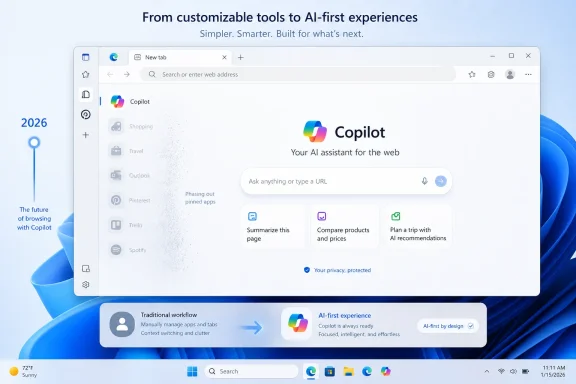
Microsoft is phasing out the Microsoft Edge Sidebar app list in 2026, beginning with Microsoft account users, as part of a stated effort to “simplify” the Windows 11 browser while preserving Copilot integration. That makes the move more than a minor interface cleanup. It is a revealing test of whether Microsoft’s new promise to “win back fans” means listening to Edge’s most committed users or sanding the browser down around the company’s AI strategy. Edge is not being abandoned; it is being narrowed.
The case against Edge clutter is not hard to make. Microsoft’s Chromium browser has spent years accumulating buttons, panels, shopping helpers, reward nudges, Bing tie-ins, productivity widgets, and AI surfaces with the enthusiasm of a product team that never met a cross-promotion it could not justify. Even people who like Edge have often had to like it despite the feeling that Microsoft was constantly trying to turn a browser into a dashboard for the whole company.
So when Microsoft says it is simplifying Edge, the instinctive response from many Windows users should be relief. A cleaner Edge could be faster to understand, easier to recommend, and less likely to trigger the reflexive “set Chrome as default” ritual that still follows so many fresh Windows installs. The browser has good bones: strong performance, useful vertical tabs, sleeping tabs, solid PDF handling, enterprise manageability, and tight Windows integration.
But the first visible casualty matters. Microsoft is not merely removing one of the many prompts that make Edge feel needy. It is retiring the Sidebar app list, a feature that gave Edge a practical identity separate from Chrome. Users could pin web apps and services in a side panel, keeping Outlook, search, messaging, shopping tools, notes, or other lightweight workflows available without turning the tab strip into a landfill.
That is why the decision lands awkwardly. Microsoft is promising a less cluttered browser while removing one of the features that made the clutter feel like a design philosophy rather than an accident. The Sidebar app list was not universally loved, but it was legible: a place for persistent, secondary tasks that did not deserve a full tab. In a market where most mainstream browsers are variations on Chromium, legibility is valuable.
The Sidebar app list was one of those features. It was not just another button in the toolbar. It was a workflow bet: that people increasingly live in small web apps and need a way to keep some of them close without constantly switching context. In practice, it made the browser feel a little more like a workbench and a little less like a stack of documents.
That distinction matters because Chrome already owns the default mental model of the modern browser. It is fast, familiar, heavily extended, and inseparable from Google’s account ecosystem. Firefox owns a different argument, built around independence, privacy, and open-web credibility. Safari owns the Apple platform by being the path of least resistance. Edge has needed a reason beyond “it came with Windows.”
The Sidebar gave Edge one. Alongside vertical tabs and workspaces, it suggested Microsoft was willing to rethink browser ergonomics for people who multitask heavily. A pinned Outlook panel beside a research tab, a quick calculator or shopping tracker, a messaging service kept out of the main tab flow — these are not revolutionary ideas, but they are the sort of conveniences that create loyalty among power users.
And power users are disproportionately loud because they are disproportionately influential. They are the people who configure family PCs, set workplace defaults, write internal guidance, and tell less technical users whether a Microsoft feature is worth trusting. Removing a niche feature may make telemetry sense. Removing a niche feature loved by the people most inclined to defend Edge is a different calculation.
That version would deserve applause. Browsers have become operating systems inside operating systems, and Edge has sometimes felt like the place where Microsoft’s consumer ambitions collide at full speed. A serious cleanup would help the browser compete on trust rather than persistence.
The problem is that Microsoft’s definition of clutter appears selective. The Sidebar app list is being retired, but Copilot is explicitly spared. In other words, the flexible user-configurable panel is clutter, while Microsoft’s strategic AI panel is not. That may be defensible from a corporate roadmap perspective, but it is a harder sell from the user’s chair.
This is the old Microsoft tension in new clothes. The company often talks about empowering users, but its consumer products frequently distinguish between features users choose and features Microsoft wants users to choose. The former are negotiable. The latter become architecture.
That distinction is what makes the Sidebar retirement symbolically bigger than its footprint. Users are not merely losing a panel. They are watching Microsoft decide which kind of sidebar deserves to survive. The answer, unsurprisingly, is the one aligned with Copilot.
From that angle, the Sidebar app list may have become inconvenient. It turned the side panel into a user-owned space. Copilot turns it into a Microsoft-owned space with user benefits attached. The two can coexist technically, but they compete conceptually: is the side of the browser a dock for the user’s chosen web tools, or is it a privileged lane for Microsoft’s assistant?
Microsoft has clearly answered that question. The company can say Copilot is not affected because it is not merely another sidebar app. It is part of the browser’s future positioning. Edge is no longer just the Windows browser; it is becoming a distribution channel for Microsoft’s AI layer.
There is business logic here. Microsoft has invested enormously in AI infrastructure and needs engagement across consumer and commercial products. A browser that can summarize pages, assist with writing, analyze shopping choices, and connect to Microsoft 365 has obvious strategic value. If Edge can turn browsing sessions into Copilot sessions, it becomes more important to Microsoft than its browser-market share alone suggests.
But that is also the risk. Users do not experience product strategy as strategy. They experience it as interface behavior. When a useful customizable feature disappears while an AI feature remains, the message is not “we are simplifying.” The message is “we are making room for what Microsoft cares about.”
That makes Edge’s simplification campaign a useful early test. Winning back fans cannot just mean improving metrics. It has to mean making choices that users recognize as being in their interest. The distinction is crucial because Microsoft has a long record of confusing engagement with affection.
Edge gaining share for twenty consecutive quarters, as Microsoft says, is not meaningless. It suggests that Edge’s enterprise position, Windows integration, performance, and incremental improvements are working. Bing reaching a billion monthly active users is also a milestone. But usage is not the same as love, and default placement is not the same as preference.
The browser market is full of accidental users. Some use Edge because their workplace mandates it. Some use it because it is installed and adequate. Some use it for a single feature. Some use it because Windows makes switching feel like a chore. If Microsoft wants fans rather than captives, it has to protect the moments where Edge feels chosen.
The Sidebar app list was one of those moments for a subset of users. It was not a growth hack. It was a reason. Removing reasons is a strange way to win back affection.
Edge’s problem is not that it has too many ideas. It is that too many of those ideas feel like they came from somewhere other than the user’s workflow. Shopping tools, rewards prompts, Bing integrations, Microsoft 365 surfaces, Copilot entry points, games, wallet features, startup boosts, profile nudges, and sync encouragement can each be defended in isolation. Together, they can make the browser feel less like software and more like a mall with a rendering engine.
A principled simplification effort would start by asking which features respect user intent. Does the feature appear because the user asked for it? Can it be disabled cleanly? Does it make the primary browsing task easier? Does it duplicate something else? Does it create value even if the user never signs into another Microsoft service?
The Sidebar app list would not automatically survive that audit, but it would have a decent case. It was user-configurable. It supported third-party and web-app workflows. It could be ignored by people who did not want it. Its purpose was understandable without a marketing deck.
By contrast, many of Edge’s most resented surfaces are resented precisely because they do not behave that way. They are not clutter because they are complicated; they are clutter because they are imposed. Microsoft’s cleanup will only feel credible if it removes imposition before it removes optionality.
Microsoft has also been trying to make Edge a serious enterprise browser, not merely the default consumer browser bundled with Windows. Its management policies, compatibility features, IE mode legacy support, Microsoft 365 integration, and security controls give it a defensible place in business environments. Many organizations standardize on Edge because it aligns with identity, device management, and compliance investments they already have.
But enterprise IT also cares deeply about change management. A feature retirement that begins with consumer Microsoft account users may not immediately disrupt managed tenants, but it still sends a signal. If Microsoft is willing to remove user-facing workflows in the name of simplification, administrators will want clarity about timelines, policies, migration paths, and whether Copilot-related surfaces will be easier or harder to suppress.
The Copilot exception is particularly relevant here. Many organizations are still deciding how broadly to expose AI tools, which data boundaries matter, and how to train users. If Edge’s side pane increasingly becomes a Copilot-first surface, admins will need confidence that it can be controlled with the same seriousness as other enterprise features.
Microsoft can make a strong enterprise case for a cleaner Edge. It just cannot make that case by surprise. In business software, simplification without predictability is just churn with better branding.
Some answers are ideological. Brave emphasizes privacy and crypto-adjacent features. Vivaldi emphasizes customization and power-user control. Opera has long leaned into built-in panels, messaging, and a more maximalist browser-as-workspace approach. Edge’s answer has been more complicated: performance, Windows integration, Microsoft account services, enterprise features, and a growing AI pitch.
The Sidebar app list fit neatly into the workspace argument. It gave Edge a feature that was immediately visible, easy to explain, and meaningfully different from Chrome’s default experience. It was also the kind of feature that made sense on wide displays, which are common among office workers and enthusiasts. Browser sidebars are not a fad; they are a response to the fact that web work is increasingly fragmented.
Removing that feature risks pushing Edge closer to the most dangerous category in software: competent but indistinct. If Edge becomes “Chrome, but with Microsoft prompts and Copilot,” Microsoft may gain AI surface area while losing some of the goodwill it built with users who appreciated the browser’s practical enhancements.
That does not mean every differentiating feature should live forever. Products need pruning. But pruning should reveal the shape of the tree. If the shape that remains is mostly Copilot, Bing, and Microsoft 365, users will understand the message.
The loss of both Collections and the Sidebar app list suggests a broader retreat from Edge as a Swiss Army browser. Microsoft may be deciding that too many bespoke features create maintenance cost, user confusion, and strategic distraction. That would not be an irrational conclusion. Browser teams have finite engineering capacity, and every feature has to be tested, localized, secured, documented, and supported across platforms.
Still, patterns shape perception. When Microsoft removes features that users deliberately adopted while preserving features tied to corporate priorities, it reinforces the belief that “simplification” is not neutral. It becomes a euphemism for product consolidation around AI and services.
There is also a data problem. Microsoft may have telemetry showing that relatively few users actively use these tools. But passionate minority use can still be strategically important. Not every feature earns its keep through raw usage. Some features earn it by giving a product character, creating advocacy, or solving specific high-value workflows.
Software companies often struggle with this because dashboards flatten user value. A feature used daily by five percent of users may look expendable next to a feature exposed to everyone. But if that five percent includes the people who recommend the product, administer it, write about it, or choose it over a rival, the math changes.
That means simplification should be user-visible in the places where users actually feel friction. Startup experiences should be quieter. Settings should be clearer. Defaults should be easier to change. AI features should be transparent about when they appear and why. Promotional content should be minimal, removable, and respectful of context. Feature retirements should come with export paths, alternatives, and enough notice to preserve trust.
Most importantly, Microsoft should stop treating customization as clutter by default. A configurable sidebar is not inherently messy. It becomes messy if Microsoft fills it with things the user did not request. A browser with optional power-user features can still be clean if the defaults are restrained and the controls are coherent.
This is where Edge could distinguish itself from Chrome in a way that actually fits Microsoft’s modern identity. Microsoft’s best products increasingly serve a spectrum of users: casual, enthusiast, professional, and enterprise. Visual Studio Code succeeds partly because it is approachable at first launch but deeply extensible when needed. Windows Terminal succeeded because it respected people who cared about terminals without forcing everyone else to care. Edge could follow that model.
Instead, the Sidebar retirement risks telling enthusiasts that Microsoft’s answer to clutter is subtraction for them and persistence for Copilot.
That makes trust more important than ever. Users will tolerate a lot from a browser they trust and very little from one they suspect is manipulating them. Microsoft has the technical ability to build a great browser. The question is whether it has the restraint to let that browser breathe.
Edge’s share gains show that Microsoft has momentum. Its bundling advantage remains enormous. Its enterprise story is strong. Its AI investments may eventually produce features users genuinely value. None of that solves the trust problem if users feel that the browser’s roadmap is being written around Microsoft’s needs first.
The Sidebar app list is not the biggest feature in Edge, but it is a useful symbol because it exposes the trade. Microsoft is exchanging a user-defined productivity surface for a cleaner, more Copilot-centered browser experience. Some users will not notice. Some will welcome the reduction. Some will leave, or at least once again file Edge under “browser I use only when I have to.”
The danger for Microsoft is not a mass exodus over one panel. The danger is accumulated cynicism. Every small removal, every forced prompt, every AI surface that appears uninvited, every setting that moves or resets, becomes part of the same story. Winning back fans requires changing the story, not just the interface.
But dismissing those users would be equally foolish. Enthusiasts are early-warning systems. They notice when a product’s stated logic and actual behavior diverge. They are also the group most likely to use advanced features in combinations Microsoft’s aggregate telemetry may not fully explain.
A user who pins Outlook in the Sidebar while researching in vertical tabs and using workspaces is not just using a feature. They are demonstrating a coherent Edge use case: browser as productivity cockpit. That use case is worth understanding even if it is not universal. It may point to where browsers are heading for knowledge workers.
Microsoft should be interviewing those users, not merely counting them. What did the Sidebar replace? Which apps stayed pinned? Did it reduce tab switching? Did it help on ultrawide monitors? Was the problem the app list itself, or Microsoft’s additions around it? Could the feature have been made opt-in, extension-based, enterprise-managed, or folded into a cleaner workspace model?
The answers might still justify retirement. But the process would feel different. Users can accept losing features when they believe the company understands what is being lost. They rebel when they suspect the company never valued it in the first place.
A disciplined Edge could be excellent. Imagine a default experience that is fast, quiet, and nearly austere, with advanced workspace tools available through an intentional customization layer. Imagine Copilot as a feature that waits for context rather than invading it. Imagine a browser that treats Microsoft account sign-in as useful but not mandatory, Bing integration as optional rather than nagging, and enterprise controls as documentation-first rather than surprise-first.
That product would have an argument. It would say: Chrome gives you Google’s web, Safari gives you Apple’s web, Firefox gives you the independent web, and Edge gives you a productive, manageable, AI-capable web that still respects your choices. That is a much stronger pitch than “Edge is simpler because we removed your sidebar apps but kept our assistant.”
The hard part is restraint. Microsoft’s consumer software often suffers not from a lack of ideas but from too many stakeholders with permission to interrupt the user. Edge can only become simpler if Microsoft simplifies the internal politics that show up as browser chrome.
That is why this moment matters. The Sidebar app list may be small, but the principle is large. If the cleanup is driven by a coherent user-first philosophy, Edge could emerge better. If it is driven by a desire to clear space for Copilot and reduce maintenance cost, users will see through it.
Microsoft can still turn this into a better story. It can explain the roadmap clearly, offer alternatives for pinned app workflows, preserve enterprise control, and make Copilot less presumptive. But the company should understand the warning embedded in the backlash: Edge’s most loyal users are not asking for a browser with more stuff. They are asking for a browser where the stuff they choose matters as much as the stuff Microsoft wants to sell them next.
Source: Windows Latest Microsoft says it'll simpilify Windows 11's Edge browser by removing features like Sidebar, pledges to win back users
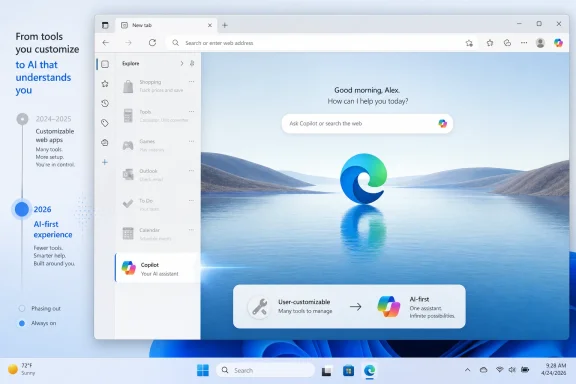 Microsoft’s Browser Cleanup Starts With the Wrong Mess
The case against Edge clutter is not hard to make. Microsoft’s Chromium browser has spent years accumulating buttons, panels, shopping helpers, reward nudges, Bing tie-ins, productivity widgets, and AI surfaces with the enthusiasm of a product team that never met a cross-promotion it could not justify. Even people who like Edge have often had to like it despite the feeling that Microsoft was constantly trying to turn a browser into a dashboard for the whole company.So when Microsoft says it is simplifying Edge, the instinctive response from many Windows users should be relief. A cleaner Edge could be faster to understand, easier to recommend, and less likely to trigger the reflexive “set Chrome as default” ritual that still follows so many fresh Windows installs. The browser has good bones: strong performance, useful vertical tabs, sleeping tabs, solid PDF handling, enterprise manageability, and tight Windows integration.
But the first visible casualty matters. Microsoft is not merely removing one of the many prompts that make Edge feel needy. It is retiring the Sidebar app list, a feature that gave Edge a practical identity separate from Chrome. Users could pin web apps and services in a side panel, keeping Outlook, search, messaging, shopping tools, notes, or other lightweight workflows available without turning the tab strip into a landfill.
That is why the decision lands awkwardly. Microsoft is promising a less cluttered browser while removing one of the features that made the clutter feel like a design philosophy rather than an accident. The Sidebar app list was not universally loved, but it was legible: a place for persistent, secondary tasks that did not deserve a full tab. In a market where most mainstream browsers are variations on Chromium, legibility is valuable.
The Sidebar Was Edge’s Weird Little Argument for Existing
For years, Edge has had a branding problem. It is a capable browser that many Windows users associate less with capability than with coercion: default-browser prompts, Bing nudges, search-engine friction, and Windows messages that seem to plead, cajole, or occasionally scold users into staying inside Microsoft’s ecosystem. That perception has always obscured the fact that Edge has developed a set of genuinely useful features.The Sidebar app list was one of those features. It was not just another button in the toolbar. It was a workflow bet: that people increasingly live in small web apps and need a way to keep some of them close without constantly switching context. In practice, it made the browser feel a little more like a workbench and a little less like a stack of documents.
That distinction matters because Chrome already owns the default mental model of the modern browser. It is fast, familiar, heavily extended, and inseparable from Google’s account ecosystem. Firefox owns a different argument, built around independence, privacy, and open-web credibility. Safari owns the Apple platform by being the path of least resistance. Edge has needed a reason beyond “it came with Windows.”
The Sidebar gave Edge one. Alongside vertical tabs and workspaces, it suggested Microsoft was willing to rethink browser ergonomics for people who multitask heavily. A pinned Outlook panel beside a research tab, a quick calculator or shopping tracker, a messaging service kept out of the main tab flow — these are not revolutionary ideas, but they are the sort of conveniences that create loyalty among power users.
And power users are disproportionately loud because they are disproportionately influential. They are the people who configure family PCs, set workplace defaults, write internal guidance, and tell less technical users whether a Microsoft feature is worth trusting. Removing a niche feature may make telemetry sense. Removing a niche feature loved by the people most inclined to defend Edge is a different calculation.
“Simplifying” Is Not the Same as Respecting Attention
There is a good version of Microsoft’s simplification story. In that version, Edge becomes calmer. The interface stops treating every new Microsoft initiative as a reason to add another entry point. Settings become easier to understand. Features that duplicate each other are merged. Promotional surfaces are demoted. Users get fewer surprise panels, fewer default-on experiments, and clearer choices.That version would deserve applause. Browsers have become operating systems inside operating systems, and Edge has sometimes felt like the place where Microsoft’s consumer ambitions collide at full speed. A serious cleanup would help the browser compete on trust rather than persistence.
The problem is that Microsoft’s definition of clutter appears selective. The Sidebar app list is being retired, but Copilot is explicitly spared. In other words, the flexible user-configurable panel is clutter, while Microsoft’s strategic AI panel is not. That may be defensible from a corporate roadmap perspective, but it is a harder sell from the user’s chair.
This is the old Microsoft tension in new clothes. The company often talks about empowering users, but its consumer products frequently distinguish between features users choose and features Microsoft wants users to choose. The former are negotiable. The latter become architecture.
That distinction is what makes the Sidebar retirement symbolically bigger than its footprint. Users are not merely losing a panel. They are watching Microsoft decide which kind of sidebar deserves to survive. The answer, unsurprisingly, is the one aligned with Copilot.
Copilot Survives Because Edge Is Becoming Microsoft’s AI Front Door
Microsoft’s AI strategy needs surfaces. Windows has one. Office has many. Bing has been remade around one. Edge is particularly useful because the browser sits at the point of intent: search, reading, shopping, writing, comparing, filling forms, summarizing, and moving between work and personal contexts. If Microsoft wants Copilot to feel ambient, Edge is one of the most logical places to put it.From that angle, the Sidebar app list may have become inconvenient. It turned the side panel into a user-owned space. Copilot turns it into a Microsoft-owned space with user benefits attached. The two can coexist technically, but they compete conceptually: is the side of the browser a dock for the user’s chosen web tools, or is it a privileged lane for Microsoft’s assistant?
Microsoft has clearly answered that question. The company can say Copilot is not affected because it is not merely another sidebar app. It is part of the browser’s future positioning. Edge is no longer just the Windows browser; it is becoming a distribution channel for Microsoft’s AI layer.
There is business logic here. Microsoft has invested enormously in AI infrastructure and needs engagement across consumer and commercial products. A browser that can summarize pages, assist with writing, analyze shopping choices, and connect to Microsoft 365 has obvious strategic value. If Edge can turn browsing sessions into Copilot sessions, it becomes more important to Microsoft than its browser-market share alone suggests.
But that is also the risk. Users do not experience product strategy as strategy. They experience it as interface behavior. When a useful customizable feature disappears while an AI feature remains, the message is not “we are simplifying.” The message is “we are making room for what Microsoft cares about.”
Nadella’s “Win Back Fans” Line Raises the Stakes
Satya Nadella’s recent comments about Microsoft doing the foundational work to win back fans across Windows, Xbox, Bing, and Edge were notable because they acknowledged something Microsoft usually prefers to imply rather than say: some of its most important consumer products have a trust problem. Windows users have complained about ads, account pressure, hardware requirements, update friction, and AI features that appear before they feel fully invited. Xbox fans have endured an identity crisis around exclusives, subscriptions, hardware, and cloud gaming. Bing and Edge still fight years of user skepticism.That makes Edge’s simplification campaign a useful early test. Winning back fans cannot just mean improving metrics. It has to mean making choices that users recognize as being in their interest. The distinction is crucial because Microsoft has a long record of confusing engagement with affection.
Edge gaining share for twenty consecutive quarters, as Microsoft says, is not meaningless. It suggests that Edge’s enterprise position, Windows integration, performance, and incremental improvements are working. Bing reaching a billion monthly active users is also a milestone. But usage is not the same as love, and default placement is not the same as preference.
The browser market is full of accidental users. Some use Edge because their workplace mandates it. Some use it because it is installed and adequate. Some use it for a single feature. Some use it because Windows makes switching feel like a chore. If Microsoft wants fans rather than captives, it has to protect the moments where Edge feels chosen.
The Sidebar app list was one of those moments for a subset of users. It was not a growth hack. It was a reason. Removing reasons is a strange way to win back affection.
Edge’s Real Clutter Has Always Been Microsoft’s Appetite
The irony is that Microsoft could remove a lot from Edge without provoking much sympathy for the deleted code. Few users are emotionally attached to aggressive default-browser prompts. Fewer still would mourn promotional banners that appear to exist mostly because another Microsoft business unit wanted browser real estate. The parts of Edge that feel cluttered are often not its productivity features but its intrusions.Edge’s problem is not that it has too many ideas. It is that too many of those ideas feel like they came from somewhere other than the user’s workflow. Shopping tools, rewards prompts, Bing integrations, Microsoft 365 surfaces, Copilot entry points, games, wallet features, startup boosts, profile nudges, and sync encouragement can each be defended in isolation. Together, they can make the browser feel less like software and more like a mall with a rendering engine.
A principled simplification effort would start by asking which features respect user intent. Does the feature appear because the user asked for it? Can it be disabled cleanly? Does it make the primary browsing task easier? Does it duplicate something else? Does it create value even if the user never signs into another Microsoft service?
The Sidebar app list would not automatically survive that audit, but it would have a decent case. It was user-configurable. It supported third-party and web-app workflows. It could be ignored by people who did not want it. Its purpose was understandable without a marketing deck.
By contrast, many of Edge’s most resented surfaces are resented precisely because they do not behave that way. They are not clutter because they are complicated; they are clutter because they are imposed. Microsoft’s cleanup will only feel credible if it removes imposition before it removes optionality.
The Enterprise Angle Is Quieter but Sharper
For IT administrators, Edge is not a lifestyle choice. It is a managed endpoint component that must behave predictably across fleets. From that perspective, simplification can be attractive. Fewer consumer-facing side features may mean fewer support questions, fewer policy exceptions, and a cleaner security model. A browser that does less can be easier to govern.Microsoft has also been trying to make Edge a serious enterprise browser, not merely the default consumer browser bundled with Windows. Its management policies, compatibility features, IE mode legacy support, Microsoft 365 integration, and security controls give it a defensible place in business environments. Many organizations standardize on Edge because it aligns with identity, device management, and compliance investments they already have.
But enterprise IT also cares deeply about change management. A feature retirement that begins with consumer Microsoft account users may not immediately disrupt managed tenants, but it still sends a signal. If Microsoft is willing to remove user-facing workflows in the name of simplification, administrators will want clarity about timelines, policies, migration paths, and whether Copilot-related surfaces will be easier or harder to suppress.
The Copilot exception is particularly relevant here. Many organizations are still deciding how broadly to expose AI tools, which data boundaries matter, and how to train users. If Edge’s side pane increasingly becomes a Copilot-first surface, admins will need confidence that it can be controlled with the same seriousness as other enterprise features.
Microsoft can make a strong enterprise case for a cleaner Edge. It just cannot make that case by surprise. In business software, simplification without predictability is just churn with better branding.
The Chromium Clone Trap Is Real
One reason the Sidebar debate has struck a nerve is that browser differentiation is brutally difficult. Chromium gives Edge a modern engine and compatibility with the web as it exists, but it also ties Edge to Chrome’s gravitational field. Every Chromium browser must answer a basic question: if the pages render the same and the extensions mostly work the same, why should anyone switch?Some answers are ideological. Brave emphasizes privacy and crypto-adjacent features. Vivaldi emphasizes customization and power-user control. Opera has long leaned into built-in panels, messaging, and a more maximalist browser-as-workspace approach. Edge’s answer has been more complicated: performance, Windows integration, Microsoft account services, enterprise features, and a growing AI pitch.
The Sidebar app list fit neatly into the workspace argument. It gave Edge a feature that was immediately visible, easy to explain, and meaningfully different from Chrome’s default experience. It was also the kind of feature that made sense on wide displays, which are common among office workers and enthusiasts. Browser sidebars are not a fad; they are a response to the fact that web work is increasingly fragmented.
Removing that feature risks pushing Edge closer to the most dangerous category in software: competent but indistinct. If Edge becomes “Chrome, but with Microsoft prompts and Copilot,” Microsoft may gain AI surface area while losing some of the goodwill it built with users who appreciated the browser’s practical enhancements.
That does not mean every differentiating feature should live forever. Products need pruning. But pruning should reveal the shape of the tree. If the shape that remains is mostly Copilot, Bing, and Microsoft 365, users will understand the message.
The Collections Retirement Makes This Feel Like a Pattern
The Sidebar decision does not arrive in isolation. Microsoft has also been retiring Collections in Edge, another feature that some users treated as a serious organizing tool. Collections let people gather pages, notes, and research into grouped sets. It was not perfect, and it overlapped with bookmarks, reading lists, OneNote, and other systems. But it represented another attempt to make Edge more than a tab container.The loss of both Collections and the Sidebar app list suggests a broader retreat from Edge as a Swiss Army browser. Microsoft may be deciding that too many bespoke features create maintenance cost, user confusion, and strategic distraction. That would not be an irrational conclusion. Browser teams have finite engineering capacity, and every feature has to be tested, localized, secured, documented, and supported across platforms.
Still, patterns shape perception. When Microsoft removes features that users deliberately adopted while preserving features tied to corporate priorities, it reinforces the belief that “simplification” is not neutral. It becomes a euphemism for product consolidation around AI and services.
There is also a data problem. Microsoft may have telemetry showing that relatively few users actively use these tools. But passionate minority use can still be strategically important. Not every feature earns its keep through raw usage. Some features earn it by giving a product character, creating advocacy, or solving specific high-value workflows.
Software companies often struggle with this because dashboards flatten user value. A feature used daily by five percent of users may look expendable next to a feature exposed to everyone. But if that five percent includes the people who recommend the product, administer it, write about it, or choose it over a rival, the math changes.
Microsoft’s Best Edge Is the One That Lets Users Say No
The path out of this is not mysterious. Microsoft needs to make Edge feel less like a vessel for corporate ambition and more like a tool that accepts boundaries. The browser can have Copilot. It can have Bing. It can integrate with Microsoft 365. It can promote features. But it has to make opting out feel like a first-class path, not a resistance movement.That means simplification should be user-visible in the places where users actually feel friction. Startup experiences should be quieter. Settings should be clearer. Defaults should be easier to change. AI features should be transparent about when they appear and why. Promotional content should be minimal, removable, and respectful of context. Feature retirements should come with export paths, alternatives, and enough notice to preserve trust.
Most importantly, Microsoft should stop treating customization as clutter by default. A configurable sidebar is not inherently messy. It becomes messy if Microsoft fills it with things the user did not request. A browser with optional power-user features can still be clean if the defaults are restrained and the controls are coherent.
This is where Edge could distinguish itself from Chrome in a way that actually fits Microsoft’s modern identity. Microsoft’s best products increasingly serve a spectrum of users: casual, enthusiast, professional, and enterprise. Visual Studio Code succeeds partly because it is approachable at first launch but deeply extensible when needed. Windows Terminal succeeded because it respected people who cared about terminals without forcing everyone else to care. Edge could follow that model.
Instead, the Sidebar retirement risks telling enthusiasts that Microsoft’s answer to clutter is subtraction for them and persistence for Copilot.
The Browser War Is Now a Trust War
The old browser wars were about rendering engines, standards, speed, and market share. The new browser war is about who gets to mediate the user’s attention. Every major browser vendor wants to sit between the user and the web with more intelligence, more account integration, more security filtering, more shopping assistance, more summarization, and more personalization. The browser is becoming an assistant, a wallet, a password manager, a document viewer, and a policy enforcement point.That makes trust more important than ever. Users will tolerate a lot from a browser they trust and very little from one they suspect is manipulating them. Microsoft has the technical ability to build a great browser. The question is whether it has the restraint to let that browser breathe.
Edge’s share gains show that Microsoft has momentum. Its bundling advantage remains enormous. Its enterprise story is strong. Its AI investments may eventually produce features users genuinely value. None of that solves the trust problem if users feel that the browser’s roadmap is being written around Microsoft’s needs first.
The Sidebar app list is not the biggest feature in Edge, but it is a useful symbol because it exposes the trade. Microsoft is exchanging a user-defined productivity surface for a cleaner, more Copilot-centered browser experience. Some users will not notice. Some will welcome the reduction. Some will leave, or at least once again file Edge under “browser I use only when I have to.”
The danger for Microsoft is not a mass exodus over one panel. The danger is accumulated cynicism. Every small removal, every forced prompt, every AI surface that appears uninvited, every setting that moves or resets, becomes part of the same story. Winning back fans requires changing the story, not just the interface.
The Edge Users Microsoft Risks Losing Are the Ones It Should Study
There is a tendency in large product organizations to view vocal users as noisy outliers. Sometimes they are. Forums, Reddit threads, and enthusiast communities do not represent the median browser user, and Microsoft would be foolish to run Edge entirely according to the preferences of people who know what a Canary build is.But dismissing those users would be equally foolish. Enthusiasts are early-warning systems. They notice when a product’s stated logic and actual behavior diverge. They are also the group most likely to use advanced features in combinations Microsoft’s aggregate telemetry may not fully explain.
A user who pins Outlook in the Sidebar while researching in vertical tabs and using workspaces is not just using a feature. They are demonstrating a coherent Edge use case: browser as productivity cockpit. That use case is worth understanding even if it is not universal. It may point to where browsers are heading for knowledge workers.
Microsoft should be interviewing those users, not merely counting them. What did the Sidebar replace? Which apps stayed pinned? Did it reduce tab switching? Did it help on ultrawide monitors? Was the problem the app list itself, or Microsoft’s additions around it? Could the feature have been made opt-in, extension-based, enterprise-managed, or folded into a cleaner workspace model?
The answers might still justify retirement. But the process would feel different. Users can accept losing features when they believe the company understands what is being lost. They rebel when they suspect the company never valued it in the first place.
A Smaller Edge Could Still Be a Better Edge
It is possible that Microsoft is right in the broad sense and wrong in the particulars. Edge may need fewer surfaces, fewer half-overlapping productivity features, and a clearer identity. Collections, Sidebar apps, web capture, shopping tools, Drop, workspaces, split screen, Copilot, vertical tabs, and Microsoft 365 hooks all compete for conceptual space. No browser can be everything without eventually feeling like a garage sale.A disciplined Edge could be excellent. Imagine a default experience that is fast, quiet, and nearly austere, with advanced workspace tools available through an intentional customization layer. Imagine Copilot as a feature that waits for context rather than invading it. Imagine a browser that treats Microsoft account sign-in as useful but not mandatory, Bing integration as optional rather than nagging, and enterprise controls as documentation-first rather than surprise-first.
That product would have an argument. It would say: Chrome gives you Google’s web, Safari gives you Apple’s web, Firefox gives you the independent web, and Edge gives you a productive, manageable, AI-capable web that still respects your choices. That is a much stronger pitch than “Edge is simpler because we removed your sidebar apps but kept our assistant.”
The hard part is restraint. Microsoft’s consumer software often suffers not from a lack of ideas but from too many stakeholders with permission to interrupt the user. Edge can only become simpler if Microsoft simplifies the internal politics that show up as browser chrome.
That is why this moment matters. The Sidebar app list may be small, but the principle is large. If the cleanup is driven by a coherent user-first philosophy, Edge could emerge better. If it is driven by a desire to clear space for Copilot and reduce maintenance cost, users will see through it.
The Browser Cleanup Microsoft Chose Tells Users Where Edge Is Going
The concrete facts are straightforward, even if the implications are messy.- Microsoft says the Edge Sidebar app list will be retired in the near future, beginning with Microsoft account users.
- Existing Sidebar apps may continue to appear temporarily, but users are already losing the ability to add new ones.
- Copilot is not part of the retirement, which makes the cleanup look less like a general simplification and more like a strategic narrowing.
- Microsoft’s recent promise to win back fans across Windows, Xbox, Bing, and Edge raises expectations for changes that feel user-centered rather than metric-centered.
- Edge’s future competitiveness depends less on whether it has fewer features and more on whether users believe Microsoft is removing the right ones.
Microsoft can still turn this into a better story. It can explain the roadmap clearly, offer alternatives for pinned app workflows, preserve enterprise control, and make Copilot less presumptive. But the company should understand the warning embedded in the backlash: Edge’s most loyal users are not asking for a browser with more stuff. They are asking for a browser where the stuff they choose matters as much as the stuff Microsoft wants to sell them next.
Source: Windows Latest Microsoft says it'll simpilify Windows 11's Edge browser by removing features like Sidebar, pledges to win back users