

XDA’s latest hands-on with EmuDeck on the Windows 11-powered ROG Xbox Ally X shows that, in 2026, the easiest way to turn a handheld PC into a serious retro-gaming machine is no longer to abandon Windows but to tame it with the right software stack. That is the important shift hiding beneath a familiar enthusiast ritual: download a script, copy ROMs, scrape box art, and play. The story is not just that EmuDeck works on another handheld. It is that the Windows handheld category is finally mature enough for retro gaming to feel like a normal use case rather than a weekend-long compatibility project.
The Steam Deck taught a generation of PC players that handheld gaming could be more than a locked-down console or a laptop with thumbsticks. But it also trained users to expect a curated, console-like layer over the chaos of PC gaming. EmuDeck became popular because it understood that lesson early: emulation is not hard because one emulator is hard; it is hard because a dozen emulators, a dozen folder structures, BIOS requirements, controller profiles, shaders, bezels, save paths, and front ends make the whole thing feel brittle.
That is why the XDA piece lands at an interesting moment. The ROG Xbox Ally X is a Windows 11 handheld with Xbox branding, Ryzen AI Z2 Extreme-class ambitions, a 7-inch 1080p 120Hz display, 24GB of memory, 1TB of storage, and the familiar promise that Windows can run nearly everything. EmuDeck’s appeal is that it quietly supplies the part Windows still does not: a sane retro-gaming experience that feels designed for a handheld.
The author’s experience starts with a very Windows problem: the device can do the job, but the operating system does not make the job feel native. A Windows handheld can run Cemu, Flycast, mGBA, PPSSPP, DuckStation, Dolphin, PCSX2, RetroArch, and other emulators, but installing those one by one is the kind of afternoon that begins with optimism and ends with three controller profiles called “final-final-fixed.”
EmuDeck attacks that sprawl by acting less like a single app and more like an opinionated deployment system. It installs and configures emulators, prepares common folders, wires up front-end access, and gives users a coherent place to manage the pieces. It does not remove complexity; it compresses it into a setup flow that ordinary handheld owners can survive.
That difference matters because retro gaming is unusually vulnerable to friction. Modern PC games usually arrive through Steam, Xbox, Epic, GOG, or another launcher that at least pretends to know what game you own and where it lives. Retro libraries are personal archives. They depend on legally dumped ROMs, BIOS files where required, naming conventions, artwork scraping, emulator-specific settings, and a lot of small decisions that become annoying on a 7-inch screen.
The clever part of EmuDeck is not that it automates everything. It is that it automates the boring defaults while leaving enough room for enthusiasts to go spelunking when they want to. That balance is why the author could describe the setup as streamlined without pretending that emulation has become a one-click console storefront.
In practice, Windows remains both the Ally X’s superpower and its tax. It gives users access to almost every emulator, front end, modding utility, file manager, driver package, cloud client, and store. It also gives them pop-ups, hidden folders, permission prompts, inconsistent controller behavior, desktop UI targets, and decades of assumptions built around a keyboard and mouse.
That is why the XDA author’s small Armoury Crate note is more revealing than it looks. Setting Control Mode to GamePad instead of Auto fixed cases where some emulators did not recognize the A button correctly. This is the exact kind of problem that makes Windows handheld ownership feel like a negotiation: the hardware has a controller, Windows sees several possible input modes, Steam may layer Steam Input over the top, and individual emulators may interpret the result differently.
SteamOS solved much of this by making Steam the gravitational center of the device. Windows handhelds have no single center. They have Armoury Crate, Xbox, Game Bar, Steam, individual launchers, and any front end the user installs. EmuDeck’s value is that it gives retro gaming one center of gravity, even if the underlying OS remains a multitasking generalist.
The irony is that EmuDeck’s reputation was forged on SteamOS, not Windows. It grew because the Steam Deck made Linux less scary for gamers while also making emulation feel like a natural extension of a Steam library. The Deck was a weirdly perfect environment for EmuDeck: open enough to tinker with, constrained enough to standardize around, and popular enough to build community knowledge.
Windows handhelds complicate that formula. They come in more shapes, with more vendor utilities, more driver quirks, and more input abstractions. Yet the payoff is also obvious. If EmuDeck can make retro libraries feel organized on Windows, then a device like the ROG Xbox Ally X can become the one handheld that plays Xbox Game Pass titles, Steam games, Epic freebies, PC ports, cloud games, remote-play sessions, and decades of console history.
That is the dream Microsoft and Asus are selling, even if they are not selling the emulation part. The Windows handheld is not trying to be a better Nintendo Switch. It is trying to be the bag-of-holding version of gaming hardware. EmuDeck simply fills one of the largest empty compartments.
That distinction matters because the front end is often what determines whether a retro setup gets used. A folder full of ROMs is an archive. A clean EmulationStation interface with box art, metadata, platform sorting, themes, and controller navigation is a library. The former is something you maintain; the latter is something you browse from the couch.
The XDA walkthrough emphasizes this transformation. After installing EmuDeck, selecting systems, copying ROMs into platform folders, and running the scraper, the author ends up with a console-like dashboard. The games are not merely executable files. They are presented as a collection.
That is not cosmetic. Retro gaming is deeply tied to memory, and memory is visual. Box art, regional covers, platform groupings, and themed interfaces do more than make a library “pretty.” They recreate the feeling of choosing a game rather than launching software. For handhelds, where the usage pattern is often ten minutes on a couch or twenty minutes before bed, that immediacy is the difference between playing and tinkering.
This is part of why EmuDeck’s positioning matters. It is not a ROM source. It is a setup tool. That keeps the project focused on configuration, organization, and user-owned files rather than becoming a storefront for copyrighted material it has no right to distribute.
For users, the practical line is simple even when the cultural debate is not. The cleanest way to treat a retro handheld is as a device for backups, homebrew, fan projects, legal ports, and personal archives. The more the experience resembles downloading a shadow library of commercial games, the more it drifts from preservation into piracy.
The industry has never resolved the contradiction at the heart of retro gaming. Companies want to preserve control over their catalogs, but they often fail to keep those catalogs legally accessible on modern hardware. Enthusiasts fill the vacuum. EmuDeck does not settle that debate, but it makes the preservation-minded side of it far easier to live with.
That is exactly what experienced sysadmins would expect. Cross-platform migrations are where hidden assumptions go to die. Paths change. File permissions change. Emulator versions differ. Save locations are not always identical. BIOS placement can be subtly wrong. Linux and Windows disagree about case sensitivity, separators, shortcuts, symlinks, and the general shape of a filesystem.
The lesson is not that EmuDeck is fragile. The lesson is that emulation stacks are ecosystems, and ecosystems do not always transplant cleanly. A clean Windows install with manually copied ROM folders is less glamorous than dragging over an entire working hierarchy, but it reduces the number of invisible variables.
That advice becomes more important as handheld owners accumulate multiple devices. A Steam Deck OLED, a Windows handheld, a desktop PC, and maybe an Android handheld can all run overlapping pieces of the same retro library. Without disciplined folder organization and save strategy, the dream of “one library everywhere” becomes a quiet mess of duplicated files and mystery saves.
That is easy in modern ecosystems because the platform owner controls the launcher, account system, entitlement model, and save API. It is much harder in emulation because every emulator has its own conventions and every platform had its own save architecture. Syncing a Game Boy Advance save is not the same as syncing a PlayStation 2 memory card image or a Wii U save structure.
EmuDeck’s CloudSync and CloudBackup approach is therefore more important than it sounds. If the project can make saves follow the player across Windows and SteamOS, it starts to behave less like a configuration helper and more like an independent retro platform. That is a much bigger ambition.
The risk is reliability. Save syncing is one of those features users only notice when it fails, and failure can mean lost progress rather than a minor annoyance. Any cloud system in this space has to be conservative, transparent, and very good at conflict handling. Enthusiasts will forgive rough artwork scraping. They will not forgive a vanished 40-hour RPG save.
The ROG Xbox Ally X’s hardware gives users headroom. Its 1080p 120Hz display can present old games cleanly with integer scaling, shaders, bezels, or widescreen hacks where appropriate. Its 1TB SSD leaves room for large disc-based libraries. Its 24GB of RAM is overkill for classic systems and useful for modern PC gaming. Its Windows foundation means the same machine can jump from retro sessions to current PC releases without rebooting into another world.
For newer emulation targets, that headroom becomes less decorative. Wii U, PlayStation 2, GameCube, Wii, and PlayStation 3 emulation can be sensitive to CPU performance, shader compilation, driver behavior, and per-game compatibility. A handheld that can shrug off older systems may still need careful tuning for more demanding consoles.
That is where EmuDeck’s defaults are helpful but not magical. It can get users to a working baseline quickly. It cannot repeal the reality that “emulation” covers everything from an 8-bit handheld to a complex HD console with platform-specific quirks. The closer a user gets to newer systems, the more likely they are to encounter edge cases.
The ROG Xbox Ally line is Microsoft’s most serious attempt yet to make Windows feel at home in handheld form. The Xbox button, Game Bar, full-screen experiences, compatibility labels, cloud gaming, remote play, and Play Anywhere messaging all aim at the same goal: reduce the number of times a user remembers they are operating a PC rather than playing a game.
But the retro-gaming use case shows how far third-party tools still have to carry the experience. Armoury Crate handles device settings. Steam may handle input. EmulationStation handles the library. EmuDeck handles installation and configuration. Individual emulators handle execution. Windows sits underneath all of it, powerful and slightly indifferent.
That is not necessarily bad. The PC has always advanced through layers, utilities, launchers, and community workarounds. But it does mean the best Windows handheld experience in 2026 is still assembled, not delivered. The ROG Xbox Ally X may be the machine. EmuDeck is part of the operating culture that makes the machine lovable.
That is why the XDA author’s “about an hour” setup matters. An hour is not console-simple, but it is enthusiast-reasonable. It suggests that the Windows handheld retro experience has crossed from “project” into “procedure.” You still need to know what a BIOS file is. You still need to bring your own legally obtained games. You still may want a Bluetooth mouse and keyboard for the setup phase. But you are no longer building the whole experience from spare parts.
There is also a psychological threshold here. A device becomes your main handheld when it is easier to use it than to go fetch another one. The author’s conclusion is telling: with EmuDeck and EmulationStation configured on the Ally X, the Steam Deck OLED no longer has to come out for retro urges. That is the moment a platform wins—not when it can run something, but when it becomes the default place you choose to run it.
For Valve, that is a reminder that the Steam Deck’s software advantage is real but not unassailable. For Microsoft, it is proof that Windows handhelds can inherit the retro scene if the user experience keeps improving. For Asus, Lenovo, MSI, and other hardware makers, it is evidence that performance specs alone are not the differentiator. The winner is the device that makes the player forget the stack underneath.
Source: XDA I turned my Windows 11 handheld into a retro gaming beast with this app
The Steam Deck taught a generation of PC players that handheld gaming could be more than a locked-down console or a laptop with thumbsticks. But it also trained users to expect a curated, console-like layer over the chaos of PC gaming. EmuDeck became popular because it understood that lesson early: emulation is not hard because one emulator is hard; it is hard because a dozen emulators, a dozen folder structures, BIOS requirements, controller profiles, shaders, bezels, save paths, and front ends make the whole thing feel brittle.
That is why the XDA piece lands at an interesting moment. The ROG Xbox Ally X is a Windows 11 handheld with Xbox branding, Ryzen AI Z2 Extreme-class ambitions, a 7-inch 1080p 120Hz display, 24GB of memory, 1TB of storage, and the familiar promise that Windows can run nearly everything. EmuDeck’s appeal is that it quietly supplies the part Windows still does not: a sane retro-gaming experience that feels designed for a handheld.
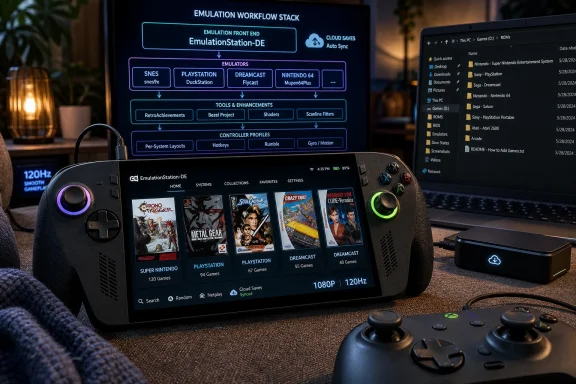 EmuDeck Turns Emulation From A Hobby Into A Workflow
The author’s experience starts with a very Windows problem: the device can do the job, but the operating system does not make the job feel native. A Windows handheld can run Cemu, Flycast, mGBA, PPSSPP, DuckStation, Dolphin, PCSX2, RetroArch, and other emulators, but installing those one by one is the kind of afternoon that begins with optimism and ends with three controller profiles called “final-final-fixed.”EmuDeck attacks that sprawl by acting less like a single app and more like an opinionated deployment system. It installs and configures emulators, prepares common folders, wires up front-end access, and gives users a coherent place to manage the pieces. It does not remove complexity; it compresses it into a setup flow that ordinary handheld owners can survive.
That difference matters because retro gaming is unusually vulnerable to friction. Modern PC games usually arrive through Steam, Xbox, Epic, GOG, or another launcher that at least pretends to know what game you own and where it lives. Retro libraries are personal archives. They depend on legally dumped ROMs, BIOS files where required, naming conventions, artwork scraping, emulator-specific settings, and a lot of small decisions that become annoying on a 7-inch screen.
The clever part of EmuDeck is not that it automates everything. It is that it automates the boring defaults while leaving enough room for enthusiasts to go spelunking when they want to. That balance is why the author could describe the setup as streamlined without pretending that emulation has become a one-click console storefront.
Windows Is Powerful, But It Still Needs A Handler
Microsoft and Asus have done real work to make the ROG Xbox Ally line feel less like a shrunken laptop. The official pitch is “Xbox, anywhere,” backed by Windows 11 Home, Xbox-flavored controls, Game Bar integration, Armoury Crate, a handheld compatibility program, and device-level features meant to make PC gaming more approachable on a small screen. On paper, that should make the handheld a dream machine for emulation.In practice, Windows remains both the Ally X’s superpower and its tax. It gives users access to almost every emulator, front end, modding utility, file manager, driver package, cloud client, and store. It also gives them pop-ups, hidden folders, permission prompts, inconsistent controller behavior, desktop UI targets, and decades of assumptions built around a keyboard and mouse.
That is why the XDA author’s small Armoury Crate note is more revealing than it looks. Setting Control Mode to GamePad instead of Auto fixed cases where some emulators did not recognize the A button correctly. This is the exact kind of problem that makes Windows handheld ownership feel like a negotiation: the hardware has a controller, Windows sees several possible input modes, Steam may layer Steam Input over the top, and individual emulators may interpret the result differently.
SteamOS solved much of this by making Steam the gravitational center of the device. Windows handhelds have no single center. They have Armoury Crate, Xbox, Game Bar, Steam, individual launchers, and any front end the user installs. EmuDeck’s value is that it gives retro gaming one center of gravity, even if the underlying OS remains a multitasking generalist.
The Steam Deck Still Casts The Longest Shadow
The XDA author came to the Ally X after living with EmuDeck on the original Steam Deck and then the Steam Deck OLED. That migration path is now common among handheld enthusiasts. Valve’s machine made the category legible, but the Windows handheld market has become the place where users chase more compatibility, more horsepower, and fewer boundaries.The irony is that EmuDeck’s reputation was forged on SteamOS, not Windows. It grew because the Steam Deck made Linux less scary for gamers while also making emulation feel like a natural extension of a Steam library. The Deck was a weirdly perfect environment for EmuDeck: open enough to tinker with, constrained enough to standardize around, and popular enough to build community knowledge.
Windows handhelds complicate that formula. They come in more shapes, with more vendor utilities, more driver quirks, and more input abstractions. Yet the payoff is also obvious. If EmuDeck can make retro libraries feel organized on Windows, then a device like the ROG Xbox Ally X can become the one handheld that plays Xbox Game Pass titles, Steam games, Epic freebies, PC ports, cloud games, remote-play sessions, and decades of console history.
That is the dream Microsoft and Asus are selling, even if they are not selling the emulation part. The Windows handheld is not trying to be a better Nintendo Switch. It is trying to be the bag-of-holding version of gaming hardware. EmuDeck simply fills one of the largest empty compartments.
The Front End Is The Product
A veteran emulator user might look at EmuDeck and say, correctly, that the individual components are not new. EmulationStation-DE, RetroArch, standalone emulators, scraping tools, controller profiles, save folders, and BIOS directories all existed before. The achievement is not invention; it is orchestration.That distinction matters because the front end is often what determines whether a retro setup gets used. A folder full of ROMs is an archive. A clean EmulationStation interface with box art, metadata, platform sorting, themes, and controller navigation is a library. The former is something you maintain; the latter is something you browse from the couch.
The XDA walkthrough emphasizes this transformation. After installing EmuDeck, selecting systems, copying ROMs into platform folders, and running the scraper, the author ends up with a console-like dashboard. The games are not merely executable files. They are presented as a collection.
That is not cosmetic. Retro gaming is deeply tied to memory, and memory is visual. Box art, regional covers, platform groupings, and themed interfaces do more than make a library “pretty.” They recreate the feeling of choosing a game rather than launching software. For handhelds, where the usage pattern is often ten minutes on a couch or twenty minutes before bed, that immediacy is the difference between playing and tinkering.
The Legal Grey Zone Still Shapes The Conversation
Every mainstream emulation article performs the same ritual disclaimer: use ROMs you dumped from cartridges and discs you already own. The XDA piece does it too, and for good reason. Emulators themselves are generally lawful software, but game ROM distribution remains a legal minefield, and platform holders have become increasingly aggressive about projects that appear to facilitate piracy or emulate current commercial ecosystems.This is part of why EmuDeck’s positioning matters. It is not a ROM source. It is a setup tool. That keeps the project focused on configuration, organization, and user-owned files rather than becoming a storefront for copyrighted material it has no right to distribute.
For users, the practical line is simple even when the cultural debate is not. The cleanest way to treat a retro handheld is as a device for backups, homebrew, fan projects, legal ports, and personal archives. The more the experience resembles downloading a shadow library of commercial games, the more it drifts from preservation into piracy.
The industry has never resolved the contradiction at the heart of retro gaming. Companies want to preserve control over their catalogs, but they often fail to keep those catalogs legally accessible on modern hardware. Enthusiasts fill the vacuum. EmuDeck does not settle that debate, but it makes the preservation-minded side of it far easier to live with.
Clean Installs Beat Heroic Migrations
The most useful part of the XDA report may be the author’s mistake. Copying a mature EmuDeck setup from a Steam Deck OLED to a Windows handheld sounds efficient, but it created save incompatibilities and broke Wii U games such as Wind Waker HD and Twilight Princess HD until troubleshooting restored order.That is exactly what experienced sysadmins would expect. Cross-platform migrations are where hidden assumptions go to die. Paths change. File permissions change. Emulator versions differ. Save locations are not always identical. BIOS placement can be subtly wrong. Linux and Windows disagree about case sensitivity, separators, shortcuts, symlinks, and the general shape of a filesystem.
The lesson is not that EmuDeck is fragile. The lesson is that emulation stacks are ecosystems, and ecosystems do not always transplant cleanly. A clean Windows install with manually copied ROM folders is less glamorous than dragging over an entire working hierarchy, but it reduces the number of invisible variables.
That advice becomes more important as handheld owners accumulate multiple devices. A Steam Deck OLED, a Windows handheld, a desktop PC, and maybe an Android handheld can all run overlapping pieces of the same retro library. Without disciplined folder organization and save strategy, the dream of “one library everywhere” becomes a quiet mess of duplicated files and mystery saves.
Cloud Saves Are The Next Battleground
EmuDeck’s Patreon-backed cloud-save features point toward the next obvious frontier. Once setup is easy, the pain moves to continuity. Players do not just want to run The Minish Cap on one handheld; they want to play it on a Steam Deck, continue on a Windows handheld, back it up to the cloud, and not think about the save file.That is easy in modern ecosystems because the platform owner controls the launcher, account system, entitlement model, and save API. It is much harder in emulation because every emulator has its own conventions and every platform had its own save architecture. Syncing a Game Boy Advance save is not the same as syncing a PlayStation 2 memory card image or a Wii U save structure.
EmuDeck’s CloudSync and CloudBackup approach is therefore more important than it sounds. If the project can make saves follow the player across Windows and SteamOS, it starts to behave less like a configuration helper and more like an independent retro platform. That is a much bigger ambition.
The risk is reliability. Save syncing is one of those features users only notice when it fails, and failure can mean lost progress rather than a minor annoyance. Any cloud system in this space has to be conservative, transparent, and very good at conflict handling. Enthusiasts will forgive rough artwork scraping. They will not forgive a vanished 40-hour RPG save.
The Ally X Makes Retro Excess Feel Reasonable
There is something faintly absurd about using a high-end 2025 Windows handheld to play Game Boy Advance, Nintendo 64, Dreamcast, PlayStation, PSP, and Wii U titles. The original hardware for many of these systems had a fraction of the compute power. But that excess is also what makes the experience pleasant.The ROG Xbox Ally X’s hardware gives users headroom. Its 1080p 120Hz display can present old games cleanly with integer scaling, shaders, bezels, or widescreen hacks where appropriate. Its 1TB SSD leaves room for large disc-based libraries. Its 24GB of RAM is overkill for classic systems and useful for modern PC gaming. Its Windows foundation means the same machine can jump from retro sessions to current PC releases without rebooting into another world.
For newer emulation targets, that headroom becomes less decorative. Wii U, PlayStation 2, GameCube, Wii, and PlayStation 3 emulation can be sensitive to CPU performance, shader compilation, driver behavior, and per-game compatibility. A handheld that can shrug off older systems may still need careful tuning for more demanding consoles.
That is where EmuDeck’s defaults are helpful but not magical. It can get users to a working baseline quickly. It cannot repeal the reality that “emulation” covers everything from an 8-bit handheld to a complex HD console with platform-specific quirks. The closer a user gets to newer systems, the more likely they are to encounter edge cases.
Microsoft’s Handheld Problem Is Becoming A Software Problem
The broader significance for WindowsForum readers is not really EmuDeck itself. It is what EmuDeck reveals about Microsoft’s handheld challenge. Windows already has the games, the drivers, the compatibility layer, the stores, and the hardware partner ecosystem. What it lacks is a consistently calm experience.The ROG Xbox Ally line is Microsoft’s most serious attempt yet to make Windows feel at home in handheld form. The Xbox button, Game Bar, full-screen experiences, compatibility labels, cloud gaming, remote play, and Play Anywhere messaging all aim at the same goal: reduce the number of times a user remembers they are operating a PC rather than playing a game.
But the retro-gaming use case shows how far third-party tools still have to carry the experience. Armoury Crate handles device settings. Steam may handle input. EmulationStation handles the library. EmuDeck handles installation and configuration. Individual emulators handle execution. Windows sits underneath all of it, powerful and slightly indifferent.
That is not necessarily bad. The PC has always advanced through layers, utilities, launchers, and community workarounds. But it does mean the best Windows handheld experience in 2026 is still assembled, not delivered. The ROG Xbox Ally X may be the machine. EmuDeck is part of the operating culture that makes the machine lovable.
Retro Gaming Has Become The Handheld Stress Test
Retro gaming is often treated as a nostalgic side quest, but on handheld PCs it is a brutal systems test. It touches input, storage, display scaling, sleep behavior, file management, cloud sync, launcher design, GPU drivers, CPU scheduling, audio latency, and user interface design. If a handheld can make retro gaming feel smooth, it has probably solved many of the same problems that affect modern PC games.That is why the XDA author’s “about an hour” setup matters. An hour is not console-simple, but it is enthusiast-reasonable. It suggests that the Windows handheld retro experience has crossed from “project” into “procedure.” You still need to know what a BIOS file is. You still need to bring your own legally obtained games. You still may want a Bluetooth mouse and keyboard for the setup phase. But you are no longer building the whole experience from spare parts.
There is also a psychological threshold here. A device becomes your main handheld when it is easier to use it than to go fetch another one. The author’s conclusion is telling: with EmuDeck and EmulationStation configured on the Ally X, the Steam Deck OLED no longer has to come out for retro urges. That is the moment a platform wins—not when it can run something, but when it becomes the default place you choose to run it.
For Valve, that is a reminder that the Steam Deck’s software advantage is real but not unassailable. For Microsoft, it is proof that Windows handhelds can inherit the retro scene if the user experience keeps improving. For Asus, Lenovo, MSI, and other hardware makers, it is evidence that performance specs alone are not the differentiator. The winner is the device that makes the player forget the stack underneath.
The Hour-Long Setup Is The New Console Cartridge
The useful conclusion from XDA’s experiment is not that every Windows handheld owner should install exactly the same emulators or use exactly the same settings. It is that EmuDeck has become one of the few tools capable of translating PC abundance into handheld simplicity. That makes it especially valuable on the ROG Xbox Ally X, where the hardware is strong enough to make retro gaming feel luxurious but Windows still needs guidance.- EmuDeck’s biggest advantage is that it configures a multi-emulator setup as a coherent handheld workflow rather than leaving users to assemble each piece manually.
- The ROG Xbox Ally X’s Windows 11 foundation makes it broadly compatible, but users should expect occasional input and launcher quirks that require device-level settings changes.
- A clean EmuDeck install is safer than copying a full Steam Deck setup wholesale, especially when moving between SteamOS and Windows.
- EmulationStation-DE is not just decoration; it is the layer that turns a directory of files into a browsable living-room-style game library.
- Cloud-save sync is the feature that could turn EmuDeck from a setup utility into a cross-device retro platform, but reliability will matter more than novelty.
- The legality of ROMs remains the user’s responsibility, and EmuDeck’s role is configuration rather than content distribution.
Source: XDA I turned my Windows 11 handheld into a retro gaming beast with this app
