

RCS, short for Rich Communication Services, is the modern replacement for SMS and MMS texting. It uses mobile data or Wi-Fi when both the sender and recipient, their messaging apps, and their carriers support it, adding higher-quality media, delivery and read receipts, typing indicators, and improved group messaging.
Technobezz’s updated guide is timely because the setup landscape has changed: Google Messages is now the practical RCS client for most Android users, while Apple has supported RCS on iPhone since iOS 18. RCS does not create a new number or inbox. It is simply the transport used automatically for compatible phone-number conversations.
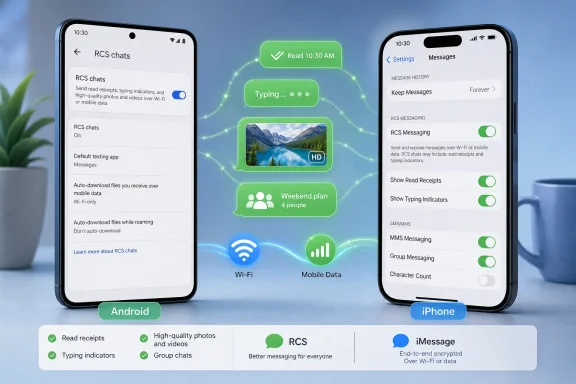
On Android, open Google Messages, tap the profile icon, then go to Messages settings > RCS chats. Google says the app must be installed, current, and selected as the phone’s default SMS app. The same page includes controls for read receipts, typing indicators, and whether failed RCS messages should fall back to SMS or MMS.
On iPhone, Apple places the switch at Settings > Apps > Messages > RCS Messaging. Apple requires iOS 18 or later plus a carrier plan that supports RCS. If the switch is absent, the carrier is the likely limitation rather than an iPhone fault. RCS conversations on iPhone remain green, while iMessage stays blue.
Neither platform requires users to choose RCS for each message. Messages selects it when the conversation supports it and falls back to SMS or MMS when it does not.
Samsung owners should also skip outdated Samsung Messages tutorials. Samsung announced that Samsung Messages would be discontinued for affected U.S. devices in July 2026, with multiple reports placing the cutoff on July 6. Google Messages is Samsung’s recommended replacement; Android 11 and older devices are reportedly excluded from the shutdown.
RCS is not automatically private in every configuration. Google Messages supports end-to-end encryption for eligible Android-to-Android chats, but Google notes that SMS, MMS, and RCS handled by unsupported messaging apps are not end-to-end encrypted. Apple also lists end-to-end encrypted RCS as a carrier-dependent beta feature in iOS 26.5.
For most users, the practical fix for missing or stuck RCS is to update Google Messages, make it the default SMS app, enable RCS chats, and verify that the carrier supports the service.
Technobezz’s updated guide is timely because the setup landscape has changed: Google Messages is now the practical RCS client for most Android users, while Apple has supported RCS on iPhone since iOS 18. RCS does not create a new number or inbox. It is simply the transport used automatically for compatible phone-number conversations.
 Where to enable it
On Android, open Google Messages, tap the profile icon, then go to Messages settings > RCS chats. Google says the app must be installed, current, and selected as the phone’s default SMS app. The same page includes controls for read receipts, typing indicators, and whether failed RCS messages should fall back to SMS or MMS.On iPhone, Apple places the switch at Settings > Apps > Messages > RCS Messaging. Apple requires iOS 18 or later plus a carrier plan that supports RCS. If the switch is absent, the carrier is the likely limitation rather than an iPhone fault. RCS conversations on iPhone remain green, while iMessage stays blue.
Neither platform requires users to choose RCS for each message. Messages selects it when the conversation supports it and falls back to SMS or MMS when it does not.
A few setup traps
Google’s support documentation confirms that older QR-code instructions for Google Messages for web no longer apply in the United States. Users now pair with their Google Account through Device Pairing, then approve the browser session on the phone.Samsung owners should also skip outdated Samsung Messages tutorials. Samsung announced that Samsung Messages would be discontinued for affected U.S. devices in July 2026, with multiple reports placing the cutoff on July 6. Google Messages is Samsung’s recommended replacement; Android 11 and older devices are reportedly excluded from the shutdown.
RCS is not automatically private in every configuration. Google Messages supports end-to-end encryption for eligible Android-to-Android chats, but Google notes that SMS, MMS, and RCS handled by unsupported messaging apps are not end-to-end encrypted. Apple also lists end-to-end encrypted RCS as a carrier-dependent beta feature in iOS 26.5.
For most users, the practical fix for missing or stuck RCS is to update Google Messages, make it the default SMS app, enable RCS chats, and verify that the carrier supports the service.
References
- Primary source: Technobezz
Published: 2026-07-14T17:34:45.906000+00:00
What Does RCS Mean in a Text Message? How to Turn It On and Use It | Technobezz
What does RCS mean in a text message? It means richer texting with better media, read receipts, typing indicators, and group chats.www.technobezz.com
