

TweakTown has highlighted a familiar answer to one of Windows 11’s more persistent annoyances: Voidtools’ Everything remains dramatically faster than Windows Search when the job is locating a file or folder by name.
Everything is not new, and it is not trying to replace every part of Windows Search. Its advantage is a narrower design. On local NTFS volumes, the utility builds a compact index of file and folder names, then keeps it current through the NTFS USN Change Journal. Voidtools says a fresh Windows 11 installation with about 250,000 files can be indexed in roughly five seconds, while a million files can take about a minute.
That does not mean Windows Search is simply broken. Microsoft’s own documentation describes a broader indexing system built to collect file properties and, for supported formats, full-text content. That requires Windows Search to queue, crawl and process items through property and filter handlers. It is a more capable approach, but it also means the experience can be less immediate when users are hunting for a known filename across large, long-lived disks.
Everything’s core database covers names and locations, which explains both its speed and its limitation. A query filters an already-built list rather than forcing the application to inspect file contents.
The app can perform content searches with its
For ordinary file retrieval, Everything’s syntax is unusually useful without requiring a scripting background. It supports wildcards and Boolean-style searches, plus filters such as
That is the sensible configuration for most systems. Running the GUI elevated also means files or applications launched from Everything can inherit administrative privileges, and mapped network drives may not appear in the same way.
Everything can index non-NTFS volumes and network locations, but those sources use folder indexing rather than the fast NTFS path. Results and update behavior will therefore vary with the storage type and connection.
TweakTown’s larger point holds up: Everything remains one of the most effective quality-of-life utilities for Windows users who routinely search by filename. It is freeware, lightweight, available in installer and portable forms, and does not depend on Windows Search’s index to produce local NTFS filename results.
Windows Search should stay enabled where indexed content, Outlook items or File Explorer integration matter; Everything is best treated as the fast path for filenames and folders.
Everything is not new, and it is not trying to replace every part of Windows Search. Its advantage is a narrower design. On local NTFS volumes, the utility builds a compact index of file and folder names, then keeps it current through the NTFS USN Change Journal. Voidtools says a fresh Windows 11 installation with about 250,000 files can be indexed in roughly five seconds, while a million files can take about a minute.
That does not mean Windows Search is simply broken. Microsoft’s own documentation describes a broader indexing system built to collect file properties and, for supported formats, full-text content. That requires Windows Search to queue, crawl and process items through property and filter handlers. It is a more capable approach, but it also means the experience can be less immediate when users are hunting for a known filename across large, long-lived disks.
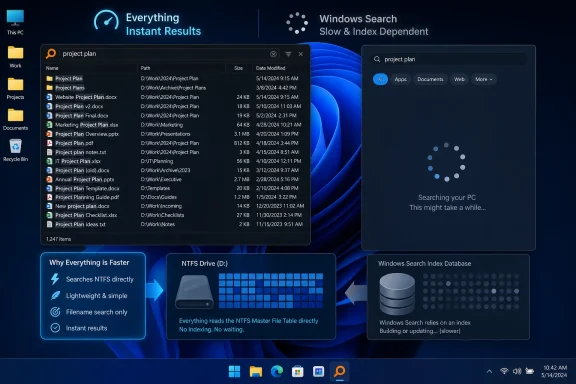 A filename finder, not a full replacement
Everything’s core database covers names and locations, which explains both its speed and its limitation. A query filters an already-built list rather than forcing the application to inspect file contents.The app can perform content searches with its
content: operator, but Voidtools is clear that file contents are not indexed, so those searches are slower. Users who remember a phrase from inside a Word document, PDF or text file should retain Windows Search—particularly File Explorer search—for that work.For ordinary file retrieval, Everything’s syntax is unusually useful without requiring a scripting background. It supports wildcards and Boolean-style searches, plus filters such as
ext: for extensions, size: for file size and date-modified terms. That makes it useful for locating, for example, large ISO images, recent log files or a lost document with only part of its filename remembered.Install the service rather than elevating the app
The practical setup detail matters for managed PCs and security-conscious home users. Everything needs privileged low-level access to index NTFS volumes. Voidtools recommends installing the Everything service so the desktop client can continue to run as a standard user, rather than launching the full application as administrator.That is the sensible configuration for most systems. Running the GUI elevated also means files or applications launched from Everything can inherit administrative privileges, and mapped network drives may not appear in the same way.
Everything can index non-NTFS volumes and network locations, but those sources use folder indexing rather than the fast NTFS path. Results and update behavior will therefore vary with the storage type and connection.
TweakTown’s larger point holds up: Everything remains one of the most effective quality-of-life utilities for Windows users who routinely search by filename. It is freeware, lightweight, available in installer and portable forms, and does not depend on Windows Search’s index to produce local NTFS filename results.
Windows Search should stay enabled where indexed content, Outlook items or File Explorer integration matter; Everything is best treated as the fast path for filenames and folders.
References
- Primary source: TweakTown
Published: 2026-07-19T18:40:08+00:00
I use this decade-old free tool that finds files faster than Windows Search does
I've kept Everything installed for many years, and it still beats the Windows 11 search box at finding files, so results appear as fast as I can type them. www.tweaktown.com
- Official source: learn.microsoft.com
Indexing process in Windows Search - Win32 apps | Microsoft Learn
This topic describes the three stages of the indexing process and the primary components involved in each, explains the timing of indexing activity, and provides some notes for third-party developers who want their data stores or file formats indexed.learn.microsoft.com
