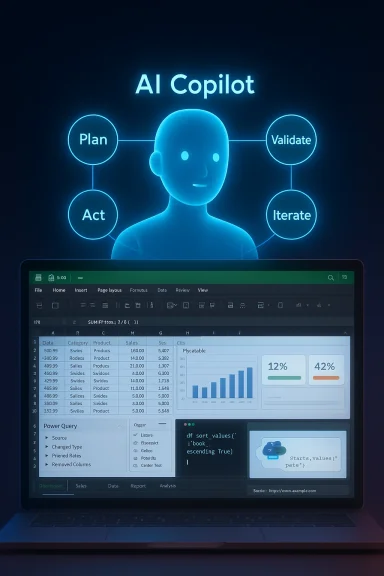
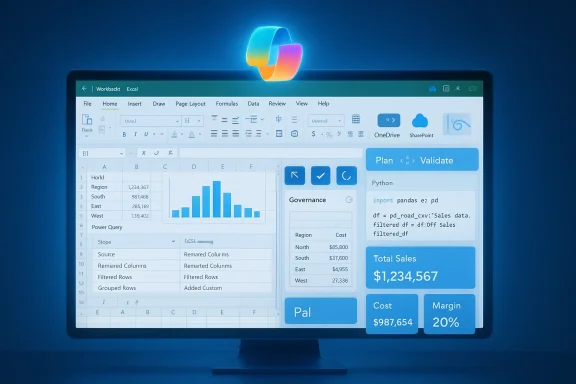
Microsoft’s latest push turns Excel from a formula tool into a task‑oriented assistant that can plan, build and validate multi‑step solutions inside workbooks — generating formulas, creating PivotTables and charts, running Power Query transforms, and even inserting Python analysis based on a short natural‑language brief. Early previews show this is more than a chat helper: it’s an agentic workflow that produces native Excel artifacts you can inspect and edit, but it also introduces new governance, portability, and validation questions for IT and power users alike.
Microsoft has been steadily embedding Copilot across Microsoft 365. What began as a conversational assistant in a sidebar has evolved into a layered platform inside Excel: on‑grid formula suggestions, a worksheet function that can call Copilot from cells, guided Power Query generation, an Agent Mode that orchestrates multi‑step work, and cloud‑hosted Python execution that spills results back into the grid. Together, these changes shift much of the repetitive and error‑prone work of spreadsheets into an AI‑orchestrated pipeline that returns editable, auditable workbook content.
The defining design choice is important: the AI produces native Excel objects — formulas, tables, PivotTables, charts, Power Query steps — rather than opaque blobs stored only in the cloud. That keeps results inspectable and editable by humans, which is Microsoft’s stated mitigation against “black‑box” outputs. Still, the agent may create multi‑layer formula chains or indirect references that require review before using in production reports.
If your organization values faster reporting cycles and can accept cloud processing under controlled tenant policies, run structured pilots now. If you operate under strict data residency, regulatory constraints, or need airtight reproducibility today, evaluate the feature set conservatively and insist on admin controls and logging before broad deployment.
Excel’s new agentic capabilities mark a step change: spreadsheets will no longer be only human‑written formula canvases but collaborative environments where AI plans and executes work that humans then inspect, refine and govern. The outcome can be dramatically higher productivity — provided organizations pair capability with responsible rollouts, validation practices, and clear governance.
Source: Neowin https://www.neowin.net/news/excel-for-windows-can-now-build-complex-solutions-on-your-behalf/
 Background
Microsoft has been steadily embedding Copilot across Microsoft 365. What began as a conversational assistant in a sidebar has evolved into a layered platform inside Excel: on‑grid formula suggestions, a worksheet function that can call Copilot from cells, guided Power Query generation, an Agent Mode that orchestrates multi‑step work, and cloud‑hosted Python execution that spills results back into the grid. Together, these changes shift much of the repetitive and error‑prone work of spreadsheets into an AI‑orchestrated pipeline that returns editable, auditable workbook content.The defining design choice is important: the AI produces native Excel objects — formulas, tables, PivotTables, charts, Power Query steps — rather than opaque blobs stored only in the cloud. That keeps results inspectable and editable by humans, which is Microsoft’s stated mitigation against “black‑box” outputs. Still, the agent may create multi‑layer formula chains or indirect references that require review before using in production reports.
What’s new — feature roundup
- Agent Mode (plan → act → validate → iterate): Accepts a plain‑English brief, generates an execution plan (sheets, formulas, pivots, visuals), performs edits directly in the workbook, runs validation checks, and iterates with human input. Edits become normal, editable workbook content and the agent surfaces its plan for auditability.
- On‑grid formula composer: Type = or invoke Copilot and ask for a formula in plain English; Copilot suggests a candidate formula, shows a short explanation of each element, and previews computed results in the grid before you accept or refine it. This supports single‑cell formulas, spill‑aware array results, and refactors of existing formulas.
- COPILOT() worksheet function: A native worksheet function that lets formulas call Copilot from cells (for example, =COPILOT("Classify feedback", D4
 18)). It can reference ranges, return arrays, and interoperate with native functions — with beta limitations applicable in early releases.
 - Guided Power Query & automated imports: Copilot can generate Power Query steps to clean data (standardize dates, remove duplicates, split columns) and set up refreshable, linked imports from PDFs, Word, web sources, or other spreadsheets stored on OneDrive/SharePoint.
- Python in Excel (cloud‑hosted): Copilot can generate Python code (Pandas, Matplotlib, etc.) which runs in Microsoft’s cloud containers and places results back into the sheet. This enables heavier analysis without a local Python install. Premium compute tiers are available for heavier workloads.
- Auto visualizations and dashboard assembly: Ask for a one‑page dashboard and the agent can create charts, KPI cards, and a formatted sheet with editable visuals.
How it works (technical overview)
The plan → act → validate loop
Agent Mode treats a brief as a multi‑step job rather than a single reply. The agent:- Produces a visible execution plan (what sheets, named ranges, formulas, pivots, and visuals it will create).
- Acts by performing those edits directly in the workbook so users see live, editable artifacts.
- Validates outputs with built‑in checks and reconciliation sheets.
- Iterates based on user feedback or clarifying prompts.
Native artifacts, not black boxes
A critical implementation choice: the agent creates real Excel primitives. That helps with inspection and manual hardening, but also means generated solutions can include deep formula nesting, volatile references, or multi‑sheet dependency graphs that are difficult to reason about without careful review. The artifacts are standard workbook objects and thus subject to the usual Excel behaviors (calculation order, volatile functions, circular reference handling).Cloud dependency and model routing
Many features assume cloud‑saved workbooks (OneDrive or SharePoint) with AutoSave on so the system can edit and version files. Reasoning tasks may be routed to different model providers depending on tenant settings (OpenAI, Anthropic, Microsoft’s own tuned models). Tenant admins can influence model routing and data residency choices, which in turn affects reproducibility and governance.Python execution environment
Python runs in Microsoft‑managed cloud containers with a curated distribution of libraries. Users don’t need a local Python install; the compute is provided by Microsoft with options for premium compute in heavier scenarios. Results “spill” back into the sheet so they remain editable like any other table.Availability, licensing, and system requirements
- Microsoft is rolling out features in stages: web‑first for Copilot‑licensed Microsoft 365 customers, Beta Channel/Insider builds for desktop, and preview programs like Frontier for advanced agent features. Availability will vary by tenant and geography.
- Many features require a Copilot‑eligible Microsoft 365 license (Microsoft 365 Copilot, Microsoft 365 Premium in some pilots, or other qualifying plans). Agent Mode and advanced imports may be gated behind preview programs.
- Practical prerequisites commonly reported:
- Save workbooks to OneDrive or SharePoint and enable AutoSave for live edits.
- Enroll in Beta/Insider programs for earlier access on Windows and Mac.
- Admin enablement may be required in enterprise tenants; tenant settings control model routing and connector opt‑ins.
Real‑world use cases and examples
- Financial reporting automation: Ask Copilot to “build a monthly close report with YoY comparison, PivotTables and charts.” The agent can create separate sheets for raw data, summary, reconciliations, visual KPIs, and populate formulas — then run validation checks against totals. This reduces manual consolidation time and speeds reporting cycles.
- Data clean‑up pipelines: Feed an exported CSV and ask for standardized dates, currency normalization, and duplicate removal. Copilot can generate Power Query transformations and a refreshable import so future exports are ingested automatically.
- Ad hoc analysis and visualization: Non‑technical users can ask for “top 5 customers by revenue and a one‑page dashboard,” get charts and a formatted sheet they can iterate on, and learn formulas through the explanation features.
- Advanced analytics with Python: Analysts can ask for a time‑series decomposition or clustering analysis. Copilot generates Python code, runs it in the cloud, and places the processed output and charts back in the workbook for presentation or further manipulation.
Strengths and why this matters
- Productivity acceleration: Repetitive tasks like formula construction, pivot assembly, and data cleaning are time sinks. Copilot compresses hours of manual work into minutes, enabling faster decision cycles.
- Lowered barrier to entry: Non‑experts can accomplish sophisticated spreadsheet tasks without memorizing function syntax, making analysis more accessible across teams. The preview‑and‑explain UI is educational as well as functional.
- Editable, auditable outputs: By creating native Excel objects rather than opaque cloud blobs, the system allows human review and manual hardening — a key advantage for regulated environments.
- Integrated stack (Power Query + Python): Combining Power Query automation with Python analysis in the same workbook unifies workflows previously split across tools, reducing friction and context switching.
Risks, limitations, and governance concerns
While promising, the new capabilities introduce operational and security vectors that organizations must manage carefully.1. Accuracy, hallucination and silent errors
AI‑generated formulas and transformations can be plausible but incorrect. A formula chain that looks right may misapply ranges, mishandle edge cases, or introduce off‑by‑one errors. Always validate critical financial or regulatory outputs with independent checks.2. Auditability vs. reproducibility
Although edits are native artifacts, model routing and cloud compute mean runs may yield non‑identical outputs over time unless you snapshot runs and store versioned copies. Tenant settings that switch model providers may change behavior subtly, complicating reproducibility. Organisations should log agent runs and capture the execution plan for audit trails.3. Data residency and compliance
Reasoning tasks may route to external model providers. Admins must understand where prompt content and intermediate data are processed and whether that violates data residency or regulatory rules. Tenant controls and model routing settings are therefore essential.4. Cloud dependency and availability
Many features require AutoSave and cloud‑stored workbooks. Environments with strict air‑gapped controls or local‑only storage will not benefit fully from agentic features. Contingency for network outages and offline workflows remains necessary.5. Cost and licensing uncertainty
Early reporting includes speculative pricing variants. Until Microsoft publishes definitive commercial terms for each Copilot capability, organizations should avoid assuming a per‑message or fixed subscription model for planning. Treat early price reporting as provisional.6. Over‑automation and skill erosion
Handing complex logic to an agent can speed work, but it may also erode spreadsheet literacy and the ability to debug subtle issues introduced by generated formulas. Encourage a culture of review and training where generated formulas are explained and understood before being promoted to production use.Practical guidance for IT and admins
- Pilot with audit trails: Start with controlled pilots in departments that can tolerate iteration. Record agent execution plans and snapshots of generated artifacts for traceability.
- Configure model routing and connectors: Decide which model providers are acceptable for your tenant and opt into/out of connectors that allow document ingestion. This matters for compliance and behavioral consistency.
- Set tenant guardrails: Require cloud‑saved workbooks only in designated storage locations, enable AutoSave policies where required, and restrict access to features with sensitive data. Use admin enablement to stage rollout.
- Train reviewers and power users: Assign reviewers who understand Excel internals to validate and harden outputs before they’re used in external reporting. Document a simple checklist (range checks, pivot totals, variance checks) for every agent run.
- Enforce logging and versioning: Use OneDrive/SharePoint version history and custom logging to capture agent actions and model metadata for audits.
Tips for end users: getting reliable results
- Start with a short, precise brief — describe desired outputs, not the steps.
- Convert ranges into proper Excel Tables before asking Copilot to manipulate them; this improves range detection.
- Use the preview and explanation panes to inspect formulas token‑by‑token before accepting.
- Run independent reconciliations (totals, pivot checks) after agent edits; never skip validation for high‑stakes numbers.
Limitations still worth noting
- Not a replacement for expertise: Copilot aims to accelerate work, not replace domain expertise. Complex statistical modeling, nuanced financial adjustments, or bespoke VBA macros still require human judgment and review.
- Beta restrictions apply: Early features (COPILOT() function, Agent Mode capabilities, certain imports) are in preview channels with limitations. Expect staged rollouts and feature gating.
- Model variability: Different model providers and prompt formulations can produce different solutions for the same brief. Capture the plan and the model metadata when reproducibility matters.
Final assessment — should you enable it?
For most knowledge‑work organizations, Copilot’s agentic features in Excel are a compelling productivity multiplier. They lower the barrier for complex analysis, automate repetitive cleanup, and unify previously fragmented workflows (Power Query + formulas + Python). However, the speed gains come with an obligation: stronger governance, disciplined validation, and clear deployment policies.If your organization values faster reporting cycles and can accept cloud processing under controlled tenant policies, run structured pilots now. If you operate under strict data residency, regulatory constraints, or need airtight reproducibility today, evaluate the feature set conservatively and insist on admin controls and logging before broad deployment.
Excel’s new agentic capabilities mark a step change: spreadsheets will no longer be only human‑written formula canvases but collaborative environments where AI plans and executes work that humans then inspect, refine and govern. The outcome can be dramatically higher productivity — provided organizations pair capability with responsible rollouts, validation practices, and clear governance.
Source: Neowin https://www.neowin.net/news/excel-for-windows-can-now-build-complex-solutions-on-your-behalf/