

Microsoft is rolling out an Excel change in Microsoft 365 that moves Copilot into a persistent floating button at the bottom-right of worksheets, and users are complaining in Microsoft feedback channels that the control cannot be fully removed. The fight is not really about one icon. It is about Microsoft’s growing habit of treating paid productivity software as a distribution surface for AI. Excel users are reacting sharply because the spreadsheet grid is not decorative chrome; it is the work.
For decades, Excel has followed a basic interface bargain: commands live around the document, while the worksheet itself belongs to the user. The ribbon, formula bar, side panes, status bar, and context menus may be crowded, but they are at least understood as application furniture. The grid is different. It is the canvas, the database, the report, the model, and sometimes the final deliverable.
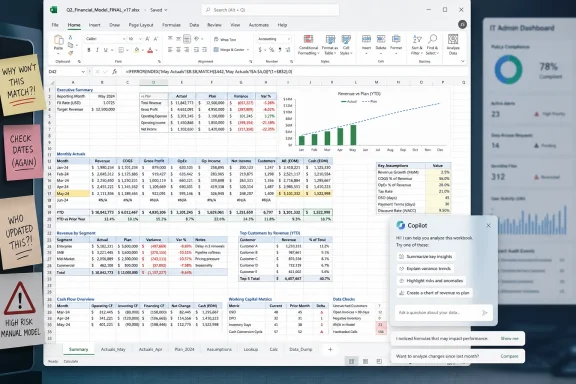
That is why the floating Copilot button has landed badly. According to Microsoft’s own support responses and Message Center wording cited by users, the new placement is part of a shift to consolidate Copilot entry points around a right-side chat pane, with a bottom-right button serving as the visible launcher. In practical terms, Excel users are seeing a Copilot icon parked inside the worksheet viewport rather than safely contained in the ribbon.
The placement matters because Excel is not a casual writing surface. People use it to inspect dense tables, compare cell values, capture screenshots, build dashboards, validate records, and navigate narrow scroll bars with pixel-level precision. A button that might feel tolerable in a blank Word document can become intrusive when it sits over cells in a spreadsheet.
Microsoft appears to see the icon as convenience. Many users see it as occupation.
Right-clicking the icon may offer a docking behavior, but users say that does not remove the feature so much as change its posture. Docking can tuck the button to the edge, where it still functions as a Copilot entry point and can return to its floating state. Clicking it, or clicking the hover suggestions attached to it, opens the Copilot side panel.
That means the dispute has moved beyond ordinary feature discovery. Microsoft is not merely adding a new command to the ribbon and letting people ignore it. It is placing a persistent affordance on top of working content, then giving users a half-measure rather than an exit.
This distinction is why the reaction has been so emotional. People tolerate unused toolbar buttons all the time. They are less forgiving when the unused feature overlays their documents, spreadsheets, and screenshots. A spreadsheet is already a negotiation between information density and screen space; inserting an AI launcher into that space feels less like help and more like a tax.
Some users say the icon is visually disruptive. Others say it covers data. Others complain that it interferes with screenshots used for validation or reporting. One Mac user cited in the original report said the button can overlap the scroll bar area, which turns a visual annoyance into an input problem. The through-line is not ideology; it is friction.
Excel is also a product with a unusually broad user base. It is used by accountants, analysts, lab managers, teachers, project coordinators, small-business owners, compliance staff, and people maintaining ancient workbooks that should have become databases years ago. Many of these users are not looking for an AI assistant while reconciling values or documenting a process. They are looking for the software to stay out of the way.
That is the danger for Microsoft. Copilot is supposed to feel like leverage. In this implementation, for some users, it feels like clutter with a marketing department behind it.
Microsoft’s modern productivity strategy depends on making Copilot impossible to miss. The company has invested heavily in AI infrastructure, positioned Copilot as a unifying layer across its apps, and tied the feature to premium subscriptions and enterprise licensing. From that perspective, burying Copilot in a menu would undercut the entire business case. Discovery is part of the product.
But discovery becomes resentment when it invades trusted workflows. Office applications are not new consumer apps trying to teach people where the buttons are. They are legacy professional tools with decades of accumulated habits, macros, templates, training materials, and institutional expectations. Even small UI shifts can ripple outward because Excel is often embedded in business process rather than merely used as a standalone app.
That is why Microsoft’s “move fast” instincts are dangerous here. The company is not experimenting on a blank canvas. It is changing the cockpit controls in an aircraft people are already flying.
Moving the launcher into the sheet changes the social contract. It turns Copilot from a tool the user summons into a presence the user must continually route around. Hover suggestions such as researching with Copilot, creating a table, or learning something about Excel may be useful to new or curious users, but they are also interruptions when they appear in the same zone as working data.
The ribbon has always been controversial, but it at least centralizes commands. Floating controls are a different design philosophy. They privilege immediacy and contextual access, but they also risk becoming the digital equivalent of a store greeter standing in the aisle you are trying to walk through.
For a feature as politically loaded as Copilot, that trade-off is especially fraught. Microsoft may see an elegant single entry point. Skeptical users see a sales funnel parked on their worksheet.
Enterprise administrators live in the gap between vendor enthusiasm and user tolerance. They are the ones who field tickets when an update changes a familiar interface. They are the ones who must explain why a feature appeared after Patch Tuesday or a Microsoft 365 channel update. They are also the ones who may need to satisfy internal security, compliance, and records-management rules around AI usage.
A floating Copilot launcher is therefore not merely cosmetic. It creates user confusion about whether Copilot is enabled, licensed, available, approved, or listening. Even if the button is only an entry point and not evidence of active AI processing, its presence can imply a capability that an organization has not fully rolled out or trained people to use.
Microsoft’s best defense would be clear, centralized administrative control: show it, hide it, move it, disable it, explain it. Anything less leaves IT staff mediating a design decision they did not make.
Microsoft’s product stack has become increasingly layered. There is Windows Copilot, Copilot in Edge, Copilot in Microsoft 365 apps, Copilot Chat, Copilot Pro, Microsoft 365 Copilot, and organization-specific controls that may or may not be exposed to end users. The branding says “Copilot” as if it were one thing. The configuration reality is messier.
That mess becomes visible when a user simply asks, “How do I turn this off?” If the answer depends on build number, license type, tenant policy, update channel, platform, and whether Microsoft has finished rolling out a server-side change, the average person will not experience that as nuance. They will experience it as evasion.
The broader AI trust problem starts here. Users are more likely to accept intelligent features when the boundaries are obvious. They are less likely to trust them when the controls feel scattered or incomplete.
But engagement is a crude measurement for a mature productivity tool. An accidental click is not adoption. A rage-click is not satisfaction. A user opening Copilot to figure out how to remove Copilot is not a success story.
The deeper metric should be whether Copilot helps users complete work with less friction. A floating button that obscures cells may do the opposite before the AI feature even opens. It begins the relationship by taking space, not saving time.
That is the trap of platform-scale AI deployment. When a company has spent billions building and marketing an assistant, the assistant’s visibility can become an internal priority independent of user need. The product starts optimizing for reminder frequency rather than trust.
An unremovable AI button inside the work area feels to many like advertising, even if Microsoft would reject that characterization. It advertises a workflow, a subscription tier, a product direction, and a corporate priority. The fact that it may also be functional does not erase the promotional feel.
This is especially sensitive because Microsoft has spent years nudging users through prompts, banners, account integrations, OneDrive defaults, Edge recommendations, Teams upsells, and Windows 11 notifications. Each individual prompt can be defended as helpful. Collectively, they create the impression of software that is always trying to steer the user somewhere.
Excel has historically been one of Microsoft’s strongest counters to that criticism. It is powerful, practical, and deeply embedded because it lets people get things done. The more Microsoft makes Excel feel like another surface for corporate messaging, the more it risks damaging one of its most durable franchises.
But usefulness does not justify omnipresence. The more powerful and personal an assistant claims to be, the more important consent becomes. Users should feel that they invite Copilot into the workbook, not that it has been assigned a desk there by corporate headquarters.
That is particularly true in Excel because the data may be sensitive. Spreadsheets often contain payroll details, budgets, forecasts, customer lists, medical-adjacent records, internal audits, and unreleased business plans. Even when Microsoft’s enterprise data protections apply, the visual presence of an AI assistant inside the sheet can make users uneasy if they have not been trained on what it can and cannot access.
Good AI integration should lower anxiety. A forced launcher raises it.
That sounds minor, but it would send a larger signal. It would tell users that Microsoft still understands the difference between making AI available and making it unavoidable. It would tell admins that Microsoft respects managed environments. It would tell skeptics that Copilot can compete on utility rather than insistence.
The company has already shown in other products that it can retreat from overly aggressive Copilot placement when feedback gets loud enough. The question is whether Office’s AI roadmap is flexible enough to admit that a spreadsheet viewport is sacred ground.
If Microsoft holds the line, the complaints will not necessarily stop Copilot adoption. Many organizations will still deploy it. Many users will still find value in it. But a small, avoidable annoyance will become another exhibit in the case that Microsoft’s AI strategy is being pushed at users rather than built with them.
Source: Neowin Excel users are raging over Microsoft's unremovable Copilot button inside their sheets
 Microsoft Put Copilot Where the Work Happens
For decades, Excel has followed a basic interface bargain: commands live around the document, while the worksheet itself belongs to the user. The ribbon, formula bar, side panes, status bar, and context menus may be crowded, but they are at least understood as application furniture. The grid is different. It is the canvas, the database, the report, the model, and sometimes the final deliverable.That is why the floating Copilot button has landed badly. According to Microsoft’s own support responses and Message Center wording cited by users, the new placement is part of a shift to consolidate Copilot entry points around a right-side chat pane, with a bottom-right button serving as the visible launcher. In practical terms, Excel users are seeing a Copilot icon parked inside the worksheet viewport rather than safely contained in the ribbon.
The placement matters because Excel is not a casual writing surface. People use it to inspect dense tables, compare cell values, capture screenshots, build dashboards, validate records, and navigate narrow scroll bars with pixel-level precision. A button that might feel tolerable in a blank Word document can become intrusive when it sits over cells in a spreadsheet.
Microsoft appears to see the icon as convenience. Many users see it as occupation.
The Button Is Small, but the Breach Is Large
The most revealing detail in the complaints is not that Copilot is present. Copilot has already been inserted across Microsoft 365, Windows, Edge, Bing, Teams, and a growing number of enterprise workflows. Users may dislike that strategy, but they are no longer surprised by it. The sharper objection is that Excel’s new button reportedly cannot be completely hidden through a simple, obvious user setting.Right-clicking the icon may offer a docking behavior, but users say that does not remove the feature so much as change its posture. Docking can tuck the button to the edge, where it still functions as a Copilot entry point and can return to its floating state. Clicking it, or clicking the hover suggestions attached to it, opens the Copilot side panel.
That means the dispute has moved beyond ordinary feature discovery. Microsoft is not merely adding a new command to the ribbon and letting people ignore it. It is placing a persistent affordance on top of working content, then giving users a half-measure rather than an exit.
This distinction is why the reaction has been so emotional. People tolerate unused toolbar buttons all the time. They are less forgiving when the unused feature overlays their documents, spreadsheets, and screenshots. A spreadsheet is already a negotiation between information density and screen space; inserting an AI launcher into that space feels less like help and more like a tax.
Excel Users Are Not Objecting to AI in the Abstract
It would be easy to dismiss the backlash as another round of anti-AI grumbling. That would be a mistake. The complaints are not simply “Copilot exists, therefore bad.” They are about control, placement, and workflow disruption.Some users say the icon is visually disruptive. Others say it covers data. Others complain that it interferes with screenshots used for validation or reporting. One Mac user cited in the original report said the button can overlap the scroll bar area, which turns a visual annoyance into an input problem. The through-line is not ideology; it is friction.
Excel is also a product with a unusually broad user base. It is used by accountants, analysts, lab managers, teachers, project coordinators, small-business owners, compliance staff, and people maintaining ancient workbooks that should have become databases years ago. Many of these users are not looking for an AI assistant while reconciling values or documenting a process. They are looking for the software to stay out of the way.
That is the danger for Microsoft. Copilot is supposed to feel like leverage. In this implementation, for some users, it feels like clutter with a marketing department behind it.
Microsoft’s AI Push Keeps Colliding With Muscle Memory
The Excel backlash follows a familiar Microsoft pattern: introduce a new AI entry point, make it prominent, and then discover that prominence can feel coercive in software people already pay to use. The recent criticism of an always-visible “Unlock Premium” button in Teams sits in the same family of complaints. The details differ, but the irritation rhymes.Microsoft’s modern productivity strategy depends on making Copilot impossible to miss. The company has invested heavily in AI infrastructure, positioned Copilot as a unifying layer across its apps, and tied the feature to premium subscriptions and enterprise licensing. From that perspective, burying Copilot in a menu would undercut the entire business case. Discovery is part of the product.
But discovery becomes resentment when it invades trusted workflows. Office applications are not new consumer apps trying to teach people where the buttons are. They are legacy professional tools with decades of accumulated habits, macros, templates, training materials, and institutional expectations. Even small UI shifts can ripple outward because Excel is often embedded in business process rather than merely used as a standalone app.
That is why Microsoft’s “move fast” instincts are dangerous here. The company is not experimenting on a blank canvas. It is changing the cockpit controls in an aircraft people are already flying.
The Ribbon Was the Compromise Microsoft Already Had
The irony is that Microsoft already had a place for Copilot: the ribbon. Users who want AI help could click the Copilot command there, and users who do not could mostly ignore it. That arrangement may not have thrilled everyone, but it respected the boundary between application chrome and document content.Moving the launcher into the sheet changes the social contract. It turns Copilot from a tool the user summons into a presence the user must continually route around. Hover suggestions such as researching with Copilot, creating a table, or learning something about Excel may be useful to new or curious users, but they are also interruptions when they appear in the same zone as working data.
The ribbon has always been controversial, but it at least centralizes commands. Floating controls are a different design philosophy. They privilege immediacy and contextual access, but they also risk becoming the digital equivalent of a store greeter standing in the aisle you are trying to walk through.
For a feature as politically loaded as Copilot, that trade-off is especially fraught. Microsoft may see an elegant single entry point. Skeptical users see a sales funnel parked on their worksheet.
Admins Need Policy, Not Vibes
For home users, an annoying floating button is irritating. For IT departments, it is another governance problem. The question is not just whether Copilot is useful; it is whether organizations can manage where it appears, who can access it, what data it can touch, and how visibly it inserts itself into daily workflows.Enterprise administrators live in the gap between vendor enthusiasm and user tolerance. They are the ones who field tickets when an update changes a familiar interface. They are the ones who must explain why a feature appeared after Patch Tuesday or a Microsoft 365 channel update. They are also the ones who may need to satisfy internal security, compliance, and records-management rules around AI usage.
A floating Copilot launcher is therefore not merely cosmetic. It creates user confusion about whether Copilot is enabled, licensed, available, approved, or listening. Even if the button is only an entry point and not evidence of active AI processing, its presence can imply a capability that an organization has not fully rolled out or trained people to use.
Microsoft’s best defense would be clear, centralized administrative control: show it, hide it, move it, disable it, explain it. Anything less leaves IT staff mediating a design decision they did not make.
The Privacy Toggle Confusion Shows the Cost of Bad Boundaries
Some users have reportedly tried privacy settings, connected experiences controls, Office options, and other workarounds in an attempt to remove Copilot entry points. The fact that people are hunting through these settings is itself a sign of design failure. A user should not have to guess whether an AI button is controlled by privacy, licensing, ribbon customization, feature flags, account policy, or an app-specific preference.Microsoft’s product stack has become increasingly layered. There is Windows Copilot, Copilot in Edge, Copilot in Microsoft 365 apps, Copilot Chat, Copilot Pro, Microsoft 365 Copilot, and organization-specific controls that may or may not be exposed to end users. The branding says “Copilot” as if it were one thing. The configuration reality is messier.
That mess becomes visible when a user simply asks, “How do I turn this off?” If the answer depends on build number, license type, tenant policy, update channel, platform, and whether Microsoft has finished rolling out a server-side change, the average person will not experience that as nuance. They will experience it as evasion.
The broader AI trust problem starts here. Users are more likely to accept intelligent features when the boundaries are obvious. They are less likely to trust them when the controls feel scattered or incomplete.
Microsoft Is Learning the Wrong Lesson From Engagement Metrics
A persistent button almost certainly improves short-term engagement. More people will see Copilot. More people will click it by curiosity, accident, or necessity. More sessions will be recorded. If the internal dashboard asks whether the new entry point increases Copilot usage, the answer may be yes.But engagement is a crude measurement for a mature productivity tool. An accidental click is not adoption. A rage-click is not satisfaction. A user opening Copilot to figure out how to remove Copilot is not a success story.
The deeper metric should be whether Copilot helps users complete work with less friction. A floating button that obscures cells may do the opposite before the AI feature even opens. It begins the relationship by taking space, not saving time.
That is the trap of platform-scale AI deployment. When a company has spent billions building and marketing an assistant, the assistant’s visibility can become an internal priority independent of user need. The product starts optimizing for reminder frequency rather than trust.
Paid Software Has a Lower Tolerance for Advertising Energy
The resentment also has an economic dimension. Excel is not a free app subsidized by ads. It is part of Microsoft 365, a paid productivity suite used by individuals, schools, businesses, and governments. Users who pay for software expect features, but they also expect a degree of restraint.An unremovable AI button inside the work area feels to many like advertising, even if Microsoft would reject that characterization. It advertises a workflow, a subscription tier, a product direction, and a corporate priority. The fact that it may also be functional does not erase the promotional feel.
This is especially sensitive because Microsoft has spent years nudging users through prompts, banners, account integrations, OneDrive defaults, Edge recommendations, Teams upsells, and Windows 11 notifications. Each individual prompt can be defended as helpful. Collectively, they create the impression of software that is always trying to steer the user somewhere.
Excel has historically been one of Microsoft’s strongest counters to that criticism. It is powerful, practical, and deeply embedded because it lets people get things done. The more Microsoft makes Excel feel like another surface for corporate messaging, the more it risks damaging one of its most durable franchises.
Copilot Needs Consent More Than It Needs Real Estate
The frustrating part for Microsoft is that Copilot in Excel has legitimate potential. Spreadsheet users often struggle with formulas, transformations, charting, data cleaning, and analysis. A competent assistant that explains formulas, suggests pivots, writes functions, and helps turn messy ranges into structured tables could be genuinely useful.But usefulness does not justify omnipresence. The more powerful and personal an assistant claims to be, the more important consent becomes. Users should feel that they invite Copilot into the workbook, not that it has been assigned a desk there by corporate headquarters.
That is particularly true in Excel because the data may be sensitive. Spreadsheets often contain payroll details, budgets, forecasts, customer lists, medical-adjacent records, internal audits, and unreleased business plans. Even when Microsoft’s enterprise data protections apply, the visual presence of an AI assistant inside the sheet can make users uneasy if they have not been trained on what it can and cannot access.
Good AI integration should lower anxiety. A forced launcher raises it.
The Fix Is Technically Boring and Strategically Important
Microsoft does not need a grand redesign to calm this down. It needs a toggle. More specifically, it needs a clear user-facing setting to hide the floating worksheet button, an administrative policy to control it at scale, and a predictable fallback placement in the ribbon for users who still want Copilot available without overlaying the grid.That sounds minor, but it would send a larger signal. It would tell users that Microsoft still understands the difference between making AI available and making it unavoidable. It would tell admins that Microsoft respects managed environments. It would tell skeptics that Copilot can compete on utility rather than insistence.
The company has already shown in other products that it can retreat from overly aggressive Copilot placement when feedback gets loud enough. The question is whether Office’s AI roadmap is flexible enough to admit that a spreadsheet viewport is sacred ground.
If Microsoft holds the line, the complaints will not necessarily stop Copilot adoption. Many organizations will still deploy it. Many users will still find value in it. But a small, avoidable annoyance will become another exhibit in the case that Microsoft’s AI strategy is being pushed at users rather than built with them.
Excel’s Floating Button Turns an AI Rollout Into a Trust Test
This episode leaves Microsoft with several concrete lessons, and none of them require abandoning Copilot.- The Excel grid should remain user-controlled workspace, not a default landing zone for persistent promotional or assistant controls.
- A dock option is not the same as a hide option when users are asking for the feature to disappear from view.
- Microsoft 365 administrators need tenant-level policy controls for visible AI entry points, not just licensing and data-governance controls.
- Copilot will earn more trust when users can summon it deliberately instead of constantly seeing it in their peripheral vision.
- Small interface changes in Excel can create outsized backlash because spreadsheets are often part of formal business processes, screenshots, audits, and training materials.
- Microsoft should treat negative feedback about Copilot placement as product intelligence, not resistance to AI itself.
Source: Neowin Excel users are raging over Microsoft's unremovable Copilot button inside their sheets
