

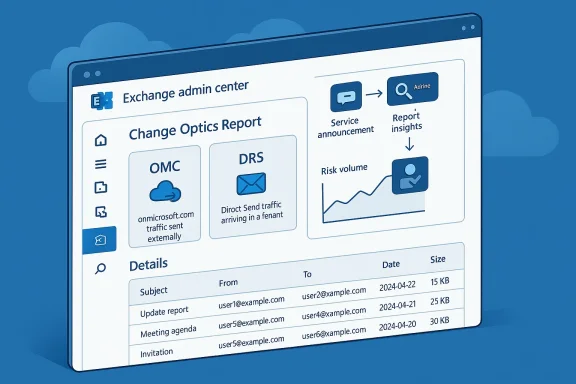
Microsoft is widening its Exchange Online change-management story with the public preview of the Change Optics Report, a new reporting surface designed to help admins spot messages that may be affected by future service changes before those changes turn into incidents. The report is positioned as a central place to monitor message patterns tied to announced changes, with example message sets that help administrators investigate and reduce risk in advance. Microsoft is also seeding the preview with two concrete scenarios: OMC, for onmicrosoft.com traffic being sent externally, and DRS, for Direct Send traffic arriving in a tenant. e Microsoft is clearly trying to shift the conversation from reactive troubleshooting to proactive readiness. Rather than waiting for a throttling change, a Direct Send policy adjustment, or some other transport behavior shift to cause a flood of support tickets, admins now get a visibility layer meant to show where the pain is likely to land first. The report is available in the Exchange admin center under Reports > Mail flow > Change Optics Report, and Microsoft says the Summary page and Details page are both intended to help teams track volume and inspect example messages tied to each scenario.
Chanays been one of the most underestimated disciplines in email administration. Exchange Online is not just a mailbox service; it is a moving transport platform with policy enforcement, routing decisions, authentication boundaries, and tenant-specific behavior that can all shift over time. When Microsoft introduces a future restriction, a throttling behavior, or a new validation rule, the technical change is only half the story. The other half is whether customers can identify the traffic that will be touched before the change becomes active.
That is the problem space the **Change Oigned to address. Microsoft’s wording makes it clear that the report is meant to surface messages with characteristics that match future-impact scenarios, not to serve as a generic mail-flow dashboard. In other words, it is less about performance monitoring and more about change risk discovery. That distinction is important because many admin tools show what happened after the fact, while this one is trying to help customers see what should be fixed before the change arrives.
The report also fits into a broader Exchange Online pattern Mhing for several years: more transparency around behavior that used to be obscure, and more tooling for admins to adapt without guesswork. The Direct Send preview announcement earlier this year already hinted at this direction by noting that Microsoft was working on a report to help admins understand which Direct Send traffic would be impacted by the new Reject Direct Send setting. The new Change Optics Report is the operationalized version of that promise.
There is also a notable shift in tone. Microsoft is no longer describing change onvement; it is acknowledging that improvements can disrupt customers and that disruption should be managed with tooling, not just documentation. That is a mature message, and in enterprise email administration maturity matters. Admins do not need platitudes about “improvements.” They need a way to find the messages that will break, the senders that need remediation, and the traffic patterns that are still unsafe.
The Summary page provides a high-level chart that tracks volume across the scenarios currently being monitored. That gives admins a quick sense of whether the problemmic. If a tenant sees a small number of flagged messages, the remediation effort may be narrow; if the chart shows a broad pattern, the organization may need a more formal cleanup or policy project.
The Details page goes a step deeper by showing example messages per scenario, along with the main message properties that can help an admin begin an investigation. Microsoft says the tabld that Message Trace can be used to retrieve additional information when needed. That combination is useful because it allows the report to function as a triage surface rather than a dead-end summary.
This is where change optics becomes more than a catchy label. OMC is the sort of issue that often survives for years because it does not break loudly right away. It is the kind of technical debt that hides in plain sight. If the report can identify that traffic while there is still time to remediate, then it could save organizations from a change window full of avoidable noise.
For admins, OMC visibility could drive several kinds of work. They may need to update application sender addresses, fix mail-enabled workflows, or educate business teams that are still using the tenant default domain in places where it no longer belongs. That is tedious work, but it is far better to do it under a planned remediation process than during an outage.
That makes the report especially useful for secuators. If a tenant is planning to reject Direct Send, the first question is not whether the setting works. It is whether the organization can identify all the systems, devices, and applications that still rely on it. The report’s example-message approach should help admins separate sanctioned traffic from the kind of unmanaged flow that becomes a support problem later.
Microsoft already signaled that it intended to build this sort of visibility when it announced Reject Direct Send public preview. In that post, the company said some customers might hesitate to enable the feature because they lacked tracking of Direct Send senders, and it explicitly noted work on a report to help customers understand the impact. The Change Optics Report looks like the first deliverable from that roadmap.
That is a better fit for how enterprises actually operate. Most organizations do not fail because they lack awareness that change is coming. They fail because they cannot connect the announcement to their own real traffic in time. A report that narrows the gap between announcement and action is therefore more valuable than another general-pso reflects a more modern cloud-service posture. When Microsoft changes behavior in Exchange Online, customers are no longer passive consumers of a monolithic product. They are tenants inside a continuously evolving service. That means change needs observability, and observability needs to be targeted. The Change Optics Report is Microsoft’s attempt to build that targetable observability into the admin workflow.
That last step is important because Microsoft explicitly describes the report as a way to observe progress made to reduce the messages until the risk has been removed. In other words, the report is not merely about idenis also about measuring improvement. That makes it useful for os well as discovery.
It is also worth emphasizing that Message Trace rekflow. Microsoft says the report’s message pro begin an investigation, but that Message Trace can retrieve n when needed. That means the Change Optics Report is a front door, n. Good admins will use it to accelerate root cause analysis, then fall back to deeper tools for validation.
The report should also reduce ambiguity in change discussions. Instead of debat change is relevant, teams can point to sample messages and volumes. That makes it easier to prioritize remediation work and justify connector changes, address normalization, or policy adjustments. In practice, better evidence often means faster approvals.
There is also a support-side benefit. Help desks often get involved only after users notice failed mail flow or rejected messages. With may be able to catch those patterns first and fix volume spikes. That is not glamorous, but i of outcome enterprises value.
For smaller tenants, the OMC scenario may be less common, but DRS can still be relevant if there are devices, scanners, legacy applications, or partner systems sending mail directly. Those environments are often the most vulnerable to surprises because the person who configureonger be around. Visibility is valuable precisely because institutional memory is often weak.
That said, this is not a consumer UI feature in the usual sense. It is an admin tool for managing service evolution, and the audience should expect to do some interpretation work. Even so, the ability to see example messages rather than just policy text is a meaningful improvement for smaller teams that nefast.
The preview also creates room for expansion. If Microsoft keeps adding scenarios, the Change Optics Report could become aamework for Exchange Online transport changes. That would make it useful not just for the two initial cases, but for future throttles, policy shifts, or delivery-behavior updates. In that sense, the report may be less important for what it is today than for the platform pattern it establishes.
It will also be interesting to see how quickly Microsoft moves this from preview to general availability. The company says it when the report reaches GA, which suggests the preview is ack and refine the experience. If customers respond positively, GA may not be far behind, especially if the report proves useful in real tenant remediation work.
Just as important, the community will watch whether Microsoft uses the Comments section feedback to sharpen the report’s usefulness. Preview tools succeed when they solve actual admin problems, not when they merely demonstrate good intentions. If Miully, the report could become one of those understated but high-value Exchange features that changes how admins prepare for service evolution.
Source: Microsoft Exchange Team Blog Change Optics Report released into Public Preview to showcase messages impacted by future changes | Microsoft Community Hub
 Background
Chanays been one of the most underestimated disciplines in email administration. Exchange Online is not just a mailbox service; it is a moving transport platform with policy enforcement, routing decisions, authentication boundaries, and tenant-specific behavior that can all shift over time. When Microsoft introduces a future restriction, a throttling behavior, or a new validation rule, the technical change is only half the story. The other half is whether customers can identify the traffic that will be touched before the change becomes active.That is the problem space the **Change Oigned to address. Microsoft’s wording makes it clear that the report is meant to surface messages with characteristics that match future-impact scenarios, not to serve as a generic mail-flow dashboard. In other words, it is less about performance monitoring and more about change risk discovery. That distinction is important because many admin tools show what happened after the fact, while this one is trying to help customers see what should be fixed before the change arrives.
The report also fits into a broader Exchange Online pattern Mhing for several years: more transparency around behavior that used to be obscure, and more tooling for admins to adapt without guesswork. The Direct Send preview announcement earlier this year already hinted at this direction by noting that Microsoft was working on a report to help admins understand which Direct Send traffic would be impacted by the new Reject Direct Send setting. The new Change Optics Report is the operationalized version of that promise.
There is also a notable shift in tone. Microsoft is no longer describing change onvement; it is acknowledging that improvements can disrupt customers and that disruption should be managed with tooling, not just documentation. That is a mature message, and in enterprise email administration maturity matters. Admins do not need platitudes about “improvements.” They need a way to find the messages that will break, the senders that need remediation, and the traffic patterns that are still unsafe.
Why this preview is different
The preview is not a feature for casual observation. It is a risk-recrosoft says the report will show a sample set of messages that match the characteristics of traffic likely to be affected by future changes, and those samples are meant to kick off investigations in customer environments. That is a much more actionable model than a simple notification banner or a policy doc tucked into a blog post.The two seeded scenarios
The first seeded scenario, OMC, targets onmicrosoft.com traffic being sent externally. Micimed at large organizations still using that domain in ways they need to address before the traffic is throttled. The second, DRS, focuses on Direct Send traffic being received by an organization’s tenant, which is relevant for customers who want to enable Reject Direct Send but need a complete picture of legitimate traffic first.What the Change Optics Report Actually Does
At a practical level, the report is meant to answer a simple but critical question: “What mere likely to be affected by an announced future change?” That framing is valuable because it turns a vague future warning into a concrete operational task. Rather than telling admins that something might change, Microsoft is now pointing them at a report that should help them find the exact traffic patterns to investigate.The Summary page provides a high-level chart that tracks volume across the scenarios currently being monitored. That gives admins a quick sense of whether the problemmic. If a tenant sees a small number of flagged messages, the remediation effort may be narrow; if the chart shows a broad pattern, the organization may need a more formal cleanup or policy project.
The Details page goes a step deeper by showing example messages per scenario, along with the main message properties that can help an admin begin an investigation. Microsoft says the tabld that Message Trace can be used to retrieve additional information when needed. That combination is useful because it allows the report to function as a triage surface rather than a dead-end summary.
Summary page value
The Summary page is where the report earns its name. It is not just showing raw traffic; it is showing the volume of traffic that aligns with risk scenarios tied to upcoming service ch, that kind of aggregation matters because it tells them where to spend attention first. In enterprise mail operations, signal is often more important than completeness.Details page value
The Details page is where the investigation begins in earnest. By exposing message properties and sample rows, Microsoft gives admins enough context to identify the source systems, user patterns, or applic the flagged messages. The export option also matters because many organizations will want to bring the data into ticketing systems, change-review meetings, or internal mail-flow remediation projects.- The report is built for change readiness, not just observation.
- The Summary page helps rank risk by volume.
- The Details page gives admins sample messages for root-cause work.
- Export support makes the report usable in real operations.
ns the deeper fallback when more context is needed.
Why OMC Maenario is easy to underestimate, which is exactalling it out. Onmicrosoft.com traffic being sent externally is often vior, misconfigured applications, or organizational drift thatars. In a large tenant, that traffic may look harmless until a throttling a deliverability issue.
Microsoft’s own explanation makes clear that this is aimed at customers from large organizations that still have onmicrosoft.com usage they need to address before the traffic is throttled. That tells us two things. First, the company believes there is still meaningful exposure in the customer base. Second, Microsoft wants admins to see the report as a cleanup tool, not as atic.This is where change optics becomes more than a catchy label. OMC is the sort of issue that often survives for years because it does not break loudly right away. It is the kind of technical debt that hides in plain sight. If the report can identify that traffic while there is still time to remediate, then it could save organizations from a change window full of avoidable noise.
The hiddenorganizations inherit onmicrosoft.com usage through mergers, test systems, old connectors, or application dependencies that never got fully normalized. The traffic may be legitimate in the moment, but it is still brittle. A future throttle is the sort of event that exposes these weak spots suddenly, which is why Microsoft is trying to create visibility before the rule changes.
icationsFor admins, OMC visibility could drive several kinds of work. They may need to update application sender addresses, fix mail-enabled workflows, or educate business teams that are still using the tenant default domain in places where it no longer belongs. That is tedious work, but it is far better to do it under a planned remediation process than during an outage.
- OMC is a marker for **legacy or misalig.
- Large tenants are the likeliest place to find lingering usage.
- Throttling turns a quiet problem into a visible one.
- Cleanup work may involve apps, connectors, and user guidance.
- The report gives teams time to fix issues before enforcement.
Why DRS Matters
The DRS scenario is arguably the more immediately strategic one. Direct Send has always been useful in specific is also a common source of ambiguity because not every message arviously malicious or obviously legitimate. Microsoft’s new Reject announced earlier this year, created a need for a way to traffic before organizations turn the feature on. The Change Opto fill that gap.That makes the report especially useful for secuators. If a tenant is planning to reject Direct Send, the first question is not whether the setting works. It is whether the organization can identify all the systems, devices, and applications that still rely on it. The report’s example-message approach should help admins separate sanctioned traffic from the kind of unmanaged flow that becomes a support problem later.
Microsoft already signaled that it intended to build this sort of visibility when it announced Reject Direct Send public preview. In that post, the company said some customers might hesitate to enable the feature because they lacked tracking of Direct Send senders, and it explicitly noted work on a report to help customers understand the impact. The Change Optics Report looks like the first deliverable from that roadmap.
Security and mail-flow governance
From a governance perspective, DRS is about trust boundaries. Direct Send can be perfectly reasonable in narrow use cases, but it is also one of those workflows that can persist without much visibility. Once Microsoft offers a report that surfaces the pattern, admins can begin deciding whether each sender deserves an exception, a connector, or a redesign. That is the kind of decision-making enterprise mail teams need more often.Enterprise rollout implications
If this report works well, it should make adoption of Reject Direct Send much less risky. Instead of flipping a setting and hoping there are no surprise business-critical workflows buried in the tenant, admins can use the report to map impact first. That is the difference between a blind security hardening step and a managed one.- DRS is most valuable for pre-change validation.
- It helps identify legitimate traffic before Reject Direct Send is enabled.
- It reduces the risk of breaking hidden workflows.
- It gives admins a path from discovery to remediation.
- It turns a policy rollout into a measured change effort.
Change Management as a Product Feature
The most interesting thing about the Change Optics Report is that it shows Microsoft treating change management itself as a product feature. That is a subtle but important shift. In the old model, admins were expected to read the message center, interpret blog posts, and then hunt manually for affected messages. In the new model, Microsoft is saying the platform should help prove which messages matter.That is a better fit for how enterprises actually operate. Most organizations do not fail because they lack awareness that change is coming. They fail because they cannot connect the announcement to their own real traffic in time. A report that narrows the gap between announcement and action is therefore more valuable than another general-pso reflects a more modern cloud-service posture. When Microsoft changes behavior in Exchange Online, customers are no longer passive consumers of a monolithic product. They are tenants inside a continuously evolving service. That means change needs observability, and observability needs to be targeted. The Change Optics Report is Microsoft’s attempt to build that targetable observability into the admin workflow.
From announcement to action
The value chain is straightforward. Microsoft announces a future change, the report identifies trafact pattern, and admins use the output to launch an investigation. That workflow sounds simple, but it can save many hours of manual querying and guesswork. It is also much easier to defend in a change board than “we think this might affect something somewhere.”A better fit for enterprise operations
Enterprises increasingly expect the platform vendt policy knobs, but also evidence about how those knobs will affect them. The Change Optics Report fits that expectation. It does not solve every mail-flow problem, but it does give admins a concrete starting point for reducing risk. That is a meaningful improvement in operational maturity.- Change management becomes visible instead of abstract.
- Admins get a bridge between service announcements and tenant realduces manual discovery work.
- It improves the credibility of future enforcement changes.
- It supports change boards and operational reviews with hard data.
How Admins Should Use It
The smartest way to use the Change Optics Report is not to treat it as a one-time lookup. It should be part of a staged readiness process. First, admins should identify whether either scenario appears in their tenant. Thenhe detailed rows, validate the source systems or users, and begin remediation work. Finally, they should revisit the report to confirm that the risky traffic volume is falling over time.That last step is important because Microsoft explicitly describes the report as a way to observe progress made to reduce the messages until the risk has been removed. In other words, the report is not merely about idenis also about measuring improvement. That makes it useful for os well as discovery.
It is also worth emphasizing that Message Trace rekflow. Microsoft says the report’s message pro begin an investigation, but that Message Trace can retrieve n when needed. That means the Change Optics Report is a front door, n. Good admins will use it to accelerate root cause analysis, then fall back to deeper tools for validation.
A practical workflow
A useful workflow would look like this:- Open the report in Exchange Admin Center.
- Check whether OMC or DRS appears in the summary.
- Export the details for the scenario with meaningful volume.
- Trace the source systems, users, or apps behind the flagged messages.
- Apply remediation, then re-check the report f
What not to do
Admins should avoid treating the report as a pass/fail certification that everything is safe. It is a sample-based visibility tool, not an absolute guarantee of coverage. It should complement policy review, connector auditing, and message tracing rather than replace them. That distinction matters, especially in large tenanan hide in the long tail.- Use the report as an early-warning system.
- Export details for local investigation.
- Pair it with Message Trace for deeper context.
- Revisit the report after remediation to confirm improvement.
- Treat sample visibility as guidance, not certification.
Enterprise Impact
For enterprises, this preview is more than a convenience feature. It reflects a growing expectatiold help manage the operational side of service evolution, not just deliver the evolution itself. That matters because Exchange Online changes often intersect with compliance, transport architecture, and user support all at once. A feature that reveals likely blast radius has real business value.The report should also reduce ambiguity in change discussions. Instead of debat change is relevant, teams can point to sample messages and volumes. That makes it easier to prioritize remediation work and justify connector changes, address normalization, or policy adjustments. In practice, better evidence often means faster approvals.
There is also a support-side benefit. Help desks often get involved only after users notice failed mail flow or rejected messages. With may be able to catch those patterns first and fix volume spikes. That is not glamorous, but i of outcome enterprises value.
Governance ange boards need concrete evidence, not just vendor promises. A rempacted messages gives administrators something they can inisk assessments, and remediation plans. That can improve the odds that cleanup projects are approved before enforcement starts causing issues.
Service desk and remediation planning
The report can also shape staffing and timing. If a tenant shows a large volume of risky traffic, the organization can schedule remediation work around business cycles instead of discovering the issue on a bad Friday afternoon. That kind of planning is espelobal organizations where mail operations cross time zones and support windows.- Better evidence means better governance decisions.
- Early discovery lowers support burden.
- Sample messages help justify change work.
- The report can inform CAB reviews and operational planning.
- Enterprises can reduce last-minute firefighting.
Consumermpact
The report is clearly aimed at admins, but the downstream effect can still matter for smaller organizations and consumer-adjacent business tenants. Small businesses often rely on a handful of mail flows, vendors, and apps that can be surprisingly opaque. A report that surfaces suspicious or future-impact traffic may hs even if they do not have a dedicated Exchange specialist on staff.For smaller tenants, the OMC scenario may be less common, but DRS can still be relevant if there are devices, scanners, legacy applications, or partner systems sending mail directly. Those environments are often the most vulnerable to surprises because the person who configureonger be around. Visibility is valuable precisely because institutional memory is often weak.
That said, this is not a consumer UI feature in the usual sense. It is an admin tool for managing service evolution, and the audience should expect to do some interpretation work. Even so, the ability to see example messages rather than just policy text is a meaningful improvement for smaller teams that nefast.
Why smaller tenants benefit
Small organizationury of deep mail-flow monitoring or custom A built-in report can save them from needingvisibility layer. If Microsoft keeps expanding the scenarios, tof those quiet admin tools that pays off far beyond udience.The limits for smaller teams
The limitation is obvious: the tool still requires someone to understand what the report is telling them and act on it. That means the biggest benefit will go to teams that already have at least some Exchange administration skill. But even there, reducing uncertainty is worthwhile. Confidence is a productivity feature.- Smaller teams may avoid breakage they would otherwise miss.
- Legacy devices and aspot.
- The report reduces dependence on homegrown monitoring.
- Admin skill is still required to interpret and fix issues.
- The tool’s value rises as Microsoft adds more scenarios.
Strengths and Opportunities
Microsoft’s strongest move here is giving customers an actual way to find future-impact messages instead of merely warning them that a change is coming. That makes the p, not promotional. It also lets Microsoft build a more responsible change-management narrative around Exchange Online, which is valuable in a service where trust is earned through predictability and transparency.The preview also creates room for expansion. If Microsoft keeps adding scenarios, the Change Optics Report could become aamework for Exchange Online transport changes. That would make it useful not just for the two initial cases, but for future throttles, policy shifts, or delivery-behavior updates. In that sense, the report may be less important for what it is today than for the platform pattern it establishes.
- Gives admins a pre-change visibility layer.
- Helps organizationsfore enforcement.
- Makes Microsoft’s change announcements more actionable.
- Supports investigations with exportable example messages.
- Can improve adoption of future settings like Reject Direct Send.
- May evolve into a broader readiness toolkit if Microsoft keeps expanding scenarios.
- Could reduce support tickets by surfacing issues early.
Ri biggest risk is that the report becomes useful only for the scealready anticipated, while real-world customer impar in more obscure edge cases. In a service like Exchange matters. If the report is too narrow, some admins may still nanual tracing and hope they catch the hidden dependencies ino a danger that customers may misread the report as comprehensive proof that no other mail is at risk. It is explicitly a sample-based mechanism, and sample-based tools can create false confidence if they are treated as exhaustive. Microsoft will need to keep clarifying that the report is a guide to action, not a substitute for broader mail-flow review. That nuance is critical.
- Scenario coverage may lag behind real-world change pattcould be mistaken for full coverage.
- Smaller teams may still struggle to interpret the results.
- Some organizations may need more context than the report alone provides.
- The tool’s value depends on how quickly Microsoft adds new scenarios.
- Admins may over-rely on the report instead of maintaining broader transport hygiene.
- Exported data still requires expertise to turn into remediation.
Looking Ahead
The most ich next is whether Microsoft expands the report beyo broader family of change-impact scenarios. If it does, the Could become a foundational Exchange Online readiness tool review feature. That would put it in the category of admin surcome essential because they solve recurring operational pain.It will also be interesting to see how quickly Microsoft moves this from preview to general availability. The company says it when the report reaches GA, which suggests the preview is ack and refine the experience. If customers respond positively, GA may not be far behind, especially if the report proves useful in real tenant remediation work.
Just as important, the community will watch whether Microsoft uses the Comments section feedback to sharpen the report’s usefulness. Preview tools succeed when they solve actual admin problems, not when they merely demonstrate good intentions. If Miully, the report could become one of those understated but high-value Exchange features that changes how admins prepare for service evolution.
- Expansion to more scenarios would dramatically increase utility.
- GA timing will signal how confident Microsoft is in the model.
- Feedback from admins will likely shape the final design.
- Integration with broader change-management workflows woul step.
Source: Microsoft Exchange Team Blog Change Optics Report released into Public Preview to showcase messages impacted by future changes | Microsoft Community Hub
