

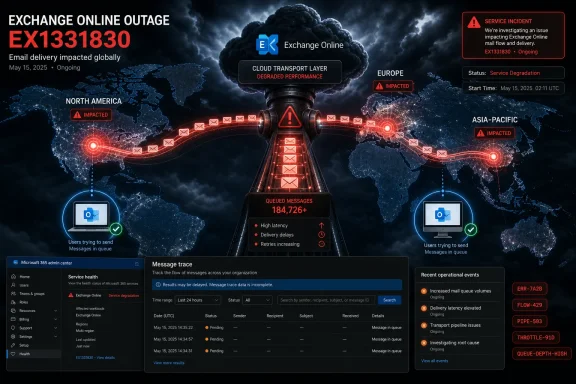
Microsoft’s Exchange Online incident EX1331830 began on June 2, 2026, disrupted enterprise email delivery across North America, Asia-Pacific, and Europe, and remained unresolved as of June 3 while engineers investigated mail-flow delays and failures in Microsoft 365. The outage is not merely another bad day for hosted email. It is a reminder that the modern office has concentrated its nervous system inside a handful of hyperscale platforms, and when one routing layer misbehaves, the blast radius looks continental. For IT teams, the immediate problem is queued mail; the larger problem is learning how little operational control remains when the failure is deep inside the cloud.
Exchange Online is sold as a finished utility: users click Send, administrators set policies, and Microsoft handles the machinery. EX1331830 cuts through that comforting abstraction because the reported symptoms point toward the mail-flow pipeline rather than a client-side problem. Outlook for Windows, Outlook on the web, mobile clients, automated SMTP senders, and third-party relays may look like separate paths from the user’s chair, but they converge inside the same hosted transport system.
That is why the outage has been so frustrating for administrators. When mail is delayed across geographies and across client types, the usual playbook becomes a trap. Recreating Outlook profiles, reauthenticating devices, toggling connectors, or blaming local DNS can consume hours while doing nothing to move the queue.
Microsoft’s own alert language reportedly described “significant delays” in sending and receiving messages, with some messages sitting undelivered for more than an hour. In enterprise email terms, an hour is not a small delay. It is enough to stall password resets, procurement approvals, incident escalations, customer orders, legal notices, and the countless invisible workflows still built on the assumption that email is boring infrastructure.
The most telling part of EX1331830 is not that Microsoft had an outage. Every large cloud has outages. The telling part is that a mail-flow problem inside a globally distributed managed service can still present to customers as a black box: they can observe symptoms, collect traces, and wait for the platform owner to decide what to say next.
Neither error reads like a bad mailbox password or a broken desktop client. They suggest a service-side bottleneck or defensive termination somewhere in the transport path. In Exchange Online, the transport system must categorize mail, resolve recipients, apply routing decisions, and hand off messages through Microsoft’s managed infrastructure before delivery becomes visible to the end user.
The phrase resource forest matters because it points toward Exchange Online’s internal directory and routing substrate, not the tenant administrator’s visible Entra ID configuration. Microsoft’s cloud mail service depends on directory lookups and recipient resolution at scale. If the systems responsible for those operations become saturated, slow, or inconsistent, messages do not simply take a scenic route; they queue.
This is where the outage becomes a lesson in cloud dependency. Most organizations moved to Exchange Online precisely to avoid owning this layer. They no longer patch mailbox servers, tune transport queues, or maintain disaster recovery for on-premises Exchange clusters. But outsourcing the machinery does not eliminate its failure modes. It changes who can touch them.
The cloud version of an email outage often feels cleaner than the old server-room version because there is less local wreckage to inspect. That cleanliness is deceptive. When Microsoft owns the transport substrate, customers also inherit Microsoft’s triage priorities, disclosure cadence, and internal architecture boundaries.
For customers, though, the difference is mostly academic. An email system used by multinational businesses is only as reliable as its most important route at the moment work needs to happen. A delay between two regions can be just as damaging as a local inability to send.
The broad geography also undercuts the easiest corporate reassurance: that the issue is limited, isolated, or affecting only “some users.” Cloud incident language often has to be careful because not every tenant, region, or workload is affected in the same way. But for an administrator fielding reports from multiple offices, “some users” can mean the CEO in New York, the finance team in Frankfurt, and a production support desk in Singapore.
Email is uniquely unforgiving because it is both human communication and application infrastructure. A Teams outage is visible immediately; an email outage can remain ambiguous. Did the message not send? Did it send but not arrive? Is the recipient ignoring it? Did a transport rule hold it? Did a third-party gateway defer it? EX1331830 lives in that ambiguity, which makes it operationally expensive even before the business impact is calculated.
The outage also exposes a strategic contradiction in Microsoft 365. Microsoft has pushed customers toward an integrated suite where identity, mail, collaboration, storage, compliance, and security increasingly reinforce one another. That integration is valuable on a normal day. On an outage day, it means customers must ask whether resilience has kept pace with consolidation.
But the Admin Center is not a substitute for an operational record. Administrators should be running message traces in the Exchange Admin Center to identify failed, pending, deferred, or delayed messages. That evidence matters for three reasons: it helps support teams answer internal questions, it gives business units a factual timeline, and it may become necessary if the organization later pursues a service credit.
The hard part is resisting the urge to “fix” the cloud from the outside. During a platform-level transport failure, creative routing changes can become liabilities. Emergency connectors, bypass paths, altered MX behavior, and improvised third-party hops may appear to relieve pressure for a subset of messages, but they can also complicate the return to normal routing once Microsoft restores the underlying service.
This is particularly true for enterprises with layered mail security architectures. Many organizations route inbound and outbound mail through security gateways, journaling systems, archiving platforms, legal hold processes, DLP engines, or signature services. When Exchange Online itself is struggling, each adjacent service can produce secondary symptoms that look like independent failures.
The practical posture is boring but defensible: document, monitor, communicate, and avoid unnecessary topology changes. That may not satisfy executives who want a switch to flip. But in a managed cloud incident, the administrator’s job is often to prevent local improvisation from turning a Microsoft outage into a self-inflicted recovery problem.
First, credits are not automatic. Customers generally have to submit claims, document impact, and fit the incident into the provider’s contractual definitions. That means the burden shifts to the organization already dealing with disruption. For smaller IT teams, the cost of proving the claim may exceed the credit itself.
Second, availability calculations can flatten pain. A global service can have a very high aggregate uptime number while a particular tenant, region, workload, or business process has a very bad day. Email delayed for an hour during a quiet period is not the same as email delayed for an hour during a security incident, merger closing, trading window, hospital shift change, or production outage.
Third, service credits compensate subscription fees, not consequential losses. A credit on a Microsoft 365 bill does not repay missed revenue, breached customer commitments, delayed payroll, spoiled incident response, or the reputational cost of appearing unresponsive. The SLA is a remedy for nonperformance under a contract; it is not business continuity.
That gap between contractual availability and operational dependence is widening. Microsoft 365 is no longer just office productivity software. For many organizations it is the authentication-adjacent, compliance-sensitive, workflow-driving platform through which work is discovered, approved, routed, archived, searched, and defended. When email stalls, the ripple does not stop at inboxes.
That pattern matters because Microsoft’s cloud dominance has made its operational choices a matter of public infrastructure, not merely private vendor performance. When a regional retailer loses email, that is a customer-service problem. When thousands of organizations across multiple continents lose reliable mail flow at the same time, the discussion moves closer to systemic risk.
Regulators have already been circling the broader cloud market. The policy concern is not that Microsoft, Amazon, or Google occasionally suffer outages; it is that modern economies increasingly depend on concentrated platforms whose failures propagate across sectors. An Exchange Online mail-flow incident is not the same as a banking crisis or an electrical grid failure, but the analogy is no longer absurd. The platforms have become connective tissue.
For Microsoft, this raises a trust problem that cannot be solved with generic reliability language. Enterprise customers understand that complex distributed systems fail. What they want is speed, specificity, and credible prevention. “We’re investigating” is acceptable in the first hour. It becomes less satisfying when customers are staring at deferred mail, regional expansion, and no clear restoration timeline.
The broader political weather also changes how enterprises evaluate lock-in. Microsoft’s integration story remains powerful: one identity layer, one compliance plane, one productivity suite, one administrative model. But every large outage adds weight to the counterargument that operational monocultures are fragile even when each individual component is best-in-class.
But old Exchange failures had one quality that cloud failures often lack: locality. If your transport queue was jammed, you could inspect it. If a server was overloaded, you could see it. If a database copy failed, you could reseed it. Control was expensive, but it was real.
Exchange Online replaces local control with outsourced scale. That trade has been rational for most organizations. Microsoft can operate mail at a scale and sophistication few individual companies could match. The security, compliance, anti-spam, mobility, and maintenance benefits are real.
EX1331830 does not prove that cloud email was a mistake. It proves that cloud email did not abolish operational risk; it centralized it. The old model failed in thousands of idiosyncratic ways. The new model fails less often for many customers, but when it does, the shared dependency becomes visible all at once.
That is why the correct lesson is not “bring Exchange back on-prem.” For most organizations, that would be a regression masquerading as resilience. The better lesson is that cloud adoption must include explicit plans for what happens when the provider’s control plane, data plane, or transport layer is the thing that breaks.
The technical question is whether any of those workarounds can move messages. The governance question is whether they should. Email is not just transport; it is a compliance boundary. Messages may carry regulated data, privileged communications, authentication links, financial approvals, customer records, or evidence subject to retention rules.
An improvised workaround can create a shadow archive problem in minutes. If users move business mail to personal accounts, the organization may lose retention, eDiscovery, DLP, audit, encryption, and incident response visibility. If administrators redirect mail through an unapproved platform, they may solve delivery while creating legal exposure.
This is why business continuity planning for Microsoft 365 has to be written before the outage. Organizations need clear rules for emergency communications, approved alternate channels, customer notification templates, and executive escalation paths. The plan should distinguish between collaboration continuity and email continuity. Teams, Slack, SMS, phone bridges, and incident management platforms can keep people coordinated, but they do not automatically replace formal email workflows.
The best continuity plans also define what not to do. In a cloud outage, restraint is an operational control. A documented decision to avoid unsupported routing workarounds can be just as important as a documented failover path.
The discipline is to capture evidence while the incident is active. Waiting until after service restoration can leave gaps in institutional memory, especially when the business later asks which customers were affected or whether a contractual deadline was missed. A trace export, incident timeline, and sample non-delivery reports can turn “email was weird yesterday” into a defensible operational account.
This matters for security as well. Outages create noise, and noise creates opportunity. Phishing lures that reference delayed mail, fake Microsoft status updates, and bogus reauthentication prompts tend to thrive when users are frustrated. Administrators should assume that confusion around EX1331830 will be exploited by attackers, even if the outage itself is not a security incident.
There is also a subtle support benefit. When IT can tell users that Microsoft has confirmed a service incident and that local troubleshooting will not accelerate recovery, ticket volume usually drops. People are more patient with bad news than with uncertainty. The worst response is to leave frontline support guessing.
Microsoft’s challenge is similar at platform scale. The company does not need to expose every internal detail of Exchange Online to satisfy customers. But it does need to provide enough detail for administrators to distinguish between provider-side failure, tenant-specific misconfiguration, and security-relevant anomalies.
Trust in a cloud platform is built from repeated small experiences. Did the provider acknowledge the issue quickly? Did the status page match reality? Did support know what the service-health advisory said? Did the timeline make sense after the fact? Did the post-incident explanation identify a preventive change, or merely state that the issue was mitigated?
For Microsoft 365 customers, these questions are not academic. The suite has become the default operating environment for white-collar work. When Exchange Online fails, the effect is emotional as well as technical. Users do not think in terms of transport categorization; they think the company cannot communicate.
That is why EX1331830 should be treated as a leadership incident inside affected organizations. CIOs and IT directors should not simply wait for green status and move on. They should use the event to revisit dependency maps, executive communications, third-party mail flows, incident documentation, and SLA claim procedures.
The uncomfortable truth is that many businesses know Microsoft 365 is critical but have never defined what “critical” requires. A service can be strategically essential and still have no practical continuity plan beyond “wait for Microsoft.” EX1331830 is a test of that assumption.
A compact playbook for this incident looks like this:
The company should also be careful with the phrase “some users.” It may be technically accurate, but it sounds evasive when the affected regions span three continents. Enterprise customers understand partial impact. They do not appreciate language that minimizes incidents they are actively living through.
There is a competitive dimension here, too. Google Workspace, hosted Exchange competitors, secure email gateways, and independent continuity vendors will all use incidents like this to argue for diversification. Microsoft does not have to be perfect to defend its position. It has to be transparent enough that customers believe the platform is learning.
The irony is that Microsoft has spent years making Exchange Online less visible because invisibility is part of the product promise. Customers do not want to think about mailbox databases and transport queues. They want email to behave like electricity. But when the lights flicker across continents, the utility has to explain the grid.
That is the bar now. Microsoft 365 is infrastructure. Its outages are infrastructure events. EX1331830 may eventually be remembered as a temporary mail-flow incident, but for administrators watching queues fill and executives ask why the company cannot send email, it is another warning that cloud productivity has become too central to treat as ordinary SaaS. The next phase of enterprise resilience will not be about abandoning Microsoft’s cloud; it will be about forcing every dependency on it into the open before the next incident does it for us.
 Microsoft’s Cloud Email Machine Hit the Layer Users Never See
Exchange Online is sold as a finished utility: users click Send, administrators set policies, and Microsoft handles the machinery. EX1331830 cuts through that comforting abstraction because the reported symptoms point toward the mail-flow pipeline rather than a client-side problem. Outlook for Windows, Outlook on the web, mobile clients, automated SMTP senders, and third-party relays may look like separate paths from the user’s chair, but they converge inside the same hosted transport system.That is why the outage has been so frustrating for administrators. When mail is delayed across geographies and across client types, the usual playbook becomes a trap. Recreating Outlook profiles, reauthenticating devices, toggling connectors, or blaming local DNS can consume hours while doing nothing to move the queue.
Microsoft’s own alert language reportedly described “significant delays” in sending and receiving messages, with some messages sitting undelivered for more than an hour. In enterprise email terms, an hour is not a small delay. It is enough to stall password resets, procurement approvals, incident escalations, customer orders, legal notices, and the countless invisible workflows still built on the assumption that email is boring infrastructure.
The most telling part of EX1331830 is not that Microsoft had an outage. Every large cloud has outages. The telling part is that a mail-flow problem inside a globally distributed managed service can still present to customers as a black box: they can observe symptoms, collect traces, and wait for the platform owner to decide what to say next.
The Error Messages Point to Congestion, Not Confusion
The two error signatures circulating among affected tenants are unusually revealing. One refers to the maximum number of concurrent connections per resource forest exceeding a limit and closing the transmission channel. The other, logged as a SuspiciousRemoteServerError, describes an abrupt connection closure before delivery completes.Neither error reads like a bad mailbox password or a broken desktop client. They suggest a service-side bottleneck or defensive termination somewhere in the transport path. In Exchange Online, the transport system must categorize mail, resolve recipients, apply routing decisions, and hand off messages through Microsoft’s managed infrastructure before delivery becomes visible to the end user.
The phrase resource forest matters because it points toward Exchange Online’s internal directory and routing substrate, not the tenant administrator’s visible Entra ID configuration. Microsoft’s cloud mail service depends on directory lookups and recipient resolution at scale. If the systems responsible for those operations become saturated, slow, or inconsistent, messages do not simply take a scenic route; they queue.
This is where the outage becomes a lesson in cloud dependency. Most organizations moved to Exchange Online precisely to avoid owning this layer. They no longer patch mailbox servers, tune transport queues, or maintain disaster recovery for on-premises Exchange clusters. But outsourcing the machinery does not eliminate its failure modes. It changes who can touch them.
The cloud version of an email outage often feels cleaner than the old server-room version because there is less local wreckage to inspect. That cleanliness is deceptive. When Microsoft owns the transport substrate, customers also inherit Microsoft’s triage priorities, disclosure cadence, and internal architecture boundaries.
A Continental Outage Makes “Tenant-Specific” Comfort Hard to Sustain
Microsoft initially appeared to narrow the investigation around North America and Germany before expanding the scope to Asia-Pacific and Europe. That kind of progression is familiar in large cloud incidents. Early telemetry often shows hot spots before engineers understand whether they are seeing the failure itself, the first observable symptoms, or the noisiest regions.For customers, though, the difference is mostly academic. An email system used by multinational businesses is only as reliable as its most important route at the moment work needs to happen. A delay between two regions can be just as damaging as a local inability to send.
The broad geography also undercuts the easiest corporate reassurance: that the issue is limited, isolated, or affecting only “some users.” Cloud incident language often has to be careful because not every tenant, region, or workload is affected in the same way. But for an administrator fielding reports from multiple offices, “some users” can mean the CEO in New York, the finance team in Frankfurt, and a production support desk in Singapore.
Email is uniquely unforgiving because it is both human communication and application infrastructure. A Teams outage is visible immediately; an email outage can remain ambiguous. Did the message not send? Did it send but not arrive? Is the recipient ignoring it? Did a transport rule hold it? Did a third-party gateway defer it? EX1331830 lives in that ambiguity, which makes it operationally expensive even before the business impact is calculated.
The outage also exposes a strategic contradiction in Microsoft 365. Microsoft has pushed customers toward an integrated suite where identity, mail, collaboration, storage, compliance, and security increasingly reinforce one another. That integration is valuable on a normal day. On an outage day, it means customers must ask whether resilience has kept pace with consolidation.
The Admin Center Is Authoritative, but It Is Not Enough
Microsoft has directed affected customers to the Microsoft 365 Admin Center’s Service Health dashboard for EX1331830 updates. That is the right first stop. The dashboard is where tenant-specific service advisories and incidents are supposed to surface, and it usually provides more relevant information than public status pages aimed at consumers.But the Admin Center is not a substitute for an operational record. Administrators should be running message traces in the Exchange Admin Center to identify failed, pending, deferred, or delayed messages. That evidence matters for three reasons: it helps support teams answer internal questions, it gives business units a factual timeline, and it may become necessary if the organization later pursues a service credit.
The hard part is resisting the urge to “fix” the cloud from the outside. During a platform-level transport failure, creative routing changes can become liabilities. Emergency connectors, bypass paths, altered MX behavior, and improvised third-party hops may appear to relieve pressure for a subset of messages, but they can also complicate the return to normal routing once Microsoft restores the underlying service.
This is particularly true for enterprises with layered mail security architectures. Many organizations route inbound and outbound mail through security gateways, journaling systems, archiving platforms, legal hold processes, DLP engines, or signature services. When Exchange Online itself is struggling, each adjacent service can produce secondary symptoms that look like independent failures.
The practical posture is boring but defensible: document, monitor, communicate, and avoid unnecessary topology changes. That may not satisfy executives who want a switch to flip. But in a managed cloud incident, the administrator’s job is often to prevent local improvisation from turning a Microsoft outage into a self-inflicted recovery problem.
The SLA Math Was Never Designed to Measure Workplace Pain
Microsoft’s financially backed uptime promises sound reassuring until an incident like EX1331830 turns them into accounting. A 99.9 percent monthly uptime commitment permits roughly 43 minutes of downtime in a 30-day month before credits become a serious discussion. But service-credit systems rarely map cleanly to how outages harm real organizations.First, credits are not automatic. Customers generally have to submit claims, document impact, and fit the incident into the provider’s contractual definitions. That means the burden shifts to the organization already dealing with disruption. For smaller IT teams, the cost of proving the claim may exceed the credit itself.
Second, availability calculations can flatten pain. A global service can have a very high aggregate uptime number while a particular tenant, region, workload, or business process has a very bad day. Email delayed for an hour during a quiet period is not the same as email delayed for an hour during a security incident, merger closing, trading window, hospital shift change, or production outage.
Third, service credits compensate subscription fees, not consequential losses. A credit on a Microsoft 365 bill does not repay missed revenue, breached customer commitments, delayed payroll, spoiled incident response, or the reputational cost of appearing unresponsive. The SLA is a remedy for nonperformance under a contract; it is not business continuity.
That gap between contractual availability and operational dependence is widening. Microsoft 365 is no longer just office productivity software. For many organizations it is the authentication-adjacent, compliance-sensitive, workflow-driving platform through which work is discovered, approved, routed, archived, searched, and defended. When email stalls, the ripple does not stop at inboxes.
A Bad Year for Reliability Changes the Political Weather
EX1331830 lands in a year already marked by Microsoft 365 reliability scrutiny. Earlier 2026 incidents reportedly affected Exchange Online, SharePoint, OneDrive, Teams, Defender, Purview, admin centers, and mailbox access paths. Each individual event has its own root cause and recovery timeline, but customers experience them as a pattern.That pattern matters because Microsoft’s cloud dominance has made its operational choices a matter of public infrastructure, not merely private vendor performance. When a regional retailer loses email, that is a customer-service problem. When thousands of organizations across multiple continents lose reliable mail flow at the same time, the discussion moves closer to systemic risk.
Regulators have already been circling the broader cloud market. The policy concern is not that Microsoft, Amazon, or Google occasionally suffer outages; it is that modern economies increasingly depend on concentrated platforms whose failures propagate across sectors. An Exchange Online mail-flow incident is not the same as a banking crisis or an electrical grid failure, but the analogy is no longer absurd. The platforms have become connective tissue.
For Microsoft, this raises a trust problem that cannot be solved with generic reliability language. Enterprise customers understand that complex distributed systems fail. What they want is speed, specificity, and credible prevention. “We’re investigating” is acceptable in the first hour. It becomes less satisfying when customers are staring at deferred mail, regional expansion, and no clear restoration timeline.
The broader political weather also changes how enterprises evaluate lock-in. Microsoft’s integration story remains powerful: one identity layer, one compliance plane, one productivity suite, one administrative model. But every large outage adds weight to the counterargument that operational monocultures are fragile even when each individual component is best-in-class.
The Old Exchange Server Had Problems You Could Touch
There is a temptation among veterans to romanticize on-premises Exchange during cloud outages. That temptation should be resisted. On-prem Exchange brought its own catalog of misery: storage failures, patching emergencies, certificate expirations, transport queue backlogs, database corruption, spam floods, and administrators discovering at 2 a.m. that the documented recovery plan was aspirational.But old Exchange failures had one quality that cloud failures often lack: locality. If your transport queue was jammed, you could inspect it. If a server was overloaded, you could see it. If a database copy failed, you could reseed it. Control was expensive, but it was real.
Exchange Online replaces local control with outsourced scale. That trade has been rational for most organizations. Microsoft can operate mail at a scale and sophistication few individual companies could match. The security, compliance, anti-spam, mobility, and maintenance benefits are real.
EX1331830 does not prove that cloud email was a mistake. It proves that cloud email did not abolish operational risk; it centralized it. The old model failed in thousands of idiosyncratic ways. The new model fails less often for many customers, but when it does, the shared dependency becomes visible all at once.
That is why the correct lesson is not “bring Exchange back on-prem.” For most organizations, that would be a regression masquerading as resilience. The better lesson is that cloud adoption must include explicit plans for what happens when the provider’s control plane, data plane, or transport layer is the thing that breaks.
Workarounds Are a Governance Problem Before They Are a Technical One
During a mail outage, everyone becomes a systems architect. Executives ask whether Gmail can be used temporarily. Sales teams reach for personal accounts. Help desks propose alternate relay paths. Developers wonder whether transactional mail should be rerouted through a cloud email API. Security teams, correctly, start to panic.The technical question is whether any of those workarounds can move messages. The governance question is whether they should. Email is not just transport; it is a compliance boundary. Messages may carry regulated data, privileged communications, authentication links, financial approvals, customer records, or evidence subject to retention rules.
An improvised workaround can create a shadow archive problem in minutes. If users move business mail to personal accounts, the organization may lose retention, eDiscovery, DLP, audit, encryption, and incident response visibility. If administrators redirect mail through an unapproved platform, they may solve delivery while creating legal exposure.
This is why business continuity planning for Microsoft 365 has to be written before the outage. Organizations need clear rules for emergency communications, approved alternate channels, customer notification templates, and executive escalation paths. The plan should distinguish between collaboration continuity and email continuity. Teams, Slack, SMS, phone bridges, and incident management platforms can keep people coordinated, but they do not automatically replace formal email workflows.
The best continuity plans also define what not to do. In a cloud outage, restraint is an operational control. A documented decision to avoid unsupported routing workarounds can be just as important as a documented failover path.
Message Trace Becomes the Black Box Recorder
For administrators, message trace is the closest thing Exchange Online provides to a black box recorder. It will not explain Microsoft’s internal failure, but it can show which messages were received, deferred, failed, delivered, expanded, or still pending from the tenant’s perspective. That makes it invaluable during incidents where users are relying on anecdotes and screenshots.The discipline is to capture evidence while the incident is active. Waiting until after service restoration can leave gaps in institutional memory, especially when the business later asks which customers were affected or whether a contractual deadline was missed. A trace export, incident timeline, and sample non-delivery reports can turn “email was weird yesterday” into a defensible operational account.
This matters for security as well. Outages create noise, and noise creates opportunity. Phishing lures that reference delayed mail, fake Microsoft status updates, and bogus reauthentication prompts tend to thrive when users are frustrated. Administrators should assume that confusion around EX1331830 will be exploited by attackers, even if the outage itself is not a security incident.
There is also a subtle support benefit. When IT can tell users that Microsoft has confirmed a service incident and that local troubleshooting will not accelerate recovery, ticket volume usually drops. People are more patient with bad news than with uncertainty. The worst response is to leave frontline support guessing.
Microsoft’s challenge is similar at platform scale. The company does not need to expose every internal detail of Exchange Online to satisfy customers. But it does need to provide enough detail for administrators to distinguish between provider-side failure, tenant-specific misconfiguration, and security-relevant anomalies.
The Real Cost Is Paid in Trust, Not Minutes
Cloud providers often describe outages in terms of duration and scope. Those metrics are necessary, but they miss the compounding effect of uncertainty. An outage that lasts two hours with a clear diagnosis and predictable recovery can be easier to manage than a one-hour incident that expands geographically while updates remain vague.Trust in a cloud platform is built from repeated small experiences. Did the provider acknowledge the issue quickly? Did the status page match reality? Did support know what the service-health advisory said? Did the timeline make sense after the fact? Did the post-incident explanation identify a preventive change, or merely state that the issue was mitigated?
For Microsoft 365 customers, these questions are not academic. The suite has become the default operating environment for white-collar work. When Exchange Online fails, the effect is emotional as well as technical. Users do not think in terms of transport categorization; they think the company cannot communicate.
That is why EX1331830 should be treated as a leadership incident inside affected organizations. CIOs and IT directors should not simply wait for green status and move on. They should use the event to revisit dependency maps, executive communications, third-party mail flows, incident documentation, and SLA claim procedures.
The uncomfortable truth is that many businesses know Microsoft 365 is critical but have never defined what “critical” requires. A service can be strategically essential and still have no practical continuity plan beyond “wait for Microsoft.” EX1331830 is a test of that assumption.
The Email Outage Playbook Writes Itself in the Queue
The immediate response to EX1331830 should be disciplined rather than dramatic. Affected administrators need to focus on visibility, evidence, and communication while avoiding changes that could make recovery messier. The point is not to out-engineer Microsoft’s transport team from the tenant edge; it is to manage the business impact while the provider restores service.A compact playbook for this incident looks like this:
- Administrators should check the Microsoft 365 Admin Center Service Health dashboard for EX1331830 and treat that tenant-specific page as the authoritative Microsoft status source.
- Administrators should run message traces in the Exchange Admin Center to identify delayed, failed, deferred, and pending messages that may require follow-up after recovery.
- Organizations should avoid unsupported routing workarounds unless they have been preapproved, tested, and reviewed for compliance, retention, and security consequences.
- Help desks should tell users that the incident is an Exchange Online infrastructure problem, not an Outlook profile issue, mailbox password issue, or local network failure.
- Security teams should warn users to distrust outage-themed reauthentication prompts, fake status pages, and messages claiming to release delayed mail.
- Business owners should preserve incident records now, because SLA credit claims and customer-impact reviews are much harder to reconstruct after the queue clears.
Microsoft Needs to Explain the Failure, Not Just End It
When EX1331830 is finally mitigated, Microsoft’s next responsibility should be explanation. Not every customer needs a dissertation on Exchange Online internals, but administrators deserve a plain account of what failed, why the scope expanded, how queued mail was handled, and what will change to prevent recurrence. A status message that simply says service has recovered will not be enough.The company should also be careful with the phrase “some users.” It may be technically accurate, but it sounds evasive when the affected regions span three continents. Enterprise customers understand partial impact. They do not appreciate language that minimizes incidents they are actively living through.
There is a competitive dimension here, too. Google Workspace, hosted Exchange competitors, secure email gateways, and independent continuity vendors will all use incidents like this to argue for diversification. Microsoft does not have to be perfect to defend its position. It has to be transparent enough that customers believe the platform is learning.
The irony is that Microsoft has spent years making Exchange Online less visible because invisibility is part of the product promise. Customers do not want to think about mailbox databases and transport queues. They want email to behave like electricity. But when the lights flicker across continents, the utility has to explain the grid.
That is the bar now. Microsoft 365 is infrastructure. Its outages are infrastructure events. EX1331830 may eventually be remembered as a temporary mail-flow incident, but for administrators watching queues fill and executives ask why the company cannot send email, it is another warning that cloud productivity has become too central to treat as ordinary SaaS. The next phase of enterprise resilience will not be about abandoning Microsoft’s cloud; it will be about forcing every dependency on it into the open before the next incident does it for us.
References
- Primary source: Tech Times
Published: Wed, 03 Jun 2026 17:21:44 GMT
Exchange Online Outage Halts Email on Three Continents: EX1331830 Still Unresolved
Exchange Online outage EX1331830 has blocked email delivery across North America, Asia-Pacific, and Europe since June 2, 2026. Microsoft confirmed messages went undelivered for over an hour aswww.techtimes.com - Related coverage: bleepingcomputer.com
Microsoft Exchange Online outage causes email delays, failures
Microsoft is working to address a widespread service issue affecting the mail flow pipeline for Exchange Online customers across North America and Germany.www.bleepingcomputer.com
- Related coverage: isdown.app
Is Exchange Online Down? Check current status and user reports
Check if Exchange Online is down right now. Live Exchange Online status, real-time outage detection, and instant alerts when Exchange Online has issues. Free 14-day trial. isdown.app
- Related coverage: downtime.expert
Is Exchange Online down? Real-time outages and issues | Downtime Expert
Browse real-time outages and issues for Exchange Online. Having issues? See what's going on. downtime.expert
- Related coverage: techcrunch.com
Microsoft 365 hit by outage, preventing access to emails and files | TechCrunch
An hours-long outage is preventing Microsoft's enterprise customers from accessing their inboxes, files, and video meetings.techcrunch.com - Related coverage: dataproof.co.za
Microsoft 365 Network-Level Disruption Affecting Exchange Online, Teams, and Core Suite Services - Dataproof Communications
A network-level disruption struck multiple Microsoft 365 services on Wednesday evening, knocking out or degrading access to Exchange Online, Microsoft Teams, and the broader Microsoft 365 suite for users across affected regions. The incident, tracked under issue ID MO1274150, began at...www.dataproof.co.za
- Related coverage: investigacion.udem.edu.mx
Has there been a Microsoft outage today? {{{Recent Significant Outage Resolved}}}
PDF documentinvestigacion.udem.edu.mx
- Related coverage: tbs.tech
- Official source: learn.microsoft.com
Message trace in the new EAC in Exchange Online | Microsoft Learn
Admins can use message trace in the new Exchange admin center to find out what happened to messages.learn.microsoft.com - Official source: techcommunity.microsoft.com
Announcing Public Preview of the New Message Trace in Exchange Online | Microsoft Community Hub
We are excited to announce that the Public Preview of the new Message Trace in the Exchange admin center (EAC) in Exchange Online. techcommunity.microsoft.com
- Related coverage: operations-apac-knowledgebase.zendesk.com
Claiming SLA Credit for Microsoft Service Outages – Operations - APAC - Knowledge Base
Claiming SLA Credit for Microsoft Service Outages Microsoft provides a Service Level Agreement ("SLA") to all customers using...operations-apac-knowledgebase.zendesk.com - Official source: support.microsoft.com
Utiliser un lecteur d’écran pour suivre un message électronique dans le Centre d’administration Exchange - Support Microsoft
Tracez les messages électroniques dans le Centre d’administration Exchange à l’aide d’un clavier et d’un lecteur d’écran.support.microsoft.com - Related coverage: parlakyigit.net
Exchange Online Admin Center Message Trace
 www.parlakyigit.net
- Official source: microsoft.com
- Related coverage: fusetechnology.com
- Official source: download.microsoft.com
