A controlled internal pilot is appropriate only when the tenant accepts a
WindowsForum’s report on
Use this pilot go/no-go checklist before attempting a production transfer:
Microsoft’s July 6 Message Center update frames this as an Exchange Online rollout. Worldwide and GCC deployment is expected to complete in July 2026. GCC High and DoD deployment begins in July and is expected to complete in August 2026.
Those dates help with planning, but they do not prove that a particular tenant can use the capability. Organizations that operate commercial and regulated Microsoft 365 environments should not assume that availability in one environment means availability in another.
The tenant-level readiness check is the cmdlet response. When the feature is not enabled, Exchange Online returns “Transfer meeting action is disabled” and does not modify the meeting. That makes a
WindowsForum users following the organizer-transfer rollout have focused on exactly this distinction: the feature is valuable because it changes an existing ownership model without requiring administrators to invent a separate calendar workaround, but it still has to be tested in the tenant where it will be used.
In this example,
If the proposed action is correct, run the transfer without the simulation switch:
For a recurring series, administrators can specify the point at which the transfer begins by using
The simulation is especially important for common subjects such as “Weekly Sync,” “1:1,” or “Project Update.” A vague subject line can be a poor identifier in a busy organizer’s calendar, so the change record should clearly name the meeting or series and the intended transfer date.
That is a meaningful continuity benefit. Rather than canceling a familiar internal series and creating a replacement meeting, the organization can preserve the existing meeting context while shifting responsibility to the new organizer.
The former organizer is not automatically retained as an attendee. If that person still needs to participate, monitor the meeting, or receive updates, the incoming organizer should confirm that they remain appropriately included after the transfer.
This is the central point in WindowsForum’s coverage of the cmdlet: it is a focused answer to meeting ownership, not a general-purpose calendar repair tool. It is intended for an existing meeting or recurring series within one Exchange Online organization.
Meeting exceptions can generate additional cancellation and invitation messages. That is reason enough to inspect a recurring series before transfer, particularly when it has a history of altered occurrences or when participants depend on a stable meeting cadence.
For external or hybrid audiences, treat the handoff as a participant communication event as well as an administrative change. Choose a quiet transfer point where possible, notify attendees in advance that replacement messages may arrive, and avoid making the change immediately before a critical occurrence.
A concise participant notice can prevent avoidable confusion:
They do not establish a current Teams-based organizer-transfer process. A richer Outlook or Teams experience does not mean that ownership transfer, invitations, and recipient notifications are available through that client surface.
The scope here is limited:
The cmdlet’s value is specific but substantial: it gives Exchange Online administrators a way to move responsibility for an existing meeting or recurring series when the tenant is ready, the replacement organizer is in the same organization, and the attendee experience has been accounted for.
The July and August milestones answer the broad deployment question, but the safe operational decision remains tenant-specific: test with
-WhatIf test, the replacement organizer is in the same Exchange Online organization, and the attendee population is understood; meetings with external or hybrid recipients also need advance communications. If Exchange Online returns “Transfer meeting action is disabled,” stop and wait for tenant availability rather than building a process around a rollout date.WindowsForum’s report on
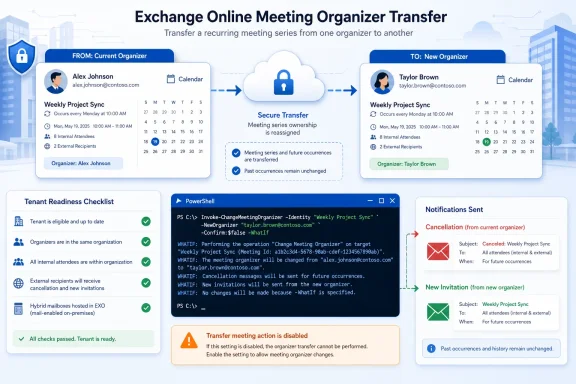
Invoke-ChangeMeetingOrganizer puts the change in practical terms: Microsoft is rolling out an Exchange Online PowerShell cmdlet that can transfer an existing meeting or recurring series to a different organizer. It addresses a long-standing ownership problem when an employee leaves, responsibilities move, or a recurring meeting needs a new accountable owner.Use this pilot go/no-go checklist before attempting a production transfer:
- [ ] Run the intended action with
-WhatIfand confirm the tenant does not return “Transfer meeting action is disabled.” - [ ] Confirm that the new organizer is in the same Exchange Online organization as the current organizer.
- [ ] Identify whether attendees are internal Exchange Online users, external recipients, or users with on-premises mailboxes in a hybrid deployment.
- [ ] For external or hybrid recipients, prepare advance communications explaining that they may receive an end-of-series message and a new invitation.
- [ ] For a recurring series, confirm the intended transfer point and review the series for exceptions before making the change.
- [ ] Have the incoming organizer verify the transferred meeting or series after the change.
 The rollout date is a planning signal, not a readiness test
Microsoft’s July 6 Message Center update frames this as an Exchange Online rollout. Worldwide and GCC deployment is expected to complete in July 2026. GCC High and DoD deployment begins in July and is expected to complete in August 2026.Those dates help with planning, but they do not prove that a particular tenant can use the capability. Organizations that operate commercial and regulated Microsoft 365 environments should not assume that availability in one environment means availability in another.
The tenant-level readiness check is the cmdlet response. When the feature is not enabled, Exchange Online returns “Transfer meeting action is disabled” and does not modify the meeting. That makes a
-WhatIf test useful both for checking availability and for reviewing the intended meeting before a real change.WindowsForum users following the organizer-transfer rollout have focused on exactly this distinction: the feature is valuable because it changes an existing ownership model without requiring administrators to invent a separate calendar workaround, but it still has to be tested in the tenant where it will be used.
Run the transfer as a controlled Exchange Online change
Use your organization’s approved Exchange Online PowerShell process, then begin with-WhatIf. The following example identifies the mailbox of the current organizer, the meeting subject, and the intended new organizer:
Code:
Invoke-ChangeMeetingOrganizer `
  -Identity [email][email protected][/email] `
  -Subject "Weekly Status Sync" `
  -NewOrganizer [email][email protected][/email] `
-WhatIf-Identity is the mailbox of the current organizer and -NewOrganizer is the destination organizer. Review the result carefully before removing -WhatIf.If the proposed action is correct, run the transfer without the simulation switch:
Code:
Invoke-ChangeMeetingOrganizer `
  -Identity [email][email protected][/email] `
  -Subject "Weekly Status Sync" `
-NewOrganizer [email][email protected][/email]-TransferSeriesStartDate:
Code:
Invoke-ChangeMeetingOrganizer `
  -Identity [email][email protected][/email] `
  -Subject "Weekly Status Sync" `
  -NewOrganizer [email][email protected][/email] `
  -TransferSeriesStartDate 09/01/2026 `
-WhatIfInternal attendees have the cleanest handoff
The strongest scenario is an existing internal recurring meeting that needs a new owner after an offboarding, department change, or administrative handoff. For attendees whose mailboxes are in the same Exchange Online organization, Microsoft says the meeting is silently updated with the new organizer information and attendees do not need to RSVP again.That is a meaningful continuity benefit. Rather than canceling a familiar internal series and creating a replacement meeting, the organization can preserve the existing meeting context while shifting responsibility to the new organizer.
The former organizer is not automatically retained as an attendee. If that person still needs to participate, monitor the meeting, or receive updates, the incoming organizer should confirm that they remain appropriately included after the transfer.
This is the central point in WindowsForum’s coverage of the cmdlet: it is a focused answer to meeting ownership, not a general-purpose calendar repair tool. It is intended for an existing meeting or recurring series within one Exchange Online organization.
External and hybrid recipients need communications planning
The quiet internal update does not apply to every attendee type. Microsoft says external attendees and attendees whose mailboxes are hosted on-premises in a hybrid deployment receive a message from the old organizer ending the series, followed by a new invitation from the new organizer.Meeting exceptions can generate additional cancellation and invitation messages. That is reason enough to inspect a recurring series before transfer, particularly when it has a history of altered occurrences or when participants depend on a stable meeting cadence.
For external or hybrid audiences, treat the handoff as a participant communication event as well as an administrative change. Choose a quiet transfer point where possible, notify attendees in advance that replacement messages may arrive, and avoid making the change immediately before a critical occurrence.
A concise participant notice can prevent avoidable confusion:
The key recipient distinction is straightforward:The organizer for this meeting series is changing. Some attendees may receive an end-of-series message followed by a new invitation. Please use the new invitation for future occurrences.
- Internal Exchange Online attendees can receive a silent update and do not need to RSVP again.
- External attendees receive an end-of-series message from the old organizer and a new invitation from the new organizer.
- Hybrid attendees with on-premises mailboxes receive the same end-of-series and new-invitation pattern described for external recipients.
Keep expectations separate from Outlook, Teams, and Copilot changes
WindowsForum has also tracked Copilot’s arrival in Classic Outlook for Windows, Microsoft 365’s evolving unified calendar direction, and Facilitator-style meeting features. Those reports show that meeting preparation, calendar surfaces, and collaboration workflows are continuing to evolve across Microsoft 365.They do not establish a current Teams-based organizer-transfer process. A richer Outlook or Teams experience does not mean that ownership transfer, invitations, and recipient notifications are available through that client surface.
The scope here is limited:
Invoke-ChangeMeetingOrganizer transfers an existing meeting or recurring series to another organizer within the same Exchange Online organization. It is not a cross-tenant transfer mechanism, and it should not be treated as a replacement for future user-driven Outlook or Teams capabilities.Build a usable change record
A production handoff does not need excessive paperwork, but it should leave enough evidence for the new organizer, service desk, and affected attendees to understand what changed. Record:- The current organizer’s mailbox.
- The intended new organizer’s mailbox.
- The meeting or recurring series being transferred.
- The planned transfer point for a series, if applicable.
- The attendee population: internal, external, hybrid, or mixed.
- The
-WhatIfresult. - Whether advance communications were sent to external or hybrid participants.
- The incoming organizer’s post-change confirmation.
The cmdlet’s value is specific but substantial: it gives Exchange Online administrators a way to move responsibility for an existing meeting or recurring series when the tenant is ready, the replacement organizer is in the same organization, and the attendee experience has been accounted for.
Frequently Asked Questions
Is August 2026 the deadline for every Microsoft 365 tenant?
No. Microsoft expects Worldwide and GCC rollout to complete in July 2026. GCC High and DoD rollout begins in July and is expected to complete in August 2026.How do we know whether the capability is enabled?
Run a controlled test with-WhatIf. If Exchange Online returns “Transfer meeting action is disabled,” the feature is not enabled for that tenant and no meeting changes are made.Can we use this for a meeting with external attendees?
Yes, but the attendee experience differs from an internal Exchange Online meeting. Microsoft says external attendees receive a message ending the series from the old organizer and a new invitation from the new organizer. Send advance communications so recipients understand why replacement messages may arrive.What happens to hybrid attendees?
Attendees whose mailboxes are hosted on-premises in a hybrid deployment receive the same end-of-series and new-invitation messaging pattern described for external recipients.What happens when a recurring series has exceptions?
Microsoft says meeting exceptions can generate additional cancellation and invitation messages. Review the series and prepare affected participants for extra notifications.Can users transfer meeting ownership directly in Outlook or Teams?
Not yet. Microsoft has indicated that user-driven transfers in Outlook on the web, new Outlook, and Teams are planned for a future release. No current Teams-specific organizer-transfer workflow is established by this rollout.The July and August milestones answer the broad deployment question, but the safe operational decision remains tenant-specific: test with
-WhatIf, confirm the same-organization organizer change, identify the attendee population, and communicate in advance when external or hybrid recipients are involved.References
- Primary source: learn.microsoft.com
Invoke-ChangeMeetingOrganizer (ExchangePowerShell) | Microsoft Learn
This cmdlet changes the organizer of a meeting or meeting series. The change is effective starting from the next instance of the series or from a specified future date. Meeting instances before the effective date remain unchanged in the original organizer's calendar. Meeting instances after...learn.microsoft.com - Independent coverage: foetron.com
- Independent coverage: reddit.com

Reddit - Please wait for verification
www.reddit.com
- Independent coverage: blog.admindroid.com
Change Meeting Organizer in Microsoft 365 Via PowerShell
Discover more about the new Exchange Online PowerShell cmdlet that lets admins change meeting organizer without recreating meetings.blog.admindroid.com - Primary source: WindowsForum
Invoke-ChangeMeetingOrganizer: Transfer Exchange Meeting Ownership in 2026 | Windows Forum
Microsoft is rolling out an Exchange Online PowerShell cmdlet, Invoke-ChangeMeetingOrganizer, that lets Microsoft 365 administrators transfer ownership of...windowsforum.com