

Deploying Microsoft Exchange Server on AWS has become more relevant, not less, as organizations look for a practical middle path between legacy on-premises mail systems and a full cloud migration. The newest AWS guidance, centered on AWS Managed Microsoft AD Hybrid Edition, is designed to make that bridge sturdier by extending an existing Active Directory domain into AWS without forcing a directory redesign, while Microsoft’s Exchange Server Subscription Edition now stands as the supported on-premises path going forward. AWS says Hybrid Edition preserves existing access controls and group policies and can integrate with EC2, FSx for Windows File Server, and RDS, while Microsoft’s lifecycle page shows Exchange Server SE is in support and governed by the Modern Lifecycle Policy. (aws.amazon.com)
What makes this moment notable is the timing. Exchange Server 2019 reached end of support on October 14, 2025, which means the old “just keep running 2019 for a bit longer” posture is no longer a viable plan for most enterprises. The AWS article is effectively a transition playbook: keep the identity fabric familiar, modernize the hosting layer, and move to a supported Exchange generation without uprooting the whole directory model. Microsoft’s own preparation guidance still expects classic Active Directory discipline: schema prep, domain prep, replication checks, and the right forest-level permissions.
There is also a broader strategic signal here. AWS is not merely providing generic Windows hosting; it is leaning into a managed, hybridized directory model that acknowledges many enterprises want less identity sprawl, not more. That matters because Exchange deployments are unusually sensitive to Active Directory topology, site awareness, and admin role hygiene. If the directory is wrong, Exchange is wrong. If the directory is stable, Exchange can be treated as an application stack instead of a constant emergency. (aws.amazon.com)
Exchange Server has always been one of the most operationally demanding Microsoft workloads because it is not just a mail platform. It is a directory consumer, a schema extender, a certificate-dependent client access stack, a highly stateful database system, and a service that historically rewards precision over improvisation. That is why every serious Exchange deployment starts with Active Directory, not with the mailbox role, and why Microsoft’s own setup guidance still puts schema extension and replication ahead of server installation. (learn.microsoft.com)
The AWS blog arrives in a world where many organizations are already running hybrid identity and hybrid messaging. For those enterprises, moving Exchange into AWS is less about novelty and more about reducing friction in a familiar operating model. The appeal is obvious: elasticity, geographic reach, infrastructure abstraction, and a chance to separate mail service availability from aging datacenter constraints. The challenge is equally obvious: Exchange’s dependency chain is unforgiving, and a cloud migration that ignores AD site design or DNS fidelity will simply relocate the pain. (aws.amazon.com)
A key enabler is AWS Managed Microsoft AD Hybrid Edition, which AWS launched in August 2025. AWS describes it as a managed service that extends an existing AD domain into AWS, automatically handles replication and maintenance, and preserves existing access controls and group policies without permission reconfiguration. For organizations with Windows workloads, that is a significant reduction in operational burden because it avoids the need to build a parallel directory or bolt on fragile identity synchronization layers just to make Exchange work in the cloud. (aws.amazon.com)
Microsoft’s own timing changed the commercial calculus in a major way. Exchange Server Subscription Edition launched on July 1, 2025, and is listed as “In Support.” That means the on-premises Exchange story did not end with 2019’s retirement; it shifted into a subscription-supported model intended to carry forward the server product line. In practical terms, the AWS architecture is now best understood as a deployment model for the supported Exchange future, not a temporary shelter for a dying platform. (learn.microsoft.com)
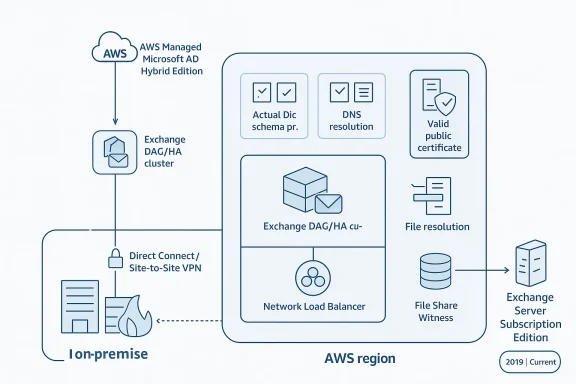
The article outlines three topologies: a single-region high-availability design, a multi-region topology, and a hybrid topology that spans on-premises and AWS. Each approach is really a different answer to the same question: where do you want your resilience boundary to live? Single-region designs are easier to operate, multi-region designs provide stronger geographic survivability, and hybrid designs preserve a staged migration path for organizations that are not ready to cut over completely. (aws.amazon.com)
This topology is especially attractive for organizations with centralized operations or a user base concentrated in one geography. It also tends to be the most realistic first step because the network and identity design are simpler than in a multi-region rollout. The tradeoff is that you are optimizing for service continuity, not regional sovereignty. (aws.amazon.com)
For global enterprises, however, this may be the only design that matches the business. If user populations, regulatory obligations, or business continuity requirements demand regional separation, then multi-region Exchange is the logical extension of an already distributed operating model. It is also the most expensive model to run well, because resilience is no longer just a checkbox; it becomes a continuous design constraint. (aws.amazon.com)
This model is also the best fit for companies still dependent on on-premises infrastructure for compliance, application interoperability, or site-specific latency. The danger is that hybrid designs can become permanent if governance is weak. In that sense, hybrid is either a transition strategy or an excuse to defer hard decisions; the difference is managerial discipline. (aws.amazon.com)
Microsoft’s guidance remains unambiguous about prerequisites. To extend the schema, the admin account must be a member of Schema Admins and Enterprise Admins; the machine must be in the same domain and site as the schema master; and if the
The need for replication pauses between steps is a strong reminder that cloud speed does not change directory physics. AD still replicates on its own schedule, and Exchange setup still expects the directory to be fully converged before the next action. Administrators who shortcut those waits create intermittent, hard-to-diagnose failures that look like setup bugs but are really topology mistakes. (learn.microsoft.com)
DNS forwarding and conditional forwarders are the quiet heroes of this design. Without dependable name resolution between on-premises DNS, self-managed controllers, and AWS Managed Microsoft AD, Exchange setup and runtime client access both become unreliable. This is why “it pings” is a useless test in Exchange architecture; the real test is whether the right names resolve from the right sites with the right latency. (aws.amazon.com)
The practical implication is that AWS-hosted Exchange no longer has the optics of a stopgap solution. Instead, it becomes a legitimate landing zone for organizations that value a familiar Microsoft stack but want infrastructure elasticity and regional flexibility. That is especially relevant in regulated industries where mail retention, integration, or locality policies make a full SaaS migration difficult. (learn.microsoft.com)
The AWS article’s focus on 2019 commands and screenshots should be read as a compatibility bridge, not as a recommendation to stay on 2019 forever. The article is explicit that the guide uses Exchange 2019 examples, and the underlying logic is still valid for SE because the same Active Directory preparation concepts apply. The lesson is not “ignore SE,” but “prepare your directory properly so the supported version can install cleanly.” (aws.amazon.com)
AWS recommends choosing a region based on user proximity and compliance, then spreading resources across Availability Zones for high availability. That is standard cloud advice, but in Exchange it has an additional implication: network locality affects logon behavior, DAG stability, and directory responsiveness. In other words, “closest region” is not just a cost or latency question; it is an availability decision. (aws.amazon.com)
Certificates are another non-negotiable item. Exchange client access services rely on valid public certificates, and this is one area where cloud hosting often exposes bad habits from on-premises deployments. Teams that have been tolerating expired or internally trusted certificates in a controlled datacenter will find that AWS-hosted Exchange makes that sloppiness much more visible. (aws.amazon.com)
The security model also includes network access control lists, security groups, and routing controls. This is a reminder that Exchange on AWS is still a layered system: directory permissions, cloud IAM, network policy, and Windows service permissions all need to align. A weak link in any one of those layers can create an outage that looks much bigger than the original mistake. (aws.amazon.com)
Microsoft’s documented process is still the canonical one: run Setup.exe /PrepareSchema, then /PrepareAD, then /PrepareAllDomains or specific domain preparation as required. The commands must be executed with the right group memberships, and the setup host should be able to contact the schema master and replicate changes before you move on. That is the sort of process that appears old-fashioned until it saves a deployment from partial state corruption. (learn.microsoft.com)
This is one of those rare cases where “more manual” is actually more reliable. Exchange schema prep is a dependency-sensitive change, and explicit targeting reduces the chance that setup talks to the wrong controller or lands in the wrong site. The cloud does not remove that dependency; it merely gives you better options for hosting the servers that manage it. (learn.microsoft.com)
The File Share Witness remains a small but important component in this architecture. It is not glamorous, but the witness helps the DAG maintain quorum and avoid split-brain behavior. In a cloud design, that witness placement should be treated as seriously as any mailbox database because quorum misconfiguration can turn a planned maintenance event into an outage. (aws.amazon.com)
The same logic applies to multi-region designs. If you are stretching Exchange across regions, your load balancing strategy must reflect which services are local, which are global, and which are allowed to fail over. Overengineering here is dangerous, but underengineering is worse. The safest designs are the ones that make failover boring. (aws.amazon.com)
This is where AWS Hybrid Edition is strategically powerful. By extending the existing Active Directory domain into AWS, AWS avoids the biggest source of migration friction: rebuilding identity from scratch or forcing a separate synchronization model. That makes the move less about identity transformation and more about workload placement, which is much easier for most IT teams to manage. (aws.amazon.com)
That lingering complexity is not trivial. Dual mail-flow paths, distributed support ownership, and split troubleshooting responsibility can make hybrid environments feel permanently messy. The organizations that succeed are the ones that define milestones for mailbox migration, service retirement, and identity simplification before the first server is deployed in AWS. (aws.amazon.com)
The second thing to watch is how quickly organizations adopt SE as the default supported platform for on-premises or AWS-hosted Exchange. Exchange 2019 is now past end of support, which changes the urgency for migration and may push more enterprises toward either Exchange SE or Exchange Online, depending on compliance and control requirements. The middle path will likely remain important, but only for organizations willing to manage it properly.
Source: Amazon Web Services Deploying Microsoft Exchange Server with AWS Managed Microsoft AD Hybrid Edition | Amazon Web Services
What makes this moment notable is the timing. Exchange Server 2019 reached end of support on October 14, 2025, which means the old “just keep running 2019 for a bit longer” posture is no longer a viable plan for most enterprises. The AWS article is effectively a transition playbook: keep the identity fabric familiar, modernize the hosting layer, and move to a supported Exchange generation without uprooting the whole directory model. Microsoft’s own preparation guidance still expects classic Active Directory discipline: schema prep, domain prep, replication checks, and the right forest-level permissions.
There is also a broader strategic signal here. AWS is not merely providing generic Windows hosting; it is leaning into a managed, hybridized directory model that acknowledges many enterprises want less identity sprawl, not more. That matters because Exchange deployments are unusually sensitive to Active Directory topology, site awareness, and admin role hygiene. If the directory is wrong, Exchange is wrong. If the directory is stable, Exchange can be treated as an application stack instead of a constant emergency. (aws.amazon.com)
 Background
Exchange Server has always been one of the most operationally demanding Microsoft workloads because it is not just a mail platform. It is a directory consumer, a schema extender, a certificate-dependent client access stack, a highly stateful database system, and a service that historically rewards precision over improvisation. That is why every serious Exchange deployment starts with Active Directory, not with the mailbox role, and why Microsoft’s own setup guidance still puts schema extension and replication ahead of server installation. (learn.microsoft.com)The AWS blog arrives in a world where many organizations are already running hybrid identity and hybrid messaging. For those enterprises, moving Exchange into AWS is less about novelty and more about reducing friction in a familiar operating model. The appeal is obvious: elasticity, geographic reach, infrastructure abstraction, and a chance to separate mail service availability from aging datacenter constraints. The challenge is equally obvious: Exchange’s dependency chain is unforgiving, and a cloud migration that ignores AD site design or DNS fidelity will simply relocate the pain. (aws.amazon.com)
A key enabler is AWS Managed Microsoft AD Hybrid Edition, which AWS launched in August 2025. AWS describes it as a managed service that extends an existing AD domain into AWS, automatically handles replication and maintenance, and preserves existing access controls and group policies without permission reconfiguration. For organizations with Windows workloads, that is a significant reduction in operational burden because it avoids the need to build a parallel directory or bolt on fragile identity synchronization layers just to make Exchange work in the cloud. (aws.amazon.com)
Microsoft’s own timing changed the commercial calculus in a major way. Exchange Server Subscription Edition launched on July 1, 2025, and is listed as “In Support.” That means the on-premises Exchange story did not end with 2019’s retirement; it shifted into a subscription-supported model intended to carry forward the server product line. In practical terms, the AWS architecture is now best understood as a deployment model for the supported Exchange future, not a temporary shelter for a dying platform. (learn.microsoft.com)
Why this matters now
The biggest reason this guide matters is that enterprises are in the middle of a normalization phase after years of rushed cloud decisions. Many want to modernize without surrendering control over mail routing, compliance, or data locality. Exchange on AWS with Hybrid Edition is a response to that demand: it keeps the familiar Microsoft identity model intact while letting infrastructure teams consume AWS as a hosting platform. (aws.amazon.com)- Exchange remains deeply tied to Active Directory structure and permissions.
- AWS Hybrid Edition reduces the need for re-architecting identity.
- Exchange SE replaces Exchange 2019 as the supported on-premises line.
- Cloud migration can proceed without abandoning established AD governance.
The AWS Architecture Story
The AWS blog’s architecture guidance is intentionally pragmatic. It is not trying to invent a new Exchange paradigm; it is documenting ways to place a traditional Exchange estate on AWS in a way that respects existing Microsoft mechanics. That distinction matters because Exchange deployments fail most often when teams treat them like generic app servers rather than tightly coupled identity-aware systems. (aws.amazon.com)The article outlines three topologies: a single-region high-availability design, a multi-region topology, and a hybrid topology that spans on-premises and AWS. Each approach is really a different answer to the same question: where do you want your resilience boundary to live? Single-region designs are easier to operate, multi-region designs provide stronger geographic survivability, and hybrid designs preserve a staged migration path for organizations that are not ready to cut over completely. (aws.amazon.com)
Single-Region High Availability
The single-region model uses multiple Availability Zones, a Database Availability Group, and a Network Load Balancer. This is the cleanest operational pattern for most organizations because it aligns Exchange resilience with AWS fault isolation without adding cross-region replication complexity. In exchange for that simplicity, you accept that regional failure remains a larger event. (aws.amazon.com)This topology is especially attractive for organizations with centralized operations or a user base concentrated in one geography. It also tends to be the most realistic first step because the network and identity design are simpler than in a multi-region rollout. The tradeoff is that you are optimizing for service continuity, not regional sovereignty. (aws.amazon.com)
Multi-Region Topology
The multi-region option is the more ambitious design. It places Exchange servers in two or more AWS Regions and uses cross-region DAG copies or multiple DAGs to provide disaster recovery and global coverage. That is a more serious design commitment because it introduces replication latency, additional routing decisions, and more complicated witness placement and recovery planning. (aws.amazon.com)For global enterprises, however, this may be the only design that matches the business. If user populations, regulatory obligations, or business continuity requirements demand regional separation, then multi-region Exchange is the logical extension of an already distributed operating model. It is also the most expensive model to run well, because resilience is no longer just a checkbox; it becomes a continuous design constraint. (aws.amazon.com)
Hybrid Topology
The hybrid topology is the one most likely to appeal to conservative IT shops. It allows Exchange to remain on-premises and in AWS simultaneously, with connectivity through Direct Connect or Site-to-Site VPN and mail flow configured across both environments. That gives organizations a staged migration path and reduces the “big bang” risk that often makes Exchange projects stall. (aws.amazon.com)This model is also the best fit for companies still dependent on on-premises infrastructure for compliance, application interoperability, or site-specific latency. The danger is that hybrid designs can become permanent if governance is weak. In that sense, hybrid is either a transition strategy or an excuse to defer hard decisions; the difference is managerial discipline. (aws.amazon.com)
- Single-region is simplest.
- Multi-region is strongest for geographic DR.
- Hybrid is best for gradual migration.
- All three still depend on correct AD design.
Active Directory as the Real Control Plane
Exchange administrators know this instinctively, but it bears repeating: Active Directory is the control plane for Exchange, not just a supporting service. The AWS blog’s emphasis on Hybrid Edition is really an emphasis on making AD behave predictably across cloud and on-premises boundaries. If the site topology, DNS forwarding, or FSMO placement is wrong, Exchange setup will punish the mistake immediately. (aws.amazon.com)Microsoft’s guidance remains unambiguous about prerequisites. To extend the schema, the admin account must be a member of Schema Admins and Enterprise Admins; the machine must be in the same domain and site as the schema master; and if the
/DomainController switch is used, it must target the schema master itself. For /PrepareAD, Microsoft again requires Enterprise Admins, plus Schema Admins if schema extension is performed in that step. (learn.microsoft.com)Forest Preparation Is Not Optional
The AWS article echoes Microsoft’s setup model by walking through the three classic preparation steps: Prepare Schema, Prepare AD, and Prepare All Domains. That is not ceremonial housekeeping. It is the mechanism by which Exchange creates the containers, objects, and permissions it needs to function across the directory. No amount of AWS infrastructure polish can compensate if those objects are missing or inconsistent. (aws.amazon.com)The need for replication pauses between steps is a strong reminder that cloud speed does not change directory physics. AD still replicates on its own schedule, and Exchange setup still expects the directory to be fully converged before the next action. Administrators who shortcut those waits create intermittent, hard-to-diagnose failures that look like setup bugs but are really topology mistakes. (learn.microsoft.com)
Site Awareness and DNS
One of the most useful details in the AWS guide is the note that Hybrid Edition domain controllers are automatically placed into the AWS directory site for the region. That matters because Exchange is sensitive to AD site awareness, and it expects local, writable domain controllers to be reachable when preparation tasks run. AWS is trying to make that relationship less brittle by automating site placement, but the customer still has to ensure DNS and routing are aligned. (aws.amazon.com)DNS forwarding and conditional forwarders are the quiet heroes of this design. Without dependable name resolution between on-premises DNS, self-managed controllers, and AWS Managed Microsoft AD, Exchange setup and runtime client access both become unreliable. This is why “it pings” is a useless test in Exchange architecture; the real test is whether the right names resolve from the right sites with the right latency. (aws.amazon.com)
What the Directory Must Look Like
- A single-domain forest is the simplest supported pattern.
- At least two writable self-managed domain controllers are required.
- FSMO roles must remain on self-managed writable DCs for preparation tasks.
- AWS directory site awareness must match the actual network path.
- DNS forwarding must work both ways across the hybrid boundary.
Why Exchange SE Changes the Business Case
The move from Exchange 2019 to Exchange Server Subscription Edition is not just a licensing story; it is a risk-management story. Once Exchange 2019 went out of support on October 14, 2025, every deployment decision became more consequential because unsupported mail systems are magnets for compliance problems and patching pressure. Microsoft’s SE release, now in support, gives enterprises a supported on-premises option again, and that keeps AWS-hosted Exchange viable for organizations that are not ready to go all-in on Exchange Online.The practical implication is that AWS-hosted Exchange no longer has the optics of a stopgap solution. Instead, it becomes a legitimate landing zone for organizations that value a familiar Microsoft stack but want infrastructure elasticity and regional flexibility. That is especially relevant in regulated industries where mail retention, integration, or locality policies make a full SaaS migration difficult. (learn.microsoft.com)
SE Is Supported, but Not Magical
Microsoft’s lifecycle page is simple: Exchange SE is in support under the Modern Lifecycle Policy. That sounds reassuring, but it also means organizations must remain current, because Modern Lifecycle support depends on staying aligned with the vendor’s servicing expectations. In other words, SE reduces the cliff edge, but it does not eliminate operational responsibility. (learn.microsoft.com)The AWS article’s focus on 2019 commands and screenshots should be read as a compatibility bridge, not as a recommendation to stay on 2019 forever. The article is explicit that the guide uses Exchange 2019 examples, and the underlying logic is still valid for SE because the same Active Directory preparation concepts apply. The lesson is not “ignore SE,” but “prepare your directory properly so the supported version can install cleanly.” (aws.amazon.com)
Enterprise and Consumer Impact Differ
For enterprises, SE plus AWS Hybrid Edition means a more credible long-term path for hosted Exchange without abandoning Microsoft identity. For consumers, the effect is indirect but real: organizations that can keep mail service stable are less likely to force abrupt mailbox moves or disruptive client changes. The real beneficiary is IT operations, which gains a more modern supportable stack without giving up the tooling it already knows. (learn.microsoft.com)- Exchange SE is the supported on-premises line.
- Exchange 2019 is past end of support.
- AWS Hybrid Edition makes the cloud path less disruptive.
- The directory design remains the main technical hurdle.
Deployment Planning and Infrastructure Choices
The AWS guide is refreshingly clear that Exchange deployment in AWS is not a casual lift-and-shift. It requires VPC planning, subnet strategy, storage sizing, load balancing, and certificate planning before you touch setup. That is appropriate because Exchange performance problems almost always begin at the infrastructure layer and only later surface as “mail delays” or “OWA is slow.” (aws.amazon.com)AWS recommends choosing a region based on user proximity and compliance, then spreading resources across Availability Zones for high availability. That is standard cloud advice, but in Exchange it has an additional implication: network locality affects logon behavior, DAG stability, and directory responsiveness. In other words, “closest region” is not just a cost or latency question; it is an availability decision. (aws.amazon.com)
Compute, Storage, and Certificates
Exchange server sizing must reflect mailbox count and performance needs, while domain controllers and witness servers need proper instance sizing as well. The AWS blog also calls out EBS performance as a design variable, which is important because Exchange databases are sensitive to storage latency. EBS can be perfectly suitable, but it must be designed as a performance component, not as generic block storage. (aws.amazon.com)Certificates are another non-negotiable item. Exchange client access services rely on valid public certificates, and this is one area where cloud hosting often exposes bad habits from on-premises deployments. Teams that have been tolerating expired or internally trusted certificates in a controlled datacenter will find that AWS-hosted Exchange makes that sloppiness much more visible. (aws.amazon.com)
Security and Permissions
AWS also recommends dedicated IAM roles with minimal permissions, including Systems Manager access and CloudWatch logging. That is the right instinct because Exchange servers should not run with broad cloud permissions just to make deployment easier. The tighter the privileges, the easier it is to reason about the blast radius of a compromise. (aws.amazon.com)The security model also includes network access control lists, security groups, and routing controls. This is a reminder that Exchange on AWS is still a layered system: directory permissions, cloud IAM, network policy, and Windows service permissions all need to align. A weak link in any one of those layers can create an outage that looks much bigger than the original mistake. (aws.amazon.com)
Planning Checklist
- Choose the region based on users and regulations.
- Decide whether the design is single-region, multi-region, or hybrid.
- Size compute for Exchange, DCs, and witness services.
- Design storage with Exchange latency in mind.
- Obtain and bind valid public certificates.
- Lock down IAM, security groups, and DNS before setup.
Forest Prep in Practice
The most operationally sensitive part of the AWS article is its treatment of forest preparation. It correctly notes that if Exchange is deployed in a multi-site AD environment and the target machine is not in the same site as the schema master, the GUI wizard may not be the right tool. That is exactly the kind of problem that separates a lab walkthrough from a real production deployment. (aws.amazon.com)Microsoft’s documented process is still the canonical one: run Setup.exe /PrepareSchema, then /PrepareAD, then /PrepareAllDomains or specific domain preparation as required. The commands must be executed with the right group memberships, and the setup host should be able to contact the schema master and replicate changes before you move on. That is the sort of process that appears old-fashioned until it saves a deployment from partial state corruption. (learn.microsoft.com)
Why the CLI Matters
The command-line approach is not just for convenience. It is the safer choice when you need to target a specific schema master or when the GUI cannot correctly infer the right domain controller. The AWS blog’s recommendation to specify the self-managed DC holding the FSMO roles mirrors Microsoft’s own guidance that the setup computer needs to be in the same domain and site as the schema master. (aws.amazon.com)This is one of those rare cases where “more manual” is actually more reliable. Exchange schema prep is a dependency-sensitive change, and explicit targeting reduces the chance that setup talks to the wrong controller or lands in the wrong site. The cloud does not remove that dependency; it merely gives you better options for hosting the servers that manage it. (learn.microsoft.com)
Common Failure Modes
- Running setup before AD replication completes.
- Using the wrong domain controller for schema prep.
- Failing to keep FSMO roles on the correct self-managed DC.
- Breaking DNS between AWS and on-premises sites.
- Assuming GUI install paths are always sufficient.
High Availability, Load Balancing, and Witness Design
Exchange’s high-availability story on AWS is really a story about aligning Microsoft’s DAG model with AWS fault domains. The AWS article’s use of multiple Availability Zones and a Network Load Balancer is exactly what you would expect from a modern Exchange design: distribute risk, keep client traffic stable, and let databases fail over without user-visible drama. (aws.amazon.com)The File Share Witness remains a small but important component in this architecture. It is not glamorous, but the witness helps the DAG maintain quorum and avoid split-brain behavior. In a cloud design, that witness placement should be treated as seriously as any mailbox database because quorum misconfiguration can turn a planned maintenance event into an outage. (aws.amazon.com)
Load Balancing in Context
AWS uses the Network Load Balancer to distribute client connections, which fits Exchange’s requirement for stable, low-latency, health-checked access. That is a better fit than ad hoc DNS tricks or single-node VIP assumptions because Exchange clients expect a consistent service endpoint behavior. Load balancing is therefore not a cosmetic layer; it is part of the service contract. (aws.amazon.com)The same logic applies to multi-region designs. If you are stretching Exchange across regions, your load balancing strategy must reflect which services are local, which are global, and which are allowed to fail over. Overengineering here is dangerous, but underengineering is worse. The safest designs are the ones that make failover boring. (aws.amazon.com)
Resilience Patterns to Favor
- Use multiple AZs even in a single-region model.
- Place the witness where quorum behavior is predictable.
- Keep load balancing regionally aware.
- Test failover under realistic network conditions.
- Validate client reconnect behavior, not just database status.
Hybrid Migration Strategy and Operational Realism
The hybrid topology deserves special attention because it mirrors how most enterprises actually migrate. Very few large organizations are comfortable with a hard cutover from on-premises Exchange to AWS in one motion. They prefer coexistence, staged mailbox moves, mail-flow validation, and rollback capability, all of which are easier when the on-premises environment remains alive during the transition. (aws.amazon.com)This is where AWS Hybrid Edition is strategically powerful. By extending the existing Active Directory domain into AWS, AWS avoids the biggest source of migration friction: rebuilding identity from scratch or forcing a separate synchronization model. That makes the move less about identity transformation and more about workload placement, which is much easier for most IT teams to manage. (aws.amazon.com)
Why Hybrid Often Wins
Hybrid designs are often the best compromise between risk and modernization. They let teams prove AWS connectivity, validate directory behavior, and stage Exchange capacity without retiring the existing datacenter on day one. The downside, of course, is that hybrid complexity can linger if there is no explicit exit plan. (aws.amazon.com)That lingering complexity is not trivial. Dual mail-flow paths, distributed support ownership, and split troubleshooting responsibility can make hybrid environments feel permanently messy. The organizations that succeed are the ones that define milestones for mailbox migration, service retirement, and identity simplification before the first server is deployed in AWS. (aws.amazon.com)
What Good Hybrid Governance Looks Like
- Defined migration waves, not indefinite coexistence.
- Clear mail-flow ownership between teams.
- Documented rollback and failback procedures.
- Consistent DNS and certificate management.
- A timeline for decommissioning the old path.
Strengths and Opportunities
The strongest thing about this AWS + Exchange pattern is that it reduces the distance between a Microsoft-native workload and a cloud-native operating model without pretending the application is simple. It respects Exchange’s directory dependencies, keeps the identity fabric familiar, and gives enterprises a path to modernize infrastructure without forcing a wholesale redesign of how mail services work. That is a practical cloud story, which is often the best kind. (aws.amazon.com)- Preserves existing AD governance and group policies.
- Supports gradual migration rather than forcing a cutover.
- Aligns Exchange HA with AWS Availability Zones.
- Makes supported Exchange SE deployments easier to justify.
- Reduces operational overhead compared with self-managed AD expansion.
- Fits regulated environments that need hybrid continuity.
- Improves disaster recovery options without abandoning Microsoft tooling.
Risks and Concerns
The biggest risk is overconfidence. Teams may assume that because AWS manages part of the directory layer, Exchange will behave like a simpler cloud service. It will not. Exchange still depends on precise AD prep, DNS fidelity, certificate hygiene, storage performance, and the correct placement of FSMO roles and schema operations. If any of those are wrong, the deployment becomes fragile very quickly. (aws.amazon.com)- AD replication delays can break setup sequencing.
- DNS mistakes can create intermittent and hard-to-trace failures.
- Multi-region complexity can grow faster than governance.
- Hybrid environments can become permanent if exit plans are weak.
- Storage latency can quietly degrade mailbox performance.
- Witness misplacement can destabilize quorum.
- Certificate or permissions errors can halt deployment or client access.
Looking Ahead
The most important thing to watch next is whether AWS and Microsoft continue tightening the operational story around Exchange in hybrid cloud environments. The launch of AWS Managed Microsoft AD Hybrid Edition in 2025 and the arrival of Exchange Server SE the same year are not isolated events; together they suggest a renewed effort to keep Microsoft server workloads viable in a cloud-first world. That should matter to any enterprise still running a serious Exchange estate. (aws.amazon.com)The second thing to watch is how quickly organizations adopt SE as the default supported platform for on-premises or AWS-hosted Exchange. Exchange 2019 is now past end of support, which changes the urgency for migration and may push more enterprises toward either Exchange SE or Exchange Online, depending on compliance and control requirements. The middle path will likely remain important, but only for organizations willing to manage it properly.
Key Signals to Monitor
- AWS region availability for Hybrid Edition.
- Exchange SE servicing and cumulative update cadence.
- Customer adoption of single-region versus multi-region Exchange.
- Microsoft guidance for hybrid mail-flow and directory prep.
- Whether enterprises begin retiring legacy on-prem Exchange faster.
Source: Amazon Web Services Deploying Microsoft Exchange Server with AWS Managed Microsoft AD Hybrid Edition | Amazon Web Services
