

ExplorerPatcher is a free, open-source Windows customization utility for Windows 11 that has reportedly passed 42 million downloads by restoring older shell behaviors, including the Windows 10-style taskbar, classic right-click menus, File Explorer tweaks, and Start menu options Microsoft removed or redesigned. That number is less a curiosity than a verdict. Four years into Windows 11’s life, a huge audience is still voting with its installer for muscle memory, density, and control. The mod’s popularity says something uncomfortable about modern Windows: Microsoft can modernize the desktop, but it cannot easily retire the workflows people built their workdays around.
It is tempting to treat ExplorerPatcher as another niche utility for people who refuse to let go of the past. Windows has always had them: Start menu replacements, shell extensions, registry tweak packs, icon restorers, theming engines, and taskbar enhancers. Every major Windows redesign creates a cottage industry for undoing the redesign.
But 42 million downloads moves the story out of the hobbyist corner. Even allowing for repeat downloads, updates, test installs, and the ambiguity of download counters, the scale is hard to dismiss. This is not one forum thread’s worth of grumbling; it is a sustained market signal from people who want Windows 11’s plumbing without all of Windows 11’s interface decisions.
ExplorerPatcher succeeds because it is not trying to turn Windows into Linux, macOS, or some vaporwave fantasy desktop. Its central promise is more conservative: let Windows behave like Windows did before. That is why the utility has spread so widely despite being open source, unofficial, occasionally fragile, and largely invisible to casual users.
The deeper irony is that ExplorerPatcher’s popularity depends on Microsoft’s own design history. Users are not demanding alien features. They are asking for labels on taskbar buttons, a full context menu, the ability to put the taskbar somewhere other than the bottom edge, and File Explorer controls that do not feel hidden behind a layer of simplification.
The taskbar was the flashpoint because it is not decoration. It is the control surface many users touch hundreds of times a day. A change there has the same psychological weight as moving keys around on a keyboard: even if the new layout is defensible, the cost is paid in interruption.
Early Windows 11 versions removed or limited several behaviors that long-time users relied on. Taskbar labels and ungrouped windows were absent at launch. Moving the taskbar to the top, left, or right was no longer supported in the normal settings interface. The right-click context menu was compressed into a new design that often required selecting “Show more options” to reach older commands.
Microsoft’s argument, implicit if not always stated plainly, was that Windows needed a reset. The shell had accumulated decades of controls, menus, inconsistencies, and visual cruft. But users heard something else: efficiency was being traded for tidiness, and customizability was being sacrificed for coherence.
ExplorerPatcher lives in that gap. It is a reminder that desktop operating systems are not judged only by how they look in screenshots. They are judged by whether the user can complete a familiar action without thinking.
Labels matter because icons are not always enough. Three browser windows may have the same icon. Several File Explorer windows may represent different servers, project folders, or network shares. A row of labeled buttons is not elegant, but it is information-rich.
The same applies to the context menu. Windows 11’s modern right-click menu is visually cleaner, but it demoted many legacy commands into a secondary menu. For users whose tools integrate through old shell extensions, that extra click is not just an annoyance; it is a repeated tax on established workflows.
File Explorer is another fault line. Microsoft has spent years reworking its command surfaces, from the old ribbon to newer simplified bars. ExplorerPatcher appeals to users who prefer the older arrangement not because it was beautiful, but because it exposed more controls in predictable places.
The Start menu options complete the package. Windows 11’s Start menu has improved over time, but it remains more opinionated than many users want. ExplorerPatcher’s ability to restore or approximate older Start menu behavior gives users a way to make Windows 11 feel less like a forced migration and more like an upgrade they can domesticate.
This is not simply resistance to change. Plenty of Windows users adopt new features quickly when they solve a visible problem. Snap layouts, improved window management, better virtual desktop handling, and modern terminal tooling all found audiences because they offered concrete value. The backlash against parts of Windows 11’s shell was sharper because users saw familiar capability removed first and partially restored later.
That sequence matters. When Microsoft removes a feature and brings it back two years later, the official story may be one of iteration. To users, it feels like unpaid beta testing on their daily workspace. ExplorerPatcher became popular in part because it offered immediate relief while Microsoft’s own roadmap moved slowly.
There is also a cultural dimension. Windows has historically been the operating system of compromise: messy, compatible, configurable, and tolerant of strange workflows. Windows 11, at least in its early shell decisions, sometimes felt like it wanted to be a more curated appliance. ExplorerPatcher is a rebellion in favor of the old bargain.
That bargain is not always pretty. It produces clutter, inconsistent UI, legacy dependencies, and settings panels that look like archaeological layers. But for power users, sysadmins, developers, and enthusiasts, that mess is also freedom.
That does not mean ExplorerPatcher is obsolete. Official restorations often arrive slowly, with limitations, and without matching every older behavior. The people who install shell mods are rarely satisfied by one checkbox; they want a cluster of behaviors that make the system feel coherent to them.
Still, Microsoft’s course correction is significant. It shows that the company underestimated how strongly users valued the old taskbar model. The Windows 11 taskbar was not just a new coat of paint over an old component; it was a rebuilt experience that initially lacked long-standing affordances. Rebuilding gave Microsoft design freedom, but it also reset expectations in painful ways.
ExplorerPatcher filled the vacuum while Microsoft rebuilt the bridge. It offered users a practical answer before the official product team had one. That is why its download count reads less like a fad and more like a public bug report with millions of signatures.
The lesson for Microsoft is not that every legacy feature must live forever. It is that removals require a higher burden of proof than redesigns. If a feature has been part of users’ daily rhythm for a decade or more, replacing it with a cleaner but less capable alternative is not modernization; it is a regression with nicer icons.
That proximity explains the antivirus anxiety around the tool. Programs that alter another process’s behavior can resemble techniques used by malware, even when the intent is benign and the code is open source. A false positive does not automatically mean danger, but neither should users wave it away without thinking.
Major Windows updates are the larger practical hazard. A cumulative update, feature update, or Insider build can change shell internals enough to break compatibility. When that happens, users may see crashes, missing features, black screens, broken taskbars, or a temporary need to uninstall the mod until a fix appears.
That is not a moral failing by ExplorerPatcher’s developers. It is the predictable consequence of depending on private or semi-private implementation details in a moving operating system. Microsoft does not design Windows updates around preserving every unofficial shell hook, and no third-party mod can fully control that terrain.
The project’s own warnings around certain taskbar implementations are worth taking seriously. A personal machine where a broken taskbar is annoying is one thing. A production workstation, kiosk, shared lab image, executive laptop, or regulated environment is another. The same tweak that feels liberating at home can become an operational liability at scale.
A sysadmin does not merely ask whether ExplorerPatcher works. They ask what happens when it stops working across 300 machines the morning after a monthly update. They ask whether help desk staff can distinguish a Windows bug from a shell-mod bug. They ask whether endpoint protection will quarantine it, whether users will install unofficial builds, and whether rollback is clean.
That does not mean organizations should dismiss user frustration. In many workplaces, the people most likely to want ExplorerPatcher are also the people most dependent on high-efficiency desktop workflows: accountants, engineers, analysts, developers, support agents, administrators, and power users juggling many windows at once. Ignoring their pain because the new interface is “standard” can quietly cost productivity.
The better enterprise answer is not usually to deploy ExplorerPatcher everywhere. It is to identify which complaints are actually about missing Windows settings, which can be solved through supported configuration, and which represent genuine workflow regressions. Where Microsoft has restored official controls, IT should prefer those.
There may still be edge cases where a carefully tested utility makes sense for a small technical group. But that should be a managed exception, not a shadow-IT free-for-all. The more deeply a tool modifies the shell, the more it needs change control, documentation, and an exit plan.
But open source does not magically eliminate risk. Most users do not audit source code. Many download from whatever page search results put in front of them. A popular utility with millions of downloads is also a tempting target for lookalike sites, bundled installers, and malicious clones.
Operational trust is different from code trust. A tool can be honest, useful, and well-maintained while still being unsuitable for certain environments. It can be safe in intent but fragile in practice. It can be the right answer for a home desktop and the wrong answer for a fleet.
That distinction is often lost in online arguments. One camp says ExplorerPatcher is indispensable and harmless if downloaded from the right place. Another says any shell patcher is reckless. Both are oversimplifying. The real answer depends on tolerance for breakage, update cadence, backup discipline, and the importance of the affected machine.
For enthusiasts, the practical advice is straightforward: download from the official project, keep a restore path, avoid stacking multiple shell mods without reason, and do not install it five minutes before a deadline. For IT pros, the advice is even simpler: test like it will break, because eventually something in the Windows shell probably will.
Modern operating systems increasingly move toward managed experiences. Defaults matter more. Cloud accounts matter more. AI surfaces, recommendation panels, and promoted services occupy more space. The local desktop is still there, but it is less clearly yours than it once felt.
That is why small UI removals provoke outsized reactions. A missing taskbar position option is not just a missing option. It becomes evidence in a broader case that the user is losing control. A simplified context menu is not just a design tweak. It becomes another place where the system decides what the user probably wants, then hides the rest.
ExplorerPatcher reverses that emotional direction. It tells users: you can still choose. You can still make the new OS behave like the old one. You can still reject the defaults without rejecting the platform.
That message is powerful because it lands at a moment when Windows is asking users to accept more change than usual. Windows 10 support has ended for mainstream consumers. Windows 11 hardware requirements pushed some machines out of the official upgrade path. Copilot-era features are changing the shape of the OS again. In that climate, a tool that restores familiarity becomes more than a tweak; it becomes a pressure valve.
That should make Redmond uneasy. If millions of people install a third-party utility to regain old first-party behavior, the product team should ask whether the original removal was worth the damage. Some simplification may be defensible. But simplification that sends users into unsupported tools has a cost of its own.
The context menu is a perfect example. Microsoft’s cleaner menu may be easier for casual users to parse. But when older commands remain necessary, hiding them behind an extra step creates friction. If the new menu cannot fully replace the old one, the old one becomes not legacy but essential.
The taskbar is even clearer. The ability to see, distinguish, and arrange running work is central to a desktop OS. Users who prefer labels or alternative taskbar positions are not asking for decorative nostalgia. They are asking for spatial and textual cues that help them work.
Microsoft has already recognized parts of this. The problem is that restoring trust takes longer than restoring features. Once users learn that a major upgrade can remove core workflow affordances, they become more likely to delay upgrades, seek mods, or treat future redesigns with suspicion.
That does not mean Microsoft should copy every mod. Enthusiast utilities can serve narrower audiences and tolerate rough edges that Windows itself cannot. But when a category of mods becomes consistently popular, it is exposing a product gap.
ExplorerPatcher’s gap is especially clear: Windows 11 did not provide enough continuity for users who depended on the classic shell. The new interface may have been more aligned with Microsoft’s design direction, but it was less aligned with some users’ daily reality. That mismatch created demand.
The mod also demonstrates that “legacy” is an imprecise word. Some legacy code is dead weight. Some legacy behavior is the accumulated wisdom of millions of workflows. The trick is knowing which is which before cutting.
Windows has always survived by being broad enough to contain contradictions. It can serve gamers, accountants, developers, schools, factories, and grandparents because it bends. ExplorerPatcher’s popularity is a sign that users still expect it to bend further than Microsoft currently allows.
The concrete lessons are hard to miss:
 Forty-Two Million Downloads Is Not a Nostalgia Story
It is tempting to treat ExplorerPatcher as another niche utility for people who refuse to let go of the past. Windows has always had them: Start menu replacements, shell extensions, registry tweak packs, icon restorers, theming engines, and taskbar enhancers. Every major Windows redesign creates a cottage industry for undoing the redesign.But 42 million downloads moves the story out of the hobbyist corner. Even allowing for repeat downloads, updates, test installs, and the ambiguity of download counters, the scale is hard to dismiss. This is not one forum thread’s worth of grumbling; it is a sustained market signal from people who want Windows 11’s plumbing without all of Windows 11’s interface decisions.
ExplorerPatcher succeeds because it is not trying to turn Windows into Linux, macOS, or some vaporwave fantasy desktop. Its central promise is more conservative: let Windows behave like Windows did before. That is why the utility has spread so widely despite being open source, unofficial, occasionally fragile, and largely invisible to casual users.
The deeper irony is that ExplorerPatcher’s popularity depends on Microsoft’s own design history. Users are not demanding alien features. They are asking for labels on taskbar buttons, a full context menu, the ability to put the taskbar somewhere other than the bottom edge, and File Explorer controls that do not feel hidden behind a layer of simplification.
Windows 11 Broke a Quiet Contract With Power Users
Windows 11 arrived with a cleaner visual language, centered taskbar icons, rounded corners, a simplified context menu, and a Start menu that looked more like a launcher than the sprawling, configurable hub Windows users had known. For many people, the changes were pleasant enough. For others, they felt like an operating system had rearranged the workshop overnight and then insisted the missing tools were an improvement.The taskbar was the flashpoint because it is not decoration. It is the control surface many users touch hundreds of times a day. A change there has the same psychological weight as moving keys around on a keyboard: even if the new layout is defensible, the cost is paid in interruption.
Early Windows 11 versions removed or limited several behaviors that long-time users relied on. Taskbar labels and ungrouped windows were absent at launch. Moving the taskbar to the top, left, or right was no longer supported in the normal settings interface. The right-click context menu was compressed into a new design that often required selecting “Show more options” to reach older commands.
Microsoft’s argument, implicit if not always stated plainly, was that Windows needed a reset. The shell had accumulated decades of controls, menus, inconsistencies, and visual cruft. But users heard something else: efficiency was being traded for tidiness, and customizability was being sacrificed for coherence.
ExplorerPatcher lives in that gap. It is a reminder that desktop operating systems are not judged only by how they look in screenshots. They are judged by whether the user can complete a familiar action without thinking.
ExplorerPatcher Wins by Restoring the Boring Stuff
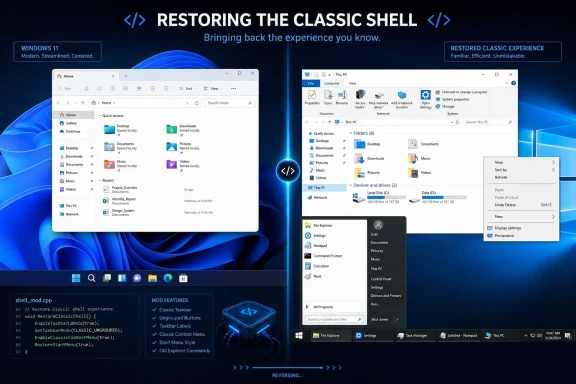
The most important thing ExplorerPatcher does is not glamorous. It brings back the Windows 10-style taskbar experience, including app labels, ungrouping behavior, and more flexible positioning. That sounds small until you watch someone who works across twenty windows, several remote sessions, multiple browsers, and pinned utilities try to operate without labels.Labels matter because icons are not always enough. Three browser windows may have the same icon. Several File Explorer windows may represent different servers, project folders, or network shares. A row of labeled buttons is not elegant, but it is information-rich.
The same applies to the context menu. Windows 11’s modern right-click menu is visually cleaner, but it demoted many legacy commands into a secondary menu. For users whose tools integrate through old shell extensions, that extra click is not just an annoyance; it is a repeated tax on established workflows.
File Explorer is another fault line. Microsoft has spent years reworking its command surfaces, from the old ribbon to newer simplified bars. ExplorerPatcher appeals to users who prefer the older arrangement not because it was beautiful, but because it exposed more controls in predictable places.
The Start menu options complete the package. Windows 11’s Start menu has improved over time, but it remains more opinionated than many users want. ExplorerPatcher’s ability to restore or approximate older Start menu behavior gives users a way to make Windows 11 feel less like a forced migration and more like an upgrade they can domesticate.
The Mod Is a Protest Against Forced Taste
Microsoft often talks about productivity in terms of AI, search, cloud integration, and cross-device experiences. ExplorerPatcher’s popularity suggests that many Windows users define productivity more bluntly: fewer clicks, less hiding, more information on screen, and no surprises after Patch Tuesday.This is not simply resistance to change. Plenty of Windows users adopt new features quickly when they solve a visible problem. Snap layouts, improved window management, better virtual desktop handling, and modern terminal tooling all found audiences because they offered concrete value. The backlash against parts of Windows 11’s shell was sharper because users saw familiar capability removed first and partially restored later.
That sequence matters. When Microsoft removes a feature and brings it back two years later, the official story may be one of iteration. To users, it feels like unpaid beta testing on their daily workspace. ExplorerPatcher became popular in part because it offered immediate relief while Microsoft’s own roadmap moved slowly.
There is also a cultural dimension. Windows has historically been the operating system of compromise: messy, compatible, configurable, and tolerant of strange workflows. Windows 11, at least in its early shell decisions, sometimes felt like it wanted to be a more curated appliance. ExplorerPatcher is a rebellion in favor of the old bargain.
That bargain is not always pretty. It produces clutter, inconsistent UI, legacy dependencies, and settings panels that look like archaeological layers. But for power users, sysadmins, developers, and enthusiasts, that mess is also freedom.
Microsoft Has Been Quietly Conceding the Point
The strongest evidence that ExplorerPatcher users had a case is that Microsoft has been restoring some of the disputed functionality itself. Taskbar labels and never-combine behavior eventually returned to Windows 11. Recent preview work has also pointed toward renewed attention on taskbar positioning and resizing, though not always in the same form as older Windows releases.That does not mean ExplorerPatcher is obsolete. Official restorations often arrive slowly, with limitations, and without matching every older behavior. The people who install shell mods are rarely satisfied by one checkbox; they want a cluster of behaviors that make the system feel coherent to them.
Still, Microsoft’s course correction is significant. It shows that the company underestimated how strongly users valued the old taskbar model. The Windows 11 taskbar was not just a new coat of paint over an old component; it was a rebuilt experience that initially lacked long-standing affordances. Rebuilding gave Microsoft design freedom, but it also reset expectations in painful ways.
ExplorerPatcher filled the vacuum while Microsoft rebuilt the bridge. It offered users a practical answer before the official product team had one. That is why its download count reads less like a fad and more like a public bug report with millions of signatures.
The lesson for Microsoft is not that every legacy feature must live forever. It is that removals require a higher burden of proof than redesigns. If a feature has been part of users’ daily rhythm for a decade or more, replacing it with a cleaner but less capable alternative is not modernization; it is a regression with nicer icons.
The Risk Is Real Because the Hook Is Deep
ExplorerPatcher is powerful because it reaches into sensitive parts of the Windows shell. That is also why it carries risk. The utility works by modifying or hooking into Explorer behavior, which means it lives close to the machinery Microsoft updates frequently.That proximity explains the antivirus anxiety around the tool. Programs that alter another process’s behavior can resemble techniques used by malware, even when the intent is benign and the code is open source. A false positive does not automatically mean danger, but neither should users wave it away without thinking.
Major Windows updates are the larger practical hazard. A cumulative update, feature update, or Insider build can change shell internals enough to break compatibility. When that happens, users may see crashes, missing features, black screens, broken taskbars, or a temporary need to uninstall the mod until a fix appears.
That is not a moral failing by ExplorerPatcher’s developers. It is the predictable consequence of depending on private or semi-private implementation details in a moving operating system. Microsoft does not design Windows updates around preserving every unofficial shell hook, and no third-party mod can fully control that terrain.
The project’s own warnings around certain taskbar implementations are worth taking seriously. A personal machine where a broken taskbar is annoying is one thing. A production workstation, kiosk, shared lab image, executive laptop, or regulated environment is another. The same tweak that feels liberating at home can become an operational liability at scale.
Enterprise IT Sees a Different Desktop Than Enthusiasts Do
For WindowsForum readers, the attraction is obvious. ExplorerPatcher lets you reclaim control. For enterprise IT, the calculation is colder: every unofficial shell modification is another variable in support, security, compliance, and update management.A sysadmin does not merely ask whether ExplorerPatcher works. They ask what happens when it stops working across 300 machines the morning after a monthly update. They ask whether help desk staff can distinguish a Windows bug from a shell-mod bug. They ask whether endpoint protection will quarantine it, whether users will install unofficial builds, and whether rollback is clean.
That does not mean organizations should dismiss user frustration. In many workplaces, the people most likely to want ExplorerPatcher are also the people most dependent on high-efficiency desktop workflows: accountants, engineers, analysts, developers, support agents, administrators, and power users juggling many windows at once. Ignoring their pain because the new interface is “standard” can quietly cost productivity.
The better enterprise answer is not usually to deploy ExplorerPatcher everywhere. It is to identify which complaints are actually about missing Windows settings, which can be solved through supported configuration, and which represent genuine workflow regressions. Where Microsoft has restored official controls, IT should prefer those.
There may still be edge cases where a carefully tested utility makes sense for a small technical group. But that should be a managed exception, not a shadow-IT free-for-all. The more deeply a tool modifies the shell, the more it needs change control, documentation, and an exit plan.
Open Source Trust Is Not the Same as Operational Trust
ExplorerPatcher’s open-source nature matters. It gives technically skilled users a way to inspect code, track issues, review releases, and distinguish the real project from suspicious repackaging. That transparency is one reason the tool has credibility in enthusiast circles.But open source does not magically eliminate risk. Most users do not audit source code. Many download from whatever page search results put in front of them. A popular utility with millions of downloads is also a tempting target for lookalike sites, bundled installers, and malicious clones.
Operational trust is different from code trust. A tool can be honest, useful, and well-maintained while still being unsuitable for certain environments. It can be safe in intent but fragile in practice. It can be the right answer for a home desktop and the wrong answer for a fleet.
That distinction is often lost in online arguments. One camp says ExplorerPatcher is indispensable and harmless if downloaded from the right place. Another says any shell patcher is reckless. Both are oversimplifying. The real answer depends on tolerance for breakage, update cadence, backup discipline, and the importance of the affected machine.
For enthusiasts, the practical advice is straightforward: download from the official project, keep a restore path, avoid stacking multiple shell mods without reason, and do not install it five minutes before a deadline. For IT pros, the advice is even simpler: test like it will break, because eventually something in the Windows shell probably will.
Windows 11’s Interface Fight Is Really About Ownership
ExplorerPatcher has become popular because Windows users still feel ownership over the desktop. They expect to move things, resize things, expose hidden things, and undo vendor decisions. That expectation is part of Windows’ identity, even when it conflicts with Microsoft’s desire for a cleaner, more secure, more predictable platform.Modern operating systems increasingly move toward managed experiences. Defaults matter more. Cloud accounts matter more. AI surfaces, recommendation panels, and promoted services occupy more space. The local desktop is still there, but it is less clearly yours than it once felt.
That is why small UI removals provoke outsized reactions. A missing taskbar position option is not just a missing option. It becomes evidence in a broader case that the user is losing control. A simplified context menu is not just a design tweak. It becomes another place where the system decides what the user probably wants, then hides the rest.
ExplorerPatcher reverses that emotional direction. It tells users: you can still choose. You can still make the new OS behave like the old one. You can still reject the defaults without rejecting the platform.
That message is powerful because it lands at a moment when Windows is asking users to accept more change than usual. Windows 10 support has ended for mainstream consumers. Windows 11 hardware requirements pushed some machines out of the official upgrade path. Copilot-era features are changing the shape of the OS again. In that climate, a tool that restores familiarity becomes more than a tweak; it becomes a pressure valve.
The Best Feature Is the One Microsoft Never Should Have Removed
The most damning thing about ExplorerPatcher’s success is how ordinary its headline features are. This is not a mod that gives Windows some wild capability Microsoft never imagined. It mostly restores behaviors Microsoft already shipped, supported, and trained users to rely on.That should make Redmond uneasy. If millions of people install a third-party utility to regain old first-party behavior, the product team should ask whether the original removal was worth the damage. Some simplification may be defensible. But simplification that sends users into unsupported tools has a cost of its own.
The context menu is a perfect example. Microsoft’s cleaner menu may be easier for casual users to parse. But when older commands remain necessary, hiding them behind an extra step creates friction. If the new menu cannot fully replace the old one, the old one becomes not legacy but essential.
The taskbar is even clearer. The ability to see, distinguish, and arrange running work is central to a desktop OS. Users who prefer labels or alternative taskbar positions are not asking for decorative nostalgia. They are asking for spatial and textual cues that help them work.
Microsoft has already recognized parts of this. The problem is that restoring trust takes longer than restoring features. Once users learn that a major upgrade can remove core workflow affordances, they become more likely to delay upgrades, seek mods, or treat future redesigns with suspicion.
The Windows Mod Scene Is a Product Feedback Machine
Microsoft should see ExplorerPatcher, StartAllBack, Open-Shell, Windhawk, and similar projects not merely as annoyances, but as telemetry with source code. They reveal where demand persists after official settings disappear. They also show which features people care about enough to accept risk.That does not mean Microsoft should copy every mod. Enthusiast utilities can serve narrower audiences and tolerate rough edges that Windows itself cannot. But when a category of mods becomes consistently popular, it is exposing a product gap.
ExplorerPatcher’s gap is especially clear: Windows 11 did not provide enough continuity for users who depended on the classic shell. The new interface may have been more aligned with Microsoft’s design direction, but it was less aligned with some users’ daily reality. That mismatch created demand.
The mod also demonstrates that “legacy” is an imprecise word. Some legacy code is dead weight. Some legacy behavior is the accumulated wisdom of millions of workflows. The trick is knowing which is which before cutting.
Windows has always survived by being broad enough to contain contradictions. It can serve gamers, accountants, developers, schools, factories, and grandparents because it bends. ExplorerPatcher’s popularity is a sign that users still expect it to bend further than Microsoft currently allows.
The Forty-Two-Million-Download Warning Microsoft Should Not Ignore
ExplorerPatcher is useful, but the real story is the pressure it exposes. Windows 11’s shell design made a subset of users feel less efficient on machines they use every day, and a third-party project became the workaround at massive scale. That is both a compliment to the open-source community and a warning to Microsoft.The concrete lessons are hard to miss:
- ExplorerPatcher restores older Windows behaviors that many users still consider productivity features, not cosmetic preferences.
- The classic taskbar remains the center of the dispute because labels, ungrouped windows, and flexible positioning affect daily work.
- Microsoft has restored some Windows 11 taskbar functionality over time, but the slow rollout left room for third-party tools to become habits.
- The utility’s shell-level modifications can trigger antivirus concern or break after major Windows updates, especially on less stable builds.
- Home enthusiasts can treat ExplorerPatcher as a reversible tweak, but organizations should treat it as an unsupported shell modification requiring testing and rollback planning.
- The popularity of the mod suggests Microsoft should preserve more legacy workflow options as supported settings rather than forcing users into unofficial fixes.
References
- Primary source: supercarblondie.com
Published: 2026-06-05T10:20:21.201978
There's a mod for Windows 11 that 42,000,000 people have downloaded and this is what it does
If you're not a fan of what Microsoft has done with Windows 11, fear not, because this mod has been downloaded 42,000,000 times by people missing the glory days supercarblondie.com
- Related coverage: windowscentral.com
I tested this Windows 11 customization app with 42 million downloads — why aren't more people discussing it? | Windows Central
ExplorerPatcher keeps gaining users, but I rarely see it mentioned as a way to customize Windows 11. I decided to find out why.www.windowscentral.com - Related coverage: memstechtips.com
How To Turn Windows 11 Into Windows 10 With ExplorerPatcher
ExplorerPatcher restores the Windows 10 taskbar, Start Menu, File Explorer ribbon, and classic context menu on Windows 11. Free, open-source, and fully configurable.memstechtips.com - Related coverage: windowsreport.com
Download ExplorerPatcher for Windows 11 [2026 Guide]
Did you know you can revert some features to Windows 10 style? Find out how ExplorerPatcher in Windows 11 can help you achieve this. windowsreport.com
- Related coverage: makeuseof.com
Make Windows 11 Look Like Windows 10 With ExplorerPatcher
Did you upgrade to Windows 11, but yearn for Windows 10's UI? Here's how to make Windows 11 look like Windows 10 using ExplorerPatcher. www.makeuseof.com
- Related coverage: ineasysteps.com
- Official source: support.microsoft.com
Customize the Taskbar in Windows | Microsoft Support
Learn how to use the taskbar features in Windows. Hide the taskbar, pin an app, change the location, and more with taskbar settings.support.microsoft.com - Related coverage: androidauthority.com
How to ungroup icons on the taskbar in Windows 11
Want to ungroup the icons on your taskbar, but can't find the option in Windows 11? Here's how to ungroup icons on the taskbar in Windows 11.www.androidauthority.com - Official source: answers.microsoft.com
Can't un-combine taskbar items in Windows 11 after latest update - Microsoft Q&A
My system just did the lastest windows 11 update and all my tasbar items have been combined. When I go into taskbar behaviours to uncheck the option, the option does not exist? I tried searching settings and nothing appears. What can I do?answers.microsoft.com - Related coverage: howtogeek.com
How to Restore Taskbar Labels on Windows 11
Let's fix one of Windows 11's big taskbar problems. www.howtogeek.com
- Related coverage: windowslatest.com
Microsoft leak hints show labels on taskbar and more features coming to Windows 11
Microsoft has been rebuilding the taskbar from scratch on Windows 11. As a result, several features have been absent from the operating system, such as the ability to drag and drop files on the taskbar, show seconds in the system tray date & time area, and features like ungrouping of icons... www.windowslatest.com
- Related coverage: guidingtech.com
4 Ways to Ungroup Taskbar Icons in Windows 11 - Guiding Tech
Want to ungroup taskbar icons in Windows 11? Here are 4 efficient ways to take control of your taskbar icons and say goodbye to clutter.www.guidingtech.com
- Official source: learn.microsoft.com
windows 11 is showing labels of apps on the taskbar - Microsoft Q&A
It has been happening for a while and it is really bugging me now. could someone help to fix the labels of the apps showing on the taskbar.learn.microsoft.com - Official source: techcommunity.microsoft.com

How to let windows 11 "never combine taskbar buttons"? | Microsoft Community Hub
How to let windows 11 "never combine taskbar buttons"?
techcommunity.microsoft.com
- Related coverage: techradar.com
Microsoft makes a nifty tweak to the Windows 11 taskbar – but it's probably not the change you were hoping for | TechRadar
It's niche, but those who run a multiple monitor setup will love itwww.techradar.com
