

ExpressVPN Is Turning a VPN Add-On Into a Security Platform
For years, VPN companies have sold themselves on a simple premise: put a tunnel between the user and the internet, reduce some forms of tracking, and make hostile networks less dangerous. That story still works at coffee shops, airports, hotels, and for users who want to make their network traffic less visible to access providers. But it is no longer enough to distinguish a premium VPN subscription in a market crowded with lookalike claims.
ExpressVPN’s answer has been to expand outward. The company has been adding identity, email, AI, and credential-management features around the VPN core, repositioning itself less as a single-purpose privacy tool and more as a consumer security suite. ExpressKeys is the clearest example of that strategy because passwords sit at the point where convenience, account recovery, device trust, and daily security all collide.
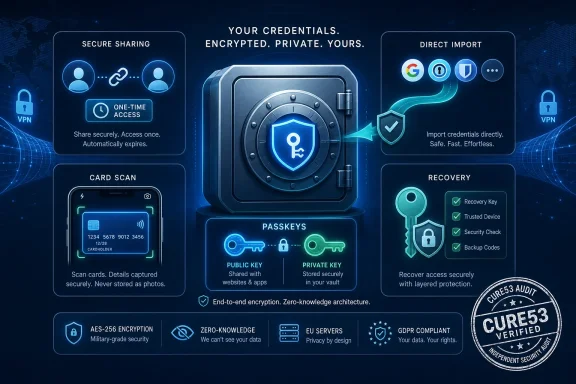
The July 2026 update matters because it addresses the two criticisms that often follow lightweight password managers: they are useful enough for casual autofill, but not complete enough to become someone’s primary vault. Passkey support moves ExpressKeys into the passwordless future. Secure sharing gives it a feature that families, small teams, and households expect. Direct imports try to solve one of the least glamorous but most important barriers in the category: moving credentials without dumping a vault into an unencrypted export file.
That does not automatically make ExpressKeys a best-in-class password manager. It does, however, make it harder to dismiss as a VPN sidecar.
Passkeys Are the Headline Because Passwords Are the Weak Link
Passkeys are the obvious marquee feature, and for good reason. Traditional passwords fail in predictable ways: users reuse them, websites leak them, phishing pages collect them, and attackers stuff them into login forms at industrial scale. Even a strong password becomes a liability once it is copied into the wrong database or typed into the wrong page.
A passkey changes the shape of that risk. Instead of sending a shared secret to a website, the user’s device or password manager holds a private key and proves possession cryptographically. The site keeps the corresponding public key, which is useless to an attacker who steals the database. In plain English: the website no longer needs to know the secret that gets you in.
For Windows users, this is not some distant standards-body fantasy. Microsoft has been steadily pushing passkeys through Windows Hello, Edge, Microsoft accounts, and broader platform support. Apple and Google have done the same in their ecosystems. The result is that passkeys are moving from “security conference demo” to “real login option” at major services, though adoption remains uneven and account recovery is still messy.
ExpressKeys adding full passkey support puts it into the synced-passkey camp. That is convenient because users can create, store, and use passkeys across devices through the vault instead of binding every login to one piece of hardware. It is also a trust decision: if your password manager becomes the thing that holds your passkeys, then the security of the vault, the recovery process, the sync model, and the vendor’s software quality become central.
That is the trade-off the industry has mostly chosen. Hardware-bound passkeys are stronger in some threat models, but they are less forgiving for ordinary people who lose devices, replace phones, or need to sign in across multiple operating systems. Synced passkeys are the practical route to mass adoption, and ExpressVPN is following the same direction as the rest of the market.
Secure Sharing Fixes a Real Problem That Users Were Already Solving Badly
The second major addition, secure item sharing, may be more immediately useful than passkeys. People share passwords whether security teams approve or not. Streaming accounts, household utilities, school portals, Wi-Fi logins, shared credit card details, and emergency notes all travel through text messages, email threads, messaging apps, screenshots, and sticky notes.
A password manager that refuses to acknowledge that behavior does not eliminate sharing. It simply pushes users toward worse sharing. Secure item sharing is the product category’s attempt to bring that behavior into a controlled channel, where a user can share one vault item instead of exposing an entire vault or sending credentials in plaintext.
ExpressVPN says ExpressKeys can share individual vault items such as logins, cards, and secure notes through controlled links, with options such as email verification and one-time viewing. The details matter here. One-time access is useful when the recipient needs a credential temporarily. Email verification adds friction, but it also helps prevent a mistyped or forwarded link from becoming an instant leak.
This is not the same as a mature enterprise secrets-management system, and nobody should confuse it with one. Admins running Microsoft Entra ID, conditional access, privileged identity management, and audited shared credential workflows have different requirements. But for consumers and small groups, secure sharing is a meaningful step up from pasting a password into a chat window and hoping nobody searches the thread later.
The larger point is cultural. Password managers used to sell themselves as personal vaults. The modern version is becoming a controlled exchange system for credentials, passkeys, cards, notes, recovery codes, and identity artifacts. ExpressKeys is moving into that second model.
The Import Feature Is Boring Until You Remember How Password Managers Fail
Direct credential imports sound less exciting than passkeys, but they may be the most security-conscious part of the update. The old way to switch password managers is often ugly: export everything into a CSV or similar file, import it elsewhere, then remember to delete the file before cloud backup, search indexing, malware, or another user account gets a look at it. That moment of migration can temporarily reduce the security of an otherwise careful user to “all secrets in one plain file.”
ExpressVPN says ExpressKeys is among the early adopters of the FIDO Alliance’s Credential Exchange work, aimed at making transfers between credential providers safer and more standardized. The promise is straightforward: move passwords and related credentials directly, with encryption and less exposure, instead of relying on clumsy file exports. If that becomes normal, password-manager switching could stop feeling like a hazardous operation.
That matters competitively, too. Password managers have historically benefited from lock-in. Not always malicious lock-in, but practical lock-in: once a user has hundreds of logins, secure notes, cards, 2FA seeds, and now passkeys in one vault, leaving is painful. A safer import/export standard weakens that moat.
For users, that is good. For vendors, it raises the bar. If moving becomes easier, the product has to win on reliability, platform coverage, recovery design, pricing, family features, and trust rather than inertia. ExpressVPN seems to understand that a password manager cannot credibly ask for trust while making departure unnecessarily risky.
The test will be interoperability. Standards announcements are useful, but users care about whether they can move from Apple Passwords, Chrome, Edge, Bitwarden, 1Password, Dashlane, Proton Pass, or LastPass without a weekend of cleanup. In this market, the boring import wizard is often where security ideals meet real-world frustration.
Card Scanning and Recovery Tools Show the Consumer Target
The smaller additions reveal the audience ExpressVPN is chasing. Card scanning is convenience-first: open the app, capture card details, store them in the vault, and reduce typing. It is not the kind of feature that excites security purists, but it is exactly the kind of feature that makes a mainstream user actually use the vault instead of leaving payment data scattered across browsers and retailer accounts.
Recovery tooling is more delicate. Password managers live with a brutal design tension: if recovery is too easy, attackers can abuse it; if recovery is too hard, users lose access to their digital life. Every vendor has to choose where to sit on that spectrum, and customers often do not understand the consequences until they are locked out.
ExpressKeys’ recovery improvements should therefore be judged not by whether recovery exists, but by how it is constrained. A credible password manager needs to make recovery comprehensible without turning the vendor into a backdoor. It must explain what can be restored, what cannot, what the company can see, and what happens if the user loses the master password or recovery material.
This is where security products often fail as communication products. They produce white papers, publish audits, and describe cryptographic designs, but the average user still does not know which mistake is fatal. ExpressVPN’s challenge is to make ExpressKeys feel recoverable without implying that the company can simply retrieve everything on demand.
That distinction matters to WindowsForum readers because many of us are the unofficial help desk for households, small businesses, and extended families. A password manager that is theoretically secure but routinely locks out nontechnical users becomes an operational problem. A password manager that recovers too easily becomes a security problem. There is no magical middle, only design choices and transparency.
The Cure53 Audit Is Necessary, Not Sufficient
ExpressVPN is also leaning on a new independent audit by Cure53, a respected German security firm frequently seen in privacy and security product reviews. That is a sensible move. In the VPN business, audits have become table stakes, especially for companies making strong claims about no-logs policies, app security, infrastructure, and cryptography. Password managers need at least that level of scrutiny because they hold the keys to nearly everything else.
An audit can improve confidence, but it should not end skepticism. Audits are scoped. They examine specific code, infrastructure, designs, or configurations at specific times. They may not cover every platform equally, every future update, every dependency, or every operational practice. A clean audit does not mean a product is unbreakable; it means qualified outsiders found what they found within the agreed boundaries.
Still, audits are useful because they force vendors to subject claims to external pressure. For a password manager that is adding passkeys, sharing links, imports, card scanning, and recovery mechanisms, external review is not decorative. Each new feature expands the attack surface. Each convenience feature creates new ways for implementation bugs, confusing flows, or account-takeover scenarios to matter.
The most important audit details are often the least marketable ones: what was in scope, what was out of scope, what severity issues were found, how quickly they were fixed, and whether the vendor published enough detail for customers to evaluate the result. “Audited” is a good start. “Here is exactly what was audited and what changed afterward” is better.
ExpressVPN says this adds to a broader audit history across its products. That history helps, but ExpressKeys still has to earn trust as its own product. A VPN client and a password vault share a brand, not a threat model.
The Subscription Question Still Shadows the Upgrade
There is another reason this update deserves scrutiny: ExpressVPN’s password-manager story has not been friction-free. Earlier this year, the company moved ExpressKeys into a standalone app model and shifted how access fits into its broader subscription tiers. Reporting also noted controversy around limits for users without active subscriptions, particularly around whether they could continue adding new credentials after a plan lapsed.
That context matters because a password manager is not like a bundled antivirus trial or a cloud storage perk. Once users commit to a vault, the product becomes infrastructure. It holds bank logins, work portals, tax accounts, medical sites, family credentials, software licenses, Wi-Fi passwords, and recovery notes. Pricing and access changes therefore land differently than they do for optional add-ons.
To be clear, paid password managers are normal. Good security software costs money to build, audit, maintain, support, and insure against failure. The problem is not that ExpressVPN wants ExpressKeys to support a subscription business. The problem is that users need absolute clarity before they put their digital life into any vault tied to a broader service bundle.
The question for prospective users is simple: what happens if you stop paying? Can you still view existing items? Can you export everything? Can you add or edit entries? Are passkeys portable? Are secure notes and 2FA codes included in export paths? How much warning do you get before functionality changes?
This is where ExpressVPN needs to be more explicit than a typical consumer app. A password manager’s exit rights are part of its security model. If users fear lock-in, they may avoid switching; if they do not understand lock-in until later, they will feel trapped.
Windows Users Already Have Password Managers, Whether They Chose One or Not
For Windows users, ExpressKeys enters a crowded default landscape. Microsoft Edge can save passwords and passkeys. Windows Hello can unlock authentication flows. Chrome brings Google Password Manager to millions of Windows desktops. Apple Passwords now has a dedicated presence for users who live across iPhone, iPad, Mac, and Windows through browser extensions or iCloud tooling. Many people already have a password manager simply because their browser asked nicely.
That creates a high bar for any standalone vault. It must justify itself against “free and already there.” The best argument is cross-platform control. A dedicated password manager can avoid tying a user’s credentials too tightly to one browser or operating system, and it can offer richer sharing, vault organization, auditing, emergency access, secure notes, and business features.
ExpressKeys’ browser-extension approach for Chrome, Edge, and Brave is sensible for Windows users because it meets them where they actually log in. A password manager without reliable browser integration is not a daily tool; it is an encrypted filing cabinet that users forget to open. Autofill reliability, save prompts, passkey prompts, and account-matching behavior will determine whether people stick with it.
But Windows also exposes the hard part of synced vaults. Users may have a work profile in Edge, a personal profile in Chrome, a phone running iOS, a tablet running Android, and a Microsoft account used for Windows Hello. Any password manager trying to span that mess has to handle duplicates, confused origins, multiple identities, and passkeys created in different ecosystems.
ExpressKeys can win some users if it makes that sprawl feel coherent. It will lose them quickly if it creates another layer of prompts, conflicts, and “where did I save that login?” uncertainty.
The Password Manager Market Is Becoming a Trust Stack
The password manager used to be a specialized utility. Today it is becoming a trust stack: password generator, passkey wallet, 2FA authenticator, secure notes store, card vault, sharing system, breach monitor, import/export broker, and recovery mechanism. That expansion is logical, but it also concentrates risk.
For security-minded users, concentration is always uncomfortable. Put everything in one place and compromise becomes catastrophic. Scatter everything across browsers, notes apps, SMS threads, and memory, and compromise becomes more likely in smaller but more frequent ways. The password manager is the industry’s bet that one hardened vault is better than a thousand weak hiding places.
ExpressKeys now wants to be that hardened vault for ExpressVPN customers and, potentially, for users evaluating it as a standalone credential manager. The company’s privacy branding helps, but it also raises expectations. A VPN company cannot market itself on distrust of networks and then ask users to be casual about vault design, recovery, telemetry, subscription access, or platform behavior.
This is why passkeys are such a consequential addition. In a password-only world, the vault stores replaceable secrets. In a passkey world, the vault increasingly stores login capability itself. That makes vendor trust, device security, and export standards even more important.
The winners in this market will not simply be the apps with the longest feature grids. They will be the apps that explain trade-offs honestly, survive audits, make migration safe, keep recovery understandable, and avoid surprising users after they have already committed.
The Upgrade Makes ExpressKeys Credible, But Not Yet Inevitable
ExpressKeys is now much easier to take seriously. Passkeys, secure sharing, direct imports, card scanning, and recovery improvements are not ornamental upgrades. They fill obvious gaps and bring the product closer to what users expect from a modern password manager.
But credibility is not inevitability. 1Password remains strong with families, businesses, developers, and security-conscious users. Bitwarden has open-source credibility and a generous pricing model. Proton Pass benefits from Proton’s privacy ecosystem. Apple, Google, and Microsoft have default-position power that no independent product can ignore. Keeper, Dashlane, NordPass, and others continue to compete aggressively on enterprise, consumer, and family features.
ExpressVPN’s advantage is bundling and brand adjacency. If a user already pays for ExpressVPN and sees ExpressKeys as part of a broader privacy suite, trying it is easy. If the app is polished enough, that user may never go shopping elsewhere. That is the same ecosystem logic that has worked for Microsoft 365, iCloud, Google One, and security suites for years.
The danger is that bundling can breed complacency. Password managers are sticky, but they are also judged during moments of stress: a new phone, a lost laptop, a compromised account, a family member who needs access, a browser extension that stops autofilling, a subscription lapse, or a migration to another product. ExpressKeys will be judged less by its launch announcement than by those ugly moments.
If ExpressVPN wants to compete beyond its existing VPN base, it needs to keep proving that ExpressKeys is not just “included,” but excellent.
The Practical Read for WindowsForum Readers
The most concrete lesson from this update is that ExpressKeys has crossed from basic credential storage into the modern password-manager contest. That does not make it the obvious choice for every Windows user, but it does make it a real candidate for users already inside ExpressVPN’s ecosystem.
For admins and power users, the right response is not hype or dismissal. It is evaluation. Test the browser extension. Test export. Test recovery. Test passkey creation and use across devices. Test what happens when credentials are shared, revoked, imported, duplicated, and edited. A vault is only as good as its behavior when the workflow stops being tidy.
- ExpressKeys now supports passkeys, which makes it more relevant as major platforms move away from traditional passwords.
- Secure item sharing is a meaningful improvement because it replaces common but unsafe habits like sending passwords through email, texts, and chat apps.
- Direct credential imports could reduce one of the riskiest moments in password-manager adoption: exporting an entire vault into an unencrypted file.
- The new Cure53 audit improves confidence, but users should still look for scope, findings, remediation details, and future audit cadence.
- Subscription terms matter because a password manager becomes personal infrastructure once users store their most important accounts in it.
- Windows users should compare ExpressKeys not only with premium rivals, but also with the password and passkey tools already built into Edge, Chrome, Windows Hello, and their mobile ecosystems.
ExpressVPN’s big ExpressKeys update is a sign of where consumer security is going: VPNs are becoming suites, password managers are becoming identity vaults, and passkeys are turning the humble autofill app into a gatekeeper for digital life. The company has added the right features at the right moment, but the real test will be whether it can make trust feel durable after the marketing cycle moves on. For Windows users, the smartest posture is cautious interest: welcome the upgrade, test the exit doors, and remember that the best password manager is not the one with the loudest launch — it is the one you can rely on when every other account depends on it.
References
- ExpressVPN's password manager just got a big upgrade with secure sharing, passkey support, and more ZDNET · 2026-07-02T13:52:09.584596