

There’s a good reason a growing number of power users are dropping their pen-and-paper mind maps for a Java app: Freeplane delivers an unusually deep set of mind‑mapping, outlining and data‑export features without locking the core functionality behind a subscription. A recent MakeUseOf feature raved that Freeplane “fundamentally transformed how I organize my thoughts,” and that praise is easy to understand once you see what Freeplane can do — but it’s equally important to separate the hands‑on truth from a few optimistic claims about teamwork and polish. This feature breaks down what Freeplane actually offers, verifies the main technical claims, flags where reviewers overstate the case, and gives practical advice for Windows users thinking about adopting it as a day‑to‑day tool.
Freeplane is a free, open‑source desktop mind‑mapping application written in Java and maintained by a volunteer community. It’s a fork of the older FreeMind project and has expanded its feature set to include powerful node formatting, scripting, add‑ons, and a broad export surface. The project is licensed under GPL (GNU General Public License) and the official repository, documentation portal and packaged downloads are publicly available. The app aims at two adjacent audiences: people who want richer structure and automation than simple pen‑and‑paper or basic drag‑and‑drop diagram tools offer, and technical users who will benefit from scripting, custom exports and tighter integration with local files. As a Java application, Freeplane runs on Windows, macOS and Linux; some distributions bundle a Java runtime to simplify installation.
The practical options people use to share maps in near‑real time are:
Conclusion
Freeplane is not a perfect substitute for the tactile joy of paper, but for structured, long‑lived work it is a far more capable tool. The MakeUseOf reviewer’s enthusiasm is warranted where Freeplane’s core strengths — exportability, LaTeX and attribute automation — truly shine. Where the review leaps to “live, real‑time team brainstorming” as if it were native functionality, users should pause and implement a collaboration plan. Overall, Freeplane is an impressively capable, no‑cost tool for anyone serious about turning messy ideas into disciplined, reusable outputs.
Source: MakeUseOf This free mind-mapping tool is so good I stopped sketching on paper
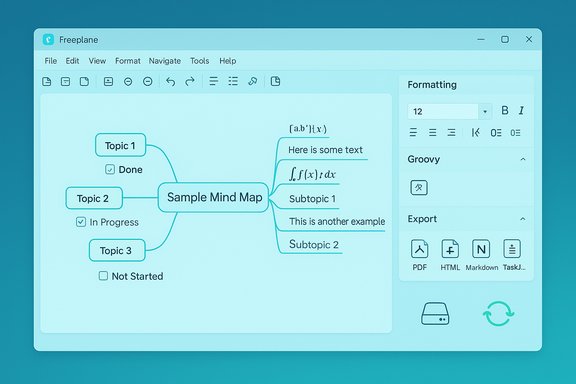 Background / Overview
Freeplane is a free, open‑source desktop mind‑mapping application written in Java and maintained by a volunteer community. It’s a fork of the older FreeMind project and has expanded its feature set to include powerful node formatting, scripting, add‑ons, and a broad export surface. The project is licensed under GPL (GNU General Public License) and the official repository, documentation portal and packaged downloads are publicly available. The app aims at two adjacent audiences: people who want richer structure and automation than simple pen‑and‑paper or basic drag‑and‑drop diagram tools offer, and technical users who will benefit from scripting, custom exports and tighter integration with local files. As a Java application, Freeplane runs on Windows, macOS and Linux; some distributions bundle a Java runtime to simplify installation. Why reviewers — and power users — like Freeplane
A concise list of what Freeplane does well
- Native, editable nodes: create nodes with text, rich formatting, and move them freely across the canvas to reorganize structure without redrawing.
- Rich node contents: nodes can contain plain text, LaTeX math and textual LaTeX blocks, small HTML fragments for some exports, images, linked documents and long node notes. LaTeX support is integrated and uses JLaTeXMath for rendering.
- Attributes and custom metadata: arbitrary key–value attributes on nodes make it possible to track priorities, owners, dates, statuses and custom metadata that scripts and exports can consume.
- Checkboxes and task tracking: nodes may be used as tasks with check icons and attribute‑driven task workflows; Freeplane supports coloring and styles that respond to states for quick visual task management.
- Extensive export surface: you can export maps to PDF, PNG, SVG, HTML/XHTML (clickable), Markdown, OPML, AsciiDoc, Microsoft Word/Excel/Project formats (older Office 2003 style), LaTeX (Beamer/books/documents), and — importantly for project workflows — TaskJuggler files (when the Tasks node convention or XSLT is used). The export system is XSLT‑driven and extensible.
- Scripting and add‑ons: Groovy scripting and community add‑ons let you automate tasks, create custom exports, build Pack & Go bundles (map + dependencies), and sync with todo systems. This extensibility is a major differentiator versus closed, subscription mind‑mappers.
Technical verification: what's true (and well‑documented)
- Freeplane is free, open source and GPL‑licensed.
- The project repository lists the GPL‑2.0 license and the codebase; Freeplane’s documentation and the public GitHub repository confirm the license.
- Freeplane runs on Windows, macOS and Linux and is Java‑based.
- The official docs state Freeplane runs on any OS with a supported Java runtime, and downloadable installers are available for Windows and macOS; some installer packages include Java to ease setup.
- Export formats are broad and extensible (including TaskJuggler).
- The Freeplane export menu and XSLT export capability permit generating images, HTML, LaTeX, MS Office formats and more; the documentation explicitly lists TaskJuggler export for Tasks nodes and describes how to add or customize XSLT transforms for bespoke exports. Older FreeMind/Freeplane accessory XSLTs include mm2tji and mm2tji(tasks) for TaskJuggler-compatible outputs — which Freeplane inherits or reimplements through its XSLT mechanism. That makes conversion into project files possible, though you may need to use or adapt provided XSLT scripts.
- LaTeX is supported inline and for export.
- Freeplane integrates JLaTeXMath to render LaTeX expressions inline; it also supports “unparsed LaTeX” nodes for export to a LaTeX document where the in‑app renderer would not attempt to render math blocks. The documentation gives concrete guidance for macros, LaTeX inputs from files and combining Groovy‑generated text with LaTeX.
- Attributes, style automation and checkboxes are production‑grade.
- The user guide and API documentation show node attributes, styles and formatting controls; scripts in the community add detailed task trackers, time trackers and GTD synchronizers that leverage attributes and icon states to create to‑do lists.
Where the enthusiastic reviews gloss over important caveats
Real‑time multi‑user editing: the myth
A very common review line — that you can “have brainstorming sessions with the team on a live mind map where everyone can work together in real‑time” — is optimistic and needs a correction. Freeplane is fundamentally a desktop application that edits local files; it does not include a built‑in, web‑style live co‑editing layer (operational transform or CRDT) comparable to Google Docs, Miro or dedicated web mind‑mappers.The practical options people use to share maps in near‑real time are:
- Host the .mm file on a shared cloud folder (Dropbox, OneDrive, etc. and rely on the file‑sync system — which can result in conflicts if two people edit the same file at once.
- Use Pack & Go or export workflows to share a snapshot and then merge changes manually.
- Run a collaboration pipeline with external tools: export to HTML or a shared outline, discuss in a conference call and update the map locally. Community scripts and add‑ons can help synchronize Todo lists or share certain structured data (e.g., a GTD sync to todo.txt), but none provide simultaneous, conflict‑free co‑editing.
A utilitarian interface and a learning curve
Freeplane favors functionality over glossy design. Reviewers and distribution pages call the UI “utilitarian”; users moving from polished commercial apps may find the default layout and control density unfamiliar. The payoff is depth: keyboard shortcuts, node scripting and the tool panel let you work faster once you learn the conventions — but expect a few hours of exploration to become fluent.Export power — but sometimes configuration required
While Freeplane can export to dozens of formats, some exports (notably TaskJuggler or custom XHTML/LaTeX flows) rely on XSLT scripts or configuration. If you need one‑click task conversion into a specific PM tool, you may need to adapt an XSLT or install an add‑on. That is not a bug; it’s a design tradeoff that gives the app tremendous flexibility at the cost of some initial setup for advanced pipelines.Where Freeplane shines for Windows users (practical workflows)
Rapid brainstorming → structured output
A typical, high‑value workflow that Freeplane makes easy:- Start with a central node, create organic branches and use collapsible nodes to keep the canvas readable.
- Add images and attach documents to nodes for context; tag nodes with attributes like owner, priority and due date.
- Use check icons and styles to mark tasks; set conditional styles so completed items dim automatically.
- Export the map to:
- An outline (Markdown/HTML) for a draft document or article.
- A PDF or PNG for sharing in meetings.
- A TaskJuggler file (or custom export) for scheduling in a PM system.
Complex knowledge mapping and research
Because nodes can store long notes, attachments and attributes, Freeplane works well as a long‑running knowledge base. Use LaTeX nodes for formulae, XSLT exports to create LaTeX Beamer slides or full documents, and Groovy scripts to produce bibliographies or reports. The system is particularly suited to researchers and technical writers who want a single source that can generate multiple output formats.Practical adoption guide for Windows users
Quick install checklist
- Prefer the installer that bundles Java if you don’t already manage Java versions on your machine.
- Install the latest stable Freeplane release from the official downloads or the documented distribution page. Check the documentation site for the current stable tag before installing.
First‑hour checklist inside Freeplane
- Create a small map and practice collapsing/expanding branches.
- Open the Tool panel (right side) and experiment with node formatting and attributes.
- Try the LaTeX example snippet to confirm math rendering works (you may need internet‑free JLaTeXMath dependencies already bundled in the install).
- Export the map to PNG and to HTML to see how the exports render by default.
If you need shared editing
- Avoid editing the same .mm file simultaneously via Dropbox; instead, establish a simple protocol:
- Reserve edit windows (Alice edits 10–11am; Bob edits 11–12pm).
- Use Pack & Go or export snapshots for discussion during live meetings.
- Use a syncing add‑on or script for structured data (e.g., tasks) — these keep a separate, conflict‑friendly representation.
Advanced tips and “pro‑user” recipes
- Use XSLT export to create custom HTML slides (Reveal.js) or beamer slides; communities have ready examples that integrate Freeplane maps into presentation frameworks.
- Write Groovy scripts for repetitive tasks: generate a checklist of overdue tasks, build HTML reports of attributes, or export a subset of nodes as a to‑do file.
- Use Pack & Go add‑ons to bundle a map and all its file dependencies for safe sharing or archiving.
Security, privacy and long‑term viability
- Local-first model: Because Freeplane maps are local files, they fit workflows that require data to remain on premises or on a user‑controlled drive. That’s a privacy advantage over cloud‑native mind mappers that persist content on third‑party servers.
- Backup and autosave: Freeplane supports autosave and keeps a configurable number of backups; integrate these with your regular Windows backup routine or version control if you want audit trails and robust recovery.
- Longevity: Freeplane is mature and maintained; the codebase and documentation are public, which reduces vendor‑lock‑in risk and supports long‑term archiving via the open .mm format. However, when constructing export‑dependent workflows (e.g., automated LaTeX pipelines, TaskJuggler exports), keep copies of custom XSLTs and scripts that you rely on so future upgrades don’t break automation.
Strengths, weaknesses and how it compares to paid alternatives
Strengths
- Price: Free and open source — no paywall for core features.
- Power & flexibility: Extensible export and scripting model; robust attribute system.
- Local control: Keeps data local; ideal for privacy‑sensitive projects.
- Format portability: Open .mm XML format, many export options and XSLT customization.
Weaknesses
- No native real‑time co‑editing: Expect file‑based collaboration rather than live multi‑user editing.
- UI polish: Functional but not visually refined — steeper initial learning curve for new users.
- Occasional configuration overhead: Advanced exports require XSLT tuning or add‑ons.
Comparison snapshot vs common paid tools
- MindMeister / Miro: superior for simultaneous synchronous collaboration, simpler for non‑technical teams; cloud hosted and subscription based.
- XMind / MindManager: polished UI and templates, but many advanced features sit behind pay tiers; export options are good but less scriptable than Freeplane’s XSLT model.
- Freeplane is the best choice when you need local control, scriptable exports, and the ability to transform maps into documents or project files through programmable pipelines.
Final verdict — who should adopt Freeplane and how to get started
Freeplane earns its place for people who want a durable, flexible mind‑mapping system they control. It’s especially attractive to:- Writers and researchers who turn maps into outlines, LaTeX documents or presentation decks.
- Engineers and project managers who want to convert brainstorming into structured tasks (with exports to TaskJuggler or PM formats).
- Privacy‑minded users and teams that prefer local, file‑based workflows over cloud subscriptions.
- Install the latest Freeplane distribution (choose the bundle with Java if unsure).
- Spend an afternoon reproducing a favorite paper map digitally; practice collapsing branches and reordering nodes.
- Try the export chain: map → HTML (clickable) → Markdown or TaskJuggler for one small project so you understand the mechanics.
- If team sessions matter, define an edit protocol or evaluate a web‑native mind mapper for synchronous sessions — use Freeplane for enduring deliverables and the web tool for live workshops.
Conclusion
Freeplane is not a perfect substitute for the tactile joy of paper, but for structured, long‑lived work it is a far more capable tool. The MakeUseOf reviewer’s enthusiasm is warranted where Freeplane’s core strengths — exportability, LaTeX and attribute automation — truly shine. Where the review leaps to “live, real‑time team brainstorming” as if it were native functionality, users should pause and implement a collaboration plan. Overall, Freeplane is an impressively capable, no‑cost tool for anyone serious about turning messy ideas into disciplined, reusable outputs.
Source: MakeUseOf This free mind-mapping tool is so good I stopped sketching on paper
