
 Google Moves Computer Use From Lab Trick to Default Tooling
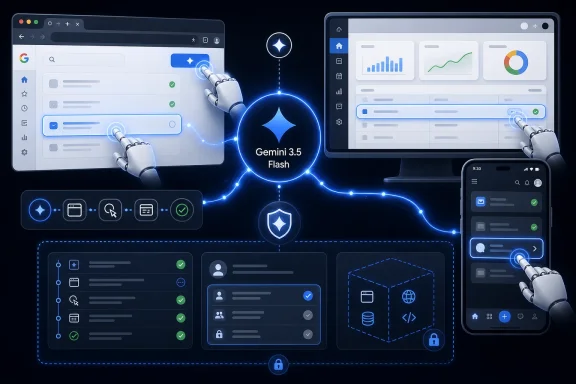
The headline sounds simple: Gemini 3.5 Flash can now use a computer. In practice, that means Google is trying to collapse several pieces of the agent stack into one model path: visual understanding, reasoning, tool use, navigation, and action. Previously, Google’s computer-use capability lived in a standalone Gemini 2.5 computer use model; now the company is putting that capability directly into Gemini 3.5 Flash.
That architectural shift is the story. A separate model can be impressive, but it also asks developers to orchestrate around it. A native tool inside a broadly deployed Flash model is easier to wire into enterprise applications, testing systems, browser automation, and internal agents that already depend on Gemini’s function calling, grounding, and tool integrations.
Google is also making a bet about where the next phase of AI adoption happens. The first wave was chat. The second wave was retrieval and copilots. This wave is about agents that do work in the messy interfaces humans already use, because most business processes still live behind web apps, admin consoles, ticketing tools, spreadsheets, dashboards, and mobile workflows that were never designed for machine-to-machine automation.
That is why computer use keeps returning as a frontier feature across the AI industry. APIs are cleaner, safer, and easier to audit, but the world is not fully API-shaped. Enterprises run on legacy systems, SaaS sprawl, browser tabs, remote desktops, and workflows held together by conventions rather than specifications.
The Flash Branding Is Doing More Work Than It Looks
Google’s choice of Gemini 3.5 Flash is not incidental. Flash models are supposed to be the fast, economical workhorses rather than the slow prestige models reserved for the most complex reasoning tasks. If computer use only works well on the most expensive frontier model, it remains a premium demo; if it works well enough on a fast default model, it becomes something developers can actually test at scale.
That matters for WindowsForum readers because the practical target is not a chatbot that writes charming emails. The practical target is a background worker that can log into a staging environment, reproduce a bug, file a ticket, verify a UI regression, extract a record from a vendor portal, or shepherd a multi-step form through a business process. Those jobs are repetitive, stateful, and often too awkward to justify custom integration work.
The “Flash” part also suggests Google is thinking about latency as a product feature. A computer-using agent that takes too long between observations and actions feels broken even when it is technically correct. Humans tolerate pauses in chat; they do not tolerate an automation system that stares at a button for five seconds before deciding whether to click it.
The danger, of course, is that speed can hide uncertainty. In classic automation, the script either finds the selector or fails. In agentic automation, the model can improvise. That improvisation is the selling point, but it is also why administrators will want logs, deterministic boundaries, and rollback strategies before letting these agents near production systems.
The Browser Is the New Command Line for AI Agents
For decades, power users treated the command line as the interface where automation became real. Scripts could chain commands, inspect output, and manipulate systems faster than any human clicking through dialogs. Computer-use agents invert that assumption by treating the graphical interface itself as the automation layer.
This is not a replacement for APIs, PowerShell, management tooling, or proper DevOps practices. It is a way to automate the long tail of work where those routes do not exist or are too expensive to build. If a vendor portal has no usable API but does have a login page and a table, an agent that can see and act may be enough to turn a manual chore into a monitored workflow.
That is also why Google’s examples emphasize professional applications and long-horizon work. “Long-horizon” is one of those AI phrases that sounds grander than it is. It means the model must keep track of a goal over many steps, survive interface changes, recover from minor errors, and decide when to stop.
Anyone who has maintained Selenium tests knows how brittle interface automation can be. A renamed button, a shifted layout, a modal dialog, or a new cookie banner can break a carefully crafted test suite. The promise of agentic computer use is that the model can interpret the interface more like a human tester would, recognizing intent instead of depending entirely on fixed selectors.
The risk is that “more like a human” includes human-style mistakes. A model may click the wrong similarly named control, misread a warning, or proceed through a destructive workflow because it interprets confirmation language as routine friction. That is why the safety design is not an accessory to this announcement; it is the main condition under which the announcement can be taken seriously.
Google’s Safeguards Admit the Real Threat Model
Google says Gemini 3.5 Flash’s computer-use capability includes targeted adversarial training to reduce prompt-injection risks. It is also offering optional enterprise safeguard systems that can require explicit user confirmation for sensitive or irreversible actions and automatically halt tasks when indirect prompt injection is detected. That is a revealing pair of controls.
The first safeguard acknowledges that action is different from advice. If a chatbot gives a bad answer, the user may ignore it, verify it, or suffer the consequences after a visible decision point. If an agent can operate software, the bad answer can become a bad action before anyone has fully processed what happened.
The second safeguard acknowledges that the agent’s environment is hostile by default. A web page, ticket, email, document, or internal dashboard can contain text that is not merely content but an attempted instruction. The classic prompt-injection problem becomes more serious when the model has a cursor, credentials, and access to business systems.
This is where enterprise IT needs to be blunt. An agent that reads untrusted content and operates trusted interfaces is a cross-domain risk. It may see a support ticket containing malicious instructions, then navigate to an internal admin tool where it has permission to make changes. The model’s job is to distinguish task-relevant information from manipulative instructions, but the organization’s job is to assume that distinction will sometimes fail.
Google’s defense-in-depth recommendations are therefore the sane starting point rather than fine print. Sandboxing, human-in-the-loop verification, and strict access controls are not bureaucratic drag. They are the difference between an automation pilot and a new class of incident report.
Enterprise Automation Gets Tempting and Messy at the Same Time
The obvious winners are software testing teams, operations groups, and internal automation shops that spend too much time maintaining brittle scripts. Continuous testing is a natural fit because the agent can be pointed at interfaces that change often, where semantic understanding may be more resilient than fixed automation code. A model that can inspect a page, attempt a workflow, and report what broke could become a useful assistant to QA teams.
Knowledge work is the broader and more dangerous category. Filing tickets, gathering information from dashboards, updating records, reconciling forms, checking policy pages, and preparing reports are all plausible uses. They are also exactly the kinds of tasks that touch identity, permissions, customer data, and compliance requirements.
For Windows administrators, the implications are easy to imagine. A future agent might operate Microsoft 365 admin pages, vendor consoles, Azure dashboards, endpoint management tools, or support portals. Even if Google’s first-party platform is not the center of a Windows shop, the pattern will matter because every major AI vendor is racing toward the same interaction model.
The hard part will not be proving that an agent can complete a task once. The hard part will be proving that it can complete the task safely, repeatedly, observably, and only within the scope intended. That is not a model benchmark problem. It is an identity, governance, logging, and change-management problem.
This is where many early demos of computer use feel misleading. A video clip of an agent clicking through a website shows possibility, not readiness. Production adoption requires boring guarantees: what account did it use, what did it see, what did it change, why did it change it, and how can the action be reversed?
The Windows Angle Is About Control, Not Loyalty
This is a Google announcement, but Windows users should not treat it as someone else’s platform story. The desktop remains the place where business applications, browser sessions, identity brokers, remote tools, and productivity workflows collide. If AI agents become mainstream, Windows environments will be among the most tempting targets for both legitimate automation and abuse.
There is a reason the announcement mentions browser, mobile, and desktop environments together. The boundary between them has already blurred. A business process might begin in a browser, require a mobile-style approval flow, and end in a desktop application or remote session. Agents that can move across those surfaces will be more useful than agents locked inside a single app.
For IT pros, that means the endpoint becomes a policy enforcement zone for agent behavior. Traditional endpoint protection looks for malware, suspicious processes, credential theft, and exploit chains. Agentic computer use introduces a weirder category: software acting through legitimate interfaces with legitimate credentials, possibly at the request of a legitimate user, but still doing something the organization would rather it did not do.
That is not entirely new. Robotic process automation has existed for years, and many enterprises already run bots that click through interfaces. What is new is the flexibility of the model and the lower barrier to creating these workflows. A brittle RPA bot usually requires deliberate setup. A Gemini-powered custom agent could make ad hoc automation much easier to build.
Ease of creation is a double-edged feature. It lowers the cost of useful automation, but it also increases the number of workflows that security teams never reviewed. Shadow IT was already hard enough when the tools were spreadsheets, browser extensions, and SaaS apps. Agentic automation could become shadow IT with hands.
The API Is Cleaner Than the Reality It Will Touch
Google is making computer use available through the Gemini API and the Gemini Enterprise Agent Platform. That gives developers and enterprises a supported route into the capability, which is better than screen-scraping hacks or experimental browser agents glued together from unofficial components. But an official API does not make the environments being controlled any less chaotic.
A model can receive a task, observe a screen, decide on an action, and call tools, but the real world resists neat abstractions. Pop-ups appear. Sessions expire. Permissions differ by user. Regional settings change labels. Accessibility trees vary. Browser security prompts intervene. Desktop apps freeze. Remote sessions lag. The more ambitious the agent, the more it must manage this entropy.
This is why the best early deployments will likely be narrow rather than magical. A well-scoped agent that files tickets from a known template, audits a defined set of pages, or runs a bounded test flow is far more credible than a general-purpose digital employee. The enterprise appetite for automation is real, but so is the institutional memory of tools that promised to eliminate drudgery and instead created new maintenance burdens.
The strongest case for Gemini 3.5 Flash is not that it eliminates engineering work. It is that it may shift some engineering work away from brittle interface scripting and toward policy, validation, and exception handling. That is still work, but it is work closer to how organizations actually manage risk.
Developers will need to think in terms of constrained autonomy. The agent should have a clear task, minimal privileges, limited data exposure, safe stopping conditions, and auditable outputs. “Let the model figure it out” is a demo strategy, not an enterprise architecture.
Prompt Injection Becomes an Operations Problem
Prompt injection has often been discussed as if it were a chatbot parlor trick: hide a malicious instruction in a web page, watch the model obey, then debate whether the model is gullible. Computer use makes that framing obsolete. If the model can act, prompt injection becomes an operations and security problem.
Indirect prompt injection is especially nasty because the user may never type the malicious instruction. The agent encounters it while browsing, reading a document, summarizing a ticket, or processing a page. The instruction may tell the model to ignore prior rules, exfiltrate data, change settings, or take an action that benefits an attacker.
Google’s automatic halt mechanism is an important acknowledgement, but no one should assume it is comprehensive. Detection systems always sit inside an adversarial loop. Attackers adapt language, hide instructions in formats, exploit ambiguity, and target the places where business context makes a dangerous action look normal.
That does not mean computer-use agents are doomed. It means they need the same layered thinking that mature organizations already apply to phishing, endpoint compromise, and privilege escalation. Assume some malicious content will reach the agent. Assume some detection will fail. Design the workflow so failure is contained.
The most important control may be identity scoping. An agent should not inherit broad human privileges simply because that is the easiest way to make the demo work. If a bot only needs to create draft tickets, it should not be able to delete records, approve payments, reset credentials, or change tenant-wide settings.
Google Is Selling Trust as Much as Capability
The announcement is framed around performance, integration, and enterprise readiness, but trust is the product being sold. Google needs developers to believe Gemini 3.5 Flash is capable enough to automate real work. It needs enterprise buyers to believe the safety story is mature enough to justify pilots. It needs security teams to believe the platform will not become an ungovernable click-bot factory.
That is a difficult balance. Too much autonomy scares the people who sign off on deployment. Too many confirmations and halts make the system feel like a slower human with extra paperwork. The product challenge is to find the point where the agent is useful precisely because it can act, but constrained enough that its actions are acceptable.
The optional nature of the enterprise safeguards is worth watching. Optional controls are valuable for flexibility, but they also create uneven deployments. Some organizations will enable confirmations and injection halts aggressively. Others will loosen controls to chase productivity gains. The resulting incidents, if they happen, will shape the reputation of the entire category.
Google’s emphasis on sandboxing and human review is pragmatic. It is also a quiet admission that model-level safety is not enough. The agent cannot be trusted simply because the model has been trained better. It must be placed inside a system that expects mistakes and limits the blast radius.
This is the correct posture for the industry. The wrong posture would be treating computer use as a solved capability because benchmarks improved. The more honest view is that agents are now good enough to be useful in controlled settings and risky enough to demand adult supervision.
The Old Automation Stack Is Not Going Away
It would be easy to overread the announcement as the beginning of the end for traditional automation. That is not how enterprise technology changes. APIs, scripts, test frameworks, RPA platforms, PowerShell, configuration management, and workflow engines will continue to matter because they are explicit, inspectable, and repeatable.
Computer-use agents will be most useful where those tools do not reach cleanly. They can bridge gaps, handle visually defined workflows, and operate software whose integration surfaces are weak or nonexistent. But when a proper API exists, it will usually remain the better choice.
The smart architecture is hybrid. Use APIs for durable system-to-system operations. Use scripts where determinism matters. Use agents for the messy edge cases where human-like interpretation is valuable. Then wrap the whole thing in policy, monitoring, and approvals.
This division of labor should comfort admins who worry that AI vendors are trying to replace every existing tool with a magical assistant. The reality is more prosaic. The agent becomes another execution layer, and like every execution layer, it needs identity, permissions, observability, and operational discipline.
That is also why this announcement belongs in the same conversation as endpoint management and browser governance. The agent may be cloud-hosted, but its work happens through interfaces that enterprises already struggle to control. If those interfaces are poorly governed for humans, they will be poorly governed for agents.
The Calendar Has Moved Faster Than the Culture
The pace of agent announcements is now faster than most organizations’ ability to absorb them. In a little more than a year, “AI agent” has gone from marketing fog to an increasingly concrete set of capabilities: tool use, code execution, browser control, desktop interaction, memory, planning, and delegated tasks. Google’s Gemini 3.5 Flash update is one more step in that compression.
But enterprise culture moves through procurement, security review, compliance mapping, pilot programs, budget cycles, and post-incident caution. The result is a widening gap between what platforms can technically do and what organizations are prepared to govern. That gap is where bad deployments happen.
The temptation will be to let enthusiastic teams experiment first and formalize later. Some experimentation is healthy. But computer-use agents are not just another chatbot feature. Once they can act inside business systems, even a pilot can create records, trigger workflows, expose data, or normalize unsafe habits.
The better path is to start with low-risk, high-friction tasks. Let the agent observe before it acts. Let it draft before it submits. Let it operate in sandboxed replicas before production. Let it handle reversible actions before irreversible ones. This is less glamorous than the demo reel, but it is how useful technology survives contact with governance.
Google’s announcement gives enterprises a capable new tool. It does not give them a deployment strategy. That part still belongs to the people who understand their systems, their users, and their failure modes.
Gemini’s New Hands Require New House Rules
The practical reading of this release is neither panic nor hype. Gemini 3.5 Flash gaining computer use is a sign that agentic automation is moving into mainstream developer infrastructure, but its safest uses will be bounded, audited, and deliberately boring at first. The organizations that benefit most will not be the ones that hand an agent the widest permissions; they will be the ones that design the narrowest useful lane.
- Google announced computer use for Gemini 3.5 Flash on June 24, 2026, moving the capability from a standalone Gemini 2.5 computer use model into the main Flash model.
- Developers and enterprises can access the feature through the Gemini API and Gemini Enterprise Agent Platform, making it easier to build agents that operate across browsers, mobile interfaces, and desktops.
- The most credible early use cases are continuous software testing, structured enterprise workflows, and repetitive knowledge-work tasks that lack clean API integrations.
- Google’s optional safeguards for confirmations and indirect prompt-injection halts are important, but they should be treated as part of a larger defense-in-depth architecture.
- Windows and enterprise admins should focus on identity scoping, sandboxing, logging, approvals, and rollback plans before letting computer-use agents touch production systems.
The bigger lesson is that AI is no longer content to sit in a chat box and suggest what a human might do next. It is moving toward the cursor, the browser tab, the admin console, and the workflow queue. Google’s Gemini 3.5 Flash update makes that future more accessible, but accessibility is not the same as readiness; the next phase will be decided by whether enterprises can turn computer-using agents from impressive operators into accountable ones.
