

Google Is Retiring the Habit, Not Just the Binary
Gemini CLI worked because it fit into an old developer reflex: open a terminal, move into a project, ask the machine to do something, then approve or reject the result. It was not glamorous, but it was direct. For a certain kind of Windows developer, especially one already living in PowerShell, Windows Terminal, WSL, Git, and VS Code, that directness was the point.
Antigravity CLI keeps that surface pattern. You still run a command from the project directory. You still prompt it in plain English. You still review changes instead of simply handing over your repo and hoping for the best.
But Google is not merely swapping gemini for agy. It is collapsing a standalone terminal experience into Antigravity, its broader agent-first development platform. The company’s argument is that coding agents now need a shared backend, background execution, plugins, hooks, subagents, and deeper orchestration than Gemini CLI was built to provide.
That is plausible. It is also convenient. A terminal tool that began as an accessible, open developer interface is being folded into a more centralized product strategy, and the deadline turns “try the new thing” into “move or lose access.”
The Windows Migration Is Simple Enough to Hide the Real Risk
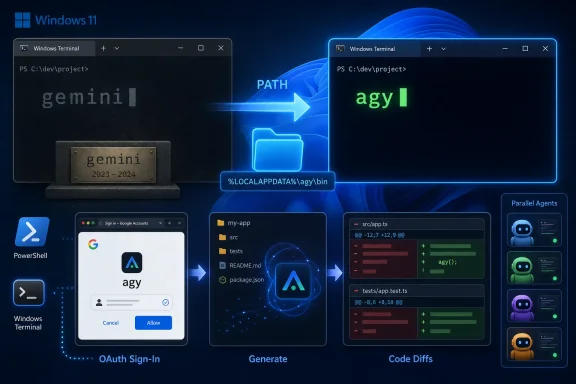
On Windows 11, the practical migration starts with PowerShell. The official installer is a one-line script that downloads the Windows build, verifies it, and places agy.exe under the user profile, typically in:
C:\Users\<YourName>\AppData\Local\agy\bin\agy.exe
That is a very Windows-shaped install location: sensible, user-scoped, and invisible enough that half the support threads will be about PATH rather than the tool itself. If agy --version works after opening a fresh terminal, the install did what it should. If Windows says agy is not recognized, the binary is probably present and the shell simply cannot find it.
The permanent fix is to add %LOCALAPPDATA%\agy\bin to the user PATH, then close and reopen every terminal session. The temporary fix is to append the folder to $env:Path in the current PowerShell window. Neither is difficult, but both are exactly the kind of small environmental detail that turns a five-minute migration into a forum post.
The more important Windows advice is security advice: do not run random install one-liners from migration blogs, screenshots, copied Discord messages, or SEO farms. The install command should come from Google’s own Antigravity site. PowerShell’s irm ... | iex pattern is powerful because it is convenient; it is dangerous for the same reason.
That is not paranoia. A forced CLI migration creates ideal conditions for copycat domains, malicious “fixed” installers, and poisoned snippets aimed at developers who are moving quickly before a deadline. If a command downloads and executes code, the source is not a detail. It is the whole story.
The Name Change Is the Smallest Breaking Change
The obvious change is that the command becomes agy, not gemini, and not antigravity. That matters because developers automate everything they touch twice. If Gemini CLI ever landed in a PowerShell script, a batch file, a Makefile, a GitHub Actions workflow, or a README command block, that reference is now technical debt with a date attached.
For most commands, the migration is almost insultingly simple. gemini --version becomes agy --version. gemini becomes agy. A one-off prompt using -p maps cleanly. Updating moves away from npm and into Antigravity’s own update mechanism.
The gotcha is the agent command. Gemini CLI used agents in places where Antigravity CLI uses agent. A lazy find-and-replace gets you from gemini agents run to agy agents run, which looks right until it fails. The correct form is agy agent run.
That small plural-to-singular change is the kind of migration splinter that cuts CI first. Local interactive usage fails loudly and immediately. Automation fails later, often when a review job, code-generation step, or scheduled maintenance task quietly reaches a code path nobody remembered existed.
On a Windows project tree, a quick search for gemini across .ps1, .bat, .yml, .yaml, and Makefiles is worth doing even if you believe you never scripted it. Developers routinely forget the helper command they added six months ago. Deadlines have a way of finding those helpers.
Node.js Leaves the Critical Path
One underrated improvement is that Antigravity CLI no longer depends on Node.js or npm. Gemini CLI arrived through the familiar npm install -g route, which was convenient for JavaScript developers and faintly annoying for everyone else. On Windows, global npm installs have always carried a little environmental baggage: global package paths, execution policy wrinkles, multiple Node installations, and shells disagreeing about what exists.
Antigravity CLI is a compiled Go binary. That is cleaner for the average Windows user. It also lowers the support burden because there is less runtime underneath the tool. If Node.js was installed only to run Gemini CLI, some users may be able to remove it after confirming nothing else depends on it.
The shift is philosophically meaningful too. Gemini CLI felt like a developer ecosystem artifact: npm package, open repository, familiar JavaScript toolchain. Antigravity CLI feels like a product binary. It installs more like a vendor tool than a community package.
That is not inherently bad. Many Windows admins would rather deploy a single binary than reason about npm’s global state. But the move changes where control lives. The tool is less entangled with the open package ecosystem and more directly tied to Google’s release, update, and authentication channels.
OAuth Makes Daily Use Easier and Automation More Deliberate
For normal users, Antigravity CLI is OAuth-first. Run agy, choose Google sign-in, open the provided browser URL, approve the request, paste back the generated code if needed, and the tool caches the credential. On a Windows desktop, this is a more natural flow than maintaining a key in a .env file.
That is good for humans. It reduces the odds that users paste API keys into repos, screenshots, bug reports, or shared terminals. It also better matches how consumer Google accounts are already managed, including account-level policy and revocation.
For automation, the story is more nuanced. API-key auth remains relevant where non-interactive jobs need deterministic access, but that is no longer the default mental model. If your old Gemini CLI setup was just a local API key and no custom configuration, there may be nothing meaningful to import at all.
This is where some migration confusion comes from. Users expect a wizard because they have heard there is a migration wizard. But if there are no extensions, skills, hooks, MCP servers, or project instructions to move, Antigravity CLI may simply proceed to login. That is not a failed migration. It is an empty one.
The Config Import Is Useful, but Not Magic
Antigravity CLI looks for legacy Gemini CLI configuration in the old .gemini folder under the user profile. If it finds meaningful material, it can offer an interactive import path for extensions and related configuration. The old folder remains intact, which is exactly what you want during a deadline migration: copy first, delete later, and only after testing.
The manual fallback is agy plugin import gemini. That command matters for users whose old configuration lives somewhere nonstandard, or who skipped through the first-run prompt too quickly. It also gives admins a repeatable way to document migration steps instead of relying on a one-time setup screen.
The rough edges are equally important. Custom terminal themes do not carry over cleanly. Some old Gemini CLI extensions do not map one-to-one to Antigravity plugins. Per-project skills may need to be moved manually into the new structure before Antigravity recognizes them.
This is where Google’s “not 1:1 feature parity” caveat becomes practical rather than theoretical. If Gemini CLI was mostly a prompt box in your terminal, Antigravity will probably feel like a straight upgrade. If you built workflows around custom skills, extensions, and project-specific conventions, you should treat this like a small platform migration, not an app update.
Parallel Agents Are the Feature and the Footgun
Google’s most persuasive case for Antigravity CLI is parallel agent execution. Long-running work can move into the background instead of monopolizing the terminal. Multiple agents can divide research, code review, refactoring, test generation, and other subtasks in a way the old CLI was not designed to coordinate.
That is the version of the future every AI coding vendor is selling: not a chatbot in a terminal, but a team of specialized workers orbiting your codebase. For big tasks, that model makes sense. A single prompt can become a small workflow rather than a long conversation.
But parallelism has costs. It can consume quota faster, make behavior harder to predict, and create more review surface for the user. A command that quietly fans out into several background agents may feel magical until it exhausts a daily allowance or produces a diff too large to audit comfortably.
Free-tier users should pay particular attention here. The old habit of casually asking for one more pass may not translate cleanly when one task becomes many subagent calls. agy /usage is not just a curiosity; it is part of responsible operation if you are leaning on the tool heavily.
The best way to approach Antigravity CLI is to start smaller than the marketing suggests. Use it for focused changes, review the generated plan, watch how it spends quota, and only then graduate to broader multi-step jobs. The tool may be more capable than Gemini CLI, but capability without observability is just another kind of risk.
Enterprise Users Get Breathing Room, Not Immunity
The June 18 deadline is aimed primarily at individual users on free, Pro, and Ultra access. Organizations using Gemini Code Assist Standard or Enterprise licensing, or users authenticating with a paid Gemini API key, are not facing the same immediate cutoff. That distinction matters for IT departments that need to avoid panic migrations.
But “not forced today” is not the same as “unaffected.” Google’s direction is clear: Antigravity is where the company wants agentic development to live. Even if enterprise Gemini CLI access continues with model updates for now, the gravity of new features, documentation, and ecosystem attention is shifting.
For sysadmins, the immediate task is inventory. Who has Gemini CLI installed? How are they authenticating? Is it used interactively, in scripts, in CI, or inside remote development boxes? Are there compliance implications in moving from API-key workflows to OAuth-linked user sessions?
Windows fleets add their own concerns. User-scoped installs are convenient for individuals but harder to govern across managed devices. PATH changes, credential storage, update behavior, and allowed domains all become part of the operational picture if Antigravity CLI moves from hobby use into daily engineering work.
A sensible enterprise posture is to pilot Antigravity CLI now while leaving existing licensed Gemini CLI workflows undisturbed until tested. That avoids deadline panic while acknowledging the obvious: the new product is where Google will spend its energy.
The Open-Source Aftertaste Will Linger
Gemini CLI’s repository staying available under Apache 2.0 does not make the service transition painless. The code may remain visible, forkable, and historically useful, but for consumer users the hosted response path is what made the tool practically valuable. An open client without the same accessible backend is not the same product.
This is the part of the migration that will irritate developers beyond the mechanical work involved. Google benefited from broad adoption, community attention, and contributions around Gemini CLI. Now the consumer access path is moving to a more centralized Antigravity product on a short timeline.
There is a defensible product argument for consolidation. Maintaining overlapping agent tools is expensive, and users do not benefit when features land in one surface but not another. If Antigravity CLI is faster, more capable, and better integrated, Google can fairly argue that migration serves users.
Still, timing and framing matter. A community-shaped CLI becoming a feeder path into a broader proprietary platform is bound to feel like a bait-and-switch to some users, even if the old code remains online. The Windows installation may be painless; the ecosystem politics are not.
Windows Users Should Treat This as a Cutover, Not a Cleanup Task
The safest migration plan is boring. Install Antigravity CLI. Fix PATH. Sign in. Confirm agy --version. Run a simple prompt in a disposable project. Import old configuration if there is any. Search scripts. Fix gemini to agy and agents to agent. Test the workflows before June 18.
Do not uninstall Gemini CLI immediately unless you have a reason. The two binaries coexist. Keeping the old tool around during the transition gives you a reference point, and for eligible users it may still function depending on account type. Cleanup can wait until after you know what Antigravity does and does not carry forward.
For remote Windows workstations, SSH sessions, or headless boxes, test authentication early. Antigravity’s browser handoff is better than many older flows, but “better” does not mean “something you want to discover during an outage.” Credential prompts, locked-down browsers, proxy settings, and enterprise identity policies can still complicate first-run setup.
The deadline is close enough that procrastination has no upside. The technical migration is short, but the validation window is what matters. Fifteen minutes today beats debugging a broken code-review workflow after the cutoff.
The agy Era Starts With Small Commands and Bigger Consequences
The concrete Windows migration is not complicated, but it is easy to underestimate because the commands look so similar. The real work is finding where Gemini CLI escaped the terminal and became infrastructure.
- Antigravity CLI uses
agy, installs as a compiled binary, and does not require Node.js or npm for normal use. - Consumer Gemini CLI access for free, Google AI Pro, and Google AI Ultra users ends on June 18, 2026.
- The most common Windows install failure is not a failed install, but a missing
%LOCALAPPDATA%\agy\binentry in the user PATH. - Existing scripts need more than a binary rename if they use agent commands, because
gemini agents runbecomesagy agent run. - Legacy configuration may import automatically, but themes and some per-project skill setups still require manual attention.
- Parallel agents are Antigravity CLI’s strongest new feature, but they can also burn quota faster and increase the amount of generated work users must review.
Google is betting that developers will accept a forced migration because the replacement is more capable, more integrated, and better aligned with the agentic workflows it wants to sell next. On Windows 11, most users can cross the bridge in a few minutes, but the bridge leads somewhere different: away from a standalone CLI habit and toward a platform where background agents, OAuth identity, quota management, and vendor-controlled orchestration are the new normal. The smart move is not to resist the rename; it is to migrate early, audit the places where gemini became part of your workflow, and decide with clear eyes how much of your development loop you want living under agy when June 18 arrives.