

GIGABYTE’s new GAMING Series PSUs add T-Guard, a vendor-claimed thermal safety system for 12V-2×6 GPU power connections; that matters because high-power builds now need protection at the cable as well as the PSU, and builders should treat this as a useful backstop while still verifying ATX 3.1/PCIe 5.1 support, cable seating, bend clearance, and a real recovery display path before relying on it.
If you are building or refreshing a Windows gaming PC with a modern high-power graphics card, the immediate takeaway is practical rather than dramatic:
The pitch is straightforward. If the connector area begins heating abnormally, GIGABYTE says T-Guard can detect the condition, cut power to the GPU, and keep the rest of the PC running. The company describes the protection model as a detect, protect, and recover sequence.
That is a meaningful design choice because the 12V-2×6 cable is not just another accessory in a high-end system. It is the compact high-current link between the PSU and the graphics card, and it sits in a part of the build where small mistakes can matter: incomplete insertion, poor visibility, case pressure, awkward routing, and tight bends close to the connector.
T-Guard does not make those problems disappear. Instead, it adds a monitoring layer at the point where builders have the most reason to be cautious. That is the sharpest way to understand this launch. GIGABYTE is not merely selling another high-wattage gaming PSU; it is selling a PSU that watches the GPU power connection as a possible failure point.
That distinction matters for WindowsForum readers because many gaming and enthusiast PCs are assembled, upgraded, moved, cleaned, and re-cabled over years of ownership. A connector that was properly seated on day one can still deserve inspection after a GPU swap, a case move, a side-panel squeeze, or a rebuild.
The claim is specific enough to be testable. GIGABYTE says the system monitors the 12V-2×6 connector temperature, responds when the connector becomes dangerously hot, cuts GPU power, and leaves the rest of the system powered so the user has a chance to recover. Those are concrete behaviors, and they are exactly the kind of claims reviewers should validate with controlled testing.
Until that happens, buyers should view T-Guard as a promising backstop rather than a license to relax build discipline. A safety system can be valuable and still need scrutiny. The important questions are not just whether it works once in a demonstration, but how it behaves across different GPUs, cases, cable routes, airflow conditions, and user mistakes.
A good protection system should trip early enough to prevent damage, avoid unnecessary false positives, behave predictably, and make the incident understandable to the user. If a monitor goes black and the rest of the system stays powered, many people will first suspect a driver crash, Windows freeze, GPU failure, or bad PSU. The feature will be more useful if the event is documented clearly and if users understand the correct response.
For now, the practical stance is simple: T-Guard is a feature worth watching, but independent testing should decide how much trust builders place in it.
The series is offered in Black and Ice editions, giving builders a choice between the standard dark PSU aesthetic and a white-themed option for showcase builds. That matters less than the safety feature, but it reflects where PC building has gone: color-matched interiors are no longer rare boutique projects.
The lineup also carries several conventional PSU selling points. GIGABYTE lists Cybenetics ETA Platinum certification, Cybenetics LAMBDA A+ certification, 80 PLUS Gold status, a 135mm FDB fan, HybridCool fan-stop behavior under low loads, 100% Japanese capacitors, and a 10-year warranty.
Those are all useful signals, but they are not the reason this launch is interesting. The differentiator is the connector-focused safety story.
For buyers, the capacity choice should still start with the system’s actual power needs. A 1000W PSU is not automatically better for every build, and a 750W unit is not automatically too small. GPU model, CPU class, transient behavior, future upgrade plans, and manufacturer recommendations all matter. T-Guard is the special feature here, but it does not replace ordinary PSU sizing.
That includes:
The buying decision is therefore about risk reduction. If the GPU connector is one of the most expensive and least forgiving parts of your build, a PSU that monitors that area may be attractive. If your system does not stress that connector scenario, T-Guard may be nice to have rather than a reason to replace a good existing PSU.
First, confirm the PSU capacity matches the intended GPU and CPU combination. Do not buy a wattage tier just because it is the top model in the stack. Leave reasonable headroom, but avoid treating extra wattage as a substitute for quality or proper cabling.
Second, confirm the system actually needs 12V-2×6 support. T-Guard’s value is tied to the GPU power connector it monitors. If your graphics card uses traditional 8-pin PCIe connectors, this specific feature is not solving your main power-cabling problem.
Third, inspect the case layout. A native 12V-2×6 cable still needs physical space. If the GPU connector sits very close to the side panel, the cable may be forced into a tight bend. That is exactly the kind of build condition where extra care is required, whether or not a monitoring feature is present.
Fourth, understand the recovery path. GIGABYTE’s broad recovery idea depends on the PC remaining usable after GPU power is cut. If all displays are connected only to the discrete GPU, and the GPU loses power, the system may keep running while the user has no visible desktop. Builders who care about saving work after an event should test a fallback display route before they need it.
Fifth, check cable replacement expectations. A safety feature tied to a specific cable raises practical ownership questions. If a cable is damaged, misplaced, or needed in a different color, the user should know whether replacements are available and whether only the supplied cable should be used.
Those checks are not glamorous, but they are the difference between buying a feature and actually benefiting from it.
That sounds minor because it is minor. It is also useful.
A modular PSU can make a build cleaner, but clean cabling can hide mechanical problems. Builders often route thick GPU cables through grommets, around motherboard trays, and behind glass side panels. In a cramped case, a connector can look close to seated from one angle while still needing a final push. A cable can feel secure even when it is not perfectly flush. A side panel can add pressure after the builder thinks the job is finished.
A color cue turns part of that hidden condition into something visible. It does not prove electrical perfection, and it does not guarantee the cable will remain ideal forever, but it gives users a simple installation check.
The combination is the point. The visual cue helps at assembly. T-Guard watches during operation. Installation safety and runtime safety are different problems, and the better PC hardware designs address both.
When a high-current connector is not fully seated or is placed under mechanical stress, resistance and heat can become serious concerns. That is why builders have been trained to check insertion depth, avoid sharp bends close to the plug, and inspect the connector after moving or upgrading a system.
T-Guard fits into that context. It is not a replacement for the connector standard, and it is not proof that every connector problem is inevitable. It is a recognition that a high-power GPU cable is important enough to monitor directly.
That is also why this story should not be reduced to wattage. A 1000W label does not tell you how the PSU reacts to a localized connector problem. A certification badge does not tell you whether a GPU cable has become hot at the plug. Those are different questions.
Cybenetics ETA Platinum certification is a signal about efficiency. 80 PLUS Gold remains a widely recognized efficiency mark. Cybenetics LAMBDA A+ addresses acoustic performance, which is increasingly important in modern desktops where users expect high airflow without constant fan noise.
GIGABYTE also lists a 135mm FDB fan and HybridCool technology, which allows the fan to stop under low loads. That can matter in everyday Windows use. A gaming PC is not always gaming. It may spend hours browsing, streaming, updating, downloading, writing, or sitting at the desktop. A PSU that remains quiet during those periods contributes to the system feeling refined rather than merely powerful.
The company also claims an average noise level below 20 dB(A). As with T-Guard, that should be verified in reviews, because acoustic behavior depends on load, ambient temperature, case airflow, fan curve tuning, and test methodology. Still, the certification and design choices put the series in the right part of the market for builders who care about more than raw wattage.
The 10-year warranty and Japanese capacitors help tell the durability story. A long warranty does not guarantee perfection, but it signals that GIGABYTE intends these units to compete as serious long-term components rather than disposable add-ons.
That compliance matters. It tells shoppers the unit is designed for the newer power-delivery expectations around modern GPUs and 12V-2×6 cabling. For a new build, choosing a current-standard PSU is cleaner than relying on adapter-heavy setups from older units.
But standards compliance does not make a PC immune to physical build problems. A standard can define connector behavior and design expectations, but it cannot guarantee that every builder fully seats the cable, leaves enough bend clearance, avoids side-panel pressure, or checks the connection after transport.
That is where T-Guard is trying to add value. It is a runtime safety layer on top of a standards-compliant platform. It should be viewed as defense against an abnormal condition, not permission to create one.
For a careful builder, the best approach is layered:
That promise is useful, but it depends on how the system is configured.
If the discrete GPU loses power, any monitor connected only to that GPU may stop being useful. For the user to see the desktop after a GPU power-cut event, the PC needs another working display path. In practice, that may mean a CPU with integrated graphics, a motherboard display output, firmware settings that allow that output to function, and a monitor connected to it.
Not every enthusiast PC meets those conditions. Some CPUs lack integrated graphics. Some users never connect a display to the motherboard. Some systems may have integrated graphics disabled or unavailable. In those cases, T-Guard may still protect the connector by cutting GPU power, but the user may not get the graceful “save your work” experience they imagined.
That does not make the feature useless. Preventing connector damage may still be valuable even if the screen goes dark. But buyers should understand the difference between damage prevention and usable recovery.
If recovery matters to you, test it. Connect a display to the motherboard, confirm it works in Windows, and make sure you understand how the system behaves when the discrete GPU is not the active display device. If you cannot or do not want to configure that fallback, treat T-Guard primarily as a protective shutdown feature for the GPU connection.
That is why the warranty, capacitor claim, certifications, and safety-forward positioning matter. GIGABYTE is trying to present this series as suitable for serious gaming systems, not merely as a brand-matched accessory. The company is saying the PSU can do more than deliver power efficiently; it can intervene when the GPU connector becomes unsafe.
That is a stronger story than another routine wattage refresh, but it also raises the bar for testing. If GIGABYTE wants T-Guard to be a defining feature, reviewers should not evaluate these units only with standard PSU metrics. Voltage regulation, ripple, transient response, noise, and efficiency still matter, but the connector protection behavior deserves its own scrutiny.
The most important review questions are direct:
The first test should be connector temperature behavior. Reviewers should measure how the system responds when the 12V-2×6 area begins heating beyond normal operation. The key question is whether the PSU intervenes early enough to prevent visible or electrical damage.
The second test should be incomplete seating. Since improper insertion is one of the most obvious real-world risks, reviewers should examine whether the visual cable cue is easy to interpret and whether T-Guard responds predictably when the connector is not fully seated.
The third test should be cable routing stress. A tight bend close to the connector is common in compact or glass-sided cases. Reviewers should test whether ordinary case constraints affect seating, temperature, or usability.
The fourth test should be recovery behavior. After the GPU is cut off, what happens to the rest of the system? Does Windows remain alive? Does storage remain safe? Can the user save work if a fallback display is available? Does the system require a full shutdown, a reboot, or a power cycle before normal GPU operation returns?
The fifth test should be communication. If the system gives no clear sign that T-Guard triggered, users may misdiagnose the event. Documentation, LEDs, software alerts, or other signaling could make the difference between a useful safety feature and a confusing black-screen incident.
Noise and efficiency should also be tested independently. The below-20 dB(A) average noise claim, fan-stop behavior, Cybenetics ratings, and 80 PLUS Gold status are all relevant, but real cases and real thermal conditions can produce different experiences from open-bench measurements.
The value rises when:
The series still brings the expected high-end PSU language: 750W, 850W, and 1000W capacities; Black and Ice editions; Cybenetics ETA Platinum; Cybenetics LAMBDA A+; 80 PLUS Gold; a 135mm FDB fan; HybridCool; Japanese capacitors; and a 10-year warranty. Those details make the line competitive on paper.
But T-Guard is the reason to pay attention. If independent testing confirms GIGABYTE’s claims, connector-temperature monitoring and GPU-only power isolation could become a genuinely useful feature for high-power Windows desktops. It would not replace careful cable seating, proper routing, or smart PSU selection, but it could provide an extra layer of protection when something goes wrong.
For builders, the next step is not hype. It is preparation. Buy the right standard, use the right cable, seat it fully, avoid tight bends, test your fallback display path, and wait for reviewers to validate how T-Guard behaves under real stress. If the feature performs as advertised, this may be the beginning of a more practical era in PSU design: not louder branding or bigger wattage numbers, but smarter protection where modern GPUs need it most.
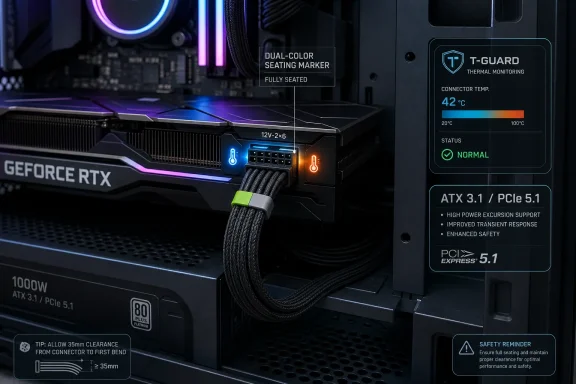 What to Do Now
If you are building or refreshing a Windows gaming PC with a modern high-power graphics card, the immediate takeaway is practical rather than dramatic:- Choose a PSU built for the current connector era. For new high-power GPU builds, prioritize models advertised as ATX 3.1 and PCIe 5.1 compliant, with native 12V-2×6 cabling rather than improvised adapter chains.
- Confirm the 12V-2×6 cable is fully seated. Do this at both the GPU end and the PSU end before first boot. If the cable or connector includes visual seating cues, use them, but do not treat them as a substitute for a physical inspection.
- Avoid tight bends near the plug. Leave enough clearance between the GPU connector and the case side panel so the cable is not forced into a sharp bend immediately after the connector.
- Test your fallback display path. If you expect to save work after a GPU power-cut event, make sure the system has a working non-GPU display route, such as integrated graphics through the motherboard, and confirm it actually displays output.
- Treat any protection event as a hardware incident. If GPU power is cut, shut down, disconnect power, inspect the connector and cable, and do not simply reboot and continue as though nothing happened.
GIGABYTE Turns a Power Supply Into a GPU Connector Watchdog
Power supplies usually compete on wattage, efficiency badges, modular cables, fan noise, warranty length, and the familiar promise of better components. GIGABYTE’s new GAMING Series checks those boxes, but the headline feature is T-Guard: an active safety system built around thermistors that monitor 12V-2×6 connector temperature in real time.The pitch is straightforward. If the connector area begins heating abnormally, GIGABYTE says T-Guard can detect the condition, cut power to the GPU, and keep the rest of the PC running. The company describes the protection model as a detect, protect, and recover sequence.
That is a meaningful design choice because the 12V-2×6 cable is not just another accessory in a high-end system. It is the compact high-current link between the PSU and the graphics card, and it sits in a part of the build where small mistakes can matter: incomplete insertion, poor visibility, case pressure, awkward routing, and tight bends close to the connector.
T-Guard does not make those problems disappear. Instead, it adds a monitoring layer at the point where builders have the most reason to be cautious. That is the sharpest way to understand this launch. GIGABYTE is not merely selling another high-wattage gaming PSU; it is selling a PSU that watches the GPU power connection as a possible failure point.
That distinction matters for WindowsForum readers because many gaming and enthusiast PCs are assembled, upgraded, moved, cleaned, and re-cabled over years of ownership. A connector that was properly seated on day one can still deserve inspection after a GPU swap, a case move, a side-panel squeeze, or a rebuild.
T-Guard Is a Vendor Claim Pending Independent Testing
The confidence level should be clear: T-Guard is GIGABYTE’s claimed protection system, not yet a feature readers should treat as independently proven in every real-world scenario.The claim is specific enough to be testable. GIGABYTE says the system monitors the 12V-2×6 connector temperature, responds when the connector becomes dangerously hot, cuts GPU power, and leaves the rest of the system powered so the user has a chance to recover. Those are concrete behaviors, and they are exactly the kind of claims reviewers should validate with controlled testing.
Until that happens, buyers should view T-Guard as a promising backstop rather than a license to relax build discipline. A safety system can be valuable and still need scrutiny. The important questions are not just whether it works once in a demonstration, but how it behaves across different GPUs, cases, cable routes, airflow conditions, and user mistakes.
A good protection system should trip early enough to prevent damage, avoid unnecessary false positives, behave predictably, and make the incident understandable to the user. If a monitor goes black and the rest of the system stays powered, many people will first suspect a driver crash, Windows freeze, GPU failure, or bad PSU. The feature will be more useful if the event is documented clearly and if users understand the correct response.
For now, the practical stance is simple: T-Guard is a feature worth watching, but independent testing should decide how much trust builders place in it.
The New GAMING Series Lineup
GIGABYTE’s new GAMING Series arrives in familiar capacity classes: 750W, 850W, and 1000W. Those are sensible tiers for modern single-GPU systems, ranging from mainstream performance builds to higher-end configurations with more demanding CPUs and graphics cards.The series is offered in Black and Ice editions, giving builders a choice between the standard dark PSU aesthetic and a white-themed option for showcase builds. That matters less than the safety feature, but it reflects where PC building has gone: color-matched interiors are no longer rare boutique projects.
The lineup also carries several conventional PSU selling points. GIGABYTE lists Cybenetics ETA Platinum certification, Cybenetics LAMBDA A+ certification, 80 PLUS Gold status, a 135mm FDB fan, HybridCool fan-stop behavior under low loads, 100% Japanese capacitors, and a 10-year warranty.
Those are all useful signals, but they are not the reason this launch is interesting. The differentiator is the connector-focused safety story.
| Variant class | Capacity | Editions | Connector focus | Certifications | Warranty |
|---|---|---|---|---|---|
| GAMING Series | 750W | Black, Ice | T-Guard monitoring for 12V-2×6 | Cybenetics ETA Platinum, Cybenetics LAMBDA A+, 80 PLUS Gold | 10 years |
| GAMING Series | 850W | Black, Ice | T-Guard monitoring for 12V-2×6 | Cybenetics ETA Platinum, Cybenetics LAMBDA A+, 80 PLUS Gold | 10 years |
| GAMING Series | 1000W | Black, Ice | T-Guard monitoring for 12V-2×6 | Cybenetics ETA Platinum, Cybenetics LAMBDA A+, 80 PLUS Gold | 10 years |
Who Should Consider One
The clearest audience is a builder using a graphics card powered through a 12V-2×6 connector, especially in a system where the GPU is expensive, the case is tight, or the cable route is difficult to inspect.That includes:
- High-end gaming desktops where the GPU draws enough power that connector condition deserves extra attention.
- Small-form-factor or compact mid-tower builds where the side panel may press close to the GPU cable.
- Frequent upgraders and test-bench users who disconnect and reconnect GPUs often enough that cable seating becomes a repeated risk point.
- Creator or compute-heavy desktops that run sustained GPU loads and cannot afford avoidable connector damage.
- Builders who want native current-generation PSU cabling rather than relying on older units and adapters.
The buying decision is therefore about risk reduction. If the GPU connector is one of the most expensive and least forgiving parts of your build, a PSU that monitors that area may be attractive. If your system does not stress that connector scenario, T-Guard may be nice to have rather than a reason to replace a good existing PSU.
What to Verify Before Purchase
Before buying one of these PSUs specifically for T-Guard, builders should verify several concrete details.First, confirm the PSU capacity matches the intended GPU and CPU combination. Do not buy a wattage tier just because it is the top model in the stack. Leave reasonable headroom, but avoid treating extra wattage as a substitute for quality or proper cabling.
Second, confirm the system actually needs 12V-2×6 support. T-Guard’s value is tied to the GPU power connector it monitors. If your graphics card uses traditional 8-pin PCIe connectors, this specific feature is not solving your main power-cabling problem.
Third, inspect the case layout. A native 12V-2×6 cable still needs physical space. If the GPU connector sits very close to the side panel, the cable may be forced into a tight bend. That is exactly the kind of build condition where extra care is required, whether or not a monitoring feature is present.
Fourth, understand the recovery path. GIGABYTE’s broad recovery idea depends on the PC remaining usable after GPU power is cut. If all displays are connected only to the discrete GPU, and the GPU loses power, the system may keep running while the user has no visible desktop. Builders who care about saving work after an event should test a fallback display route before they need it.
Fifth, check cable replacement expectations. A safety feature tied to a specific cable raises practical ownership questions. If a cable is damaged, misplaced, or needed in a different color, the user should know whether replacements are available and whether only the supplied cable should be used.
Those checks are not glamorous, but they are the difference between buying a feature and actually benefiting from it.
The Dual-Color Cable May Be the Most Human Feature
The thermistor monitoring is the headline technology, but the dual-color 12V-2×6 cable design may be the feature many builders appreciate first. GIGABYTE uses color marking to help users visually confirm that the cable is fully inserted.That sounds minor because it is minor. It is also useful.
A modular PSU can make a build cleaner, but clean cabling can hide mechanical problems. Builders often route thick GPU cables through grommets, around motherboard trays, and behind glass side panels. In a cramped case, a connector can look close to seated from one angle while still needing a final push. A cable can feel secure even when it is not perfectly flush. A side panel can add pressure after the builder thinks the job is finished.
A color cue turns part of that hidden condition into something visible. It does not prove electrical perfection, and it does not guarantee the cable will remain ideal forever, but it gives users a simple installation check.
The combination is the point. The visual cue helps at assembly. T-Guard watches during operation. Installation safety and runtime safety are different problems, and the better PC hardware designs address both.
Why the 12V-2×6 Connector Gets This Much Attention
The background does not need to be overcomplicated. Modern high-end graphics cards can require a lot of power. The 12V-2×6 connector is intended to deliver that power through a compact connector and cable arrangement. Compact cabling helps build cleanliness and standardization, but it also puts a lot of importance on proper insertion and routing.When a high-current connector is not fully seated or is placed under mechanical stress, resistance and heat can become serious concerns. That is why builders have been trained to check insertion depth, avoid sharp bends close to the plug, and inspect the connector after moving or upgrading a system.
T-Guard fits into that context. It is not a replacement for the connector standard, and it is not proof that every connector problem is inevitable. It is a recognition that a high-power GPU cable is important enough to monitor directly.
That is also why this story should not be reduced to wattage. A 1000W label does not tell you how the PSU reacts to a localized connector problem. A certification badge does not tell you whether a GPU cable has become hot at the plug. Those are different questions.
The Efficiency and Noise Badges Still Matter
Although T-Guard is the feature that separates this launch from a routine PSU announcement, the conventional specifications still matter.Cybenetics ETA Platinum certification is a signal about efficiency. 80 PLUS Gold remains a widely recognized efficiency mark. Cybenetics LAMBDA A+ addresses acoustic performance, which is increasingly important in modern desktops where users expect high airflow without constant fan noise.
GIGABYTE also lists a 135mm FDB fan and HybridCool technology, which allows the fan to stop under low loads. That can matter in everyday Windows use. A gaming PC is not always gaming. It may spend hours browsing, streaming, updating, downloading, writing, or sitting at the desktop. A PSU that remains quiet during those periods contributes to the system feeling refined rather than merely powerful.
The company also claims an average noise level below 20 dB(A). As with T-Guard, that should be verified in reviews, because acoustic behavior depends on load, ambient temperature, case airflow, fan curve tuning, and test methodology. Still, the certification and design choices put the series in the right part of the market for builders who care about more than raw wattage.
The 10-year warranty and Japanese capacitors help tell the durability story. A long warranty does not guarantee perfection, but it signals that GIGABYTE intends these units to compete as serious long-term components rather than disposable add-ons.
ATX 3.1 and PCIe 5.1 Are Necessary, Not Sufficient
The GAMING Series is advertised as ATX 3.1 and PCIe 5.1 compliant, which is what buyers should expect from a new PSU aimed at current high-performance graphics cards.That compliance matters. It tells shoppers the unit is designed for the newer power-delivery expectations around modern GPUs and 12V-2×6 cabling. For a new build, choosing a current-standard PSU is cleaner than relying on adapter-heavy setups from older units.
But standards compliance does not make a PC immune to physical build problems. A standard can define connector behavior and design expectations, but it cannot guarantee that every builder fully seats the cable, leaves enough bend clearance, avoids side-panel pressure, or checks the connection after transport.
That is where T-Guard is trying to add value. It is a runtime safety layer on top of a standards-compliant platform. It should be viewed as defense against an abnormal condition, not permission to create one.
For a careful builder, the best approach is layered:
- Start with a current-standard PSU.
- Use the native cable intended for the unit.
- Seat the connector fully.
- Route it with enough clearance.
- Inspect it after installation and movement.
- Treat T-Guard as a last line of protection if something still goes wrong.
The Recovery Promise Has a Practical Catch
The most appealing part of T-Guard is not only that it cuts GPU power. It is that GIGABYTE says the rest of the PC can keep running, potentially giving the user a chance to save work before shutting down and inspecting the issue.That promise is useful, but it depends on how the system is configured.
If the discrete GPU loses power, any monitor connected only to that GPU may stop being useful. For the user to see the desktop after a GPU power-cut event, the PC needs another working display path. In practice, that may mean a CPU with integrated graphics, a motherboard display output, firmware settings that allow that output to function, and a monitor connected to it.
Not every enthusiast PC meets those conditions. Some CPUs lack integrated graphics. Some users never connect a display to the motherboard. Some systems may have integrated graphics disabled or unavailable. In those cases, T-Guard may still protect the connector by cutting GPU power, but the user may not get the graceful “save your work” experience they imagined.
That does not make the feature useless. Preventing connector damage may still be valuable even if the screen goes dark. But buyers should understand the difference between damage prevention and usable recovery.
If recovery matters to you, test it. Connect a display to the motherboard, confirm it works in Windows, and make sure you understand how the system behaves when the discrete GPU is not the active display device. If you cannot or do not want to configure that fallback, treat T-Guard primarily as a protective shutdown feature for the GPU connection.
Action Checklist for Builders and Admins
- Standardize on ATX 3.1 and PCIe 5.1 PSUs for new high-power GPU systems that require 12V-2×6 cabling.
- Use the PSU’s native 12V-2×6 cable rather than mixing modular cables from other PSU models or brands.
- Verify the connector is fully seated at the GPU before closing the case.
- Verify the connector is fully seated at the PSU if the cable is modular.
- Use the dual-color seating cue as a visual aid, not as the only inspection method.
- Avoid tight bends immediately after the connector.
- Leave enough side-panel clearance so the cable is not compressed.
- Recheck the connector after moving the PC, replacing the GPU, changing the PSU, or rerouting cables.
- If you rely on the recovery behavior, configure and test a fallback display path before the system is put into regular use.
- Document what a GPU power-cut event means: shut down, disconnect power, inspect the connector and cable, and do not ignore the incident.
GIGABYTE Is Also Making a Trust Argument
GIGABYTE is best known to many PC builders for motherboards and graphics cards, but power supplies are a category where buyers tend to be cautious. That caution is healthy. A PSU is not a cosmetic component, and a bad one can put the rest of a system at risk.That is why the warranty, capacitor claim, certifications, and safety-forward positioning matter. GIGABYTE is trying to present this series as suitable for serious gaming systems, not merely as a brand-matched accessory. The company is saying the PSU can do more than deliver power efficiently; it can intervene when the GPU connector becomes unsafe.
That is a stronger story than another routine wattage refresh, but it also raises the bar for testing. If GIGABYTE wants T-Guard to be a defining feature, reviewers should not evaluate these units only with standard PSU metrics. Voltage regulation, ripple, transient response, noise, and efficiency still matter, but the connector protection behavior deserves its own scrutiny.
The most important review questions are direct:
- Does T-Guard respond before connector damage occurs?
- How hot does the connector get before intervention?
- Does the GPU-only power cut behave consistently?
- Does the rest of the system remain stable?
- Is the event obvious to the user?
- Are false positives rare?
- Is recovery clear and repeatable?
- Are replacement cables available and clearly specified?
What Reviewers Should Test
T-Guard needs testing under controlled abnormal conditions. That does not mean reckless abuse. It means careful instrumentation and repeatable procedures that simulate plausible build problems.The first test should be connector temperature behavior. Reviewers should measure how the system responds when the 12V-2×6 area begins heating beyond normal operation. The key question is whether the PSU intervenes early enough to prevent visible or electrical damage.
The second test should be incomplete seating. Since improper insertion is one of the most obvious real-world risks, reviewers should examine whether the visual cable cue is easy to interpret and whether T-Guard responds predictably when the connector is not fully seated.
The third test should be cable routing stress. A tight bend close to the connector is common in compact or glass-sided cases. Reviewers should test whether ordinary case constraints affect seating, temperature, or usability.
The fourth test should be recovery behavior. After the GPU is cut off, what happens to the rest of the system? Does Windows remain alive? Does storage remain safe? Can the user save work if a fallback display is available? Does the system require a full shutdown, a reboot, or a power cycle before normal GPU operation returns?
The fifth test should be communication. If the system gives no clear sign that T-Guard triggered, users may misdiagnose the event. Documentation, LEDs, software alerts, or other signaling could make the difference between a useful safety feature and a confusing black-screen incident.
Noise and efficiency should also be tested independently. The below-20 dB(A) average noise claim, fan-stop behavior, Cybenetics ratings, and 80 PLUS Gold status are all relevant, but real cases and real thermal conditions can produce different experiences from open-bench measurements.
The Practical Buying Decision Is About Risk
For a midrange PC with a modest GPU, T-Guard may be a nice extra rather than a decisive reason to buy. For a high-end build with a 12V-2×6-powered GPU, a tight case, and expensive components, the feature becomes more compelling.The value rises when:
- The GPU is expensive enough that connector damage would be painful.
- The system runs sustained GPU-heavy workloads.
- The case makes cable routing difficult.
- The builder wants a current ATX 3.1 and PCIe 5.1 PSU anyway.
- The user is willing to configure a fallback display path for recovery.
- The system will be moved, serviced, or upgraded often.
- The GPU does not use 12V-2×6.
- The build has low power demand.
- The existing PSU is already high quality and appropriately cabled.
- The system has no realistic recovery display path.
- The buyer is choosing the unit only for marketing rather than a real connector-risk scenario.
The Bottom Line
GIGABYTE’s GAMING Series PSUs are interesting because they shift attention from the usual PSU checklist to a specific point of failure builders actually worry about: the 12V-2×6 GPU power connection.The series still brings the expected high-end PSU language: 750W, 850W, and 1000W capacities; Black and Ice editions; Cybenetics ETA Platinum; Cybenetics LAMBDA A+; 80 PLUS Gold; a 135mm FDB fan; HybridCool; Japanese capacitors; and a 10-year warranty. Those details make the line competitive on paper.
But T-Guard is the reason to pay attention. If independent testing confirms GIGABYTE’s claims, connector-temperature monitoring and GPU-only power isolation could become a genuinely useful feature for high-power Windows desktops. It would not replace careful cable seating, proper routing, or smart PSU selection, but it could provide an extra layer of protection when something goes wrong.
For builders, the next step is not hype. It is preparation. Buy the right standard, use the right cable, seat it fully, avoid tight bends, test your fallback display path, and wait for reviewers to validate how T-Guard behaves under real stress. If the feature performs as advertised, this may be the beginning of a more practical era in PSU design: not louder branding or bigger wattage numbers, but smarter protection where modern GPUs need it most.
References
- Primary source: TechnoSports Media Group
Published: 2026-07-09T11:30:24.220680
GIGABYTE's New PSUs Just Became Your GPU's Bodyguard
Power supply units rarely make headlines — but GIGABYTE's newest release might change that. The company has launched its all-new GAMING Series PSUs, builttechnosports.co.in - Related coverage: tomshw.it
- Related coverage: club386.com
Gigabyte has developed a solution to protect 12V-2x6 power cables from melting | Club386
Gigabyte launches a new PSU series featuring T-Guard, a temperature-monitoring technology designed to protect against cable burning. www.club386.com
- Related coverage: pcgamer.com
Thermal Grizzly's WireView Pro II keeps an eye on your 12V-2x6 GPU power connector and can turn your PC off entirely if things get... melty | PC Gamer
The bear protects. Presumably, it does not attack.www.pcgamer.com - Related coverage: gigabyte.com
- Related coverage: download.gigabyte.com
- Related coverage: download1.gigabyte.com
