

GitHub introduced the GitHub Copilot app in technical preview in May 2026 as a desktop control center for agent-driven development, available to existing Copilot Pro, Pro+, Business, and Enterprise users across connected GitHub repositories. The announcement matters less because it adds another Copilot surface and more because it admits that the editor is no longer enough. GitHub is trying to turn AI coding from a clever side panel into an operating model for software teams. That is a much bigger bet, and a much riskier one.
The original Copilot bargain was easy to understand: type code, get suggestions, accept or reject them. It fit neatly into the mental model of autocomplete, even when the underlying system was doing something more ambitious. Developers stayed in charge because the AI lived inside the place where developers already exercised judgment.
The new GitHub Copilot app changes that relationship. It is not merely a bigger chat window or a prettier wrapper around existing Copilot features. GitHub is positioning it as a desktop application for managing multiple agent sessions, each doing real work in parallel: investigating bugs, implementing issues, responding to review feedback, and shepherding pull requests through checks.
That shift is important because it moves Copilot from assistant to operator. The developer is no longer just accepting a line completion or asking for a refactor. The developer is supervising a fleet of software workers that can plan, modify files, run tests, open pull requests, monitor CI, and potentially merge code when defined conditions are met.
This is the clearest version yet of GitHub’s agentic thesis: the future of software development is not one human paired with one AI assistant, but one human coordinating several bounded agents across the lifecycle of a repository. The desktop app is GitHub’s answer to the obvious problem that follows. If agents are going to multiply, someone needs a dashboard.
A coding agent may begin with a prompt, but it quickly produces artifacts that do not belong in a scrollback: plans, diffs, test output, terminal logs, CI failures, review comments, and deployment state. Once that happens, the chat thread becomes less like a conversation and more like an overstuffed incident channel. The context is technically present, but operationally buried.
GitHub’s new app is built around the recognition that agentic development needs visible state. Its “My Work” view is meant to show active sessions, issues, pull requests, and background automations across connected repositories. That is not a flashy feature in the usual AI-demo sense, but it is exactly the sort of plumbing that determines whether these systems are useful on a Tuesday afternoon.
The same logic explains GitHub’s introduction of canvases. A canvas is a work surface where an agent’s plan, pull request, browser session, terminal, deployment, dashboard, or workflow state can be inspected and changed. In GitHub’s framing, chat is where intent is formed; canvases are where intent becomes inspectable work.
That distinction is overdue. Developers do not need more conversational magic if the result is another opaque blob of generated code. They need a way to see what the agent believes it is doing, what it has already tried, what evidence it has gathered, and where human judgment is still required.
This matters because parallelism is the entire promise of agentic development. If one agent is chasing a bug, another is implementing a backlog item, and a third is revising a pull request, the system has to keep their work separated. Otherwise, the human supervisor inherits a mess of branch conflicts, half-applied changes, and “which agent did this?” archaeology.
Git worktrees are not new. Many advanced developers already use them to juggle multiple branches without constantly stashing and checking out code. What GitHub is doing here is productizing that workflow for agent management: no manual setup, no cleanup, no branch juggling, and no expectation that every developer wants to become a worktree power user.
That is the correct abstraction. The point of an agent-native environment should not be to invent a new source-control model. It should be to use existing developer primitives in a way that makes parallel automation less dangerous. In that respect, worktrees are a reassuring sign that GitHub understands at least one layer of the problem.
That boundary is not sacred, but it is consequential. Many pull requests fail for mundane reasons: formatting, flaky tests, forgotten snapshots, small review comments, missing imports, stale branches. Asking an agent to clean up that kind of friction is sensible. Nobody becomes a better engineer by babysitting an avoidable lint failure for the third time in a day.
But CI is also where organizations encode risk. A red build may point to a trivial failure, or it may reveal that a change has violated an architectural assumption. A reviewer comment may be a request for a variable rename, or it may be a warning that the proposed design is wrong. The danger is not that Agent Merge can do too little. The danger is that it can make too much of the process look routine.
GitHub’s framing tries to preserve human control: the developer chooses how far Copilot should go, whether to drive CI back to green, address feedback, or merge when conditions are met. That is the right posture. But the operational reality will depend on defaults, admin policies, audit trails, and team culture.
In high-trust teams with strong tests and clear ownership, Agent Merge could remove enormous amounts of procedural drag. In teams where CI is patchy and reviews are already rushed, it could become a polite machine for accelerating bad decisions.
The local sandbox runs on the developer’s machine with restricted access to filesystems, network connectivity, and system capabilities. GitHub says these policies can be centrally configured and enforced, which is the sentence enterprise administrators will look for first. Local execution gives teams proximity to their real development environment, but it also raises obvious concerns about secrets, credentials, private files, and lateral movement.
The cloud sandbox takes the opposite approach. Each environment is isolated, ephemeral, Linux-based, and hosted by GitHub, with organizations defining their own policies. The appeal is portability and containment: a session can be picked up from different devices, and local resource constraints become less important. The tradeoff is that code, context, and execution move deeper into GitHub’s hosted infrastructure.
Neither model eliminates risk. Local sandboxes put pressure on endpoint policy and workstation hygiene. Cloud sandboxes put pressure on identity, repository permissions, network boundaries, and vendor trust. For regulated organizations, the question will not be “does Copilot have a sandbox?” but “can we prove what it accessed, what it executed, what data left the environment, and who approved each write?”
That is where the announcement’s language about policy enforcement matters. Agentic development will not be adopted at enterprise scale because it feels magical. It will be adopted if security teams can constrain it, observe it, audit it, and turn it off when necessary.
Copilot code review is GitHub’s attempt to keep up with that volume. The system can review pull requests, leave inline comments, and provide committable fix suggestions. GitHub is also extending it through custom agent skills, Model Context Protocol server connections, and configurable actions workflows so teams can align reviews with their own standards and internal systems.
The new medium-tier review option is especially revealing. GitHub is effectively acknowledging that not all reviews deserve the same model budget. A low-risk repository may get lighter, cheaper review. A high-impact service may route pull requests to a higher-reasoning model for better precision and recall. That kind of tiering is likely to become normal as AI usage costs become part of engineering management.
There is also a dedicated security-review skill and a generally available rubberduck skill that uses multiple model families to critique an implementation. These are smart additions because they make review less monolithic. A security review is not the same as a style review, and a skeptical second-pass critique is not the same as approving a change.
Still, organizations should be careful not to confuse automated review with accountability. A model can catch patterns, inconsistencies, missing tests, and certain classes of security issues. It cannot own the consequences of shipping a subtle design flaw into a critical production system. The more code agents generate, the more important human review becomes — not less.
Many Microsoft shops do not live entirely in GitHub. They have Azure DevOps repositories, legacy pipelines, internal governance processes, long-lived enterprise contracts, and teams that have no immediate plan to move. If GitHub wants Copilot to become the AI layer for professional software development, it cannot pretend every relevant repository already lives under github.com.
This is also a reminder that Microsoft’s developer strategy is less tidy than its keynote narratives. GitHub is the modern collaboration platform, Azure DevOps remains entrenched, Visual Studio still matters, VS Code is the gravitational center for many developers, and Windows is increasingly being asked to host local AI workflows. Copilot has to span that reality rather than replace it overnight.
For administrators, native Azure DevOps support lowers the barrier to experimentation. They can apply AI review to selected repositories without uprooting the entire toolchain. For GitHub, it expands the Copilot surface area and makes the agentic story less dependent on a wholesale platform migration.
That is pragmatic. The enterprise does not adopt new development workflows by deleting old ones. It layers them, tests them, restricts them, argues about them, and only later standardizes.
The SDK exposes the same agentic runtime that powers the Copilot app, allowing teams to build internal tools such as code analysis agents, release-note generators, support workflow assistants, or custom automation tied to their own engineering processes. In other words, GitHub does not only want developers using its agents. It wants organizations building on its agent runtime.
This is where the announcement becomes strategically important. The desktop app creates the control plane. Sandboxes create the execution boundary. Code review creates the quality filter. The SDK creates extensibility. Partner-built agent apps create an ecosystem.
That combination is GitHub’s attempt to make Copilot not just another AI coding tool, but the fabric through which coding agents interact with repositories, issues, pull requests, CI, review systems, and internal developer platforms. If successful, Copilot becomes harder to replace because it is no longer a feature in the editor. It becomes embedded in the workflow graph.
The risk for customers is lock-in of a new kind. Traditional platform lock-in came from APIs, data formats, and hosting environments. Agentic lock-in may come from prompts, policies, skills, memory, internal automations, review conventions, and accumulated workflow state. The more useful the system becomes, the more it becomes part of how a team thinks.
A terminal-native agent can fit into established habits. It can sit next to Git, package managers, test runners, deployment tools, and shell scripts. GitHub’s redesigned TUI with tabbed access to pull requests, issues, and gists is a nod to developers who want richer orchestration without leaving the command line.
Voice input is more curious. GitHub says it uses on-device speech-to-text so audio does not leave the machine, which is a sensible privacy choice. Whether developers actually want to talk to their terminal is another matter. In shared offices, remote calls, and focused debugging sessions, voice may remain a niche interaction model.
Scheduled tasks are more immediately consequential. The
GitHub is not building one agent UI. It is building many surfaces over the same agentic substrate: desktop, terminal, cloud, editor, pull request, issue, partner app, and SDK.
That continuity is powerful. A developer who starts work in the Copilot app, continues in VS Code, checks something from the CLI, and later reviews a pull request on GitHub should not have to re-explain the repository, the design discussion, or the constraints. The whole promise of a platform-level agent is that context follows the work.
But memory is also where convenience becomes governance. What is remembered? Who can inspect it? Can it be edited, deleted, scoped, exported, or excluded from training and inference? Does it cross organizational boundaries? How does it behave when contractors leave, teams reorganize, or repositories change ownership?
GitHub’s announcement frames continuity as a productivity feature, and that is understandable. But administrators will view it as a data-management feature. Context is not free. It can contain credentials, architectural secrets, customer information, unreleased product plans, and internal security assumptions.
The agentic future will require memory, but memory must become manageable infrastructure rather than a vague promise that the machine “knows” what happened before.
This is the real platform play. A feature does not move from idea to production through code alone. It passes through planning, analysis, security review, testing, rollout, monitoring, incident response, documentation, and feedback. GitHub is trying to make itself the place where those workflows can be delegated, observed, and connected.
Partner-built agent apps give GitHub a way to extend Copilot without building every specialized capability itself. They also give vendors a reason to integrate directly into GitHub’s agentic workflow rather than competing for developer attention elsewhere. If a team can assign an issue to a security agent, a deployment agent, or a product-analysis agent without leaving GitHub, the repository becomes more than a code host.
For WindowsForum readers who administer developer environments, this should sound familiar. Platform vendors rarely win by having the best single tool. They win by becoming the place where other tools must show up. GitHub is now attempting that move for agentic software work.
The practical challenge will be trust fragmentation. If one Copilot session can involve GitHub’s own agent, a partner agent, an MCP server, internal tools, cloud sandboxes, and repository secrets, the security model becomes multi-party by default. That demands clearer provenance than many current developer tools provide.
If agents increase repository creation, pull request activity, CI consumption, API usage, and review volume, then GitHub’s infrastructure becomes the limiting factor. Agentic development is not just a UX problem. It is a scaling problem.
That explains why GitHub’s announcement repeatedly emphasizes resilience, stability, availability, and hardening. The company is selling a faster workflow, but it is also preparing customers for a world in which automated actors generate more load than human developers ever did. Every idle agent that runs tests, polls status, opens a pull request, or retries a failed task consumes platform capacity.
For teams, this means AI productivity gains may surface first as infrastructure costs. More pull requests mean more CI minutes. More automated review means more model usage. More cloud sandboxes mean more hosted compute. More agent sessions mean more events, logs, permissions, and audit data.
GitHub’s new Copilot Max upgrade for heavy users fits into that story. Agentic development has a volume curve. Once developers start dispatching cohorts of agents, the old subscription assumptions become strained. Power users will hit limits, organizations will model spend, and finance teams will begin asking whether AI-generated throughput is producing shipped value or just more activity.
A good developer can reason about architecture, state, correctness, and tradeoffs. A good supervisor of agents must also decompose work, set boundaries, inspect intermediate outputs, detect hallucinated confidence, decide when to intervene, and maintain enough situational awareness across parallel sessions to avoid shipping nonsense quickly. These skills overlap, but they are not identical.
The optimistic version is appealing. Agents take on repetitive glue work, obvious fixes, review-response churn, test updates, and routine issue implementation. Developers spend more time on architecture, product judgment, security reasoning, and integration. The job becomes less clerical and more editorial.
The pessimistic version is also plausible. Developers become overwhelmed by partially completed machine work, spend their days triaging agent output, and lose the deep code familiarity that once allowed them to catch subtle bugs. Velocity increases while comprehension declines.
The outcome will depend on how disciplined teams are about scope. Agents are useful when the task is bounded, the feedback loop is short, and the validation signal is strong. They are dangerous when the work is ambiguous, the tests are weak, and the human reviewer is too busy to think.
That has practical consequences. Local sandboxing, on-device voice transcription, repository worktrees, and multi-session orchestration all benefit from a capable developer machine. Windows developers already juggling Visual Studio, VS Code, WSL, Docker, terminals, browsers, and Teams may see the Copilot app as either welcome consolidation or yet another window in an already noisy day.
The app’s success on Windows will depend on how well it respects the realities of enterprise desktops. Proxy settings, endpoint protection, controlled folder access, credential managers, VPNs, corporate certificates, local admin restrictions, and developer toolchains all complicate agent execution. A demo sandbox is one thing; a locked-down corporate laptop is another.
If GitHub gets the desktop integration right, the app could become a useful command center for developers who split time between local code and hosted collaboration. If it gets it wrong, power users will retreat to the CLI and editor integrations, while enterprises restrict the app until the policy story matures.
The broader Microsoft angle is hard to miss. Windows is being asked to host more local AI activity, GitHub is becoming an agent platform, and developer tooling is being reorganized around AI-assisted workflows. The Copilot app sits at the intersection of all three.
When an agent modifies code, the important question is not merely what changed. It is why the change was made, what context the agent used, what commands it ran, what tests passed, what tests failed, what external tools it consulted, what permissions it requested, and where it needed human input. Without that trail, agentic development becomes a black box with a pull request attached.
Pull requests already provide some of this structure, but not enough. A diff tells you the final state. It does not necessarily tell you the path. For human developers, that path can be reconstructed through conversation, commit history, review comments, and institutional memory. For agents, it must be captured by design.
This is especially important for regulated industries and security-sensitive teams. If an agent introduces a vulnerability, mishandles a secret, or changes a compliance-critical path, the organization will need more than “Copilot did it.” It will need logs, approvals, policies, and evidence.
GitHub has the advantage of owning many of the relevant surfaces: repositories, issues, pull requests, Actions, code review, and now agent sessions. The question is whether it will make provenance first-class enough for administrators, not just convenient enough for developers.
Who gets to see the issue first? Who turns it into a plan? Who chooses the environment? Who runs the tests? Who summarizes the change? Who requests review? Who responds to review? Who decides that the change is safe enough to merge? These are the points of leverage.
GitHub’s advantage is that it already sits where many of those decisions become concrete. A repository is not just a file store. It is a social and operational system: issues, pull requests, branches, reviews, checks, releases, security alerts, workflows, and permissions. That makes GitHub a natural home for agents, because agents need access to the same structures humans use to coordinate work.
The threat to GitHub is that developers are promiscuous with tools. They will use the agent that solves the problem, whether it lives in the editor, terminal, browser, cloud IDE, internal platform, or another vendor’s app. GitHub’s response is to make Copilot available across many of those surfaces while anchoring the work back to GitHub.
That strategy is coherent. It is also aggressive. If GitHub succeeds, the repository becomes the command center not just for code collaboration, but for machine-mediated software production.
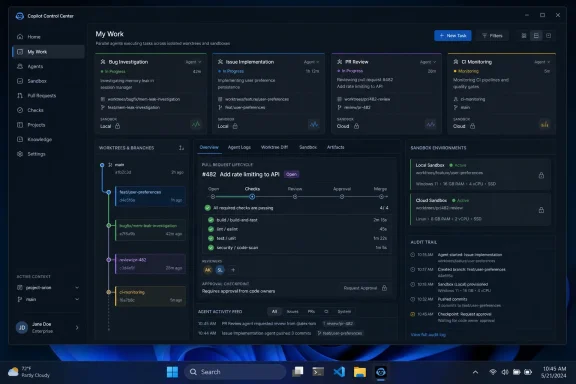 GitHub Moves Copilot Out of the Editor and Into the Workday
The original Copilot bargain was easy to understand: type code, get suggestions, accept or reject them. It fit neatly into the mental model of autocomplete, even when the underlying system was doing something more ambitious. Developers stayed in charge because the AI lived inside the place where developers already exercised judgment.The new GitHub Copilot app changes that relationship. It is not merely a bigger chat window or a prettier wrapper around existing Copilot features. GitHub is positioning it as a desktop application for managing multiple agent sessions, each doing real work in parallel: investigating bugs, implementing issues, responding to review feedback, and shepherding pull requests through checks.
That shift is important because it moves Copilot from assistant to operator. The developer is no longer just accepting a line completion or asking for a refactor. The developer is supervising a fleet of software workers that can plan, modify files, run tests, open pull requests, monitor CI, and potentially merge code when defined conditions are met.
This is the clearest version yet of GitHub’s agentic thesis: the future of software development is not one human paired with one AI assistant, but one human coordinating several bounded agents across the lifecycle of a repository. The desktop app is GitHub’s answer to the obvious problem that follows. If agents are going to multiply, someone needs a dashboard.
The Control Center Is an Admission That Chat Has Hit Its Ceiling
For the past two years, the industry has tried to make chat do too much. Chat is excellent for ambiguity, explanation, and negotiation. It is a poor long-term record of work.A coding agent may begin with a prompt, but it quickly produces artifacts that do not belong in a scrollback: plans, diffs, test output, terminal logs, CI failures, review comments, and deployment state. Once that happens, the chat thread becomes less like a conversation and more like an overstuffed incident channel. The context is technically present, but operationally buried.
GitHub’s new app is built around the recognition that agentic development needs visible state. Its “My Work” view is meant to show active sessions, issues, pull requests, and background automations across connected repositories. That is not a flashy feature in the usual AI-demo sense, but it is exactly the sort of plumbing that determines whether these systems are useful on a Tuesday afternoon.
The same logic explains GitHub’s introduction of canvases. A canvas is a work surface where an agent’s plan, pull request, browser session, terminal, deployment, dashboard, or workflow state can be inspected and changed. In GitHub’s framing, chat is where intent is formed; canvases are where intent becomes inspectable work.
That distinction is overdue. Developers do not need more conversational magic if the result is another opaque blob of generated code. They need a way to see what the agent believes it is doing, what it has already tried, what evidence it has gathered, and where human judgment is still required.
Worktrees Are the Quietly Sensible Part of the Announcement
The most practical detail in the Copilot app announcement is also one of the least glamorous: every agent session runs in its own Git worktree. That means each session gets a real, isolated copy of the relevant branch, allowing multiple agents to operate without trampling one another’s files.This matters because parallelism is the entire promise of agentic development. If one agent is chasing a bug, another is implementing a backlog item, and a third is revising a pull request, the system has to keep their work separated. Otherwise, the human supervisor inherits a mess of branch conflicts, half-applied changes, and “which agent did this?” archaeology.
Git worktrees are not new. Many advanced developers already use them to juggle multiple branches without constantly stashing and checking out code. What GitHub is doing here is productizing that workflow for agent management: no manual setup, no cleanup, no branch juggling, and no expectation that every developer wants to become a worktree power user.
That is the correct abstraction. The point of an agent-native environment should not be to invent a new source-control model. It should be to use existing developer primitives in a way that makes parallel automation less dangerous. In that respect, worktrees are a reassuring sign that GitHub understands at least one layer of the problem.
Agent Merge Turns CI Into a Negotiation With a Machine
Agent Merge may become the feature that most sharply divides developers. On paper, it is straightforward: Copilot can monitor a pull request, track required reviewers, watch CI checks, address failures, respond to feedback, and merge once the developer’s conditions are satisfied. In practice, it pushes automation closer to the boundary where engineering judgment has traditionally lived.That boundary is not sacred, but it is consequential. Many pull requests fail for mundane reasons: formatting, flaky tests, forgotten snapshots, small review comments, missing imports, stale branches. Asking an agent to clean up that kind of friction is sensible. Nobody becomes a better engineer by babysitting an avoidable lint failure for the third time in a day.
But CI is also where organizations encode risk. A red build may point to a trivial failure, or it may reveal that a change has violated an architectural assumption. A reviewer comment may be a request for a variable rename, or it may be a warning that the proposed design is wrong. The danger is not that Agent Merge can do too little. The danger is that it can make too much of the process look routine.
GitHub’s framing tries to preserve human control: the developer chooses how far Copilot should go, whether to drive CI back to green, address feedback, or merge when conditions are met. That is the right posture. But the operational reality will depend on defaults, admin policies, audit trails, and team culture.
In high-trust teams with strong tests and clear ownership, Agent Merge could remove enormous amounts of procedural drag. In teams where CI is patchy and reviews are already rushed, it could become a polite machine for accelerating bad decisions.
Sandboxes Are the Security Story GitHub Has to Get Right
Agents that only suggest code are limited, but agents that can run code are risky. That is the trade GitHub is now embracing directly. The company is offering both local and cloud sandboxes for Copilot, giving agents bounded places to execute commands, inspect results, test changes, and iterate without being handed uncontrolled access to production systems.The local sandbox runs on the developer’s machine with restricted access to filesystems, network connectivity, and system capabilities. GitHub says these policies can be centrally configured and enforced, which is the sentence enterprise administrators will look for first. Local execution gives teams proximity to their real development environment, but it also raises obvious concerns about secrets, credentials, private files, and lateral movement.
The cloud sandbox takes the opposite approach. Each environment is isolated, ephemeral, Linux-based, and hosted by GitHub, with organizations defining their own policies. The appeal is portability and containment: a session can be picked up from different devices, and local resource constraints become less important. The tradeoff is that code, context, and execution move deeper into GitHub’s hosted infrastructure.
Neither model eliminates risk. Local sandboxes put pressure on endpoint policy and workstation hygiene. Cloud sandboxes put pressure on identity, repository permissions, network boundaries, and vendor trust. For regulated organizations, the question will not be “does Copilot have a sandbox?” but “can we prove what it accessed, what it executed, what data left the environment, and who approved each write?”
That is where the announcement’s language about policy enforcement matters. Agentic development will not be adopted at enterprise scale because it feels magical. It will be adopted if security teams can constrain it, observe it, audit it, and turn it off when necessary.
Code Review Becomes the Bottleneck After Code Generation Gets Cheap
GitHub’s announcement spends significant time on code review, and for good reason. If AI agents make it easier to produce pull requests, then review becomes the scarce resource. The constraint moves from writing code to deciding whether the code should exist.Copilot code review is GitHub’s attempt to keep up with that volume. The system can review pull requests, leave inline comments, and provide committable fix suggestions. GitHub is also extending it through custom agent skills, Model Context Protocol server connections, and configurable actions workflows so teams can align reviews with their own standards and internal systems.
The new medium-tier review option is especially revealing. GitHub is effectively acknowledging that not all reviews deserve the same model budget. A low-risk repository may get lighter, cheaper review. A high-impact service may route pull requests to a higher-reasoning model for better precision and recall. That kind of tiering is likely to become normal as AI usage costs become part of engineering management.
There is also a dedicated security-review skill and a generally available rubberduck skill that uses multiple model families to critique an implementation. These are smart additions because they make review less monolithic. A security review is not the same as a style review, and a skeptical second-pass critique is not the same as approving a change.
Still, organizations should be careful not to confuse automated review with accountability. A model can catch patterns, inconsistencies, missing tests, and certain classes of security issues. It cannot own the consequences of shipping a subtle design flaw into a critical production system. The more code agents generate, the more important human review becomes — not less.
Azure DevOps Support Shows GitHub Knows the Enterprise Is Messy
The announcement also brings Copilot code review natively to Azure DevOps, with one-click review, inline comments, and committable fix suggestions. That detail may look secondary in a GitHub-branded launch, but it matters for the real world.Many Microsoft shops do not live entirely in GitHub. They have Azure DevOps repositories, legacy pipelines, internal governance processes, long-lived enterprise contracts, and teams that have no immediate plan to move. If GitHub wants Copilot to become the AI layer for professional software development, it cannot pretend every relevant repository already lives under github.com.
This is also a reminder that Microsoft’s developer strategy is less tidy than its keynote narratives. GitHub is the modern collaboration platform, Azure DevOps remains entrenched, Visual Studio still matters, VS Code is the gravitational center for many developers, and Windows is increasingly being asked to host local AI workflows. Copilot has to span that reality rather than replace it overnight.
For administrators, native Azure DevOps support lowers the barrier to experimentation. They can apply AI review to selected repositories without uprooting the entire toolchain. For GitHub, it expands the Copilot surface area and makes the agentic story less dependent on a wholesale platform migration.
That is pragmatic. The enterprise does not adopt new development workflows by deleting old ones. It layers them, tests them, restricts them, argues about them, and only later standardizes.
The SDK Turns Copilot From Product Into Platform
The GitHub Copilot SDK is now generally available across Node.js and TypeScript, Python, Go, .NET, Rust, and Java. That is a platform move disguised as a developer convenience.The SDK exposes the same agentic runtime that powers the Copilot app, allowing teams to build internal tools such as code analysis agents, release-note generators, support workflow assistants, or custom automation tied to their own engineering processes. In other words, GitHub does not only want developers using its agents. It wants organizations building on its agent runtime.
This is where the announcement becomes strategically important. The desktop app creates the control plane. Sandboxes create the execution boundary. Code review creates the quality filter. The SDK creates extensibility. Partner-built agent apps create an ecosystem.
That combination is GitHub’s attempt to make Copilot not just another AI coding tool, but the fabric through which coding agents interact with repositories, issues, pull requests, CI, review systems, and internal developer platforms. If successful, Copilot becomes harder to replace because it is no longer a feature in the editor. It becomes embedded in the workflow graph.
The risk for customers is lock-in of a new kind. Traditional platform lock-in came from APIs, data formats, and hosting environments. Agentic lock-in may come from prompts, policies, skills, memory, internal automations, review conventions, and accumulated workflow state. The more useful the system becomes, the more it becomes part of how a team thinks.
The Terminal Is No Longer Exempt From the Agent Push
GitHub is also refreshing Copilot CLI with a redesigned terminal interface in experimental mode, voice input, and scheduled tasks. That may sound like product sprawl, but it reflects an important truth: many developers trust the terminal more than any graphical AI surface.A terminal-native agent can fit into established habits. It can sit next to Git, package managers, test runners, deployment tools, and shell scripts. GitHub’s redesigned TUI with tabbed access to pull requests, issues, and gists is a nod to developers who want richer orchestration without leaving the command line.
Voice input is more curious. GitHub says it uses on-device speech-to-text so audio does not leave the machine, which is a sensible privacy choice. Whether developers actually want to talk to their terminal is another matter. In shared offices, remote calls, and focused debugging sessions, voice may remain a niche interaction model.
Scheduled tasks are more immediately consequential. The
/every command allows recurring prompts and background work, pushing Copilot CLI from interactive assistant toward automation runner. Combine that with cloud automations that respond to GitHub events, open issues, leave comments, and ask permission before write actions by default, and the shape of the system becomes clear.GitHub is not building one agent UI. It is building many surfaces over the same agentic substrate: desktop, terminal, cloud, editor, pull request, issue, partner app, and SDK.
Memory and Chronicle Raise the Stakes for Context
Memory++ and/chronicle are GitHub’s answer to one of the most persistent problems in AI-assisted development: continuity. A useful agent must remember more than the last prompt. It needs context from prior sessions, across devices, across tools, and across time.That continuity is powerful. A developer who starts work in the Copilot app, continues in VS Code, checks something from the CLI, and later reviews a pull request on GitHub should not have to re-explain the repository, the design discussion, or the constraints. The whole promise of a platform-level agent is that context follows the work.
But memory is also where convenience becomes governance. What is remembered? Who can inspect it? Can it be edited, deleted, scoped, exported, or excluded from training and inference? Does it cross organizational boundaries? How does it behave when contractors leave, teams reorganize, or repositories change ownership?
GitHub’s announcement frames continuity as a productivity feature, and that is understandable. But administrators will view it as a data-management feature. Context is not free. It can contain credentials, architectural secrets, customer information, unreleased product plans, and internal security assumptions.
The agentic future will require memory, but memory must become manageable infrastructure rather than a vague promise that the machine “knows” what happened before.
Partner Agents Turn GitHub Into the Marketplace for Software Work
GitHub’s partner list includes names associated with feature flags, security analysis, product analytics, deployment automation, observability, design collaboration, and code intelligence. The implication is obvious: agents will not be limited to writing code. They will coordinate the surrounding work of software delivery.This is the real platform play. A feature does not move from idea to production through code alone. It passes through planning, analysis, security review, testing, rollout, monitoring, incident response, documentation, and feedback. GitHub is trying to make itself the place where those workflows can be delegated, observed, and connected.
Partner-built agent apps give GitHub a way to extend Copilot without building every specialized capability itself. They also give vendors a reason to integrate directly into GitHub’s agentic workflow rather than competing for developer attention elsewhere. If a team can assign an issue to a security agent, a deployment agent, or a product-analysis agent without leaving GitHub, the repository becomes more than a code host.
For WindowsForum readers who administer developer environments, this should sound familiar. Platform vendors rarely win by having the best single tool. They win by becoming the place where other tools must show up. GitHub is now attempting that move for agentic software work.
The practical challenge will be trust fragmentation. If one Copilot session can involve GitHub’s own agent, a partner agent, an MCP server, internal tools, cloud sandboxes, and repository secrets, the security model becomes multi-party by default. That demands clearer provenance than many current developer tools provide.
Microsoft Build’s Agent Story Is Really About Throughput
The announcement’s most striking numbers are not about models. GitHub says commits nearly doubled year over year, crossing 1.4 billion per month, with more than 2 billion GitHub Actions minutes per week. Those figures are meant to demonstrate demand, but they also reveal GitHub’s operational anxiety.If agents increase repository creation, pull request activity, CI consumption, API usage, and review volume, then GitHub’s infrastructure becomes the limiting factor. Agentic development is not just a UX problem. It is a scaling problem.
That explains why GitHub’s announcement repeatedly emphasizes resilience, stability, availability, and hardening. The company is selling a faster workflow, but it is also preparing customers for a world in which automated actors generate more load than human developers ever did. Every idle agent that runs tests, polls status, opens a pull request, or retries a failed task consumes platform capacity.
For teams, this means AI productivity gains may surface first as infrastructure costs. More pull requests mean more CI minutes. More automated review means more model usage. More cloud sandboxes mean more hosted compute. More agent sessions mean more events, logs, permissions, and audit data.
GitHub’s new Copilot Max upgrade for heavy users fits into that story. Agentic development has a volume curve. Once developers start dispatching cohorts of agents, the old subscription assumptions become strained. Power users will hit limits, organizations will model spend, and finance teams will begin asking whether AI-generated throughput is producing shipped value or just more activity.
Developers Are Becoming Supervisors, Whether They Asked To or Not
The cultural shift underneath all of this is uncomfortable. GitHub’s vision asks developers to become managers of automated work. That is not the same skill as writing code.A good developer can reason about architecture, state, correctness, and tradeoffs. A good supervisor of agents must also decompose work, set boundaries, inspect intermediate outputs, detect hallucinated confidence, decide when to intervene, and maintain enough situational awareness across parallel sessions to avoid shipping nonsense quickly. These skills overlap, but they are not identical.
The optimistic version is appealing. Agents take on repetitive glue work, obvious fixes, review-response churn, test updates, and routine issue implementation. Developers spend more time on architecture, product judgment, security reasoning, and integration. The job becomes less clerical and more editorial.
The pessimistic version is also plausible. Developers become overwhelmed by partially completed machine work, spend their days triaging agent output, and lose the deep code familiarity that once allowed them to catch subtle bugs. Velocity increases while comprehension declines.
The outcome will depend on how disciplined teams are about scope. Agents are useful when the task is bounded, the feedback loop is short, and the validation signal is strong. They are dangerous when the work is ambiguous, the tests are weak, and the human reviewer is too busy to think.
Windows Developers Get a New Kind of Desktop Tool
For Windows users, the Copilot app is notable because it treats the desktop as a serious surface for AI development work. Much of the AI coding boom has lived inside browser tabs, VS Code panels, cloud consoles, and terminal sessions. A native-ish desktop control center suggests that the workstation still matters.That has practical consequences. Local sandboxing, on-device voice transcription, repository worktrees, and multi-session orchestration all benefit from a capable developer machine. Windows developers already juggling Visual Studio, VS Code, WSL, Docker, terminals, browsers, and Teams may see the Copilot app as either welcome consolidation or yet another window in an already noisy day.
The app’s success on Windows will depend on how well it respects the realities of enterprise desktops. Proxy settings, endpoint protection, controlled folder access, credential managers, VPNs, corporate certificates, local admin restrictions, and developer toolchains all complicate agent execution. A demo sandbox is one thing; a locked-down corporate laptop is another.
If GitHub gets the desktop integration right, the app could become a useful command center for developers who split time between local code and hosted collaboration. If it gets it wrong, power users will retreat to the CLI and editor integrations, while enterprises restrict the app until the policy story matures.
The broader Microsoft angle is hard to miss. Windows is being asked to host more local AI activity, GitHub is becoming an agent platform, and developer tooling is being reorganized around AI-assisted workflows. The Copilot app sits at the intersection of all three.
The Audit Trail Will Decide Whether Teams Trust the Machine
The announcement repeatedly uses the language of control: inspect, redirect, test, merge, approve, verify. That is the right vocabulary. But control is only meaningful if the system records enough detail for humans to understand what happened.When an agent modifies code, the important question is not merely what changed. It is why the change was made, what context the agent used, what commands it ran, what tests passed, what tests failed, what external tools it consulted, what permissions it requested, and where it needed human input. Without that trail, agentic development becomes a black box with a pull request attached.
Pull requests already provide some of this structure, but not enough. A diff tells you the final state. It does not necessarily tell you the path. For human developers, that path can be reconstructed through conversation, commit history, review comments, and institutional memory. For agents, it must be captured by design.
This is especially important for regulated industries and security-sensitive teams. If an agent introduces a vulnerability, mishandles a secret, or changes a compliance-critical path, the organization will need more than “Copilot did it.” It will need logs, approvals, policies, and evidence.
GitHub has the advantage of owning many of the relevant surfaces: repositories, issues, pull requests, Actions, code review, and now agent sessions. The question is whether it will make provenance first-class enough for administrators, not just convenient enough for developers.
The Real Competition Is Not Another Chatbot
It is tempting to read the Copilot app as GitHub’s answer to rival coding agents. That is partly true, but too narrow. The deeper competition is over the workflow layer of software development.Who gets to see the issue first? Who turns it into a plan? Who chooses the environment? Who runs the tests? Who summarizes the change? Who requests review? Who responds to review? Who decides that the change is safe enough to merge? These are the points of leverage.
GitHub’s advantage is that it already sits where many of those decisions become concrete. A repository is not just a file store. It is a social and operational system: issues, pull requests, branches, reviews, checks, releases, security alerts, workflows, and permissions. That makes GitHub a natural home for agents, because agents need access to the same structures humans use to coordinate work.
The threat to GitHub is that developers are promiscuous with tools. They will use the agent that solves the problem, whether it lives in the editor, terminal, browser, cloud IDE, internal platform, or another vendor’s app. GitHub’s response is to make Copilot available across many of those surfaces while anchoring the work back to GitHub.
That strategy is coherent. It is also aggressive. If GitHub succeeds, the repository becomes the command center not just for code collaboration, but for machine-mediated software production.
The Copilot App Makes the Future Look More Manageable and More Complicated
The most concrete takeaway from GitHub’s announcement is not that agents can write more code. We already knew that. It is that the industry is now building management systems for AI-generated software work.- The GitHub Copilot app is a technical-preview desktop control center for managing multiple agent sessions across repositories, issues, pull requests, and background automations.
- Each agent session runs in its own Git worktree, which gives parallel workstreams isolation without forcing developers to manually juggle branches and cleanup.
- Agent Merge moves Copilot into the pull request lifecycle by monitoring checks, addressing failures, tracking reviewers, and merging only under conditions the developer enables.
- Local and cloud sandboxes are the security hinge of the whole model, because agents that can run code need bounded execution environments and enforceable policies.
- Copilot code review, custom skills, MCP connections, and Azure DevOps support show that GitHub expects review capacity to become the next bottleneck in AI-assisted development.
- The Copilot SDK and partner agent apps turn this from a product launch into a platform strategy aimed at making GitHub the coordination layer for agentic software work.
References
- Primary source: The GitHub Blog
Published: Tue, 02 Jun 2026 17:33:26 GMT
GitHub Copilot app: The agent-native desktop experience - The GitHub Blog
At Microsoft Build 2026, GitHub introduced new tools, updates, and surfaces so agents can work the way you already work.github.blog
- Official source: docs.github.com
About the GitHub Copilot app - GitHub Docs
The GitHub Copilot app is a desktop application for agent-driven development that brings parallel workstreams, GitHub integration, and PR lifecycle management into one place. docs.github.com
- Official source: github.com
GitHub Introduces Coding Agent For GitHub Copilot · GitHub
At Microsoft Build 2025, GitHub introduced a new, enterprise-ready coding agent for Copilot – integrated, responsible and secured by GitHub’s control layer github.com
- Related coverage: devopsjournal.io

GitHub Copilot App is now in Technical Preview | DevOps Journal
GitHub Copilot App is now in technical preview — a standalone desktop app for agent-driven development with parallel sessions, three session modes, and Agent Merge.
devopsjournal.io
- Official source: developer.microsoft.com
GDC 2026: Windows Game Development with Visual Studio 2026 & GitHub Copilot
From improvements in runtime performance to updated Windows tools, here are some ways to make everyday development work more efficient.developer.microsoft.com - Related coverage: simpmusic.org
GitHub launches the Copilot app in technical preview as it pushes deeper into agentic development - SimpMusic Blog
GitHub has put its new Copilot app into technical preview, packaging agent sessions, issue triage, pull request review, and scheduled workflows into a native desktop app for macOS, Windows, and Linux.www.simpmusic.org
- Related coverage: windowscentral.com
I dug into how Microsoft is pushing Windows 11 toward fully native apps, and it could lead to major speed gains | Windows Central
Project K2 is gutting legacy lag from the OS while new AI tools help third-party apps get a boost.www.windowscentral.com - Related coverage: tomshardware.com
Microsoft's vision of "AI-native" Windows is becoming real, update introduces agents that pilfer through your files — Latest Windows 11 Insider build includes experimental AI agents toggle that can perform tasks for you in the background | Tom'
Microsoft states that agents read files in an isolated runtimewww.tomshardware.com
