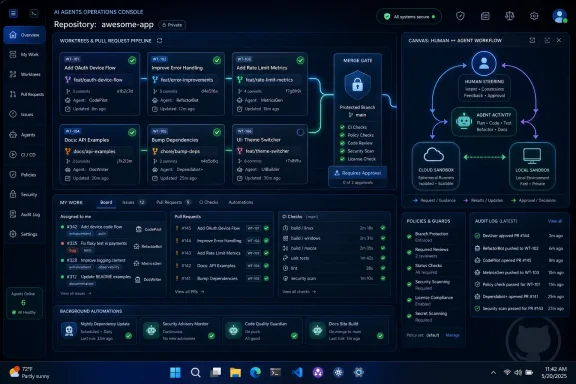
GitHub made its standalone GitHub Copilot app available in technical preview on May 14, 2026, for Windows, macOS, and Linux, giving paid Copilot users a desktop command center for agent-driven development outside the traditional IDE. The timing is not accidental: Microsoft opened Build 2026 on June 2 with Windows, GitHub, and agentic AI welded into a single developer-platform story. The app is less about giving Copilot another window and more about changing where software work is coordinated. If GitHub can make the pull request, issue, terminal, code review, and agent loop feel like one workflow, the IDE stops being the only cockpit that matters.
For years, GitHub Copilot’s value proposition was almost comfortingly narrow. It sat inside the editor, watched the file in front of you, and suggested code that was sometimes uncanny, sometimes wrong, and often useful enough to justify the subscription. That Copilot was an assistant in the literal sense: present, subordinate, and bounded by the developer’s current context.
The new GitHub Copilot app signals a different ambition. It is a desktop application built around agent-driven development, where Copilot is expected to take on longer-running workstreams, coordinate with GitHub issues and pull requests, and help push completed work through review and merge. That is not autocomplete with a better coat of paint. It is GitHub trying to turn Copilot into a project participant.
This explains why the app exists even though Copilot already lives in Visual Studio Code, Visual Studio, JetBrains IDEs, GitHub.com, GitHub Mobile, the command line, and code review workflows. The desktop app is not a convenience layer for people who dislike browser tabs. It is an attempt to create a durable workspace for AI work that survives across tasks, repos, PRs, and interruptions.
That matters because agentic coding breaks the old editor metaphor. A developer writing a function is doing one thing in one place. A developer supervising three AI agents, reviewing diffs, watching CI, nudging one branch, rejecting another, and merging a safe change is doing something closer to engineering management at machine speed. The IDE can host pieces of that workflow, but it was not designed to be the dispatch board.
That is a profound shift in how coding tools are monetized, trusted, and evaluated. A code completion can be judged in seconds. An agent session may consume minutes or hours, touch dozens of files, invoke tools, run tests, and generate a pull request that looks finished while hiding subtle risk. The surface that manages those sessions becomes more important than the model that generated any one line of code.
GitHub has a structural advantage here. It owns the repository graph, the issue tracker, pull requests, code review, CI integration, security alerts, and enterprise policy layer for a large share of professional software development. A rival coding agent can write excellent code, but it still has to enter the GitHub workflow somewhere. GitHub’s bet is that the place where agents enter, operate, and get judged should also be a GitHub product.
That does not make the Copilot app automatically better than an IDE-native agent or a terminal-first tool. But it does make it strategically coherent. GitHub does not need to win every prompt-level benchmark if it can become the system of record for agentic software work. In that world, Copilot is not merely a model picker. It is a workflow broker.
A serious coding agent needs to read files, modify repositories, run commands, inspect build failures, invoke package managers, and sometimes interact with local tooling. That is powerful on a developer workstation and terrifying on an unmanaged one. The difference between an assistant and a liability is not only model quality; it is the operating system boundary around what the agent can see and do.
This is where Windows has been trying to recover developer credibility. The modern Windows developer story is not just Visual Studio anymore. It is Windows Terminal, WSL, PowerShell 7, Dev Drive, Visual Studio Code, package managers, containers, and now AI agents that need a controlled execution environment. Microsoft’s pitch is that Windows can be the host OS where agents are productive without being allowed to roam freely through the user’s desktop, clipboard, input devices, and identity context.
The catch is that Microsoft has made similar platform promises before. Developers remember UWP, Windows Store ambitions, Dev Home, Windows Subsystem for Android, and a rotating cast of “future of Windows development” initiatives that did not always become the center of gravity. The Copilot app will not succeed because Microsoft says Windows is trusted. It will succeed only if developers feel safer and faster using it than stitching together competing tools themselves.
The old Copilot subscription was easy to understand. You paid a predictable fee, received completions and chat, and judged the tool by whether it saved enough time to be worth the monthly cost. Agentic workflows are messier. A long session that explores a bad path, burns through premium model usage, and produces an unmergeable PR is not just annoying. It can become a line item.
This is the unresolved tension behind the Copilot app. The app encourages developers to think bigger: assign work, run sessions in parallel, let agents grind through bugs and review comments. The billing model encourages developers to think harder: which tasks deserve agent time, which model is being used, how much hidden usage is accumulating, and whether the same job would be cheaper in another tool.
That tension is not unique to GitHub. Every serious AI coding platform is colliding with the same physics. Frontier models are expensive, long-running tool use is expensive, and the industry’s initial flat-rate subscriptions trained users to expect unlimited magic. GitHub’s problem is that it is trying to introduce a more ambitious product at the same moment it is making the cost of ambition more visible.
For enterprises, that may actually be a feature. Centralized billing, admin controls, preview policies, and usage analysis are exactly the things procurement and security teams want before allowing AI agents near production code. For individual developers, especially heavy users who embraced Copilot precisely because it felt predictable, the shift may feel like a rug pull even if the business logic is defensible.
That distinction matters because chat is an interface, not a workflow. Developers do not ship software by receiving plausible explanations in a text pane. They ship through branches, diffs, tests, reviews, approvals, deployment checks, and rollback plans. GitHub’s advantage is that it can wrap AI around the boring machinery that actually determines whether code becomes part of a product.
The app’s deeper promise is to reduce the transaction cost of moving from “the agent says it fixed it” to “this change is safe enough to merge.” That means surfacing CI failures, responding to code review comments, managing pull request state, and keeping the developer oriented across multiple autonomous attempts. The glamour is code generation. The value is lifecycle management.
This is also where GitHub may avoid the trap that has caught many AI coding demos. A model can look brilliant in a five-minute presentation where it builds a toy app. It looks much less magical when it encounters flaky tests, dependency conflicts, half-documented internal conventions, security scanners, and a reviewer who wants the change split into three smaller PRs. The Copilot app’s success will depend on how well it handles the unglamorous middle of software work.
But the IDE’s monopoly over “where coding happens” is weakening. A growing amount of development work now happens in issue comments, pull request threads, CI logs, cloud workspaces, mobile notifications, and agent sessions that run while the human is elsewhere. The editor remains essential, but it is no longer the only place where meaningful software decisions are made.
That is why GitHub’s desktop move is important. It follows the work rather than the file. Instead of asking developers to live entirely inside an editor tab, it gives them a place to manage outcomes: which tasks are in flight, which diffs need attention, which agent got stuck, which PR is ready, and which automated change should never see the main branch.
This is also why the app will irritate some power users. Developers already suffer from tool sprawl. Adding another desktop surface can feel like one more notification source, one more login state, one more Electron-shaped slab of memory pressure, and one more place where Microsoft and GitHub can nudge workflow behavior. The app has to earn its existence by collapsing complexity, not simply relocating it.
From above, GitHub faces model and agent companies that want to own the developer relationship directly. If a developer spends all day in a Codex or Claude desktop app, GitHub becomes infrastructure in the background: the place where repos live, not the place where decisions happen. That is a dangerous demotion for a platform whose value grows when developers interact inside its workflow.
From below, GitHub faces editors and terminals that can embed agents deeply into local development. Visual Studio Code is friendly territory for Microsoft, but the broader pattern is not guaranteed to favor GitHub. Developers often prefer tools that stay close to the code, especially when they are debugging, refactoring, or working in complex local environments that a higher-level agent dashboard may not fully understand.
The Copilot app is GitHub’s answer to both threats. It says the agent hub should be close enough to local development to feel immediate, but close enough to GitHub’s collaboration layer to manage the full lifecycle. That is a plausible middle ground, and perhaps the only one GitHub can defend long term.
Who can enable the technical preview? Which Copilot plans are eligible? Can admins disable CLI access? How are agent sessions logged? What repositories can an agent touch? What happens when a generated change introduces a vulnerability? How is usage billed back to teams? Can security teams distinguish human-authored commits from agent-authored ones with enough confidence to audit the chain of responsibility?
GitHub and Microsoft clearly know these questions are coming. That is why the preview is tied to paid plans and, for Business and Enterprise customers, administrator-controlled preview and policy settings. It is also why Microsoft is talking about Windows isolation, identity, and secure agent execution in the same breath as Copilot workflows. The market will not accept autonomous coding agents at scale if they look like unsupervised scripts with a friendly avatar.
The uncomfortable truth is that many organizations are already using these tools informally. Developers install extensions, paste errors into external chatbots, run local agents, and experiment with personal subscriptions because the productivity gains are too tempting to ignore. A sanctioned Copilot app gives IT a chance to bring that behavior into a governed channel. It also gives Microsoft a chance to argue that the safest AI coding workflow is the one running through its stack.
Preview software in developer tooling has a long tradition of becoming production infrastructure before anyone officially admits it. If the Copilot app proves useful, teams will start relying on it for real work. Once that happens, every product change becomes a workflow disruption, and every billing adjustment becomes a management issue. GitHub needs to move quickly, but it also needs to avoid teaching customers that agentic development is inherently unstable.
There is also a trust gap that no preview program can paper over. Developers need to understand what the agent did, why it did it, and how to unwind the change. They need clear diffs, reproducible commands, visible test results, and enough transparency to distinguish a smart shortcut from an expensive hallucination. The app cannot merely celebrate completed work. It must make skepticism efficient.
That may be the hardest product-design problem in AI coding. The best assistant is not the one that produces the most code. It is the one that lets a human maintain judgment without drowning in supervision overhead. If every agent session requires a forensic audit, the productivity story collapses. If the audit trail is too thin, the risk story explodes.
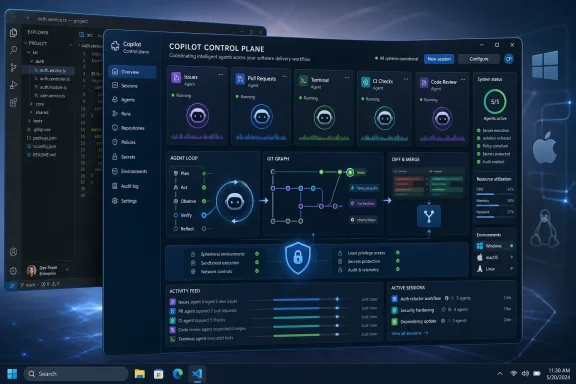 Microsoft Is Moving the Developer Surface Out of the Editor
For years, GitHub Copilot’s value proposition was almost comfortingly narrow. It sat inside the editor, watched the file in front of you, and suggested code that was sometimes uncanny, sometimes wrong, and often useful enough to justify the subscription. That Copilot was an assistant in the literal sense: present, subordinate, and bounded by the developer’s current context.The new GitHub Copilot app signals a different ambition. It is a desktop application built around agent-driven development, where Copilot is expected to take on longer-running workstreams, coordinate with GitHub issues and pull requests, and help push completed work through review and merge. That is not autocomplete with a better coat of paint. It is GitHub trying to turn Copilot into a project participant.
This explains why the app exists even though Copilot already lives in Visual Studio Code, Visual Studio, JetBrains IDEs, GitHub.com, GitHub Mobile, the command line, and code review workflows. The desktop app is not a convenience layer for people who dislike browser tabs. It is an attempt to create a durable workspace for AI work that survives across tasks, repos, PRs, and interruptions.
That matters because agentic coding breaks the old editor metaphor. A developer writing a function is doing one thing in one place. A developer supervising three AI agents, reviewing diffs, watching CI, nudging one branch, rejecting another, and merging a safe change is doing something closer to engineering management at machine speed. The IDE can host pieces of that workflow, but it was not designed to be the dispatch board.
The App Is Really About Owning the Agent Loop
The most important word in GitHub’s description of the Copilot app is not “desktop.” It is “parallel.” The product is designed around parallel workstreams, which means GitHub is acknowledging that the new unit of AI-assisted development is no longer a single prompt or completion. It is a session: a chunk of work assigned to an agent, monitored over time, inspected through its changes, and either accepted, corrected, or discarded.That is a profound shift in how coding tools are monetized, trusted, and evaluated. A code completion can be judged in seconds. An agent session may consume minutes or hours, touch dozens of files, invoke tools, run tests, and generate a pull request that looks finished while hiding subtle risk. The surface that manages those sessions becomes more important than the model that generated any one line of code.
GitHub has a structural advantage here. It owns the repository graph, the issue tracker, pull requests, code review, CI integration, security alerts, and enterprise policy layer for a large share of professional software development. A rival coding agent can write excellent code, but it still has to enter the GitHub workflow somewhere. GitHub’s bet is that the place where agents enter, operate, and get judged should also be a GitHub product.
That does not make the Copilot app automatically better than an IDE-native agent or a terminal-first tool. But it does make it strategically coherent. GitHub does not need to win every prompt-level benchmark if it can become the system of record for agentic software work. In that world, Copilot is not merely a model picker. It is a workflow broker.
Windows Gets Cast as the Safe Place for Dangerous Automation
Microsoft’s Build 2026 Windows messaging gives the Copilot app a second layer of meaning. The company is positioning Windows as a “trusted platform for development,” with an emphasis on process isolation, session isolation, identity binding, and constrained agent execution. Those phrases sound like conference-room security language, but they point at a real problem: coding agents are useful precisely because they can do things that would be dangerous if done carelessly.A serious coding agent needs to read files, modify repositories, run commands, inspect build failures, invoke package managers, and sometimes interact with local tooling. That is powerful on a developer workstation and terrifying on an unmanaged one. The difference between an assistant and a liability is not only model quality; it is the operating system boundary around what the agent can see and do.
This is where Windows has been trying to recover developer credibility. The modern Windows developer story is not just Visual Studio anymore. It is Windows Terminal, WSL, PowerShell 7, Dev Drive, Visual Studio Code, package managers, containers, and now AI agents that need a controlled execution environment. Microsoft’s pitch is that Windows can be the host OS where agents are productive without being allowed to roam freely through the user’s desktop, clipboard, input devices, and identity context.
The catch is that Microsoft has made similar platform promises before. Developers remember UWP, Windows Store ambitions, Dev Home, Windows Subsystem for Android, and a rotating cast of “future of Windows development” initiatives that did not always become the center of gravity. The Copilot app will not succeed because Microsoft says Windows is trusted. It will succeed only if developers feel safer and faster using it than stitching together competing tools themselves.
The Pricing Shift Changes the Emotional Contract
The Copilot app also lands at an awkward moment for customers because GitHub Copilot’s economics are changing. GitHub’s move toward usage-based billing for Copilot plans, effective June 1, 2026, reframes agentic development from an all-you-can-eat productivity promise into a metered compute relationship. That may be economically rational for GitHub, but it changes how developers experience the product.The old Copilot subscription was easy to understand. You paid a predictable fee, received completions and chat, and judged the tool by whether it saved enough time to be worth the monthly cost. Agentic workflows are messier. A long session that explores a bad path, burns through premium model usage, and produces an unmergeable PR is not just annoying. It can become a line item.
This is the unresolved tension behind the Copilot app. The app encourages developers to think bigger: assign work, run sessions in parallel, let agents grind through bugs and review comments. The billing model encourages developers to think harder: which tasks deserve agent time, which model is being used, how much hidden usage is accumulating, and whether the same job would be cheaper in another tool.
That tension is not unique to GitHub. Every serious AI coding platform is colliding with the same physics. Frontier models are expensive, long-running tool use is expensive, and the industry’s initial flat-rate subscriptions trained users to expect unlimited magic. GitHub’s problem is that it is trying to introduce a more ambitious product at the same moment it is making the cost of ambition more visible.
For enterprises, that may actually be a feature. Centralized billing, admin controls, preview policies, and usage analysis are exactly the things procurement and security teams want before allowing AI agents near production code. For individual developers, especially heavy users who embraced Copilot precisely because it felt predictable, the shift may feel like a rug pull even if the business logic is defensible.
GitHub Is Building a Control Plane, Not Another Chat App
The consumer AI world has trained users to see every new AI app as a chat box with a mascot. That framing undersells what GitHub is doing. The Copilot app is not primarily a place to ask programming questions. It is a control plane for assigning, supervising, and integrating machine-generated software work.That distinction matters because chat is an interface, not a workflow. Developers do not ship software by receiving plausible explanations in a text pane. They ship through branches, diffs, tests, reviews, approvals, deployment checks, and rollback plans. GitHub’s advantage is that it can wrap AI around the boring machinery that actually determines whether code becomes part of a product.
The app’s deeper promise is to reduce the transaction cost of moving from “the agent says it fixed it” to “this change is safe enough to merge.” That means surfacing CI failures, responding to code review comments, managing pull request state, and keeping the developer oriented across multiple autonomous attempts. The glamour is code generation. The value is lifecycle management.
This is also where GitHub may avoid the trap that has caught many AI coding demos. A model can look brilliant in a five-minute presentation where it builds a toy app. It looks much less magical when it encounters flaky tests, dependency conflicts, half-documented internal conventions, security scanners, and a reviewer who wants the change split into three smaller PRs. The Copilot app’s success will depend on how well it handles the unglamorous middle of software work.
The IDE Is Not Dead, but Its Monopoly Is Weakening
It would be easy to overstate this shift and declare the IDE obsolete. That would be silly. Developers will still need editors for reading code, shaping architecture, debugging hard problems, and making judgment calls that require deep local context. Visual Studio Code, Visual Studio, JetBrains IDEs, and terminal workflows are not going away because GitHub shipped a preview desktop app.But the IDE’s monopoly over “where coding happens” is weakening. A growing amount of development work now happens in issue comments, pull request threads, CI logs, cloud workspaces, mobile notifications, and agent sessions that run while the human is elsewhere. The editor remains essential, but it is no longer the only place where meaningful software decisions are made.
That is why GitHub’s desktop move is important. It follows the work rather than the file. Instead of asking developers to live entirely inside an editor tab, it gives them a place to manage outcomes: which tasks are in flight, which diffs need attention, which agent got stuck, which PR is ready, and which automated change should never see the main branch.
This is also why the app will irritate some power users. Developers already suffer from tool sprawl. Adding another desktop surface can feel like one more notification source, one more login state, one more Electron-shaped slab of memory pressure, and one more place where Microsoft and GitHub can nudge workflow behavior. The app has to earn its existence by collapsing complexity, not simply relocating it.
The Competitive Threat Is Coming from Both Sides
GitHub’s move is defensive as much as offensive. AI coding is no longer a one-product category. Developers are comparing Copilot with Claude Code, OpenAI Codex, Cursor, Devin-style agents, IDE-native assistants, terminal agents, and custom workflows tied together with MCP servers and local scripts. The question is not whether developers will use AI for code; it is which layer gets to mediate that use.From above, GitHub faces model and agent companies that want to own the developer relationship directly. If a developer spends all day in a Codex or Claude desktop app, GitHub becomes infrastructure in the background: the place where repos live, not the place where decisions happen. That is a dangerous demotion for a platform whose value grows when developers interact inside its workflow.
From below, GitHub faces editors and terminals that can embed agents deeply into local development. Visual Studio Code is friendly territory for Microsoft, but the broader pattern is not guaranteed to favor GitHub. Developers often prefer tools that stay close to the code, especially when they are debugging, refactoring, or working in complex local environments that a higher-level agent dashboard may not fully understand.
The Copilot app is GitHub’s answer to both threats. It says the agent hub should be close enough to local development to feel immediate, but close enough to GitHub’s collaboration layer to manage the full lifecycle. That is a plausible middle ground, and perhaps the only one GitHub can defend long term.
Enterprise IT Will Care Less About Magic Than Blast Radius
For WindowsForum readers managing fleets, the most interesting part of this story is not whether the app writes a clever regex. It is what happens when agentic coding becomes normal inside organizations with compliance requirements, internal repositories, secrets, build systems, and production deployment pipelines. The administrative questions arrive quickly and they are not philosophical.Who can enable the technical preview? Which Copilot plans are eligible? Can admins disable CLI access? How are agent sessions logged? What repositories can an agent touch? What happens when a generated change introduces a vulnerability? How is usage billed back to teams? Can security teams distinguish human-authored commits from agent-authored ones with enough confidence to audit the chain of responsibility?
GitHub and Microsoft clearly know these questions are coming. That is why the preview is tied to paid plans and, for Business and Enterprise customers, administrator-controlled preview and policy settings. It is also why Microsoft is talking about Windows isolation, identity, and secure agent execution in the same breath as Copilot workflows. The market will not accept autonomous coding agents at scale if they look like unsupervised scripts with a friendly avatar.
The uncomfortable truth is that many organizations are already using these tools informally. Developers install extensions, paste errors into external chatbots, run local agents, and experiment with personal subscriptions because the productivity gains are too tempting to ignore. A sanctioned Copilot app gives IT a chance to bring that behavior into a governed channel. It also gives Microsoft a chance to argue that the safest AI coding workflow is the one running through its stack.
The Preview Label Is Doing a Lot of Work
Technical preview is not a footnote. It is a warning label and a market probe. GitHub is signaling that the app’s shape may change, that policies and capabilities may evolve, and that early adopters should expect rough edges. In a normal app release, that would be unremarkable. In an agentic development tool that can modify code and influence pull requests, it is more consequential.Preview software in developer tooling has a long tradition of becoming production infrastructure before anyone officially admits it. If the Copilot app proves useful, teams will start relying on it for real work. Once that happens, every product change becomes a workflow disruption, and every billing adjustment becomes a management issue. GitHub needs to move quickly, but it also needs to avoid teaching customers that agentic development is inherently unstable.
There is also a trust gap that no preview program can paper over. Developers need to understand what the agent did, why it did it, and how to unwind the change. They need clear diffs, reproducible commands, visible test results, and enough transparency to distinguish a smart shortcut from an expensive hallucination. The app cannot merely celebrate completed work. It must make skepticism efficient.
That may be the hardest product-design problem in AI coding. The best assistant is not the one that produces the most code. It is the one that lets a human maintain judgment without drowning in supervision overhead. If every agent session requires a forensic audit, the productivity story collapses. If the audit trail is too thin, the risk story explodes.
The Copilot App Makes GitHub’s Bet Unmistakable
The practical readout is straightforward: GitHub is no longer content to be an AI feature inside other development environments. It wants Copilot to become a coordinating layer for software work, and the desktop app is the clearest expression of that strategy so far.- GitHub Copilot now has a standalone desktop app in technical preview for Windows, macOS, and Linux.
- The app is aimed at agent-driven development, especially parallel workstreams, GitHub integration, pull request management, and moving agent output toward merge.
- Business and Enterprise access depends on administrator preview settings and Copilot CLI policy, making governance part of the product from the start.
- Microsoft is tying the app’s arrival to a broader Build 2026 story about Windows as a secure host for developer agents.
- Usage-based billing changes the economics of agentic coding just as GitHub is encouraging developers to run longer and more ambitious sessions.
- The app’s real competition is not only other coding assistants, but any tool that becomes the place developers supervise autonomous software work.
References
- Primary source: thurrott.com
Published: Tue, 02 Jun 2026 19:26:36 GMT
github-copilot-app - Thurrott.com
 www.thurrott.com
- Related coverage: techradar.com
10 products that launched at Microsoft Build — and what happened to them | TechRadar
From Windows 8 to Copilot, here’s everything that was born at Buildwww.techradar.com - Related coverage: windowscentral.com
How to watch Microsoft Build 2026: Windows 11, NVIDIA RTX Spark, AI agents, and more | Windows Central
Build isn't just some boring developer conference. It showcases the future of Windows and computing.www.windowscentral.com - Related coverage: tomsguide.com
Microsoft Build 2026 preview — all the big announcements to expect | Tom's Guide
Microsoft Build 2026 should be a showcase for the company's latest and upcoming AI efforts. Here are some of the big announcements we expect to see.www.tomsguide.com - Official source: learn.microsoft.com
Set up GitHub Copilot for Windows development - Windows apps | Microsoft Learn
Install and configure GitHub Copilot, the WinUI 3 plugin, and the Microsoft Learn MCP server for AI-assisted Windows app development.learn.microsoft.com - Official source: developer.microsoft.com
GDC 2026: Windows Game Development with Visual Studio 2026 & GitHub Copilot
From improvements in runtime performance to updated Windows tools, here are some ways to make everyday development work more efficient.developer.microsoft.com
- Official source: blogs.windows.com
Copilot App on Windows: Opening web links alongside your conversations begins rolling out to Windows Insiders
Hello Windows Insiders, In today's update, we are introducing a new way to get things done in the Copblogs.windows.com - Official source: build.microsoft.com
Your home for Microsoft Build
Go deep on real code and real systems with the teams building and scaling AI at Microsoft Build, June 2–3, 2026, in San Francisco and online.build.microsoft.com - Official source: docs.github.com
Quickstart for GitHub Copilot - GitHub Docs
Quickly learn how to use GitHub Copilot. docs.github.com
- Related coverage: enterprisedna.co
Build 2026: Polaris Replaces GPT-4 in GitHub Copilot — Enterprise DNA
At Build 2026, Microsoft unveiled Project Polaris to replace GPT-4 Turbo in GitHub Copilot by August and open-sourced the Windows Agent Framework under MIT.enterprisedna.co - Official source: devblogs.microsoft.com
Now in Public Preview: GitHub Copilot build performance for Windows - C++ Team Blog
Try out GitHub Copilot build performance for Windows today in Visual Studio 2026. Optimize your build performance for C++ applications.devblogs.microsoft.com - Related coverage: notebookcheck.net
Microsoft Build 2026: What to expect from the June 2 keynote - Notebookcheck News
Microsoft Build 2026 opens June 2 in San Francisco with AI agents, GitHub Copilot updates, and Windows local AI. Here is what developers can expect. www.notebookcheck.net
- Related coverage: winbuzzer.com
GitHub Copilot App Launches Agentic Desktop Preview
Microsoft has launched the GitHub Copilot app in technical preview as a standalone agentic desktop client for macOS, Windows, and Linux on paid Copilot plans.winbuzzer.com - Related coverage: tomshardware.com
Admins finally get the power to uninstall Microsoft Copilot on Windows 11 Pro, Enterprise, and EDU versions — devices must meet specific conditions to allow the removal of the AI app | Tom's Hardware
One less bloatware on Windows 11.www.tomshardware.com - Related coverage: github.blog
GitHub Copilot app is now available in technical preview - GitHub Changelog
The GitHub Copilot app is now in technical preview. It’s a GitHub-native desktop experience to start agentic development from the work in front of you, keep it isolated, steer it…github.blog
- Related coverage: devopsjournal.io

GitHub Copilot App is now in Technical Preview | DevOps Journal
GitHub Copilot App is now in technical preview — a standalone desktop app for agent-driven development with parallel sessions, three session modes, and Agent Merge.
devopsjournal.io
- Related coverage: gihyo.jp
GitHub、デスクトップ用のCopilotアプリをテクニカルプレビューとして公開 | gihyo.jp
GitHubは2026年5月15日、GitHub Copilotアプリのテクニカルプレビュー開始を発表した。GitHubのIssueやプルリクエストなど、実際の開発作業にひも付く文脈を起点に、エージェントによる開発セッションを立ち上げ、コード変更からレビュー、検証、プルリクエスト作成までを1つのデスクトップアプリ内で進められるようになる。gihyo.jp - Related coverage: byteiota.com
GitHub Copilot App: Desktop Agent Is Now in Technical Preview | byteiota
GitHub Copilot's new desktop app runs parallel agent sessions with isolated git worktrees. Here's what it does, who has access, and how to get started.byteiota.com - Related coverage: nerova.ai
GitHub Copilot App Enters Technical Preview: Why the New Desktop Agent Workflow Matters
GitHub’s new Copilot app is more than another client. The May 14 technical preview turns issues, sessions, validation, and pull requests into one desktop workflow, showing where...nerova.ai - Related coverage: bighatgroup.com
Copilot Weekly: Desktop App Preview, Cloud Agent Expansion, and CLI v1.0.49 | Big Hat Group Inc.
GitHub Copilot enters a new era with the desktop app technical preview, one-click Actions fixes, cheaper cloud agent models, and a massive CLI update — plus GPT-5.3-Codex becomes the first LTS base model.www.bighatgroup.com - Related coverage: thenewstack.io
GitHub takes aim at Claude Code and Codex with its new Copilot app
With its AI rivals already in the desktop agent race, GitHub bets its existing developer infrastructure gives it the inside track. thenewstack.io
- Related coverage: creativebloq.com
Microsoft's "ironic" GitHub Copilot logo sparks controversy | Creative Bloq
"No AI" is a strange flex for an AI bot.www.creativebloq.com