

GitHub opened the GitHub Copilot app technical preview to eligible paid Copilot users in June 2026, removing the waitlist for subscribers on Pro, Pro+, Max, Business, and Enterprise plans who want to test its agent-native desktop development workflow. That is a small access change with a much larger message behind it. GitHub is no longer selling Copilot as a smarter autocomplete box; it is trying to make Copilot the operating layer for software work. The preview is rough by definition, but the strategic direction is anything but subtle.
For years, Copilot’s center of gravity was the editor. It completed lines, suggested functions, answered questions in chat, and gradually learned to sit beside the developer rather than merely behind the cursor. The new desktop app moves the product into a more ambitious category: not a coding assistant, but a task-running environment where agents can be assigned work, monitored, corrected, and eventually used to shepherd changes through review.
That shift matters because software development is not only typing code. It is issue triage, context gathering, branch management, test failure analysis, pull request review, and the often messy negotiation between “the code compiles” and “the change is safe to ship.” GitHub’s pitch is that the Copilot app can bring more of that lifecycle into one interface.
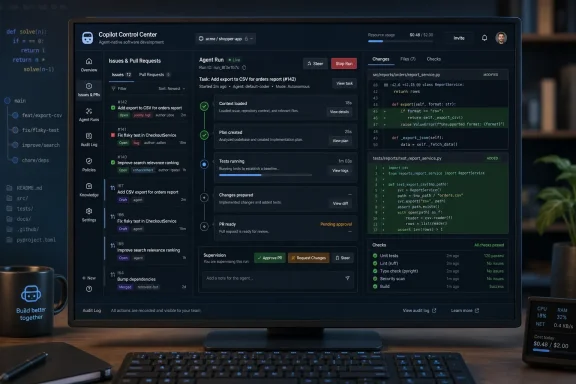
The technical preview reportedly lets users start from GitHub context such as issues, pull requests, prompts, or previous sessions. From there, the app is designed around isolated work sessions, agent progress, human steering, validation, and landing changes through pull request review. That is a different mental model from asking a chatbot to “fix this bug” and pasting the answer into an IDE.
The waitlist removal is therefore not just a rollout milestone. It is GitHub inviting a much larger group of paying developers to test whether the agentic development story survives contact with real repositories, real deadlines, and real review cultures.
GitHub’s desktop app is an attempt to collapse at least part of that sprawl. If the agent can begin from an issue, work in a contained session, expose its changes, and help turn that work into a reviewed pull request, GitHub becomes more than the repository host. It becomes the coordination layer for human and machine contributors.
That is strategically valuable for GitHub because the repository is the one place where developer intent, code history, review policy, and delivery workflow already intersect. Other AI coding tools can generate code, and some are excellent at it. GitHub’s advantage is that it owns the workflow metadata around the code.
This is also why the app’s desktop form factor is interesting. A browser tab can host a chat panel, but a desktop environment can feel more like a persistent command center. It can keep sessions visible, separate agent workstreams, and make the developer feel less like they are “prompting a bot” and more like they are supervising a queue of software tasks.
Developers do not merely need agents that can produce diffs. They need agents that can explain what they changed, show intermediate reasoning in useful ways, avoid stomping on local work, respect project conventions, and fail safely when the task is ambiguous. A coding agent that saves 20 minutes and then creates a one-hour review burden is not a productivity tool. It is a very confident intern with root access.
GitHub appears to understand this, at least in its positioning. The app emphasizes deciding what agents work on, how they work, and what ships. That framing keeps the human in the approval path, which is essential for both individual trust and enterprise adoption.
The danger is that “human oversight” can become a comforting phrase used to paper over workflow complexity. Reviewing AI-generated code is not the same as reviewing a colleague’s patch, because the failure modes differ. Agents may produce plausible code that passes superficial checks while misunderstanding product intent, security boundaries, or long-term maintainability.
That reality is already reshaping Copilot’s pricing story. GitHub has been moving toward usage-aware packaging, AI credits, and higher tiers for heavier workloads. The arrival of a desktop app built around agent-driven work makes that shift feel less like a billing footnote and more like the business model catching up with the product roadmap.
For casual users, this may create confusion. A subscription that once felt like an all-you-can-code productivity upgrade increasingly looks like a bundle of metered AI capacity. For power users, especially those experimenting with multi-hour agent tasks, the difference between “included” and “billable” will matter.
For enterprises, the trade-off is more familiar. If agent sessions reduce engineering cycle time, the cost may be easy to justify. But procurement teams and platform owners will want predictability, policy controls, auditability, and clear reporting before they let agentic workflows spread across large organizations.
That can be useful. Developers working across repositories, editors, and environments may prefer a separate agent hub that is not tied to whichever file happens to be open. The app can become a place to queue work, inspect sessions, and manage agent output without turning the IDE into an overloaded dashboard.
But it also complicates the daily toolchain. Windows developers already navigate a split world of IDEs, WSL, terminals, containers, local services, cloud runners, and browser-based review. If the Copilot app becomes another pane demanding attention, it may increase the very context switching it claims to reduce.
The difference will come down to integration quality. A good agent desktop should hand work cleanly to the editor, repository, test runner, and pull request. A poor one will become an impressive demo that still requires developers to manually reconcile branches, logs, failures, and review comments elsewhere.
Administrators will care about which repositories agents can access, which models are allowed, whether preview features are enabled, how data is handled, and whether generated changes can be audited. They will also care about cost controls, because agentic workflows can turn compute consumption into a new class of shadow spending.
The policy surface is therefore as important as the user interface. If an organization can decide who gets access, what previews are allowed, which agents can run, and how changes enter review, the Copilot app becomes easier to pilot. If those controls are weak or scattered, security teams will slow adoption regardless of developer enthusiasm.
There is also a compliance wrinkle. AI-generated code does not exempt an organization from its usual obligations around licensing, security, privacy, and accountability. The more an agent participates in the software delivery lifecycle, the more important it becomes to preserve a clear record of what changed, why it changed, and who approved it.
That does not mean PR review is sufficient. Reviewers can be overloaded, CI can miss intent-level bugs, and AI-generated diffs can be tedious to inspect if they are too broad. But the PR gives teams a familiar governance structure for experimenting with agents without pretending that generated code should flow straight into production.
This is where agentic development may become less dramatic and more useful. The winning workflow may not be “the AI builds the feature while you drink coffee.” It may be “the AI prepares a narrow, testable patch while you spend your attention on architecture, edge cases, and risk.”
That is a less glamorous story, but it is also more believable. Most teams do not need an artificial senior engineer. They need help converting well-understood tasks into reviewable changes with fewer interruptions.
That does not make the preview unimportant. Early previews often reveal the true shape of a platform before marketing hardens around it. The Copilot app will show whether GitHub can make agent sessions feel trustworthy, interruptible, and reviewable in daily use.
The first wave of broader users will also discover what kinds of tasks agents handle well. Bug fixes with clear reproduction steps may work better than vague product changes. Small refactors may be safer than architecture migrations. Documentation updates, test generation, dependency chores, and issue-to-PR cleanup may become the early sweet spots.
The most revealing feedback will come not from perfect demos, but from failures. When the agent gets stuck, does the app make that obvious? When it produces a bad patch, is it easy to recover? When it misunderstands the issue, can the developer redirect it without starting over?
That mismatch will produce friction. Some developers will embrace agents as a natural extension of automation. Others will see them as a source of low-quality patches and managerial pressure. Both reactions are rational, because agentic coding can either remove toil or create a new layer of AI babysitting.
The cultural question is who gets to define “done.” If managers treat agent-generated code as automatically accelerating delivery, developers may inherit more review burden without more time. If engineers treat agents as tools for bounded tasks, the benefits may be more durable.
GitHub’s challenge is to make the app useful without encouraging reckless delegation. The product has to reward careful task definition, incremental changes, and visible validation. Otherwise, the agentic workflow becomes a factory for impressive-looking pull requests that senior engineers quietly distrust.
GitHub’s answer is to build around the repository and the software delivery lifecycle. That is a strong position because real work ultimately has to land somewhere, and for many teams that somewhere is GitHub. If Copilot can connect issues, code changes, reviews, and merges better than standalone coding agents, GitHub can defend its centrality even as model providers compete underneath.
But the field is moving quickly. Developers are already experimenting with coding agents inside IDEs, command-line tools, browser workspaces, and dedicated desktop apps. Model quality, latency, cost, and local environment access will all influence where the work actually happens.
GitHub does not need to win every interface. It needs to make sure that when AI-generated work becomes serious enough to review and ship, GitHub remains the system of record.
 GitHub Wants Copilot to Become the Place Work Happens
For years, Copilot’s center of gravity was the editor. It completed lines, suggested functions, answered questions in chat, and gradually learned to sit beside the developer rather than merely behind the cursor. The new desktop app moves the product into a more ambitious category: not a coding assistant, but a task-running environment where agents can be assigned work, monitored, corrected, and eventually used to shepherd changes through review.That shift matters because software development is not only typing code. It is issue triage, context gathering, branch management, test failure analysis, pull request review, and the often messy negotiation between “the code compiles” and “the change is safe to ship.” GitHub’s pitch is that the Copilot app can bring more of that lifecycle into one interface.
The technical preview reportedly lets users start from GitHub context such as issues, pull requests, prompts, or previous sessions. From there, the app is designed around isolated work sessions, agent progress, human steering, validation, and landing changes through pull request review. That is a different mental model from asking a chatbot to “fix this bug” and pasting the answer into an IDE.
The waitlist removal is therefore not just a rollout milestone. It is GitHub inviting a much larger group of paying developers to test whether the agentic development story survives contact with real repositories, real deadlines, and real review cultures.
The Desktop App Is a Bet Against Tool Sprawl
The most practical argument for the Copilot app is not that agents are magical. It is that modern development already involves too many windows pretending to be the source of truth. A developer may track work in GitHub Issues or Jira, discuss intent in Teams or Slack, edit in VS Code or JetBrains, inspect CI in a browser, review a pull request in GitHub, and keep a terminal open for everything the GUI forgot.GitHub’s desktop app is an attempt to collapse at least part of that sprawl. If the agent can begin from an issue, work in a contained session, expose its changes, and help turn that work into a reviewed pull request, GitHub becomes more than the repository host. It becomes the coordination layer for human and machine contributors.
That is strategically valuable for GitHub because the repository is the one place where developer intent, code history, review policy, and delivery workflow already intersect. Other AI coding tools can generate code, and some are excellent at it. GitHub’s advantage is that it owns the workflow metadata around the code.
This is also why the app’s desktop form factor is interesting. A browser tab can host a chat panel, but a desktop environment can feel more like a persistent command center. It can keep sessions visible, separate agent workstreams, and make the developer feel less like they are “prompting a bot” and more like they are supervising a queue of software tasks.
Agent-Native Is the New Branding, but Supervision Is the Real Product
The phrase agent-native is doing a lot of work here. It suggests a development environment built from the ground up for autonomous or semi-autonomous AI workers rather than retrofitted with a chat sidebar. But the app’s success will depend less on autonomy than on control.Developers do not merely need agents that can produce diffs. They need agents that can explain what they changed, show intermediate reasoning in useful ways, avoid stomping on local work, respect project conventions, and fail safely when the task is ambiguous. A coding agent that saves 20 minutes and then creates a one-hour review burden is not a productivity tool. It is a very confident intern with root access.
GitHub appears to understand this, at least in its positioning. The app emphasizes deciding what agents work on, how they work, and what ships. That framing keeps the human in the approval path, which is essential for both individual trust and enterprise adoption.
The danger is that “human oversight” can become a comforting phrase used to paper over workflow complexity. Reviewing AI-generated code is not the same as reviewing a colleague’s patch, because the failure modes differ. Agents may produce plausible code that passes superficial checks while misunderstanding product intent, security boundaries, or long-term maintainability.
Paid Access Reveals the Economics Behind the Vision
Opening the preview to paid users is unsurprising, but it also says something important about the economics of agentic coding. Long-running coding sessions are more expensive than autocomplete. A model that reads project context, edits files, runs commands, reacts to errors, and iterates over a task consumes far more compute than a line suggestion.That reality is already reshaping Copilot’s pricing story. GitHub has been moving toward usage-aware packaging, AI credits, and higher tiers for heavier workloads. The arrival of a desktop app built around agent-driven work makes that shift feel less like a billing footnote and more like the business model catching up with the product roadmap.
For casual users, this may create confusion. A subscription that once felt like an all-you-can-code productivity upgrade increasingly looks like a bundle of metered AI capacity. For power users, especially those experimenting with multi-hour agent tasks, the difference between “included” and “billable” will matter.
For enterprises, the trade-off is more familiar. If agent sessions reduce engineering cycle time, the cost may be easy to justify. But procurement teams and platform owners will want predictability, policy controls, auditability, and clear reporting before they let agentic workflows spread across large organizations.
Windows Developers Get Another Desktop Control Plane
For WindowsForum readers, the desktop angle deserves special attention. Microsoft and GitHub have spent years embedding Copilot into familiar developer surfaces: Visual Studio, VS Code, GitHub.com, terminals, and cloud workflows. A standalone GitHub Copilot app adds another control plane rather than simply another extension.That can be useful. Developers working across repositories, editors, and environments may prefer a separate agent hub that is not tied to whichever file happens to be open. The app can become a place to queue work, inspect sessions, and manage agent output without turning the IDE into an overloaded dashboard.
But it also complicates the daily toolchain. Windows developers already navigate a split world of IDEs, WSL, terminals, containers, local services, cloud runners, and browser-based review. If the Copilot app becomes another pane demanding attention, it may increase the very context switching it claims to reduce.
The difference will come down to integration quality. A good agent desktop should hand work cleanly to the editor, repository, test runner, and pull request. A poor one will become an impressive demo that still requires developers to manually reconcile branches, logs, failures, and review comments elsewhere.
Enterprise IT Will Care Less About Magic Than Boundaries
The consumer story for agentic coding is speed. The enterprise story is control. Business and Enterprise availability matters because GitHub knows that large organizations will not adopt autonomous coding agents simply because they produce flashy demos.Administrators will care about which repositories agents can access, which models are allowed, whether preview features are enabled, how data is handled, and whether generated changes can be audited. They will also care about cost controls, because agentic workflows can turn compute consumption into a new class of shadow spending.
The policy surface is therefore as important as the user interface. If an organization can decide who gets access, what previews are allowed, which agents can run, and how changes enter review, the Copilot app becomes easier to pilot. If those controls are weak or scattered, security teams will slow adoption regardless of developer enthusiasm.
There is also a compliance wrinkle. AI-generated code does not exempt an organization from its usual obligations around licensing, security, privacy, and accountability. The more an agent participates in the software delivery lifecycle, the more important it becomes to preserve a clear record of what changed, why it changed, and who approved it.
The Pull Request Remains the Firewall
GitHub’s smartest move is keeping the pull request at the center of the agentic workflow. However advanced the app becomes, the PR is still where many teams enforce quality, ownership, CI validation, and institutional memory. It is the checkpoint where software work becomes organizationally visible.That does not mean PR review is sufficient. Reviewers can be overloaded, CI can miss intent-level bugs, and AI-generated diffs can be tedious to inspect if they are too broad. But the PR gives teams a familiar governance structure for experimenting with agents without pretending that generated code should flow straight into production.
This is where agentic development may become less dramatic and more useful. The winning workflow may not be “the AI builds the feature while you drink coffee.” It may be “the AI prepares a narrow, testable patch while you spend your attention on architecture, edge cases, and risk.”
That is a less glamorous story, but it is also more believable. Most teams do not need an artificial senior engineer. They need help converting well-understood tasks into reviewable changes with fewer interruptions.
The Preview Label Is Doing Real Work
Technical previews exist because vendors want feedback before making stronger guarantees. In this case, the label should be taken seriously. Developers should expect rough edges, shifting capabilities, and possible changes to access, pricing, supported platforms, or policy behavior.That does not make the preview unimportant. Early previews often reveal the true shape of a platform before marketing hardens around it. The Copilot app will show whether GitHub can make agent sessions feel trustworthy, interruptible, and reviewable in daily use.
The first wave of broader users will also discover what kinds of tasks agents handle well. Bug fixes with clear reproduction steps may work better than vague product changes. Small refactors may be safer than architecture migrations. Documentation updates, test generation, dependency chores, and issue-to-PR cleanup may become the early sweet spots.
The most revealing feedback will come not from perfect demos, but from failures. When the agent gets stuck, does the app make that obvious? When it produces a bad patch, is it easy to recover? When it misunderstands the issue, can the developer redirect it without starting over?
GitHub Is Moving Faster Than Developer Culture
The uncomfortable truth is that tools can move faster than teams. GitHub can ship an agent-native desktop app, but most organizations still have review habits, branching strategies, security gates, and release practices designed around humans doing most of the implementation work manually.That mismatch will produce friction. Some developers will embrace agents as a natural extension of automation. Others will see them as a source of low-quality patches and managerial pressure. Both reactions are rational, because agentic coding can either remove toil or create a new layer of AI babysitting.
The cultural question is who gets to define “done.” If managers treat agent-generated code as automatically accelerating delivery, developers may inherit more review burden without more time. If engineers treat agents as tools for bounded tasks, the benefits may be more durable.
GitHub’s challenge is to make the app useful without encouraging reckless delegation. The product has to reward careful task definition, incremental changes, and visible validation. Otherwise, the agentic workflow becomes a factory for impressive-looking pull requests that senior engineers quietly distrust.
The Bigger Fight Is Over the Developer Desktop
The Copilot app also belongs to a broader platform battle. AI coding vendors are competing not only over model quality, but over where developers spend their working day. The editor, terminal, browser, repository, and chat client are all candidates to become the command center for AI-assisted work.GitHub’s answer is to build around the repository and the software delivery lifecycle. That is a strong position because real work ultimately has to land somewhere, and for many teams that somewhere is GitHub. If Copilot can connect issues, code changes, reviews, and merges better than standalone coding agents, GitHub can defend its centrality even as model providers compete underneath.
But the field is moving quickly. Developers are already experimenting with coding agents inside IDEs, command-line tools, browser workspaces, and dedicated desktop apps. Model quality, latency, cost, and local environment access will all influence where the work actually happens.
GitHub does not need to win every interface. It needs to make sure that when AI-generated work becomes serious enough to review and ship, GitHub remains the system of record.
The No-Waitlist Moment Turns Copilot Into a Governance Test
The immediate news is simple: more paid users can now try the GitHub Copilot app without waiting. The deeper story is that GitHub is pushing agentic development into the hands of the customers most likely to stress-test it: professionals, teams, and enterprises with real repositories and real consequences.- The GitHub Copilot app is now broadly available as a technical preview to eligible paid Copilot subscribers, while free users remain outside the main access path.
- The app is designed around agent-driven development sessions that begin from GitHub context and move toward pull request review.
- The most important promise is not code generation by itself, but reducing the distance between issue, implementation, validation, review, and merge.
- The biggest risks are review burden, unclear cost exposure, weak task boundaries, and misplaced confidence in plausible AI-generated changes.
- Enterprise adoption will depend on administrative controls, auditability, policy enforcement, and predictable billing as much as raw model capability.
- The preview should be treated as an experiment in workflow design, not as proof that autonomous software delivery has arrived.
References
- Primary source: thewincentral.com
Published: 2026-06-11T07:07:07.842545
GitHub Copilot App Now Available to All Paid Users - WinCentral
GitHub removes the Copilot app waitlist, giving all paid subscribers access to its new AI agent-powered desktop experience. - Read in AI News on WinCentral thewincentral.com
- Official source: docs.github.com
About the GitHub Copilot app - GitHub Docs
The GitHub Copilot app is a desktop application for agent-driven development that brings parallel workstreams, GitHub integration, and PR lifecycle management into one place. docs.github.com
- Related coverage: github.blog
GitHub Copilot app is now available in technical preview - GitHub Changelog
The GitHub Copilot app is now in technical preview. It’s a GitHub-native desktop experience to start agentic development from the work in front of you, keep it isolated, steer it…github.blog
- Official source: github.com
GitHub Copilot · Plans & pricing · GitHub
GitHub Copilot works alongside you directly in your editor, suggesting whole lines or entire functions for you. github.com
- Related coverage: linkloot.io
GitHub Copilot app opens wider as Copilot CLI adds scheduled prompts – Blog | LinkLoot
GitHub widened the Copilot app technical preview to existing paid Copilot customers and updated Copilot CLI with experimental scheduled prompts, voice input,...linkloot.io - Related coverage: winbuzzer.com
GitHub Copilot App Launches Agentic Desktop Preview
Microsoft has launched the GitHub Copilot app in technical preview as a standalone agentic desktop client for macOS, Windows, and Linux on paid Copilot plans. winbuzzer.com
- Related coverage: chatforest.com
GitHub Copilot App: The Standalone Agent Desktop Is Now in Technical Preview — ChatForest
GitHub's standalone Copilot app — a desktop client separate from any IDE — expanded its technical preview at Build 2026 on June 2. Sessions run in isolated git worktrees, canvases give agents and humans a shared work surface, and Agent Merge handles the PR-through-merge pipeline. Here's...chatforest.com - Related coverage: tomshardware.com
Github Copilot customers report up to 100-fold price hikes — AI sticker shock bites as Microsoft switches to usage-based pricing | Tom's Hardware
The AI investment chickens have come home to roost.www.tomshardware.com - Related coverage: itpro.com
Everything you need to know about the GitHub Copilot pricing changes | IT Pro
GitHub Copilot pricing changes mean users will be charged based on consumption, rather than a set number of credits.www.itpro.com - Official source: cdn-dynmedia-1.microsoft.com
</rdf:Alt> </dc:title> <dc:creator> <rdf:Seq> <rdf:li>Ryan Fowles
PDF documentcdn-dynmedia-1.microsoft.com
- Official source: microsoft.ai
- Related coverage: na.ingrammicro.com
- Related coverage: intuitionlabs.ai
