

On July 1, 2026, GitHub made browser tools for GitHub Copilot in Visual Studio Code generally available, turning on by default a capability that lets Copilot agents open, navigate, inspect, and test live web pages from inside the editor. The announcement is small in changelog form but large in product direction. Copilot is no longer merely reading code, proposing edits, and waiting for the developer to run the app; it is being invited into the messy, stateful, failure-prone surface where modern software actually lives. That makes the feature useful, risky, and strategically revealing all at once.
The most important thing about browser tools is not that Copilot can click a button. It is that GitHub has given its coding agent a feedback loop outside the repository.
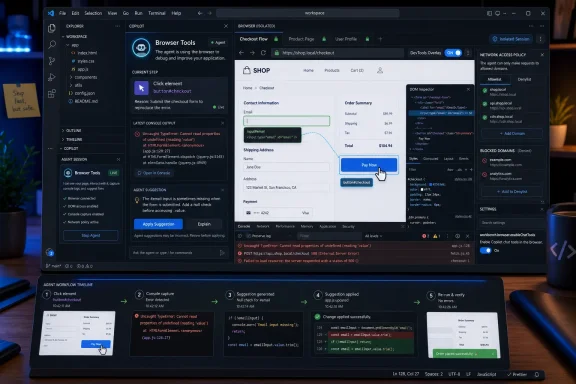
For years, coding assistants have been judged by what they can infer from static context: a file, a stack trace, a prompt, a few adjacent modules, perhaps a test failure if the developer bothered to paste it in. Browser-enabled agents change that bargain. They can now open the app, reproduce the flow, read the rendered page, capture console errors, take screenshots, and fold the result back into the chat.
That is a subtle but meaningful shift from assistant to operator. A code model that suggests a React fix is one kind of tool. A code model that changes the file, opens the page, sees the broken component, checks the console, and tries again is a different category of machine.
GitHub’s announcement is careful to frame the feature in developer language. Agents receive browser actions a developer already uses: open pages, navigate, click, type, hover, drag, handle dialogs, read page content, collect console output, and take screenshots. But that very ordinariness is the point. The browser is where many bugs stop being abstractions and become visible behavior.
For Windows developers living in VS Code, this collapses a familiar loop. The old rhythm was edit, run, Alt-Tab, refresh, inspect, copy an error, return to the editor, paste, ask, repeat. The new rhythm asks whether the agent can own more of that loop while the developer supervises. General availability is GitHub saying that the answer is now good enough for mainstream use.
That is why browser access matters more than yet another completion model. A model can read a unit test and still miss the fact that a button is hidden behind a cookie banner, a modal swallows keyboard focus, or a checkout form fails only after a third-party script throws a console warning. Much of web development is not code in isolation; it is code under conditions.
Browser tools bring Copilot closer to those conditions. The agent can drive a real browser, not merely reason about what might happen when JavaScript runs. That distinction matters for front-end work, QA triage, documentation testing, and internal app maintenance, where the bug report often begins with “when I click this, nothing happens.”
GitHub also says scripted flows are supported when a sequence of steps is more efficient than individual tool calls. That hints at the real target: repeatable agentic testing. If Copilot can be asked to sign into a test app, create a record, confirm a validation rule, and report what failed, it starts looking less like autocomplete and more like a lightweight QA coworker.
This is not the same as replacing Playwright, Selenium, or a disciplined automated test suite. It is closer to giving the coding agent hands and eyes for exploratory work. The danger is that developers mistake exploratory confidence for formal coverage. The opportunity is that many teams that never write enough browser tests may still gain a practical debugging companion.
GitHub says browser tools are on by default with general availability, shaped by feedback from preview users. That default matters. Optional agent capabilities are easy for organizations to ignore. Default-on capabilities become part of the baseline developer experience unless administrators intervene.
This is where the feature will feel different depending on where it lands. A solo developer building a side project may experience browser tools as the most natural thing in the world: “open my app and see why the login page is broken.” A regulated enterprise may hear the same sentence and ask a longer series of questions. Which sites can the agent reach? Which data can it see? Which browser state does it inherit? Which permissions can it request? What audit trail exists when something goes wrong?
GitHub’s answer is an architecture of isolation and control. The browser tools do not simply let the agent rummage through the user’s everyday browsing session. Pages opened by the agent run in fresh sessions, without access to the cookies or storage from regular browsing. Tabs the user already opened are private unless explicitly shared with the agent.
That is a necessary line. It is also not the end of the risk discussion.
Those are not cosmetic safeguards. They address the obvious nightmare scenario: a coding assistant that can suddenly see banking tabs, personal email, corporate dashboards, or production admin consoles simply because they happen to be open nearby. By requiring explicit sharing for user-opened tabs, GitHub is drawing a boundary between the developer’s browser life and the agent’s browser work.
The isolation of agent tabs is equally important. Fresh sessions mean the agent does not automatically inherit the cookies that make the developer authenticated everywhere. That should limit accidental exposure and reduce the blast radius if a prompt or page content causes the agent to behave badly. Parallel agent isolation also matters in the new Agents window world, where multiple tasks may be running at once.
But the privacy model will only be as good as the habits around it. A developer can still share the wrong page. A test environment can still contain sensitive records. An agent can still be asked to navigate to a live service that was never designed for automated exploration. Privacy by default lowers the chance of accidental access; it does not abolish judgment.
The announcement’s July 1 editor’s note is telling. GitHub added detail about which permissions remain under user control and about existing network domain controls. That suggests the company understands that browser access triggers a different class of customer concern than code suggestions. Once an agent can interact with websites, every permission boundary becomes part of the product story.
That is the correct default, and it is worth saying plainly: an agent that can approve its own permissions is not a convenience feature; it is a security problem. The user needs to remain the authority for capabilities that cross from page interaction into device access or personal context.
Clipboard reads deserve special attention. Developers live on the clipboard. It may contain API keys, customer identifiers, database strings, password manager output, internal URLs, or snippets from private chats. Treating clipboard reads as sensitive is not overcautious; it is basic hygiene.
Still, permissions are only one layer. The browser itself is an enormous integration surface. Even without camera or microphone access, a browser agent can type into forms, submit requests, trigger workflows, download content, and interact with applications in ways that may have side effects. The relevant enterprise question is not only “Can it access my microphone?” It is “Can it click the wrong thing in the wrong environment?”
That is where organizations will need policy, not just product controls. Development, staging, demo, and production environments should not be treated equally. If an agent is useful for testing a shopping cart in a sandbox, that does not mean it should be allowed to explore the production admin console of the same business.
The dedicated setting,
The network domain controls are even more significant. GitHub points to
Domain allow and deny lists will not solve every problem. They can be misconfigured. They can miss third-party dependencies. They can become brittle in sprawling SaaS environments. But they give IT teams a policy lever that maps to real concerns: block production systems, allow internal development hosts, deny known data-sensitive domains, and keep agent traffic away from places it has no reason to visit.
Workspace trust and approval prompts remaining in force is also important. VS Code already has a model for treating untrusted folders differently because code workspaces can execute tasks, load extensions, and influence developer machines. Browser tools extend the need for that model. If the workspace is untrusted, the agent should not get a free pass just because the request is phrased as a helpful chat prompt.
For administrators, the practical recommendation is obvious: do not wait for the first incident to decide what the agent can browse. Browser-capable Copilot should be reviewed like any other tool that can interact with internal systems. The setting names are dry, but the governance question is not.
Browser tools are a good example. A developer may still decide what needs to be fixed, judge whether the proposed code is acceptable, and merge the final change. But Copilot can now do more of the mechanical investigation. It can open the page, click through the reproduction steps, notice the console error, inspect the DOM, and explain what it found.
That shifts the developer’s role toward intent setting and verification. Instead of “write this function,” the prompt becomes “open the local app, try to create a user with an invalid email, and fix the validation message.” The task spans code, runtime behavior, and user interface. The agent’s value comes from traversing those boundaries.
This is the direction the whole coding assistant market is moving. The first wave made suggestions inside a file. The second wave edited across a repository. The third wave runs commands, reads logs, invokes tools, and interacts with the application under test. Browser tools sit squarely in that third wave.
That also means failure modes become more complicated. A bad autocomplete can insert wrong code. A bad browser-capable agent can misread UI state, chase the wrong error, alter files based on a transient failure, or perform actions the developer did not intend. The remedy is not to reject the feature; it is to design workflows where human review remains meaningful.
But QA is not just clicking. Good testers bring adversarial thinking, product knowledge, domain context, accessibility awareness, risk prioritization, and a memory of every strange thing the system has done before. A browser agent can amplify that work, but it does not automatically possess that judgment.
Where this feature may shine is in the unglamorous middle ground. A developer fixing a bug can ask Copilot to verify the obvious path. A support engineer can ask it to reproduce a reported console error in a test environment. A documentation writer can ask it to walk through a setup guide and see where the product diverges from the instructions. An accessibility specialist may use it to gather initial observations before deeper testing.
The value is less “replace testing” than “make more things testable more often.” Many teams do not suffer because they have too much rigorous QA. They suffer because routine checks are skipped under schedule pressure. If browser tools make the cheap checks cheaper, they can improve quality even without replacing mature automation.
Still, organizations should be careful with language. A Copilot agent that successfully clicks through a flow has not certified the flow. It has observed one path under one set of conditions. Treating that as a signal is useful. Treating it as proof is how defects escape.
Putting DevTools nearby keeps the developer in the loop. It lets the user inspect elements, view console output, and debug the page directly. In other words, the browser is not just an agent sandbox; it remains a developer instrument.
That is important because AI tools earn trust when their work is inspectable. Code diffs are inspectable. Terminal output is inspectable. Test logs are inspectable. Browser behavior must be inspectable too, or the agent’s findings become too easy to accept uncritically.
There is also a practical benefit. Many web bugs involve a mix of layout, JavaScript, CSS, network timing, and browser state. If Copilot gets close but not all the way to the answer, the developer can step in without rebuilding the context from scratch. The shared environment becomes a handoff point between machine exploration and human debugging.
This is the more durable pattern for AI-assisted development: let the agent do the tedious traversal, but keep the artifacts visible. Screenshots, console errors, DOM inspection, and code diffs are the breadcrumbs that make the agent’s reasoning less mystical.
VS Code already sits at the center of many workflows: source editing, terminal sessions, debugging, extensions, remote development, containers, WSL, GitHub integration, and Copilot Chat. Browser tools pull yet another surface into that orbit. The editor is no longer where code is written before being tested elsewhere; it is increasingly where the app is operated, observed, debugged, and modified in one loop.
That has upsides for Windows developers. The friction of switching tools drops. Local web development, internal app testing, and cloud-connected debugging become more conversational. A developer can stay in the editor while an agent opens the web app, finds the problem, and proposes a fix.
It also reinforces a larger Microsoft ecosystem strategy. GitHub owns the developer network. VS Code owns the editor footprint. Copilot provides the AI layer. Browser tools connect that layer to the actual application surface. The result is not just a feature; it is an increasingly integrated development environment in the literal sense.
This may irritate those who prefer sharper boundaries between editor, browser, terminal, and test runner. But the trend is clear. Developer tools are consolidating around agents that need access to everything the developer would normally touch. VS Code is becoming the place where those permissions are brokered.
Both reactions are rational. Default-on features are how platforms move the baseline forward. They are also how organizations discover too late that an experimental capability has become normal practice.
GitHub tries to soften that tension with admin controls and privacy boundaries. That is the right move, but it does not eliminate the governance burden. Enterprises need to decide whether browser tools are allowed everywhere, allowed only in trusted workspaces, restricted to approved domains, disabled for production-adjacent teams, or rolled out gradually.
Small teams face a different question: how much agency should they give Copilot in day-to-day development? The convenience will be real. So will the temptation to let the agent “just check” things in environments that were not prepared for automated interaction.
The healthiest posture is neither panic nor blind adoption. Browser tools should be treated as a powerful developer capability with meaningful guardrails. That means enabling them where they make work safer and faster, constraining them where data sensitivity or side effects are high, and training developers to understand what the agent can and cannot see.
An agent with a browser can perform operations. It can fill a field, press a button, follow a link, trigger a workflow, and interact with web applications in ways that may have consequences. Even if the browser session is isolated, the agent may still be operating inside a test system connected to real data or downstream services.
This is where old categories become inadequate. Data loss prevention tools often think in terms of files, messages, and network destinations. Browser agents introduce sequences of intent: the agent was asked to test a flow, the flow submitted a form, the form called an API, and the API changed state. Governance has to account for chains, not just individual requests.
Domain filtering helps, but it is not a full semantic policy. Allowing an agent to reach
The long-term answer will likely involve better environment labeling, safer test data, scoped credentials, app-level permissions, and audit logs that distinguish human actions from agent-driven actions. Browser tools in VS Code are one piece of a larger reckoning: if AI agents operate software, software must become better at recognizing and constraining agents.
That weirdness is precisely why agents need browsers. If software behavior could be fully inferred from source code, Copilot would not need to click around. It needs the browser because the rendered app is often the only place where the truth appears.
This is especially true in enterprise environments. Internal web apps are frequently old, under-tested, poorly documented, and built by teams that have moved on. A browser-capable agent may be useful not because it is brilliant, but because it is willing to patiently explore a brittle interface and report what happened.
There is a hidden productivity story here. Developers spend a lot of time reacquiring context: which page is broken, which login works, which route triggers the issue, which console error matters, which CSS rule is winning. An agent that can gather that context may reduce the cognitive tax of maintenance work.
But again, the agent’s exploration is not neutral. It depends on the prompt, the available environment, the permissions granted, and the model’s interpretation of what it sees. The weirdness of web apps gives browser tools their value; it also guarantees their mistakes will be weird.
The move is predictable. Chat alone is a weak interface for complex work. A user describes a problem, the model suggests steps, the user performs them, and the loop continues. Tool-using agents compress that process by performing some steps directly. Browser tools are a natural extension because the browser is one of the developer’s most important tools.
There is a competitive angle as well. Coding assistants are converging on similar promises: understand the repo, make changes, run commands, test results, and iterate. Browser access is becoming table stakes for front-end and full-stack agent workflows. GitHub cannot afford for Copilot to be trapped in the text layer while rivals operate the app.
The question is how much trust developers will place in that operation. Microsoft and GitHub have an advantage because VS Code is already deeply embedded in workflows. They also have a burden because enterprises will scrutinize default-on AI behavior inside a widely deployed editor.
That tension will define the next phase. The winner is unlikely to be the assistant with the flashiest demo. It will be the assistant that can act usefully while making its actions governable, inspectable, and reversible.
 Copilot Moves From Suggesting Code to Operating Software
The most important thing about browser tools is not that Copilot can click a button. It is that GitHub has given its coding agent a feedback loop outside the repository.For years, coding assistants have been judged by what they can infer from static context: a file, a stack trace, a prompt, a few adjacent modules, perhaps a test failure if the developer bothered to paste it in. Browser-enabled agents change that bargain. They can now open the app, reproduce the flow, read the rendered page, capture console errors, take screenshots, and fold the result back into the chat.
That is a subtle but meaningful shift from assistant to operator. A code model that suggests a React fix is one kind of tool. A code model that changes the file, opens the page, sees the broken component, checks the console, and tries again is a different category of machine.
GitHub’s announcement is careful to frame the feature in developer language. Agents receive browser actions a developer already uses: open pages, navigate, click, type, hover, drag, handle dialogs, read page content, collect console output, and take screenshots. But that very ordinariness is the point. The browser is where many bugs stop being abstractions and become visible behavior.
For Windows developers living in VS Code, this collapses a familiar loop. The old rhythm was edit, run, Alt-Tab, refresh, inspect, copy an error, return to the editor, paste, ask, repeat. The new rhythm asks whether the agent can own more of that loop while the developer supervises. General availability is GitHub saying that the answer is now good enough for mainstream use.
The Browser Was the Missing Runtime
The web browser is not just an output device for modern development. It is the runtime for authentication, layout, storage, permissions, network calls, accessibility states, client-side routing, and an increasingly absurd amount of business logic.That is why browser access matters more than yet another completion model. A model can read a unit test and still miss the fact that a button is hidden behind a cookie banner, a modal swallows keyboard focus, or a checkout form fails only after a third-party script throws a console warning. Much of web development is not code in isolation; it is code under conditions.
Browser tools bring Copilot closer to those conditions. The agent can drive a real browser, not merely reason about what might happen when JavaScript runs. That distinction matters for front-end work, QA triage, documentation testing, and internal app maintenance, where the bug report often begins with “when I click this, nothing happens.”
GitHub also says scripted flows are supported when a sequence of steps is more efficient than individual tool calls. That hints at the real target: repeatable agentic testing. If Copilot can be asked to sign into a test app, create a record, confirm a validation rule, and report what failed, it starts looking less like autocomplete and more like a lightweight QA coworker.
This is not the same as replacing Playwright, Selenium, or a disciplined automated test suite. It is closer to giving the coding agent hands and eyes for exploratory work. The danger is that developers mistake exploratory confidence for formal coverage. The opportunity is that many teams that never write enough browser tests may still gain a practical debugging companion.
General Availability Means the Experiment Is Now a Default
The phrase “generally available” does a lot of work in enterprise software. It says the feature is no longer just a preview curiosity for early adopters. It also says the vendor is ready to support it, document it, and defend its default behavior to customers.GitHub says browser tools are on by default with general availability, shaped by feedback from preview users. That default matters. Optional agent capabilities are easy for organizations to ignore. Default-on capabilities become part of the baseline developer experience unless administrators intervene.
This is where the feature will feel different depending on where it lands. A solo developer building a side project may experience browser tools as the most natural thing in the world: “open my app and see why the login page is broken.” A regulated enterprise may hear the same sentence and ask a longer series of questions. Which sites can the agent reach? Which data can it see? Which browser state does it inherit? Which permissions can it request? What audit trail exists when something goes wrong?
GitHub’s answer is an architecture of isolation and control. The browser tools do not simply let the agent rummage through the user’s everyday browsing session. Pages opened by the agent run in fresh sessions, without access to the cookies or storage from regular browsing. Tabs the user already opened are private unless explicitly shared with the agent.
That is a necessary line. It is also not the end of the risk discussion.
The Privacy Model Is Sensible Because the Threat Model Is Obvious
The most reassuring part of the announcement is the privacy model around tabs. Copilot cannot read or interact with an already-open page until the user chooses to share it with the agent. Access can be revoked. Agent-opened tabs are isolated from everyday browser cookies and storage. Agents running in parallel keep their browser tabs private from one another.Those are not cosmetic safeguards. They address the obvious nightmare scenario: a coding assistant that can suddenly see banking tabs, personal email, corporate dashboards, or production admin consoles simply because they happen to be open nearby. By requiring explicit sharing for user-opened tabs, GitHub is drawing a boundary between the developer’s browser life and the agent’s browser work.
The isolation of agent tabs is equally important. Fresh sessions mean the agent does not automatically inherit the cookies that make the developer authenticated everywhere. That should limit accidental exposure and reduce the blast radius if a prompt or page content causes the agent to behave badly. Parallel agent isolation also matters in the new Agents window world, where multiple tasks may be running at once.
But the privacy model will only be as good as the habits around it. A developer can still share the wrong page. A test environment can still contain sensitive records. An agent can still be asked to navigate to a live service that was never designed for automated exploration. Privacy by default lowers the chance of accidental access; it does not abolish judgment.
The announcement’s July 1 editor’s note is telling. GitHub added detail about which permissions remain under user control and about existing network domain controls. That suggests the company understands that browser access triggers a different class of customer concern than code suggestions. Once an agent can interact with websites, every permission boundary becomes part of the product story.
Permissions Are Where “Agentic” Meets the Operating System
GitHub says sensitive browser permissions remain under explicit user control. Camera, microphone, location, notifications, and clipboard reads are not granted automatically. Each requires user approval for a site, and agents cannot approve those permissions on the user’s behalf. Only lower-risk actions, such as sanitized clipboard writes, are allowed by default.That is the correct default, and it is worth saying plainly: an agent that can approve its own permissions is not a convenience feature; it is a security problem. The user needs to remain the authority for capabilities that cross from page interaction into device access or personal context.
Clipboard reads deserve special attention. Developers live on the clipboard. It may contain API keys, customer identifiers, database strings, password manager output, internal URLs, or snippets from private chats. Treating clipboard reads as sensitive is not overcautious; it is basic hygiene.
Still, permissions are only one layer. The browser itself is an enormous integration surface. Even without camera or microphone access, a browser agent can type into forms, submit requests, trigger workflows, download content, and interact with applications in ways that may have side effects. The relevant enterprise question is not only “Can it access my microphone?” It is “Can it click the wrong thing in the wrong environment?”
That is where organizations will need policy, not just product controls. Development, staging, demo, and production environments should not be treated equally. If an agent is useful for testing a shopping cart in a sandbox, that does not mean it should be allowed to explore the production admin console of the same business.
Admin Controls Make This a Real Enterprise Feature
GitHub’s enterprise control story has three parts: a dedicated on/off switch for browser tools, network domain controls for where agents and the integrated browser can go, and the continued application of workspace trust and approval prompts.The dedicated setting,
workbench.browser.enableChatTools, gives administrators a clean kill switch. That matters because broad AI capabilities often arrive as bundles of smaller features, and enterprises need to disable the risky piece without necessarily turning off the entire assistant. A switch specific to browser tools acknowledges that browser interaction is a distinct risk category.The network domain controls are even more significant. GitHub points to
chat.agent.allowedNetworkDomains and chat.agent.deniedNetworkDomains, enabled through chat.agent.networkFilter, as mechanisms to restrict which sites agents and the integrated browser can reach. Denied domains take precedence, and wildcards are supported. In enterprise terms, this is the difference between “trust the developer” and “shape the environment.”Domain allow and deny lists will not solve every problem. They can be misconfigured. They can miss third-party dependencies. They can become brittle in sprawling SaaS environments. But they give IT teams a policy lever that maps to real concerns: block production systems, allow internal development hosts, deny known data-sensitive domains, and keep agent traffic away from places it has no reason to visit.
Workspace trust and approval prompts remaining in force is also important. VS Code already has a model for treating untrusted folders differently because code workspaces can execute tasks, load extensions, and influence developer machines. Browser tools extend the need for that model. If the workspace is untrusted, the agent should not get a free pass just because the request is phrased as a helpful chat prompt.
For administrators, the practical recommendation is obvious: do not wait for the first incident to decide what the agent can browse. Browser-capable Copilot should be reviewed like any other tool that can interact with internal systems. The setting names are dry, but the governance question is not.
The Developer Experience Is Being Rebuilt Around Supervision
The most interesting part of agentic coding is not whether developers stop writing code. They will not. It is whether developers spend more time supervising loops they used to execute manually.Browser tools are a good example. A developer may still decide what needs to be fixed, judge whether the proposed code is acceptable, and merge the final change. But Copilot can now do more of the mechanical investigation. It can open the page, click through the reproduction steps, notice the console error, inspect the DOM, and explain what it found.
That shifts the developer’s role toward intent setting and verification. Instead of “write this function,” the prompt becomes “open the local app, try to create a user with an invalid email, and fix the validation message.” The task spans code, runtime behavior, and user interface. The agent’s value comes from traversing those boundaries.
This is the direction the whole coding assistant market is moving. The first wave made suggestions inside a file. The second wave edited across a repository. The third wave runs commands, reads logs, invokes tools, and interacts with the application under test. Browser tools sit squarely in that third wave.
That also means failure modes become more complicated. A bad autocomplete can insert wrong code. A bad browser-capable agent can misread UI state, chase the wrong error, alter files based on a transient failure, or perform actions the developer did not intend. The remedy is not to reject the feature; it is to design workflows where human review remains meaningful.
QA Gets a Helper, Not a Replacement
It is tempting to view browser tools as a direct shot at manual QA. In some narrow cases, they are. If the task is to click through a simple flow and report whether the page throws an error, an agent can plausibly save time.But QA is not just clicking. Good testers bring adversarial thinking, product knowledge, domain context, accessibility awareness, risk prioritization, and a memory of every strange thing the system has done before. A browser agent can amplify that work, but it does not automatically possess that judgment.
Where this feature may shine is in the unglamorous middle ground. A developer fixing a bug can ask Copilot to verify the obvious path. A support engineer can ask it to reproduce a reported console error in a test environment. A documentation writer can ask it to walk through a setup guide and see where the product diverges from the instructions. An accessibility specialist may use it to gather initial observations before deeper testing.
The value is less “replace testing” than “make more things testable more often.” Many teams do not suffer because they have too much rigorous QA. They suffer because routine checks are skipped under schedule pressure. If browser tools make the cheap checks cheaper, they can improve quality even without replacing mature automation.
Still, organizations should be careful with language. A Copilot agent that successfully clicks through a flow has not certified the flow. It has observed one path under one set of conditions. Treating that as a signal is useful. Treating it as proof is how defects escape.
DevTools in the Toolbar Is a Quietly Smart Move
GitHub’s note that DevTools are available in the browser toolbar might seem like a small convenience, but it matters for trust. If the agent reports that a console error occurred or a DOM element is misbehaving, the developer needs a way to inspect the same environment. Otherwise the agent becomes a black box narrating a browser session the human cannot effectively audit.Putting DevTools nearby keeps the developer in the loop. It lets the user inspect elements, view console output, and debug the page directly. In other words, the browser is not just an agent sandbox; it remains a developer instrument.
That is important because AI tools earn trust when their work is inspectable. Code diffs are inspectable. Terminal output is inspectable. Test logs are inspectable. Browser behavior must be inspectable too, or the agent’s findings become too easy to accept uncritically.
There is also a practical benefit. Many web bugs involve a mix of layout, JavaScript, CSS, network timing, and browser state. If Copilot gets close but not all the way to the answer, the developer can step in without rebuilding the context from scratch. The shared environment becomes a handoff point between machine exploration and human debugging.
This is the more durable pattern for AI-assisted development: let the agent do the tedious traversal, but keep the artifacts visible. Screenshots, console errors, DOM inspection, and code diffs are the breadcrumbs that make the agent’s reasoning less mystical.
The Windows Angle Is VS Code as the New Control Plane
For WindowsForum readers, the story is not only GitHub Copilot. It is VS Code’s continuing evolution into a control plane for development work on Windows.VS Code already sits at the center of many workflows: source editing, terminal sessions, debugging, extensions, remote development, containers, WSL, GitHub integration, and Copilot Chat. Browser tools pull yet another surface into that orbit. The editor is no longer where code is written before being tested elsewhere; it is increasingly where the app is operated, observed, debugged, and modified in one loop.
That has upsides for Windows developers. The friction of switching tools drops. Local web development, internal app testing, and cloud-connected debugging become more conversational. A developer can stay in the editor while an agent opens the web app, finds the problem, and proposes a fix.
It also reinforces a larger Microsoft ecosystem strategy. GitHub owns the developer network. VS Code owns the editor footprint. Copilot provides the AI layer. Browser tools connect that layer to the actual application surface. The result is not just a feature; it is an increasingly integrated development environment in the literal sense.
This may irritate those who prefer sharper boundaries between editor, browser, terminal, and test runner. But the trend is clear. Developer tools are consolidating around agents that need access to everything the developer would normally touch. VS Code is becoming the place where those permissions are brokered.
The Default-On Choice Will Divide Teams
Turning browser tools on by default is a statement of confidence, but it will not be universally welcomed. Developers who have been waiting for Copilot to test what it writes will see this as overdue. Security teams may see it as another feature that quietly expands the operational reach of AI inside the enterprise.Both reactions are rational. Default-on features are how platforms move the baseline forward. They are also how organizations discover too late that an experimental capability has become normal practice.
GitHub tries to soften that tension with admin controls and privacy boundaries. That is the right move, but it does not eliminate the governance burden. Enterprises need to decide whether browser tools are allowed everywhere, allowed only in trusted workspaces, restricted to approved domains, disabled for production-adjacent teams, or rolled out gradually.
Small teams face a different question: how much agency should they give Copilot in day-to-day development? The convenience will be real. So will the temptation to let the agent “just check” things in environments that were not prepared for automated interaction.
The healthiest posture is neither panic nor blind adoption. Browser tools should be treated as a powerful developer capability with meaningful guardrails. That means enabling them where they make work safer and faster, constraining them where data sensitivity or side effects are high, and training developers to understand what the agent can and cannot see.
The Security Conversation Moves From Code Leakage to Action Leakage
Much of the early debate about coding assistants focused on code: whether prompts exposed proprietary source, whether suggestions reproduced licensed material, whether models made insecure recommendations. Browser tools do not make those questions disappear. They add another dimension: action.An agent with a browser can perform operations. It can fill a field, press a button, follow a link, trigger a workflow, and interact with web applications in ways that may have consequences. Even if the browser session is isolated, the agent may still be operating inside a test system connected to real data or downstream services.
This is where old categories become inadequate. Data loss prevention tools often think in terms of files, messages, and network destinations. Browser agents introduce sequences of intent: the agent was asked to test a flow, the flow submitted a form, the form called an API, and the API changed state. Governance has to account for chains, not just individual requests.
Domain filtering helps, but it is not a full semantic policy. Allowing an agent to reach
dev.example.com says nothing about whether it should create users, delete records, initiate payments, or interact with a sensitive admin panel. Those distinctions live inside applications, not DNS.The long-term answer will likely involve better environment labeling, safer test data, scoped credentials, app-level permissions, and audit logs that distinguish human actions from agent-driven actions. Browser tools in VS Code are one piece of a larger reckoning: if AI agents operate software, software must become better at recognizing and constraining agents.
The Feature Is Also a Bet on Web Apps Staying Weird
There is an amusing irony here. The more standardized and testable web development becomes, the less magical a browser agent needs to be. But the modern web remains stubbornly weird. Every app is a pile of frameworks, build tools, authentication redirects, feature flags, third-party scripts, CSS quirks, browser differences, and stateful user journeys.That weirdness is precisely why agents need browsers. If software behavior could be fully inferred from source code, Copilot would not need to click around. It needs the browser because the rendered app is often the only place where the truth appears.
This is especially true in enterprise environments. Internal web apps are frequently old, under-tested, poorly documented, and built by teams that have moved on. A browser-capable agent may be useful not because it is brilliant, but because it is willing to patiently explore a brittle interface and report what happened.
There is a hidden productivity story here. Developers spend a lot of time reacquiring context: which page is broken, which login works, which route triggers the issue, which console error matters, which CSS rule is winning. An agent that can gather that context may reduce the cognitive tax of maintenance work.
But again, the agent’s exploration is not neutral. It depends on the prompt, the available environment, the permissions granted, and the model’s interpretation of what it sees. The weirdness of web apps gives browser tools their value; it also guarantees their mistakes will be weird.
Microsoft’s AI Stack Is Learning to Touch the Work
GitHub’s announcement fits a broader pattern across Microsoft’s developer tools: AI is being moved closer to the places where work is executed, not just discussed. In the Windows and Microsoft ecosystem, that means agents inside editors, terminals, documentation, cloud consoles, productivity apps, and eventually management surfaces.The move is predictable. Chat alone is a weak interface for complex work. A user describes a problem, the model suggests steps, the user performs them, and the loop continues. Tool-using agents compress that process by performing some steps directly. Browser tools are a natural extension because the browser is one of the developer’s most important tools.
There is a competitive angle as well. Coding assistants are converging on similar promises: understand the repo, make changes, run commands, test results, and iterate. Browser access is becoming table stakes for front-end and full-stack agent workflows. GitHub cannot afford for Copilot to be trapped in the text layer while rivals operate the app.
The question is how much trust developers will place in that operation. Microsoft and GitHub have an advantage because VS Code is already deeply embedded in workflows. They also have a burden because enterprises will scrutinize default-on AI behavior inside a widely deployed editor.
That tension will define the next phase. The winner is unlikely to be the assistant with the flashiest demo. It will be the assistant that can act usefully while making its actions governable, inspectable, and reversible.
The New Copilot Browser Era Has a Short Checklist
The practical story is simpler than the strategic one: browser tools are useful, but they should be introduced deliberately. Developers should understand the privacy boundaries, and administrators should decide whether the defaults match their risk tolerance before the feature becomes part of everyday muscle memory.- Browser tools are now generally available in VS Code and are enabled by default, so teams should assume developers may start using them immediately after updating.
- Copilot agents can operate a real browser, including navigation, clicks, typing, hovering, dragging, dialog handling, page reading, console capture, screenshots, and scripted flows.
- User-opened tabs remain private unless explicitly shared with the agent, while agent-opened tabs run in isolated fresh sessions without everyday browsing cookies or storage.
- Sensitive permissions such as camera, microphone, location, notifications, and clipboard reads require explicit user approval, and agents cannot approve those permissions themselves.
- Administrators can disable browser tools with a dedicated setting and can use agent network domain controls to restrict where agents and the integrated browser may connect.
- Teams should treat browser-capable Copilot as a supervised operator for development and testing environments, not as a blanket authorization to interact with production systems.
References
- Primary source: The GitHub Blog
Published: Wed, 01 Jul 2026 16:01:00 GMT
Browser tools for GitHub Copilot in VS Code are generally available - GitHub Changelog
Browser tools in VS Code are now generally available. Agents can now drive a real browser, navigate web apps, and feed findings back into the chat.github.blog
