

Teams already using GitHub Copilot should pilot Visual Studio Code 1.116 now, because the April 15, 2026 release makes Copilot Chat built in, adds locally persisted Agent Debug Logs, and lets agent tools interact with visible terminal sessions, including REPLs and interactive scripts. Teams with strict change-control, logging, terminal-use, or AI-review requirements should validate those behaviors before a fleet-wide rollout.
That is the direct upgrade call. VS Code 1.116 is not just another editor refresh. It changes the default Copilot experience inside VS Code, gives teams a local artifact for troubleshooting agent activity, and expands where agents can participate in the developer workflow.
The practical answer is straightforward. If your team already uses VS Code and GitHub Copilot, 1.116 is worth testing as the next managed baseline. It removes one common onboarding step — installing Copilot Chat separately — while adding troubleshooting and terminal-agent capabilities that matter once AI use moves beyond demos.
For individual developers, the upgrade case is simple: install VS Code 1.116 or later, sign in with the account entitled for Copilot, and Copilot Chat is available as a built-in extension. That does not eliminate licensing, account, policy, or internal approval questions. It only reduces first-run friction for users who are allowed to use Copilot.
For admins, the rollout should be staged. Put 1.116 on a pilot ring first, validate sign-in, confirm that built-in Copilot Chat appears as expected, review Agent Debug Logs behavior, and test terminal-agent interactions against real developer workflows. Then move to broader deployment only after the team understands whether the built-in experience changes packaging, user profiles, support scripts, or internal documentation.
The decision line is this:
That distinction matters because enterprise software decisions are often shaped less by what is technically possible than by what is already present on the machine. Until now, many teams treated Copilot Chat as an extension dependency to package, document, install, update, and troubleshoot. With 1.116, teams need to manage it as part of the editor baseline.
Microsoft’s release framing is limited but important: new users no longer need to install a separate extension to start using Copilot Chat in VS Code. The intended effect is less setup friction. The administrative effect is a cleaner baseline image and fewer support paths that begin with “which Copilot extension did this developer install?”
That is why the release matters even to skeptical organizations. Whether a particular developer loves or hates AI coding assistants, built-in Copilot Chat moves the governance question from “Should we install this extension?” to “How do we manage this feature inside the editor?”
WindowsForum readers have been tracking that shift across several related reports. In the forum’s coverage of VS Code 1.116, the release was described as a clear signal that Microsoft wants AI features to feel more integrated into the editor experience. That is the useful operational point: administrators should expect Copilot Chat to be part of the VS Code surface they document, support, and govern.
That is good news for platform teams trying to reduce variation. Anyone who has supported a mixed fleet of laptops knows the pain of debugging “same editor, different extensions, different behavior.” VS Code 1.116 gives leads a stronger basis for documenting one expected experience.
But the same change increases the need for internal clarity. Built-in does not mean universally enabled. Built-in does not mean compliant by default. Built-in does not mean every developer is entitled to use Copilot. If your organization has not decided whether AI chat should be available, whether terminal-aware agents are acceptable, or whether local debug logs can be retained on developer machines, 1.116 will surface those unresolved decisions quickly.
WindowsForum’s broader Copilot coverage points in the same direction without needing to overstate it. Forum reports on Copilot Studio entering VS Code, GitHub’s Agent Mode and Copilot Edits, and Build-era Copilot updates around customization and multi-agent collaboration all describe a similar product direction: Microsoft and GitHub are moving AI assistance closer to developer tools and workflows. VS Code 1.116 is the editor-level decision point for teams that need to translate that direction into a controlled rollout.
That matters because agent behavior is often difficult to explain after the fact. A developer says the assistant misunderstood the prompt. A lead wants to know whether a customization changed the output. A platform engineer needs to determine whether a failure came from the prompt, the workspace, or the way the agent handled available context.
Without useful logs, too much of that investigation depends on screenshots, memory, or trying to reproduce the same chat path. With locally persisted Agent Debug Logs, teams have a local troubleshooting artifact that can help review agent-related behavior. That is not the same as enterprise-wide observability, audit logging, or centralized monitoring. It is a local debugging aid, and admins should treat it as exactly that unless their own testing and policy work say otherwise.
The setting associated with Agent Debug Logs file logging is
The verified facts are intentionally narrow. Agent Debug Logs can be persisted locally on disk and are useful for debugging prompts and customizations. That does not automatically answer every question about retention, collection, endpoint management, access control, or whether a specific organization’s data-handling policy is satisfied.
So the smart move is review, not panic. Before broad deployment, admins should decide whether Agent Debug Logs are enabled for pilots, who may access them, how support staff should request them, and whether local persistence conflicts with internal rules for regulated projects.
For development leads, the feature is still welcome. The fastest way to make AI tools more credible inside professional teams is to make their behavior easier to inspect. If Copilot is going to participate in development workflows, teams need a way to debug what happened when it misunderstands instructions or behaves differently across machines.
A useful pilot question is simple: “If a developer reports that Copilot behaved unexpectedly, can we use the local Agent Debug Logs to support the investigation without violating our own retention and access rules?” If the answer is yes, 1.116 becomes easier to support. If the answer is no, solve that policy issue before calling the release a fleet-wide standard.
That is the verified point, and it is enough to matter. Real development does not happen only in clean editor buffers. It happens in terminals full of test runners, package managers, shells, local servers, migration scripts, REPLs, and half-finished experiments. Giving agents a way to work with visible terminal sessions makes them more useful, but also more operationally sensitive.
For developers who live in terminal-driven stacks, this is closer to how they already solve problems. An assistant that can participate around an interactive script or REPL is more relevant than one that only comments on a static file. But the same capability requires testing because terminal output often contains more than harmless build logs.
A visible terminal can contain secrets, internal hostnames, customer-like test data, private package paths, access prompts, or operational details that should not be exposed casually. The more useful the agent becomes near the terminal, the more important it is to define acceptable use.
But this is exactly why teams should test real workflows rather than toy demos. A frontend developer running a dev server, a backend engineer using a database migration script, a data engineer working in a REPL, and a DevOps engineer using an interactive CLI may all experience the change differently. The point of the pilot is to find those differences before they become support incidents.
The pilot should answer practical questions:
For admins, the lesson is not that every later build requires a new governance model. The lesson is simpler: AI-related editor capabilities are arriving quickly enough that unmanaged drift is a risk. If some developers upgrade individually while others stay on older extension-centered setups, support and documentation will fragment.
WindowsForum’s recent Copilot reports give helpful context without changing the rollout facts. The forum has covered Copilot Studio becoming available in VS Code for unified agent development, GitHub’s earlier push around Agent Mode and Copilot Edits, Microsoft’s 2025 Copilot updates around no-code customization and multi-agent collaboration, and GitHub Copilot updates around prompts, asynchronous features, and open-source chat. Those reports show why developers are asking more questions about AI inside the IDE. VS Code 1.116 is where admins need to turn those questions into a deployment plan.
The key is to avoid treating the wider Copilot roadmap as proof of what 1.116 itself does. For this rollout, the actionable facts are narrow: built-in Copilot Chat, locally persisted Agent Debug Logs, and terminal tools that interact with visible terminal sessions.
A consistent 1.116 baseline lets platform teams write clearer internal docs. It also lets leads test prompts, customizations, terminal-agent behavior, and debug logging against the same assumptions. That matters when AI tooling becomes part of code review, onboarding, internal libraries, or project scaffolding.
For teams that already pay for Copilot and encourage its use, waiting too long may create its own cost. Developers will upgrade individually, docs will drift, and support will inherit a shadow rollout anyway. In that environment, a managed upgrade is often safer than pretending the change is not happening.
The better immediate action is to create a pilot group with developers from different stacks: frontend, backend, scripting-heavy, DevOps, data, and any team that relies on interactive terminals. Ask them to test not only whether Copilot Chat appears, but whether the new agent behavior changes their daily workflow in ways that are useful, confusing, or risky.
The same is true for organizations with strict AI review processes. Built-in Copilot Chat may be acceptable, but terminal-aware agents and local debug logs may require separate decisions. In some environments, the issue is not whether developers like the feature; it is whether compliance, security, and legal teams have agreed on how the feature is used.
There is also the human factor. Developers who have built habits around older extension-based workflows may resist sudden changes if the rollout is framed as “AI is now here, deal with it.” A better migration message is operational: this version gives the team a single baseline for support, debugging, and documentation.
Holding back should be an active decision with a review date, not passive inertia. If you defer, document why: extension workflow dependency, policy review, terminal-agent assessment, local logging review, or user training. Otherwise, “wait” quietly becomes “fragment.”
The second area is Agent Debug Logs. Because logs can persist locally on disk, teams should test how they behave in the pilot environment and decide how support staff should use them. The point is not to overcomplicate the rollout. The point is to avoid discovering local logging behavior for the first time during an incident.
The third area is terminal-agent behavior. Test visible terminal sessions, REPLs, and interactive scripts. Look for the mundane details that affect adoption: Does the agent help developers move faster? Does it behave acceptably around common terminal output? Does it create concern around sensitive information? Does it behave differently across shells, project types, or common internal tools?
That is enough for a useful pilot. Teams do not need to invent a grand AI transformation program just to evaluate 1.116. They need a clean baseline, a representative test group, and a short list of behaviors to verify.
This is the familiar bargain of modern developer tooling. The product becomes easier for individuals because more complexity has been pushed into platform management. That is not necessarily bad. It is how mature tooling usually evolves.
The danger is treating a built-in AI assistant as if it were just another convenience toggle. Copilot Chat now sits closer to the center of the editor experience, and terminal-agent support brings agent behavior closer to the runtime workflows developers actually care about. That makes the feature more useful and more consequential.
The right adoption strategy should therefore sound boring: pilot, document, standardize, review. Excitement is fine for demos. Boring rollout discipline is what keeps enterprise upgrades from becoming incident reports.
Agent Debug Logs make agent behavior easier to troubleshoot locally. Terminal tools make agents more capable inside visible development workflows. Built-in Copilot Chat makes the feature easier to find and easier to include in a supported VS Code baseline.
That combination changes the upgrade calculation. A small shop or enthusiast can treat 1.116 as an obvious update. A larger organization should treat it as a moment to decide how VS Code fits into its approved AI tooling model.
This is also why WindowsForum’s related coverage belongs in the background of the decision. Reports on Copilot Studio in VS Code, GitHub Agent Mode and Copilot Edits, and the broader 2025 Copilot push all show developer AI becoming less peripheral. But the rollout decision for VS Code 1.116 should stay focused on what this release actually changes.
For teams already invested in Copilot, the right move is a controlled pilot with a short decision window. For teams still debating AI coding tools, the right move is to hold back from broad deployment until policy catches up. For everyone else, the worst option is unmanaged drift: some developers on the new built-in experience, some on older extension assumptions, and no shared support model.
VS Code 1.116 is not a reason to panic. It is a reason to get precise. Test the built-in chat path. Review local log behavior. Validate terminal-agent workflows. Then either standardize with confidence or document the blocker and revisit it on a defined date.
That is the direct upgrade call. VS Code 1.116 is not just another editor refresh. It changes the default Copilot experience inside VS Code, gives teams a local artifact for troubleshooting agent activity, and expands where agents can participate in the developer workflow.
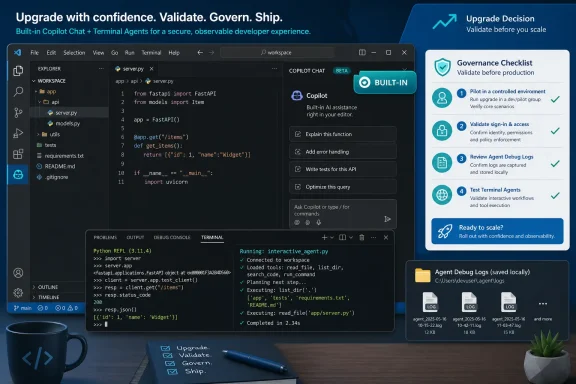 Microsoft Has Made the Upgrade Decision Less About Features and More About Standardization
The practical answer is straightforward. If your team already uses VS Code and GitHub Copilot, 1.116 is worth testing as the next managed baseline. It removes one common onboarding step — installing Copilot Chat separately — while adding troubleshooting and terminal-agent capabilities that matter once AI use moves beyond demos.For individual developers, the upgrade case is simple: install VS Code 1.116 or later, sign in with the account entitled for Copilot, and Copilot Chat is available as a built-in extension. That does not eliminate licensing, account, policy, or internal approval questions. It only reduces first-run friction for users who are allowed to use Copilot.
For admins, the rollout should be staged. Put 1.116 on a pilot ring first, validate sign-in, confirm that built-in Copilot Chat appears as expected, review Agent Debug Logs behavior, and test terminal-agent interactions against real developer workflows. Then move to broader deployment only after the team understands whether the built-in experience changes packaging, user profiles, support scripts, or internal documentation.
The decision line is this:
- Standardize now if Copilot is already approved, your team does not depend on the old extension-install model, local Agent Debug Logs fit your device and retention policies, and terminal-agent behavior is acceptable after testing.
- Pilot first if Copilot is approved but your team has custom VS Code packaging, locked-down extensions, regulated projects, sensitive terminals, or unresolved support questions.
- Hold back if AI coding tools are not approved, local log persistence conflicts with policy, or terminal-agent interaction is outside your organization’s risk tolerance.
Built-In Copilot Chat Changes the Default VS Code Experience
The headline change in VS Code 1.116 is that GitHub Copilot Chat is now a built-in extension. That does not mean every developer is forced to use AI, and it does not mean every Copilot capability is automatically enabled, licensed, or approved. It means Copilot Chat is now part of the VS Code installation experience rather than something users separately add from the Marketplace.That distinction matters because enterprise software decisions are often shaped less by what is technically possible than by what is already present on the machine. Until now, many teams treated Copilot Chat as an extension dependency to package, document, install, update, and troubleshoot. With 1.116, teams need to manage it as part of the editor baseline.
Microsoft’s release framing is limited but important: new users no longer need to install a separate extension to start using Copilot Chat in VS Code. The intended effect is less setup friction. The administrative effect is a cleaner baseline image and fewer support paths that begin with “which Copilot extension did this developer install?”
That is why the release matters even to skeptical organizations. Whether a particular developer loves or hates AI coding assistants, built-in Copilot Chat moves the governance question from “Should we install this extension?” to “How do we manage this feature inside the editor?”
WindowsForum readers have been tracking that shift across several related reports. In the forum’s coverage of VS Code 1.116, the release was described as a clear signal that Microsoft wants AI features to feel more integrated into the editor experience. That is the useful operational point: administrators should expect Copilot Chat to be part of the VS Code surface they document, support, and govern.
Easier Deployment Still Requires Clear Internal Rules
There is an obvious upside to bundling Copilot Chat. New developer onboarding becomes simpler, especially in organizations that already provide Copilot access through GitHub accounts. A standard VS Code install can put an approved developer closer to the assisted workflow without a separate Marketplace checklist.That is good news for platform teams trying to reduce variation. Anyone who has supported a mixed fleet of laptops knows the pain of debugging “same editor, different extensions, different behavior.” VS Code 1.116 gives leads a stronger basis for documenting one expected experience.
But the same change increases the need for internal clarity. Built-in does not mean universally enabled. Built-in does not mean compliant by default. Built-in does not mean every developer is entitled to use Copilot. If your organization has not decided whether AI chat should be available, whether terminal-aware agents are acceptable, or whether local debug logs can be retained on developer machines, 1.116 will surface those unresolved decisions quickly.
WindowsForum’s broader Copilot coverage points in the same direction without needing to overstate it. Forum reports on Copilot Studio entering VS Code, GitHub’s Agent Mode and Copilot Edits, and Build-era Copilot updates around customization and multi-agent collaboration all describe a similar product direction: Microsoft and GitHub are moving AI assistance closer to developer tools and workflows. VS Code 1.116 is the editor-level decision point for teams that need to translate that direction into a controlled rollout.
Agent Debug Logs Are the Feature Leads Will Reach for After the First Incident
Agent Debug Logs may sound like a niche troubleshooting tool, but they are one of the most enterprise-relevant changes in the release. VS Code 1.116 adds Agent Debug Logs that are persisted locally on disk and are intended to help debug prompts and customizations.That matters because agent behavior is often difficult to explain after the fact. A developer says the assistant misunderstood the prompt. A lead wants to know whether a customization changed the output. A platform engineer needs to determine whether a failure came from the prompt, the workspace, or the way the agent handled available context.
Without useful logs, too much of that investigation depends on screenshots, memory, or trying to reproduce the same chat path. With locally persisted Agent Debug Logs, teams have a local troubleshooting artifact that can help review agent-related behavior. That is not the same as enterprise-wide observability, audit logging, or centralized monitoring. It is a local debugging aid, and admins should treat it as exactly that unless their own testing and policy work say otherwise.
The setting associated with Agent Debug Logs file logging is
github.copilot.chat.agentDebugLog.fileLogging.enabled. Admins should document how they expect pilots to use it, because a debug feature that persists locally is both useful and sensitive.Local Logs Create a Review Question, Not Just a Support Tool
The appeal of local Agent Debug Logs is obvious: they can help developers and support teams understand agent interactions after the fact. The concern is just as obvious: logs that capture agent-related activity may contain information a team does not want casually retained on a workstation.The verified facts are intentionally narrow. Agent Debug Logs can be persisted locally on disk and are useful for debugging prompts and customizations. That does not automatically answer every question about retention, collection, endpoint management, access control, or whether a specific organization’s data-handling policy is satisfied.
So the smart move is review, not panic. Before broad deployment, admins should decide whether Agent Debug Logs are enabled for pilots, who may access them, how support staff should request them, and whether local persistence conflicts with internal rules for regulated projects.
For development leads, the feature is still welcome. The fastest way to make AI tools more credible inside professional teams is to make their behavior easier to inspect. If Copilot is going to participate in development workflows, teams need a way to debug what happened when it misunderstands instructions or behaves differently across machines.
A useful pilot question is simple: “If a developer reports that Copilot behaved unexpectedly, can we use the local Agent Debug Logs to support the investigation without violating our own retention and access rules?” If the answer is yes, 1.116 becomes easier to support. If the answer is no, solve that policy issue before calling the release a fleet-wide standard.
Terminal-Aware Agents Move Copilot Closer to Real Developer Workflows
The terminal changes in 1.116 are more consequential than they look. VS Code agent tools can now interact with visible terminal sessions, including REPLs and interactive scripts.That is the verified point, and it is enough to matter. Real development does not happen only in clean editor buffers. It happens in terminals full of test runners, package managers, shells, local servers, migration scripts, REPLs, and half-finished experiments. Giving agents a way to work with visible terminal sessions makes them more useful, but also more operationally sensitive.
For developers who live in terminal-driven stacks, this is closer to how they already solve problems. An assistant that can participate around an interactive script or REPL is more relevant than one that only comments on a static file. But the same capability requires testing because terminal output often contains more than harmless build logs.
A visible terminal can contain secrets, internal hostnames, customer-like test data, private package paths, access prompts, or operational details that should not be exposed casually. The more useful the agent becomes near the terminal, the more important it is to define acceptable use.
Terminal-Agent Testing Should Use Real Workflows
The most immediate productivity gain is likely in onboarding and repetitive project setup. Interactive tools are everywhere: project generators, package initializers, local dev scripts, test harnesses, CLIs, and REPL-based workflows. A terminal-aware agent can be more useful when it can work with the actual visible session instead of waiting for a developer to summarize every step.But this is exactly why teams should test real workflows rather than toy demos. A frontend developer running a dev server, a backend engineer using a database migration script, a data engineer working in a REPL, and a DevOps engineer using an interactive CLI may all experience the change differently. The point of the pilot is to find those differences before they become support incidents.
The pilot should answer practical questions:
- Does terminal-agent behavior help developers move faster in approved workflows?
- Does it interact appropriately with visible terminal sessions?
- Does it behave acceptably with REPLs and interactive scripts?
- Does it create concern when terminal output includes sensitive strings, internal endpoints, or credential prompts?
- Does behavior differ across shells, operating systems, project types, or internal tooling?
- Do developers understand when not to use the feature?
The April 2026 VS Code Cycle Shows Direction, but 1.116 Is the Rollout Decision
GitHub later described the April 2026 VS Code cycle as covering v1.116 through v1.119. That framing is useful, but it should not be stretched too far. The specific decision facing teams here is whether to pilot and standardize on 1.116, the release that makes Copilot Chat built in, persists Agent Debug Logs locally, and lets terminal tools interact with visible sessions.For admins, the lesson is not that every later build requires a new governance model. The lesson is simpler: AI-related editor capabilities are arriving quickly enough that unmanaged drift is a risk. If some developers upgrade individually while others stay on older extension-centered setups, support and documentation will fragment.
WindowsForum’s recent Copilot reports give helpful context without changing the rollout facts. The forum has covered Copilot Studio becoming available in VS Code for unified agent development, GitHub’s earlier push around Agent Mode and Copilot Edits, Microsoft’s 2025 Copilot updates around no-code customization and multi-agent collaboration, and GitHub Copilot updates around prompts, asynchronous features, and open-source chat. Those reports show why developers are asking more questions about AI inside the IDE. VS Code 1.116 is where admins need to turn those questions into a deployment plan.
The key is to avoid treating the wider Copilot roadmap as proof of what 1.116 itself does. For this rollout, the actionable facts are narrow: built-in Copilot Chat, locally persisted Agent Debug Logs, and terminal tools that interact with visible terminal sessions.
The Enterprise Case for Upgrading Now Is Consistency
The strongest argument for standardizing on VS Code 1.116 is not that every new Copilot-related behavior is perfect. It is that consistency makes support possible. If some developers have Copilot Chat as a manually installed extension, some have it built in, and some are on older editor versions, every bug report becomes harder to triage.A consistent 1.116 baseline lets platform teams write clearer internal docs. It also lets leads test prompts, customizations, terminal-agent behavior, and debug logging against the same assumptions. That matters when AI tooling becomes part of code review, onboarding, internal libraries, or project scaffolding.
For teams that already pay for Copilot and encourage its use, waiting too long may create its own cost. Developers will upgrade individually, docs will drift, and support will inherit a shadow rollout anyway. In that environment, a managed upgrade is often safer than pretending the change is not happening.
The better immediate action is to create a pilot group with developers from different stacks: frontend, backend, scripting-heavy, DevOps, data, and any team that relies on interactive terminals. Ask them to test not only whether Copilot Chat appears, but whether the new agent behavior changes their daily workflow in ways that are useful, confusing, or risky.
The Case for Waiting Is Policy, Not Fear
There are legitimate reasons not to standardize immediately. If your team has a locked-down extension model, custom VS Code packaging, or workflows that assume Copilot Chat is separately installed and managed, 1.116 deserves validation before broad deployment.The same is true for organizations with strict AI review processes. Built-in Copilot Chat may be acceptable, but terminal-aware agents and local debug logs may require separate decisions. In some environments, the issue is not whether developers like the feature; it is whether compliance, security, and legal teams have agreed on how the feature is used.
There is also the human factor. Developers who have built habits around older extension-based workflows may resist sudden changes if the rollout is framed as “AI is now here, deal with it.” A better migration message is operational: this version gives the team a single baseline for support, debugging, and documentation.
Holding back should be an active decision with a review date, not passive inertia. If you defer, document why: extension workflow dependency, policy review, terminal-agent assessment, local logging review, or user training. Otherwise, “wait” quietly becomes “fragment.”
A Practical Decision Tree for VS Code 1.116
Use this decision tree instead of a vague “upgrade or wait” debate.Standardize now if all of these are true
Move toward a managed 1.116 rollout if:- GitHub Copilot is already approved for the relevant developer population.
- Your deployment model does not depend on Copilot Chat being installed only as a separate extension.
- Your support team is ready to document the built-in Copilot Chat experience.
- Locally persisted Agent Debug Logs do not conflict with your log retention or device policies.
- Terminal-agent interaction with visible terminal sessions is acceptable after testing.
- Pilot users confirm that common workflows behave as expected.
Pilot first if any of these are unclear
Run a controlled pilot if:- Copilot is approved, but your packaging or extension management is tightly controlled.
- You need to confirm how built-in Copilot Chat appears for entitled and non-entitled users.
- You have regulated projects where local logs require review.
- Developers commonly work in terminals that may expose sensitive information.
- You rely heavily on REPLs, interactive scripts, or internal CLIs.
- Support documentation still assumes Copilot Chat is separately installed.
Hold back if any of these are true
Delay broad rollout if:- Copilot or AI coding tools are not approved for your organization.
- Local Agent Debug Logs conflict with internal retention, privacy, or endpoint rules.
- Terminal-agent behavior is outside current security expectations.
- Your VS Code baseline is governed by a change-control process that has not reviewed 1.116.
- You cannot yet support the difference between built-in availability and user entitlement.
- Your internal documentation would mislead users about what is allowed.
What Admins Should Validate Before Broad Deployment
The first thing to validate is the built-in Copilot Chat experience. Confirm that eligible users can sign in, access chat, and use the expected approved Copilot workflows without requiring the old installation checklist. Also confirm what non-entitled or non-approved users see, because support teams need to distinguish licensing issues, sign-in issues, policy restrictions, and deployment problems.The second area is Agent Debug Logs. Because logs can persist locally on disk, teams should test how they behave in the pilot environment and decide how support staff should use them. The point is not to overcomplicate the rollout. The point is to avoid discovering local logging behavior for the first time during an incident.
The third area is terminal-agent behavior. Test visible terminal sessions, REPLs, and interactive scripts. Look for the mundane details that affect adoption: Does the agent help developers move faster? Does it behave acceptably around common terminal output? Does it create concern around sensitive information? Does it behave differently across shells, project types, or common internal tools?
That is enough for a useful pilot. Teams do not need to invent a grand AI transformation program just to evaluate 1.116. They need a clean baseline, a representative test group, and a short list of behaviors to verify.
What To Do Next
Use a staged checklist rather than a dramatic rollout plan:- Pilot VS Code 1.116 with a representative developer group. Include developers from multiple stacks, especially teams that rely heavily on terminals, scripts, CLIs, or REPLs.
- Test built-in Copilot Chat. Confirm sign-in, entitlement behavior, chat availability, and the basic approved Copilot experience on clean and upgraded machines.
- Validate Agent Debug Logs. Check how locally persisted logs behave in your pilot environment and decide how support teams should use them.
- Evaluate terminal-agent behavior. Test visible terminal sessions, REPLs, interactive scripts, setup flows, and common project commands.
- Check extension and packaging assumptions. Confirm whether your old deployment scripts, extension allowlists, documentation, or support runbooks assume Copilot Chat is separately installed.
- Document the outcome. If the pilot succeeds, turn the findings into a standard deployment note. If it fails, record the blocker and set a review date.
Developers Get Less Setup Friction, but Leads Get More Responsibility
For developers, the happy path is simple: update VS Code, sign in with an entitled account, and use Copilot Chat without hunting for the separate extension. For leads, the happy path is more involved: understand which agent capabilities are acceptable, decide how logs are handled, and make sure terminal interaction does not collide with security expectations.This is the familiar bargain of modern developer tooling. The product becomes easier for individuals because more complexity has been pushed into platform management. That is not necessarily bad. It is how mature tooling usually evolves.
The danger is treating a built-in AI assistant as if it were just another convenience toggle. Copilot Chat now sits closer to the center of the editor experience, and terminal-agent support brings agent behavior closer to the runtime workflows developers actually care about. That makes the feature more useful and more consequential.
The right adoption strategy should therefore sound boring: pilot, document, standardize, review. Excitement is fine for demos. Boring rollout discipline is what keeps enterprise upgrades from becoming incident reports.
The WindowsForum Read Is That 1.116 Is a Productivity Release With Operational Consequences
Most coverage will naturally lead with built-in Copilot Chat, because that is the easiest change to explain. But the sharper WindowsForum read is that VS Code 1.116 is a productivity release with operational consequences. It gives developers a smoother Copilot Chat path while giving organizations more reasons to define the rules.Agent Debug Logs make agent behavior easier to troubleshoot locally. Terminal tools make agents more capable inside visible development workflows. Built-in Copilot Chat makes the feature easier to find and easier to include in a supported VS Code baseline.
That combination changes the upgrade calculation. A small shop or enthusiast can treat 1.116 as an obvious update. A larger organization should treat it as a moment to decide how VS Code fits into its approved AI tooling model.
This is also why WindowsForum’s related coverage belongs in the background of the decision. Reports on Copilot Studio in VS Code, GitHub Agent Mode and Copilot Edits, and the broader 2025 Copilot push all show developer AI becoming less peripheral. But the rollout decision for VS Code 1.116 should stay focused on what this release actually changes.
Frequently Asked Questions
Should every VS Code user upgrade to 1.116 immediately?
Individual developers who already use GitHub Copilot will probably find the upgrade straightforward, especially because Copilot Chat is built in. Organizations should still pilot first if they have strict controls around AI tools, local logging, terminal workflows, extension management, or developer machine configuration.Does built-in Copilot Chat mean Copilot is free or automatically approved for use?
No. Built-in availability inside VS Code does not remove licensing, sign-in, entitlement, or internal approval requirements. Teams still need to confirm who is allowed to use Copilot and under what conditions.Does built-in Copilot Chat include every Copilot capability automatically?
No. The important 1.116 change is that Copilot Chat is built into VS Code. Licensing, entitlement, policy, account sign-in, and feature availability still matter. Do not assume that every Copilot capability is automatically available to every user just because Copilot Chat is built in.What is the most important change for developers?
The most visible change is built-in Copilot Chat. It reduces setup friction and makes the Copilot Chat experience easier to find on a standard VS Code install.What is the most important change for admins?
Agent Debug Logs and terminal-agent behavior deserve the closest review. Locally persisted logs can help troubleshoot agent interactions, while terminal tools that interact with visible terminal sessions can bring agents closer to sensitive development activity.What should teams test during a pilot?
Test built-in Copilot Chat, sign-in behavior, Agent Debug Logs, and terminal-agent behavior with visible sessions, REPLs, and interactive scripts. Use real projects rather than synthetic demos.Is VS Code 1.116 only about Copilot Chat?
No. Copilot Chat is the headline, but the release also matters because of Agent Debug Logs and terminal-agent interaction with visible sessions. Together, those changes affect onboarding, support, debugging, and day-to-day development workflows.How does this fit with the broader April 2026 VS Code cycle?
The April 2026 VS Code cycle has been described as covering v1.116 through v1.119. For rollout planning, the specific 1.116 changes to focus on are built-in Copilot Chat, locally persisted Agent Debug Logs, and terminal-agent interaction with visible sessions.Should teams wait for later releases before making a decision?
Waiting can be reasonable if your organization has unresolved policy or support questions. But teams already using Copilot should avoid passive drift. If you defer standardization, record the reason and set a review date.The Upgrade Call Comes Down to How Ready Your Team Is to Validate the New Baseline
If you need a short operational answer, 1.116 is worth adopting early for teams already committed to Copilot, but it should be piloted before broad deployment in environments with strict extension, logging, or terminal policies. The important details are concrete enough to act on now.- Teams already using GitHub Copilot should pilot VS Code 1.116 and move toward standardization if sign-in, chat, logging, and terminal-agent behavior validate cleanly.
- Teams that have not approved AI coding tools should hold back from broad rollout until they decide how built-in Copilot Chat fits their policy model.
- Admins should validate Agent Debug Logs before asking developers or support staff to rely on them for troubleshooting.
- Leads should test terminal-agent behavior with real workflows, including REPLs, interactive scripts, local setup tools, and terminals that may expose sensitive output.
- Organizations that still rely on older extension-based Copilot deployment assumptions should verify packaging and management behavior before declaring 1.116 the new standard.
- The April 2026 VS Code cycle should be discussed precisely as v1.116 through v1.119, without assuming effects that are not directly tied to the documented 1.116 changes.
For teams already invested in Copilot, the right move is a controlled pilot with a short decision window. For teams still debating AI coding tools, the right move is to hold back from broad deployment until policy catches up. For everyone else, the worst option is unmanaged drift: some developers on the new built-in experience, some on older extension assumptions, and no shared support model.
VS Code 1.116 is not a reason to panic. It is a reason to get precise. Test the built-in chat path. Review local log behavior. Validate terminal-agent workflows. Then either standardize with confidence or document the blocker and revisit it on a defined date.
References
- Primary source: code.visualstudio.com
- Independent coverage: github.blog
GitHub Copilot in Visual Studio Code, April releases - GitHub Changelog
VS Code moved to weekly stable releases. This changelog covers releases v1.116 through v1.119, the releases we shipped throughout April and early May 2026. Copilot can now search by meaning…github.blog
- Primary source: WindowsForum
VS Code 1.116 Adds Built-in Copilot Chat, Agent Debug Logs, and Smarter Terminal Agents | Windows Forum
Visual Studio Code 1.116 marks one of the clearest signals yet that Microsoft wants AI features to feel native, not bolted on. The April 15, 2026 release...windowsforum.com
