

Microsoft released Visual Studio Code 1.123 on June 3, 2026, adding GitHub-backed synchronization for AI chat sessions, new /chronicle history commands, a preview research agent, larger model context windows, browser-capture improvements, and a two-hour delay before many third-party extension updates install automatically. The release is not just another monthly polish pass on a popular editor. It is Microsoft’s clearest statement yet that AI coding assistance is becoming persistent infrastructure rather than a disposable chat pane. For developers and IT teams, the important shift is that VS Code is beginning to remember not only what code exists, but how work unfolded.
The headline feature in VS Code 1.123 is session sync, and its importance is easy to understate if you think of Copilot chat as a transient conversation. Until now, many AI-assisted coding sessions behaved like scratchpads: useful in the moment, awkward to resume later, and often trapped on the machine or workspace where the work began. Version 1.123 pushes the editor toward a different model, where the AI interaction becomes part of the project’s operating memory.
Microsoft says synced sessions can include the conversation, files touched, repository context such as repo and branch, timestamps, and referenced pull requests, issues, or commits. That matters because the value of an agent session rarely lives in a single answer. It lives in the trail of decisions: what the assistant inspected, what the developer accepted, what was rejected, and which related work shaped the outcome.
The practical audience is obvious. A developer starts a refactor on a desktop, checks something from a laptop, reconnects from a remote environment, and later needs to explain what happened in a standup or pull request. In that world, AI history is not a novelty feature. It is the connective tissue between intent, code changes, and accountability.
That is also why tying this memory to a GitHub account is strategically important. Microsoft is not merely syncing UI state. It is joining VS Code, GitHub identity, Copilot workflows, repository metadata, and agent history into a single productivity layer. The editor becomes less like a local tool and more like the front end for an increasingly cloud-aware development record.
A standup report generated from actual coding sessions is different from a manually reconstructed update at 9:45 a.m. A search for “the authentication bug from last week” is different from grepping commit messages or trying to remember which branch held the experiment. If the feature works well, /chronicle becomes a personal development log that sits somewhere between chat transcript, lightweight project journal, and repository-aware assistant.
There is a risk here, too. The more useful the memory becomes, the more developers will lean on it as a source of truth. That makes accuracy, retention controls, organization policy, and privacy expectations central rather than peripheral. Microsoft notes that the session sync setting can be managed at the organization level, which is exactly where many enterprises will want the conversation to begin.
For individual developers, the trade-off will feel familiar. A tool that remembers more can help more. A tool that remembers more also demands more trust. In 2026, that tension is becoming the defining bargain of AI coding tools.
These are separate features, but they solve related problems. Session sync preserves what happened. Remote execution keeps work alive. Multi-session surfaces let developers compare or monitor parallel attempts. Protocol-level state synchronization is the less glamorous but necessary layer that prevents different clients from seeing different versions of the same agent task.
That distinction matters because AI coding is no longer limited to asking for a function or explaining an error. Developers are increasingly using agents to investigate codebases, stage changes, run commands, inspect failures, and propose multi-file edits. Once the assistant becomes active across files, branches, terminals, and remote machines, the old chat-window metaphor starts to buckle.
Microsoft’s answer is to make VS Code itself the control plane. Files, terminals, source control, extensions, browser previews, and chat history already live inside the editor. The company’s bet is that agents become more useful when they operate where the developer’s context already exists.
A large context window helps when the immediate task requires more code, more logs, or a longer conversation. Persistent session memory helps when the task spans time, machines, and human interruptions. These are related capabilities, but they are not substitutes.
A model with a huge context window can read more in one sitting. A synchronized session history can explain why a developer went down one path yesterday, which files were touched, and how the work connected to an issue or pull request. For real projects, that second layer may prove just as important as raw model capacity.
There is also a cost angle. Larger context windows can consume more tokens per interaction, which matters under usage-based billing. That makes curated memory more attractive. If /chronicle can surface the right prior session instead of shoving an entire repository and weeks of conversation into the prompt, it could become a practical cost-control feature as much as a convenience feature.
That is exactly the kind of agent capability developers have been trying to approximate manually. Understanding an unfamiliar library, comparing implementation options, or mapping a legacy subsystem often involves jumping among source files, documentation, issues, and search results. A read-only research agent that produces a structured report could save time, especially when onboarding to a messy codebase.
But the preview boundary matters. This is not yet a general-purpose research layer in the stable editor for every Copilot user. It is an early signal of direction: Microsoft wants VS Code agents not only to edit code, but to investigate and explain the surrounding technical landscape.
The read-only posture is sensible. Research is a domain where hallucination is still a risk, but unintended file modification would be worse. By limiting the agent to investigation and reporting, Microsoft is drawing a line between analysis and action. That line will matter more as agents gain broader tool access.
That is especially useful for UI debugging. A developer can capture a browser viewport or selected area and attach it to chat as context. If full-page capture matures, web application debugging inside VS Code becomes less dependent on switching between browser, editor, screenshot tool, and chat.
The broader story is that Microsoft is flattening the surfaces around development. The code, terminal, browser, issue context, session history, and AI assistant are being pulled into the same workspace. That can feel efficient, but it also raises the stakes of the editor itself. VS Code is no longer merely where developers type; it is increasingly where they observe, delegate, audit, and remember.
For WindowsForum readers who manage developer fleets, this is worth watching. The richer the editor becomes, the more its configuration becomes a governance issue. Browser capture, AI session sync, extension trust, model access, and network permissions are not isolated preferences when they operate inside the same daily tool.
This is not a hard block. Developers can still click the Update button and install an extension immediately. The delay is a default cooling-off period, not a policy wall.
That distinction is important. A two-hour window may help if maintainers, users, or security teams quickly detect a bad release and remove or flag it before automatic updates fan out. It will not stop a malicious update that remains unnoticed for half a day, nor will it help users who manually update the moment a release appears.
Still, the move is grounded in a real supply-chain concern. VS Code extensions run with meaningful access inside developer environments, and extension compromise has moved from theoretical risk to operational worry. A short delay is not a comprehensive defense, but it is an admission that instant auto-update is not always the safest default for a software supply chain made of many publishers.
The exception for Microsoft, GitHub, and OpenAI extensions will draw scrutiny. From Microsoft’s perspective, trusted publishers are likely to have stronger release controls and urgent update needs. From an enterprise administrator’s perspective, any privileged fast lane deserves documentation, monitoring, and ideally policy control.
This is a revealing compromise. Agents need to run real development commands, and real development commands often need the network. A
The retry behavior tries to keep the safe path as the default while acknowledging that development work is messy. It is a classic engineering trade-off: reduce friction without pretending the risk disappears. For enterprise teams, the relevant question is not whether this is convenient, but how visible and configurable the fallback path is in managed environments.
Microsoft is also giving attention to bring-your-own-key model support and controls for utility-task models, which will matter to organizations with stricter AI procurement and data-handling rules. Those controls are not the flashy part of the release, but they are part of the same enterprise story. AI coding tools only become durable in business environments when security teams can define boundaries rather than merely accept vendor defaults.
That is where VS Code has an obvious advantage. It already owns the places where developers spend time: the file tree, editor tabs, terminal, debugger, Git integration, extensions, remote workspaces, and increasingly the browser preview. A rival assistant can be clever, but if it lives outside the core workflow, it must constantly ask for context VS Code already has.
Session sync strengthens that advantage by making the editor’s AI layer portable. The developer does not merely carry settings and extensions from one machine to another. They carry a history of agent-mediated work, linked to repository context and searchable after the fact.
That also deepens lock-in. A project memory layer tied to GitHub identity and VS Code sessions will be hard to leave behind if it becomes useful. Microsoft does not need to force developers into its ecosystem if the daily record of their work naturally accumulates there.
Microsoft’s release notes say the session sync setting is managed at the organization level. That is necessary, but not sufficient as a story for every environment. Highly regulated teams will want retention controls, auditability, tenant-level documentation, and clear separation between personal and corporate GitHub identities.
There is also the human factor. Developers may paste secrets, customer snippets, internal architecture details, or incident context into chat even when policy says they should not. If chat history becomes synchronized and searchable, accidental disclosure becomes more durable. A bad prompt that once disappeared into local history may now become part of a cross-machine work record.
None of this makes session sync a bad idea. It makes it an enterprise feature. The more useful it is, the more it needs administrative maturity.
The through line is that software work is becoming less linear. Developers are juggling local and remote environments, multiple devices, long-running agents, larger model contexts, and codebases too large to hold in short-term memory. The editor that can coordinate those moving parts becomes more valuable than the assistant that merely answers a prompt.
That is why this release feels more consequential than a normal feature bundle. Microsoft is not just adding AI to VS Code. It is changing what VS Code is allowed to remember.
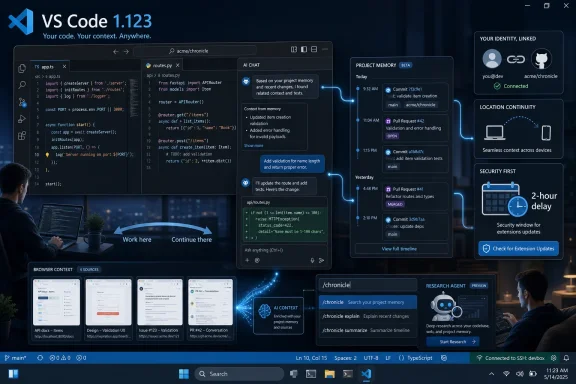 Microsoft Moves the AI Assistant From Prompt Box to Work Record
The headline feature in VS Code 1.123 is session sync, and its importance is easy to understate if you think of Copilot chat as a transient conversation. Until now, many AI-assisted coding sessions behaved like scratchpads: useful in the moment, awkward to resume later, and often trapped on the machine or workspace where the work began. Version 1.123 pushes the editor toward a different model, where the AI interaction becomes part of the project’s operating memory.Microsoft says synced sessions can include the conversation, files touched, repository context such as repo and branch, timestamps, and referenced pull requests, issues, or commits. That matters because the value of an agent session rarely lives in a single answer. It lives in the trail of decisions: what the assistant inspected, what the developer accepted, what was rejected, and which related work shaped the outcome.
The practical audience is obvious. A developer starts a refactor on a desktop, checks something from a laptop, reconnects from a remote environment, and later needs to explain what happened in a standup or pull request. In that world, AI history is not a novelty feature. It is the connective tissue between intent, code changes, and accountability.
That is also why tying this memory to a GitHub account is strategically important. Microsoft is not merely syncing UI state. It is joining VS Code, GitHub identity, Copilot workflows, repository metadata, and agent history into a single productivity layer. The editor becomes less like a local tool and more like the front end for an increasingly cloud-aware development record.
The Chronicle Command Is a Quiet Bid to Own the Developer’s Narrative
The new /chronicle commands turn synced AI sessions into something developers can query. Microsoft’s examples are deliberately practical: ask natural-language questions about past sessions, generate standup reports, get productivity tips, and search coding history by topic, file, or pull request. That sounds modest until you consider what kind of data is being indexed.A standup report generated from actual coding sessions is different from a manually reconstructed update at 9:45 a.m. A search for “the authentication bug from last week” is different from grepping commit messages or trying to remember which branch held the experiment. If the feature works well, /chronicle becomes a personal development log that sits somewhere between chat transcript, lightweight project journal, and repository-aware assistant.
There is a risk here, too. The more useful the memory becomes, the more developers will lean on it as a source of truth. That makes accuracy, retention controls, organization policy, and privacy expectations central rather than peripheral. Microsoft notes that the session sync setting can be managed at the organization level, which is exactly where many enterprises will want the conversation to begin.
For individual developers, the trade-off will feel familiar. A tool that remembers more can help more. A tool that remembers more also demands more trust. In 2026, that tension is becoming the defining bargain of AI coding tools.
Agent Work Now Needs State, Not Just Smarter Models
VS Code 1.123 lands after months of editor changes that have been nudging Copilot and agent workflows deeper into the daily development loop. The release brings the Agents window to Stable as a preview, allowing multiple agent sessions to be opened side by side. It also sits alongside GitHub’s broader remote-agent work, where long-running sessions can continue even when a local client disconnects.These are separate features, but they solve related problems. Session sync preserves what happened. Remote execution keeps work alive. Multi-session surfaces let developers compare or monitor parallel attempts. Protocol-level state synchronization is the less glamorous but necessary layer that prevents different clients from seeing different versions of the same agent task.
That distinction matters because AI coding is no longer limited to asking for a function or explaining an error. Developers are increasingly using agents to investigate codebases, stage changes, run commands, inspect failures, and propose multi-file edits. Once the assistant becomes active across files, branches, terminals, and remote machines, the old chat-window metaphor starts to buckle.
Microsoft’s answer is to make VS Code itself the control plane. Files, terminals, source control, extensions, browser previews, and chat history already live inside the editor. The company’s bet is that agents become more useful when they operate where the developer’s context already exists.
Bigger Context Windows Do Not Eliminate the Need for Memory
VS Code 1.123 also adds support for one-million-token context windows for compatible Anthropic and OpenAI models, including models Microsoft identifies in its release notes as Claude Opus 4.7 and GPT-5.5. That is a dramatic number, and it will tempt some users to think context size alone solves the problem of AI continuity. It does not.A large context window helps when the immediate task requires more code, more logs, or a longer conversation. Persistent session memory helps when the task spans time, machines, and human interruptions. These are related capabilities, but they are not substitutes.
A model with a huge context window can read more in one sitting. A synchronized session history can explain why a developer went down one path yesterday, which files were touched, and how the work connected to an issue or pull request. For real projects, that second layer may prove just as important as raw model capacity.
There is also a cost angle. Larger context windows can consume more tokens per interaction, which matters under usage-based billing. That makes curated memory more attractive. If /chronicle can surface the right prior session instead of shoving an entire repository and weeks of conversation into the prompt, it could become a practical cost-control feature as much as a convenience feature.
The Research Agent Shows the Ambition and the Limits
The new Research Agent is one of the more intriguing additions, but it is also tightly constrained. Microsoft says it is currently available only in Copilot CLI local sessions in Insiders. In that preview form, it can investigate a topic and produce a Markdown report by synthesizing information from a codebase, relevant GitHub repositories, and the web.That is exactly the kind of agent capability developers have been trying to approximate manually. Understanding an unfamiliar library, comparing implementation options, or mapping a legacy subsystem often involves jumping among source files, documentation, issues, and search results. A read-only research agent that produces a structured report could save time, especially when onboarding to a messy codebase.
But the preview boundary matters. This is not yet a general-purpose research layer in the stable editor for every Copilot user. It is an early signal of direction: Microsoft wants VS Code agents not only to edit code, but to investigate and explain the surrounding technical landscape.
The read-only posture is sensible. Research is a domain where hallucination is still a risk, but unintended file modification would be worse. By limiting the agent to investigation and reporting, Microsoft is drawing a line between analysis and action. That line will matter more as agents gain broader tool access.
The Integrated Browser Becomes Agent Context, Not Just Convenience
The browser updates in VS Code 1.123 look smaller than session sync, but they fit the same pattern. The integrated browser now supports favorites, access to open tabs from the address bar, selected-area screenshots, and an experimental full-page screenshot option. On paper, these are quality-of-life improvements. In the context of AI work, they are a way to bring visual and web state into the assistant’s context without leaving the editor.That is especially useful for UI debugging. A developer can capture a browser viewport or selected area and attach it to chat as context. If full-page capture matures, web application debugging inside VS Code becomes less dependent on switching between browser, editor, screenshot tool, and chat.
The broader story is that Microsoft is flattening the surfaces around development. The code, terminal, browser, issue context, session history, and AI assistant are being pulled into the same workspace. That can feel efficient, but it also raises the stakes of the editor itself. VS Code is no longer merely where developers type; it is increasingly where they observe, delegate, audit, and remember.
For WindowsForum readers who manage developer fleets, this is worth watching. The richer the editor becomes, the more its configuration becomes a governance issue. Browser capture, AI session sync, extension trust, model access, and network permissions are not isolated preferences when they operate inside the same daily tool.
The Two-Hour Extension Delay Is Small, Sensible, and Incomplete
The other security-relevant change in VS Code 1.123 is a two-hour delay before newly published extension versions are automatically installed. Microsoft says the delay applies when automatic updates are enabled and is meant to add protection against problematic or potentially compromised releases. Extensions from trusted publishers such as Microsoft, GitHub, and OpenAI continue to update immediately.This is not a hard block. Developers can still click the Update button and install an extension immediately. The delay is a default cooling-off period, not a policy wall.
That distinction is important. A two-hour window may help if maintainers, users, or security teams quickly detect a bad release and remove or flag it before automatic updates fan out. It will not stop a malicious update that remains unnoticed for half a day, nor will it help users who manually update the moment a release appears.
Still, the move is grounded in a real supply-chain concern. VS Code extensions run with meaningful access inside developer environments, and extension compromise has moved from theoretical risk to operational worry. A short delay is not a comprehensive defense, but it is an admission that instant auto-update is not always the safest default for a software supply chain made of many publishers.
The exception for Microsoft, GitHub, and OpenAI extensions will draw scrutiny. From Microsoft’s perspective, trusted publishers are likely to have stronger release controls and urgent update needs. From an enterprise administrator’s perspective, any privileged fast lane deserves documentation, monitoring, and ideally policy control.
Sandboxed Commands Reveal the Friction in Local Agents
VS Code 1.123 also changes how local-agent terminal commands handle network-dependent work. If a command run by a local agent needs access to domains not configured as allowed, VS Code can retry it inside the sandbox with broader network access, while keeping filesystem protections in place. If that still fails, the command can fall back to unsandboxed execution.This is a revealing compromise. Agents need to run real development commands, and real development commands often need the network. A
git fetch, package restore, test dependency, or documentation lookup can fail if network policy is too narrow. But allowing every agent command unconstrained network and filesystem access would be reckless.The retry behavior tries to keep the safe path as the default while acknowledging that development work is messy. It is a classic engineering trade-off: reduce friction without pretending the risk disappears. For enterprise teams, the relevant question is not whether this is convenient, but how visible and configurable the fallback path is in managed environments.
Microsoft is also giving attention to bring-your-own-key model support and controls for utility-task models, which will matter to organizations with stricter AI procurement and data-handling rules. Those controls are not the flashy part of the release, but they are part of the same enterprise story. AI coding tools only become durable in business environments when security teams can define boundaries rather than merely accept vendor defaults.
VS Code’s Advantage Is the Boring Stuff Around the Chatbot
The competitive backdrop is crowded. Amazon Q Developer, Gemini Code Assist, Tabnine, Mistral Code, GitHub Copilot, and standalone coding agents are all fighting for developer attention. Many can generate code, explain errors, or search a project. The differentiation is shifting away from the chat response itself and toward workflow capture.That is where VS Code has an obvious advantage. It already owns the places where developers spend time: the file tree, editor tabs, terminal, debugger, Git integration, extensions, remote workspaces, and increasingly the browser preview. A rival assistant can be clever, but if it lives outside the core workflow, it must constantly ask for context VS Code already has.
Session sync strengthens that advantage by making the editor’s AI layer portable. The developer does not merely carry settings and extensions from one machine to another. They carry a history of agent-mediated work, linked to repository context and searchable after the fact.
That also deepens lock-in. A project memory layer tied to GitHub identity and VS Code sessions will be hard to leave behind if it becomes useful. Microsoft does not need to force developers into its ecosystem if the daily record of their work naturally accumulates there.
Enterprise IT Will Ask Where the Memory Lives and Who Can Read It
The most important administrative questions are not about whether /chronicle is clever. They are about data boundaries. What exactly is stored, how long it persists, who can access it, how it is governed by organizational policy, and how it interacts with regulated codebases or customer data are the questions that will decide whether session sync is embraced or disabled.Microsoft’s release notes say the session sync setting is managed at the organization level. That is necessary, but not sufficient as a story for every environment. Highly regulated teams will want retention controls, auditability, tenant-level documentation, and clear separation between personal and corporate GitHub identities.
There is also the human factor. Developers may paste secrets, customer snippets, internal architecture details, or incident context into chat even when policy says they should not. If chat history becomes synchronized and searchable, accidental disclosure becomes more durable. A bad prompt that once disappeared into local history may now become part of a cross-machine work record.
None of this makes session sync a bad idea. It makes it an enterprise feature. The more useful it is, the more it needs administrative maturity.
The Editor Is Becoming the Memory Layer for Software Work
VS Code 1.123 is best read as a release about continuity. Session sync preserves history. /chronicle retrieves it. The Agents window exposes parallel work. Browser capture feeds visual context into chat. The Research Agent points toward deeper investigation. Extension-update delays acknowledge that the editor’s ecosystem is now important enough to need supply-chain pacing.The through line is that software work is becoming less linear. Developers are juggling local and remote environments, multiple devices, long-running agents, larger model contexts, and codebases too large to hold in short-term memory. The editor that can coordinate those moving parts becomes more valuable than the assistant that merely answers a prompt.
That is why this release feels more consequential than a normal feature bundle. Microsoft is not just adding AI to VS Code. It is changing what VS Code is allowed to remember.
The Details That Should Survive the Hype Cycle
The best way to judge VS Code 1.123 is to separate what is immediately usable from what is directional. The release has enough of both to matter, but they should not be confused. Session sync and extension-update delays will affect more users sooner than the Research Agent preview.- VS Code 1.123 was released on June 3, 2026, for Windows, macOS, and Linux.
- AI chat session sync uses GitHub accounts to carry session history across machines and workspaces.
- The new /chronicle commands can search past coding sessions, generate standup reports, and answer natural-language questions about prior work.
- The Research Agent remains a narrow preview limited to Copilot CLI local sessions in Insiders.
- VS Code now delays many third-party extension auto-updates by two hours, while still allowing immediate manual updates.
- The release’s real significance is not any single AI feature, but the move toward persistent, searchable project memory inside the editor.
References
- Primary source: WinBuzzer
Published: 2026-06-07T18:12:07.788389
VS Code 1.123 Turns AI Sessions Into Project Memory
Microsoft has released VS Code 1.123 with portable AI session history, /chronicle commands, and an extension-update delay for safer daily agent workflows. winbuzzer.com
- Related coverage: code.visualstudio.com
Release Notes Archive - Visual Studio Code
Browse all Visual Studio Code release notes by year.code.visualstudio.com
- Related coverage: ntcompatible.com
Visual Studio Code 1.123 Brings Cross Machine Chat Sync and Safer Extension Updates
Visual Studio Code 1.123 ties Copilot conversations directly to GitHub so developers can automatically sync chat history across machines without manual copy-pasting.www.ntcompatible.com - Related coverage: windowsreport.com
Visual Studio Code Gains Research Agent, Chronicle Search, and New AI Features
Microsoft has released VS Code 1.123 with a new Research Agent, AI session syncing, Chronicle search, browser upgrades, and more. windowsreport.com
- Related coverage: dev.ua
Microsoft has released a major update to VS Code 1.123 | dev.ua
Microsoft has just released Visual Studio Code 1.123 ahead of its annual developer conference, Build 2026. The release focuses on deep integration of advanced AI agents and improved stability of the built-in browser. In particular, the update brings major changes to synchronization, ensuring that AIdev.ua - Related coverage: techzine.eu
VS Code now maintains AI context across devices
Microsoft announced a new version of Visual Studio Code during its Build 2026 developer conference. Version 1.123 focuses primarily on further integrating www.techzine.eu
- Related coverage: radar.offseq.com
VS code forces 2 hour cool down for most integrations. - Live Threat Intelligence - Threat Radar | OffSeq.com
Detailed information about VS code forces 2 hour cool down for most integrations.. Get real-time updates, technical details, and mitigation strategies.radar.offseq.com - Related coverage: tweakers.net
Visual Studio Code legt pauze van 2 uur op voor updaten van npm-packages
Visual Studio Code legt een standaardpauze van 2 uur op voor het automatisch updaten van nieuwe extensies zoals npm-packages. Dit volgt op incidenten met npm-packages, waarmee hackaanvallen zijn uitgevoerd. Microsoft hanteert wel uitzonderingen voor de verplichte pauze.tweakers.net
- Related coverage: byteiota.com
VS Code 1.123: Session Sync, 1M Context, Research Agent | byteiota
VS Code 1.123 ships agent session sync across machines, 1 million token context windows, and a read-only research agent. Here's what changed and what to do now.byteiota.com - Related coverage: techzine.nl
VS Code houdt AI-context voortaan vast tussen apparaten
Microsoft heeft tijdens zijn ontwikkelaarsconferentie Build 2026 een nieuwe versie van Visual Studio Code aangekondigd. www.techzine.nl
- Related coverage: visualstudiomagazine.com
VS Code 1.111 Debuts Weekly Stable Cadence, Expands Agent Controls -- Visual Studio Magazine
Microsoft's VS Code 1.111 release adds agent permissions, Autopilot preview, agent-scoped hooks and new debugging tools.visualstudiomagazine.com - Related coverage: app.daily.dev
Visual Studio Code 1.123 | daily.dev
VS Code 1.123 (Insiders) release notes covering updates from May 26–29, 2026. Key changes include: chat session handoff from VS Code to the standalone Agents... app.daily.dev
