

Google is adding a personalized image-discovery feed to the Google app, turning its image experience into something closer to Pinterest than a conventional keyword-results page. The change is rolling out in the United States over the next few weeks for Android and iOS, according to Google.
The new Images tab sits in the bottom navigation of the Google app. It presents a daily stream of images tailored to a user’s interests, alongside suggested searches. Users can browse the feed, search from it, and save material into Collections for later reference.
Some early reports described the update as a desktop redesign of Google Images with a “For You” page. Google’s own announcement is more limited: it describes a new Images section in the mobile Google app, not a replacement for the existing Google Images website on Windows or other desktop platforms.
That distinction matters for PC users. Opening Google Images in Chrome, Edge, Firefox, or another desktop browser should continue to present the familiar search-led interface. Google has not announced a matching desktop rollout, an English-only requirement, or a Google Account requirement for a new web-based feed.
The feature is nevertheless part of a broader effort to make Search more recommendation-driven. Instead of requiring users to formulate a query first, the app can surface ideas for travel, clothing, home projects, and similar visual topics before a search begins. Collections provide the organizational layer, letting users keep images grouped around projects or interests.
Google has already been expanding its Nano Banana image-generation and editing technology across its products. In Search, the company says Nano Banana powers a Lens “Create” mode: users can take a photo or select one from a device gallery, then transform it with AI. That experience is accessed through Google Lens in the Google app on Android or iOS, rather than through a general desktop Google Images prompt box.
Google has also introduced newer Nano Banana models for its Gemini products, so the branding is likely to recur across Search, Lens, Photos, and other services. But Windows users should treat claims of a new AI image generator embedded directly in Google Images as unconfirmed until Google publishes a specific desktop announcement.
For users who have the Google app installed on an Android phone or iPhone, the Images icon may appear gradually as the server-side rollout reaches their account. Everyone else can continue using Google Images normally on the web.
For now, the practical impact is limited to the mobile Google app, with no announced change to desktop Google Images.
The new Images tab sits in the bottom navigation of the Google app. It presents a daily stream of images tailored to a user’s interests, alongside suggested searches. Users can browse the feed, search from it, and save material into Collections for later reference.
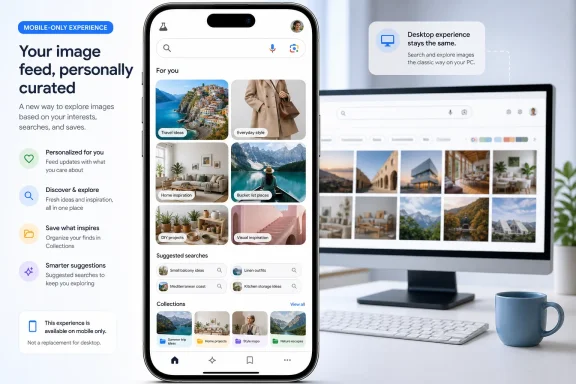 A feed, not a desktop Google Images replacement
Some early reports described the update as a desktop redesign of Google Images with a “For You” page. Google’s own announcement is more limited: it describes a new Images section in the mobile Google app, not a replacement for the existing Google Images website on Windows or other desktop platforms.That distinction matters for PC users. Opening Google Images in Chrome, Edge, Firefox, or another desktop browser should continue to present the familiar search-led interface. Google has not announced a matching desktop rollout, an English-only requirement, or a Google Account requirement for a new web-based feed.
The feature is nevertheless part of a broader effort to make Search more recommendation-driven. Instead of requiring users to formulate a query first, the app can surface ideas for travel, clothing, home projects, and similar visual topics before a search begins. Collections provide the organizational layer, letting users keep images grouped around projects or interests.
Nano Banana is adjacent, not part of this feed
Reports also tied the rollout to text-to-image generation in AI Overviews. Google’s published material does not describe a new prompt-to-image generator inside the Images feed.Google has already been expanding its Nano Banana image-generation and editing technology across its products. In Search, the company says Nano Banana powers a Lens “Create” mode: users can take a photo or select one from a device gallery, then transform it with AI. That experience is accessed through Google Lens in the Google app on Android or iOS, rather than through a general desktop Google Images prompt box.
Google has also introduced newer Nano Banana models for its Gemini products, so the branding is likely to recur across Search, Lens, Photos, and other services. But Windows users should treat claims of a new AI image generator embedded directly in Google Images as unconfirmed until Google publishes a specific desktop announcement.
What Windows users and IT admins need to know
There is no Windows update, Chrome update, browser policy, or enterprise action tied to this rollout. The initial feature is app-based and U.S.-only.For users who have the Google app installed on an Android phone or iPhone, the Images icon may appear gradually as the server-side rollout reaches their account. Everyone else can continue using Google Images normally on the web.
For now, the practical impact is limited to the mobile Google app, with no announced change to desktop Google Images.
References
- Primary source: afaqs!
Published: 2026-07-15T05:58:52.994000+00:00
Google Images gets Pinterest-like feed & AI image generation
The latest update, introduced as Google Images turns 25, expands the platform beyond image search to focus on browsing and visual discovery. www.afaqs.com
- Independent coverage: The Tech Buzz
Published: Tue, 14 Jul 2026 16:55:00 GMT
Google Images Launches Pinterest-Style 'For You' Feed | The Tech Buzz
Google Images unveils AI-powered personalized discovery feed, challenging Pinterestwww.techbuzz.ai - Related coverage: blog.google
Browse, search and explore images directly in the Google app
People all over the world already turn to Google Images for visual discovery, whether you're planning a trip, sprucing up your apartment or deciding what to wear to a ho…blog.google
