

Google Drive is getting an AI-powered facelift that surfaces folder-level summaries and interactive file previews directly in the folder view — but the smartest bits are behind paid tiers, setting up a clear productivity trade-off between speed and subscription cost that IT leaders and knowledge workers must weigh carefully.
Google has quietly folded its Gemini models deeper into Google Workspace, and the latest user-facing improvement places insights by Gemini at the top of Drive folders. The new experience replaces earlier, small “nudges” with proactive summaries that highlight key documents, recent edits, and likely items of interest — and it adds an “Explore with Gemini” side panel so users can ask follow-up questions, request summaries, or extract action items without opening documents one by one. This update was announced on Google’s Workspace Updates feed and is rolling out now to eligible accounts. This feature marks a shift in how cloud storage surfaces knowledge: Drive is moving from a passive repository of files to an interactive knowledge layer where AI helps people find, understand, and act on stored content faster.
Google Drive’s new Gemini-driven folder insights are a practical example of AI moving from novelty to utility: they address a mundane, high-frequency problem (finding the right file) in a way that saves time and reduces cognitive load. The catch — that the smartest features are behind paid plans — is the industry’s current playbook for monetizing AI. Organizations should evaluate the clear productivity upside against governance and licensing realities, pilot with clear success metrics, and enforce verification steps for any critical outputs.
Source: findarticles.com Google Drive Rolls Out Enhanced Search for Subscribers
 Background
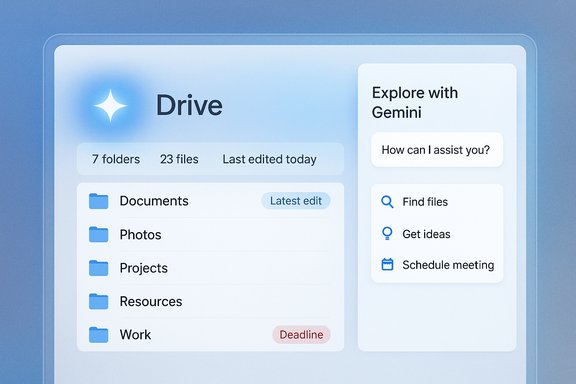
Google has quietly folded its Gemini models deeper into Google Workspace, and the latest user-facing improvement places insights by Gemini at the top of Drive folders. The new experience replaces earlier, small “nudges” with proactive summaries that highlight key documents, recent edits, and likely items of interest — and it adds an “Explore with Gemini” side panel so users can ask follow-up questions, request summaries, or extract action items without opening documents one by one. This update was announced on Google’s Workspace Updates feed and is rolling out now to eligible accounts. This feature marks a shift in how cloud storage surfaces knowledge: Drive is moving from a passive repository of files to an interactive knowledge layer where AI helps people find, understand, and act on stored content faster.What’s changed in Drive: folder-level Gemini insights
Google’s new folder experience does three things differently:- Top-of-folder summaries. When you open a Drive folder, Gemini automatically generates a brief summary of the folder’s contents and highlights the most relevant files and edits so you get a quick sense of the folder without opening items individually.
- “Explore with Gemini” side panel. The summary includes a chip that opens the Gemini side panel. From there you can ask targeted follow-ups — for example, “show the latest budget spreadsheet” or “summarize feedback in the review document” — and receive conversational, context-aware answers.
- Actionable surfacing. Gemini emphasizes likely targets (recently edited decks, shared budgets, deadline documents) and offers quick-entry points so teams can dive into the right asset with fewer clicks and less context switching. This turns Drive into a task-aware surface rather than a simple file list.
The paywall: who gets these AI features
The extension of Gemini into Drive’s folder view is not universally available — it is gated behind paid plans and certain AI subscription tiers. Google’s official rollout notes list the Workspace editions that will receive the change and name consumer/premium tiers that qualify; independent coverage has reported overlapping but sometimes inconsistent descriptions of the subscriber requirements. Key, verifiable points:- Google’s Workspace Updates page lists availability for Business Standard, Business Plus, Enterprise Standard, and Enterprise Plus, and calls out Google One AI Premium and Google AI Pro for Education among eligible plans. Admins can enable or disable the feature via Workspace settings.
- Coverage from major technology outlets confirms the feature is targeted first at paying users; several reports also describe the consumer/personal subscription gates using names such as Gemini Plus/Pro or Google AI Pro/AI Premium. These naming differences reflect Google’s evolving subscription packaging and regional branding, so organizations should check their admin consoles for exact entitlements in their tenant.
Why this matters: the productivity case
Time spent finding information is a real cost. McKinsey’s research on interaction workers — the class of knowledge workers whose day-to-day value depends on communications, documents, and collaboration — estimated that the average interaction worker spends nearly 20% of the workweek looking for internal information or tracking down colleagues who can help with tasks. That equates to roughly 1.8 hours a day or close to a full workday each week lost to retrieval and context-switching. AI features that reduce even a fraction of that overhead can deliver measurable savings. Practical examples where Drive’s folder-level Gemini helps:- A program manager opening a shared project folder can immediately surface the final slide deck, the most-edited budget sheet, and the document that lists deadlines — all visible at the folder header — eliminating multiple exploratory clicks.
- A sales leader prepping for a regional update can ask Gemini to pull the most recent metrics and summarize feedback from a shared review document without opening every file.
- A legal assistant can get an at-a-glance summary of a case folder to triage documents for review, then ask follow-ups to extract named parties or deadlines.
How Google’s rollout compares with rivals
The major cloud vendors are taking similar approaches: AI as a knowledge layer, plus subscription gating.- Microsoft: Copilot for Microsoft 365 integrates directly into OneDrive, SharePoint and Office apps to answer questions and summarize documents. Microsoft requires separate Copilot licensing for the full capabilities — Copilot Chat may be available with eligible Microsoft 365 subscriptions, but Microsoft 365 Copilot (the deeper, work-grounded experience) is a paid add-on with its own license rules and prerequisites. This mirrors Google’s gating strategy: advanced AI features are bundled into paid commercial tiers.
- Dropbox / Box / others: Dropbox and Box have trialed or shipped AI-guided search and summarization features; these vendors also often limit the most powerful models or higher quotas to paid or enterprise customers. The competitive dynamic is clear: AI features are compelling product differentials and revenue levers.
Privacy, governance and accuracy: IT’s checklist
Moving AI into folder headers raises immediate governance questions. Google’s Workspace rollout notes and product docs emphasize admin controls and compatibility with existing file permissions, but organizations should not treat summary outputs as authoritative without checks. Key considerations:- Permissions and visibility. Google says Gemini for Workspace respects file permissions — users should only see insights for files they are authorized to access. Admins can control smart features via the Admin console and set personalization defaults. Still, enterprises should test to confirm that summaries and side-panel previews never surface content beyond the viewer’s permission set.
- Data residency and contractual protections. Regulated organizations should verify contractual commitments about data use and whether workspace content processed by Gemini is excluded from model training under enterprise agreements or special terms.
- Accuracy and hallucination risk. Generative summaries can omit nuance or introduce errors. Treat Gemini highlights as starting points, not final sources of record. Put verification steps into workflows for decision-critical documents.
- Auditability and logging. Confirm what logging and audit trails are available for Gemini interactions (who asked what and when). These trails matter for compliance and incident response.
- Pilot and rollout plan. Test in small groups first; apply tagging rules or content policies restricting certain folders from AI processing until governance is comfortable.
Conflicting reporting on subscription names — a caution
Early reporting from outlets and some consumer-facing coverage describe eligibility in varying ways: some mention Gemini Plus or Gemini Pro, others use Google’s AI plan names like Google One AI Premium or Google AI Pro. Google’s Workspace Updates message lists specific Workspace tiers and also names Google One AI Premium and Google AI Pro for Education as eligible. Because Google has several overlapping AI and storage bundles, the safest path is to check the exact entitlements in your organization’s Workspace Admin console or Google account subscriptions rather than relying on shorthand media reporting. This naming inconsistency has been flagged in multiple reports; admins should verify feature flags and license entitlements in their tenant.What IT teams and admins should do now
- Review entitlement and admin controls.
- Check your Workspace edition (Business Standard/Plus, Enterprise tiers) and consumer AI subscriptions in your organization to confirm who will see the feature. Google’s Workspace Updates gives the rollout schedule and enabling/disabling details.
- Create a pilot plan.
- Start with a small set of non-sensitive folders and users to validate visibility, accuracy, and audit logs before a broad rollout.
- Update policies and communications.
- Draft short user guidance that clarifies (a) what the Gemini summaries are for, (b) when not to rely on AI output for final decisions, and (c) how to opt out or disable smart features if required.
- Verify contractual protections.
- If your organization handles regulated data, confirm whether Google’s enterprise agreements include non-training clauses or other data usage guarantees.
- Track usage and costs.
- If you adopt AI subscription tiers for users, monitor usage to avoid unexpected billing or quota limits; advanced tools often have metered or quota-based metering.
Potential risks and mitigations
- Over-reliance on summaries. Mitigation: insist policy that AI outputs must be validated for legal, financial, or clinical decisions.
- Data leakage due to misconfiguration. Mitigation: enforce least-privilege access and run access reviews; disable AI for highly sensitive folders until controls are verified.
- Inconsistent entitlements causing confusion. Mitigation: maintain an internal entitlement map that documents who has which Google and Gemini subscriptions.
- Vendor lock-in and workflow sprawl. Mitigation: preserve exportable, portable source files and maintain an archival strategy independent of vendor AI features.
How this will change daily work (and what to watch next)
The immediate user-facing change is reduced friction for discovery: fewer clicks to the right document, faster orientation in shared folders, and faster extraction of action items. Over time, expect deeper, multimodal search — summaries that include scanned PDFs, images with OCR-aware summaries, and integrated results that cross Gmail, Calendar, and Drive into a single conversational answer. Google is likely to iterate toward tighter Gmail and Calendar integrations and expanded language support beyond English. Whether those broader upgrades reach free Drive users remains uncertain; current signals show Google prioritizing paid and Workspace tiers first. Key signals to monitor in the coming months:- Official help center pages that list the precise entitlements and subscription names (this will clear up the Plus/Pro vs Google AI Pro nomenclature).
- Admin console rollout flags and new controls for limiting Gemini access to specific organizational units or folders.
- Cross-vendor feature parity from Microsoft and others — expect incremental enhancements in OneDrive/SharePoint and Copilot feature sets as competition intensifies.
Final analysis: strengths, trade-offs and a practical verdict
Strengths- Time savings. Folder-level summaries address a high-friction moment for knowledge workers who repeatedly hunt through folders to find what they need. The McKinsey figures underscore the scale of that problem — saving even a small percentage of that time is valuable.
- Context-aware workflows. Gemini in the folder header narrows the gap between “where is the file?” and “give me the part I need,” reducing context switches and speeding execution.
- Integration advantage. For organizations already rooted in Workspace, tight integration makes the feature sticky and practical for day-to-day tasks.
- Subscription gating. The most useful AI behaviors are reserved for paying tiers, which could widen the capability gap between premium and free users and complicate procurement decisions.
- Accuracy and governance. Generative summaries are helpful but not infallible; organizations must treat them as starting points, not authoritative records.
- Naming and entitlement confusion. Media reporting has used multiple subscription labels; admins must verify actual entitlements in their consoles before making decisions.
- For teams already paying for Google Workspace at eligible tiers, enabling Gemini folder insights and running a controlled pilot is likely to produce meaningful day-to-day productivity gains — especially for collaboration-heavy teams that routinely share folders. For free users and small teams unwilling to expand subscriptions, the feature is an attractive capability to evaluate, but adoption requires budgeting and governance planning.
Google Drive’s new Gemini-driven folder insights are a practical example of AI moving from novelty to utility: they address a mundane, high-frequency problem (finding the right file) in a way that saves time and reduces cognitive load. The catch — that the smartest features are behind paid plans — is the industry’s current playbook for monetizing AI. Organizations should evaluate the clear productivity upside against governance and licensing realities, pilot with clear success metrics, and enforce verification steps for any critical outputs.
Source: findarticles.com Google Drive Rolls Out Enhanced Search for Subscribers
