

Google expanded Gemini’s “Take notes for me” feature in Google Meet on June 29, 2026, making the AI meeting note-taker available to Google AI Pro and AI Ultra subscribers on Meet for web and mobile in supported languages. The move turns a formerly Workspace-centered productivity perk into a consumer subscription feature, and that shift matters more than the note-taking itself. Google is no longer treating AI meeting summaries as a premium enterprise experiment. It is making them part of the expected software furniture for anyone paying for its top AI plans.
The obvious story is that Google Meet can now listen to a call, summarize the discussion, identify action items, and save the result as a Google Doc. That is useful, but not novel. Microsoft Teams, Zoom, Otter, Fireflies, and a growing list of meeting assistants have spent the last few years turning the humble meeting transcript into a battleground for AI productivity.
The more important story is distribution. “Take notes for me” launched in 2024 for selected Google Workspace users, where it made sense as a business feature with admin controls, compliance knobs, and a clear corporate buyer. Now Google is extending it to Google AI Pro and Ultra subscribers, which places the same capability in the hands of freelancers, consultants, students, founders, community organizers, and anyone else who hosts meetings from a paid consumer AI account.
That tells us something about where the AI bundle is heading. Google does not want Gemini to be just a chatbot tab, a sidebar in Docs, or a model picker for enthusiasts comparing benchmarks. It wants Gemini to be present in the moments where work is actually produced: meetings, documents, calendars, follow-ups, and decisions.
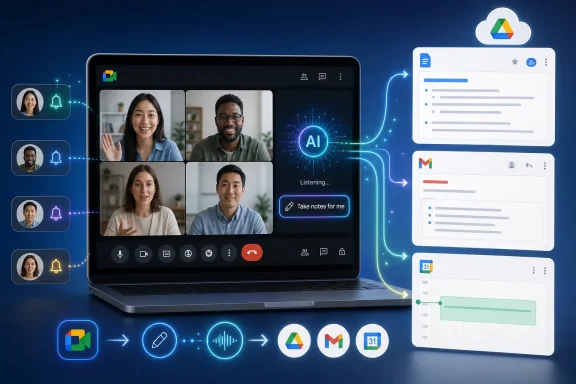
The company’s framing is deliberately mundane. A pencil icon appears in Meet. Participants are notified. Notes go into Drive. The organizer gets an email recap. The Calendar event may receive the notes depending on meeting setup and sharing settings. That mundanity is the point: AI becomes harder to opt out of not when it is dramatic, but when it looks like another button in the toolbar.
The workflow is straightforward. A meeting host enables the feature, Gemini listens during the call, and the output is saved as a Google Doc in the organizer’s Drive. After the meeting, Google sends the organizer an email recap with the summary and action items, while the generated notes can attach to the associated Calendar event if the meeting configuration allows it.
That last bit is crucial. Google is not merely generating text; it is routing meeting output into the rest of the Google productivity stack. A note-taking bot that dumps a transcript into a random dashboard is one thing. A note-taking system that writes to Drive, threads into Calendar, and lands in Gmail is much closer to institutional memory.
This is where Google has an advantage over standalone AI meeting tools. Third-party notetakers can be more flexible, more cross-platform, or more specialized, but they usually have to ask permission to sit in the meeting, then ask again to store, share, and organize the result. Google already owns the meeting room, the calendar invite, the document destination, and in many cases the identity layer.
For users, the promise is less “Gemini understands your business” than “Gemini knows where the notes should go.” That sounds boring until you remember how much workplace friction is just misplaced context. The meeting happened in one app, the task was mentioned in another, the document lives somewhere else, and the decision disappeared into a recording nobody will rewatch.
A paid AI subscriber may be using a personal Gmail account for professional work. A contractor may host client meetings from a consumer account because that is where their calendar lives. A startup founder may sit somewhere between “individual” and “organization” for years. Google’s expansion acknowledges that the market for AI productivity does not map neatly onto traditional enterprise licensing.
That creates opportunity and confusion. On one hand, AI Pro and Ultra subscribers now get a feature that makes Meet more competitive without needing to buy into a larger Workspace plan. On the other, users with multiple Google identities will have to pay close attention to which account is hosting the meeting, which account has the subscription, and whether their organization’s policies allow the feature.
This has become a recurring problem across the AI subscription landscape. Microsoft has consumer Copilot, Microsoft 365 Copilot, Teams Premium, and enterprise controls layered across identity and tenancy. Google has Gemini features spread across consumer plans, Workspace editions, add-ons, and admin settings. Zoom has AI Companion built into its own collaboration platform while also pushing into third-party meetings.
The result is that AI features increasingly arrive not as apps, but as licensing conditions. The question is no longer “Do I have a note-taking tool?” It is “Which account am I using, who hosts the meeting, what plan pays for AI, and what policy applies to this tenant?” That is not exactly the frictionless future vendors promised, but it is the one IT departments now have to manage.
A human taking notes is socially legible. A recording is obvious, or at least it should be. An AI system that listens, summarizes, extracts actions, and saves the result in a shareable document occupies a more ambiguous space. Participants may understand that notes are being taken, but not necessarily how the raw speech is processed, what is retained, who can access the output, or how the notes might be used later.
That is why the enterprise controls matter. For work and school accounts, administrators can decide whether the feature is available and may require explicit participant consent for note-taking, recording, or transcription features. In regulated environments, those controls are not optional polish; they are the difference between a productivity feature and a compliance incident.
The consumer rollout raises a different problem. A meeting hosted by an individual AI Pro subscriber may include employees, clients, vendors, students, or community members who are not part of the same administrative domain. Google can notify participants, but the social pressure to continue in a meeting after a host enables AI notes is real. Consent banners do not erase power dynamics.
This will be especially sensitive in hybrid work, consulting, education, healthcare-adjacent conversations, legal-adjacent conversations, and any meeting where participants might speak more cautiously if they know an AI summary will persist. The issue is not that automated notes are inherently dangerous. The issue is that generated summaries tend to look authoritative even when they compress nuance, omit caveats, or turn tentative statements into apparent commitments.
There is also the matter of who gets the artifact. If the organizer receives the recap and the notes live in the organizer’s Drive, then the feature naturally privileges the host. That may be fine for most meetings. But in disputes, negotiations, disciplinary conversations, or sensitive planning sessions, the AI-generated version of events could become a record with consequences beyond convenience.
The one-language limitation is particularly important. Many real meetings are not monolingual, even when the invite claims they are. Teams switch between English and Spanish, French and English, Japanese and English, or Portuguese and English depending on topic, speaker, and audience. In multinational organizations, code-switching is not an edge case; it is a normal part of collaboration.
Google’s recommendation that meetings run between 15 minutes and eight hours also says something practical. Very short meetings may not provide enough context for useful structured notes. Very long sessions risk summary drift, fatigue in the source material, or outputs that become too broad to be actionable. The tool is aimed at the thick middle of modern work: the 30-minute sync, the 60-minute planning call, the 90-minute workshop, the multi-hour review.
This matters because users tend to overgeneralize AI capability. Once a feature works well in a neat product demo, people try it on multilingual calls, chaotic brainstorming sessions, customer escalations, legal reviews, lectures, interviews, and town halls. Some of those will work. Some will produce confident-looking summaries with missing context.
The practical advice for users is not to distrust the feature wholesale, but to treat it as a first draft. In a routine status call, that may be enough. In a decision-heavy meeting, someone should still verify the action items. In a sensitive meeting, participants should agree upfront about whether AI notes are appropriate at all.
Zoom, meanwhile, has pushed AI Companion as both a meeting summary tool and a broader productivity layer. Zoom’s pitch has evolved from “we can summarize your Zoom meeting” to “we can help you manage conversation across the workday,” including meetings on other platforms in some scenarios. That is a direct challenge to the idea that the meeting platform itself owns the meeting memory.
Google had to respond because Meet cannot afford to look like the quiet room in an AI-first office suite. If Teams users get Copilot recaps and Zoom users get AI Companion summaries, Meet users will expect the same baseline utility. The competitive question is no longer whether a video conferencing platform can host a stable call. It is whether the platform can turn the call into structured work afterward.
This is where Google’s broader ecosystem helps. Meet is not just a video app; it is attached to Gmail, Calendar, Docs, Drive, and Gemini. A meeting summary that becomes a Google Doc is immediately editable, shareable, searchable, and linkable. A recap email lands in a place many users already treat as a task queue. A Calendar attachment keeps the output connected to the event that produced it.
Microsoft has a comparable advantage in its own world. Teams, Outlook, Word, OneDrive, Planner, Loop, and Copilot are designed to reinforce one another. Zoom’s challenge is different: it must remain essential even when the surrounding productivity suite belongs to Microsoft or Google. That is why Zoom has been so interested in cross-platform AI features and assistant-style workflows.
For users and administrators, the competition is good in the narrow sense that features arrive faster. The danger is that each vendor’s meeting memory becomes another ecosystem lock-in mechanism. Once your notes, tasks, summaries, and decisions are generated inside one suite and stored in its native documents, switching platforms becomes less about moving meetings and more about moving institutional context.
AI changes that economics. Speech becomes transcript, transcript becomes summary, summary becomes action item, and action item becomes a task or document. The meeting is no longer just communication; it is a structured data source feeding the rest of the workplace system.
That shift is powerful because meetings contain the material that formal systems often miss. The CRM might know the customer status, but the call explains the tension. The project tracker might list deadlines, but the meeting reveals who is blocked and why. The document might show the final wording, but the discussion captures the trade-offs.
It is also risky because meetings contain casual speech, uncertainty, jokes, objections, side comments, and half-formed ideas. Summarization systems are designed to impose order. That is their virtue and their vice. They turn conversation into prose, but prose can flatten ambiguity.
The phrase “action items” is a perfect example. In a human meeting, there is often a difference between “Alice will look into that,” “Alice owns that,” and “Alice agreed to deliver that by Friday.” AI systems may become increasingly good at distinguishing those shades, but users should not assume perfection. A bad action item can create unnecessary work; a missing one can create accountability gaps.
The best organizations will adapt their meeting behavior. They will state decisions clearly. They will assign owners explicitly. They will correct generated notes when they matter. They will not treat the AI as an oracle, but they will learn to speak in ways that make the resulting record more useful.
That means “Take notes for me” is not merely a user feature. It is a governance surface. If enabled carelessly, it can create new documents containing sensitive business discussions. If disabled too broadly, users may route around policy with third-party bots, personal accounts, or manual transcript uploads to external AI tools.
The third-party bot problem is real. Many organizations already face a parade of AI meeting assistants joining calls as named participants. Some are sanctioned, many are not, and users often invite them because they solve a practical problem faster than IT can approve an official tool. Native Meet note-taking gives Google-centric organizations a defensible alternative: keep the meeting assistant inside the platform rather than allowing unknown services into the room.
But native does not automatically mean safe. Admins still need to understand storage location, access inheritance, external sharing, legal hold, retention, and auditability. A Google Doc generated from a sensitive meeting is still a document. It can be shared, copied, downloaded, misfiled, or discovered later.
The best policy will likely be tiered. Routine internal meetings may allow AI notes with standard notification. External meetings may require explicit consent. Sensitive departments may need tighter controls or complete restrictions. Education, healthcare, legal, finance, and public-sector environments will need special care, especially when local recording and consent rules differ.
The hard part is that employees will experience these controls as friction. They will see competitors using AI recaps, consultants sending polished meeting summaries, and consumer accounts offering features that corporate accounts restrict. IT’s job is not to pretend the friction is imaginary. It is to explain why the organization’s meeting memory deserves the same care as email, chat, and documents.
But tools do not fix meeting culture by themselves. A rambling meeting will produce rambling notes. A meeting without decisions will produce a polished record of indecision. A team that ignores follow-ups will not suddenly become accountable because Gemini placed them in a Google Doc.
There is a danger that AI summaries make bad meetings feel more productive than they are. A neat recap can create the impression that progress occurred, even if the underlying discussion was circular. This is not a Google-specific issue; it applies equally to Teams, Zoom, and every AI notetaker promising to turn conversation into clarity.
The better use of the feature is as a forcing function. If the generated notes show no decisions, maybe the meeting had none. If action items lack owners, maybe the team did not assign them. If the summary misses a critical caveat, maybe the caveat was not stated clearly enough — or maybe the AI simply failed and needs correction.
Teams that get value from AI notes will develop habits around them. Someone will review the recap after important meetings. Participants will correct misstatements promptly. Hosts will decide whether notes should be shared broadly or kept narrow. Managers will avoid treating AI-generated action items as infallible evidence of commitment.
In other words, the feature can reduce clerical work, but it cannot outsource judgment. That is the recurring lesson of office AI in 2026. The systems are increasingly capable, increasingly integrated, and increasingly useful. They are still not substitutes for organizational discipline.
Google AI Pro and Ultra are not just model access plans. They are becoming keys that unlock AI features across Google’s applications. The more places Gemini appears — Meet, Docs, Gmail, Drive, Search, Photos, and beyond — the easier it becomes for Google to justify the monthly fee. The subscription stops being a chatbot purchase and becomes an ambient productivity tax.
That is not necessarily bad for users who extract real value. If AI notes save a consultant several hours a week, the plan may pay for itself quickly. If a student uses it to recap study sessions, a founder uses it for investor calls, or a distributed team uses it to maintain continuity, the utility is obvious.
The concern is bundling opacity. Users may struggle to determine which plan includes which feature, which account can use it, whether it works in their language, whether mobile access is supported, and whether organizational policy overrides the subscription. AI vendors have not yet solved the product naming and entitlement problem; in many cases, they have made it worse.
Google’s challenge is to make the feature feel dependable rather than merely available. A productivity feature becomes trusted when users know when it will appear, what it will capture, where the output will land, and who can see it. If users have to troubleshoot plan names and account contexts before every meeting, the magic evaporates.
There is also the competitive pressure on pricing. Microsoft, Google, and Zoom are all trying to prove that AI is worth paying for on top of existing productivity suites. Meeting summaries are among the easiest features to demonstrate because the pain is universal. But easy demos invite commoditization. If every platform summarizes meetings, the differentiator becomes integration, governance, quality, and trust.
That means administrators need to think beyond a single vendor checkbox. The same employee may attend a Teams meeting with Copilot in the morning, a Google Meet call with Gemini at lunch, and a Zoom meeting with AI Companion in the afternoon. Each system may generate a different kind of record, store it in a different location, and expose it to different sharing rules.
The operational question is not whether AI notes are good or bad. It is whether the organization knows when they are being used. Shadow AI meeting tools are harder to govern than native features, but native features can still produce shadow records if sharing and retention are poorly understood.
Users, meanwhile, should treat AI note-taking as a convenience with obligations attached. If you turn it on, say so clearly. If the meeting is sensitive, ask before enabling it. If the notes matter, review them. If the summary assigns work incorrectly, fix it before it becomes the accepted version of the meeting.
The social contract around meetings is changing. A decade ago, people worried about whether a call was being recorded. Now they must also ask whether it is being transcribed, summarized, mined for action items, attached to a calendar event, and stored in a cloud document. The notification banner is just the visible tip of a much larger workflow.
 Google Moves the Meeting Scribe Out of the Enterprise Suite
The obvious story is that Google Meet can now listen to a call, summarize the discussion, identify action items, and save the result as a Google Doc. That is useful, but not novel. Microsoft Teams, Zoom, Otter, Fireflies, and a growing list of meeting assistants have spent the last few years turning the humble meeting transcript into a battleground for AI productivity.The more important story is distribution. “Take notes for me” launched in 2024 for selected Google Workspace users, where it made sense as a business feature with admin controls, compliance knobs, and a clear corporate buyer. Now Google is extending it to Google AI Pro and Ultra subscribers, which places the same capability in the hands of freelancers, consultants, students, founders, community organizers, and anyone else who hosts meetings from a paid consumer AI account.
That tells us something about where the AI bundle is heading. Google does not want Gemini to be just a chatbot tab, a sidebar in Docs, or a model picker for enthusiasts comparing benchmarks. It wants Gemini to be present in the moments where work is actually produced: meetings, documents, calendars, follow-ups, and decisions.
The company’s framing is deliberately mundane. A pencil icon appears in Meet. Participants are notified. Notes go into Drive. The organizer gets an email recap. The Calendar event may receive the notes depending on meeting setup and sharing settings. That mundanity is the point: AI becomes harder to opt out of not when it is dramatic, but when it looks like another button in the toolbar.
The Feature Is Simple Because the Workflow Is the Product
“Take notes for me” does not need to dazzle users with a science-fiction interface. Its value comes from shaving down one of the most durable annoyances of office life: everyone wants accurate meeting notes, and nobody wants to be the note-taker. A feature that reliably captures topics, decisions, and next steps does not have to be glamorous to become sticky.The workflow is straightforward. A meeting host enables the feature, Gemini listens during the call, and the output is saved as a Google Doc in the organizer’s Drive. After the meeting, Google sends the organizer an email recap with the summary and action items, while the generated notes can attach to the associated Calendar event if the meeting configuration allows it.
That last bit is crucial. Google is not merely generating text; it is routing meeting output into the rest of the Google productivity stack. A note-taking bot that dumps a transcript into a random dashboard is one thing. A note-taking system that writes to Drive, threads into Calendar, and lands in Gmail is much closer to institutional memory.
This is where Google has an advantage over standalone AI meeting tools. Third-party notetakers can be more flexible, more cross-platform, or more specialized, but they usually have to ask permission to sit in the meeting, then ask again to store, share, and organize the result. Google already owns the meeting room, the calendar invite, the document destination, and in many cases the identity layer.
For users, the promise is less “Gemini understands your business” than “Gemini knows where the notes should go.” That sounds boring until you remember how much workplace friction is just misplaced context. The meeting happened in one app, the task was mentioned in another, the document lives somewhere else, and the decision disappeared into a recording nobody will rewatch.
Consumer AI Subscriptions Are Becoming Work Subscriptions by Another Name
The availability for AI Pro and Ultra subscribers blurs a line Google has spent years drawing between consumer accounts and Workspace accounts. The old division was clean enough: Workspace was for organizations, Google One and related subscriptions were for individuals, and advanced admin controls lived on the business side. Gemini has made that map messier.A paid AI subscriber may be using a personal Gmail account for professional work. A contractor may host client meetings from a consumer account because that is where their calendar lives. A startup founder may sit somewhere between “individual” and “organization” for years. Google’s expansion acknowledges that the market for AI productivity does not map neatly onto traditional enterprise licensing.
That creates opportunity and confusion. On one hand, AI Pro and Ultra subscribers now get a feature that makes Meet more competitive without needing to buy into a larger Workspace plan. On the other, users with multiple Google identities will have to pay close attention to which account is hosting the meeting, which account has the subscription, and whether their organization’s policies allow the feature.
This has become a recurring problem across the AI subscription landscape. Microsoft has consumer Copilot, Microsoft 365 Copilot, Teams Premium, and enterprise controls layered across identity and tenancy. Google has Gemini features spread across consumer plans, Workspace editions, add-ons, and admin settings. Zoom has AI Companion built into its own collaboration platform while also pushing into third-party meetings.
The result is that AI features increasingly arrive not as apps, but as licensing conditions. The question is no longer “Do I have a note-taking tool?” It is “Which account am I using, who hosts the meeting, what plan pays for AI, and what policy applies to this tenant?” That is not exactly the frictionless future vendors promised, but it is the one IT departments now have to manage.
Consent Is the Line Between Convenience and Surveillance
Google is careful to say that participants are notified when AI note-taking is turned on. That is not a cosmetic detail. Meeting AI sits at the uncomfortable intersection of productivity, privacy, employment law, and workplace culture.A human taking notes is socially legible. A recording is obvious, or at least it should be. An AI system that listens, summarizes, extracts actions, and saves the result in a shareable document occupies a more ambiguous space. Participants may understand that notes are being taken, but not necessarily how the raw speech is processed, what is retained, who can access the output, or how the notes might be used later.
That is why the enterprise controls matter. For work and school accounts, administrators can decide whether the feature is available and may require explicit participant consent for note-taking, recording, or transcription features. In regulated environments, those controls are not optional polish; they are the difference between a productivity feature and a compliance incident.
The consumer rollout raises a different problem. A meeting hosted by an individual AI Pro subscriber may include employees, clients, vendors, students, or community members who are not part of the same administrative domain. Google can notify participants, but the social pressure to continue in a meeting after a host enables AI notes is real. Consent banners do not erase power dynamics.
This will be especially sensitive in hybrid work, consulting, education, healthcare-adjacent conversations, legal-adjacent conversations, and any meeting where participants might speak more cautiously if they know an AI summary will persist. The issue is not that automated notes are inherently dangerous. The issue is that generated summaries tend to look authoritative even when they compress nuance, omit caveats, or turn tentative statements into apparent commitments.
There is also the matter of who gets the artifact. If the organizer receives the recap and the notes live in the organizer’s Drive, then the feature naturally privileges the host. That may be fine for most meetings. But in disputes, negotiations, disciplinary conversations, or sensitive planning sessions, the AI-generated version of events could become a record with consequences beyond convenience.
Language Support Shows Both Ambition and Constraint
Google says the feature supports English, French, German, Italian, Japanese, Korean, Portuguese, and Spanish, but only one spoken language at a time. Meetings with multiple spoken languages are not currently supported, and Google recommends using the tool for meetings between 15 minutes and eight hours. Those limits are easy to skim past, but they reveal the gap between AI demo culture and the messy reality of global work.The one-language limitation is particularly important. Many real meetings are not monolingual, even when the invite claims they are. Teams switch between English and Spanish, French and English, Japanese and English, or Portuguese and English depending on topic, speaker, and audience. In multinational organizations, code-switching is not an edge case; it is a normal part of collaboration.
Google’s recommendation that meetings run between 15 minutes and eight hours also says something practical. Very short meetings may not provide enough context for useful structured notes. Very long sessions risk summary drift, fatigue in the source material, or outputs that become too broad to be actionable. The tool is aimed at the thick middle of modern work: the 30-minute sync, the 60-minute planning call, the 90-minute workshop, the multi-hour review.
This matters because users tend to overgeneralize AI capability. Once a feature works well in a neat product demo, people try it on multilingual calls, chaotic brainstorming sessions, customer escalations, legal reviews, lectures, interviews, and town halls. Some of those will work. Some will produce confident-looking summaries with missing context.
The practical advice for users is not to distrust the feature wholesale, but to treat it as a first draft. In a routine status call, that may be enough. In a decision-heavy meeting, someone should still verify the action items. In a sensitive meeting, participants should agree upfront about whether AI notes are appropriate at all.
Microsoft and Zoom Forced Google to Make Meet Feel AI-Native
Google is not making this move in a vacuum. Microsoft Teams has spent the Copilot era turning meeting recap into one of the more obvious demonstrations of Microsoft 365 AI. Teams can summarize meetings, generate follow-up tasks, surface key points, and tie those outputs into the broader Microsoft productivity graph.Zoom, meanwhile, has pushed AI Companion as both a meeting summary tool and a broader productivity layer. Zoom’s pitch has evolved from “we can summarize your Zoom meeting” to “we can help you manage conversation across the workday,” including meetings on other platforms in some scenarios. That is a direct challenge to the idea that the meeting platform itself owns the meeting memory.
Google had to respond because Meet cannot afford to look like the quiet room in an AI-first office suite. If Teams users get Copilot recaps and Zoom users get AI Companion summaries, Meet users will expect the same baseline utility. The competitive question is no longer whether a video conferencing platform can host a stable call. It is whether the platform can turn the call into structured work afterward.
This is where Google’s broader ecosystem helps. Meet is not just a video app; it is attached to Gmail, Calendar, Docs, Drive, and Gemini. A meeting summary that becomes a Google Doc is immediately editable, shareable, searchable, and linkable. A recap email lands in a place many users already treat as a task queue. A Calendar attachment keeps the output connected to the event that produced it.
Microsoft has a comparable advantage in its own world. Teams, Outlook, Word, OneDrive, Planner, Loop, and Copilot are designed to reinforce one another. Zoom’s challenge is different: it must remain essential even when the surrounding productivity suite belongs to Microsoft or Google. That is why Zoom has been so interested in cross-platform AI features and assistant-style workflows.
For users and administrators, the competition is good in the narrow sense that features arrive faster. The danger is that each vendor’s meeting memory becomes another ecosystem lock-in mechanism. Once your notes, tasks, summaries, and decisions are generated inside one suite and stored in its native documents, switching platforms becomes less about moving meetings and more about moving institutional context.
The Meeting Is Becoming a Data Source
For years, the meeting was treated as a synchronous event: people gathered, talked, maybe recorded the session, and then dispersed. The recording was technically a record, but in practice it was often a dead archive. Nobody wanted to scrub through 58 minutes of video to find the two decisions that mattered.AI changes that economics. Speech becomes transcript, transcript becomes summary, summary becomes action item, and action item becomes a task or document. The meeting is no longer just communication; it is a structured data source feeding the rest of the workplace system.
That shift is powerful because meetings contain the material that formal systems often miss. The CRM might know the customer status, but the call explains the tension. The project tracker might list deadlines, but the meeting reveals who is blocked and why. The document might show the final wording, but the discussion captures the trade-offs.
It is also risky because meetings contain casual speech, uncertainty, jokes, objections, side comments, and half-formed ideas. Summarization systems are designed to impose order. That is their virtue and their vice. They turn conversation into prose, but prose can flatten ambiguity.
The phrase “action items” is a perfect example. In a human meeting, there is often a difference between “Alice will look into that,” “Alice owns that,” and “Alice agreed to deliver that by Friday.” AI systems may become increasingly good at distinguishing those shades, but users should not assume perfection. A bad action item can create unnecessary work; a missing one can create accountability gaps.
The best organizations will adapt their meeting behavior. They will state decisions clearly. They will assign owners explicitly. They will correct generated notes when they matter. They will not treat the AI as an oracle, but they will learn to speak in ways that make the resulting record more useful.
The Admin Console Is Now Part of Meeting Etiquette
For IT administrators, this rollout is another reminder that collaboration policy can no longer be separated from AI policy. In the old world, video meeting controls covered recording, chat, external participants, screen sharing, and maybe transcription. In the new world, admins must decide who can generate AI notes, whether consent is required, how notes are stored, and how those notes interact with retention and sharing rules.That means “Take notes for me” is not merely a user feature. It is a governance surface. If enabled carelessly, it can create new documents containing sensitive business discussions. If disabled too broadly, users may route around policy with third-party bots, personal accounts, or manual transcript uploads to external AI tools.
The third-party bot problem is real. Many organizations already face a parade of AI meeting assistants joining calls as named participants. Some are sanctioned, many are not, and users often invite them because they solve a practical problem faster than IT can approve an official tool. Native Meet note-taking gives Google-centric organizations a defensible alternative: keep the meeting assistant inside the platform rather than allowing unknown services into the room.
But native does not automatically mean safe. Admins still need to understand storage location, access inheritance, external sharing, legal hold, retention, and auditability. A Google Doc generated from a sensitive meeting is still a document. It can be shared, copied, downloaded, misfiled, or discovered later.
The best policy will likely be tiered. Routine internal meetings may allow AI notes with standard notification. External meetings may require explicit consent. Sensitive departments may need tighter controls or complete restrictions. Education, healthcare, legal, finance, and public-sector environments will need special care, especially when local recording and consent rules differ.
The hard part is that employees will experience these controls as friction. They will see competitors using AI recaps, consultants sending polished meeting summaries, and consumer accounts offering features that corporate accounts restrict. IT’s job is not to pretend the friction is imaginary. It is to explain why the organization’s meeting memory deserves the same care as email, chat, and documents.
The Notes Are Only as Useful as the Culture Around Them
AI note-taking is often sold as a way to make meetings less exhausting. That is plausible. If participants do not have to split attention between listening and typing, they may engage more fully. If absent colleagues can read a summary instead of watching a recording, they may recover time. If action items are captured reliably, fewer decisions vanish.But tools do not fix meeting culture by themselves. A rambling meeting will produce rambling notes. A meeting without decisions will produce a polished record of indecision. A team that ignores follow-ups will not suddenly become accountable because Gemini placed them in a Google Doc.
There is a danger that AI summaries make bad meetings feel more productive than they are. A neat recap can create the impression that progress occurred, even if the underlying discussion was circular. This is not a Google-specific issue; it applies equally to Teams, Zoom, and every AI notetaker promising to turn conversation into clarity.
The better use of the feature is as a forcing function. If the generated notes show no decisions, maybe the meeting had none. If action items lack owners, maybe the team did not assign them. If the summary misses a critical caveat, maybe the caveat was not stated clearly enough — or maybe the AI simply failed and needs correction.
Teams that get value from AI notes will develop habits around them. Someone will review the recap after important meetings. Participants will correct misstatements promptly. Hosts will decide whether notes should be shared broadly or kept narrow. Managers will avoid treating AI-generated action items as infallible evidence of commitment.
In other words, the feature can reduce clerical work, but it cannot outsource judgment. That is the recurring lesson of office AI in 2026. The systems are increasingly capable, increasingly integrated, and increasingly useful. They are still not substitutes for organizational discipline.
Google’s Small Button Carries a Big Subscription Bet
This rollout also exposes the economics of the AI platform race. The consumer web trained users to expect powerful services for free, subsidized by ads, data, or ecosystem lock-in. Generative AI is too expensive and too strategically important for vendors to give everything away indefinitely. Subscription bundles are the compromise.Google AI Pro and Ultra are not just model access plans. They are becoming keys that unlock AI features across Google’s applications. The more places Gemini appears — Meet, Docs, Gmail, Drive, Search, Photos, and beyond — the easier it becomes for Google to justify the monthly fee. The subscription stops being a chatbot purchase and becomes an ambient productivity tax.
That is not necessarily bad for users who extract real value. If AI notes save a consultant several hours a week, the plan may pay for itself quickly. If a student uses it to recap study sessions, a founder uses it for investor calls, or a distributed team uses it to maintain continuity, the utility is obvious.
The concern is bundling opacity. Users may struggle to determine which plan includes which feature, which account can use it, whether it works in their language, whether mobile access is supported, and whether organizational policy overrides the subscription. AI vendors have not yet solved the product naming and entitlement problem; in many cases, they have made it worse.
Google’s challenge is to make the feature feel dependable rather than merely available. A productivity feature becomes trusted when users know when it will appear, what it will capture, where the output will land, and who can see it. If users have to troubleshoot plan names and account contexts before every meeting, the magic evaporates.
There is also the competitive pressure on pricing. Microsoft, Google, and Zoom are all trying to prove that AI is worth paying for on top of existing productivity suites. Meeting summaries are among the easiest features to demonstrate because the pain is universal. But easy demos invite commoditization. If every platform summarizes meetings, the differentiator becomes integration, governance, quality, and trust.
The Practical Read Is Less Hype, More Habit Change
For WindowsForum readers, the relevance is not limited to Google users. Many Windows shops now live in mixed collaboration environments: Teams internally, Google Meet with partners, Zoom for webinars, Slack for chat, and a sprawl of personal AI tools around the edges. AI note-taking is becoming a default expectation across all of them.That means administrators need to think beyond a single vendor checkbox. The same employee may attend a Teams meeting with Copilot in the morning, a Google Meet call with Gemini at lunch, and a Zoom meeting with AI Companion in the afternoon. Each system may generate a different kind of record, store it in a different location, and expose it to different sharing rules.
The operational question is not whether AI notes are good or bad. It is whether the organization knows when they are being used. Shadow AI meeting tools are harder to govern than native features, but native features can still produce shadow records if sharing and retention are poorly understood.
Users, meanwhile, should treat AI note-taking as a convenience with obligations attached. If you turn it on, say so clearly. If the meeting is sensitive, ask before enabling it. If the notes matter, review them. If the summary assigns work incorrectly, fix it before it becomes the accepted version of the meeting.
The social contract around meetings is changing. A decade ago, people worried about whether a call was being recorded. Now they must also ask whether it is being transcribed, summarized, mined for action items, attached to a calendar event, and stored in a cloud document. The notification banner is just the visible tip of a much larger workflow.
The Gemini Notetaker Will Matter Most After the Call Ends
The concrete significance of Google’s announcement is not that Gemini can write meeting notes; it is that Google is pushing those notes into the everyday paths where work continues after the meeting. For users comparing platforms or admins setting policy, the details matter more than the marketing phrase.- Google AI Pro and Ultra subscribers can now use “Take notes for me” in Google Meet on web and mobile when they host eligible meetings.
- Gemini-generated notes are saved as a Google Doc in the organizer’s Drive, and the organizer receives an email recap with summaries and action items.
- Participants are notified when AI note-taking is enabled, and work or school administrators can control availability and require explicit consent in some configurations.
- The feature supports several major languages, but it currently handles only one spoken language at a time and is not designed for multilingual meetings.
- Microsoft Teams and Zoom already offer competing AI recap and summary features, making AI-generated meeting memory a baseline collaboration expectation rather than a novelty.
- The biggest risk is not that the notes exist, but that users treat generated summaries as authoritative without reviewing consent, sharing, accuracy, and retention.
References
- Primary source: Neowin
Published: 2026-06-29T19:42:10.465173
Google Meet brings Gemini note-taking to AI Pro and Ultra subscribers | Neowin
Google is expanding its Gemini-powered note-taking feature called "Take notes for me" in Meet to Google AI Pro and Ultra subscribers. www.neowin.net
- Official source: workspace.google.com

AI Note taking and Take Notes for Me in Google Meet with Gemini | Google Workspace
Unlock the power of AI note taking. Improve accuracy, efficiency, and focus with Google Workspace and Gemini, saving you time and effort while enhancing collaboration.
workspace.google.com
- Related coverage: blog.google
Gemini can handle note-taking during Google Meet calls
Google Meet's "Take notes for me" feature is available to Google AI Pro and Ultra subscribers in select languages.blog.google - Official source: support.google.com

Take notes for me in Google Meet - Computer - Google Meet Help
Important: This feature requires an eligible Google Workspace edition or Google AI plan. Learn about Gemini features and plans. This feature is available in: English
support.google.com
- Official source: 9to5google.com
Google Meet’s Gemini-powered ‘Take notes for me’ comes to AI Pro
Following Workspace availability in 2024, “Take notes for me” in Google Meet is now available for Google AI Pro and Ultra subscribers.9to5google.com - Official source: knowledge.workspace.google.com
Let Google Meet AI take notes for my users | Google Workspace Help
 knowledge.workspace.google.com
- Related coverage: cobry.ai
Take notes for me in Meet | Google Workspace AI | Cobry
Generate meeting notes in Google Meet. Check Workspace edition availability, source links, and how to start using it.cobry.ai - Related coverage: workspaceupdates.googleblog.com
Google Workspace Updates: “Take notes for me” in Google Meet is now available
workspaceupdates.googleblog.com
- Related coverage: digitaltrends.com
Gemini will now take notes for you in Google Meet for you, if you the minimum $20 AI tax - Digital Trends
Google Meet’s Gemini-powered “Take notes for me” feature is rolling out to AI Pro and Ultra subscribers, but the useful meeting upgrade starts behind a $20 monthly plan.www.digitaltrends.com - Related coverage: androidauthority.com
Google Meet's Gemini note-taker opens up to a lot more users on web and mobile
Google has announced that it is expanding the Gemini-powered "Take notes for me" feature to more Meet users.www.androidauthority.com - Related coverage: phonearena.com
Google Meet gets new AI note-taker feature for meetings - PhoneArena
Google Meet gets new AI note-taker feature for meetingswww.phonearena.com - Related coverage: techradar.com
Google Meet will now use Gemini AI to automatically take meeting notes for you | TechRadar
"Take notes for me" tool rolling out to Google Workspace userswww.techradar.com - Related coverage: tomsguide.com
Google Meet's AI note-taking feature can now summarize your in-person meetings — here’s how it works | Tom's Guide
Google announced a host of new Google Workspace features—one of them includes Google Meet’s AI note-taker being able to summarize in-person meetingswww.tomsguide.com - Related coverage: itpro.com
Google Workspace just got a huge Gemini update: Here’s what to expect with new AI features in Docs, Slides, Sheets, and Drive | IT Pro
Google has unveiled a raft of updates to Google Workspace, adding even more Gemini AI features to Docs, Sheets, Slides and Drive.www.itpro.com - Related coverage: androidcentral.com
Google Meet now uses AI to show more faces in 'Dynamic layouts' | Android Central
AI can cut out unnecessary backgrounds to get more people in the spotlight.www.androidcentral.com - Related coverage: content.shi.com
