

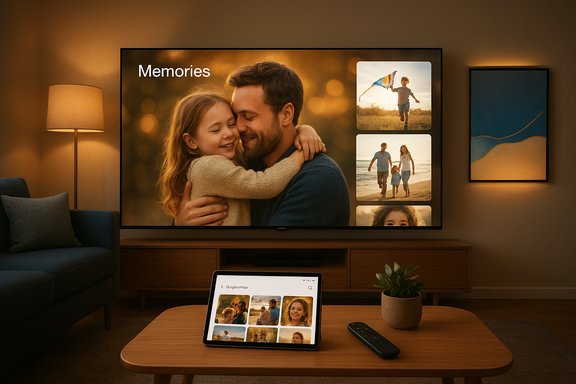
Samsung and Google are teaming up to bring Google Photos natively to Samsung smart TVs, rolling out an initial “Memories” experience in March 2026 with broader AI-driven creation and personalized slideshow features arriving later in the year.
Background
Samsung has steadily pushed its TVs beyond being just content displays, turning them into ambient, AI-aware surfaces through initiatives like Vision AI Companion, Daily+, and Daily Board. Google Photos, one of the world’s largest consumer photo services, has matured into a generative-AI-enabled platform over the last two years—adding features such as conversational editing, Photo-to-Video conversion, and style-transforming “Remix” tools powered by Google’s Gemini image models (nicknamed Nano Banana). The new integration represents a first-party, TV-native Google Photos experience targeted at making family photos and AI creativity a built-in part of the living-room experience.What’s being announced
Samsung’s plan is a staged rollout that emphasizes a TV-first gallery experience before introducing deeper generative features. The core elements are:- Memories: Curated, cinematic presentations of a user’s best photos and short clips based on people, places, and meaningful events. Scheduled to debut on Samsung TVs in March 2026 and exclusive to Samsung for six months.
- Create with AI: A later 2026 phase that brings themed templates and editing tools powered by Google DeepMind’s Gemini image models (commonly referred to as Nano Banana). This includes style transfers (Remix), image generation, and Photo to Video transformations that animate stills into short clips.
- Personalized Results: A personalized slideshow feature that can surface related photos grouped by topic (for example, “ocean,” “hiking,” or “Paris”) and present them as tailored slideshows on demand.
- Integration with Samsung UI: Google Photos content will appear through Samsung’s Vision AI Companion and ambient displays like Daily+ and Daily Board, and users will sign into their Google Account on the TV to sync libraries.
Timeline and rollout details
Phase 1 — Memories (March 2026)
Memories is the first feature scheduled to arrive. It will present curated stories based on people, locations, and moments and is planned as an initial Samsung-exclusive offering for a six-month window. The intent is to make a user’s best moments appear automatically and attractively on the TV without manual casting or mirroring.Phase 2 — Create with AI (Second half of 2026)
Later in 2026 Samsung plans to enable AI-powered creation tools on TVs. These features rely on Google’s Gemini image models—marketed under playful codenames such as Nano Banana and Nano Banana Pro—which provide image generation and editing capabilities at a level intended for consumer-friendly creative workflows.Phase 3 — Personalized Results (Second half of 2026)
Also slated for later in the year, Personalized Results will allow topic- or content-based slideshow generation and improved search and surfacing of related images directly on the TV.Compatibility and availability
- Newer Samsung TV models that ship in 2026 are explicitly targeted for the earliest availability. In-market models are expected to receive the feature via OS updates on Samsung’s typical update cadence, but availability will vary by region and model.
- After the six-month Samsung exclusivity for Memories, the feature may be made available to other TV brands and platforms.
Feature deep dive
Memories: cinematic curation for the living room
Memories adapts the phone-focused “curated story” concept to a TV environment. Expect:- Large, well-composed photo and short-clip presentations optimized for a living-room screen.
- Theme-driven groupings (people, places, trips) surfaced automatically.
- Ambient appearance: photos may surface via Daily+ or Daily Board so that they greet users in shared spaces.
Create with AI: templates, Remix, and Photo to Video
The “Create with AI” phase brings generative features to the TV:- Themed templates: Pre-built templates that transform photos into stylized pieces (holiday cards, illustrated portraits, retro film looks).
- Remix / Style transfer: Convert a photo’s style to comic, anime, 3D-render, or painterly variants without manual prompt writing.
- Photo to Video: Short animations that add subtle motion or cinematic effects to still photos, producing brief video clips for highlights reels.
- On-device vs cloud processing: Some edits may be performed locally when feasible, but more compute-heavy generation will likely rely on cloud processing using Google’s image-generation stacks.
Personalized Results: topic-driven slideshows
Personalized Results is essentially search-driven surfacing: type or voice a topic and the TV can create an on-the-fly slideshow of related photos from your library. It’s designed to turn a large personal archive into instantly usable, theme-based presentations.Integration points: Vision AI Companion, Daily+, Daily Board
Samsung plans to integrate Google Photos with its existing Ambient and AI surfaces:- Vision AI Companion will be able to pull in photos contextually.
- Daily+ and Daily Board will show photos throughout the day as part of ambient displays.
- The overall goal is to make photos part of the TV’s personality and not just an app you open.
Technical verification and naming notes
- The image-generation and editing model that powers the new creative features is part of the Gemini image family and is widely referred to under the Nano Banana and Nano Banana Pro names. These model names are used across Google’s image product stack.
- The initial Memories rollout is scheduled for March 2026, with the Create and Personalized Results phases planned for the second half of 2026.
- SynthID and other watermarking/attribution tools are part of Google’s image-generation safety toolkit and are used to label or identify AI-generated content; however, the watermarking is typically invisible and intended for downstream detection tools rather than visible UI badges.
Why this matters: UX, convenience, and shifting TV roles
This move changes the TV from a passive media receiver into an active memory surface and light creative canvas. Several practical benefits are apparent:- Frictionless sharing: Eliminates casting and mirroring steps for everyday photo viewing.
- Family-first display: A TV is usually the largest shared screen in a household—native Google Photos support makes it an easy hub for group viewing.
- Creative workflows for casual users: People who don’t use complex editing tools will get straightforward AI templates and one-tap creative outputs.
- Product differentiation for Samsung: Exclusive early access to Memories gives Samsung an experience differentiator in the living-room AI race.
Privacy, security, and safety analysis
Bringing personal photo libraries onto a shared, always-on device raises meaningful privacy and security questions. The key concerns and recommended mitigations are outlined below.Data flow: account sign-in and sync
Users will sign into Google Photos on a TV using their Google Account to surface libraries. Critical questions include:- Where is image processing performed? Some features may do local inference on the TV; heavy generative tasks will likely use cloud processors. The split between local and cloud affects privacy and latency.
- What stays on-device vs what is uploaded or processed in Google’s servers? Users should be aware that generative editing may involve server-side workloads that interact with Google’s model infrastructure.
Visibility and access controls
Because TVs are shared, it’s vital to manage what appears:- Photos displayed on the TV may be visible to guests or children. Family settings, guest modes, and profile locks are important to prevent accidental exposure.
- Memories and auto-surfacing: If a user prefers certain photos remain private, they must check Google Photos privacy controls and Memories settings. The auto-surfacing behavior can usually be turned off for selected people or content categories.
AI-generated content and authenticity
Generative features open doors to useful creativity but also to misuse:- Deepfakes and misrepresentation: The ability to restyle or animate photos of people raises concern if misused to create misleading media.
- SynthID watermarking: Invisible watermarking helps identify generated images, but detection requires technical tools; an invisible watermark alone is not a complete solution for public trust.
- Labeling and transparency: Any AI-generated slideshow or remix should include clear labels saying content was AI-created or edited to avoid confusion when sharing.
Account security
Signing into Google on a TV means a new client gets access to a primary account:- Use strong authentication—enable two-factor authentication (2FA) on the Google account.
- Consider using short-lived login tokens or QR-based login flows when signing into shared devices so credentials aren’t entered directly on TV remotes.
Children and content moderation
Generative tools should be gated appropriately for minors:- Parental controls must be set to restrict the use of AI image generation for underage accounts.
- TVs often lack fine-grained per-app controls, so manufacturers must offer robust family settings.
Legal and regulatory context
Depending on jurisdiction, privacy laws and biometric restrictions (for example, face recognition guardrails) might limit certain features. Users and manufacturers should be mindful of local regulations around biometric processing and AI-generated content labeling.Practical recommendations for users
- Enable two-factor authentication on your Google Account before signing into the TV.
- Review Google Photos’ Memories and sharing settings—turn off auto-surfacing for people or categories you don’t want displayed on shared devices.
- Use a guest mode or limited TV profile for visitors to prevent their access to personal libraries.
- Confirm whether editing operations that use generative models occur in the cloud; if sensitive, avoid uploading or enabling those features.
- Keep TV firmware and the Google Photos client updated to the latest versions for security patches and privacy options.
- For households with children, set parental controls to restrict access to AI-generation and editing features.
- When sharing AI-generated media, enable visible labels or disclaimers to indicate the content was created or modified by AI.
Strategic implications for Samsung, Google, and the TV ecosystem
- Samsung strengthens the position of its TV platform by delivering exclusive, high-profile Google integration that improves the living-room experience.
- Google benefits by extending Google Photos’ reach into the communal, high-visibility context of the TV—an area where Google historically relied on casting rather than native clients.
- Other TV makers may be pressured to secure similar integrations or rely more on third-party casting and app support to remain competitive.
- For the wider smart-home market, the move accelerates the trend of TVs as primary ambient surfaces that host personal data and AI experiences.
Limitations, caveats, and unverifiable points
- Availability will vary by model and region. Not all 2026 Samsung TVs will necessarily support every feature at launch; older in-market models depend on OS-update schedules and hardware capabilities.
- The exact split between on-device processing and cloud-based inference for creative features is not fully detailed publicly; users should assume heavier edits are cloud-based unless explicitly stated.
- The effectiveness and fidelity of AI edits (for example, maintaining facial likeness in style transfers) will vary with model quality and the particular photo being edited.
- Watermarking and detection systems like SynthID are helpful but are not a guarantee that manipulations cannot be traced or misattributed—detection tools and cross-platform adoption matter.
The user experience question: will it feel polished?
There are two likely UX outcomes:- Best case: Google Photos on TV offers a highly curated, delightful experience—quick login, fast, attractive Memories presentations, responsive AI templates, and simple sharing controls—making the TV the natural place to relive and tinker with family memories.
- Worst case: Resource constraints and UI friction (slow cloud roundtrips, limited remote input, inconsistent model outputs) could make the experience feel tacked-on. Generative edits that take long to render or require complex confirmation flows will impede mainstream adoption.
Final assessment
This partnership is a notable step for both companies: Samsung gets a compelling software differentiator for its TVs, and Google gains native entry into the communal TV surface where photos matter most. The phased rollout—starting with Memories and expanding into generative editing and personalized results—makes sense tactically and reduces initial risk by first proving the concept as an ambient gallery.However, the move also raises genuine privacy and safety challenges. Users must take basic security steps—strong account protection, careful Memories settings, and parental controls—before enabling full library sync on shared devices. The generative features will be fun and creatively empowering, but they require transparent labeling and sensible safeguards to minimize misuse or confusion.
For households that value both convenience and privacy, the integration could be an elegant way to enjoy photos together—provided manufacturers and platform owners maintain clear controls and transparency about where and how images are processed. The coming months will show whether the combination of Samsung’s TV software and Google’s image AI delivers a polished, secure, and user-respectful experience in living rooms around the globe.
Source: extremetech.com Google Photos Is Coming to Samsung Smart TVs
