

Samsung and Google are partnering to bring a native Google Photos experience to Samsung’s AI‑powered smart TVs in 2026, starting with a curated “Memories” view in March and expanding later in the year to include generative creation tools and personalized slideshows — a rollout Samsung says will be exclusive to its TVs for the first six months.
Smart televisions have long supported photo playback through casting or limited screensaver-style integrations, but a fully featured, native Google Photos app designed for couch-distance, shared viewing has been conspicuously absent from most TV platforms — even on Google’s own TV ecosystem. Samsung’s announcement frames the new partnership as a first-class, TV‑native gallery and creative surface that will be woven into its Vision AI experience and ambient surfaces like Daily+ and Daily Board.
Practical implications of this sign‑in model:
This hybrid architecture has predictable implications:
What consumers should watch for:
Expect competitive responses: other TV platforms and OEMs will likely pursue their own partnerships, timed exclusives, or native apps once the initial six‑month window lapses. The risk for consumers is a fragmented landscape where template sets, creation features, and UX parity vary by brand.
The benefits are obvious: a more cinematic way to relive photos, simple sign‑in, and accessible AI creation tools that can make family memories more sharable and playful. The tradeoffs are concrete as well: privacy on shared devices, cloud dependencies and bandwidth limits, model/region fragmentation, and open questions about moderation and user controls. Households should prepare by auditing Google Photos settings, using profiles and guest modes where available, securing accounts with two‑factor authentication, and verifying model compatibility before expecting full feature parity.
For WindowsForum readers and power users, the integration is a reminder that large displays are becoming cloud‑native endpoints — and that device choice, firmware updates, and account hygiene will increasingly shape the privacy and creative experiences in the living room.
Source: PCMag Samsung TVs to Get Native Google Photos App in 2026
 Background
Smart televisions have long supported photo playback through casting or limited screensaver-style integrations, but a fully featured, native Google Photos app designed for couch-distance, shared viewing has been conspicuously absent from most TV platforms — even on Google’s own TV ecosystem. Samsung’s announcement frames the new partnership as a first-class, TV‑native gallery and creative surface that will be woven into its Vision AI experience and ambient surfaces like Daily+ and Daily Board.Why this matters now
Televisions are the communal display in many households, and native photo apps that scale well to a room and support hands‑off interaction change the experience of sharing memories. A native Google Photos app on a big screen removes friction: no casting, no awkward phone mirroring, and — critically — the potential for new creative workflows powered by modern generative models tuned for larger displays. Samsung positions this as more than an app port; it’s a UX integration intended to make photos a living part of the TV’s ambient persona.What Samsung announced: the rollout and core features
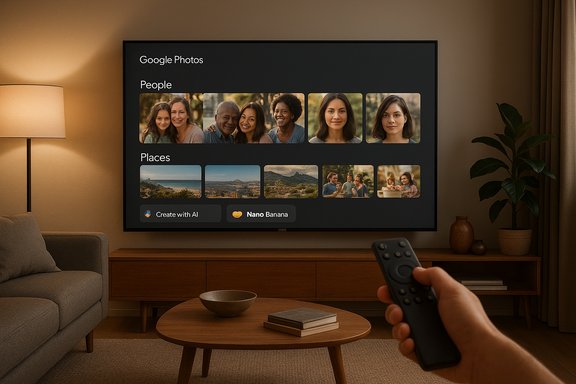
Samsung’s staged plan for Google Photos on its TVs breaks down into three broad phases: an initial “Memories” launch, a later integration with Vision AI and ambient surfaces, and a full suite of generative and personalization features arriving in the second half of 2026.- Memories (March 2026): curated, cinematic presentations of your best photos and short clips, grouped by people, place, and meaningful occasions. This initial experience will be the first element to roll out and will be exclusive to Samsung TVs for six months.
- Vision AI + Ambient Integration (later in 2026): Google Photos content will be surfaced on Samsung’s ambient and daily features such as Daily+ and Daily Board, so photos appear automatically in designated living‑room surfaces after signing in.
- Create with AI and Personalized Results (second half of 2026): generative tools powered by Google’s image models (referenced as Nano Banana) will enable themed templates, Remix-style art transfers, and Photo‑to‑Video conversions. Personalized Results will generate topic- or location-based slideshows (for example, “ocean” or “Paris”) and contextual slideshows based on activities.
At‑launch limitations to note
At launch, the experience will focus on Memories; the creative tools and deeper personalization are scheduled later in 2026. Samsung also cautions that availability will vary by model year and region — some in-market models may receive features via firmware updates while others will be limited to 2026 hardware.How setup and sign‑in work
Samsung says the setup will be intentionally simple: users sign in to the TV with a Google Account and backed‑up photos and videos will begin appearing in Memories and designated ambient areas. The company emphasizes a low-friction sign‑in flow, but notes model- and region-level differences in the exact behavior and controls.Practical implications of this sign‑in model:
- Convenience: immediate access to a comprehensive Google Photos library from a shared screen.
- Shared‑device risk: communal TVs make sign-in convenience a double‑edged sword — personal content can be exposed to anyone in the room if account controls and guest modes aren’t used.
Vision AI, Nano Banana, and the on‑device vs. cloud tradeoff
Samsung will blend Google Photos functionality with its Vision AI suite, which already brings on‑device perceptual features and multi‑agent cloud capabilities to selected TV models. The creative features Samsung references (themed templates, Remix-style transforms, and Photo‑to‑Video) are reported to use Google’s Nano Banana image models. These generative tasks, especially when they produce video or high‑fidelity edits, are likely to be hybrid: latency‑sensitive tasks handled on-device, heavier generation routed to cloud infrastructure.This hybrid architecture has predictable implications:
- Lower latency for simple adjustments and previews when supported by the TV’s neural processing units (NPUs).
- Dependence on cloud backends for heavier generative work, which can introduce latency, data transfer, and cost considerations.
- Variable performance across models: premium 2025–2026 SoCs will deliver smoother local processing than older sets.
Device support, fragmentation and the model‑by‑model reality
Samsung’s announcement explicitly warns that support varies by model and region. Early availability targets 2026 TV models and selected 2023–2025 sets that are capable of receiving the necessary OS updates. Expect a patchwork where the Memories feature may arrive earlier on some in-market models while Create with AI remains exclusive to newer hardware until later updates are available. This fragmentation is a common real‑world outcome for large, multi-year hardware portfolios.What consumers should watch for:
- Check your model number and Samsung support pages for a definitive compatibility list before assuming feature parity.
- Firmware update cadence matters: a TV may be physically capable but still await a software push to unlock functionality.
- Regional rollout differences may delay features in some markets due to localization, regulation, or partner terms.
Privacy, account management, and shared‑screen safeguards
Bringing a full cloud photo library to a communal TV presents obvious privacy tradeoffs. Samsung and Google’s convenience-first sign‑in model raises several questions that remain partially unanswered in the initial materials:- How granular are per‑user privacy and profile controls on the TV? Will the TV support multiple Google Account profiles with quick switching or ephemeral guest modes?
- What controls will be offered for Memories and sensitive‑content filtering on a TV surface versus a personal phone?
- How are biometric or quick‑lock options (PIN, guest mode) exposed for fast account removal in shared spaces?
- Audit Google Photos settings on your phone: disable Memories or sensitive-content surfacing if you don’t want certain items to appear on a shared TV.
- Use separate profiles on the TV where possible, or create a dedicated “family” Google account for shared display.
- Enable two‑factor authentication on Google and Samsung accounts, and maintain firmware updates.
- Consider network segmentation (VLANs) for privacy and security to keep cameras, TVs and personal devices on different subnets.
Performance and bandwidth realities
Generative features that convert still photos into short video clips or perform complex style transfers will require significant upload bandwidth and backend compute. Households with limited upstream speeds should expect:- Longer processing times for Photo‑to‑Video and advanced Create with AI templates.
- Potential quality/performance tradeoffs when Samsung falls back to lower-resolution edits to reduce cloud cost or latency.
Business and competitive implications
The six‑month Samsung exclusivity for Memories is a deliberate commercial lever. For Samsung, it:- Creates a family‑friendly differentiator for 2026 models, strengthening the marketing narrative around Vision AI and integrated ecosystems.
- Gives Samsung an early period to collect usage metrics and refine the TV UX before competitors can ship similar integrations.
Expect competitive responses: other TV platforms and OEMs will likely pursue their own partnerships, timed exclusives, or native apps once the initial six‑month window lapses. The risk for consumers is a fragmented landscape where template sets, creation features, and UX parity vary by brand.
Moderation, safety, and the risk of misuse
Generative tools on large, shared screens introduce non‑trivial moderation questions. The announcement does not fully specify guardrails for:- Preventing harmful or offensive image edits generated on a communal TV.
- Detecting or preventing misuse that could produce deepfakes or manipulated content of real people.
Practical guidance: preparing your TV and account
If you plan to use Google Photos on a Samsung TV in 2026, follow these recommended steps to prepare and protect your content:- Verify compatibility: check your TV model and Samsung’s firmware update schedule for confirmed support.
- Audit Google Photos settings now: turn off Memories or sensitive-content surfacing for a safer baseline on shared displays.
- Create a shared/family account for ambient displays if you want a curated, safe library for visitors.
- Enable two‑factor authentication and ensure your Google and Samsung accounts are secured.
- Test network bandwidth with large uploads if you intend to use Photo‑to‑Video or heavy creation features and consider upgrading upstream capacity where necessary.
Strengths of the integration
- Designed for the living room: curated Memories and ambient surfacing take advantage of the TV’s strengths as a communal, cinematic display.
- Lower friction: direct sign‑in reduces steps needed to show family photos to a room full of people.
- Accessible generative tools: bringing Nano Banana‑powered templates and Remix-style editing to a TV could democratize simple creative workflows for non‑expert users.
- Ecosystem play: the integration strengthens Samsung’s Vision AI value proposition while giving Google another high‑value surface for Photos.
Risks and unresolved questions
- Shared‑device privacy gaps: sign‑in convenience needs to be balanced by robust per‑profile controls and fast sign‑out/guest modes.
- Cloud dependency: heavy reliance on backend services for generation and indexing introduces latency and quality variability.
- Fragmentation: model‑and region‑dependent rollouts could produce inconsistent user experiences across Samsung’s installed base.
- Moderation and misuse: guardrails for generative content on large shared displays remain underspecified.
The wider smart‑TV landscape: what this means for competitors
This partnership reframes the TV as a social, creative hub connected to a user’s cloud identity. Competitors without similar integrations risk being perceived as less convenient for family‑sharing scenarios. Expect other OEMs and platform providers to either negotiate similar partnerships or accelerate their own native photo and creative solutions to avoid losing ground on the living‑room use case. The short exclusivity window means the marketplace may quickly normalize around TV‑native photo experiences, but the early advantage for Samsung could shape consumer expectations for years.Conclusion
Samsung’s plan to bring a native Google Photos app to its Vision AI‑equipped TVs is a clear inflection point: it converts the TV from a passive playback device to a communal, creative surface where cloud identity and generative tools meet the living room. The launch strategy — Memories in March 2026 with a six‑month exclusivity followed by Create with AI and Personalized Results later in the year — is pragmatic and staged to limit risk while proving the UX.The benefits are obvious: a more cinematic way to relive photos, simple sign‑in, and accessible AI creation tools that can make family memories more sharable and playful. The tradeoffs are concrete as well: privacy on shared devices, cloud dependencies and bandwidth limits, model/region fragmentation, and open questions about moderation and user controls. Households should prepare by auditing Google Photos settings, using profiles and guest modes where available, securing accounts with two‑factor authentication, and verifying model compatibility before expecting full feature parity.
For WindowsForum readers and power users, the integration is a reminder that large displays are becoming cloud‑native endpoints — and that device choice, firmware updates, and account hygiene will increasingly shape the privacy and creative experiences in the living room.
Source: PCMag Samsung TVs to Get Native Google Photos App in 2026
