Windows 7 Hello Help PLease!!!

arinbmw

New Member
Joined
Mar 13, 2019
Messages
4
Achievements 1
No badges yet
Problem Solver
Reliable Fixer
Answer Authority
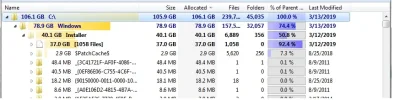
Dear Users, my notebook`s Drive C: is decreasing withing minutes! I deleted a lot of things, and i had forexample 2 GB space! then it becomes 135Mb and when i Refresh the Windows Explorer! it is decreasing withing seconds! what can be the problem?!
 

Solution
The installer cache is normally very large. Deleting it isn't usually a good idea. Your Windows directory is a bit higher than what it should be, but that's likely due to how long the system has bee around.

Download Patch Cleaner and run it. It may take sometime for it to finish. Once it does select Delete to remove orphaned and superseded patches. I have a feeling you will clean up around 30GB.
PatchCleaner

arinbmw

New Member
Joined
Mar 13, 2019
Messages
4
Achievements 1
No badges yet
Problem Solver
Reliable Fixer
Answer Authority

arinbmw

New Member
Joined
Mar 13, 2019
Messages
4
Achievements 1
No badges yet
Problem Solver
Reliable Fixer
Answer Authority

Attachments

  • Save.webp
    Save.webp
    34.2 KB · Views: 199

Neemobeer

Windows Forum Team
Staff member
Joined
Jul 4, 2015
Messages
8,998
Achievements 43
Problem Solver Reliable Fixer Answer Authority WindowsForum Expert Question Guide
News Scanner
Update Watcher
Patch Tuesday Regular
The installer cache is normally very large. Deleting it isn't usually a good idea. Your Windows directory is a bit higher than what it should be, but that's likely due to how long the system has bee around.

Download Patch Cleaner and run it. It may take sometime for it to finish. Once it does select Delete to remove orphaned and superseded patches. I have a feeling you will clean up around 30GB.
PatchCleaner
 

Solution
Back
Top