

Paint Endured Because It Was Never Really About Art
The funny thing about Paint is that most people who loved it were not artists. They were bored children, office workers marking up screenshots, students making terrible birthday cards, and family tech-support volunteers trying to circle the button someone should click. Paint was not a creative suite. It was a blank rectangle with permission to be unserious.
That is why the Neowin reminiscence lands so cleanly. A slow dial-up connection, a Windows XP desktop, and a child with time to kill were exactly the conditions in which Paint became more than a bundled accessory. It was not competing with Photoshop. It was competing with boredom, stalled web games, trialware, and whatever happened to be installed on the family PC.
This is the underappreciated genius of old Windows utilities. They were not always best-in-class tools, but they were there. Not in the subscription sense, not behind an account prompt, not as a cloud service waiting to initialize. They were local, immediate, forgiving, and slightly goofy.
Paint’s value came from that immediacy. Open the Start menu, launch the app, draw something ugly, fill it with lurid colors, save it if you wanted, close it if you did not. There was no onboarding funnel, no template gallery, no “continue in browser,” no artificial distinction between free and premium tiers. For millions of people, that was their first taste of creation on a PC.
The 2017 Funeral Was Premature, but Revealing
Microsoft’s 2017 decision to mark Paint as deprecated in Windows 10 was one of those small product moves that accidentally exposed a much larger disconnect. On paper, the company had a perfectly rational story. Windows 10 was in its Creators Update era, Paint 3D was supposed to represent the future, and classic Paint looked like a relic from another computing age.
The backlash was swift because users understood something Microsoft’s product planners seemed to miss: Paint 3D was not a replacement for Paint. It was a different bet entirely. It belonged to Microsoft’s then-fashionable 3D and mixed-reality push, a moment when the company imagined ordinary users would soon be remixing three-dimensional objects as naturally as they edited photos.
That future did not arrive in the form Microsoft expected. Paint 3D became one more artifact of the Windows 10 era’s concept-heavy design culture, while classic Paint retained the one thing that mattered most: a low-friction path from intent to action. Microsoft eventually backed away from killing Paint, moved it toward Store-based updates, and later watched Paint 3D become the expendable one.
There is a lesson here that applies far beyond this particular app. Users are often tolerant of modernization, but they are hostile to replacement when the replacement misunderstands the original job. Paint did not need to become a 3D creation environment to justify its place in Windows. It needed to remain a fast, understandable tool for small visual tasks and casual play.
Microsoft Accidentally Preserved a Piece of Windows’ Social Memory
Every long-running operating system carries emotional infrastructure. Windows has File Explorer, Notepad, Solitaire, Calculator, Paint, the Control Panel, and a dozen other familiar corners that may not drive revenue but do shape whether the platform feels continuous. Remove too many of them, or mutate them too aggressively, and users stop feeling like the system belongs to them.
Paint is unusually powerful in that sense because it crosses generations. Windows 95 children, Windows XP teenagers, Windows 7 office workers, and Windows 11 laptop buyers all recognize the basic bargain. You get tools along the top, a canvas in the middle, and very little judgment.
That continuity is more valuable than it looks. Microsoft spends enormous energy trying to make Windows feel fresh, but Windows’ advantage over newer platforms is not freshness. It is accumulated familiarity. The operating system wins in part because a person can sit down at a PC after years away and still find recognizable landmarks.
This is where nostalgia becomes practical rather than sentimental. A familiar utility lowers cognitive cost. It gives users confidence. It says, implicitly, that not every corner of Windows has been turned into a monetized surface or a cloud-connected workflow. In an era when even Notepad has been pulled into the AI orbit, that reassurance is not trivial.
The Windows 11 Version Works Because It Modernizes Around the Core
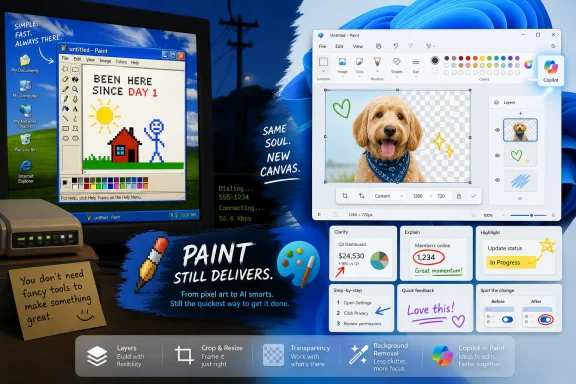
The modern Paint app is not the same program that shipped in the Windows XP memory palace. It has a refreshed interface, better file handling, improved accessibility, support for newer Windows design conventions, and features that would have sounded absurdly ambitious for the old accessory. Layers, transparency, background removal, and AI-assisted image generation have all pushed Paint into territory once reserved for more serious editors.
The surprising part is that these upgrades have not destroyed the app’s basic character. Open Paint today and the old mental model still works. You can still draw a line, dump color into a region, crop an image, resize a screenshot, add text, and close the app without needing to understand a creative workflow.
That restraint is the difference between modernization and product vandalism. Microsoft has not always managed that distinction in Windows. Too often, the company treats old utilities as canvases for strategy rather than tools with settled user expectations. Paint, oddly enough, has become one of the better examples of how to add capability without forcing every user to engage with it.
Layers are a good example. For power users, they make Paint meaningfully more capable. For everyone else, they can be ignored. Background removal is similar. It is a modern convenience that fits the app’s real-world use as a quick image editor, not a forced transformation of Paint into a professional design environment.
The Copilot Button Is the Price of Admission to Modern Microsoft
The more complicated part is AI. Paint’s Copilot-era features make more sense than many of Microsoft’s other AI insertions, because image generation and image editing are at least native to the app’s purpose. A tool that helps create or alter pictures belongs more naturally in Paint than a chatbot belongs in every blank text field in Windows.
Still, the execution exposes the familiar tension. Microsoft wants AI to be ambient, visible, and constantly discoverable. Users often want tools to stay out of the way until summoned. The result is a Paint that can still feel charmingly simple, but now carries a large strategic signpost in the toolbar.
That signpost matters because it changes the emotional temperature of the app. Classic Paint felt like a toy box. AI Paint can feel, at moments, like a storefront for Microsoft’s broader Copilot economy. Credits, account requirements, subscription tiers, and cloud processing are not inherently wrong, but they are a long way from the instant local canvas that made Paint beloved.
This does not mean AI ruins Paint. It means Microsoft has to be careful. If AI remains an optional accelerator for people who want it, Paint can absorb it. If AI becomes the organizing principle of the app, Paint risks becoming another example of Microsoft confusing corporate priority with user need.
Paint 3D Lost Because It Chased a Platform Vision Users Did Not Share
Paint 3D’s failure is now easier to understand than it was in 2017. It was not a bad idea in isolation. It was a reasonable experiment from a company trying to imagine what creation might look like in a world of mixed reality headsets, 3D objects, and more tactile computing.
The problem was that this imagined world never became normal for mainstream Windows users. Most people did not need to manipulate 3D models on their laptops. They needed to crop screenshots, annotate images, make simple drawings, and occasionally entertain themselves. Paint 3D addressed a future Microsoft wanted; Paint addressed the present users had.
That distinction has haunted Windows for years. The platform is littered with features that were built around strategic narratives: tiles, charms, mixed reality, universal apps, Cortana, widgets, and now Copilot. Some of those ideas had merit. Many were implemented with more enthusiasm than patience.
Classic Paint survived because it did not require belief in a Microsoft platform thesis. It did not ask users to adopt a new computing paradigm. It simply offered a stable little workspace inside Windows. In retrospect, that modesty was its moat.
The Small Utility Is Having an Unexpected Renaissance
Paint’s recent upgrades also point to a broader shift in Windows development. Microsoft has rediscovered the value of updating inbox apps independently of major OS releases. Store-delivered updates let the company improve Paint, Notepad, Snipping Tool, Photos, and other utilities without waiting for a monolithic Windows version bump.
That is good for users, at least in principle. A utility like Paint can gain features at the pace of an app rather than the pace of an operating system. Bugs can be fixed faster. Interface changes can roll out gradually. Microsoft can test features with Insiders before pushing them broadly.
But this model also changes the contract. The Paint you open today may not be exactly the Paint you open six months from now, even if your Windows version number looks largely the same. For enthusiasts, that is interesting. For enterprise administrators, schools, and managed environments, it introduces yet another moving part.
The old Windows accessory was static almost to a fault. The new Paint is a living app. That is mostly a win, but it also means Microsoft has a responsibility to preserve predictability. A simple utility can become less simple not only by adding too many features, but by changing too often.
The Best Paint Features Understand the Screenshot Economy
If childhood nostalgia explains why people care about Paint, modern work habits explain why it still deserves development. The contemporary PC is a screenshot machine. Users capture error messages, crop receipts, blur information, paste images into chats, mark up documents, and resize graphics for forms, tickets, presentations, and posts.
Paint is not the only Windows tool for that world, but it remains one of the most approachable. Snipping Tool captures. Photos views. Paint edits. That division is not always clean, and Microsoft has blurred it over time, but Paint still occupies a useful middle ground between too little and too much.
Background removal fits this world perfectly. So do layers and transparency. These are not merely “creative” features; they are everyday communication tools. A sysadmin preparing a support guide, a student assembling a slide, or a forum user explaining a driver issue can benefit from image-editing features that do not require a full design app.
This is why Paint’s modernization feels more justified than some other Windows embellishments. The app is being pulled toward actual user behavior. People are not necessarily becoming digital artists. They are becoming constant visual communicators, and Paint can help without pretending to be Adobe Creative Cloud.
Nostalgia Should Not Become a Product Strategy
There is a trap in praising Paint too warmly. Nostalgia can excuse stagnation. Users may love an app because it reminds them of childhood, but that does not mean Microsoft should freeze it in amber. A platform that never changes becomes a museum, and Windows cannot afford that either.
The right lesson is not that Paint must remain exactly as it was. It is that Microsoft should understand why it mattered before changing it. Paint’s magic was not the old toolbar, the jagged pencil strokes, or the primitive spray can. The magic was accessibility, immediacy, and a sense that anyone could make something without first becoming the kind of person who uses creative software.
That spirit can survive modern features. It can survive layers. It can survive AI, if handled gently. It can survive a refreshed UI and Store updates. What it cannot survive is becoming heavy, nagging, account-dependent, or strategically overdetermined.
Microsoft’s challenge is to resist its own worst instincts. The company loves funnels, prompts, branded experiences, and cross-product integration. Paint loves silence. The future of the app depends on which impulse wins.
The Lesson Hidden in a Child’s Dial-Up Boredom
The Neowin essay is framed as a personal memory, but the reason it resonates is that it describes a shared era of computing. Before every idle moment was absorbed by a phone, the family PC was a place to explore. Not every click had a purpose. Not every app had a productivity outcome. Sometimes the computer was simply a thing you used to see what would happen.
Paint rewarded that kind of aimless curiosity. It did not punish bad work. It did not ask for skill. It let a child draw nonsense, abandon it, start again, and feel briefly in command of the machine. That is a small thing, but small things are often how people form lifelong relationships with technology.
Modern Windows is less hospitable to that kind of discovery. It is more connected, more commercial, more managed, and more instrumented. The system is vastly more capable, but also more insistent. It wants accounts, sync, recommendations, widgets, cloud files, AI suggestions, and subscription awareness.
That makes Paint’s continued presence feel almost subversive. It is one of the few places in Windows where the user can still begin with a blank space and no serious obligation. Even with the Copilot button looking over its shoulder, Paint remains closer to a playground than a platform.
Microsoft’s Best Move Is to Keep Paint Slightly Unambitious
The temptation now will be to make Paint more impressive. Microsoft can add more generative editing, more object recognition, more templates, more cloud features, more integration with Photos, Designer, Clipchamp, OneDrive, and Copilot. Some of that may be useful. Too much of it would miss the point.
Paint should not become Designer Lite. It should not become a mandatory AI canvas. It should not become a project hub or a social creation surface. Windows already has enough apps trying to be the front door to an ecosystem.
The smarter path is humbler. Keep Paint fast. Keep the basic tools obvious. Keep advanced features discoverable but optional. Keep local editing strong. Keep account-gated features from defining the first-run experience. Above all, keep the app useful for the person who opens it for thirty seconds to solve one small visual problem.
That may sound unambitious, but it is exactly the kind of discipline Windows needs. Not every app should carry the full weight of Microsoft’s strategic roadmap. Some apps should just do their job so well that users forget to appreciate them until someone threatens to take them away.
The Canvas Survived, and That Is the Story Microsoft Should Remember
Paint’s unlikely second act leaves Windows users with a few practical truths that are easy to miss beneath the nostalgia. The app is better than it used to be, but the reason it still matters is the same reason it mattered decades ago: it makes simple visual work feel approachable.
- Microsoft Paint remains built into modern Windows and has outlived the 2017 attempt to steer users toward Paint 3D.
- Paint 3D’s decline shows that replacing a beloved utility with a platform-driven reinvention is riskier than improving the original.
- Windows 11 Paint now includes genuinely useful modern features such as layers, transparency, background removal, and AI-assisted creation.
- The Copilot integration makes more sense in Paint than in many other Windows surfaces, but it should remain optional rather than central.
- Paint’s enduring value is speed, familiarity, and low pressure, not professional-grade creative power.
- Microsoft’s safest path is to keep expanding Paint around its core workflow instead of turning it into another branded AI destination.
Paint is still here because users knew what Microsoft briefly forgot: a small, familiar tool can be more durable than a grand platform vision. The app’s future will not be secured by nostalgia alone, and it should not be protected from every modern feature. But if Microsoft keeps treating Paint as a blank canvas first and a strategy vehicle second, one of Windows’ oldest companions may remain one of its most quietly useful apps for another generation.
References
- Microsoft Paint used to be my favorite Windows app as a kid, and it's still pretty good - Neowin Neowin · Sat, 20 Jun 2026 12:11:00 GMT
- blogs.windows.com blogs.windows.com
- support.microsoft.com support.microsoft.com