Windows 7 How to Add 150 GB of Free Space to C: Drive on Windows

Janis Skaris

New Member
Joined
Dec 8, 2014
Messages
14
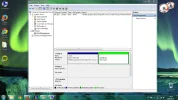
Hello, i've got free space about 150 gb and I want add it to my C: Drive wich is my local disk. How can I do this?
 

Attachments

  • Capture.webp
    Capture.webp
    90.4 KB · Views: 403
Solution
Freespace you cannot add to anything. You need 'unallocated space'. Right click on that freespace and delete partition. Then do what was said above.

patcooke

Microsoft MVP
Microsoft MVP
Joined
May 16, 2010
Messages
5,703
But then, I would not recommend a single partition of 500GB for the system drive. Unless you have a specific requirement for it I would allocate no more than 100GB to drive C and create a second partition for data storage.
 

whs

Extraordinary Member
Joined
Sep 17, 2009
Messages
1,537
Freespace you cannot add to anything. You need 'unallocated space'. Right click on that freespace and delete partition. Then do what was said above.
 

Solution

patcooke

Microsoft MVP
Microsoft MVP
Joined
May 16, 2010
Messages
5,703
And before you do anything ensure that all your data is backed up and you have the means to run a full recovery install in case you lose or corrupt your operating system.

 

Back
Top