

Windows 7 How to Download uNETbootIN Without Admin Permissions as a Standard User

Noah Duley

New Member
Joined
Jan 1, 2016
Messages
20
I am trying to download uNETbootIN but I need an admin password but I am only a standard user.
 

Solution
No, I don't think you understand.

You need to burn the ISO to the USB stick with Rufus.
This creates bootable media.
You boot from that media, via USB, changing the boot order when you start your computer.
This boots you into NT Offline Windows Password & Registry editor.

You can not just run it from a command prompt in Windows.
Hope this helps.
Than you for the help, but i do not have any disks and any software to burn iso on to a usb requires an administrator password.
 

There is one other way, with the installation media, or an elevated command prompt, but I can't say I would endorse this method, as it could seriously damage your system. It is safe to say this method may also work with Windows 7.

How to reset a Windows 8 password - 4sysops
 

Is there any software that you know of that I can use to burn iso to USB without administrator password?
 

It is probably the most low profile software you will find for doing this. If it still requires elevated or administrator permissions I would think you need to really reset that password. Possibly using another computer to burn the bootable media to get the password back.
 

I have not watched the video for the cmd. would the commands be something like
Net user administrator *
Enter password: [_]
I'm not entirely sure as to what you are referring to here. If you are able to burn anything to USB or disk I would recommend:

Offline Windows Password & Registry Editor
 

I'm not entirely sure as to what you are referring to here. If you are able to burn anything to USB or disk I would recommend:

Offline Windows Password & Registry Editor

I understand what you are saying but I do not have any disks and I do not have amin privileges to any programs that can burn iso to USB without amin password.
 

Then you should back up all essential files and re-install your entire system or buy a portable USB DVDRW or a 4+GB USB flash drive. Nothing more can be done!
 

This is what my CMD shows when I follow the readme file
 

Attachments

  • WF1.webp
    WF1.webp
    10.7 KB · Views: 326
No, I don't think you understand.

You need to burn the ISO to the USB stick with Rufus.
This creates bootable media.
You boot from that media, via USB, changing the boot order when you start your computer.
This boots you into NT Offline Windows Password & Registry editor.

You can not just run it from a command prompt in Windows.
Hope this helps.
 

Solution
No, I don't think you understand.

You need to burn the ISO to the USB stick with Rufus.
This creates bootable media.
You boot from that media, via USB, changing the boot order when you start your computer.
This boots you into NT Offline Windows Password & Registry editor.

You can not just run it from a command prompt in Windows.
Hope this helps.
I do understand, The readme file said to update the MBR so I did and it said access is denied. I know how to boot from a USB as I have did the same with Kali, and Ubuntu linux.
 

I do understand, The readme file said to update the MBR so I did and it said access is denied. I know how to boot from a USB as I have did the same with Kali, and Ubuntu linux.
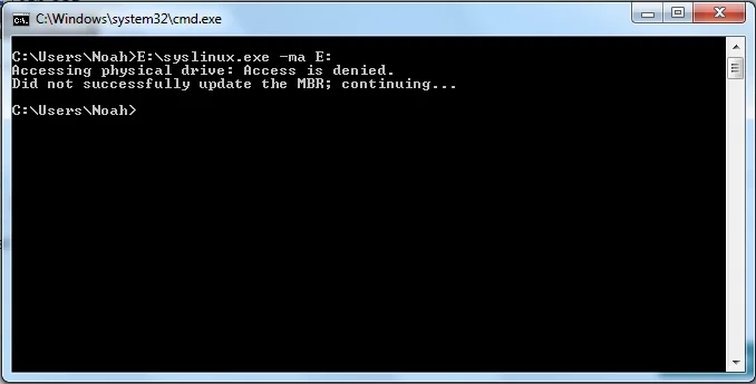
Nope you don't know what you're talking about, really. Why would you update the MBR on your main C drive? What you are trying to do makes absolutely no sense. What I suggest you do at this point is use Rufus create a bootable ISO - download Windows 7 from Microsoft at Link Removed and re-install your operating system.
 

Back
Top