

Paul Thurrott’s May 18, 2026 “Switcher 2026” walkthrough on minimizing Microsoft’s footprint in Windows 11 is less a niche power-user recipe than a public stress test of what Windows has become: an operating system that still can be made clean, local, and quiet, but only by users willing to fight the defaults. The point is not that Windows 11 is unusable. The point is that the most technically satisfying version of Windows now feels like something you carve out of the shipping product rather than something Microsoft hands you.
There was a time when a clean install of Windows meant a blank-ish desktop, a Start menu, a browser, a few utilities, and the expectation that the user would decide what came next. That model was never perfectly pure, and OEM trialware has been with us for decades, but the platform bargain was legible: Windows supplied the base, and users supplied the life.
Windows 11 complicates that bargain. The first-run experience wants an account, the desktop wants cloud integration, the Start menu wants recommendations, the browser wants loyalty, the widgets panel wants attention, and the taskbar increasingly behaves like a surface for Microsoft’s priorities rather than the user’s habits. Thurrott’s experiment lands because it treats those pressures not as isolated irritations, but as one system-wide pattern.
His “Microsoft-minimized” setup is telling because it is not a move away from Windows. It is a move toward Windows as many longtime users still understand it: a general-purpose PC operating system that should be able to run Chrome, Firefox, Steam, LibreOffice, iCloud, Proton, Google services, local NAS tools, or whatever else the owner prefers without turning every corner of the interface into a loyalty test.
That distinction matters. The Windows backlash is often framed as if users resent Microsoft because they dislike change. In reality, many of the complaints are about agency. A user who installs Windows 11 and then spends the next hour removing Microsoft 365 prompts, OneDrive hooks, Edge nudges, search clutter, telemetry settings, and sponsored surfaces is not rejecting modernization. They are trying to restore the boundary between operating system and sales channel.
But it also turns setup into a funnel. Once the user signs in with an online account, Windows can attach the machine to a larger Microsoft services graph. That graph may be convenient, but convenience and consent are not the same thing, especially when the local-account path is hidden, weakened, or dependent on workarounds that change from build to build.
Thurrott’s piece is blunt about the counter-move: use a local account if your goal is to minimize Microsoft services. That choice immediately changes the character of the install. It makes Windows feel less like an extension of a cloud subscription and more like a machine you own.
The tradeoff is that local-account Windows is now a second-class path in some important ways. You may get fewer prompts later, but you also lose some automated safety rails. Device encryption, recovery-key escrow, app acquisition, settings sync, and certain Microsoft Store conveniences become more manual. For enthusiasts, that is an acceptable price. For ordinary users, it is a subtle form of pressure.
That is the dilemma in miniature. Microsoft can plausibly argue that cloud-backed recovery keys prevent data loss. If a laptop update, firmware change, TPM event, or hardware failure triggers BitLocker recovery, a user who has a key stored in a Microsoft account has a clear path back. A user who wanted independence but failed to save the key properly may have a very secure brick.
Thurrott’s answer is the responsible one: if you avoid Microsoft account key escrow, you must enable encryption deliberately and store the recovery key somewhere safe. On Windows 11 Pro, that means using BitLocker and saving the recovery key to a file, printout, USB drive, NAS, password manager, or another controlled location. On Windows 11 Home, the path is murkier because the consumer-facing device encryption model is more tightly bound to account-based recovery.
This is where the anti-Microsoft impulse can run into operational reality. Privacy-minded users are right to care about who holds recovery material. Security-minded users are right to care about full-disk encryption. Administrators are right to care about recovery workflows. A clean Windows installation that disables cloud identity but forgets encryption is not a victory; it is a different risk profile wearing a minimalist theme.
The mature version of this argument is not “Microsoft account bad, local account good.” It is that Windows should make both models explicit, understandable, and equally supportable. Today, the online-account path is polished, while the local path increasingly feels like an escape hatch.
That duality drives users mad. If Edge were merely preinstalled, many people would shrug. Windows has always shipped with a browser. The resentment comes from the places where Edge behaves less like an optional app and more like a preferred route that Windows tries to reassert through links, defaults, search surfaces, widgets, and first-run prompts.
A Microsoft-minimized Windows setup therefore does not necessarily require deleting Edge. Thurrott’s more pragmatic stance is to keep it as a secondary browser but configure it into submission. That means disabling the noisy first-run behavior, ignoring the Microsoft account pitch, and preventing Edge from turning every interaction into another opportunity to reclaim default status.
This is a useful distinction for IT pros. The cleanest Windows build is not always the most aggressively stripped one. Removing components can introduce fragility, break dependencies, or create future update weirdness. Taming a component is often wiser than ripping it out, especially on machines that need to remain serviceable over years of cumulative updates.
But Windows 11 often treats that conclusion as predetermined. The problem is not that OneDrive exists. The problem is that it can feel like Windows assumes the user has already agreed to a storage architecture before the user has actually made that decision.
For switchers, privacy-conscious users, or people who already live in Google Drive, Dropbox, iCloud Drive, Syncthing, Nextcloud, or a local NAS, OneDrive’s integration becomes friction. It changes folder semantics, creates confusion about what is local and what is cloud-backed, and can make a fresh PC feel less like a blank slate than a partially configured Microsoft 365 endpoint.
Uninstalling OneDrive is therefore not a symbolic act. It is a way of reasserting that storage is a user decision. The irony is that Microsoft could reduce the hostility simply by making OneDrive opt-in in a cleaner and more transparent way, especially during initial setup. Instead, the company too often lets the setup flow do the persuading.
Removing Search and Task View from the taskbar is a perfect example. The features are not necessarily bad. Keyboard shortcuts already exist, and power users can summon them without permanent buttons. What irritates people is the presumption that Microsoft’s preferred discovery surfaces deserve default visual priority.
The Copilot key adds a hardware dimension to the same conflict. On new PCs, Microsoft and its partners have literally put the AI strategy onto the keyboard. Some users may welcome that. Others see it as the physical manifestation of a company trying to make its service ambitions unavoidable.
Remapping that key to something mundane, such as a left-arrow key, is funny because it is so deflating. The grand AI portal becomes a cursor movement. The machine becomes less futuristic, but perhaps more obedient.
Microsoft’s strongest case is on diagnostics. A platform with the hardware diversity of Windows needs telemetry to survive. Without broad signal from real machines, patch quality gets worse, driver failures linger longer, and security regressions become harder to isolate. Serious administrators may dislike opaque data flows, but they understand the engineering need.
The weaker case is the promotional layer. Users are far less patient with “suggestions” in Start, account nags in Settings, Microsoft 365 prompts, Edge pitches, and content feeds that look suspiciously like ads even when Microsoft chooses softer language. That is not system health telemetry. That is product steering.
Thurrott’s recommendation of tools such as Win11Debloat reflects a market failure inside Windows itself. When knowledgeable users routinely reach for community scripts to disable annoyances, the issue is not that users are reckless. It is that the official controls are too scattered, too incomplete, or too euphemistic.
The danger, however, is that debloating tools can become folk medicine. Some are careful. Some are blunt. Some age poorly as Windows changes. Enterprises generally cannot run their fleet on vibes and GitHub scripts. Microsoft should see the popularity of these tools not as an edge-case hobby, but as telemetry of a different kind: a measurable protest against the defaults.
For U.S. users, that creates a credibility gap. If Edge can be more removable in one market, why not another? If web search routing can be opened up under regulatory pressure, why should users elsewhere accept tighter coupling as a law of nature? Once a company demonstrates that a restriction is policy rather than architecture, users stop treating it as a technical constraint.
This is why the “just use Linux” answer misses the point. Many users want Windows because Windows remains the best-supported consumer PC platform for games, peripherals, commercial software, accessibility tools, firmware utilities, and weird old Win32 applications that still matter. Their complaint is not that Windows exists. Their complaint is that Windows increasingly refuses to stay in its lane.
Microsoft’s challenge is that regulatory compliance creates a two-tier trust model. European users may get more formal choice because lawmakers forced the issue. Everyone else gets whatever level of restraint Microsoft decides is strategically tolerable. That is not a great look for a company trying to convince customers that the new calmer Windows is a sincere reset.
That does not mean Microsoft is wrong to integrate services. Apple integrates iCloud. Google integrates Google accounts into Chromebooks and Android. The difference is expectation. Windows earned its dominance as the neutral-ish layer beneath everyone else’s software. When Microsoft makes Windows behave more like an appliance for Microsoft services, it collides with the platform’s own history.
This is especially sensitive in 2026 because Windows 10’s consumer afterlife has sharpened the stakes. Many users delayed Windows 11 not because they cannot understand centered taskbar icons, but because they mistrust the direction of travel. They see each new prompt as part of a longer story: fewer local choices, more account dependencies, more cloud assumptions, more AI surfaces, and more defaults that need undoing.
Microsoft appears to understand at least part of this. Recent reporting has described a company trying to make Windows 11 calmer, faster, and less cluttered, with attention to File Explorer performance, Start menu behavior, widgets noise, and the broader perception that Windows has become too pushy. If that work is real and sustained, it is welcome. But the existence of a cleanup campaign is also an admission that the defaults have been doing reputational damage.
In managed environments, administrators can use Group Policy, MDM, provisioning packages, Autopilot, Intune, security baselines, and enterprise licensing to suppress much of the noise. They can control Edge policies, disable consumer experiences, manage OneDrive, redirect known folders, escrow BitLocker keys into Entra ID, and standardize update behavior. The tooling exists because businesses would not tolerate the out-of-box consumer experience at scale.
That split is revealing. Microsoft knows how to make Windows manageable. It knows how to separate policy from preference. It knows how to document settings, expose controls, and give administrators switches that ordinary users never see. The consumer complaint is that too much of that respect is reserved for organizations with IT departments.
Small businesses sit in the most awkward middle. They may buy consumer PCs at retail, sign in with personal Microsoft accounts, and only later discover that the machine’s storage, identity, encryption, and browser defaults are entangled with choices made during setup. By the time a consultant is called, the “personal” configuration has become operational debt.
A truly calmer Windows would bring some enterprise clarity downmarket. It would ask direct questions in plain language. It would distinguish backup from sync, diagnostics from personalization, browser choice from system dependency, and AI assistance from keyboard real estate. Most users do not need every Group Policy knob. They do need defaults that do not behave like traps.
That recipe is useful, but it is not neutral. It assumes the user values local control over cloud convenience. It assumes the user can store recovery keys safely. It assumes the user knows which components are safe to remove and which are better left configured. It assumes the user can distinguish a cosmetic annoyance from a security feature.
That is why the clean-Windows movement is both empowering and slightly damning. It empowers skilled users to get the operating system they want. It damns Microsoft because those users increasingly need a post-install ritual to reach a state that feels sane.
The obvious counterargument is that most people do not care. They sign in, accept defaults, use Edge or install Chrome, let OneDrive back up their Desktop, and move on. That is true up to a point. But platforms do not lose trust only through catastrophic failures. They lose trust through accumulated small coercions, each one minor enough to defend and numerous enough to define the experience.
That is why the healthiest version of this debate is not anti-Microsoft absolutism. It is pro-boundary. Users are not wrong to want Defender updates while rejecting Microsoft 365 ads. They are not hypocrites for using Windows Update while preferring Firefox. They are not confused for wanting BitLocker without cloud escrow. A platform can be valuable without every adjacent service being mandatory, privileged, or nagging.
Microsoft’s own history proves this. Windows became indispensable because it welcomed software that competed with Microsoft’s own ambitions. Netscape, Chrome, Steam, Adobe apps, iTunes, Dropbox, Slack, Zoom, VMware, Python, Java, and a thousand line-of-business applications all made Windows more valuable without making Microsoft the center of every workflow.
The risk of modern Windows is that Microsoft forgets that lesson at the interface layer. It can still technically run everything, but the user experience keeps whispering that the Microsoft way is the expected way. For a company whose greatest platform victories came from ubiquity, that whisper can become a strategic mistake.
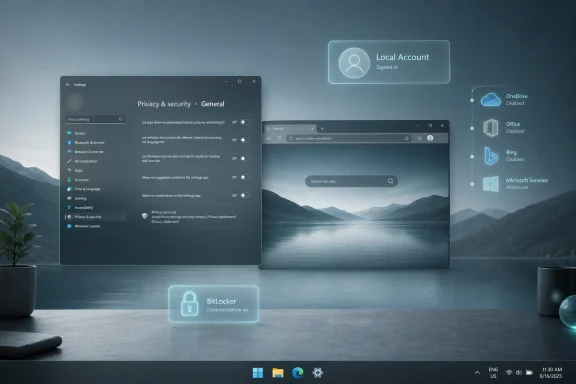 The Clean Windows Desktop Has Become a Workaround
There was a time when a clean install of Windows meant a blank-ish desktop, a Start menu, a browser, a few utilities, and the expectation that the user would decide what came next. That model was never perfectly pure, and OEM trialware has been with us for decades, but the platform bargain was legible: Windows supplied the base, and users supplied the life.Windows 11 complicates that bargain. The first-run experience wants an account, the desktop wants cloud integration, the Start menu wants recommendations, the browser wants loyalty, the widgets panel wants attention, and the taskbar increasingly behaves like a surface for Microsoft’s priorities rather than the user’s habits. Thurrott’s experiment lands because it treats those pressures not as isolated irritations, but as one system-wide pattern.
His “Microsoft-minimized” setup is telling because it is not a move away from Windows. It is a move toward Windows as many longtime users still understand it: a general-purpose PC operating system that should be able to run Chrome, Firefox, Steam, LibreOffice, iCloud, Proton, Google services, local NAS tools, or whatever else the owner prefers without turning every corner of the interface into a loyalty test.
That distinction matters. The Windows backlash is often framed as if users resent Microsoft because they dislike change. In reality, many of the complaints are about agency. A user who installs Windows 11 and then spends the next hour removing Microsoft 365 prompts, OneDrive hooks, Edge nudges, search clutter, telemetry settings, and sponsored surfaces is not rejecting modernization. They are trying to restore the boundary between operating system and sales channel.
Microsoft’s Account Strategy Is the Center of Gravity
The Microsoft account requirement is the load-bearing beam in this story. Microsoft’s official Windows 11 requirements have long made clear that Windows 11 Home and Windows 11 Pro for personal use require internet connectivity and a Microsoft account during initial setup. That policy is defensible from Microsoft’s perspective: it enables sync, Store identity, OneDrive, device recovery, Find My Device, Microsoft 365 upsells, and safer defaults around encryption keys.But it also turns setup into a funnel. Once the user signs in with an online account, Windows can attach the machine to a larger Microsoft services graph. That graph may be convenient, but convenience and consent are not the same thing, especially when the local-account path is hidden, weakened, or dependent on workarounds that change from build to build.
Thurrott’s piece is blunt about the counter-move: use a local account if your goal is to minimize Microsoft services. That choice immediately changes the character of the install. It makes Windows feel less like an extension of a cloud subscription and more like a machine you own.
The tradeoff is that local-account Windows is now a second-class path in some important ways. You may get fewer prompts later, but you also lose some automated safety rails. Device encryption, recovery-key escrow, app acquisition, settings sync, and certain Microsoft Store conveniences become more manual. For enthusiasts, that is an acceptable price. For ordinary users, it is a subtle form of pressure.
Encryption Shows the Real Cost of Independence
The most serious part of the Microsoft-minimized setup is not removing icons or changing defaults. It is encryption. A Windows PC that avoids Microsoft account sign-in may also avoid the automatic recovery-key flow that makes device encryption less frightening for nontechnical users.That is the dilemma in miniature. Microsoft can plausibly argue that cloud-backed recovery keys prevent data loss. If a laptop update, firmware change, TPM event, or hardware failure triggers BitLocker recovery, a user who has a key stored in a Microsoft account has a clear path back. A user who wanted independence but failed to save the key properly may have a very secure brick.
Thurrott’s answer is the responsible one: if you avoid Microsoft account key escrow, you must enable encryption deliberately and store the recovery key somewhere safe. On Windows 11 Pro, that means using BitLocker and saving the recovery key to a file, printout, USB drive, NAS, password manager, or another controlled location. On Windows 11 Home, the path is murkier because the consumer-facing device encryption model is more tightly bound to account-based recovery.
This is where the anti-Microsoft impulse can run into operational reality. Privacy-minded users are right to care about who holds recovery material. Security-minded users are right to care about full-disk encryption. Administrators are right to care about recovery workflows. A clean Windows installation that disables cloud identity but forgets encryption is not a victory; it is a different risk profile wearing a minimalist theme.
The mature version of this argument is not “Microsoft account bad, local account good.” It is that Windows should make both models explicit, understandable, and equally supportable. Today, the online-account path is polished, while the local path increasingly feels like an escape hatch.
Edge Is No Longer Just a Browser
Microsoft Edge occupies a special place in the Windows 11 trust problem because it is both a useful browser and a recurring symbol of overreach. Edge is fast, compatible, and often technically excellent. It is also difficult to avoid completely in the United States, where Windows does not offer the same uninstall flexibility that Microsoft has had to expose in parts of Europe under regulatory pressure.That duality drives users mad. If Edge were merely preinstalled, many people would shrug. Windows has always shipped with a browser. The resentment comes from the places where Edge behaves less like an optional app and more like a preferred route that Windows tries to reassert through links, defaults, search surfaces, widgets, and first-run prompts.
A Microsoft-minimized Windows setup therefore does not necessarily require deleting Edge. Thurrott’s more pragmatic stance is to keep it as a secondary browser but configure it into submission. That means disabling the noisy first-run behavior, ignoring the Microsoft account pitch, and preventing Edge from turning every interaction into another opportunity to reclaim default status.
This is a useful distinction for IT pros. The cleanest Windows build is not always the most aggressively stripped one. Removing components can introduce fragility, break dependencies, or create future update weirdness. Taming a component is often wiser than ripping it out, especially on machines that need to remain serviceable over years of cumulative updates.
OneDrive Is the Feature That Feels Like a Policy
OneDrive is another case where Microsoft’s technical argument is stronger than its user-experience argument. File sync is useful. Known Folder Move can save users from losing Desktop, Documents, and Pictures data. Cross-device access is now a normal expectation. For many Microsoft 365 households, OneDrive is not bloat; it is infrastructure.But Windows 11 often treats that conclusion as predetermined. The problem is not that OneDrive exists. The problem is that it can feel like Windows assumes the user has already agreed to a storage architecture before the user has actually made that decision.
For switchers, privacy-conscious users, or people who already live in Google Drive, Dropbox, iCloud Drive, Syncthing, Nextcloud, or a local NAS, OneDrive’s integration becomes friction. It changes folder semantics, creates confusion about what is local and what is cloud-backed, and can make a fresh PC feel less like a blank slate than a partially configured Microsoft 365 endpoint.
Uninstalling OneDrive is therefore not a symbolic act. It is a way of reasserting that storage is a user decision. The irony is that Microsoft could reduce the hostility simply by making OneDrive opt-in in a cleaner and more transparent way, especially during initial setup. Instead, the company too often lets the setup flow do the persuading.
The Taskbar Is Where the Argument Becomes Visible
The Windows 11 taskbar is the smallest stage on which Microsoft’s largest product argument plays out. Search, Task View, Widgets, Copilot, notifications, and system tray surfaces all compete for a strip of pixels that users expect to be boring, fast, and predictable. The more Microsoft treats that space as strategic real estate, the more enthusiasts treat cleanup as mandatory maintenance.Removing Search and Task View from the taskbar is a perfect example. The features are not necessarily bad. Keyboard shortcuts already exist, and power users can summon them without permanent buttons. What irritates people is the presumption that Microsoft’s preferred discovery surfaces deserve default visual priority.
The Copilot key adds a hardware dimension to the same conflict. On new PCs, Microsoft and its partners have literally put the AI strategy onto the keyboard. Some users may welcome that. Others see it as the physical manifestation of a company trying to make its service ambitions unavoidable.
Remapping that key to something mundane, such as a left-arrow key, is funny because it is so deflating. The grand AI portal becomes a cursor movement. The machine becomes less futuristic, but perhaps more obedient.
Telemetry Is Not the Same Debate as Ads
Windows telemetry is often discussed as if it were a single moral category, but there are at least two debates tangled together. One is about diagnostic data that helps Microsoft understand crashes, compatibility failures, and update regressions. The other is about the use of Windows surfaces to recommend, promote, nudge, personalize, and monetize.Microsoft’s strongest case is on diagnostics. A platform with the hardware diversity of Windows needs telemetry to survive. Without broad signal from real machines, patch quality gets worse, driver failures linger longer, and security regressions become harder to isolate. Serious administrators may dislike opaque data flows, but they understand the engineering need.
The weaker case is the promotional layer. Users are far less patient with “suggestions” in Start, account nags in Settings, Microsoft 365 prompts, Edge pitches, and content feeds that look suspiciously like ads even when Microsoft chooses softer language. That is not system health telemetry. That is product steering.
Thurrott’s recommendation of tools such as Win11Debloat reflects a market failure inside Windows itself. When knowledgeable users routinely reach for community scripts to disable annoyances, the issue is not that users are reckless. It is that the official controls are too scattered, too incomplete, or too euphemistic.
The danger, however, is that debloating tools can become folk medicine. Some are careful. Some are blunt. Some age poorly as Windows changes. Enterprises generally cannot run their fleet on vibes and GitHub scripts. Microsoft should see the popularity of these tools not as an edge-case hobby, but as telemetry of a different kind: a measurable protest against the defaults.
The EU Version of Windows Reveals the Artificial Limits
Regulation has made one thing painfully clear: some Windows behaviors that Microsoft presents as normal are not technically inevitable. In the European Economic Area, Microsoft has had to expose more choice around browsers, search providers, and app removal than it offers elsewhere. That does not mean every regional rule is elegant, but it does prove that Windows can be more flexible when compelled.For U.S. users, that creates a credibility gap. If Edge can be more removable in one market, why not another? If web search routing can be opened up under regulatory pressure, why should users elsewhere accept tighter coupling as a law of nature? Once a company demonstrates that a restriction is policy rather than architecture, users stop treating it as a technical constraint.
This is why the “just use Linux” answer misses the point. Many users want Windows because Windows remains the best-supported consumer PC platform for games, peripherals, commercial software, accessibility tools, firmware utilities, and weird old Win32 applications that still matter. Their complaint is not that Windows exists. Their complaint is that Windows increasingly refuses to stay in its lane.
Microsoft’s challenge is that regulatory compliance creates a two-tier trust model. European users may get more formal choice because lawmakers forced the issue. Everyone else gets whatever level of restraint Microsoft decides is strategically tolerable. That is not a great look for a company trying to convince customers that the new calmer Windows is a sincere reset.
A Clean Install Is Now an Editorial Statement
The phrase clean install used to describe a technical state. Today, on Windows 11, it also describes a point of view. A clean install says the user rejects the OEM bundle, the preloaded trialware, the Microsoft 365 presumption, the OneDrive funnel, the Edge nagging, the widgets feed, the Copilot-first posture, and the idea that a PC should arrive already enlisted in a services strategy.That does not mean Microsoft is wrong to integrate services. Apple integrates iCloud. Google integrates Google accounts into Chromebooks and Android. The difference is expectation. Windows earned its dominance as the neutral-ish layer beneath everyone else’s software. When Microsoft makes Windows behave more like an appliance for Microsoft services, it collides with the platform’s own history.
This is especially sensitive in 2026 because Windows 10’s consumer afterlife has sharpened the stakes. Many users delayed Windows 11 not because they cannot understand centered taskbar icons, but because they mistrust the direction of travel. They see each new prompt as part of a longer story: fewer local choices, more account dependencies, more cloud assumptions, more AI surfaces, and more defaults that need undoing.
Microsoft appears to understand at least part of this. Recent reporting has described a company trying to make Windows 11 calmer, faster, and less cluttered, with attention to File Explorer performance, Start menu behavior, widgets noise, and the broader perception that Windows has become too pushy. If that work is real and sustained, it is welcome. But the existence of a cleanup campaign is also an admission that the defaults have been doing reputational damage.
Enterprises See the Same Problem Through a Different Lens
Consumer enthusiasts talk about annoyance. Enterprise IT talks about governance. But the underlying issue is similar: Windows 11 contains too many surfaces where Microsoft’s consumer services agenda can leak into environments that want predictability, compliance, and control.In managed environments, administrators can use Group Policy, MDM, provisioning packages, Autopilot, Intune, security baselines, and enterprise licensing to suppress much of the noise. They can control Edge policies, disable consumer experiences, manage OneDrive, redirect known folders, escrow BitLocker keys into Entra ID, and standardize update behavior. The tooling exists because businesses would not tolerate the out-of-box consumer experience at scale.
That split is revealing. Microsoft knows how to make Windows manageable. It knows how to separate policy from preference. It knows how to document settings, expose controls, and give administrators switches that ordinary users never see. The consumer complaint is that too much of that respect is reserved for organizations with IT departments.
Small businesses sit in the most awkward middle. They may buy consumer PCs at retail, sign in with personal Microsoft accounts, and only later discover that the machine’s storage, identity, encryption, and browser defaults are entangled with choices made during setup. By the time a consultant is called, the “personal” configuration has become operational debt.
A truly calmer Windows would bring some enterprise clarity downmarket. It would ask direct questions in plain language. It would distinguish backup from sync, diagnostics from personalization, browser choice from system dependency, and AI assistance from keyboard real estate. Most users do not need every Group Policy knob. They do need defaults that do not behave like traps.
The Minimalist Windows Recipe Is Practical but Not Neutral
There is a practical recipe inside Thurrott’s exercise: install Windows, avoid or limit Microsoft account dependency where possible, remove unnecessary bundled apps, configure Edge rather than rage at it, uninstall OneDrive if you do not use it, reduce taskbar clutter, review privacy settings, enable encryption deliberately, and use reputable utilities only when Windows itself does not expose adequate controls.That recipe is useful, but it is not neutral. It assumes the user values local control over cloud convenience. It assumes the user can store recovery keys safely. It assumes the user knows which components are safe to remove and which are better left configured. It assumes the user can distinguish a cosmetic annoyance from a security feature.
That is why the clean-Windows movement is both empowering and slightly damning. It empowers skilled users to get the operating system they want. It damns Microsoft because those users increasingly need a post-install ritual to reach a state that feels sane.
The obvious counterargument is that most people do not care. They sign in, accept defaults, use Edge or install Chrome, let OneDrive back up their Desktop, and move on. That is true up to a point. But platforms do not lose trust only through catastrophic failures. They lose trust through accumulated small coercions, each one minor enough to defend and numerous enough to define the experience.
The “De-Microsofted” PC Still Depends on Microsoft
There is also a paradox here that Windows enthusiasts should admit. Even a Microsoft-minimized Windows PC remains deeply dependent on Microsoft. Windows Update, Defender, driver distribution, security mitigations, compatibility layers, activation, kernel development, and the entire Win32 ecosystem are still Microsoft’s work. You can remove OneDrive, but you cannot remove the fact that Windows is a Microsoft platform.That is why the healthiest version of this debate is not anti-Microsoft absolutism. It is pro-boundary. Users are not wrong to want Defender updates while rejecting Microsoft 365 ads. They are not hypocrites for using Windows Update while preferring Firefox. They are not confused for wanting BitLocker without cloud escrow. A platform can be valuable without every adjacent service being mandatory, privileged, or nagging.
Microsoft’s own history proves this. Windows became indispensable because it welcomed software that competed with Microsoft’s own ambitions. Netscape, Chrome, Steam, Adobe apps, iTunes, Dropbox, Slack, Zoom, VMware, Python, Java, and a thousand line-of-business applications all made Windows more valuable without making Microsoft the center of every workflow.
The risk of modern Windows is that Microsoft forgets that lesson at the interface layer. It can still technically run everything, but the user experience keeps whispering that the Microsoft way is the expected way. For a company whose greatest platform victories came from ubiquity, that whisper can become a strategic mistake.
The Real Lesson in Thurrott’s Clean Windows Experiment
Thurrott’s walkthrough is useful as a checklist, but its larger value is diagnostic. It shows where Windows 11 still respects user choice, where it merely tolerates it, and where it resists it.- A local Windows account remains the clearest way to reduce Microsoft cloud dependency, but Microsoft has made that path less obvious than it should be.
- Disk encryption should not be skipped in the name of privacy, because local control only works if the user also takes recovery-key management seriously.
- Removing OneDrive, Microsoft 365 stubs, and other bundled services can make Windows feel calmer, but it also reveals how strongly Microsoft assumes its services are the default.
- Edge is often better configured than removed, because Windows still expects it in enough places that aggressive removal can create maintenance problems.
- Third-party debloating tools are popular because Microsoft’s own privacy and annoyance controls remain scattered, incomplete, and too softly worded.
- The cleanest Windows 11 experience is still achievable, but achieving it now requires knowledge that ordinary users should not need.
References
- Primary source: thurrott.com
Published: Tue, 19 May 2026 03:31:28 GMT
win11-clean - Thurrott.com
 www.thurrott.com
- Related coverage: windowscentral.com
Microsoft will hide Windows 11's annoying MSN feed by default as it moves to reduce ads and noise across the OS | Windows Central
A new Windows 11 preview build has confirmed that the OS will soon hide the MSN feed by default, replacing it with a new default behavior that opens straight to your widgets instead.www.windowscentral.com - Related coverage: windowslatest.com
Microsoft says it'll make Windows 11 a calmer OS with fewer upsells or ads, as it tries to win back users
Microsoft has now confirmed it’s scaling back “upsells” (or ads/recommendations) in Windows 11, as it tries to win back users. www.windowslatest.com
- Related coverage: techspot.com
Microsoft admits Windows 11 lost its way, Nadella pledges to "win back fans" | TechSpot
During Microsoft's fiscal Q3 2026 earnings call, Nadella put consumer Windows front and center. As part of Microsoft's broader push to reconnect with users across its platforms,...www.techspot.com - Related coverage: pcworld.com
Microsoft’s faster, less annoying Windows 11 is coming into focus | PCWorld
Microsoft is starting to roll out its promised changes to make Windows 11 cleaner, calmer, faster, and more productive.www.pcworld.com - Related coverage: windowsforum.com
How to Build a Microsoft-Minimized Windows 11 Setup (2026 Local, Clean & Calm) | Windows Forum
Windows 11 can still be configured in 2026 as a mostly local, Microsoft-minimized desktop, but doing so now means deliberately working around setup...windowsforum.com
- Official source: cdn-dynmedia-1.microsoft.com
- Official source: support.microsoft.com
Find your BitLocker recovery key | Microsoft Support
Learn how to find your BitLocker recovery key in Windows.support.microsoft.com - Official source: learn.microsoft.com
BitLocker recovery process | Microsoft Learn
Learn how to obtain BitLocker recovery information for Microsoft Entra joined, Microsoft Entra hybrid joined, and Active Directory joined devices, and how to restore access to a locked drive.learn.microsoft.com - Related coverage: howtogeek.com
How to Set Up Windows 11 Without a Microsoft Account
Did anyone ask for compulsory Microsoft logins? www.howtogeek.com
- Related coverage: tomshardware.com
Microsoft’s official guide to switching from a Microsoft Account to a local account in Windows has been reinstated | Tom's Hardware
It also has a new guide for creating a password reset disk.www.tomshardware.com - Related coverage: techradar.com
Microsoft is 'removing known mechanisms for creating a local account' from Windows 11 setup - get ready to use a Microsoft account | TechRadar
This isn't a popular decision...www.techradar.com - Related coverage: pcgamer.com
Microsoft says sure, it'll hand over your encrypted data to the FBI: 'The lesson here is that if you have access to keys, eventually law enforcement is going to come' | PC Gamer
Microsoft believes customers are in the best position to decide how to manage their keys.www.pcgamer.com - Official source: download.microsoft.com
- Official source: microsoft.com
